# Automations
Every automation of the house: on or off, run, last and next run; schedules written as native automations, created and edited in a sheet.
`custom:fluvy-automations-card` · [Try it live](https://acosta290.github.io/fluvy/?card=automations) · [All cards](../cards.md#scenes-actions-and-helpers)
## Example
```yaml
type: custom:fluvy-automations-card
entities:
- automation.blinds
- automation.good_morning
- automation.leak_alert
- automation.odd
- automation.broken
- automation.vacation_lights
- automation.weekend_heating
```
The picture above, on the demo house: put your own entities in place of its.
## Layouts
`variant` chooses the layout. The picture above is `rows`, the default; each of the others is the example plus the line over it, and opens in the live demo.
variant: compact
variant: tiles
## All options
```yaml
type: custom:fluvy-automations-card
# title:
# subtitle:
# icon:
variant: rows
show_icon: auto
name_lines: 1
show: all
sort: name
show_add: true
show_switch: true
show_last: true
show_next: true
show_filters: false
max_rows: 6
entities:
- automation.blinds
- automation.good_morning
- automation.leak_alert
- automation.odd
- automation.broken
- automation.vacation_lights
- automation.weekend_heating
# area:
# workday:
time_step: 5
domains:
- light
- switch
- input_boolean
- fan
- cover
- climate
- scene
- script
# tone:
# color:
# card_color:
# card_opacity: 100
# card_border: true
# unavailable: dashed
# tap_action:
# action: none
# hold_action:
# action: none
# double_tap_action:
# action: none
# icon_tap_action:
# action: none
# icon_hold_action:
# action: none
# icon_double_tap_action:
# action: none
# targets:
```
## Options
| Option | Default | What it does |
| --- | --- | --- |
| `title` | | The title at the top of the card. |
| `subtitle` | | The line under the title: your own words, an entity’s state or a template. |
| `icon` | | The card’s icon, in place of the entity’s own. |
| `variant` | `rows` | The card’s layout. `rows` · `compact` · `tiles`. |
| `show` | `all` | Lists every automation, or only Fluvy’s schedules. `all` · `schedules`. |
| `sort` | `name` | Orders the automations by name, by the next run, or by the last. `name` · `next` (The next event) · `last`. |
| `show_add` | `true` | Shows the + button that adds one. |
| `show_switch` | `true` | Shows each automation’s switch. |
| `show_last` | `true` | Says when each automation last ran. |
| `show_next` | `true` | Says when each automation next runs. |
| `show_filters` | `false` | Shows the All · Schedules · On chips under the head. |
| `max_rows` | `6` | How many rows the card shows before a "more" row takes the rest. 1 or more. |
| `entities` | | The automations the card lists; left out, every one of the house. A list of `automation` entities. |
| `area` | | Limits the card to the automations of this area. |
| `workday` | | The house’s workday sensor, for schedules that run on working days. A `binary_sensor`. |
| `time_step` | `5` | How many minutes the time arrows of a schedule move by. 1 to 60. |
| `domains` | `light`, `switch`, `input_boolean`, `fan`, `cover`, `climate`, `scene`, `script` | The kinds of entity a new schedule can switch. Any of `light` · `switch` · `input_boolean` (Toggles) · `fan` · `cover` · `climate` · `scene` · `script` · `valve` · `media_player` (Players). |
| [`targets`](#targets) | | Only these entities may be the target of a new schedule. A list: [its items](#targets). |
Its look and its actions, as on every card
| Option | Default | What it does |
| --- | --- | --- |
| `show_icon` | `auto` | Shows the icon, hides it, or lets the card decide. `auto` · `always` · `never`. |
| `name_lines` | `1` | Lets the name in the card’s head take two balanced lines where one would cut it; the head is a line taller whatever the name. `1` · `2`. |
| `tone` | the card’s own | The card’s colour from the palette’s tones; left out, the tone of what it shows. `accent` · `light` · `heat` · `cool` · `dry` · `fan` · `water` · `solar` · `grid` · `media` · `presence` · `armed` · `battery` · `house` · `gas` · `vehicle` (Car) · `neutral` · `ok` (Good) · `warning` · `danger`. |
| `color` | | The card’s colour: its circle, its accents and its tints wear it. Left out, the colour of what it shows. |
| `card_color` | | Paints the card’s surface in a colour of your own. |
| `card_opacity` | `100` | How solid the card’s surface is, in percent: under 100 the view’s background shows through. Left out, the house’s. 0 % to 100 %, in steps of 5. |
| `card_border` | `true` | Whether the card draws its hairline border. Left out, the house’s. |
| `unavailable` | `dashed` | How the card looks while its entity is unavailable: dashed, or quiet as when it is off. Left out, the house’s. `dashed` · `quiet` (As when off). |
| **Interactions** | | |
| `tap_action` | `none` | What a tap on the card does. |
| `hold_action` | `none` | What a long press on the card does. |
| `double_tap_action` | `none` | What two taps on the card do. |
| `icon_tap_action` | `none` | What a tap on the icon does. |
| `icon_hold_action` | `none` | What a long press on the icon does. |
| `icon_double_tap_action` | `none` | What two taps on the icon do. |
More about them in [Options every card takes](../customising.md#options-every-card-takes).
## Lists
### `targets`
An item is an entity id, or a map with `entity` and any of these fields.
| Field | What it does |
| --- | --- |
| `entity` | An entity a new schedule may switch. A `light`, `switch`, `fan`, `input_boolean`, `media_player`, `humidifier`, `siren`, `climate`, `cover`, `valve`, `scene`, `script`, `automation`, `button` or `input_button`. |
| `name` | The item’s own name, in place of the one the card would give it. |
| `icon` | The item’s own icon, in place of the one the card would give it. |
| `verb` | What a new schedule for it does: turn it on or off, open, close, or run it. `on` (Turn on) · `off` (Turn off) · `open` · `close` · `run`. |
| `level` | The brightness a new schedule turns a light on to. 1 to 100. |
| `temperature` | The temperature a new schedule sets. 5 to 95, in steps of 0.5. |
## Guide
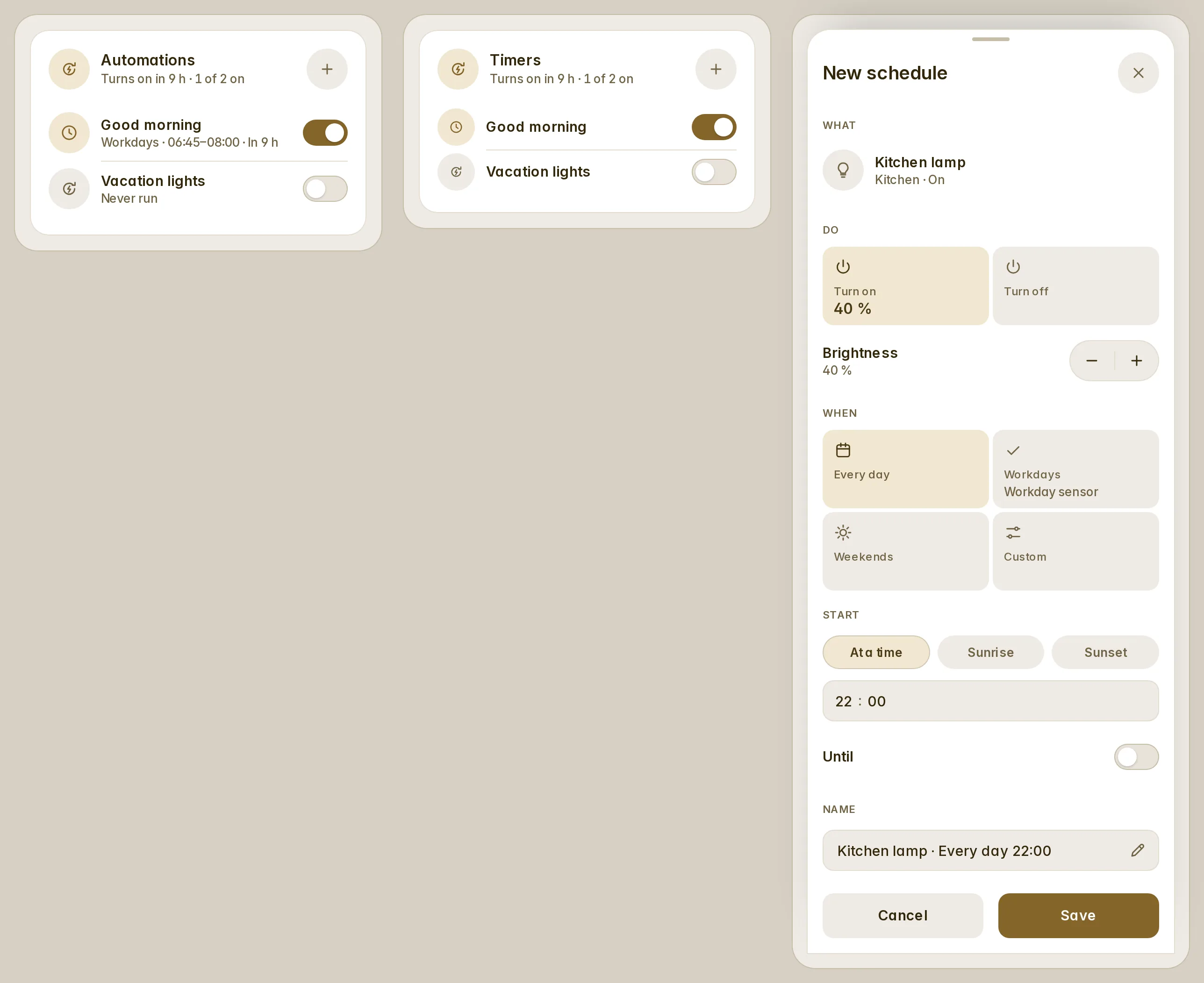
The card lists every automation of the house (on or off, when it last ran) and the schedules Fluvy wrote, with their
days, times and next run. A schedule is a normal Home Assistant automation: it is in Settings → Automations too, and
Home Assistant's editor opens it.
```yaml
type: custom:fluvy-automations-card
show: schedules # only the schedules
variant: tiles
entities:
- automation.good_morning
- automation.blinds
```
**A new schedule.** Tap `+` and choose:
- What it targets, and what it does: on, off, open, close, run; a brightness or a target temperature.
- On which days: every day, workdays (the workday integration's sensor), the weekend, or days you pick.
- When: a time, or sunrise or sunset with an offset. With an end: until when (quick ends 15 min, 30 min, 1 h, 2 h).
Only administrators add, edit or delete. Everyone else sees the list, the switches and Home Assistant's dialog on a
tap. An automation edited past Fluvy's shape is still listed, as a plain row.
### A timer for one lamp
In a popup, `targets` keeps the card to one lamp: the list shows its schedules and the automations related to it, the
head says when it next turns on, and `+` opens the sheet already set to it. A timer is `+`, a time, Save.
```yaml
type: custom:fluvy-automations-card
title: Timers
targets:
- entity: light.kitchen
verb: 'on' # what a new schedule starts on: on, off, open, close, run
level: 40 # the brightness it turns on to, 1 to 100 (a thermostat: temperature)
```
Older names the card still reads
| Older name | Read as |
| --- | --- |
| `sub` | `subtitle` |
| `meta` | `subtitle` |
| `layout` | `variant` |
| `view` | `variant` |
| `accent` | `color` |


