{
"cells": [
{
"cell_type": "markdown",
"metadata": {
"id": "Tce3stUlHN0L"
},
"source": [
"##### Copyright 2026 Google LLC."
]
},
{
"cell_type": "code",
"execution_count": null,
"metadata": {
"cellView": "form",
"id": "tuOe1ymfHZPu"
},
"outputs": [],
"source": [
"# @title Licensed under the Apache License, Version 2.0 (the \"License\");\n",
"# you may not use this file except in compliance with the License.\n",
"# You may obtain a copy of the License at\n",
"#\n",
"# https://www.apache.org/licenses/LICENSE-2.0\n",
"#\n",
"# Unless required by applicable law or agreed to in writing, software\n",
"# distributed under the License is distributed on an \"AS IS\" BASIS,\n",
"# WITHOUT WARRANTIES OR CONDITIONS OF ANY KIND, either express or implied.\n",
"# See the License for the specific language governing permissions and\n",
"# limitations under the License."
]
},
{
"cell_type": "markdown",
"metadata": {
"id": "F3Ajxf0ytKIO"
},
"source": [
"# Gemini 2.X - Multi-tool with the Multimodal Live API"
]
},
{
"cell_type": "markdown",
"metadata": {
"id": "X_mg5MhCkVpK"
},
"source": [
""
]
},
{
"cell_type": "markdown",
"metadata": {
"id": "iThfTc34kX1Y"
},
"source": [
"In this notebook you will learn how to use tools, including charting tools, Google Search and code execution in the [Gemini 2](https://ai.google.dev/gemini-api/docs/models/gemini-v2) Multimodal Live API. For an overview of new capabilities refer to the [Gemini 2 docs](https://ai.google.dev/gemini-api/docs/models/gemini-v2).\n",
"\n",
"This notebook is written in Python and uses the secure Websockets protocol directly, it does *not* use the GenAI SDK.\n",
"\n",
"If you aren't looking for code, and just want to try multimedia streaming use [Live API in Google AI Studio](https://aistudio.google.com/app/live)."
]
},
{
"cell_type": "markdown",
"metadata": {
"id": "6djaErK64smq"
},
"source": [
"## Get set up"
]
},
{
"cell_type": "code",
"execution_count": null,
"metadata": {
"id": "HBGg4WPcpvMv"
},
"outputs": [
{
"name": "stdout",
"output_type": "stream",
"text": [
"\u001b[?25l \u001b[90m━━━━━━━━━━━━━━━━━━━━━━━━━━━━━━━━━━━━━━━━\u001b[0m \u001b[32m0.0/169.9 kB\u001b[0m \u001b[31m?\u001b[0m eta \u001b[36m-:--:--\u001b[0m\r\u001b[2K \u001b[90m━━━━━━━━━━━━━━━━━━━━━━━━━━━━━━━━━━━━━━━━\u001b[0m \u001b[32m169.9/169.9 kB\u001b[0m \u001b[31m5.1 MB/s\u001b[0m eta \u001b[36m0:00:00\u001b[0m\n",
"\u001b[?25h"
]
}
],
"source": [
"%pip install -q 'websockets~=14.0' altair"
]
},
{
"cell_type": "markdown",
"metadata": {
"id": "1CwvE3FYJkw5"
},
"source": [
"### Set up your API key\n",
"\n",
"To run the following cell, your API key must be stored it in a Colab Secret named `GOOGLE_API_KEY`. If you don't already have an API key, or you're not sure how to create a Colab Secret, see the [Authentication ](../quickstarts/Authentication.ipynb) quickstart for an example."
]
},
{
"cell_type": "code",
"execution_count": null,
"metadata": {
"id": "HTXNOnBopm2X"
},
"outputs": [],
"source": [
"import os\n",
"from google.colab import userdata\n",
"\n",
"GOOGLE_API_KEY = userdata.get('GOOGLE_API_KEY')"
]
},
{
"cell_type": "markdown",
"metadata": {
"id": "Iru_uvhlhgt0"
},
"source": [
"Multimodal Live API are a new capability introduced with the [Gemini 2.0](https://ai.google.dev/gemini-api/docs/models/gemini-v2) model. It won't work with previous generation models.\n",
"\n",
"You also need to set the client version to `v1alpha`."
]
},
{
"cell_type": "code",
"execution_count": null,
"metadata": {
"id": "YFqqwegvtVZJ"
},
"outputs": [],
"source": [
"uri = f\"wss://generativelanguage.googleapis.com/ws/google.ai.generativelanguage.v1beta.GenerativeService.BidiGenerateContent?key={GOOGLE_API_KEY}\"\n",
"model = \"models/gemini-2.5-flash-native-audio-preview-09-2025\""
]
},
{
"cell_type": "markdown",
"metadata": {
"id": "n--A3IREKAS8"
},
"source": [
"### Set up some helpers\n",
"\n",
"Before interacting with the API, define some helpers that you'll need in this codelab.\n",
"\n",
"In this notebook, you'll be buffering the streamed PCM audio responses, so create a context manager to wrap the PCM audio data in a wave audio file with the relevant audio parameters. This way, you can play the audio back directly within Colab."
]
},
{
"cell_type": "code",
"execution_count": null,
"metadata": {
"id": "eZcinbBdkZ1h"
},
"outputs": [],
"source": [
"import contextlib\n",
"import wave\n",
"\n",
"@contextlib.contextmanager\n",
"def wave_file(filename, channels=1, rate=24000, sample_width=2):\n",
" \"\"\"Define a wave context manager using the audio parameters supplied.\"\"\"\n",
" with wave.open(filename, \"wb\") as wf:\n",
" wf.setnchannels(channels)\n",
" wf.setsampwidth(sample_width)\n",
" wf.setframerate(rate)\n",
" yield wf"
]
},
{
"cell_type": "markdown",
"metadata": {
"id": "By4hePpVKrZs"
},
"source": [
"Use a custom logger so you can easily toggle the log level in order to see in-flight requests and responses from the API."
]
},
{
"cell_type": "code",
"execution_count": null,
"metadata": {
"id": "0JTDa_0N2VPj"
},
"outputs": [],
"source": [
"import logging\n",
"logger = logging.getLogger(\"Live\")\n",
"# Switch to \"DEBUG\" to see the in-flight requests & responses\n",
"logger.setLevel(\"INFO\")"
]
},
{
"cell_type": "markdown",
"metadata": {
"id": "7k625Q19Kytz"
},
"source": [
"### Define connection functions\n",
"\n",
"This code defines some functions that will connect to (`quick_connect`), execute and handle prompts (`run`) and handle specific server responses (`handle_tool_call`, `handle_server_content`).\n",
"\n",
"This code uses the [websockets](https://pypi.org/project/websockets) PyPI package, specifically the async interface available in 14.0 and will not work with significantly older packages."
]
},
{
"cell_type": "code",
"execution_count": null,
"metadata": {
"id": "lwLZrmW5zR_P"
},
"outputs": [],
"source": [
"import asyncio\n",
"import base64\n",
"import json\n",
"import time\n",
"\n",
"from websockets.asyncio.client import connect\n",
"from IPython import display\n",
"\n",
"\n",
"async def setup(ws, modality, tools):\n",
" \"\"\"Perform a setup handshake to configure the conversation.\"\"\"\n",
" setup = {\n",
" \"setup\": {\n",
" \"model\": model,\n",
" \"tools\": tools,\n",
" \"generation_config\": {\n",
" \"response_modalities\": [modality]\n",
" }\n",
" }\n",
" }\n",
" setup_json = json.dumps(setup)\n",
" logger.debug(\">>> \" + setup_json)\n",
" await ws.send(setup_json)\n",
"\n",
" setup_response = json.loads(await ws.recv())\n",
" logger.debug(\"<<< \" + json.dumps(setup_response))\n",
"\n",
"async def send(ws, prompt):\n",
" \"\"\"Send a user content message (only text is supported).\"\"\"\n",
" msg = {\n",
" \"client_content\": {\n",
" \"turns\": [{\"role\": \"user\", \"parts\": [{\"text\": prompt}]}],\n",
" \"turn_complete\": True,\n",
" }\n",
" }\n",
" json_msg = json.dumps(msg)\n",
" logger.debug(\">>> \" + json_msg)\n",
" await ws.send(json_msg)\n",
"\n",
"\n",
"def handle_server_content(wf, server_content):\n",
" \"\"\"Handle any server content messages, e.g. incoming audio or text.\"\"\"\n",
" audio = False\n",
" model_turn = server_content.pop(\"modelTurn\", None)\n",
" if model_turn:\n",
" text = model_turn[\"parts\"][0].pop(\"text\", None)\n",
" if text:\n",
" print(text, end='')\n",
"\n",
" inline_data = model_turn['parts'][0].pop('inlineData', None)\n",
" if inline_data:\n",
" print('.', end='')\n",
" b64data = inline_data['data']\n",
" pcm_data = base64.b64decode(b64data)\n",
" wf.writeframes(pcm_data)\n",
" audio = True\n",
"\n",
" turn_complete = server_content.pop('turnComplete', None)\n",
" return turn_complete, audio\n",
"\n",
"\n",
"async def handle_tool_call(ws, tool_call, responses):\n",
" \"\"\"Process an incoming tool call request, returning a response.\"\"\"\n",
" logger.debug(\"<<< \" + json.dumps(tool_call))\n",
" for fc in tool_call['functionCalls']:\n",
"\n",
" if fc['name'] in responses:\n",
" # Use a response from `responses` if provided.\n",
" result_entry = responses[fc['name']]\n",
" # If it's a function, actuall call it.\n",
" if callable(result_entry):\n",
" result = result_entry(**fc['args'])\n",
" else:\n",
" # Otherwise it's a stub, just say \"OK\"\n",
" result = {'string_value': 'ok'}\n",
"\n",
" msg = {\n",
" 'tool_response': {\n",
" 'function_responses': [{\n",
" 'id': fc['id'],\n",
" 'name': fc['name'],\n",
" 'response': {'result': result}\n",
" }]\n",
" }\n",
" }\n",
" json_msg = json.dumps(msg)\n",
" logger.debug(\">>> \" + json_msg)\n",
" await ws.send(json_msg)\n",
"\n",
"\n",
"@contextlib.asynccontextmanager\n",
"async def quick_connect(modality='TEXT', tools=()):\n",
" \"\"\"Establish a connection and keep it open while the context is active.\"\"\"\n",
" async with connect(uri, additional_headers={\"Content-Type\": \"application/json\"}) as ws:\n",
" await setup(ws, modality, tools)\n",
" yield ws\n",
"\n",
"\n",
"audio_lock = time.time()\n",
"\n",
"async def run(ws, prompt, responses=()):\n",
" \"\"\"Send the provided prompt and handle the streamed response.\"\"\"\n",
" print('>', prompt)\n",
" await send(ws, prompt)\n",
"\n",
" audio = False\n",
" filename = 'audio.wav'\n",
" with wave_file(filename) as wf:\n",
" async for raw_response in ws:\n",
" response = json.loads(raw_response.decode())\n",
" logger.debug(\"<<< \" + str(response)[:150])\n",
"\n",
" server_content = response.pop(\"serverContent\", None)\n",
" if server_content:\n",
" turn_complete, a = handle_server_content(wf, server_content)\n",
" audio = audio or a\n",
"\n",
" if turn_complete:\n",
" print()\n",
" print('')\n",
" break\n",
"\n",
" tool_call = response.pop('toolCall', None)\n",
" if tool_call:\n",
" await handle_tool_call(ws, tool_call, responses)\n",
"\n",
" if audio:\n",
" global audio_lock\n",
" # Sleep before playing audio to make sure it doesn't play over an existing clip.\n",
" if (delta := audio_lock - time.time()) > 0:\n",
" print('Pausing for audio to complete...')\n",
" await asyncio.sleep(delta + 1.0) # include a buffer so there's a breather\n",
"\n",
" display.display(display.Audio(filename, autoplay=True))\n",
" audio_lock = time.time() + (wf.getnframes() / wf.getframerate())"
]
},
{
"cell_type": "markdown",
"metadata": {
"id": "6cHmb1tR9ocy"
},
"source": [
"## Use the API"
]
},
{
"cell_type": "markdown",
"metadata": {
"id": "wpnmPVIaabOa"
},
"source": [
"### One-turn example\n",
"\n",
"Now, let's see how all the pieces you've defined fit together in a simple example. You'll send a single prompt to the API and observe the response.\n",
"\n",
"This example uses the `quick_connect` context manager to create a connection to the API. As long as you're inside the async with block, the connection remains active and is accessible through the ws variable. Then use the run function to send our prompt and process the API's response.\n",
"\n",
"\n",
"Make a simple request to understand how the above code works. A connection is created through a context manager using `quick_connect`, and while the context is active, the web-socket connection is stored in `ws`, and passed to subsequent `run` calls that execute the prompts.\n",
"\n",
"Note that you can change the modality from `AUDIO` to `TEXT`. and adjust the prompt."
]
},
{
"cell_type": "code",
"execution_count": null,
"metadata": {
"id": "h8x7xH1I9p7J"
},
"outputs": [
{
"name": "stdout",
"output_type": "stream",
"text": [
"> Please find the last 5 Denis Villeneuve movies and look up their runtimes and the year published.\n",
"Based on the search results, the last 5 Denis Villeneuve movies are:\n",
"\n",
"1. *Dune: Part Two* (2024)\n",
"2. *Dune: Part One* (2021)\n",
"3. *Blade Runner 2049* (2017)\n",
"4. *Arrival* (2016)\n",
"5. *Sicario* (2015)\n",
"\n",
"Now, let's find the runtimes for these movies.\n",
"Here's a summary of the last 5 Denis Villeneuve movies, their release year, and runtime:\n",
"\n",
"* **Dune: Part Two** (2024): 166 minutes (2 hours 46 minutes)\n",
"* **Dune: Part One** (2021): 155 minutes (2 hours 35 minutes)\n",
"* **Blade Runner 2049** (2017): 163 minutes (2 hours 43 minutes)\n",
"* **Arrival** (2016): 116 minutes (1 hour 56 minutes)\n",
"* **Sicario** (2015): 121 minutes (2 hours 1 minute)\n",
"\n"
]
}
],
"source": [
"tools = [\n",
" {'google_search': {}},\n",
" {'code_execution': {}},\n",
"]\n",
"\n",
"async def go():\n",
" async with quick_connect(tools=tools, modality=\"TEXT\") as ws:\n",
" await run(ws, \"Please find the last 5 Denis Villeneuve movies and look up their runtimes and the year published.\")\n",
"\n",
"logger.setLevel('INFO')\n",
"await go()"
]
},
{
"cell_type": "markdown",
"metadata": {
"id": "ggNpawQGahnS"
},
"source": [
"### Complex multi-tool example\n",
"\n",
"Now define additional tools. Add a tool for charting by defining a schema (in `altair_fns`), a function to execute (`render_altair`) and connect the two using the `tool_calls` mapping.\n",
"\n",
"The charting tool used here is [Vega-Altair](https://pypi.org/project/altair/), a \"declarative statistical visualization library for Python\". Altair supports chart persistance using JSON, which you will expose as a tool so that the Gemini model can produce a chart.\n",
"\n",
"The helper code defined earlier will run as soon as it can, but audio takes some time to play so you may see output from later turns displayed before the audio has played."
]
},
{
"cell_type": "code",
"execution_count": null,
"metadata": {
"id": "XR0oQestA15a"
},
"outputs": [],
"source": [
"import altair as alt\n",
"from google.api_core import retry\n",
"\n",
"\n",
"def apply_altair_theme(altair_json: str, theme: str) -> str:\n",
" chart = alt.Chart.from_json(altair_json)\n",
" with alt.themes.enable(theme):\n",
" themed_altair_json = chart.to_json()\n",
" return themed_altair_json\n",
"\n",
"\n",
"@retry.Retry()\n",
"def render_altair(altair_json: str, theme: str = \"default\"):\n",
" themed_altair_json = apply_altair_theme(altair_json, theme)\n",
" chart = alt.Chart.from_json(themed_altair_json)\n",
" chart.display()\n",
"\n",
" return {'string_value': 'ok'}\n",
"\n",
"\n",
"altair_fns = [\n",
" {\n",
" 'name': 'render_altair',\n",
" 'description': 'Displays an Altair chart in JSON format.',\n",
" 'parameters': {\n",
" 'type': 'OBJECT',\n",
" 'properties': {\n",
" 'altair_json': {\n",
" 'type': 'STRING',\n",
" 'description': 'JSON STRING representation of the Altair chart to render. Must be a string, not a json object',\n",
" },\n",
" 'theme': {\n",
" 'type': 'STRING',\n",
" 'description': 'Altair theme. Choose from one of \"dark\", \"ggplot2\", \"default\", \"opaque\".',\n",
" },\n",
" },\n",
" },\n",
" },\n",
"]\n",
"\n",
"tool_calls = {\n",
" 'render_altair': render_altair,\n",
"}"
]
},
{
"cell_type": "markdown",
"metadata": {
"id": "5MZ7367aS8n5"
},
"source": [
"Now put that all together into a chat conversation. This code opens a streaming session (with `quick_connect`), and each `run` invocation will send the text prompt, read the streamed response (and buffer if it's audio), handle any server responses (such as tool calls) and finally return once the end-of-turn signal has been sent.\n",
"\n",
"By sequencing multiple `run` calls within a `quick_connect` session, you are executing a multi-turn, streamed, conversation. Once the code reaches the end of the `quick_connect` block, the session is terminated."
]
},
{
"cell_type": "code",
"execution_count": null,
"metadata": {
"id": "B0vuLasrSrXG"
},
"outputs": [
{
"name": "stdout",
"output_type": "stream",
"text": [
"> Please find the last 5 Denis Villeneuve movies and find their runtimes.\n",
".......................................................................................................................\n",
"\n"
]
},
{
"data": {
"text/html": [
"\n",
" \n",
" "
],
"text/plain": [
""
]
},
"metadata": {},
"output_type": "display_data"
},
{
"name": "stdout",
"output_type": "stream",
"text": [
"> Can you write some code to work out which has the longest and shortest runtimes?\n",
".....................................................\n",
"\n",
"Pausing for audio to complete...\n"
]
},
{
"data": {
"text/html": [
"\n",
" \n",
" "
],
"text/plain": [
""
]
},
"metadata": {},
"output_type": "display_data"
},
{
"name": "stdout",
"output_type": "stream",
"text": [
"> Now can you plot them in a line chart showing the year on the x-axis and runtime on the y-axis?\n"
]
},
{
"name": "stderr",
"output_type": "stream",
"text": [
":7: AltairDeprecationWarning: \n",
"Deprecated since `altair=5.5.0`. Use altair.theme instead.\n",
"Most cases require only the following change:\n",
"\n",
" # Deprecated\n",
" alt.themes.enable('quartz')\n",
"\n",
" # Updated\n",
" alt.theme.enable('quartz')\n",
"\n",
"If your code registers a theme, make the following change:\n",
"\n",
" # Deprecated\n",
" def custom_theme():\n",
" return {'height': 400, 'width': 700}\n",
" alt.themes.register('theme_name', custom_theme)\n",
" alt.themes.enable('theme_name')\n",
"\n",
" # Updated\n",
" @alt.theme.register('theme_name', enable=True)\n",
" def custom_theme():\n",
" return alt.theme.ThemeConfig(\n",
" {'height': 400, 'width': 700}\n",
" )\n",
"\n",
"See the updated User Guide for further details:\n",
" https://altair-viz.github.io/user_guide/api.html#theme\n",
" https://altair-viz.github.io/user_guide/customization.html#chart-themes\n",
" with alt.themes.enable(theme):\n"
]
},
{
"data": {
"text/html": [
"\n",
"\n",
"\n",
""
],
"text/plain": [
"alt.Chart(...)"
]
},
"metadata": {},
"output_type": "display_data"
},
{
"name": "stdout",
"output_type": "stream",
"text": [
"....................................................\n",
"\n"
]
},
{
"data": {
"text/html": [
"\n",
" \n",
" "
],
"text/plain": [
""
]
},
"metadata": {},
"output_type": "display_data"
},
{
"name": "stdout",
"output_type": "stream",
"text": [
"Any requests? > can you add the movie names into the dots as also make it in a dark theme?\n",
"> can you add the movie names into the dots as also make it in a dark theme?\n"
]
},
{
"data": {
"text/html": [
"\n",
"\n",
"\n",
""
],
"text/plain": [
"alt.LayerChart(...)"
]
},
"metadata": {},
"output_type": "display_data"
},
{
"name": "stdout",
"output_type": "stream",
"text": [
".............................\n",
"\n"
]
},
{
"data": {
"text/html": [
"\n",
" \n",
" "
],
"text/plain": [
""
]
},
"metadata": {},
"output_type": "display_data"
}
],
"source": [
"tools = [\n",
" {'google_search': {}},\n",
" {'code_execution': {}},\n",
" {'function_declarations': altair_fns},\n",
"]\n",
"\n",
"async def go():\n",
" async with quick_connect(tools=tools, modality=\"AUDIO\") as ws:\n",
"\n",
" # Google Search\n",
" await run(ws, \"Please find the last 5 Denis Villeneuve movies and find their runtimes.\")\n",
" # Code execution\n",
" await run(ws, \"Can you write some code to work out which has the longest and shortest runtimes?\")\n",
" # Tool use\n",
" await run(ws, \"Now can you plot them in a line chart showing the year on the x-axis and runtime on the y-axis?\", responses=tool_calls)\n",
" # Tool use - this step takes user input, so you can ask the model to tweak the chart to your liking.\n",
" # Try changing to dark mode, or lay out the data differently.\n",
" await run(ws, input('Any requests? > '), responses=tool_calls)\n",
"\n",
"\n",
"logger.setLevel('INFO')\n",
"await go()"
]
},
{
"cell_type": "markdown",
"metadata": {
"id": "wq4C-F3Chk3B"
},
"source": [
"### Maps example\n",
"\n",
"For this example you will use the [Google Maps Static API](https://developers.google.com/maps/documentation/maps-static) to draw on a map during the conversation. You'll need to [make sure your API key is enabled for the Google Maps Static API](https://developers.google.com/maps/documentation/maps-static/get-api-key). It can be the same API key as you used for the Gemini API, or a new one, as long as the Static Maps API is enabled.\n",
"\n",
"Add the key in Colab Secrets, or add it in the code directly (`MAPS_API_KEY = 'AIza...'`)."
]
},
{
"cell_type": "code",
"execution_count": null,
"metadata": {
"id": "goLE3lDjmSYJ"
},
"outputs": [],
"source": [
"from google.colab import userdata\n",
"MAPS_API_KEY = userdata.get('MAPS_API_KEY')"
]
},
{
"cell_type": "markdown",
"metadata": {
"id": "_PikTcEnabAt"
},
"source": [
"The following cell is hidden by default, but needs te be run. It comtains the function schema for the `draw_map` function, including some documentation on how to draw markers with the Google Maps API.\n",
"\n",
"Note that the model needs to produce a fairly complex set of parameters in order to call `draw_map`, including defining a center-point for the map, an integer zoom level and custom marker styles and locations."
]
},
{
"cell_type": "code",
"execution_count": null,
"metadata": {
"cellView": "form",
"id": "NRtl_Z0wKUlV"
},
"outputs": [],
"source": [
"# @title Map tool schema (run this cell)\n",
"\n",
"map_fns = [\n",
" {\n",
" 'name': 'draw_map',\n",
" 'description': 'Render a Google Maps static map using the specified parameters. No information is returned.',\n",
" 'parameters': {\n",
" 'type': 'OBJECT',\n",
" 'properties': {\n",
" 'center': {\n",
" 'type': 'STRING',\n",
" 'description': 'Location to center the map. It can be a lat,lng pair (e.g. 40.714728,-73.998672), or a string address of a location (e.g. Berkeley,CA).',\n",
" },\n",
" 'zoom': {\n",
" 'type': 'NUMBER',\n",
" 'description': 'Google Maps zoom level. 1 is the world, 20 is zoomed in to building level. Integer only. Level 11 shows about a 15km radius. Level 9 is about 30km radius.'\n",
" },\n",
" 'path': {\n",
" \"type\": \"STRING\",\n",
" 'description': \"\"\"The path parameter defines a set of one or more locations connected by a path to overlay on the map image. The path parameter takes set of value assignments (path descriptors) of the following format:\n",
"\n",
"path=pathStyles|pathLocation1|pathLocation2|... etc.\n",
"\n",
"Note that both path points are separated from each other using the pipe character (|). Because both style information and point information is delimited via the pipe character, style information must appear first in any path descriptor. Once the Maps Static API server encounters a location in the path descriptor, all other path parameters are assumed to be locations as well.\n",
"\n",
"Path styles\n",
"The set of path style descriptors is a series of value assignments separated by the pipe (|) character. This style descriptor defines the visual attributes to use when displaying the path. These style descriptors contain the following key/value assignments:\n",
"\n",
"weight: (optional) specifies the thickness of the path in pixels. If no weight parameter is set, the path will appear in its default thickness (5 pixels).\n",
"color: (optional) specifies a color either as a 24-bit (example: color=0xFFFFCC) or 32-bit hexadecimal value (example: color=0xFFFFCCFF), or from the set {black, brown, green, purple, yellow, blue, gray, orange, red, white}.\n",
"\n",
"When a 32-bit hex value is specified, the last two characters specify the 8-bit alpha transparency value. This value varies between 00 (completely transparent) and FF (completely opaque). Note that transparencies are supported in paths, though they are not supported for markers.\n",
"\n",
"fillcolor: (optional) indicates both that the path marks off a polygonal area and specifies the fill color to use as an overlay within that area. The set of locations following need not be a \"closed\" loop; the Maps Static API server will automatically join the first and last points. Note, however, that any stroke on the exterior of the filled area will not be closed unless you specifically provide the same beginning and end location.\n",
"geodesic: (optional) indicates that the requested path should be interpreted as a geodesic line that follows the curvature of the earth. When false, the path is rendered as a straight line in screen space. Defaults to false.\n",
"Some example path definitions:\n",
"\n",
"Thin blue line, 50% opacity: path=color:0x0000ff80|weight:1\n",
"Solid red line: path=color:0xff0000ff|weight:5\n",
"Solid thick white line: path=color:0xffffffff|weight:10\n",
"These path styles are optional. If default attributes are desired, you may skip defining the path attributes; in that case, the path descriptor's first \"argument\" will consist instead of the first declared point (location).\n",
"\n",
"Path points\n",
"In order to draw a path, the path parameter must also be passed two or more points. The Maps Static API will then connect the path along those points, in the specified order. Each pathPoint is denoted in the pathDescriptor separated by the | (pipe) character.\n",
"\"\"\",\n",
" },\n",
" 'markers': {\n",
" \"type\": \"ARRAY\",\n",
" \"items\": {\n",
" \"type\": \"STRING\"\n",
" },\n",
" # Copied from https://developers.google.com/maps/documentation/maps-static/start#Markers\n",
" 'description': \"\"\"The markers parameter defines a set of one or more markers (map pins) at a set of locations. Each marker defined within a single markers declaration must exhibit the same visual style; if you wish to display markers with different styles, you will need to supply multiple markers parameters with separate style information.\n",
"\n",
"The markers parameter takes set of value assignments (marker descriptors) of the following format:\n",
"\n",
"markers=markerStyles|markerLocation1| markerLocation2|... etc.\n",
"\n",
"The set of markerStyles is declared at the beginning of the markers declaration and consists of zero or more style descriptors separated by the pipe character (|), followed by a set of one or more locations also separated by the pipe character (|).\n",
"\n",
"Because both style information and location information is delimited via the pipe character, style information must appear first in any marker descriptor. Once the Maps Static API server encounters a location in the marker descriptor, all other marker parameters are assumed to be locations as well.\n",
"\n",
"Marker styles\n",
"The set of marker style descriptors is a series of value assignments separated by the pipe (|) character. This style descriptor defines the visual attributes to use when displaying the markers within this marker descriptor. These style descriptors contain the following key/value assignments:\n",
"\n",
"size: (optional) specifies the size of marker from the set {tiny, mid, small}. If no size parameter is set, the marker will appear in its default (normal) size.\n",
"color: (optional) specifies a 24-bit color (example: color=0xFFFFCC) or a predefined color from the set {black, brown, green, purple, yellow, blue, gray, orange, red, white}.\n",
"\n",
"Note that transparencies (specified using 32-bit hex color values) are not supported in markers, though they are supported for paths.\n",
"\n",
"label: (optional) specifies a single uppercase alphanumeric character from the set {A-Z, 0-9}. (The requirement for uppercase characters is new to this version of the API.) Note that default and mid sized markers are the only markers capable of displaying an alphanumeric-character parameter. tiny and small markers are not capable of displaying an alphanumeric-character.\n",
"\"\"\",\n",
" }\n",
" },\n",
" \"required\": [\n",
" \"center\",\n",
" \"zoom\",\n",
" ]\n",
"\n",
" },\n",
" },\n",
"]"
]
},
{
"cell_type": "markdown",
"metadata": {
"id": "Vth03617aoTn"
},
"source": [
"Now define the `draw_map` function and add `google_search` as a tool to use for this conversation. This will allow the model to look up restaurants that might be popular."
]
},
{
"cell_type": "code",
"execution_count": null,
"metadata": {
"id": "dmJvjYFiavFZ"
},
"outputs": [],
"source": [
"from urllib.parse import urlencode\n",
"\n",
"import altair as alt\n",
"from google.api_core import retry\n",
"import requests\n",
"\n",
"\n",
"def draw_map(center, zoom, path: str = \"\", markers: list[str] = ()):\n",
" logger.debug(f'MAPS: {center=} {zoom=} {path=} {markers=}')\n",
" q = {\n",
" 'key': MAPS_API_KEY,\n",
" 'size': '512x512',\n",
" 'center': center,\n",
" 'zoom': zoom,\n",
" }\n",
"\n",
" if path:\n",
" q['path'] = path\n",
"\n",
" qs = list(q.items())\n",
"\n",
" for marker in markers:\n",
" qs.append(('markers', marker))\n",
"\n",
" url = f'https://maps.googleapis.com/maps/api/staticmap?{urlencode(qs)}'\n",
" display.display(display.Image(url=url))\n",
" logger.debug(f\"Map URL: {url}\")\n",
"\n",
" return {'string_value': f'ok'}\n",
"\n",
"\n",
"tool_calls = {\n",
" 'draw_map': draw_map,\n",
"}\n",
"\n",
"tools = [\n",
" {'google_search': {}},\n",
" {'function_declarations': map_fns},\n",
"]"
]
},
{
"cell_type": "markdown",
"metadata": {
"id": "IEjPrWY3a-f0"
},
"source": [
"Finally, define and run the conversation."
]
},
{
"cell_type": "code",
"execution_count": null,
"metadata": {
"id": "blVqlcuXDl_B"
},
"outputs": [],
"source": [
"async def go():\n",
" async with quick_connect(tools=tools, modality=\"TEXT\") as ws:\n",
"\n",
" # Google Search + Tools (Maps)\n",
" await run(ws, \"Please look up and mark 3 Sydney restaurants that are currently trending on a map.\", responses=tool_calls)\n",
" # Code execution + Tools\n",
" await run(ws, \"Now write some code to randomly pick one to eat at tonight and zoom in to that one on the map.\", responses=tool_calls)\n",
"\n",
"\n",
"logger.setLevel('INFO')\n",
"await go()"
]
},
{
"cell_type": "markdown",
"metadata": {
"id": "JI66TBbgSW_N"
},
"source": [
"The output for the first image will look something like this. Don't worry if yours is slightly different, there are many popular restaurants, and many ways to style a map. You can always ask the model for more specific guidance if you wish.\n",
"\n",
""
]
},
{
"cell_type": "markdown",
"metadata": {
"id": "Wk4Z6InJATlL"
},
"source": [
"### Maps with Code execution\n",
"\n",
"In this example, you will use the Google Maps tools defined before, and you'll challenge the model to generate a color gradient and uses it to visually represent data on a map. This task requires code execution, so it is also included as a tool.\n",
"\n",
"Specifically, you will ask the model to plot the capital cities in Australia, and apply a gradient between two colors in a circular direction around the country using Google Maps markers."
]
},
{
"cell_type": "code",
"execution_count": null,
"metadata": {
"id": "RyjqWWyE6qvN"
},
"outputs": [],
"source": [
"from urllib.parse import urlencode\n",
"\n",
"import altair as alt\n",
"from google.api_core import retry\n",
"\n",
"\n",
"tool_calls = {\n",
" 'draw_map': draw_map,\n",
"}\n",
"\n",
"tools = [\n",
" {'code_execution': {}},\n",
" {'function_declarations': map_fns},\n",
"]\n",
"\n",
"async def go():\n",
" async with quick_connect(tools=tools, modality=\"TEXT\") as ws:\n",
"\n",
" # Code exec and tool use. No search.\n",
" await run(ws, \"Plot markers on every capital city in Australia using a gradient between \"\n",
" \"Orange and Green. Plan out your steps first, then follow the plan.\", responses=tool_calls)\n",
"\n",
" await run(ws, \"Awesome! Can you ensure the gradient is applied smoothly in a circular direction \"\n",
" \"around the country?\", responses=tool_calls)\n",
"\n",
"\n",
"logger.setLevel('INFO')\n",
"await go()"
]
},
{
"cell_type": "markdown",
"metadata": {
"id": "3sQ9oDMAjcJ7"
},
"source": [
"The final image should look something like this.\n",
"\n",
"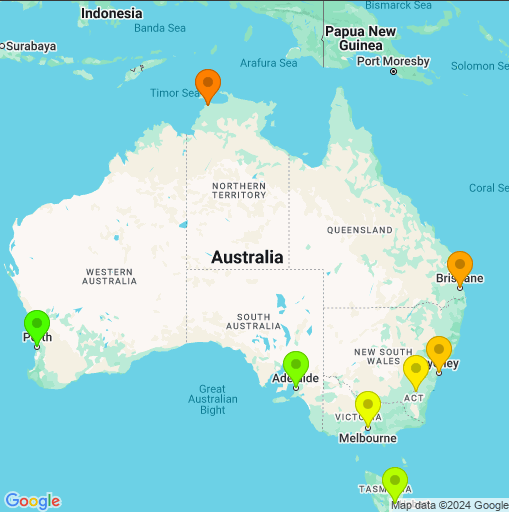\n",
"\n",
"Performance in this example depends on your feedback to get the output perfect. This example showed the first 2 steps of a hypothetical conversation, but you could keep iterating with the model until the results are what you need."
]
},
{
"cell_type": "markdown",
"metadata": {
"id": "1RzVFUvbk-vu"
},
"source": [
"## Next steps\n",
"\n",
"\n",
"\n",
"This guide shows more intermedite use of the Multimodal Live API over Websockets.\n",
"\n",
"- To try multimodal streaming, use [Live API in Google AI Studio](https://aistudio.google.com/app/live) - no code required.\n",
"- Check out the [Live API starter using the Python SDK](../quickstarts/Get_started_LiveAPI.ipynb) or using [websockets](../quickstarts/websockets/Get_started_LiveAPI.ipynb).\n",
"- Try some other [grounding](../examples/Search_grounding_for_research_report.ipynb) examples.\n",
"- Try the [Tool use in the live API tutorial](../quickstarts/Get_started_LiveAPI_tools.ipynb) for a walkthrough of Gemini live tool use capabilities.\n",
"\n",
"Or just check the other Gemini capabilities illustrated in the [Cookbook examples](https://github.com/google-gemini/cookbook/tree/main/examples/) ."
]
}
],
"metadata": {
"colab": {
"collapsed_sections": [
"Tce3stUlHN0L"
],
"name": "LiveAPI_plotting_and_mapping.ipynb",
"toc_visible": true
},
"kernelspec": {
"display_name": "Python 3",
"name": "python3"
}
},
"nbformat": 4,
"nbformat_minor": 0
}
