# How to Contribute
We'd love to accept your patches and contributions to this project. There are
just a few small guidelines you need to follow.
## Contributor License Agreement
Contributions to this project must be accompanied by a Contributor License
Agreement. You (or your employer) retain the copyright to your contribution;
this simply gives us permission to use and redistribute your contributions as
part of the project. Head over to to see
your current agreements on file or to sign a new one.
You generally only need to submit a CLA once, so if you've already submitted one
(even if it was for a different project), you probably don't need to do it
again.
## Code reviews
All submissions, including submissions by project members, require review. We
use GitHub pull requests for this purpose. Consult
[GitHub Help](https://help.github.com/articles/about-pull-requests/) for more
information on using pull requests.
When creating a pull request, please use the provided
[pull request template](/.github/PULL_REQUEST_TEMPLATE/pull_request_template.md) and fill out the
sections to ensure a smooth review process.
For any new feature, please [create an issue first](https://github.com/google/osv.dev/issues/new?template=feature_request.md)
to discuss the proposed changes before proceeding to make a pull request.
This helps ensure that your contribution is aligned with the project's goals
and avoids duplicate work.
## Community Guidelines
This project follows
[Google's Open Source Community Guidelines](https://opensource.google.com/conduct/).
## Contributing code
### Prerequisites
You must install:
1. Git
1. Python 3.13
1. [Docker](https://www.docker.com/)
1. [Pylint](https://pypi.org/project/pylint)
1. [Yapf](https://github.com/google/yapf)
1. [Make](https://www.gnu.org/software/make/)
1. [Poetry](https://python-poetry.org/) >= 2.3.3
2. [Google Cloud SDK](https://cloud.google.com/sdk)
3. [Hugo](https://gohugo.io/installation/)
4. [Node JS](https://nodejs.org/) >= 18.17.x
5. [pnpm](https://pnpm.io/installation) (install via `npm install -g pnpm --prefix ~/.local` or `corepack enable pnpm`)
6. [Terraform](https://developer.hashicorp.com/terraform/install) >= 1.5 (for infrastructure changes)
Then you can set up the development environment by cloning the OSV repo and
installing the Poetry dependencies.
```shell
git clone --recurse-submodules https://github.com/google/osv.dev
# FYI
# git config fetch.recurseSubmodules on-demand
# is recommended to help manage updates to the osv/osv-schema submodule
cd osv.dev
poetry install
poetry self add poetry-plugin-shell
poetry shell
```
### Backend development
#### Running tests
Certain tests require you to auth with the Google Cloud SDK and to install the
Firestore Emulator:
```shell
gcloud auth login
gcloud auth application-default login
gcloud components install cloud-firestore-emulator
```
To run tests:
```shell
make all-tests
```
To run integration tests for the API is a separate command
```shell
make api-server-tests
```
By default, this skips long tests, enable them by setting the `LONG_TESTS` variable
```shell
LONG_TESTS=1 make api-server-tests
```
There are additional tests for testing coarse version ordering logic for ecosystem version
parsers. These are tested against the entire OSV database.
```shell
# in go/
# you must generate the list of all versions by running
./osv/ecosystem/testdata/regen_coarse_test_data.sh
# then run the tests
RUN_COARSE_LARGE_TEST=1 go test ./osv/ecosystem -run TestCoarseMonotonicityLarge
```
##### Test result generation
Many tests are written using a
[simple framework](https://github.com/google/osv.dev/blob/a4b682a32575cc3314a5ef83c8e91b70c60f7b77/osv/tests.py#L32)
to help with generating expected test outputs.
The expected outputs are generated once and saved into the source tree to run
all subsequent tests against.
If a change is made that requires these outputs to be regenerated, you can set
the environment variable `TESTS_GENERATE=1` and run the tests:
```shell
TESTS_GENERATE=1 make all-tests
```
#### Running a local API instance (maintainers only)
Running a local instance of the API server requires the path to application
default credentials. This is required so that the ESP container has credentials
to download API configuration.
```shell
gcloud auth login
gcloud auth application-default login
make run-api-server
```
#### API E2E Snapshots
If you have made any changes to the API, please update the API query snapshots with
```shell
gcloud auth login
gcloud auth application-default login
make update-api-snapshots
```
and check the git diff to see if the API result changes are expected.
### Frontend development
#### Running a local UI instance (maintainers only)
```shell
gcloud auth login
gcloud auth application-default login
make run-website
```
#### Running a local UI instance
For contributors without access to the GCP project, you can use the website emulator which does
not require Google Cloud project access. This emulator uses a local datastore
and loads data from a local directory.
```shell
make run-website-emulator
```
You can add testcase records to `gcp/website/testdata/osv/` to test odd cases.
See [gcp/website/testdata/osv/README.md](gcp/website/testdata/osv/README.md)
for more information on the format of these records.
### Linting and formatting
To lint your code, run
```shell
make lint
```
To format your code, run
```shell
yapf -i .py
```
### Making commits
Please follow the [Conventional Commits](https://www.conventionalcommits.org/en/v1.0.0/) specification for commit messages. This helps us to automate processes like changelog generation and ensures a clear and consistent commit history.
Some types: `feat:`, `fix:`, `docs:`, `chore:`, `refactor:`, and others.
## Contributing data
Data contributions are also welcome!
If you work with a project such as a Linux distribution and would like to
contribute your security advisories, please follow these steps.
1. Open an [issue](https://github.com/google/osv.dev/issues). Let us know about
your project and we can help you figure out the remaining steps. Please tag
the issue `datasource` so we can properly triage the issue.
2. Refer to the [OSV Schema](https://ossf.github.io/osv-schema/) documentation
for information on how to properly format the data so it can be accepted.
3. Data can be supplied either through a public Git repository, a public GCS
bucket or to [REST API endpoints](https://google.github.io/osv.dev/data/new/rest-api).
## Contributing documentation
Please follow these steps to successfully contribute documentation.
1. Fork the repository.
2. Make desired documentation changes.
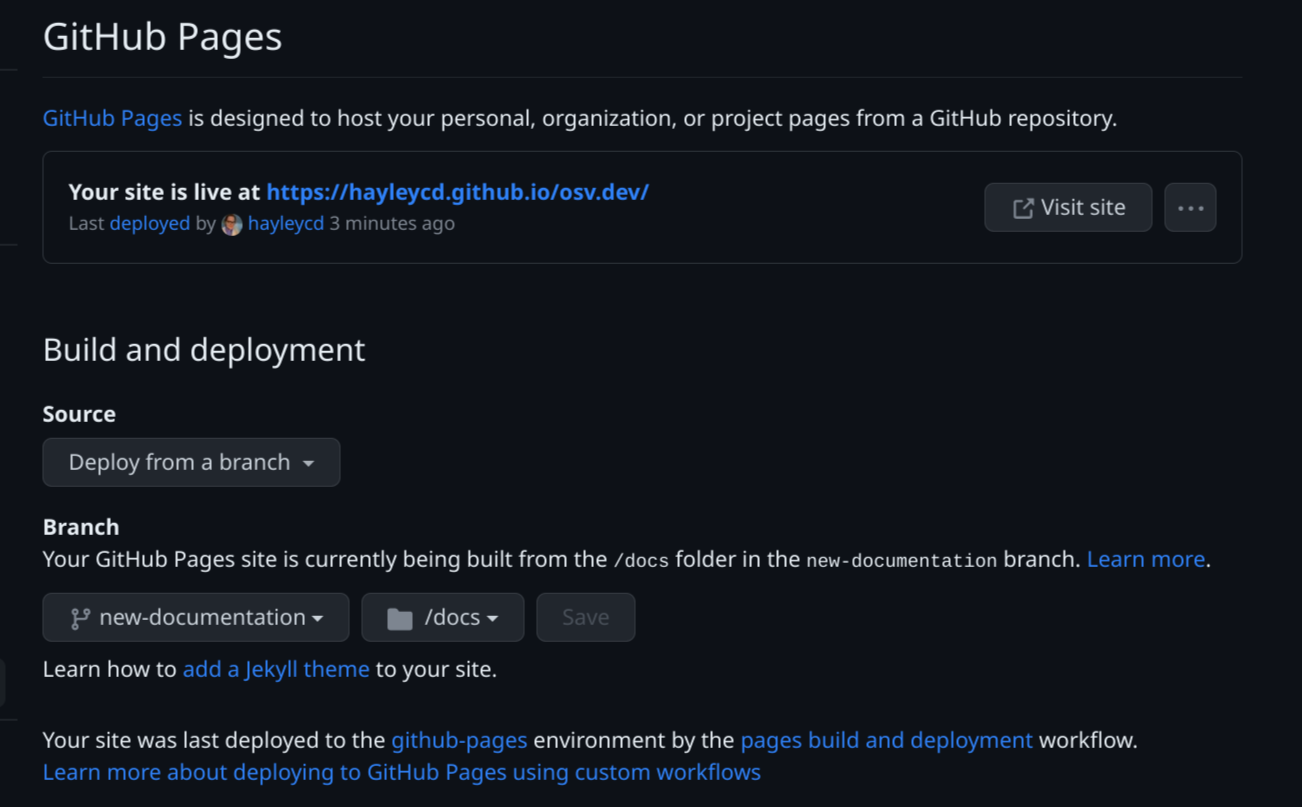
3. Preview the changes by spinning up a GitHub page for your fork, building
from your working branch.
- On your fork, go to the settings tab and then the GitHub page settings.
Sample URL:
https://github.com/{your-github-profile}/osv.dev/settings/pages
- Under "Build and deployment" select "Build from branch"
- Set the branch to your working branch
- Set the github page to build from the "/docs" folder
- Hit save and wait for your site to build
- Once it is ready, click the link and preview the docs
1. If you are satisfied with the changes, open a PR
2. In the PR, link to your fork's GitHub page, so we can preview the changes