{
"cells": [
{
"cell_type": "markdown",
"metadata": {},
"source": [
"# 函数"
]
},
{
"cell_type": "markdown",
"metadata": {},
"source": [
"函数,实际上是可被调用的完整的程序。它具备输入、处理、输出的功能。又因为它经常在主程序里被调用,所以它总是更像是个子程序。\n",
"\n",
"了解一个函数,无非是要了解它的两个方面:\n",
"\n",
"> * 它的**输入**是怎么构成的(都有哪些参数?如何指定?);\n",
"> * 以及它的**输出**是什么(返回值究竟是什么?)……\n",
"\n",
"从这个角度看,牛,对人类来说就是个函数,它吃的是*草*,挤出来的是*奶*…… 开玩笑了。\n",
"\n",
"在我们使用函数的过程中,我们常常*有意忽略*它的内部如何完成从输入到输出之间的*处理过程* —— 这就好像我们平日里用灯泡一样,大多数情况下,我们只要知道开关的使用方法就够了 —— 至于为什么按到这个方向上灯会亮,为什么按到另外一个方向上灯会灭,并不是我们作为用户必须关心的事情……\n",
"\n",
"当然,如果你是设计开关的人就不一样了,你必须知道其中的运作原理;但是,最终,你还是希望你的用户用最简单方便的操作界面,而不是必须搞懂所有原理才能够使用你所设计的产品……\n",
"\n",
"当我们用 Python 编程的时候,更多的情况下,我们只不过是在使用别人已经写好的函数,或者用更专业一点的词藻,叫做 “已完好封装的函数”。而我们所需要做的事情(所谓的 “学习使用函数”),其实只不过是 “通过阅读产品说明书了解如何使用产品” 而已,真的没多神秘……\n",
"\n",
"**注意**\n",
"\n",
"> 这一章的核心目的,不是让你学会如何写函数;而是通过一些例子,让你大抵上学会 “*如何阅读官方文档中关于函数的使用说明*”。也请注意之前的那个词:“*大抵上*”,所以**千万别怕自己最初的时候理解不全面**。\n",
"\n",
"另外,这一章中用来举例的函数,全部来自于同一个官方文档页面,[Built-in Functions](https://docs.python.org/3/library/functions.html):\n",
"\n",
"> https://docs.python.org/3/library/functions.html"
]
},
{
"cell_type": "markdown",
"metadata": {
"toc-hr-collapsed": true
},
"source": [
"## 示例 print()"
]
},
{
"cell_type": "markdown",
"metadata": {},
"source": [
"### 基本的使用方法"
]
},
{
"cell_type": "markdown",
"metadata": {},
"source": [
"`print()` 是初学者最常遇到的函数 —— 姑且不说是不是最常用到的。\n",
"\n",
"它最基本的作用就是把传递给它的值输出到屏幕上,如果不给它任何参数,那么它就输出一个空行:"
]
},
{
"cell_type": "code",
"execution_count": 3,
"metadata": {},
"outputs": [
{
"name": "stdout",
"output_type": "stream",
"text": [
"line 1st\n",
"line 2nd\n",
"\n",
"line 4th\n"
]
}
],
"source": [
"print('line 1st')\n",
"print('line 2nd')\n",
"print()\n",
"print('line 4th')"
]
},
{
"cell_type": "markdown",
"metadata": {},
"source": [
"你也可以向它传递多个参数,参数之间用 `,` 分开,它就会把那些值逐个输出到屏幕,每个值之间默认用空格分开。"
]
},
{
"cell_type": "code",
"execution_count": 5,
"metadata": {},
"outputs": [
{
"name": "stdout",
"output_type": "stream",
"text": [
"Hello, jack mike ... and all you guys!\n"
]
}
],
"source": [
"print('Hello,', 'jack', 'mike', '...', 'and all you guys!')"
]
},
{
"cell_type": "markdown",
"metadata": {},
"source": [
"当我们想把变量或者表达式的值插入字符串中的时候,可以用 f-string:"
]
},
{
"cell_type": "code",
"execution_count": 12,
"metadata": {},
"outputs": [
{
"name": "stdout",
"output_type": "stream",
"text": [
"Ann is 22 years old.\n"
]
}
],
"source": [
"name = 'Ann'\n",
"age = '22'\n",
"print(f'{name} is {age} years old.')"
]
},
{
"cell_type": "markdown",
"metadata": {},
"source": [
"但这并不是 `print()` 这个函数的功能,这实际上是 [`f-string`](https://docs.python.org/3/library/stdtypes.html#printf-style-string-formatting) 的功能,`f-string` 中用花括号 `{}` 括起来的部分是表达式,最终转换成字符串的时候,那些表达式的值(而不是变量或者表达式本身)会被插入相应的位置……"
]
},
{
"cell_type": "code",
"execution_count": 11,
"metadata": {},
"outputs": [
{
"data": {
"text/plain": [
"'Ann is 22 years old.'"
]
},
"execution_count": 11,
"metadata": {},
"output_type": "execute_result"
}
],
"source": [
"name = 'Ann'\n",
"age = '22'\n",
"f'{name} is {age} years old.'"
]
},
{
"cell_type": "markdown",
"metadata": {},
"source": [
"所以,`print(f'{name} is {age} years old.')` 这一句中,函数 `print()` 完成的还是它最基本的功能:给它什么,它就把什么输出到屏幕上。"
]
},
{
"cell_type": "markdown",
"metadata": {},
"source": [
"### print() 的官方文档说明"
]
},
{
"cell_type": "markdown",
"metadata": {},
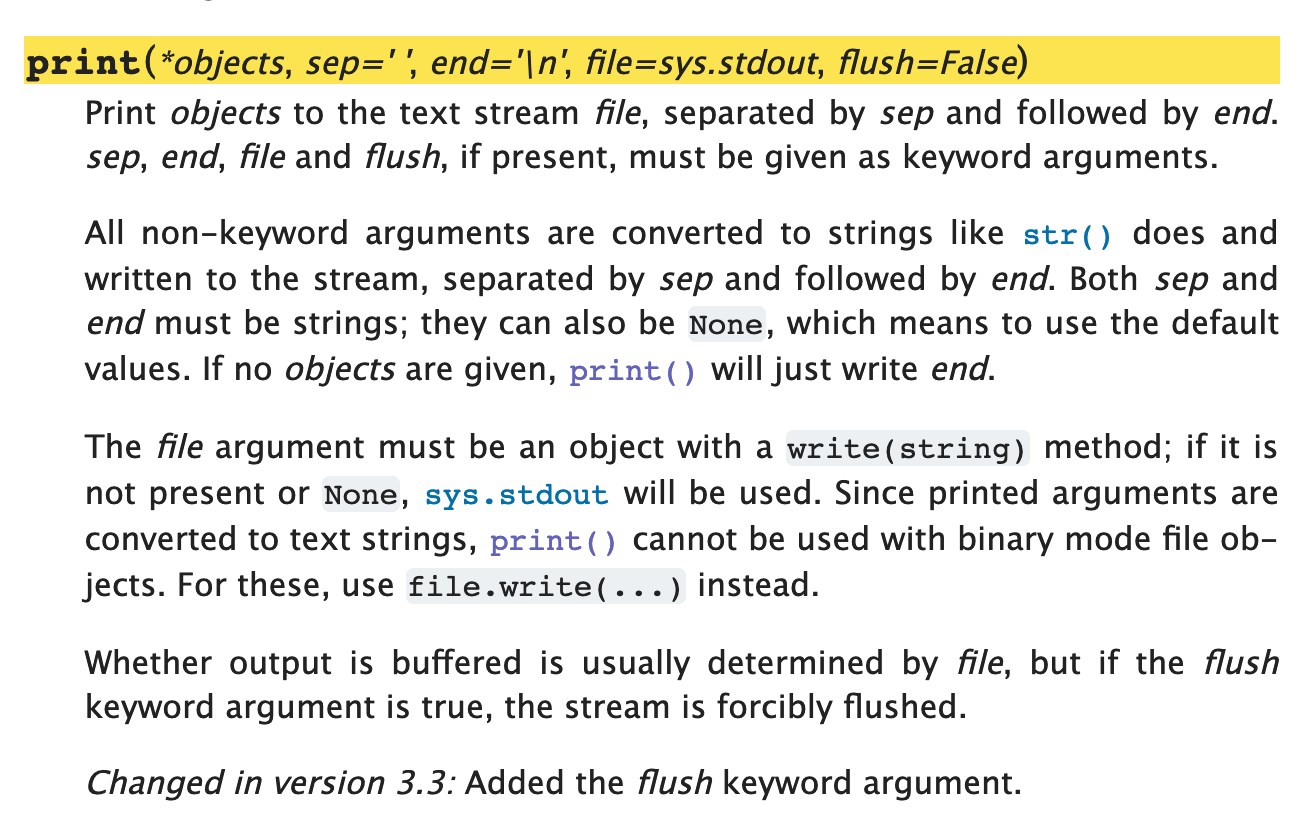
"source": [
"以下,是 print() 这个函数的[官方文档](https://docs.python.org/3/library/functions.html#print):\n",
"\n",
"\n",
"\n",
"最必须读懂的部分,就是这一行:\n",
"\n",
"> `print(*object, sep=' ', end='\\n', file=sys.stdout, flush=False)` [1]\n",
"\n",
"先只注意那些有着 `=` 的参数,`sep=' '`、`end='\\n'`、`file=sys.stdout`,和 `flush=False`。\n",
"\n",
"这其中,先关注这三个 `sep=' '`、`end='\\n'`、`file=sys.stdout`:\n",
"\n",
"> * `sep=' '`:接收多个参数之后,输出时,分隔符号默认为空格,`' '`;\n",
"> * `end='\\n'`:输出行的末尾默认是换行符号 `'\\n'`;\n",
"> * `file=sys.stdout`:默认的输出对象是 `sys.stdout`(即,用户正在使用的屏幕)……\n",
"\n",
"也就是说,这个函数中有若干个具有默认值的参数,即便我们在调用这个函数的时候,就算没有指定它们,它们也存在于此。\n",
"\n",
"即,当我们调用 `print('Hello', 'world!')` 的时候,相当于我们调用的是 `print('Hello', 'world!', sep=' ', end='\\n', file=sys.stdout, flush=False)`"
]
},
{
"cell_type": "code",
"execution_count": 22,
"metadata": {},
"outputs": [
{
"name": "stdout",
"output_type": "stream",
"text": [
"Hello world!\n",
"Hello world!\n",
"Hello-world!\tHello~world!\n",
"Hello\n",
"world!\n"
]
}
],
"source": [
"import sys # 如果没有这一行,代码会报错\n",
"\n",
"print('Hello', 'world!') # 下一行的输出和这一行相同\n",
"print('Hello', 'world!', sep=' ', end='\\n', file=sys.stdout, flush=False)\n",
"print('Hello', 'world!', sep='-', end='\\t')\n",
"print('Hello', 'world!', sep='~') # 上一行的末尾是 \\t,所以,这一行并没有换行显示\n",
"print('Hello', 'world!', sep='\\n') # 参数之间用换行 \\n 分隔 "
]
},
{
"cell_type": "markdown",
"metadata": {},
"source": [
"很多人只看各种教材、教程,却从来不去翻阅官方文档 —— 到最后非常吃亏。只不过是多花一点点的功夫而已,看过之后,就会知道:原来 `print()` 这个函数是可以往文件里写数据的,只要指定 `file` 这个参数为一个已经打开的文件对象就可以了(真的有很多人完全不知道)……"
]
},
{
"cell_type": "markdown",
"metadata": {},
"source": [
"另外,现在可以说清楚了:\n",
"\n",
"> `print()` 这个函数的返回值是 `None` —— 注意,它向屏幕输出的内容,与 `print()` 这个函数的返回值不是一回事。\n",
"\n",
"做为例子,看看 `print(print(1))` 这个语句 —— `print()` 这个函数被调用了两次,第一次是 `print(1)`,它向屏幕输出了一次,完整的输出值实际上是 `str(1) + '\\n'`,而后返回一个值,`None`;而第二次调用 print(),这相当于是向屏幕输出这个 `None`:"
]
},
{
"cell_type": "code",
"execution_count": 1,
"metadata": {},
"outputs": [
{
"name": "stdout",
"output_type": "stream",
"text": [
"1\n",
"None\n"
]
}
],
"source": [
"print(print(1))"
]
},
{
"cell_type": "markdown",
"metadata": {},
"source": [
"“**看说明书**” 就是这样,全都看了,真不一定全部看懂,但看总是比不看强,因为总是有能看懂的部分……"
]
},
{
"cell_type": "markdown",
"metadata": {},
"source": [
"## 关键字参数"
]
},
{
"cell_type": "markdown",
"metadata": {},
"source": [
"在 Python 中,函数的参数,有两种:\n",
"> * **位置参数**(Positional Arguments,在官方文档里常被缩写为 *arg*)\n",
"> * **关键字参数**(Keyword Arguments,在官方文档里常被缩写为 *kwarg*)\n",
"\n",
"在函数定义中,带有 `=` 的,即,已为其设定了默认值的参数,叫做 Keyword Arguments,其它的是 Positional Arguments。\n",
"\n",
"在调用有 Keyword Arguments 的函数之时,如若不提供这些参数,那么参数在执行时,启用的是它在定义的时候为那些 Keyword Arguments 所设定的默认值;如若提供了这些参数的值,那么参数在执行的时候,启用的是接收到的相应值。\n",
"\n",
"比如,`sorted()` 函数,它的定义如下:\n",
"\n",
"> `sorted(iterable, *, key=None, reverse=False)`\n",
"\n",
"现在先只关注它的 Keyword Arguments,`reverse`:"
]
},
{
"cell_type": "code",
"execution_count": 31,
"metadata": {},
"outputs": [
{
"data": {
"text/plain": [
"['a', 'b', 'c', 'd']"
]
},
"execution_count": 31,
"metadata": {},
"output_type": "execute_result"
},
{
"data": {
"text/plain": [
"['d', 'c', 'b', 'a']"
]
},
"execution_count": 31,
"metadata": {},
"output_type": "execute_result"
}
],
"source": [
"from IPython.core.interactiveshell import InteractiveShell\n",
"InteractiveShell.ast_node_interactivity = \"all\"\n",
"\n",
"sorted('abdc')\n",
"sorted('abdc', reverse=True)"
]
},
{
"cell_type": "markdown",
"metadata": {},
"source": [
"## 位置参数"
]
},
{
"cell_type": "markdown",
"metadata": {},
"source": [
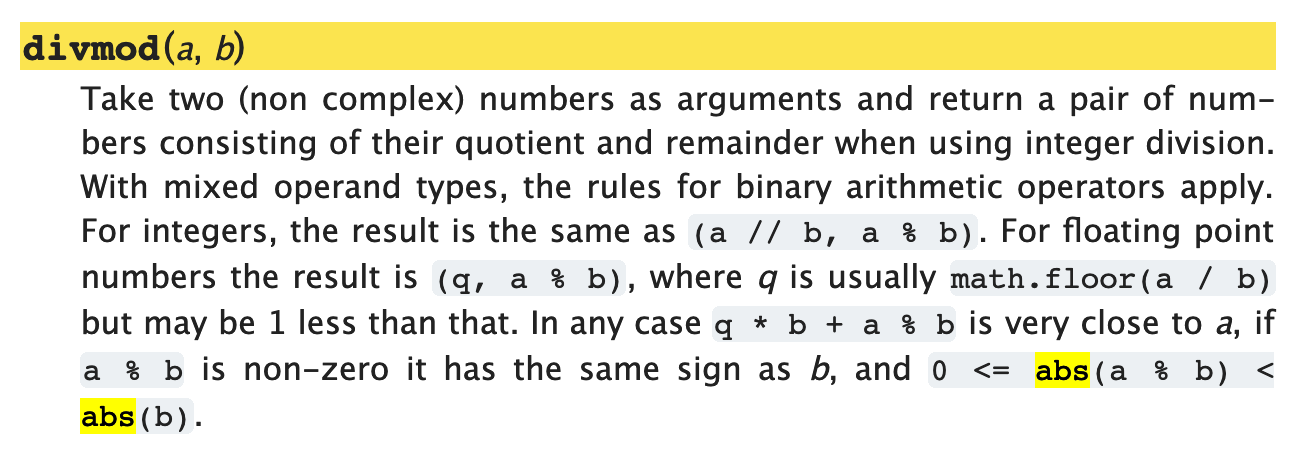
"位置参数,顾名思义,是 “由位置决定其值的参数”。拿 `divmod()` 为例,它的[官方文档](https://docs.python.org/3/library/functions.html#divmod)是这样写的:\n",
"\n",
"\n",
"\n",
"它接收且必须接收两个参数。\n",
"\n",
"> * 当你调用这个函数的时候,括号里写的第一个参数,是被除数,第二个参数是除数 —— 此为该函数的输入;\n",
"> * 而它的返回值,是一个元组(Tuple,至于这是什么东西,后面讲清楚),其中包括两个值,第一个是商,第二个是余 —— 此为该函数的输出。\n",
"\n",
"作为 “这个函数的用户”,你不能(事实上也没必要)调换这两个参数的意义。因为,根据定义,被传递的值的意义就是由参数的位置决定的。"
]
},
{
"cell_type": "code",
"execution_count": 2,
"metadata": {},
"outputs": [
{
"data": {
"text/plain": [
"(3, 2)"
]
},
"execution_count": 2,
"metadata": {},
"output_type": "execute_result"
},
{
"data": {
"text/plain": [
"3"
]
},
"execution_count": 2,
"metadata": {},
"output_type": "execute_result"
},
{
"data": {
"text/plain": [
"2"
]
},
"execution_count": 2,
"metadata": {},
"output_type": "execute_result"
},
{
"data": {
"text/plain": [
"(0, 3)"
]
},
"execution_count": 2,
"metadata": {},
"output_type": "execute_result"
},
{
"data": {
"text/plain": [
"0"
]
},
"execution_count": 2,
"metadata": {},
"output_type": "execute_result"
},
{
"data": {
"text/plain": [
"3"
]
},
"execution_count": 2,
"metadata": {},
"output_type": "execute_result"
}
],
"source": [
"from IPython.core.interactiveshell import InteractiveShell\n",
"InteractiveShell.ast_node_interactivity = \"all\"\n",
"\n",
"divmod(11, 3)\n",
"a, b = divmod(11, 3)\n",
"a\n",
"b\n",
"\n",
"divmod(3, 11)\n",
"a, b = divmod(3, 11)\n",
"a\n",
"b\n"
]
},
{
"cell_type": "markdown",
"metadata": {
"toc-hr-collapsed": false
},
"source": [
"## 可选位置参数"
]
},
{
"cell_type": "markdown",
"metadata": {},
"source": [
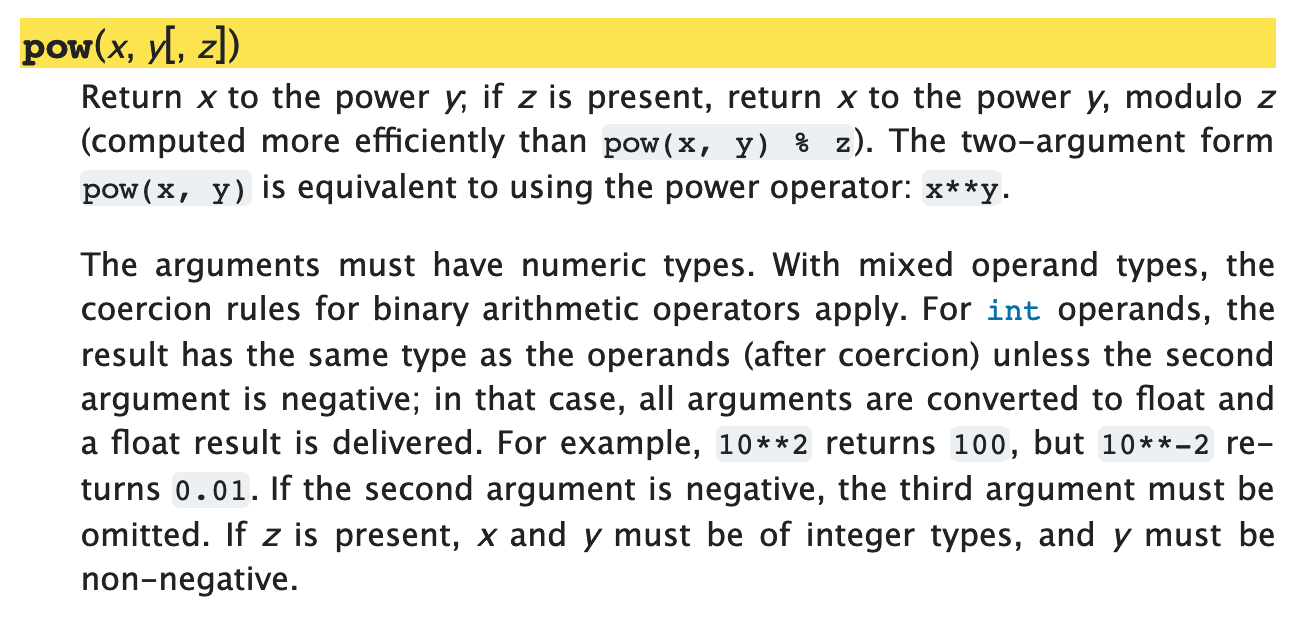
"有些函数,如 `pow()`,有**可选的位置参数**(Optional Positional Arguments)。\n",
"\n",
"\n",
"\n",
"于是,`pow()` 有两种用法,各有不同的结果:\n",
"\n",
"> * `pow(x, y)` —— 返回值是 `x ** y`\n",
"> * `pow(x, y, z)` —— 返回值是 `x ** y % z`\n",
"\n"
]
},
{
"cell_type": "code",
"execution_count": 40,
"metadata": {},
"outputs": [
{
"data": {
"text/plain": [
"8"
]
},
"execution_count": 40,
"metadata": {},
"output_type": "execute_result"
},
{
"data": {
"text/plain": [
"0"
]
},
"execution_count": 40,
"metadata": {},
"output_type": "execute_result"
}
],
"source": [
"from IPython.core.interactiveshell import InteractiveShell\n",
"InteractiveShell.ast_node_interactivity = \"all\"\n",
"\n",
"pow(2, 3)\n",
"pow(2, 3, 4)"
]
},
{
"cell_type": "markdown",
"metadata": {},
"source": [
"注意 `pow()` 函数定义部分中,圆括号内的方括号 `[, z]` —— 这是非常严谨的标注,如果没有 `z`,那么那个逗号 `,` 就是没必要的。\n",
"\n",
"看看 `exec()` 的官方文档(先别管这个函数干嘛用的),注意函数定义中的两个嵌套的方括号:\n",
"\n",
"\n",
"\n",
"这些方括号的意思是说:\n",
"\n",
"> * 没在方括号里的 `object` 是不可或缺的参数,调用时必须提供;\n",
"> * 可以有第二个参数,第二个参数会被接收为 `globals`;\n",
"> * 在有第二个参数的情况下,第三个参数会被接收为 `locals`;\n",
"> * *但是,你没办法在不指定 `globals` 这个位置参数的情况下指定 `locals`……*"
]
},
{
"cell_type": "markdown",
"metadata": {},
"source": [
"## 可接收很多值的位置参数"
]
},
{
"cell_type": "markdown",
"metadata": {},
"source": [
"再回头看看 `print()`,它的第一个位置参数,`object` 前面是有个星号的:`*object, ...`。\n",
"\n",
"对函数的用户来说,这说明,这个位置可以接收很多个参数(或者说,这个位置可以接收一个列表或者元组)。\n",
"\n",
"再仔细看看 `print()`,它只有一个位置参数:\n",
"\n",
"\n",
"\n",
"因为位置决定了值的定义,一般来说,一个函数里最多只有一个这种可以接收很多值的位置参数 —— 否则如何获知谁是谁呢?\n",
"\n",
"如果与此同时,还有若干个位置参数,那么,*能够接收很多值的位置参数*只能放置最后,就好像 `max()` 函数那样:\n",
"\n",
""
]
},
{
"cell_type": "markdown",
"metadata": {},
"source": [
"## Class 也是函数"
]
},
{
"cell_type": "markdown",
"metadata": {},
"source": [
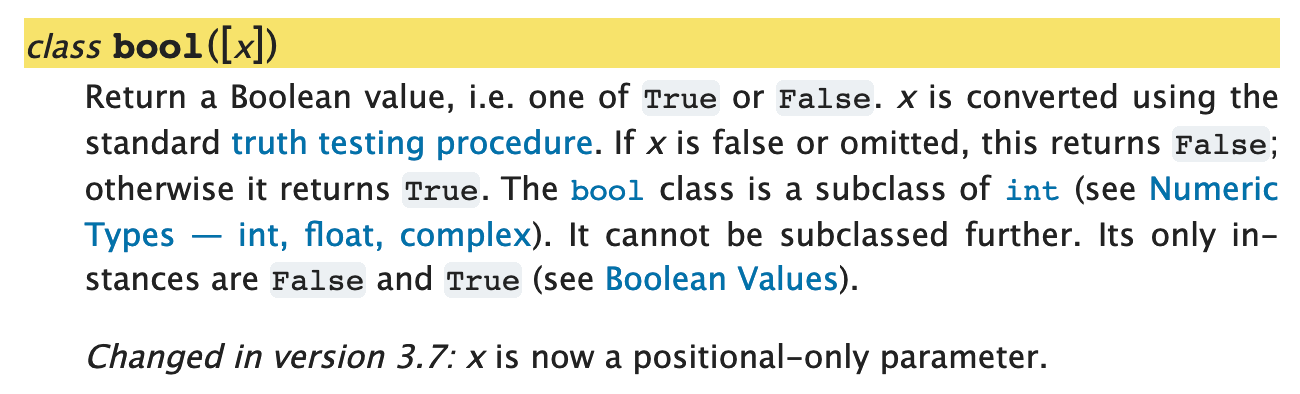
"虽然你现在还不一定知道 Class 究竟是什么,但在阅读官方文档的时候,遇到一些内建函数前面写着 Class,比如 `Class bool([x])`,千万别奇怪,因为 Class 本质上来看就是一种特殊类型的函数,也就是说,它也是函数:\n",
"\n",
""
]
},
{
"cell_type": "code",
"execution_count": 44,
"metadata": {},
"outputs": [
{
"data": {
"text/plain": [
"False"
]
},
"execution_count": 44,
"metadata": {},
"output_type": "execute_result"
},
{
"data": {
"text/plain": [
"True"
]
},
"execution_count": 44,
"metadata": {},
"output_type": "execute_result"
},
{
"data": {
"text/plain": [
"True"
]
},
"execution_count": 44,
"metadata": {},
"output_type": "execute_result"
},
{
"data": {
"text/plain": [
"False"
]
},
"execution_count": 44,
"metadata": {},
"output_type": "execute_result"
},
{
"data": {
"text/plain": [
"False"
]
},
"execution_count": 44,
"metadata": {},
"output_type": "execute_result"
}
],
"source": [
"from IPython.core.interactiveshell import InteractiveShell\n",
"InteractiveShell.ast_node_interactivity = \"all\"\n",
"\n",
"bool()\n",
"bool(3.1415926)\n",
"bool(-3.1415926)\n",
"bool(1 == 2)\n",
"bool(None)"
]
},
{
"cell_type": "markdown",
"metadata": {},
"source": [
"## 总结"
]
},
{
"cell_type": "markdown",
"metadata": {},
"source": [
"本章需要(大致)了解的重点如下,其实很简单:\n",
"\n",
"> * 你可以把函数当作一个产品,而你自己是这个产品的用户;\n",
"> * 既然你是产品的用户,你要养成好习惯,一定要亲自阅读产品说明书;\n",
"> * 调用函数的时候,注意*可选位置参数的使用方法*和*关键字参数的默认值*;\n",
"> * 函数定义部分,注意两个符号就行了,`[]` 和 `=`;\n",
"> * 所有的函数都有返回值,即便它内部不指定返回值,也有一个默认返回值:`None`;\n",
"> * 另外,一定要耐心阅读该函数在使用的时候需要注意什么 —— 产品说明书的主要作用就在这里……\n",
"\n",
"知道这些就很好了!\n",
"\n",
"这就好像你拿着一张地图,不可能一下子掌握其中所有的细节,但花几分钟搞清楚 “图例”(Legend)部分总是可以的,知道什么样的线标示的是公交车,什么样的线标示的是地铁,什么样的线标示的是桥梁,然后知道上北下南左西右东 —— 这之后,就可以开始慢慢研究地图了……\n",
"\n",
"为了学会使用 Python,你以后最常访问的页面一定是这个:\n",
"\n",
"> * https://docs.python.org/3/library/index.html\n",
">\n",
"> 而最早反复阅读查询的页面肯定是其中的这两个:\n",
"> * https://docs.python.org/3/library/functions.html\n",
"> * https://docs.python.org/3/library/stdtypes.html\n",
"\n",
"对了,还有就是,在这一章之后,你已经基本上 “**精通**” 了 `print()` 这个函数的用法。"
]
},
{
"cell_type": "markdown",
"metadata": {},
"source": [
"-----\n",
"**脚注**\n",
"\n",
"(2019.02.14)[1]:`print()` 函数的[官方文档](https://docs.python.org/3/library/functions.html#print)里,`sep=''` 肯定是 `sep=' '` 的笔误 —— 可以用以下代码验证:\n",
"\n",
"```python\n",
"print('a', 'b', sep='')\n",
"print('a', 'b')\n",
"```\n",
"(2019.03.16)有读者提醒:https://github.com/selfteaching/the-craft-of-selfteaching/issues/111\n",
"\n",
"> 而现在(2019.03.16)复制粘贴文档中的 `sep=' '`,会发现是有空格的。\n",
">\n",
"> 这是改了么?\n",
"\n",
"我回去查看了一下 2019.02.13 我提交的 bug track:[https://bugs.python.org/issue35986](https://bugs.python.org/issue35986),结论是 “人家没问题,是我自己的浏览器字体设置有问题”……\n",
"\n",
"然而,我决定将这段文字保留在此书里,以便人们看到 “平日里软件维护是什么样的” —— 作为一个实例放在这里,很好。\n",
"\n",
"↑Back to Content↑\n"
]
},
{
"cell_type": "markdown",
"metadata": {},
"source": [
"Next Page"
]
}
],
"metadata": {
"kernelspec": {
"display_name": "Python 3",
"language": "python",
"name": "python3"
},
"language_info": {
"codemirror_mode": {
"name": "ipython",
"version": 3
},
"file_extension": ".py",
"mimetype": "text/x-python",
"name": "python",
"nbconvert_exporter": "python",
"pygments_lexer": "ipython3",
"version": "3.8.3"
},
"toc-autonumbering": true
},
"nbformat": 4,
"nbformat_minor": 2
}