audio.cpp
audio.cpp is a high-performance C++ audio inference framework built on top of ggml, designed to make modern local audio models practical, portable, and fast.
Tired of juggling a dozen Conda environments, hundreds of Python packages, and dependency conflicts just to try a few audio models? audio.cpp gives those paths a shared native runtime instead. Runs on Windows, Linux, and macOS, with support for NVIDIA, AMD, Apple Silicon, and CPU-only machines.
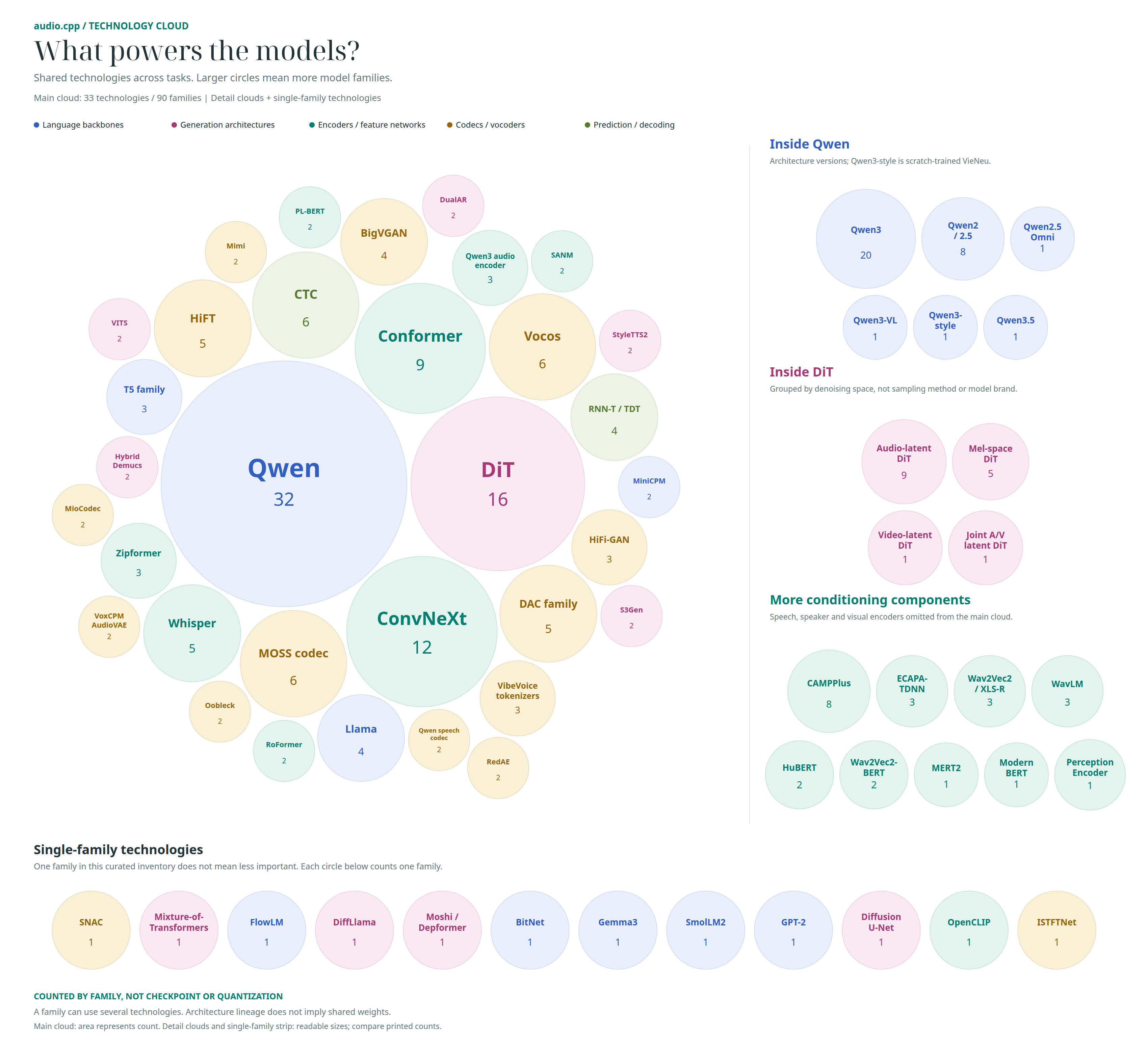
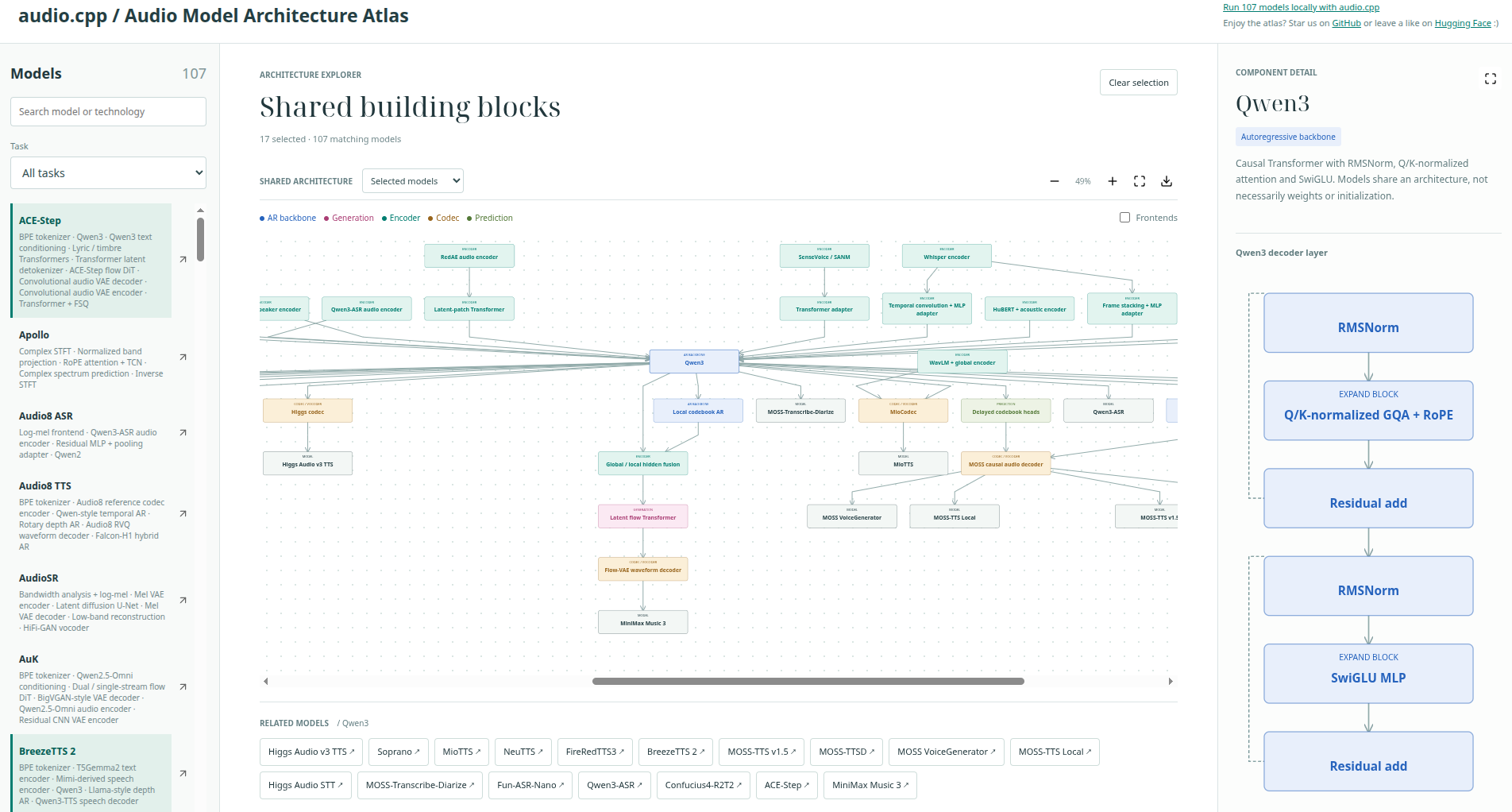
Lost in a sea of audio model names, papers, and codebases? Explore 100+ audio models in the Audio Model Architecture Atlas to see how they're built, what they share, and where they differ, whether you're learning or building your own.




[!IMPORTANT]
2026-09-23 - Release v0.8.2: Day-zero support for NVIDIA Nemotron 3 Diarization, with streaming and batched inference. AuK and LiveAvatar are now available in the WebUI.
Arena UI: The new Arena tab makes it easier to compare local models side by side for TTS, voice conversion, and ASR. Use one shared input, queue multiple models or GGUF variants, then review outputs with metrics!
CUDA performance headline: multiple TTS paths already run 1.8x to up to 8x faster than their Python reference paths while cutting end-to-end latency by 45%-85%.
GGUF performance: all released model families support GGUF loading, and tested Q8 packages can run up to 1.53x faster while reducing peak VRAM by up to about 37% on routes such as Higgs Audio, Fish Audio, and Voxtral. See the GGUF guide for support status and the Q8 performance report for 16-bit vs Q8 measurements.
Production deployment example: Try Fun-ASR-Nano and SenseVoice with audio.cpp on the FunASR platform!
VibeVoice 1.5B: generates a 93.9-minute podcast in 18.2 minutes with 10 diffusion steps and without quantization, running about 5.15x faster than real time.
Supertonic 3: generates about 10 hours of audio in 3 minutes on RTX5090. Up to 200x+ real-time on CUDA, 6x+ real-time on CPU, and 47 ms TTFT in CUDA streaming mode. Demo: 10 hours of audio generated in 3 minutes.
Real-world ASR win: In TranscrIA benchmark on messy French meeting audio, audio.cpp’s Nemotron 3.5 ASR matched the same WER as other implementations while using about 1/4 of the wall time.
It is built for real end-to-end execution rather than one-off model demos: the same runtime powers TTS, voice cloning, voice conversion, ASR, diarization, VAD, source separation, alignment, codec-style models, and higher-level workflows through a common framework surface.
Highlights:
- Parity. Strong parity tooling against Python reference paths.
- Performance. Performance-focused execution, reusable sessions, and batch-style offline inference. Optimized for CUDA.
- Portability. A portable native stack centered on
ggml, with CUDA, HIP/ROCm, Vulkan, Metal, and CPU backends behind shared CLI and server entry points instead of Python-only deployment paths. - Pipelines. Experimental JSON pipeline support for higher-level multi-step workflows.
- Audio Utilities. Built-in denoise, enhancement, resampling, and STFT/ISTFT utilities for real production-style task paths. Model-based utilities need separately downloaded weights; see downloads and usage.
The goal of the framework is to provide highly optimized, reusable building blocks for audio-related models, so new model integrations can be brought up faster, shared components can be improved once and benefit many families, and real end-to-end inference paths can stay efficient, maintainable, and portable.
audio.cpp would not be moving this quickly without generous contributors bringing in real fixes, new capabilities, and careful polish. See CONTRIBUTING.md for how to contribute and for a shout-out to the people already helping shape the project.
[!TIP] Contribution focus: the most helpful contributions right now are improvements to the UI, API server, and pipeline/workflow subsystems. These areas make the existing model surface easier to use, serve, compose, and validate. See CONTRIBUTING.md for more details.
New model PRs: before starting a new model port, please check the supported model table because several families are already implemented or under testing and read the New Model PRs section in CONTRIBUTING.md. New ports should start under the community models surface, where review is lighter than core models but still needs reproducible validation.
News
[!IMPORTANT] 2026-09-15 - Release 0.8.0: Since v0.7.0, audio.cpp has added YuE2 song generation, SheetSage2 audio-to-score transcription, BreezeTTS 2, CosyVoice3, Kokoro 82M, Moonshine Streaming ASR, Niagara ASR, and VibeVoice ASR Streaming 7B. The community lineup also grows with Audio8 ASR/TTS, Echo-TTS, Chatterbox Turbo, MiraTTS, Sopro, Soprano, sanoTTS, VoxCPM1, VibeASR, and Sortformer v2.1, alongside Irodori v4.1 Anime support. This brings audio.cpp to 80+ model families and 120+ model variants! This release also brings improvements to performance, stability, and usability across the project. Thanks to the community for the contributions, testing, and feedback!
Optional server frontend modules add MP3 support, HTTPS listeners, and more customization for server integrations.
Thanks to @DrewThomasson for the Colab UI, @christopherthompson81 for the C ABI, and @XsquirrelC/VibeASR for the official VibeASR port, extending audio.cpp with support for BitNet models!
2026-08-26 - Release 0.7: This release adds MiniMax Music 3, MagpieTTS, PersonaPlex, MeanVC2, AudioSR, ControlFoley, FireRedTTS3, FireRedAudio, MiDashengLM-Gen, F5-TTS/Habibi, Granite Speech 5.0 TurboCTC, MMS Forced Aligner, and MOSS-VoiceGenerator, plus DotTTS Edit and ACE-Step 1.5 XL variants, bringing audio.cpp to 62 total model families and 85+ model variants! It also introduces the new Arena UI for side-by-side TTS, voice-conversion, and ASR comparison with shared inputs, queued runs, metrics, and result sorting.
2026-08-13 - Release 0.6: This release adds 5 new model families - DotTTS, NeuTTS, MuScriptor, MiniMax-H3, and SenseVoice - bringing audio.cpp to 49 total model families and 70+ model variants, alongside the new native WebUI from @mirek190, expanded GGUF packaging, and more shared framework runtime pieces.
2026-07-31 - Release 0.5: audio.cpp reaches 44 model families with 9 new additions, early HIP/ROCm support for AMD GPUs, Nix ROCm/HIP build support, Metal optimizations with tested VoxCPM2 runs up to 2.56x faster on Apple Silicon, and a major GGUF-first WebUI/package-spec usability pass.
2026-06-25 to 2026-07-23 (release 0.1 to 0.4): audio.cpp grew from the first released model wave into broad TTS, ASR, music generation, source separation, VAD, diarization, codec, and voice-conversion coverage, with VibeVoice 1.5B/7B, LoRA adapter loading, initial streaming support, and major CUDA Conv1DTransp speedups.
Supported Models
Task tags: TTS text to speech, Clone voice cloning, VC voice conversion, S2S speech-to-speech, ASR speech recognition, Align forced alignment, VAD voice activity detection, Diar speaker diarization, Codec audio codec, Sep source separation, MIDI audio-to-symbolic MIDI/events, Music music/song generation, SFX sound effects, Video video generation, Edit audio/music editing, Design voice design, Dialogue multi-speaker dialogue TTS, Ctrl TTS/clone voice control such as emotion, style, instruction, caption, or non-verbal tag control.
Runtime tags summarize the supported loading paths. GGUF package precision varies by model and release; check the audio.cpp GGUF repo or docs/gguf.md for the exact package list. Bundled means the tiny runtime asset ships under assets/framework/models and needs no separate model download. Stream means the family exposes a streaming server/session path.
Model weights keep the license of their original release, which is separate from audio.cpp's own license. docs/model_licenses.md lists that license per family, and whether it allows commercial use.
Speech Generation And Conversation
| Family | Task | Lang | Variants | Runtime |
|---|---|---|---|---|
| breeze_tts | TTS, Clone, Design, Ctrl | zh, en | BreezeTTS 2 instruction-conditioned TTS and prompt-audio voice cloning | GGUF BF16/Q8, Stream |
| chatterbox | TTS, Clone, VC | ar, da, de, el, en, es, fi, fr, hi, it, ko, ms, nl, no, pl, pt, sv, sw, tr | Chatterbox with 0.5B backbone | GGUF 16/Q8 |
| confucius4_tts | Clone | zh, en, ja, ko, de, fr, es, id, it, th, pt, ru, ms, vi | Confucius4-TTS multilingual voice cloning | GGUF F32, Stream |
| cosyvoice3 | TTS, Clone | zh, en, ja, ko, de, es, fr, it, ru, yue | Fun-CosyVoice3 zero-shot, cross-lingual, and instruction-conditioned TTS | GGUF F32/Q8 |
| dots_tts | TTS, Clone, Edit, Ctrl | multilingual | DotTTS SOAR DotTTS MeanFlow DotTTS Edit | GGUF 16/Q8, Stream |
| dramabox | TTS, Clone | en | DramaBox expressive TTS and voice cloning | GGUF Q8 |
| fish_audio | TTS, Clone, Ctrl | auto, en, zh | Fish Audio S2 Pro | GGUF 16/Q8 |
| firered_audio | ASR, TTS, Clone, Design, Ctrl | zh, en | FireRedAudio multimodal speech/audio model with ASR, understanding, cloning, design, and edit paths | GGUF original/Q8 |
| fireredtts3 | TTS, Clone, Design, Ctrl | 24 langs + 21 zh dialects | FireRedTTS3 Base FireRedTTS3 Instruct/Voicedesign | GGUF original/Q8 |
| higgs_audio_tts | TTS, Clone, Ctrl | auto | Higgs Audio v3 TTS 4B | GGUF 16/Q8 |
| index_tts2 | TTS, Clone, Ctrl | zh, en, ja, es, ar | IndexTTS-2 IndexTTS-2.5 | GGUF 16/Q8 |
| kokoro_tts | TTS | en-us, en-gb, es, fr, hi, it, ja, pt-br, zh | Kokoro 82M, 54 preset voices | Safetensors, local GGUF BF16/Q8 |
| irodori_tts | TTS, Clone, Design, Ctrl | ja | Irodori-TTS-v4.1-Small Irodori-TTS-v4.1-Anime Irodori-TTS-500M-v3 Irodori-TTS-600M-v3-VoiceDesign | GGUF 16/Q8 |
| magpie_tts | TTS | ar-AE, ar-MSA, ar-SA, de, en, es, fr, hi, it, ko, pt-BR, vi, zh | NVIDIA MagpieTTS Multilingual 357M (v2607) with baked speaker prompts and NanoCodec decode | GGUF original/Q8 |
| maya1 | TTS, Design, Ctrl | en | Maya1 expressive TTS with natural-language voice design, inline emotion tags, and SNAC decoding | GGUF original/Q8 |
| miotts | TTS, Clone | en, ja | MioTTS-1.7B | GGUF 16/Q8 |
| moss_tts_local | TTS, Clone, Ctrl | auto, optional language hint | MOSS-TTS-Local-Transformer-v1.5 | GGUF 16/Q8 |
| moss_tts_nano | TTS, Clone | auto | MOSS-TTS-Nano-100M | GGUF 16/Q8 |
| neutts | TTS, Ctrl | en | NeuTTS 2E with built-in speaker prompts and emotion control | GGUF original precision, Stream |
| omnivoice | TTS, Clone, Design, Ctrl | 646+ langs | OmniVoice, Qwen3-0.6B based | GGUF 16/Q8, Stream |
| personaplex | Dialogue, S2S | en | PersonaPlex 7B v1 speech-to-speech conversational model with packaged voice/persona prompts | GGUF Q4/Q8, Stream |
| pocket_tts | TTS, Clone | en, de, it, pt, es | PocketTTS-100M English/German/Italian/Portuguese/Spanish | GGUF 16/Q8, Stream |
| qwen3_tts | TTS, Clone, Design, Ctrl | zh, en, fr, de, it, ja, ko, pt, ru, es | Qwen3-TTS-12Hz-0.6B-Base Qwen3-TTS-12Hz-1.7B-Base Qwen3-TTS-12Hz-1.7B-CustomVoice Qwen3-TTS-12Hz-1.7B-VoiceDesign | GGUF 16/Q8 |
| supertonic | TTS | en, ko, ja, ar, bg, cs, da, de, el, es, et, fi, fr, hi, hr, hu, id, it, lt, lv, nl, pl, pt, ro, ru, sk, sl, sv, tr, uk, vi, na | Supertonic 3 | GGUF F32, Stream |
| vibevoice | TTS, Dialogue | en, zh | VibeVoice-1.5B VibeVoice-7B | GGUF 16/Q8 |
| voxcpm2 | TTS, Clone, Design, Ctrl | ar, da, de, el, en, es, fi, fr, he, hi, id, it, ja, km, ko, lo, ms, my, nl, no, pl, pt, ru, sv, sw, th, tl, tr, vi, zh | VoxCPM2-2B, 48 kHz | GGUF 16/Q8, Stream |
Speech Recognition And Analysis
| Family | Task | Lang | Variants | Runtime |
|---|---|---|---|---|
| canary_asr | ASR, Translate | en, de, es, fr | Canary 180M Flash | GGUF F32/Q8 |
| citrinet_asr | ASR | en | Citrinet-256 | GGUF Q8 |
| cohere_asr | ASR | en, fr, de, es, it, pt, nl, pl, el, ar, ja, zh, vi, ko | Cohere Transcribe 03-2026 | GGUF BF16/Q8/Q4_0 |
| gigaam_asr | ASR | ru, kk, ky, uz, en | GigaAM v3 CTC GigaAM v3 RNN-T GigaAM v3 E2E CTC GigaAM v3 E2E RNN-T GigaAM Multilingual CTC GigaAM Multilingual Large CTC | GGUF F16/F32 |
| fun_asr_nano | ASR | auto, zh, en, ja | Fun-ASR-Nano-2512 | GGUF 16/Q8 |
| higgs_audio_stt | ASR | en | Higgs Audio v3 STT | GGUF 16/Q8, Stream |
| hviske_asr | ASR | da | Hviske v5.3 | GGUF Q8 |
| marblenet_vad | VAD | lang agnostic | MarbleNet VAD | Bundled |
| pulsevad | VAD | lang agnostic | PulseVAD 2.1K Student / 81K Teacher | GGUF F32 |
| moonshine_asr | ASR | en | Moonshine Streaming Tiny/Small/Medium | GGUF Q8, Stream |
| moss_transcribe_diarize | ASR | auto, 50+ languages | MOSS-Transcribe-Diarize with speaker labels and timestamps | GGUF BF16/Q8/Q4_K, Stream |
| nemotron_3_diar | Diar | multilingual | NVIDIA Nemotron 3 Diarization with eight-speaker arrival-order diarization | GGUF BF16, Batch, Stream |
| nemotron_asr | ASR | 100+ ASR prompt codes incl. auto | Nemotron 3.5 ASR Streaming 0.6B | GGUF 16/Q8, Stream |
| niagara_asr | ASR | en | Niagara 19M Batch English Niagara 38M Batch English | GGUF F32 |
| qwen3_asr | ASR | zh, en, yue, ar, de, fr, es, pt, id, it, ko, ru, th, vi, ja, tr, hi, ms, nl, sv, da, fi, pl, cs, fil, fa, el, ro, hu, mk | Qwen3-ASR-0.6B Qwen3-ASR-1.7B-hf | GGUF 16/Q8, Stream |
| qwen3_forced_aligner | Align | zh, yue, en, de, es, fr, it, pt, ru, ko, ja | Qwen3-ForcedAligner-0.6B | GGUF 16/Q8 |
| samsone | Audio understanding | en | SAMSONE 99M SAMSONE 134M SAMSONE 356M | GGUF BF16/Q8 |
| silero_vad | VAD | lang agnostic | Silero VAD | Bundled, Stream |
| sortformer_diar | Diar | en | Sortformer-4spk-v1 | - |
| vibevoice_asr | ASR | auto | VibeVoice ASR | GGUF 16/Q8 |
| vibevoice_asr_streaming | ASR | en, zh, es, pt, de, ja, ko, fr, ru, it | VibeVoice ASR Streaming 7B/1.5B with persistent decoder state and speaker turns | GGUF BF16/Q8/Q4, Stream |
| voxtral_realtime | ASR | auto | Voxtral-Mini-4B-Realtime-2602 | GGUF 16/Q8/Q4, Stream |
Audio Conversion And Processing
| Family | Task | Lang | Variants | Runtime |
|---|---|---|---|---|
| apollo | S2S | lang agnostic | Apollo music restoration | GGUF F32 |
| audiosr | S2S | lang agnostic | AudioSR Basic audio super-resolution package | GGUF F32 |
| bs_roformer | Sep | lang agnostic | BS-RoFormer vocal separation checkpoints | GGUF Q8 |
| builtin_audio_utils | S2S | lang agnostic | RNNoise DeepFilterNet2 ZipEnhancer GTCRN Streaming GTCRN DNS3 GTCRN VCTK FlashSR | Safetensors |
| controlfoley | SFX | auto | ControlFoley 44 kHz multimodal Foley generation from text, video, and reference audio conditioning | GGUF F32/Q8 |
| htdemucs | Sep | lang agnostic | HTDemucs HTDemucs_ft HTDemucs_6stems | GGUF 16/Q8 |
| meanvc2 | VC | lang agnostic | MeanVC2 120 ms/40 ms zero-shot voice conversion | GGUF F32/Q4, Stream |
| mel_band_roformer | Sep | lang agnostic | Mel-Band RoFormer MLX vocal separation variants | GGUF 16/Q8 |
| miocodec | Codec, VC | lang agnostic | MioCodec v2, 25 Hz, 44.1 kHz | GGUF 16/Q8 |
| muscriptor | MIDI | music | MuScriptor Small audio-to-symbolic transcription | GGUF F32, Stream |
| rvc | VC | lang agnostic | RVC F16 GGUF with packaged v1/v2 voices and optional retrieval blending | GGUF 16 |
| sam_audio | S2S | lang agnostic | SAM Audio Small SAM Audio Base SAM Audio Large | GGUF F32/BF16/Q8 |
| seed_vc | VC | lang agnostic | SeedVC XLS-R + HiFT SeedVC Whisper-small + BigVGAN | GGUF 16/Q8 |
| sheetsage2 | MIDI | music | SheetSage2 audio-to-ABC score transcription | GGUF orig |
| tone_color_vc | VC | lang agnostic | Tone Color VC | GGUF F32/F16 |
| universr | S2S | lang agnostic | UniverSR Audio and Speech super-resolution | GGUF F32 |
Music, Media, And Editing
| Family | Task | Lang | Variants | Runtime |
|---|---|---|---|---|
| ace_step | Music, Edit | 50+ langs | ACE-Step 1.5 Turbo ACE-Step 1.5 Base ACE-Step 1.5 XL Turbo ACE-Step 1.5 XL SFT | GGUF 16 |
| heartmula | Music | zh, en, ja, ko, es | HeartMuLa-oss-3B with HeartCodec-oss | GGUF 16/Q8 |
| midashenglm_gen | Music, SFX | auto | MiDashengLM-Gen structured-prompt generation for speech, music, sound effects, and ambience | GGUF F32/Q8 |
| minimax_h3 | Video, Music, TTS/Dialogue | auto | MiniMax-H3 Q4_K with optional INT8 ConvRot DiT | GGUF Q4/INT8 |
| minimax_music3 | Music | auto | MiniMax Music 3 text-to-music generation with lyrics conditioning | GGUF Q4/Q8 |
| stable_audio | Music, SFX, Edit | en | Stable Audio 3 Small Music Stable Audio 3 Small SFX Stable Audio 3 Medium | GGUF 16/Q8 |
| vevo2 | TTS, Music, VC, Edit | en, zh | Vevo2 with Qwen2.5-0.5B AR model | GGUF 16 |
| yue2 | Music | en | YuE2-3B lyrics-conditioned song generation with optional ABC score planning and conditioning | GGUF BF16/Q8/Q4 |
Some model families in the supported table started as outside contributions before being promoted into the core release surface. Thanks to Mirek @mirek190 for BS-RoFormer, @justinjohn0306 for MOSS-TTS-Local, and @LauraGPT from the official FunASR team for Fun-ASR-Nano.
Community Models
Community model ports live under community_models to make the ownership boundary clear while keeping them available through the normal audio.cpp CLI and server paths. Some community-contributed models graduate into the core model tree when they become part of the main release surface. Huge thanks to the contributors who bring these models in, test them, and keep pushing the framework into new territory. See docs/community_models/models.md for community-model expectations and current entries.
| Family | Task | Lang | Runtime | Contributor | What They Added |
|---|---|---|---|---|---|
| audio8_asr | ASR | en, zh, yue, ja, ko, fr, de | GGUF Q8, Safetensors | @gqf2008 | Audio8-ASR-0.1B compact multilingual autoregressive ASR reusing the Qwen3-ASR encoder with an MLP-tower adapter and an 8-layer Qwen2-style decoder (CC-BY-NC, local conversion only) |
| audio8_tts | TTS, Clone | auto, yue, zh, nl, en, fr, de, it, ja, ko, pl, es | GGUF Q8, Stream | @jasonchen31 | Audio8 TTS Preview 0.6B DualAR multilingual TTS and zero-shot voice cloning with a Qwen backbone and neural codec |
| auk | TTS, audio editing | auto | GGUF F32/F16/Q8 | @0xShug0 | AuK Base and AuK-Flash instruction-guided speech generation and editing with separate generator, Qwen conditioner, and VAE components |
| chatterbox_turbo | TTS (testing) | en | GGUF 16/Q8 | @pannagaps | Chatterbox Turbo distilled 350M GPT2 T3 backbone + 2-step meanflow S3Gen decoder; built-in voice |
| confucius4_r2t2 | ASR | 30 languages | Safetensors, GGUF F16/Q8/Q4, Stream | @davidxifeng | Confucius4-R2T2 streaming ASR with context and hotword prompts |
| echo_tts | Clone | en | GGUF 16/Q8 | @5uck1ess | Echo-TTS 44.1 kHz zero-shot voice cloning with EchoDiT latents and Fish S1-DAC decoding |
| f5_tts | TTS, Clone | en, ar (Habibi) | GGUF | @tareko | F5-TTS flow-matching DiT synthesis and voice cloning, with Habibi Arabic aliases habibi/habibi_tts |
| glm_tts | TTS, Clone | zh, en | GGUF | Mirek @mirek190 | GLM-TTS zero-shot synthesis and voice cloning support |
| zipvoice | TTS, Clone | zh, en | GGUF F32, Stream | Community | ZipVoice k2-fsa TTSZipformer flow-matching zero-shot voice cloning with Vocos vocoder; jieba + pypinyin Chinese frontend; chunk streaming |
| granite5asr | ASR | en | GGUF Q8 | @ampersandru | IBM Granite Speech 5.0 470M TurboCTC ultra-fast Conformer-CTC ASR with Shaw relative positional embeddings and ByteLevel BPE |
| inflect_v2 | TTS | en | GGUF FP32 | Jan @JanWerder | Inflect Micro v2 and Nano v2 native offline synthesis |
| kroko_asr | ASR | de, en, es, fr, it, he, nl, pt, sv, tr | Safetensors, GGUF Q8 | Mirek @mirek190 | Kroko Community ASR native offline/streaming Zipformer2/RNN-T transcription with word timestamps |
| kitten_tts | TTS | en | GGUF FP32 | Community | KittenTTS Mini 0.8 native 80M-parameter synthesis with eight built-in voices and the shared eSpeak-ng frontend |
| liveavatar | Audio-to-video | auto | GGUF NVFP4 | @0xShug0 | LiveAvatar audio-to-video avatar generation with Wan2.2 S2V and an optional low-VRAM denoiser path |
| minimax_h3 | Video, Music, TTS/Dialogue | auto | GGUF Q4/INT8 | @0xShug0 | MiniMax-H3 text-to-audio/video generation with Q4_K and optional INT8 ConvRot DiT |
| minimax_music3 | Music | auto | GGUF Q4/Q8 | @0xShug0, @JoeMattie | MiniMax Music 3 text-to-music generation with lyrics conditioning |
| mira_tts | TTS, Clone | en | Local conversion | Mirek @mirek190 | MiraTTS experimental native Qwen2 + ECAPA/Perceiver zero-shot voice cloning with progressive segment streaming (CC-BY-NC-SA-4.0 weights) |
| mms_forced_aligner | Align | nl (nld), en (eng); pre-romanized Latin | Safetensors, GGUF 16/Q8 | @LysanderdeJong | MMS-300M-1130 Forced Aligner word-timestamp alignment from a wav2vec2 CTC checkpoint (safetensors or local GGUF) |
| moss_tts_v15 | TTS, Clone | en, zh | GGUF | Chris @christopherthompson81 | MOSS-TTS-v1.5 8B delay-pattern zero-shot voice cloning; voice-attribute instructions are followed only loosely, see the limitation note |
| moss_ttsd | TTS, Clone, Dialogue | en, zh | GGUF BF16/Q8/Q4 | Chris @christopherthompson81 | MOSS-TTSD 8B dialogue TTS with speaker-tagged conversations and per-speaker voice cloning |
| moss_voicegen | Voice Design | en, zh | GGUF | Joost @jrohde | MOSS-VoiceGenerator speech in a voice designed from a written instruction |
| outetts | TTS, Clone | en, ar, zh, nl, fr, de, it, ja, ko, lt, ru, es, pt, be, bn, ka, hu, lv, fa, pl, sw, ta, uk | GGUF | Mirek @mirek190 | Llama-OuteTTS-1.0-1B TTS and voice cloning support |
| parakeet_tdt | ASR | auto, bg, cs, da, de, el, en, es, et, fi, fr, hr, hu, it, lt, lv, mt, nl, pl, pt, ro, ru, sk, sl, sv, uk | GGUF F32/16/Q8, Stream | @dleiferives | Parakeet-TDT 0.6B v3 offline, long-form, and buffered-streaming ASR support, plus the Orukeet r3 weight variant |
| piper_tts | TTS | en | GGUF FP32 | Community | Piper TTS native VITS synthesis for the Lessac medium voice with the shared eSpeak-ng frontend |
| sanotts | TTS | en, vi, id, cs, de, es, fr, it, pt, ro, ru, tr, ne, hi | GGUF FP32 | Ashish @voidash | sanoTTS voice family eighteen voices from 294k to 2.27M parameters, native offline synthesis |
| sense_asr | ASR | auto, zh, en, yue, ja, ko, pt, ru, es, it, fr, de, nl, pl, tr, ar, hi, vi, th, id, ms, fa, nospeech | GGUF Q8, Stream | Jason Chen @jasonchen31, @LauraGPT / FunASR | SenseVoice-Small offline/streaming SAN-M + CTC transcription with event/emotion/language tags and ITN |
| sopro_tts | TTS, Clone | en, pt, fr, de | Safetensors, GGUF, Stream | @Brioch | Sopro V2 Turbo 120M zero-shot voice cloning: style-prefix semantic LM over FSQ tokens, rectified-flow acoustic DiT, Vocos ISTFT vocoder at 24 kHz |
| soprano_tts | TTS | en | GGUF Q8, Stream | @drzsdrtfg | Soprano-1.1-80M ultra-lightweight TTS with Qwen3 LM + Vocos decoder |
| sortformer_diar_v2 | Diar | multilingual | GGUF F32/mixed F16, Stream | @LysanderdeJong | NVIDIA Sortformer v2.1 four-speaker streaming diarization; local conversion only pending redistribution approval |
| vieneu_v3_turbo | TTS, Clone | vi, en | GGUF | Bảo @pnnbao97 (model author); first port by Phuoc @phuocnguyen90 | VieNeu-TTS v3 Turbo 48 kHz Vietnamese/English TTS and voice cloning (formerly vietneu_tts) |
| vibeasr | ASR | en | GGUF I8_S + I2_S | @XsquirrelC/VibeASR | VibeASR fully quantized port of VibeASR.cpp: VibeVoice acoustic/semantic tokenizers on INT8 weights and INT8 activations, feeding a ternary BitNet Qwen2 decoder. Offline, CPU only |
| voxcpm1 | TTS, Clone | zh, en, ja, ko | GGUF Q8, Stream | @jasonchen31 | VoxCPM1 tokenizer-free 0.5B TTS with 16 kHz output, streaming, and continuation-mode voice cloning |
Prebuilt Binaries
Official packages for every release are attached to the Releases page:
| Platform | Backends |
|---|---|
| Windows x64 | CPU, Vulkan, CUDA (12.4 / 13.3) |
| Ubuntu x64 | CPU, Vulkan |
| macOS (arm64 / x64) | Metal |
The Windows CUDA packages ship the CUDA runtime in a separate cudart archive. Extract it next to the binaries so the CUDA backend can load ggml-cuda.dll and the CUDA runtime DLLs (cudart, cuBLAS, cuFFT).
- Windows (HIP/ROCm, AMD GPUs): community-maintained packages with the ROCm runtime bundled, so no HIP SDK installation is required. Published from @IIIIIllllIIIIIlllll's fork Releases in two tracks: ROCm 6.4 (full coverage incl. RX 7600 / gfx1102) and ROCm 7.1 (recommended for RDNA4). Version numbers follow the upstream releases; see docs/build/windows-hip-distribution.md for details.
Homebrew Install
On macOS, audio.cpp can be installed from the Homebrew tap:
brew tap 0xShug0/audio-cpp
brew trust 0xShug0/audio-cpp
brew install audio-cpp
WebUI

audiocpp_server includes an embedded SvelteKit/TypeScript WebUI for running local TTS, cloning, ASR,
generation, conversion, separation, VAD, diarization, and alignment workflows. The production UI is compiled
into the server binary, so using it requires neither Python nor separate frontend files:
audiocpp_server --ui --ui-management --backend cudaOpen http://127.0.0.1:8080. --ui-management enables catalog browsing, downloads, temporary
uploads, and dynamic model switching, so this is the easiest way to try audio.cpp without writing a
server config first. For a locked-down config-driven instance, start with --ui and a server config
instead; in that mode the UI only offers models declared by the config unless management is enabled.
For Docker UI downloads, mount a writable models directory at /app/models and
use --ui-management. See docker.md.
The native UI also exposes background model download/preparation, long-text split-and-merge synthesis, a browser-local saved voice library, microphone recording, and near-live ASR input. Some model preparation jobs invoke the repository's Python model manager because those packages require Hugging Face download or checkpoint conversion; model inference and the embedded UI remain Python-free. See webui/README.md for launch commands, model notes, and frontend development instructions.
Docker
Docker CUDA and CPU images are available for both CLI and server use. See docker.md for available images, build commands and working Docker examples.
Model Manager and GGUF Downloads
Use tools/model_manager_v2.py for normal model downloads. It reads
model_specs/*.json and installs the default package for each family, preferring
ready-to-use GGUF packages when they are available.
Native builds configured with -DAUDIOCPP_BUILD_NATIVE_MODEL_MANAGER=ON also
provide audiocpp_model_manager, a standalone headless
frontend over the same reusable C++ package-management library used by the
server and embedded WebUI. It supports list, info, install, clean, and remove
without starting audiocpp_server; this is the preferred native path for CLI,
Docker, remote provisioning, and other scripted environments. The Python v2
manager remains available as an alternative during migration. The native path
uses bundled TLS by default and does not require libcurl.
audiocpp_model_manager list
audiocpp_model_manager install qwen3_asr_0_6b_q8_0 --models-dir models
The old safetensors/converter catalog has been renamed to
tools/model_manager_deprecated.py. Use it only for legacy model layouts that
have not moved to spec-backed GGUF packages yet.
GGUF downloads:
- Released model packages: audio-cpp/audio.cpp-gguf
- Community model package: mirek190/audio.cpp
See the Model Manager guide for model-manager usage and package notes.
Build yourself
| OS | Requirements |
|---|---|
| Linux | GCC 13 or newer, CMake, plus the backend toolchain for the build you want: NVIDIA CUDA Toolkit for CUDA, Vulkan SDK for Vulkan, ROCm for HIP |
| Windows | Visual Studio Build Tools 2022 or newer with C++ desktop workload, MSVC x64 compiler, Windows SDK, CMake, Ninja, MSVC OpenMP components; official NVIDIA CUDA Toolkit for CUDA builds, Vulkan SDK for Vulkan builds, AMD HIP SDK for HIP builds |
| macOS | Xcode or Xcode Command Line Tools, plus CMake. Metal builds also require the Metal compiler available through xcrun |
Composite Builds
Composite builds let you compile only the model families you need. full is the default and is what release/Docker builds should use. custom registers only the requested loaders while still linking required internal dependencies; core builds the runtime without the optional model-family set.
The helper scripts expose this as --model-set and --models on Linux/macOS, and -ModelSet and -Models on Windows:
scripts/build_linux.sh --backend cuda --model-set custom --models qwen3_tts,pocket_tts,qwen3_asr --target audiocpp_cliDirect CMake builds use the same underlying variables:
cmake -S . -B build/debug -DCMAKE_BUILD_TYPE=Debug -DAUDIOCPP_MODEL_SET=custom -DAUDIOCPP_MODELS=qwen3_tts,pocket_tts,qwen3_asr
cmake --build build/debug --target audiocpp_cli -j 8
Linux Build
Use the Linux helper script for CPU, CUDA, Vulkan, or HIP builds:
scripts/build_linux.sh --backend cuda --target audiocpp_cli --target audiocpp_server
scripts/build_linux.sh --backend vulkan --target audiocpp_cli --target audiocpp_server
scripts/build_linux.sh --backend hip --target audiocpp_cli --target audiocpp_server
scripts/build_linux.sh --backend cpu --target audiocpp_cli --target audiocpp_server
The script writes to aligned build directories such as build/linux-cuda-release, build/linux-vulkan-release, build/linux-hip-release, and build/linux-cpu-release.
Without --cuda-arch, CUDA builds use the portable arch list (works on many
GPUs, slower to build). For a faster build targeting only the local GPU, pass
--cuda-arch native (CMake >= 3.24; on older CMake this falls back to the
portable list) or an explicit arch list:
scripts/build_linux.sh --backend cuda --cuda-arch native --target audiocpp_cli --target audiocpp_server
scripts/build_linux.sh --backend cuda --cuda-arch "86;89" --target audiocpp_cli --target audiocpp_server
Nothing caches compiler output by default. --ccache wires ccache up as the
compiler launcher, which leaves a cold build about as slow as it already is and
makes a rebuild roughly 14x faster. A CMAKE_<LANG>_COMPILER_LAUNCHER already
set in the environment is left alone.
scripts/build_linux.sh --backend cuda --cuda-arch native --ccache --target audiocpp_cliComposite examples:
scripts/build_linux.sh --backend cuda --model-set full --target audiocpp_cli
scripts/build_linux.sh --backend cuda --model-set custom --models qwen3_tts,pocket_tts,qwen3_asr --target audiocpp_cli
scripts/build_linux.sh --backend cpu --model-set core --target audiocpp_cli
For portable CPU kernels on machines where native ISA flags are not suitable:
scripts/build_linux.sh --backend cuda --native-cpu OFF --target audiocpp_cli --target audiocpp_serverFor deployment builds with compiled package specs:
scripts/build_linux.sh --backend cuda --deployment-build --target audiocpp_cli --target audiocpp_serverFor native WebUI model downloads, enable the native model manager:
scripts/build_linux.sh --backend cuda --native-model-manager --target audiocpp_serverFor direct CMake commands, see docs/build/linux.md.
Windows Build
Use the Windows PowerShell build script:
powershell.exe -NoProfile -ExecutionPolicy Bypass -File .\scripts\build_windows.ps1Common presets:
.\scripts\build_windows.ps1 -Preset windows-cuda-release -Target audiocpp_cli
.\scripts\build_windows.ps1 -Preset windows-vulkan-release -Target audiocpp_cli
.\scripts\build_windows.ps1 -Preset windows-cpu-release -Target audiocpp_cli
.\scripts\build_windows.ps1 -Target audiocpp_server -Jobs 16
.\scripts\build_windows.ps1 -Preset windows-cuda-release -ModelSet custom -Models "qwen3_tts,pocket_tts,qwen3_asr" -Target audiocpp_cli
From cmd.exe, use the wrapper:
scripts\build_windows.cmdFor deployment builds with compiled package specs:
.\scripts\build_windows.ps1 -DeploymentBuild -Target audiocpp_cliFor native WebUI model downloads, enable the native model manager:
.\scripts\build_windows.ps1 -NativeModelManager -Target audiocpp_serverFor requirements, CPU profiles, CUDA packaging, and release zips, see docs/build/windows.md.
macOS/Metal Build
CPU-only Build
Apple builds enable Metal by default. To build a CPU-only binary, disable Metal explicitly:
cmake -S . -B build/macos-cpu-release \
  -DCMAKE_BUILD_TYPE=Release \
  -DENGINE_ENABLE_CUDA=OFF \
  -DENGINE_ENABLE_VULKAN=OFF \
  -DENGINE_ENABLE_METAL=OFF \
  -DENGINE_ENABLE_OPENMP=OFF \
  -DGGML_OPENMP=OFF
cmake --build build/macos-cpu-release \
  --parallel "$(sysctl -n hw.logicalcpu)" \
  --target audiocpp_cli audiocpp_server audiocpp_gguf
Confirm that the resulting CLI sees the host CPU backend:
build/macos-cpu-release/bin/audiocpp_cli --list-devicesMetal Build
On macOS, use the Metal helper script to build against ggml's Metal backend:
scripts/build_metal.sh --target audiocpp_cliThe script configures build/macos-metal-release by default, enables ENGINE_ENABLE_METAL=ON, disables CUDA and Vulkan, embeds the Metal shader library, and builds static libraries plus the requested target.
Useful variants:
scripts/build_metal.sh --target audiocpp_server
scripts/build_metal.sh --build-type Release --archs arm64 --target audiocpp_cli
scripts/build_metal.sh --model-set custom --models qwen3_tts,pocket_tts --target audiocpp_cli
scripts/build_metal.sh --with-tests --target audio_dsp_test
scripts/build_metal.sh --openmp auto --target audiocpp_cli
scripts/build_metal.sh --native-cpu OFF --target audiocpp_cli
scripts/build_metal.sh --deployment-build --target audiocpp_cli
The built CLI is written to:
build/macos-metal-release/bin/audiocpp_cliHIP/ROCm Build
On Linux and Windows, HIP builds compile ggml's CUDA backend sources as HIP code for AMD GPUs. ENGINE_ENABLE_HIP and ENGINE_ENABLE_CUDA are mutually exclusive — configure with exactly one of them.
Linux (the helper script auto-detects ROCm via ROCM_PATH/HIP_PATH/hipconfig and local GPU targets via amdgpu-arch, falling back to rocminfo; pass --gpu-targets to build for other architectures, or when no AMD GPU is visible, e.g. in a VM or container):
scripts/build_linux.sh --backend hip --target audiocpp_cli --target audiocpp_server
scripts/build_linux.sh --backend hip --gpu-targets "gfx1100;gfx1103" --target audiocpp_cli
Direct CMake:
cmake -S . -B build_hip \
  -DENGINE_ENABLE_HIP=ON \
  -DGPU_TARGETS=gfx1151 \
  -DCMAKE_C_COMPILER="$(hipconfig -l)/clang" \
  -DCMAKE_CXX_COMPILER="$(hipconfig -l)/clang++" \
  -DCMAKE_BUILD_TYPE=Release
cmake --build build_hip -j$(nproc)
Windows (the helper script auto-detects ROCm, GPU targets, cmake, and ninja):
powershell -ExecutionPolicy Bypass -File scripts\build_windows_hip.ps1Run with --backend hip (rocm is accepted as an alias). For GPU target selection, hipBLASLt GEMM notes, iGPU tuning, and known limitations, see docs/build/HIP.md.
Nix / NixOS Build
For Nix and NixOS builds, see the build guide.
Server Frontend Modules
Optional server adapters are built from the external/audio.cpp-server-frontends
submodule. They are separate from the embedded WebUI. From the repository root,
fetch the package (using HTTPS here so no GitHub SSH key is required):
git -c 'url.https://github.com/.insteadOf=git@github.com:' submodule update --init external/audio.cpp-server-frontendsFor example, build a server with audio decoding and MP3 encoding adapters:
cmake -S . -B build/debug \
  -DCMAKE_BUILD_TYPE=Debug \
  -DAUDIOCPP_BUILD_SERVER_FRONTENDS=ON \
  -DAUDIOCPP_SERVER_FRONTENDS_DIR=external/audio.cpp-server-frontends \
  -DAUDIOCPP_SERVER_FRONTEND_MODULES="audio_decode;mp3_encode"
cmake --build build/debug --target audiocpp_server --parallel 8
The example uses the default backend settings of a fresh build directory; add the backend flags from the platform build instructions when needed. Module-specific dependencies and available adapters are documented in the frontend package. See the server guide for configuration and usage.
Build Options
| Option | Meaning | Default |
|---|---|---|
ENGINE_ENABLE_CUDA | Enable the ggml CUDA backend. Required for --backend cuda. | OFF |
ENGINE_ENABLE_HIP | Enable the ggml HIP backend (AMD GPUs). Required for --backend hip; mutually exclusive with ENGINE_ENABLE_CUDA. | OFF |
ENGINE_ENABLE_VULKAN | Enable the ggml Vulkan backend. Required for --backend vulkan. | OFF |
ENGINE_ENABLE_METAL | Enable the ggml Metal backend. Required for --backend metal. | OFF on most platforms, ON on Apple |
ENGINE_ENABLE_LLAMAFILE | Enable llamafile SGEMM support in ggml CPU builds. | ON |
ENGINE_ENABLE_CUDA_GRAPHS | Enable ggml CUDA graphs support when CUDA is enabled. | ON |
ENGINE_ENABLE_NATIVE_CPU | Build ggml CPU kernels with native host ISA flags such as -march=native. Disable this for portable CPU kernels or toolchains that reject generated CPU instructions. | ON |
ENGINE_ENABLE_OPENMP | Enable OpenMP for host-side parallel work. | ON |
ENGINE_BUILD_EXAMPLES | Build example binaries. | OFF |
AUDIOCPP_BUILD_SERVER_FRONTENDS | Enable optional in-process server frontend adapters, separate from the embedded WebUI. | OFF |
AUDIOCPP_SERVER_FRONTEND_MODULES | Semicolon-separated adapter modules to build. Requires AUDIOCPP_BUILD_SERVER_FRONTENDS=ON and an external frontend package. | empty |
AUDIOCPP_SERVER_FRONTENDS_DIR | External frontend package directory containing server_frontends.cmake, which registers the requested modules. | empty |
ENGINE_BUILD_TESTS | Build framework unit tests. | OFF |
ENGINE_BUILD_EXTENDED_TESTS | Build extended non-model tests and probes, such as server/app/package-manager checks and backend graph tests. | OFF |
ENGINE_BUILD_MODEL_TESTS | Build model-specific tests and probes. | OFF |
ENGINE_BUILD_WARMBENCH | Build warmbench helper binaries. | OFF |
AUDIOCPP_BUILD_NATIVE_MODEL_MANAGER | Build the standalone native model manager and enable server-side WebUI downloads/install management. This opt-in feature builds the HTTP/TLS dependency. | OFF |
AUDIOCPP_USE_SYSTEM_OPENSSL | Use system OpenSSL instead of bundled BoringSSL when native model management is enabled. | OFF |
AUDIOCPP_DEPLOYMENT_BUILD | Compile package specs into CLI/server binaries for standalone GGUF and package-spec fallback loading. Script builds expose this as --deployment-build on Linux/macOS and -DeploymentBuild on Windows. | OFF |
| Native model manager script flag | Build scripts expose AUDIOCPP_BUILD_NATIVE_MODEL_MANAGER as --native-model-manager on Linux/macOS and -NativeModelManager on Windows. --system-openssl / -SystemOpenSsl and --boringssl-archive / -BoringSslArchive configure its TLS backend. | disabled |
AUDIOCPP_MODEL_SET | Model composite to build: full, core, or custom. Script builds expose this as --model-set on Linux/macOS and -ModelSet on Windows. | full |
AUDIOCPP_MODELS | Comma or semicolon separated model target names when AUDIOCPP_MODEL_SET=custom, such as qwen3_tts,pocket_tts,qwen3_asr. Script builds expose this as --models on Linux/macOS and -Models on Windows. | empty |
Usage
[!IMPORTANT] Please read your model's documentation: open the model-docs index, choose your task category, then find your model. Also read the dedicated CLI usage guide and server guide. The examples below are quick starts; model requirements, supported options, and setup details vary.
CLI
The main CLI binary is:
build/bin/audiocpp_cliHigh-level command shape:
audiocpp_cli --task <task> --model <path> [--family <family>] [--backend <backend>] [--mode <mode>] [options]Core selectors:
--task vad|asr|diar|sep|gen|tts|clon|vc|s2s|align|vdes|spk|svc--model <path>--family <name>optionally narrows model-loader selection when a model path could match more than one family--backend cpu|cuda|vulkan|metal|best--mode offline|streaming; streaming is available for models whose docs list streaming support
Common interface options:
--load-option key=valuepasses model-load options, such as PocketTTS language selection--session-option key=valuepasses session/runtime options, such as backend-specific weight controls--request-option key=valuepasses per-request model options--config <id>selects a discovered config asset--weight <id>selects a discovered weight asset--device <n>selects the backend device--threads <n>sets backend and OpenMP worker threads
Examples:
Text-to-speech:
build/bin/audiocpp_cli \
  --task tts \
  --family pocket_tts \
  --model /path/to/model \
  --backend cuda \
  --text "audio.cpp is running PocketTTS locally." \
  --voice-ref assets/resources/sample.wav \
  --out build/out/pocket_tts.wav
PocketTTS with another language and a built-in voice:
build/bin/audiocpp_cli \
  --task tts \
  --family pocket_tts \
  --model /path/to/models/pocket-tts \
  --backend cuda \
  --load-option language=spanish \
  --text "Hola, esta es una prueba corta de Pocket TTS." \
  --voice-id alba \
  --out build/out/pocket_tts_spanish.wav
ASR:
build/bin/audiocpp_cli \
  --task asr \
  --family qwen3_asr \
  --model /path/to/model \
  --backend cuda \
  --audio assets/resources/sample_16k.wav
Voice conversion:
build/bin/audiocpp_cli \
  --task vc \
  --family seed_vc \
  --model /path/to/model \
  --backend cuda \
  --audio assets/resources/a.wav \
  --voice-ref assets/resources/b.wav \
  --out build/out/seed_vc.wav
Useful CLI features:
--helpwith--taskshows task-oriented help--helpwith--model <path>and optional--family <family>shows model-owned request, session, and load options--inspectprints discovered configs, weights, and capabilities--list-loadersprints registered model families (--jsonfor the machine-readable contract)python tools/model_manager_v2.py list --jsonprints installable packages frommodel_specs/*.json--batch-text-file <txt>runs one offline request per non-empty line--batch-text-dir <dir>runs one offline request per.txt,.md, or.jsonfile, normalizing each file as one paragraph--batch-audio-dir <dir>runs one offline request per.wav--audio-chunk-mode autolets ASR/alignment models choose their safe long-audio policy; expert users can override withfixed,vad, ornonewhere supported--request-sequence <json>runs a multi-request offline session--batch-merge-audio none|concatcontrols batch audio merge behavior--batch-manifest-out <json>writes a batch output manifest--metricsprints compact offline wall time, audio duration, RTF, realtime speed, sample rate, and channel metrics- Use
--request-sequence <json> --metricsfor per-request metrics from one long-lived offline session --pipeline <json>runs a workflow instead of a raw task--list-pipelinesprints registered workflows--workflow-input key=valueoverrides pipeline inputs--logstreams framework logs to stdout--log-file <path>streams framework logs to a file in real time--segments-out,--turns-out, and--words-outwrite structured JSON outputs--vad-chunks-outwrites offline VAD-based chunk windows; tune them with--vad-chunk-max-seconds,--vad-chunk-merge-gap-seconds, and--vad-chunk-padding-seconds
Server
The server binary is:
build/bin/audiocpp_serverBuild:
cmake --build build -j$(nproc) --target audiocpp_serverCreate a config file with your own model paths:
cat > server.json <<'JSON'
{
  "host": "127.0.0.1",
  "port": 8080,
  "backend": "cuda",
  "device": 0,
  "threads": 1,
  "lazy_load": true,
  "models": [
    {
      "id": "pocket-tts",
      "family": "pocket_tts",
      "path": "/path/to/models/pocket-tts",
      "task": "tts",
      "mode": "offline",
      "load_options": {
        "language": "english"
      },
      "session_options": {
        "language": "english"
      }
    },
    {
      "id": "qwen3-asr",
      "family": "qwen3_asr",
      "path": "/path/to/models/Qwen3-ASR-0.6B",
      "task": "asr",
      "mode": "offline"
    }
  ]
}
JSON
Set "lazy_load": true to register configured model ids at startup while loading each model only on first use. Use per-model "lazy": true or "lazy": false to override that default.
Set top-level "backend" to "cuda", "cpu", "vulkan", "metal", or "hip". CUDA is the optimized path for audio.cpp; CPU, Vulkan, Metal, and HIP are intended for portability and testing when the binary is built with that backend, but performance and model coverage may be lower.
[!WARNING] Lazy loading does not unload models after a request. Once a model is first used, the server keeps that model and session in memory for reuse until the server exits, unless
max_loaded_modelslimits residency.
Set top-level "max_loaded_models" (or start with --max-loaded-models <n>) to bound how many models stay resident in memory at once: loading one more past the limit first unloads the least recently used idle model, and 1 enforces a single loaded model at a time. The default 0 keeps every used model in memory. See app/server/README.md for details.
Start:
build/bin/audiocpp_server --config server.jsonThe server exposes:
GET /healthGET /v1/modelsPOST /v1/audio/speechPOST /v1/audio/transcriptionsPOST /v1/audio/transcriptions/detailsPOST /v1/audio/alignmentsPOST /v1/tasks/run
More server examples are in app/server/README.md.
Pipelines
Pipelines are an experimental JSON workflow feature for chaining multiple model and audio-processing steps behind one CLI command. A pipeline can define default inputs, let users override them with --workflow-input key=value, split long media into model-sized chunks, merge text or audio outputs back together, write intermediate artifacts under --out-dir, and copy the declared final_audio to --out.
This is the higher-level layer for production-style audio jobs: redubbing, batch cleanup, long-form narration, voice conversion, source-separation workflows, transcription-plus-alignment, and future workflows that combine translation, diarization, denoise, enhancement, or review steps as those model surfaces are wired into the framework.
The included same-language speech redub pipeline transcribes long speech in chunks with Qwen3 ASR, merges the transcript, then regenerates the speech in a target reference voice with Qwen3 TTS. The default test input assets/resources/speech.wav is about 418 seconds long and was generated from an 8,091-character speech text, so it exercises long-audio split and merge behavior rather than a short one-shot request:
build/bin/audiocpp_cli \
  --pipeline assets/pipeline/speech_redub.json \
  --backend cuda \
  --out-dir build/out/speech_redub_pipeline \
  --out build/out/speech_redub_pipeline.wav
Override the source speech or target voice without editing the JSON:
build/bin/audiocpp_cli \
  --pipeline assets/pipeline/speech_redub.json \
  --backend cuda \
  --workflow-input source_audio=/path/to/speech.wav \
  --workflow-input target_voice=/path/to/voice.wav \
  --workflow-input language=English \
  --out-dir build/out/speech_redub_pipeline \
  --out build/out/speech_redub_pipeline.wav
Tests
The repository includes both framework-level parity validation and app-level end-to-end path checks. At a high level, the flow is:
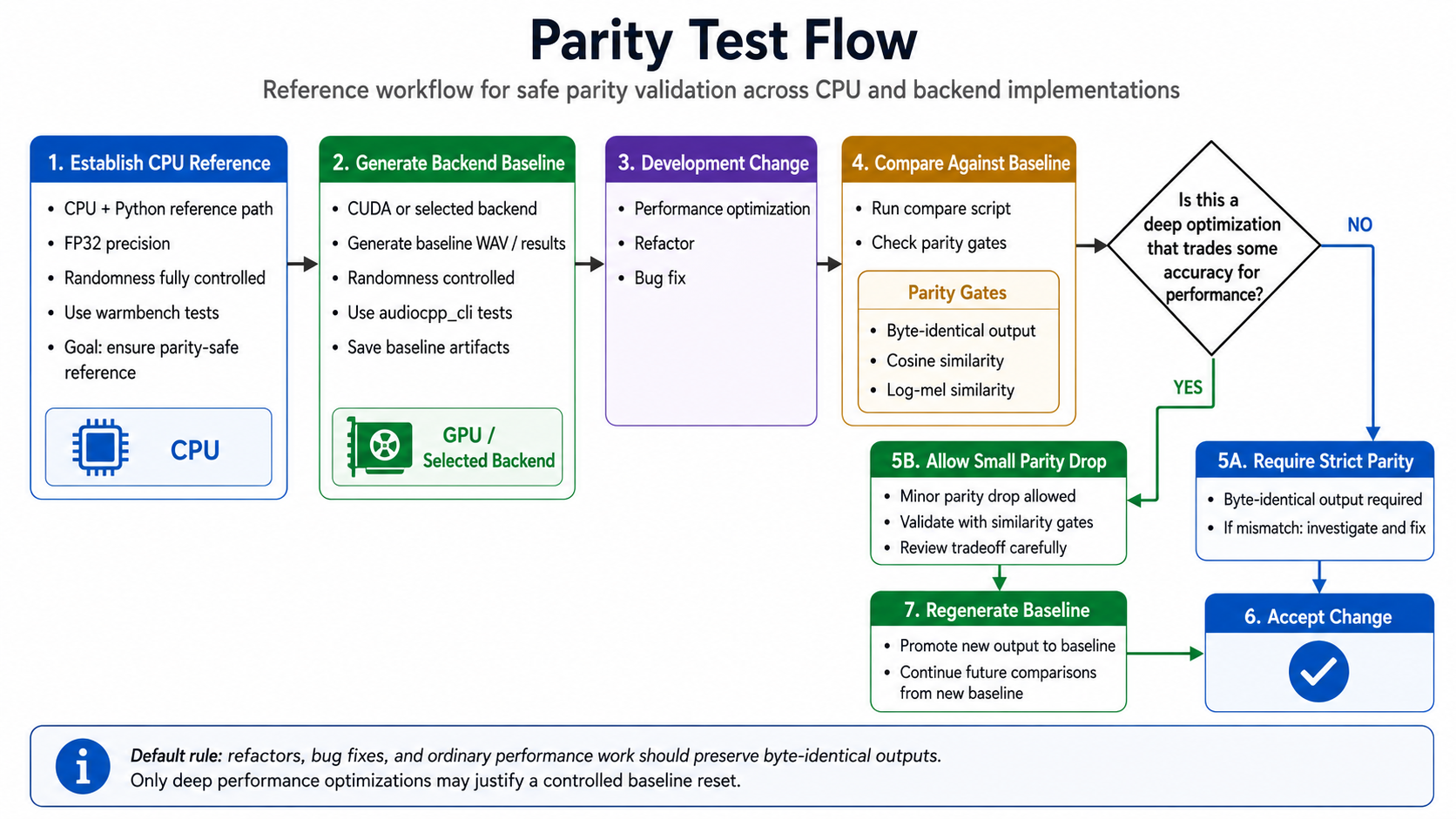
The main harness under tests/ is tests/warmbench.py. It is used for long-lived multi-request validation, parity checks against Python references, and performance-oriented session reuse scenarios. The tests/ tree also contains model-specific C++ and Python warmbench entrypoints that warmbench.py coordinates.
The main app-facing test tooling under tools/ is tools/audiocpp_cli/run_audiocpp_cli_path_tests.py. It drives audiocpp_cli through cataloged offline and streaming cases, verifies expected outputs such as audio or JSON artifacts, and is useful for checking real user-facing request paths rather than just lower-level model components. Streaming coverage is model-specific and applies to models documented with streaming support.
The Python-reference side of these tests usually requires more time-consuming setup than the C++ path because different models rely on different Python reference repos and dependency stacks. In practice, the framework-side tooling is fast to iterate on once models are installed, while Python parity runs often need extra environment preparation before they are ready.
Projects
Last update: 2026-09-23
Have a project using audio.cpp? Submit a PR or let me know, and I’ll be happy to add it here.
- AIRI Audio Server: A lightweight, zero-Python Node.js microservice wrapper providing OpenAI-compatible
/v1/audio/speech(with real-time SSE streaming),/v1/audio/transcriptions(Citrinet/Whisper), dynamic voice catalog discovery, and serialized GPU queueing foraudio.cpp. - Project AIRI: An open-source, next-generation AI companion and desktop frontend featuring interactive Voice Studio curation, zero-shot voice cloning dropzones, and real-time audio pipeline integration powered by
airi-audio-serverandaudio.cpp. - TranscrIA is a self-hosted meeting transcription platform with diarization and local LLM correction. audio.cpp is integrated as a first-class STT engine in the product.
- Pocket TTS Browser Engine uses audio.cpp to bring fully local PocketTTS voices into Chrome and Edge through the browser TTS API.
- GuideAnts uses audio.cpp as the default local AI stack path for basic ASR and TTS, with planned reusable skills for audio.cpp scenarios and model configurations.
- audio.cpp-webui provides a full-task Python/Gradio WebUI for audio.cpp, focused on browser-based model downloads and common TTS, ASR, voice conversion, diarization, music, and audio workflows.
- audio.cpp-hub is a Web GUI for audio.cpp that packages model-oriented workflows around the native runtime.
- Delusion provide Pythonic, strongly typed wrapper classes around audio.cpp usage, including model download/cache helpers and typed request surfaces.
- AudioCppTray is a Windows tray management tool for
audiocpp_server.exe, with start/stop/restart controls, notifications, log viewing, log rotation, and server configuration shortcuts. - AudioCpp.NET provides .NET 10 bindings for audio.cpp behind a small versioned C ABI shim, shipped as managed, CPU runtime, and CUDA runtime NuGet packages for Windows and Linux.
- yovoice is a desktop voiceover app for macOS and Windows, built on audio.cpp with support for local text-to-speech, voice cloning, and emotion control.
- AudioCpp-Bindings provides .NET bindings over the C ABI merged in #530, an Avalonia desktop app for Linux, macOS and Windows that mirrors the web UI's seven workflows and model manager (with its interface strings imported from the web UI's own language files, so the two read alike in English, Italian, Polish, Russian and Simplified Chinese), and a C# reimplementation of the HTTP API that an existing client can be pointed at unchanged.
- Remiqora is an open-source (MIT) local music studio for Windows, macOS and Linux that runs YuE2-3B on audio.cpp's native server (plus MuScriptor for audio-to-MIDI) next to ACE-Step 1.5, swapping the two engines on a single GPU. It adds one-click Demucs stem splitting, a browser multitrack editor with an effects rack and WAV/MP3 export, and a LoRA training UI.
Performance Metrics
[!WARNING] These Python-relative numbers were measured for the initial release. Several model paths have improved substantially since then, so the figures below should be read as the original release baseline rather than the latest peak performance.
All performance metrics in this section were measured on Ubuntu with the CUDA backend on an NVIDIA GeForce RTX 5090. The Python-relative one-shot and long-lived-session comparisons come from direct framework/runtime API benchmark calls, not from audiocpp_cli; CLI path tests are separate and include app-layer request parsing, output writing, and other user-facing overhead.
Absolute RTF depends on the GPU and system setup, but the Python-relative speedups are real because audio.cpp and the matching Python reference paths were measured on the same CUDA setup.
audio.cpp already shows some genuinely exciting wins against the matching Python reference paths, especially on the TTS side, even when using the original model weights without quantization. The headline win is wall time: several TTS paths run 1.8x to up to 10x faster than Python while cutting end-to-end latency by 45%-90%.
- In one-shot runs, several TTS-family models already land far ahead of Python:
vevo2: 5.03x faster with 80.11% less wall timepocket tts: 3.68x faster with 72.80% less wall timemiotts: 2.73x faster with 63.39% less wall timemoss_tts_local: 2.33x faster with 57.07% less wall timeqwen3 tts: 1.83x faster with 45.34% less wall timevibevoice: 1.40x faster with 28.75% less wall time
- In long-lived-session runs, where the same loaded session serves multiple requests in sequence, the gains stay strong:
pocket tts: 3.22x faster with 68.91% less wall timeqwen3 tts: 2.74x faster with 63.47% less wall timemoss_tts_local: 2.66x faster with 62.35% less wall timemiotts: 2.28x faster with 56.22% less wall timevibevoice: 1.77x faster with 43.55% less wall timevevo2: 1.75x faster with 42.72% less wall time
- In long-form runs on the shared 6,026-character, 1,028-word passage, the strongest Python-relative wins still show up clearly:
pocket tts: 3.15x faster with 68.23% less wall timeqwen3 tts: 3.06x faster with 67.33% less wall timevibevoice: 2.86x faster with 65.07% less wall timevevo2: 1.77x faster with 43.51% less wall timechatterbox: 1.58x faster with 36.83% less wall time
- These long-lived-session numbers are especially important for real applications, because they reflect the common case where model load, cached state, and reusable runtime setup are amortized across many requests.
- Bars below the 1.0x line are useful too: they spotlight exactly where more optimization work is still worth doing.
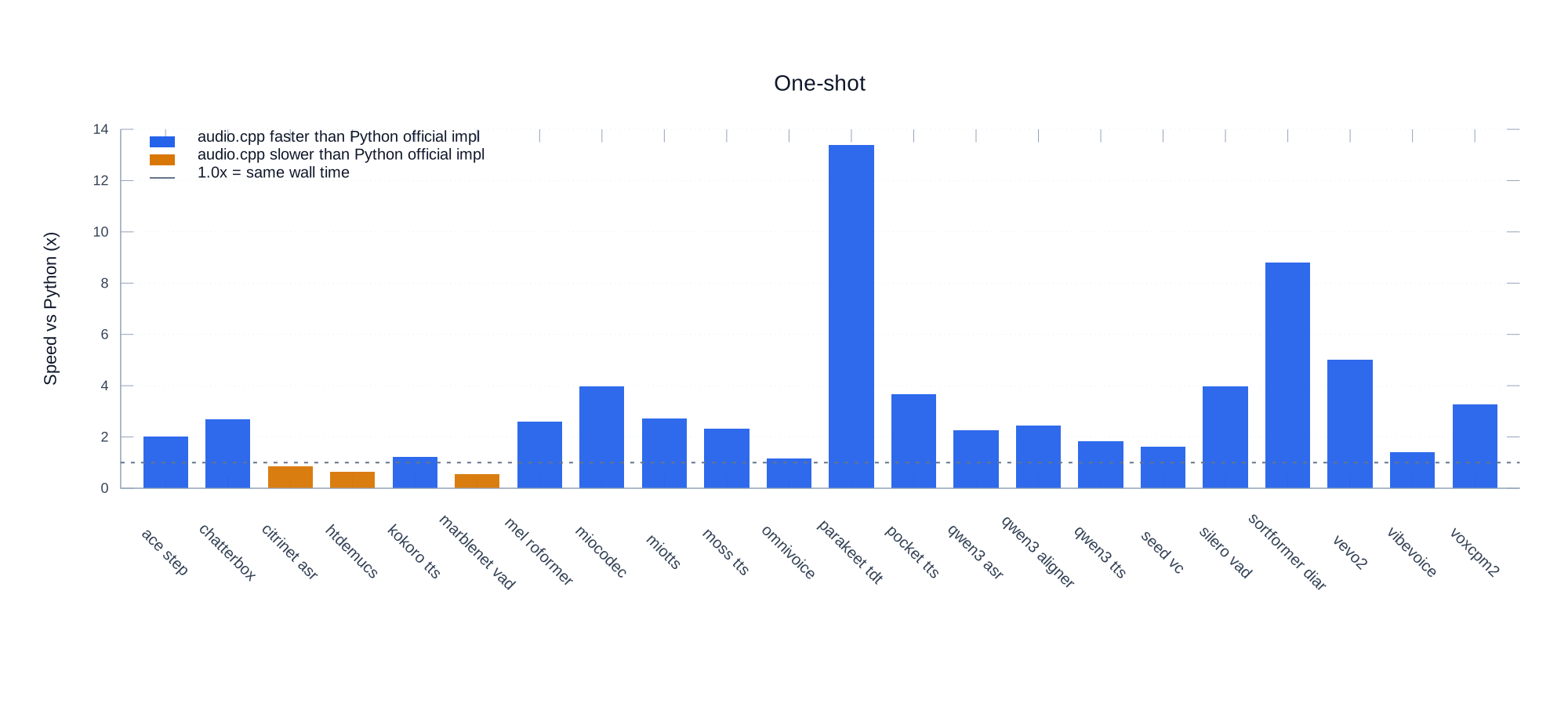
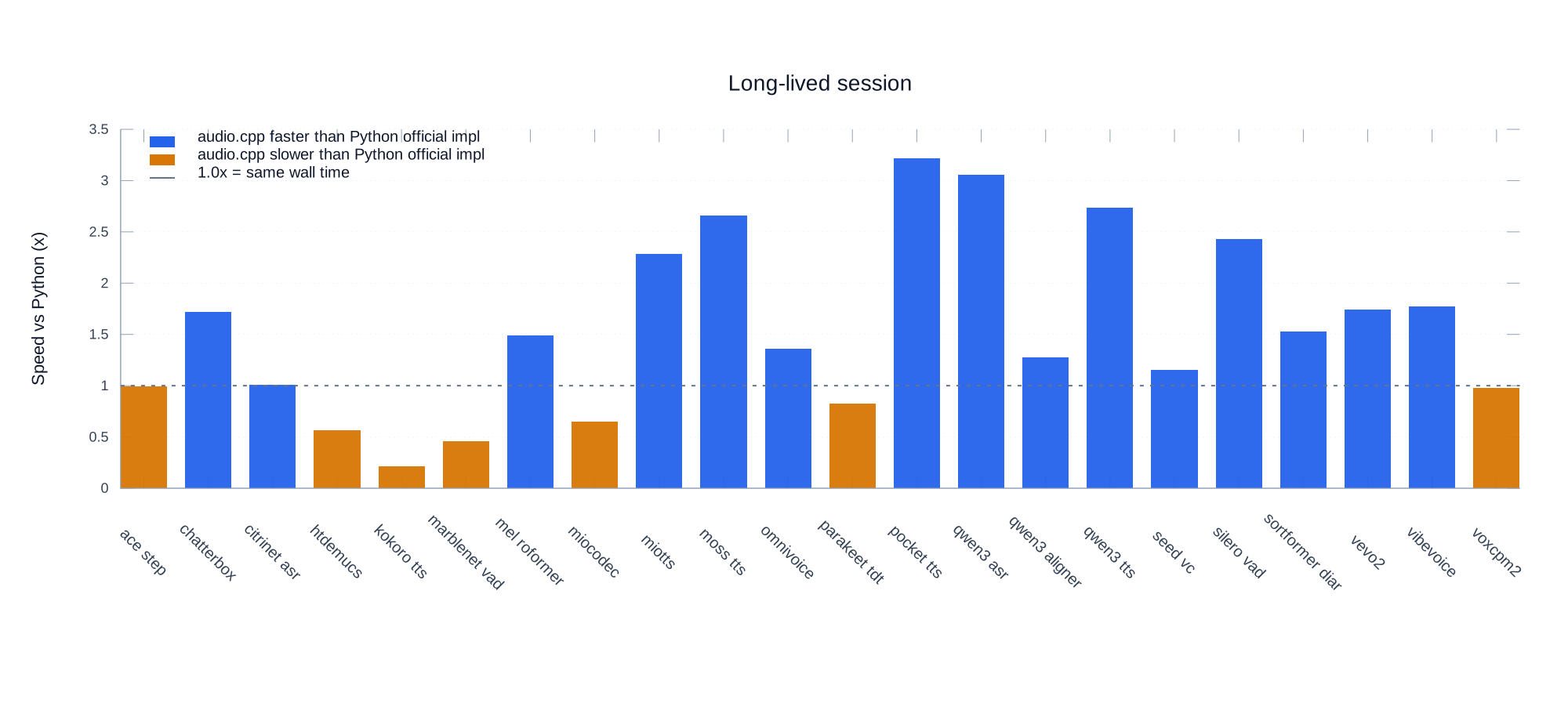
The figures report Python wall time / audio.cpp wall time. The 1.0x line means equal wall time; bars above 1.0x mean audio.cpp is faster than Python, and bars below 1.0x mean it is slower.
For TTS-family models, the measured one-shot RTF is:
| model | audio len (s) | wall time (s) | RTF | x faster than real time |
|---|---|---|---|---|
| chatterbox | 9.72 | 2.45 | 0.252 | 3.97x |
| miotts | 20.40 | 3.30 | 0.162 | 6.18x |
| moss_tts_local | 9.60 | 0.97 | 0.101 | 9.91x |
| omnivoice | 9.00 | 1.32 | 0.146 | 6.84x |
| pocket tts | 8.08 | 0.26 | 0.032 | 31.09x |
| qwen3 tts | 11.44 | 4.46 | 0.390 | 2.56x |
| vevo2 | 8.66 | 2.47 | 0.285 | 3.51x |
| vibevoice | 11.07 | 5.02 | 0.454 | 2.20x |
| voxcpm2 | 5.60 | 3.09 | 0.551 | 1.81x |
For long-form TTS tests, each run uses the same 6,026-character, 1,028-word input text (vibevoice uses 106,310 chars, 18,052 words, 4 speakers). Rows are CUDA unless marked CPU. The measured RTF is:
| model | audio len (s) | wall time (s) | RTF | x faster than real time |
|---|---|---|---|---|
| chatterbox | 391.24 | 58.57 | 0.150 | 6.68x |
| index tts2 | 422.12 | 139.95 | 0.332 | 3.02x |
| miotts | 399.16 | 66.59 | 0.167 | 5.99x |
| moss_tts_nano | 391.20 | 43.16 | 0.110 | 9.06x |
| moss_tts_local | 375.44 | 73.84 | 0.197 | 5.08x |
| omnivoice | 357.00 | 17.77 | 0.050 | 20.09x |
| pocket tts | 353.12 | 7.30 | 0.021 | 48.40x |
| qwen3 tts | 327.60 | 72.65 | 0.222 | 4.51x |
| supertonic | 379.32 | 2.02 | 0.005 | 187.62x |
| supertonic (CPU) | 379.40 | 61.40 | 0.162 | 6.18x |
| vevo2 | 457.68 | 52.47 | 0.115 | 8.72x |
| voxcpm2 | 315.84 | 72.70 | 0.230 | 4.34x |
| vibevoice | 5615.73 | 1376.84 | 0.245 | 4.08x |
Runtime Memory Options
Some models expose memory-saver session options such as ace_step.mem_saver=true, dramabox.mem_saver=true, heartmula.mem_saver=true, stable_audio.mem_saver=true, omnivoice.mem_saver=true, voxcpm2.mem_saver=true, and echo_tts.mem_saver=true. These options keep the default output path unchanged while reducing graph workspace VRAM or releasing staged graph/cache state after request phases; later requests may rebuild released graphs.
Precision/Quantization Support
Many model sessions expose quantization through --session-option <family>.weight_type=<mode>, and some families also expose more specific knobs such as ...conv_weight_type, ...talker_weight_type, or ...speech_decoder_weight_type. The exact supported modes are model-specific rather than global.
audio.cpp also supports standalone GGUF packages.
In practice, lower precision and quantized modes should be treated as model- and route-specific optimizations rather than universally safe defaults.
-
Safety. Quantization may not be safe on every path even when a model parser accepts the option. For example, in our ACE-Step 1.5 checks, lower-precision runs could fail at runtime with
ACE-Step planner masked decode found no valid tokenwhile higher-precision settings completed normally. -
Quality Drop. Output quality can drop a lot. In our VeVo2 checks, non-
fp32outputs showed noticeably weaker similarity to thefp32reference under the repo's existing waveform and log-mel comparison metrics, and even output length could shift. -
Performance Gain. The performance gain may be minor relative to that quality risk. For example,
q8_0was faster than the default setting by only around 3.8% on Qwen3-TTS and around 3.6% on VeVo2. Other models may benefit more, but the tradeoff should be validated per model and per route rather than assumed. -
Memory Benefit. Lower precision and quantized weights can still be useful for reducing weight memory footprint and making larger models easier to fit within device limits. For example, in our Qwen3-TTS checks, switching from the default setting to
q8_0reduced peak RAM by about 3.7% and peak VRAM by about 25.0%. That benefit is real, but it should be evaluated together with runtime stability, output quality, and end-to-end speed rather than assumed from precision alone.
Notes
- The repo supports multiple backends, but backend and model coverage are model-dependent.
- GGUF is a container, not a universal architecture adapter. Existing llama.cpp or whisper.cpp GGUF files are not automatically compatible unless their tensor names and model metadata are mapped to the audio.cpp family implementation.
Build_xcframework.shis outdated; Metal and Apple XCFramework packaging still need to be retested after the framework refactor.