🌌 Antigravity Context Window Monitor
A plugin built for Antigravity (Google's Windsurf-based IDE) that provides real-time monitoring of context window usage across all your chat sessions.
🇨🇳 中文文档 / Chinese Documentation
[!WARNING] Platform Support
🍏 macOS: Fully supported. Uses
psandlsoffor process discovery.🐧 Linux: Fully supported (v1.6.0+). Uses
pswithlsof/ssfallback for process discovery. Tested on Ubuntu 22.04 (x64 & ARM64).🪟 Windows: Fully supported (v1.8.0+). Optimized discovery with
wmiccaching and PowerShell fallbacks.🐧🪟 WSL: Fully supported (v1.12.0+). Detects WSL environment via
/proc/versionand uses Windows-side tools through WSL interop for LS discovery. v1.12.1 addsextensionKind: ["ui", "workspace"]so the extension runs on the local Windows host when connected via Remote-WSL or Remote SSH. v1.13.0 adds Remote-WSL LS discovery — when connected to a WSL workspace, the extension discovers thelanguage_server_linux_x64process running inside the WSL distro viawsl -d <distro>, connects to it through WSL2 port forwarding, and displays the correct context data.
📚 Technical Details
👉 Read the Technical Implementation Guide
✨ Features
-
⚡ Real-Time Token Usage Shows current token consumption in the status bar (e.g.
125k/200k, 62.5%). Token data comes from model checkpoint values when available, with content-based character estimation between checkpoints (replaces fixed constants since v1.4.0). Fixed constants are only used as fallback when step data structure is missing. -
🪪 Stable Plan Tier Hover The status bar hover now clears stale secondary plan/tier suffixes when Antigravity stops returning the latest
userTierName, preventing outdated labels from lingering across later polls. -
🌐 Language Switching Users can choose between Chinese-only, English-only, or bilingual display mode. Accessible from the details panel: click status bar → Settings → Switch Language. Preference is persisted via
globalStateacross sessions. -
🔒 Multi-Window Isolation Each Antigravity window prefers conversations from its own workspace, filtered by workspace URI. If Antigravity keeps reporting a stale workspace after you switch projects, the monitor can follow the currently RUNNING conversation from the shared language server instead of going blank. Windows without a workspace folder show all conversations.
-
🗜️ Context Compression Detection When the model auto-compresses conversation history, the plugin detects it via two-layer detection: primary layer compares consecutive checkpoint
inputTokens(drop > 5000 tokens, immune to Undo false positives), fallback layer compares cross-pollcontextUsed(with Undo exclusion guard). Shows~100% 🗜in the status bar. -
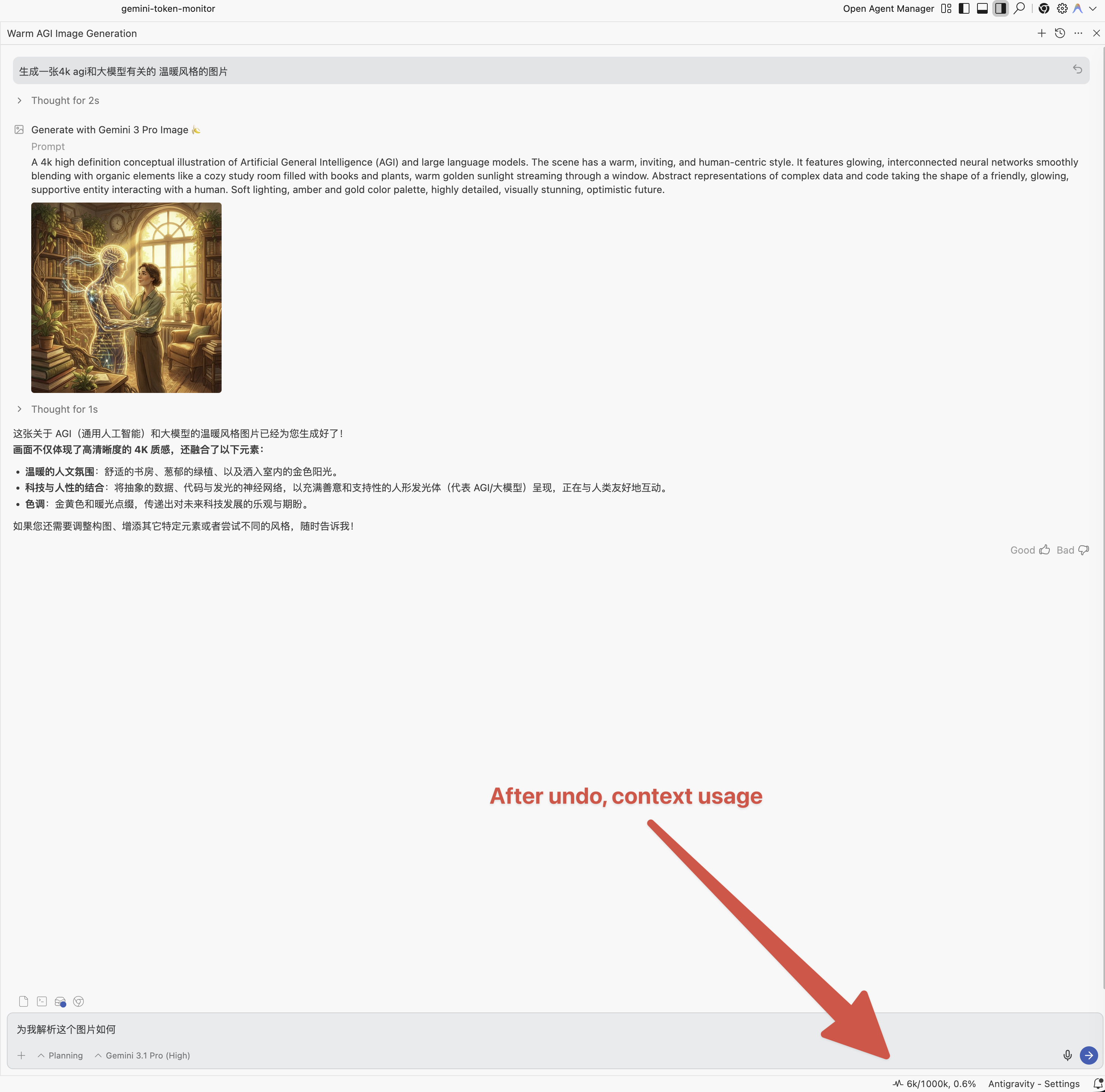
⏪ Undo/Rewind Support When you undo a conversation step, the plugin detects the
stepCountdecrease and recalculates token usage to reflect the rollback.Before Undo After Undo 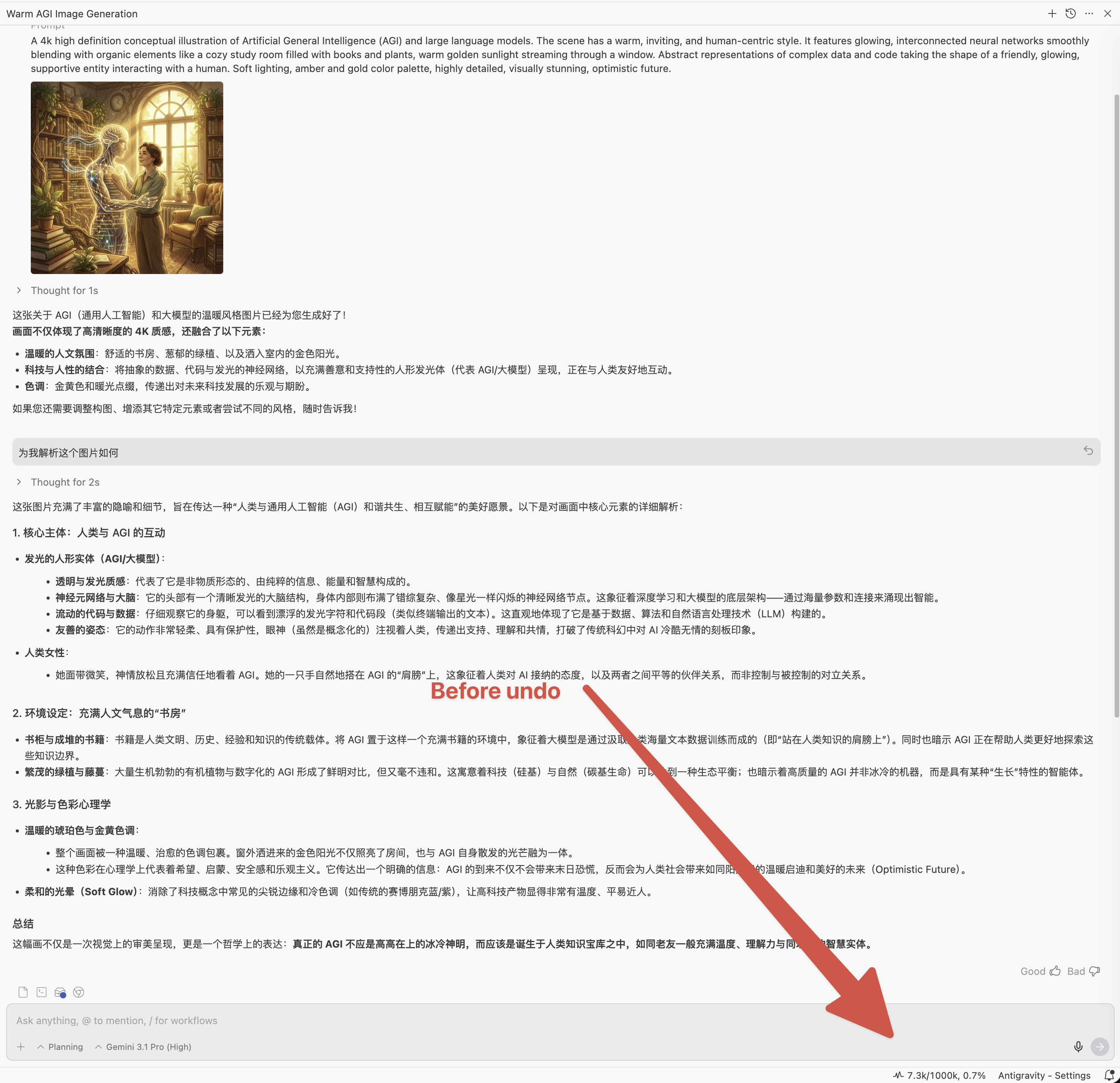
-
🔄 Dynamic Model Switching When switching models mid-conversation, the context window limit automatically updates to match the new model. Since v1.4.0, model display names are dynamically fetched via the
GetUserStatusAPI. -
🎨 Image Generation Tracking When Nano Banana Pro is invoked for image generation during Gemini Pro conversations, the associated token consumption is tracked and marked with
📷in the tooltip. Detection is based on step type and generator model name matching.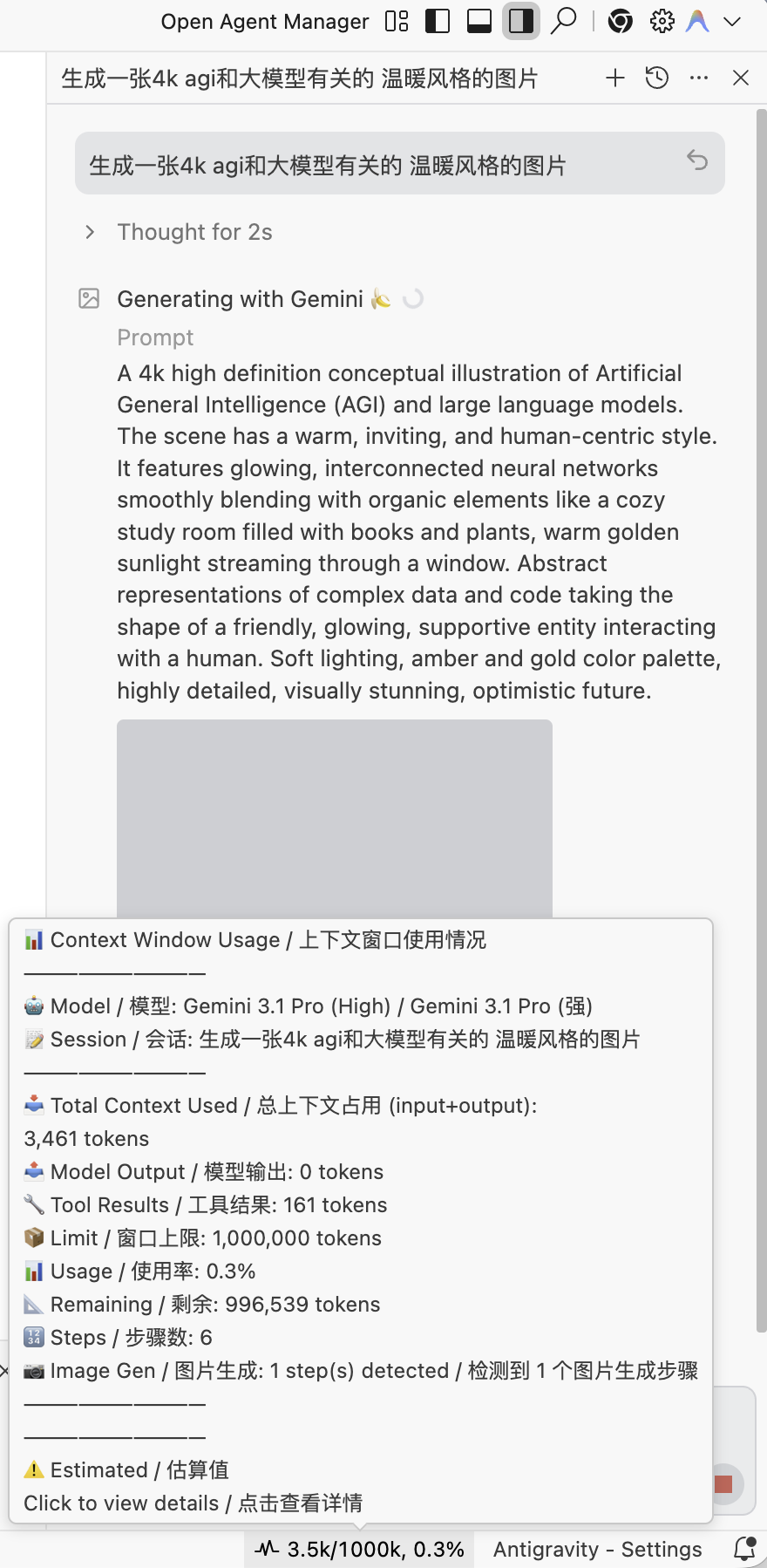
-
🛌 Exponential Backoff Polling When the language server is unreachable, polling interval increases as
baseInterval × 2^nwith dual caps: discovery failures cap at 15s (5s → 10s → 15s) for fast LS detection, RPC failures cap at 60s. Resets immediately on reconnection. -
📊 WebView Monitor Panel (v1.10.1) Click the status bar to open a side panel with a full-featured dashboard. Displays your account plan and tier, Prompt/Flow credit balance, per-model quota usage with color-coded progress bars, feature flags, team config (MCP Servers, Auto-Run, etc.), and Google AI credits. All data comes from the existing
GetUserStatusAPI — zero additional network requests.- 🛡️ Privacy Mask: A shield button in the panel header masks your name and email. The toggle state persists across panel refreshes.
- 📂 Collapsible Sections: Secondary info (Plan Limits, Feature Flags, Team Config, Google AI Credits) is collapsed by default. Expand/collapse state persists.
-
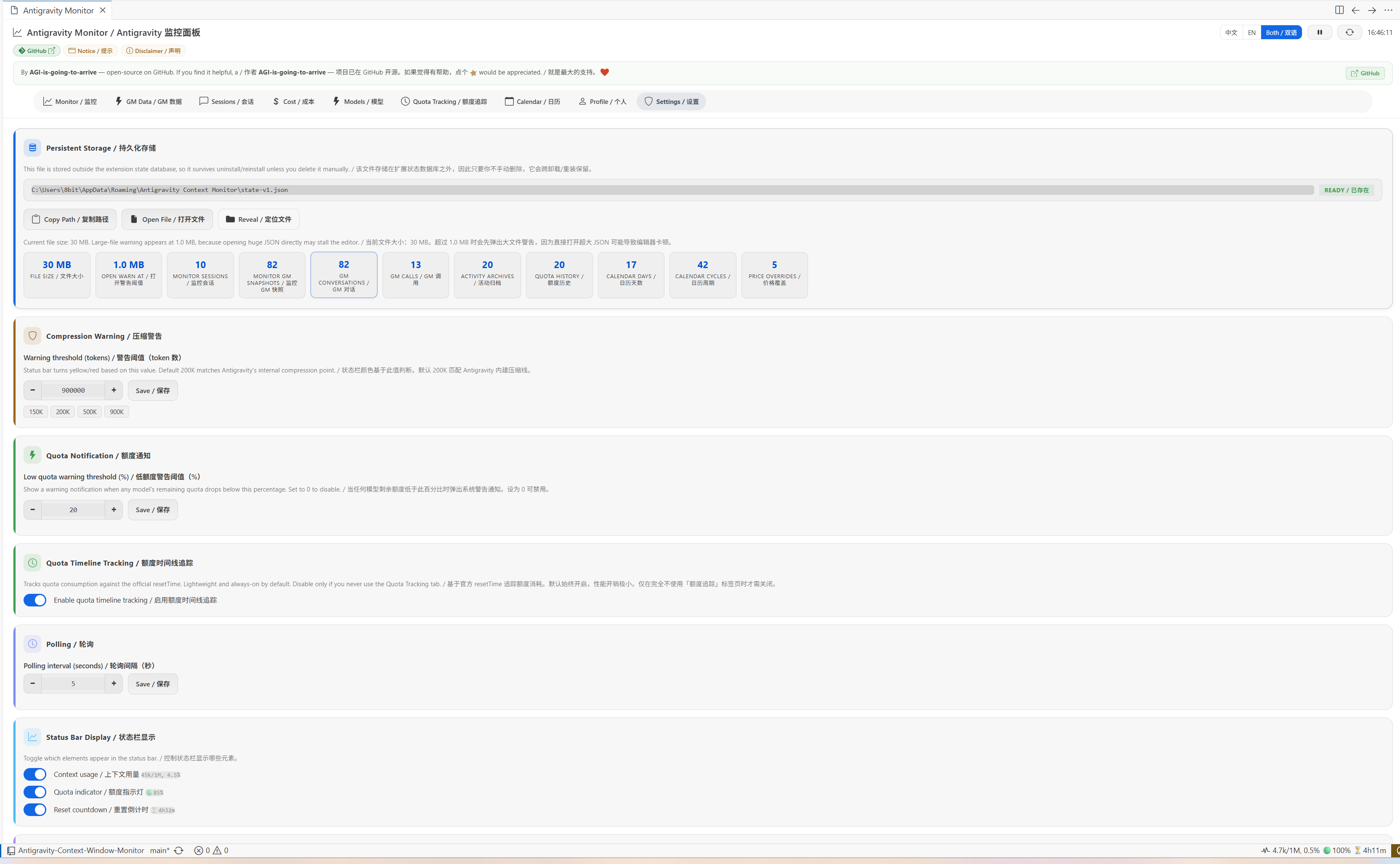
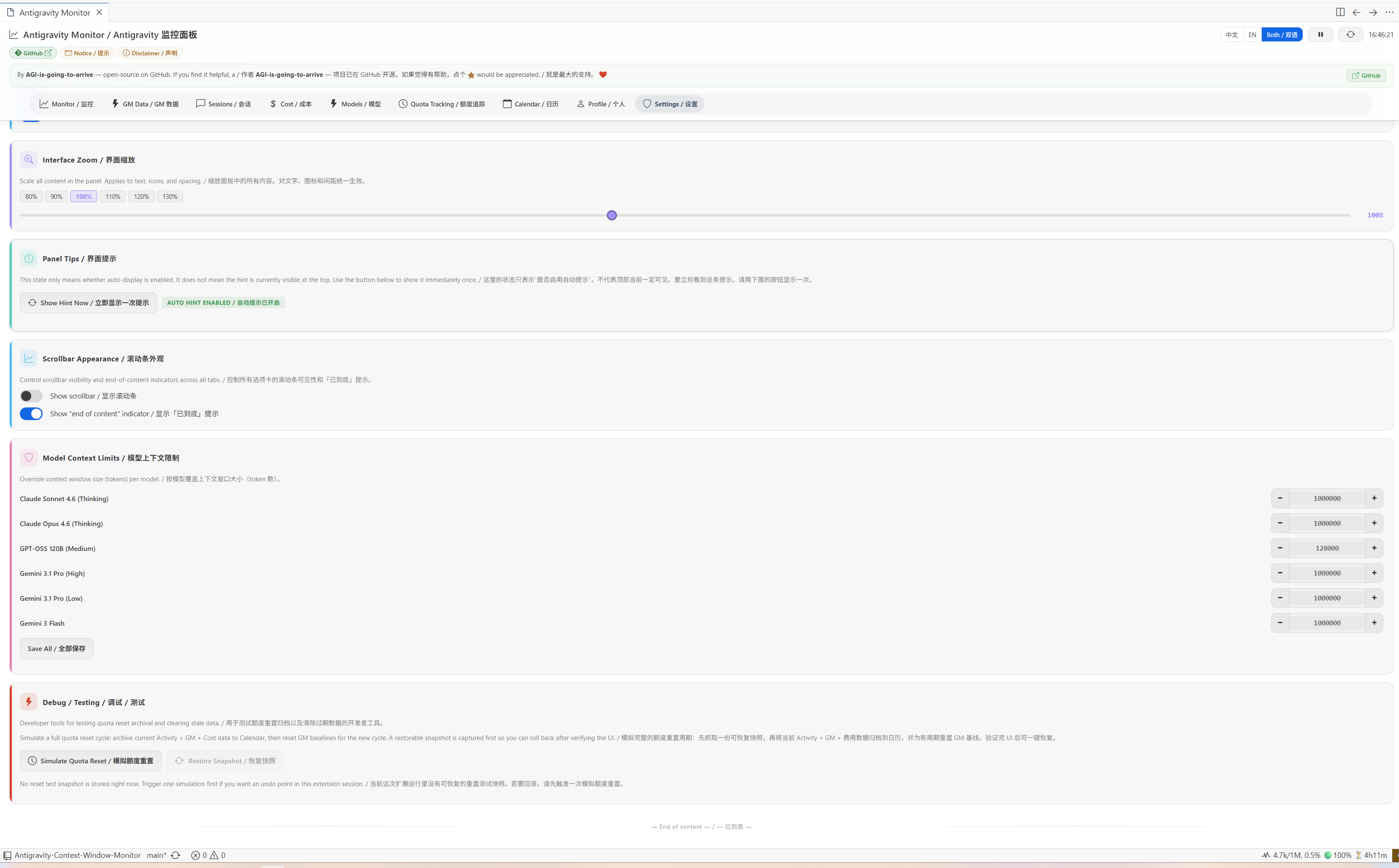
⚙️ Interactive Settings Dashboard (v1.11.0, enhanced through v1.16.9) The WebView panel now features a dual-tab layout ('Monitor' and 'Settings'). The Settings tab lets you configure extension behaviors directly from a GUI — no more manual
settings.jsonediting.- 🎯 Compression Warning Threshold: Set a custom "tripwire" (e.g., 150K, 200K, 500K, 900K) for early warning around Antigravity's current platform truncation range (~128K-160K). Status bar color changes are based on this threshold instead of the model's native window.
- 🟢 Status Bar Quota Indicator: Current model's quota percentage is now shown directly in the status bar with color-coded dot icons (
🟢,🟡,🔴). - ⏳ Current-Model Reset Countdown: The status bar countdown now tracks the reset time of the model you are currently using, not the earliest reset across all models.
- 🎛️ Status Bar Display Toggles: Independent toggle switches to hide/show 'Context Usage', 'Quota Indicator', 'Reset Countdown' and 'AI Credits Balance' in the status bar.
- ⚡ AI Credits in Status Bar (v1.16.7): Status bar shows real-time AI Credits balance (e.g.
⚡14,701) wrapped in||separators (e.g.|| ⚠ 121.2k/160k || 🟡40% || ⏳4h6m || ⚡14,701 ||). Auto-hides when credits are zero. Controlled bystatusBar.showAiCreditstoggle. - 📆 Per-Account Billing Day (v1.16.7): Set monthly credits-expiry day per account (1-31) inline on the Profile tab. Profile, account panel and status bar tooltip all show a countdown badge ("Expires today / Xd until expiry / Expiry date not set"). Stored in durable JSON state — survives uninstall/reinstall. Uses UTC calendar-day delta so the countdown is correct across DST transitions.
- ↩ Restore Model Defaults (v1.16.8): Settings → Model Context Limits includes a restore button that clears stale custom overrides and returns to the built-in platform thresholds.
- ⏸️ Pause/Resume: Pause auto-refresh to freeze the panel while investigating data.
-
🧠 Model Activity Monitor (v1.11.2, enhanced through v1.16.4) New Activity tab tracks real-time AI reasoning calls, tool usage, tokens, and timing per model across all conversations. Access via the main status bar item or the
Show Model Activitycommand.- 🔧 Tool Name Display (v1.11.3): Timeline entries show the tool name (e.g.,
view_file,gh/search_issues) with step index badges. - 📚 Tool Catalog Cleanup (v1.16.4): GM Data shows a collapsible tool catalog with smart chip tooltips and a clear button for removing stale catalog entries without touching tool ranking counts.
- ⚡ Independent Activity Polling (v1.11.3): Activity tracking runs on a separate 3-second polling loop, decoupled from the global 5-second poll for faster updates.
- 🎯 Three-Layer Quota Detection (v1.12.2): Instant detection via elapsed-in-cycle comparison, drift-based detection via resetTime observation, and fraction-based detection. No more hardcoded cycle lengths — adapts to any quota cycle automatically.
- 🔀 Archive Debounce (v1.12.2): Cross-pool resets within 5 minutes are merged into a single archive entry, preventing fragmentation.
- 💾 Persistence: Activity stats survive VS Code restarts via
globalState. Throttled to max once per 30s. - 📋 Auto-Archive: When model quota resets, current activity is automatically archived to history with source tracking (
triggeredBy), giving per-cycle usage reports. - 📊 Estimated Steps: When conversations exceed the LS API's ~500 step window, additional steps are tracked as estimated counts with clear
📊markers. - ⚠️ Low Quota Notification: Warning popup when any model's remaining quota drops below a configurable threshold (default 20%).
- 🔧 Tool Name Display (v1.11.3): Timeline entries show the tool name (e.g.,
🤖 Supported Models
| Model | Internal ID | Context Limit |
|---|---|---|
| Gemini 3.1 Pro (High) | MODEL_PLACEHOLDER_M16 | 128,000 |
| Gemini 3.1 Pro (Low) | MODEL_PLACEHOLDER_M36 | 128,000 |
| Gemini 3.5 Flash (High) | MODEL_PLACEHOLDER_M132 | 128,000 |
| Gemini 3.5 Flash (Medium) | MODEL_PLACEHOLDER_M20 | 128,000 |
| Gemini 3 Flash | MODEL_PLACEHOLDER_M133 | 128,000 |
| Gemini 3 Flash (legacy) | MODEL_PLACEHOLDER_M84 / M47 / M18 | 128,000-160,000 |
| Claude Sonnet 4.6 (Thinking) | MODEL_PLACEHOLDER_M35 | 160,000 |
| Claude Opus 4.6 (Thinking) | MODEL_PLACEHOLDER_M26 | 160,000 |
| GPT-OSS 120B (Medium) | MODEL_OPENAI_GPT_OSS_120B_MEDIUM | 80,000 |
These are Antigravity platform truncation thresholds, not model-native context windows. Model IDs are fetched from the local Antigravity language server's GetUserStatus API. If new models are added, you can override context limits in IDE settings.
🚀 Usage
-
Install:
- OpenVSX: Install directly from Open VSX Registry.
- Manual: Install the
.vsixfile via Extensions → Install from VSIX.
-
Status Bar: The bottom-right status bar shows current context usage (empty chats use the current/default model threshold).
-
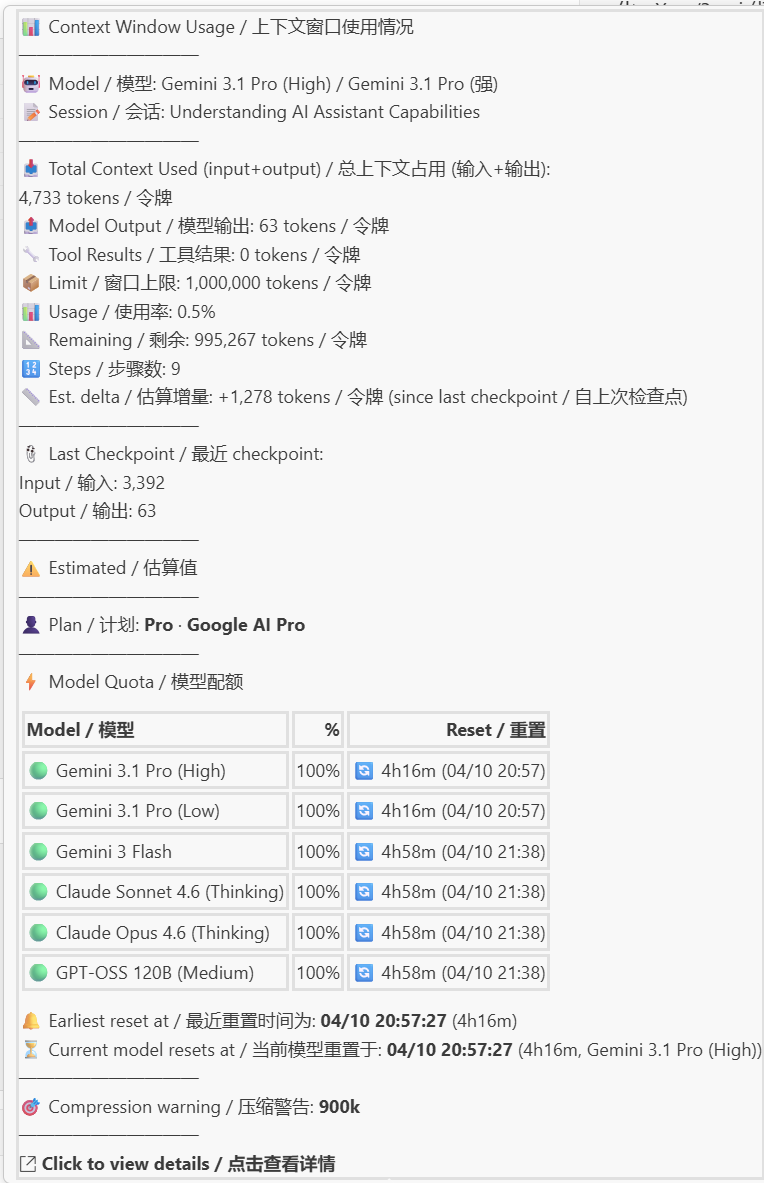
Hover: Hover over the status bar item for detailed info (model, input/output tokens, remaining capacity, compression status, image gen steps, per-model quota summary, and the latest checkpoint shadow model when present).
-
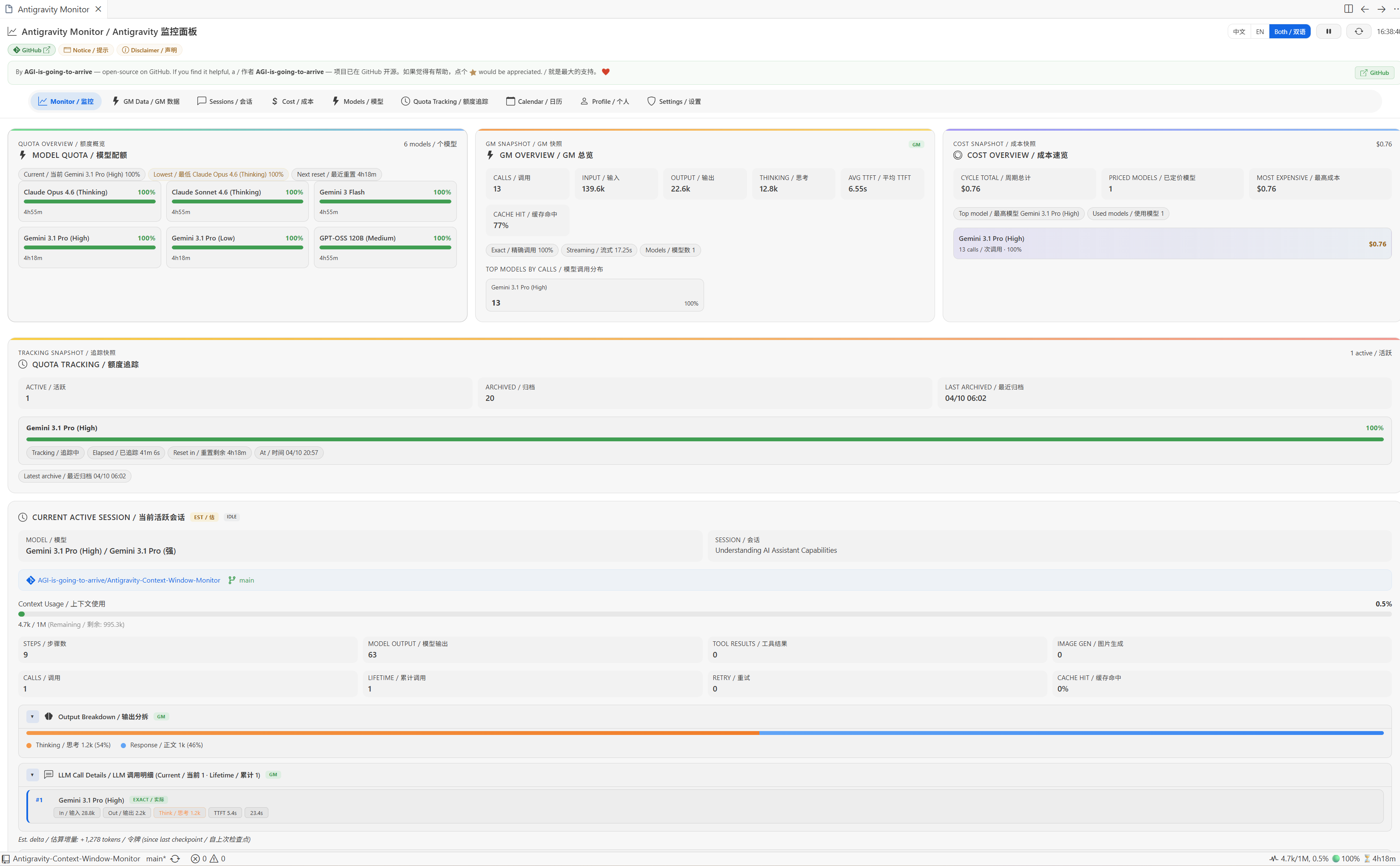
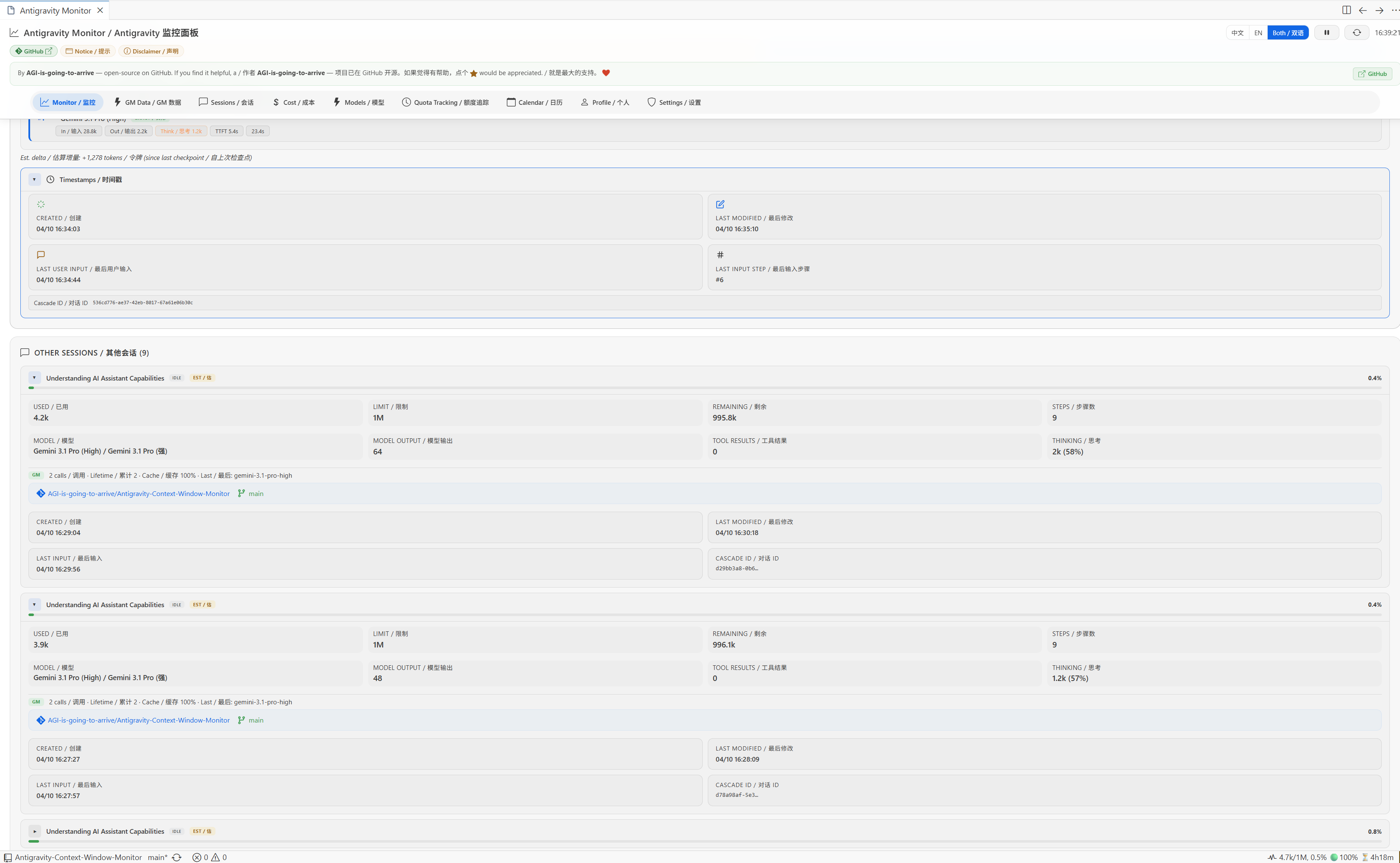
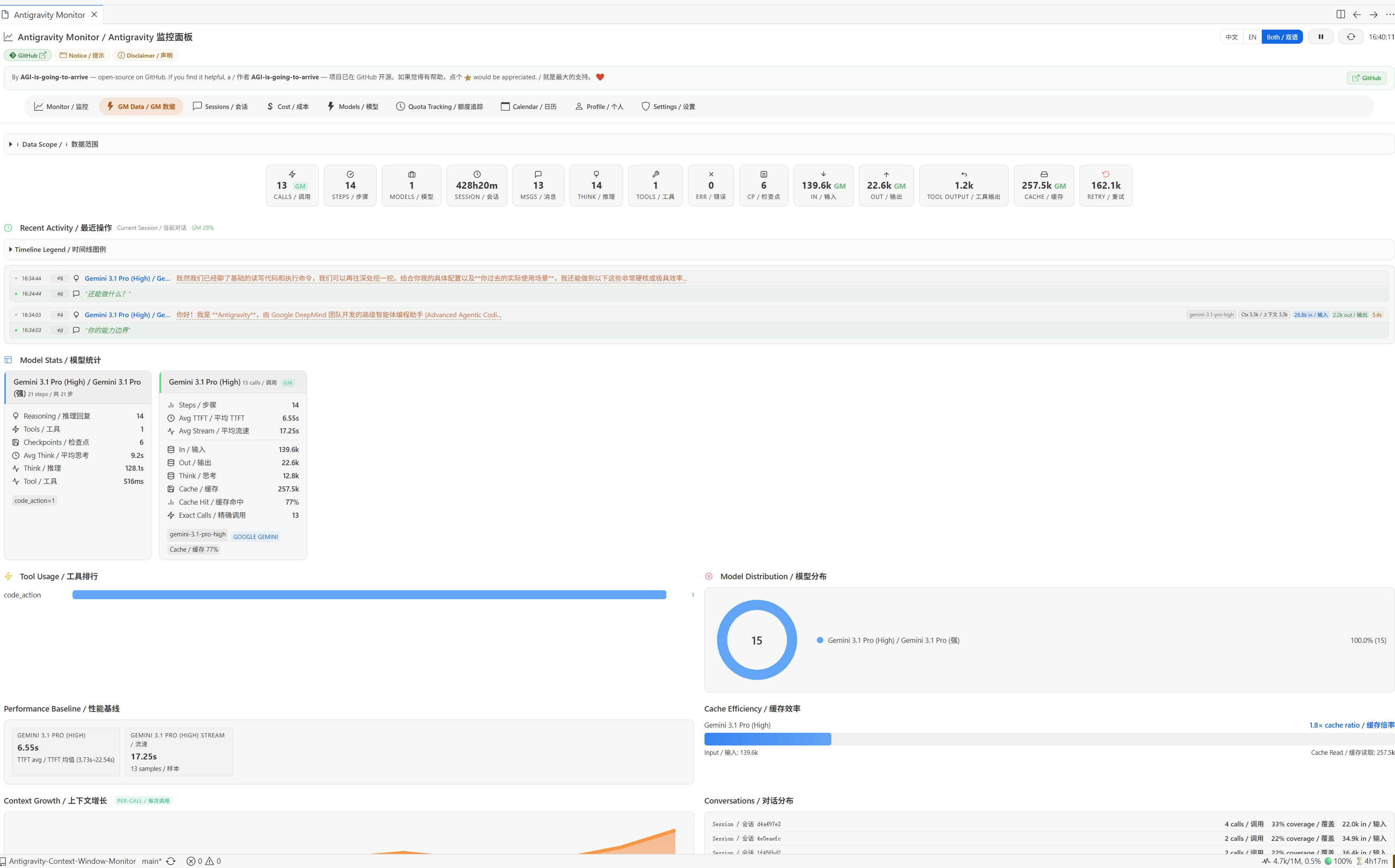
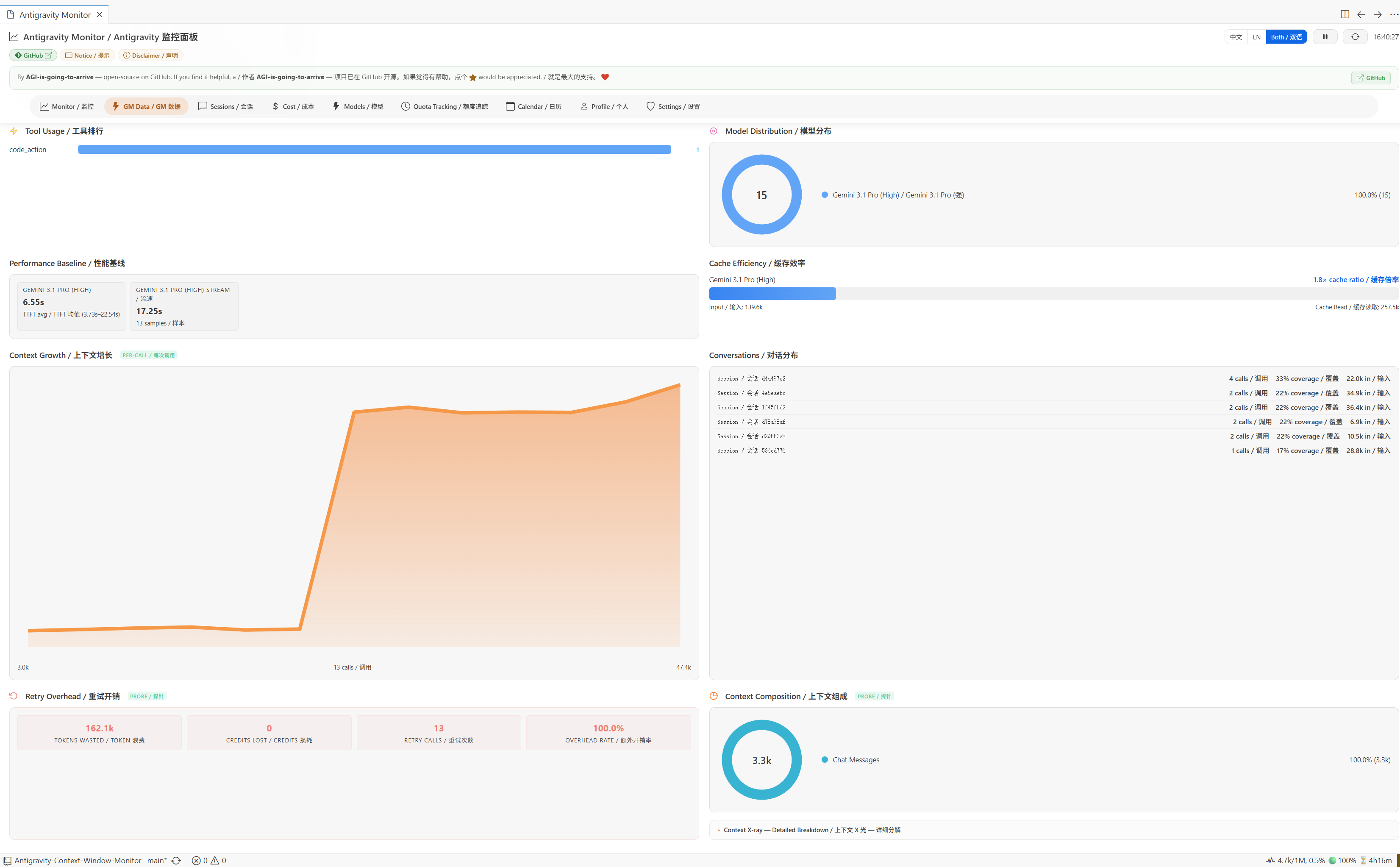
Click — WebView Monitor Panel: Click the status bar item to open a comprehensive 9-tab monitoring dashboard:
Monitor — Quota overview, GM snapshot, cost snapshot, active session details with output breakdown and LLM call details.
GM Data — Detailed per-model token usage, call counts, cache hit rates, retry statistics, tool ranking, and a collapsible tool catalog.
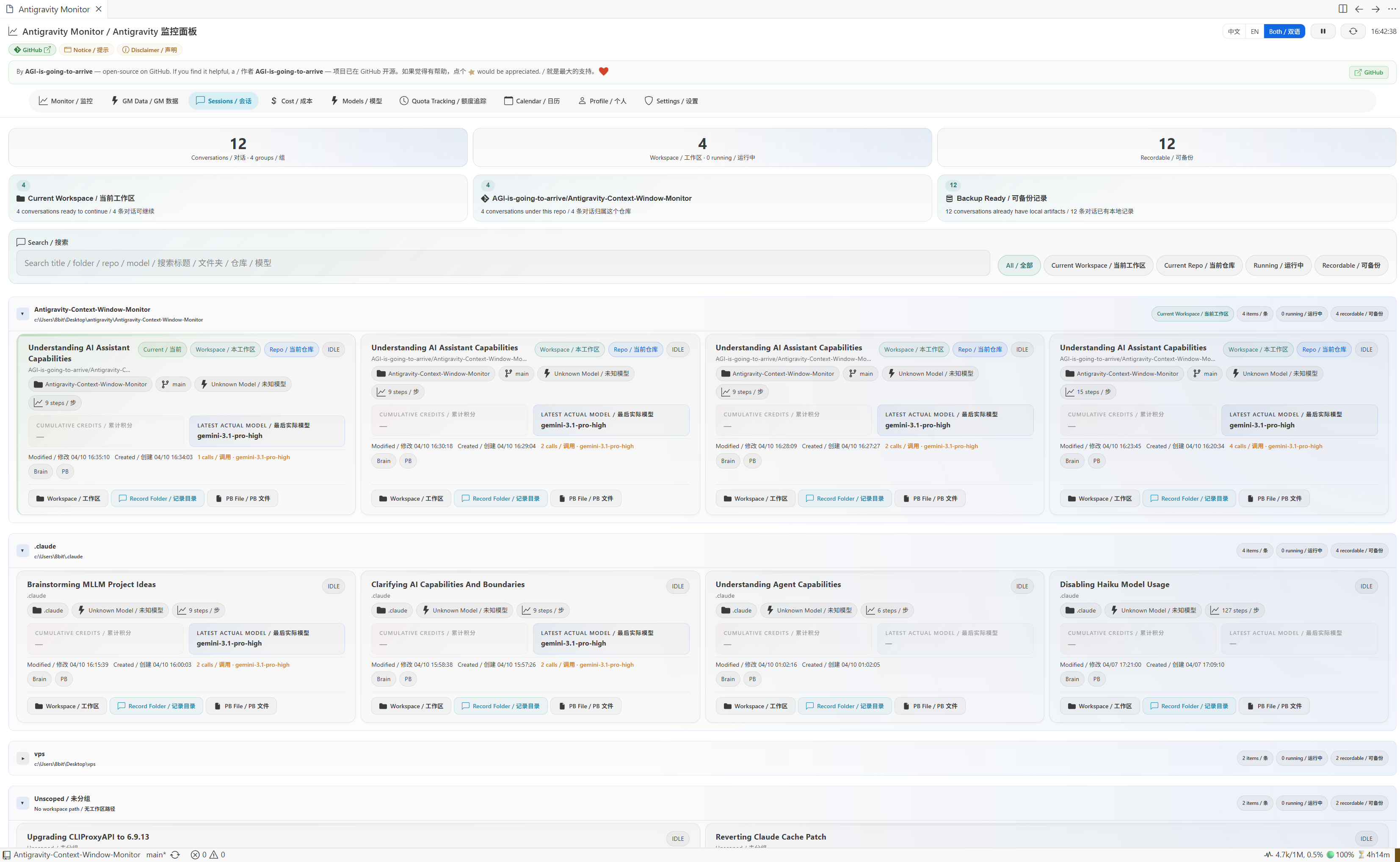
Sessions — Browse all conversation sessions with context usage, step counts, and model info.
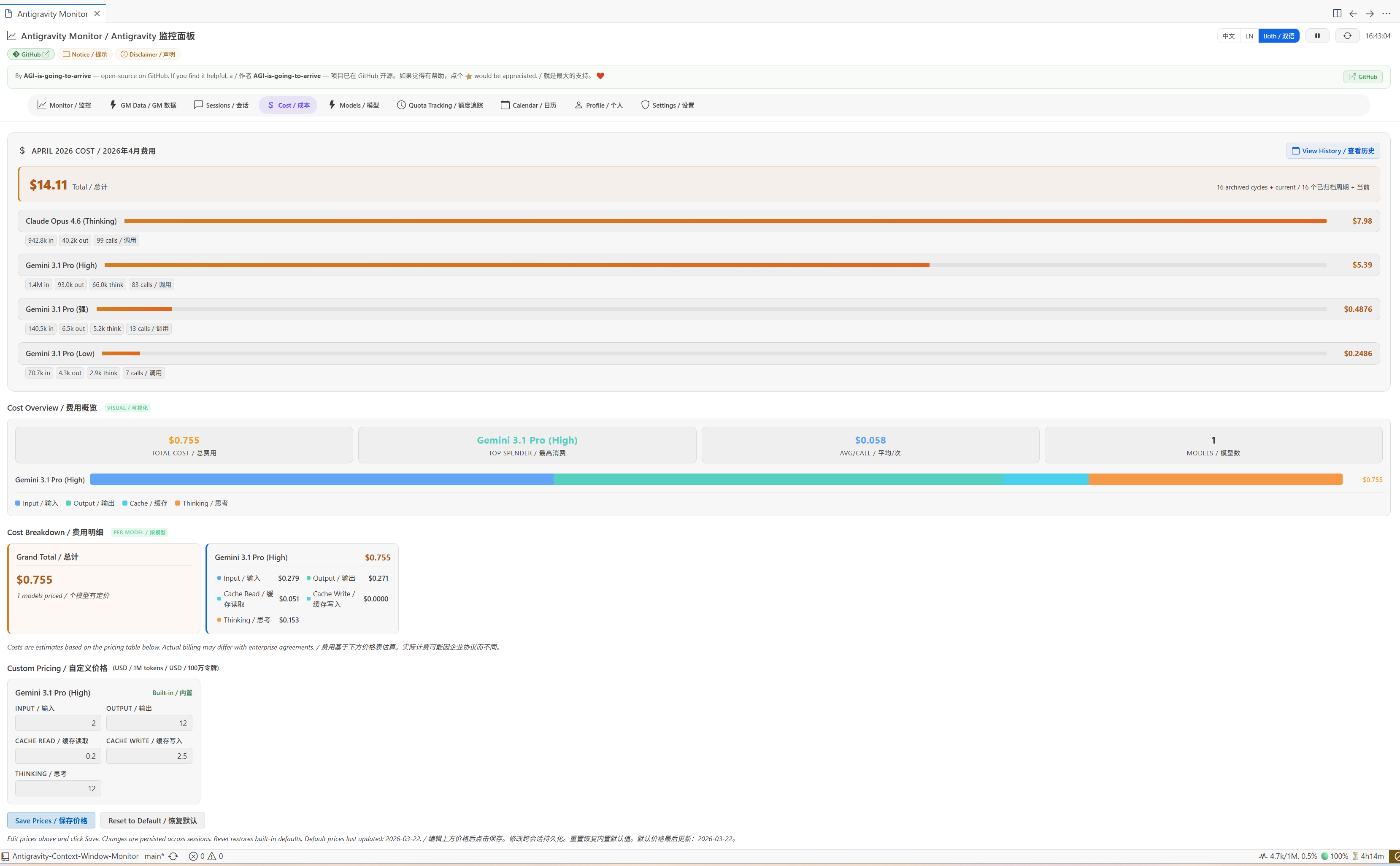
Cost — Monthly cost breakdown with per-model pricing, cost overview visualization, and a custom pricing editor for called models plus built-in default pricing models.
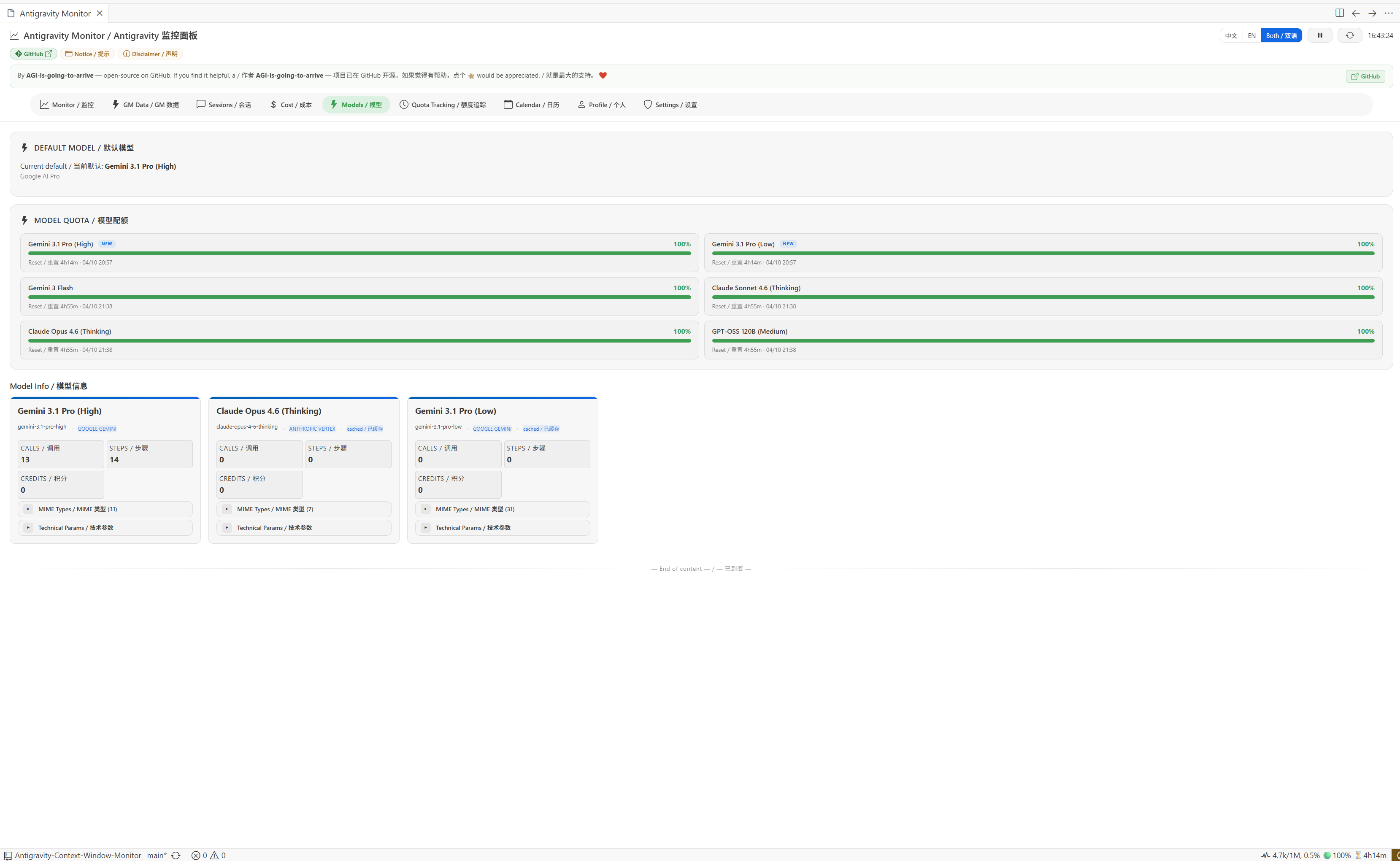
Models — All available models with quota status, context limits, and reset countdowns.
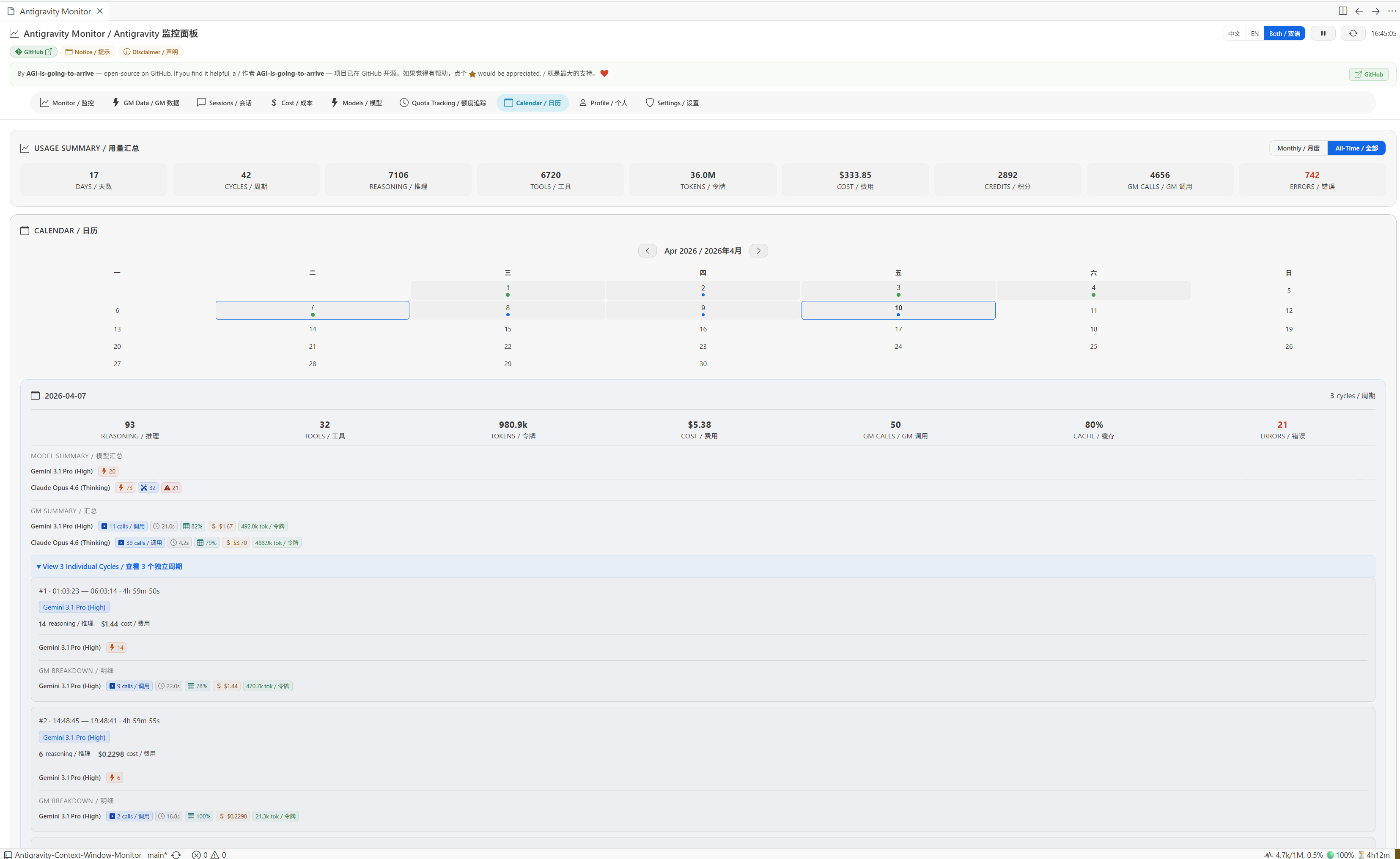
Calendar — Historical usage data organized by date, with per-cycle cost and token breakdowns.
Profile — Account information, plan details, and credit balances.
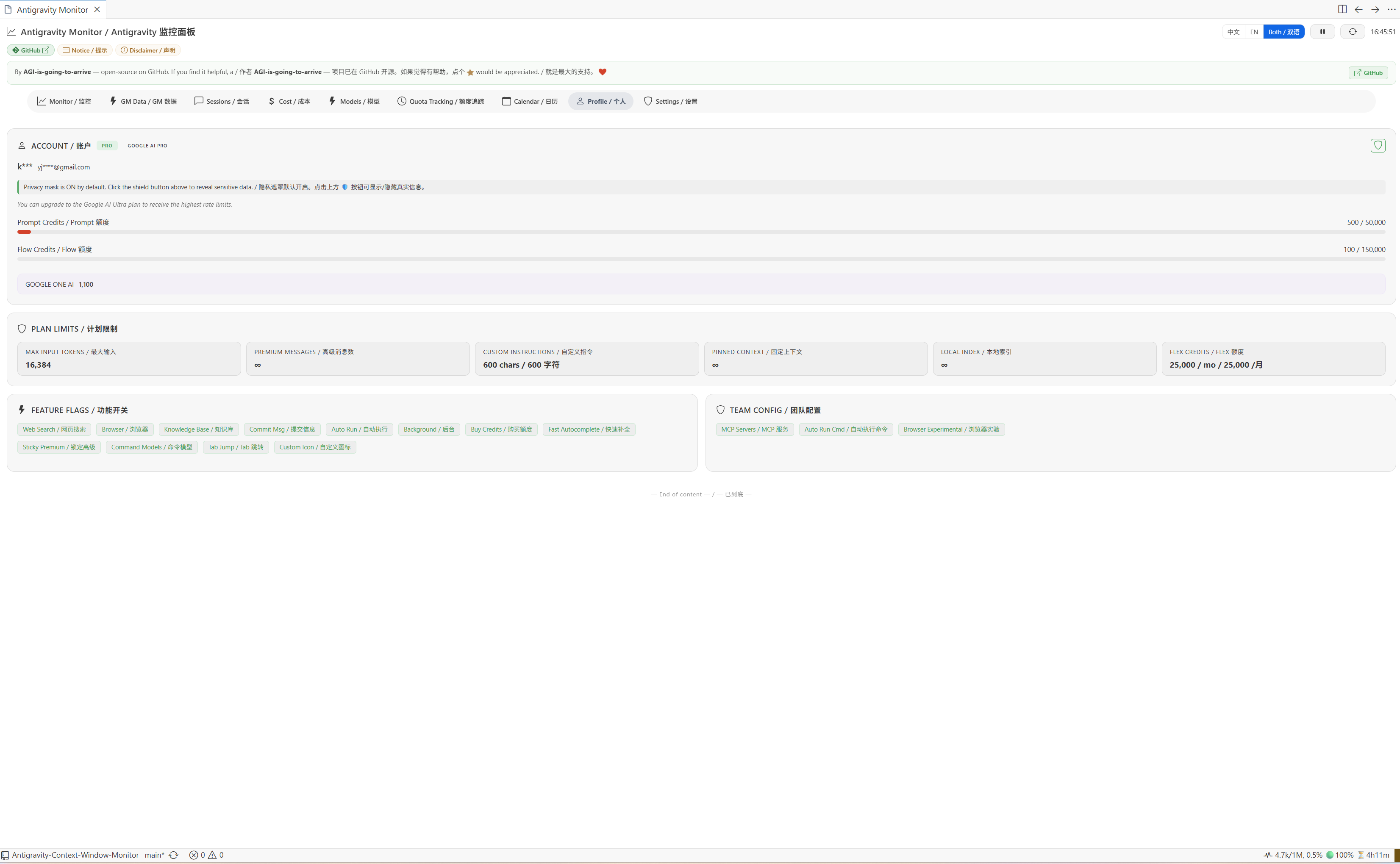
Settings — Configure extension behaviors: compression threshold, status bar toggles, polling interval, and more.
⚠️ Known Limitations
[!IMPORTANT] Same-Workspace Multi-Window If you open multiple Antigravity windows on the same folder, they share the same workspace URI, and session data may overlap.
Solution: Open different folders in different windows.
[!NOTE] Compression Notification The compression notification (🗜 icon) shows for ~15 seconds (3 poll cycles) before reverting to normal display.
[!IMPORTANT] Antigravity Internal Summarization The Antigravity IDE has a hardcoded 7500 token "Summarization Threshold" for checkpoint summaries. This can lead to slight discrepancies in token counts for very long conversations once the threshold is crossed. For more details on this behavior, see the Reddit reference.
[!NOTE] Dynamic Sub-Agent Switching When using Claude models, Antigravity may call Gemini 2.5 Flash Lite as a sub-agent for lightweight tasks. Since v1.10.0, Claude 4.6 models also have 1M context limits (GA 2026-03-13), so sub-agent switching no longer causes a visible context limit change.
[!IMPORTANT] "LS not found" & do NOT run the IDE as Administrator (Windows) If the status bar is stuck on
LS not found, open Output → "Antigravity Context Monitor" and read thePATH check:line — the extension now logs exactly which discovery step failed. Since v1.16.13 it invokeswmic/powershell.exe/netstatby absolute%SystemRoot%path, so a truncated Extension HostPATH(e.g. missingSystem32\wbemon Win11 24H2+ where WMIC is removed) no longer breaks discovery. Do not run Antigravity as Administrator — it does not help detection (LS discovery needs no elevation) and can crash the IDE at launch withThe window terminated unexpectedly (reason: 'launch-failed', code: '18'), an Electron/Chromium sandbox issue unrelated to this extension.
⚙️ Settings
| Setting | Default | Description |
|---|---|---|
pollingInterval | 5 | Polling interval in seconds |
contextLimits | (see defaults) | Override context limits per model |
compressionWarningThreshold | 150000 | Compression warning threshold (tokens). Status bar color is based on this value. |
statusBar.showContext | true | Show context usage (e.g. 45k/1M, 4.5%) in status bar |
statusBar.showQuota | true | Show current model quota indicator (e.g. 🟢85%) in status bar |
statusBar.showResetCountdown | true | Show quota reset countdown (e.g. ⏳4h32m) in status bar |
| quotaNotificationThreshold | 20 | Show warning when model quota drops below this % (0 to disable) |
| activity.maxRecentSteps | 100 | Max recent activity steps to keep in timeline |
| activity.maxArchives | 20 | Max activity archives to keep |
🔤 Commands
| Command | Description |
|---|---|
Show Context Window Details | Open a QuickPick panel listing all tracked sessions |
Refresh Context Window Monitor | Re-discover the language server and restart polling |
Switch Display Language | Choose between Chinese-only, English-only, or bilingual display |
Show Model Activity | Open the GM Data tab in the monitor panel |
⭐ Star History
🔗 Friendly Links
Author: AGI-is-going-to-arrive Version: 1.16.10