🏛️ Memory Palace
Persistent memory for AI agents — searchable, auditable, cross-session.
"Every conversation leaves a trace. Every trace becomes memory."





中文 · Landing Page · Docs · Quick Start · Benchmarks
What Is Memory Palace?
Memory Palace gives LLM agents a persistent, searchable, and auditable memory store, so each conversation can build on the last instead of starting from scratch.
Through the MCP (Model Context Protocol), one backend serves Claude Code, Codex, Gemini CLI, and OpenCode as full skill clients. For IDE hosts (Cursor / Windsurf / VSCode-host / Antigravity), use the repo-local AGENTS.md + rendered MCP snippet path instead. Shortest path: SKILLS_QUICKSTART_EN.md for CLI clients; IDE_HOSTS_EN.md for IDE hosts.
If you want an AI to guide installation step by step, start from memory-palace-setup. The recommended stance is skills + MCP, not MCP-only.
Why Memory Palace?
| Pain Point | How Memory Palace Solves It |
|---|---|
| 🔄 Agent forgets between sessions | Persistent SQLite-backed memory that survives across runs |
| 🔍 Hard to recall past context | Hybrid retrieval (keyword + semantic + reranker) with intent-aware routing |
| 🚫 No control over what gets stored | Write Guard pre-checks every write; snapshots enable full rollback |
| 🧩 Each client needs its own integration | One unified MCP interface |
| 📊 Can't observe what's happening | Dashboard with Memory, Review, Maintenance, and Observability views |
What's New
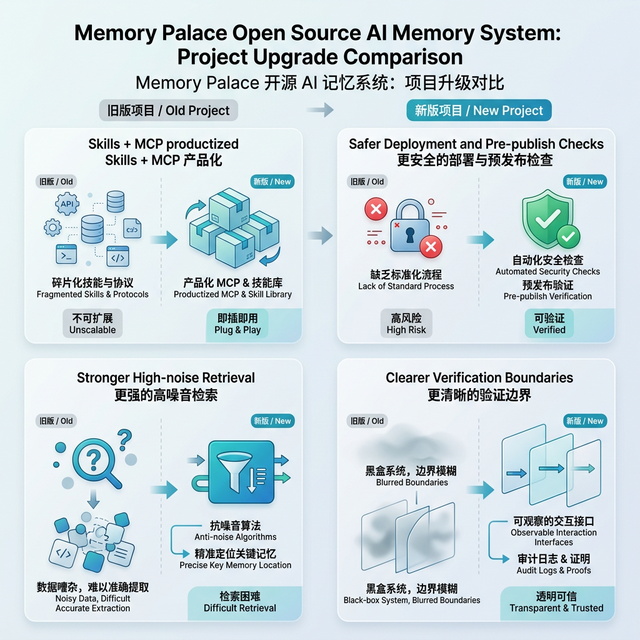
- Memory Maintenance Engines (v2): four independent engines — Forgetting (vitality decay + archive), Layering (L0→L1→L2 provenance), Compression (cascade preview), Procedural (step extraction). All read-only preview by default; mutations gated behind explicit review tokens.
- SSE Hardening: per-principal rate limiting (429 + Retry-After), idle watchdog, trusted proxy CIDR allowlist, graceful shutdown draining, loopback port auto-fallback.
- Dashboard: L0/L1/L2 layer hierarchy, forgetting simulation, archive candidates, Search Quality panel, Observability SSE live view with connection-loss banner.
- Retrieval: RRF fusion remains on by default for Profile B only (
RRF_K=10). Profile C/D keep RRF and MMR disabled by default and enable the sqlite-vec native vector engine when the pipsqlite-vecpackage is installed; otherwise it falls back to legacy scoring. Mixed CJK/Latin handling, full-width normalization (API → API), MMR dedup, embedding drift detection, session-first cache. - Security: artifact stripper (opt-in tool-output sanitization), external import guard (path traversal + rate-limit + symlink rejection), Docker non-root containers.
- MCP boundary: malformed URI rejection, oversized payload blocking, percent-encoded URI handling, clean rollback on
add_aliasfailures,system://write protection. - Docker: deployment locks, runtime env injection (opt-in), loopback →
host.docker.internalauto-rewrite, NFS/CIFS/SMB mount rejection. - Skills + MCP: single install path for CLI clients (Claude / Codex / Gemini CLI / OpenCode) and IDE hosts (Cursor / Windsurf / VSCode-host / Antigravity). User-scope recommended default.
- Cross-platform: ps1/sh parity for all scripts, CRLF defense, UTF-8 forced encoding, Windows
mcp_wrapper.pyas native stdio path.
Per-release detail: docs/changelog/.
Key Features
Auditable Write Pipeline
Every write passes through Write Guard pre-check → Snapshot → Async index rebuild. Core guard actions are ADD, UPDATE, NOOP, DELETE; BYPASS is reserved as a flow marker for metadata-only updates. Dashboard tree writes (POST/PUT/DELETE /browse/node) follow the same snapshot semantics, so the Review page can roll them back. Snapshot writes are serialized through a per-session file lock and use atomic replace.
The backend revalidates content age before any rollback and returns 409 if a newer snapshot already exists. Saturation surfaces as a structured 503 (write_lane_timeout) instead of generic 500. SQLite lock conflicts get a bounded retry, and background index jobs share the same global write gate.
Unified Retrieval Engine
Three modes — keyword, semantic, hybrid — with automatic degradation. When external embedding services are unavailable, the system falls back to keyword search and reports degrade_reasons. Embedding-dimension checks follow the current query scope (domain, path_prefix) instead of scanning unrelated vectors. The final path-revalidation step uses batched lookups when supported, and drops stale results instead of silently keeping them.
Intent-Aware Search
Four intent classes — factual, exploratory, temporal, causal — route to templates (factual_high_precision, exploratory_high_recall, temporal_time_filtered, causal_wide_pool). With no strong signal, the default is factual_high_precision; conflicting or low-signal queries fall back to unknown (default template). Mixed why ... after ... queries stay on the causal path when the time word is only a connector.
Memory Maintenance Engines
Four engines work together to keep the memory store healthy over time:
- Forgetting Engine: runtime vitality scores decay with
VITALITY_DECAY_HALF_LIFE_DAYS(30 days in.env.example). Memories below threshold become archive candidates. Actual archival requires a review token — no silent deletion. - Layering Engine: organizes memories into L0 (raw) → L1 (linked clusters) → L2 (topic summaries) with full derivation provenance. Read-only; summaries are draft-only until explicitly approved.
- Compression Engine: previews cascade tiers (mild/aggressive/emergency) at different budget utilization levels. Never writes — only shows what would compress.
- Procedural Engine: extracts step-by-step procedures from conversation memories, making implicit workflows explicit and searchable.
Flexible Deployment
Four profiles (A/B/C/D) from pure local to remote API. Profile B ships with RRF fusion enabled; C/D keep RRF/MMR disabled by default and enable sqlite-vec native vector search when sqlite-vec is installed. The vec0 KNN table is dropped and recreated when the embedding dimension changes, but existing vectors written with a different backend/model/dimension still need rebuild_index(wait=true) or a separate database. The most validated path remains macOS + Docker; native Windows works through backend/mcp_wrapper.py. Remote and GUI-host combinations should be re-verified in your target environment.
Built-in Observability Dashboard
React-based, four views: Memory Browser, Review & Rollback, Maintenance, Observability. Language preference is persisted; common Chinese locales (zh, zh-TW, zh-HK) normalize to zh-CN, others fall back to English. Edge users get a lighter visual mode automatically.
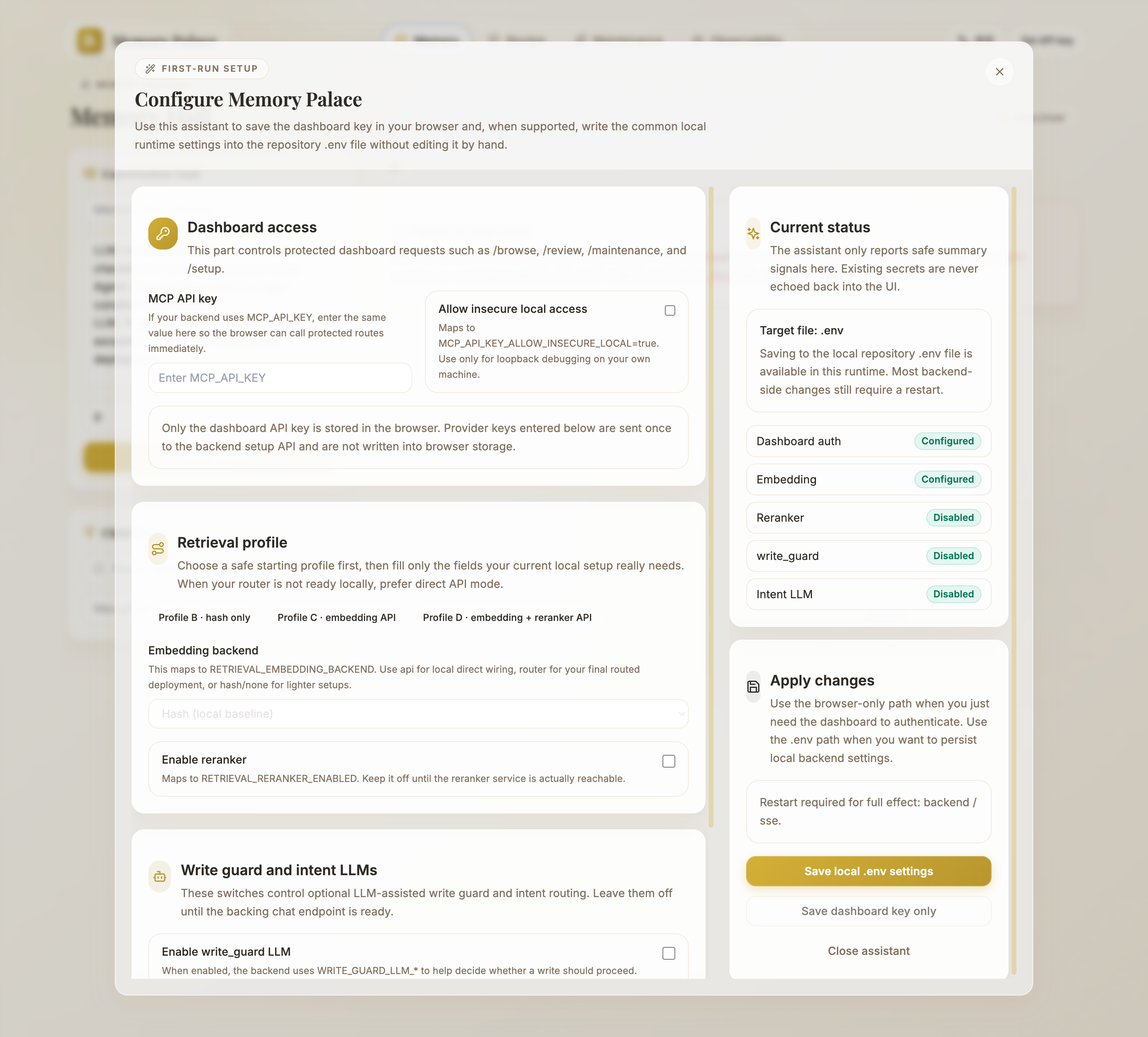
When neither runtime Dashboard auth nor stored browser Dashboard auth is available, a first-run setup assistant opens. It can save the MCP_API_KEY to the current browser session and, on a local checkout, write common runtime fields to .env. The local .env write path is strictly project-local, loopback-only, and requires a non-empty key. Provider bases are normalized (/embeddings, /rerank, /chat/completions suffixes trimmed); loopback IPs and localhost are allowed; other private targets need MEMORY_PALACE_ALLOWED_PRIVATE_PROVIDER_TARGETS.
For a full page-by-page tour, see Dashboard User Guide (English).
System Architecture
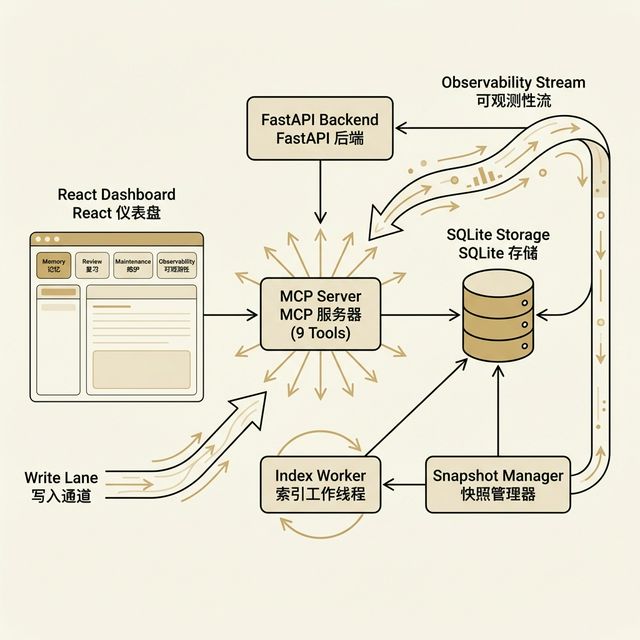
User / AI Agent → React Dashboard or MCP Server (9 tools + SSE) → FastAPI Backend → Write Guard / Search Engine → Write Lane / Index Worker → SQLite.
Tech Stack
Backend
| Component | Technology | Version |
|---|---|---|
| Web Framework | FastAPI | ≥ 0.109 |
| ORM | SQLAlchemy | ≥ 2.0 |
| Database | SQLite + aiosqlite | ≥ 0.19 |
| MCP Protocol | mcp (FastMCP) | ≥ 0.1 |
| HTTP Client | httpx | ≥ 0.26 |
| Validation | Pydantic | ≥ 2.5 |
| Diff Engine | diff_match_patch + difflib fallback | — |
Frontend
| Component | Technology | Version |
|---|---|---|
| UI | React | 18 |
| Build | Vite | 7.x |
| Styling | Tailwind CSS | 3.x |
| Animation | Framer Motion | 12.x |
| Routing | React Router DOM | 6.x |
| API | Axios | 1.x |
For module-by-module responsibilities, see TECHNICAL_OVERVIEW_EN.md.
Requirements
| Component | Minimum | Recommended |
|---|---|---|
| Python | 3.10+ | 3.11+ |
| Node.js | 20.19+ (or >=22.12) | latest LTS |
| npm | 9+ | latest stable |
| Docker (optional) | 20+ | latest stable |
Quick Start
Three paths, same Dashboard + MCP surface.
Option 1: Prebuilt Docker Images (Fastest)
git clone https://github.com/AGI-is-going-to-arrive/Memory-Palace.git
cd Memory-Palace

bash scripts/apply_profile.sh docker b .env.docker
docker compose -f docker-compose.ghcr.yml pull
docker compose -f docker-compose.ghcr.yml up -d
Windows PowerShell: .\scripts\apply_profile.ps1 -Platform docker -Profile b -Target .env.docker, then the same docker compose commands. Stop with docker compose -f docker-compose.ghcr.yml down --remove-orphans.
Option 2: One-Click Docker (Auto-Adjusts Ports)
bash scripts/docker_one_click.sh --profile b              # macOS / Linux
.\scripts\docker_one_click.ps1 -Profile b                  # Windows
bash scripts/docker_one_click.sh --profile c --allow-runtime-env-injection   # C/D needs real endpoints
Auto-generates MCP_API_KEY if empty, picks free ports if 3000/18000 are taken, runs a /sse readiness probe, refuses NFS-style data mounts. Stop: COMPOSE_PROJECT_NAME=<printed> docker compose -f docker-compose.yml down --remove-orphans.
Option 3: Manual Local Setup
git clone https://github.com/AGI-is-going-to-arrive/Memory-Palace.git
cd Memory-Palace
bash scripts/apply_profile.sh macos b       # generate Profile B env

# Backend
cd backend && python -m venv .venv && source .venv/bin/activate
pip install -r requirements.txt
uvicorn main:app --host 127.0.0.1 --port 8000 --reload

# Frontend (new terminal)
cd frontend && npm install && npm run dev
Open http://localhost:5173. Add MCP_API_KEY=<your-mcp-api-key> (or MCP_API_KEY_ALLOW_INSECURE_LOCAL=true for loopback-only debugging) to .env before starting the backend if you want Dashboard / /browse / /review / /maintenance access.
Default Endpoints
| Service | Local Dev | Docker |
|---|---|---|
| Frontend Dashboard | http://localhost:5173 | http://127.0.0.1:3000 |
| Backend API | http://127.0.0.1:8000 | http://127.0.0.1:18000 |
| SSE | http://127.0.0.1:8000/sse (or 8010 fallback) | http://127.0.0.1:3000/sse |
Important Boundaries
- Docker data lives in named volumes
<compose-project>_dataand<compose-project>_snapshots. They survivedocker compose downbut are destroyed bydown -v. - NFS/CIFS/SMB mounts are rejected by the one-click script. If you must use a network mount, bypass the one-click script and run
docker compose upmanually withMEMORY_PALACE_DOCKER_WAL_ENABLED=falseandMEMORY_PALACE_DOCKER_JOURNAL_MODE=delete. - The repo-local
stdiolaunchers (scripts/run_memory_palace_mcp_stdio.sh,backend/mcp_wrapper.py) need a host-side.envwith an absoluteDATABASE_URL. Container paths (/app/...,/data/...) are rejected. - Skill
memory-palace-reportsoutput goes to~/.memory-palace-reports/(outside the repository) by default. - Treat the Docker frontend port as an admin surface; put your own auth/VPN in front if exposing beyond loopback.
Profile C/Dneed real endpoint, key, and model values.apply_profile.*and the backend fail-closed on placeholders.- Switching embedding backend / model / dimension requires checking
index_status()and possiblyrebuild_index(wait=true).
Full walkthrough: GETTING_STARTED_EN.md.
Deployment Profiles (A / B / C / D)
| Profile | Retrieval | Embedding | Reranker | Best For |
|---|---|---|---|---|
| A | keyword | ❌ | ❌ | Minimal resources, initial validation |
| B | hybrid | 📦 Local hash | ❌ | Default starting profile — local dev, no external services |
| C | hybrid | 🌐 Router/API | ✅ | Recommended when local model endpoints are available |
| D | hybrid | 🌐 Router/API | ✅ | Remote API, production |
C and D share the same hybrid pipeline. Templates differ in endpoint (local vs remote) and default RETRIEVAL_RERANKER_WEIGHT (0.30 vs 0.35). Stay on B until you actually need richer semantics; switching backend/dimension after vectors are written requires a reindex.
C/D Configuration
All endpoints use the OpenAI-compatible API format (Ollama, LM Studio, vLLM, hosted services, etc.):
RETRIEVAL_EMBEDDING_BACKEND=router
RETRIEVAL_EMBEDDING_API_BASE=http://localhost:11434/v1
RETRIEVAL_EMBEDDING_API_KEY=your-api-key
RETRIEVAL_EMBEDDING_MODEL=your-embedding-model-id
RETRIEVAL_EMBEDDING_DIM=<provider-vector-dim>

RETRIEVAL_RERANKER_ENABLED=true
RETRIEVAL_RERANKER_API_BASE=http://localhost:11434/v1
RETRIEVAL_RERANKER_API_KEY=your-api-key
RETRIEVAL_RERANKER_MODEL=your-reranker-model-id

RETRIEVAL_RERANKER_WEIGHT=0.30  # Profile C default; use 0.35 for Profile D
Notes:
RETRIEVAL_EMBEDDING_DIMmust match the provider's real vector size. The runtime sends it as thedimensionsfield on/embeddings; if the provider rejects it, the runtime retries once without it. If the actual response size still mismatches, the vector is dropped anddegrade_reasonsis reported.- Reranker activation is controlled by
RETRIEVAL_RERANKER_ENABLED; connection settings fall back toROUTER_*thenOPENAI_*only when explicitRETRIEVAL_RERANKER_*are unset. - Optional LLM-assisted Write Guard / Gist / intent routing uses
WRITE_GUARD_LLM_*,COMPACT_GIST_LLM_*,INTENT_LLM_*in the same.env.
Templates live at deploy/profiles/{macos,linux,windows,docker}/profile-{a,b,c,d}.env. Full parameter reference: DEPLOYMENT_PROFILES_EN.md.
MCP Tools
Memory Palace exposes 9 standardized tools:
| Category | Tool | Description |
|---|---|---|
| Read/Write | read_memory | Read memory (full or chunked by RETRIEVAL_CHUNK_SIZE) |
create_memory | Create node (passes Write Guard first; prefer explicit title) | |
update_memory | Update memory (prefer Patch; Append only for true tail-appends) | |
delete_memory | Delete path (structured JSON response) | |
add_alias | Add an alias path | |
| Retrieval | search_memory | keyword / semantic / hybrid modes |
| Governance | compact_context | Compress session into long-term summary (Gist + Trace) |
rebuild_index | Trigger index rebuild / sleep consolidation | |
index_status | Query index availability and runtime state |
System URIs
| URI | Description |
|---|---|
system://boot | Loads core memories from CORE_MEMORY_URIS |
system://index | Full memory index overview |
system://index-lite | Gist-backed lightweight summary |
system://audit | Consolidated observability/audit summary |
system://recent / system://recent/N | Recently modified memories |
Starting the MCP Server
cd backend && ./.venv/bin/python mcp_server.py     # stdio (Windows: .\.venv\Scripts\python.exe)
cd backend && HOST=127.0.0.1 python run_sse.py              # SSE (default 8000; auto-fallback 8010)
stdio bypasses the HTTP/SSE auth middleware. HTTP/SSE routes still require MCP_API_KEY. Use HOST=0.0.0.0 only after your own firewall/proxy/auth is in place; remote hosts also need MCP_ALLOWED_HOSTS / MCP_ALLOWED_ORIGINS.
The shell wrapper sets PYTHONIOENCODING=utf-8 and PYTHONUTF8=1 to avoid encoding issues on Windows consoles with non-ASCII memory content.
Full tool semantics: TOOLS_EN.md.
Multi-Client Integration
The MCP tool layer handles deterministic execution; the Skills strategy layer handles policy and timing.

Recommended Default Flow
1. 🚀 Boot     → read_memory("system://boot")
2. 🔍 Recall   → search_memory(include_session=true)
3. ✍️ Write    → update_memory patch; create_memory (with title) for new entries
4. 📦 Compact  → compact_context(force=false)
5. 🔧 Recover  → rebuild_index(wait=true) + index_status()
Supported Clients
| Client | Integration |
|---|---|
| Claude Code | --scope user is the stable default; add workspace only for repo-level entry |
| Gemini CLI | --scope user default; workspace optional |
| Codex CLI / OpenCode | sync for repo-local skill discovery; use --scope user --with-mcp to bind reliably |
| Cursor / Windsurf / VSCode-host / Antigravity | Repo-local AGENTS.md + rendered MCP snippet |
Install Skills
python scripts/sync_memory_palace_skill.py
python scripts/install_skill.py --targets claude,codex,gemini,opencode --scope user --with-mcp --force

# IDE hosts: render MCP snippet directly
python scripts/render_ide_host_config.py --host cursor       # or: windsurf | vscode-host | antigravity
Optional local verification:
python scripts/evaluate_memory_palace_skill.py
cd backend && python ../scripts/evaluate_memory_palace_mcp_e2e.py
FAIL is actionable; SKIP/PARTIAL/MANUAL mean host or environment boundaries. Use MEMORY_PALACE_SKILL_REPORT_PATH / MEMORY_PALACE_MCP_E2E_REPORT_PATH to isolate output in CI.
User-scope install is the stable default on fresh machines — Codex and OpenCode only bind MCP under user scope. Canonical bundle: <repo-root>/docs/skills/memory-palace/. After install, mirrors appear under .claude/, .codex/, .opencode/. Full guides: MEMORY_PALACE_SKILLS_EN.md, IDE_HOSTS_EN.md.
Benchmark Results
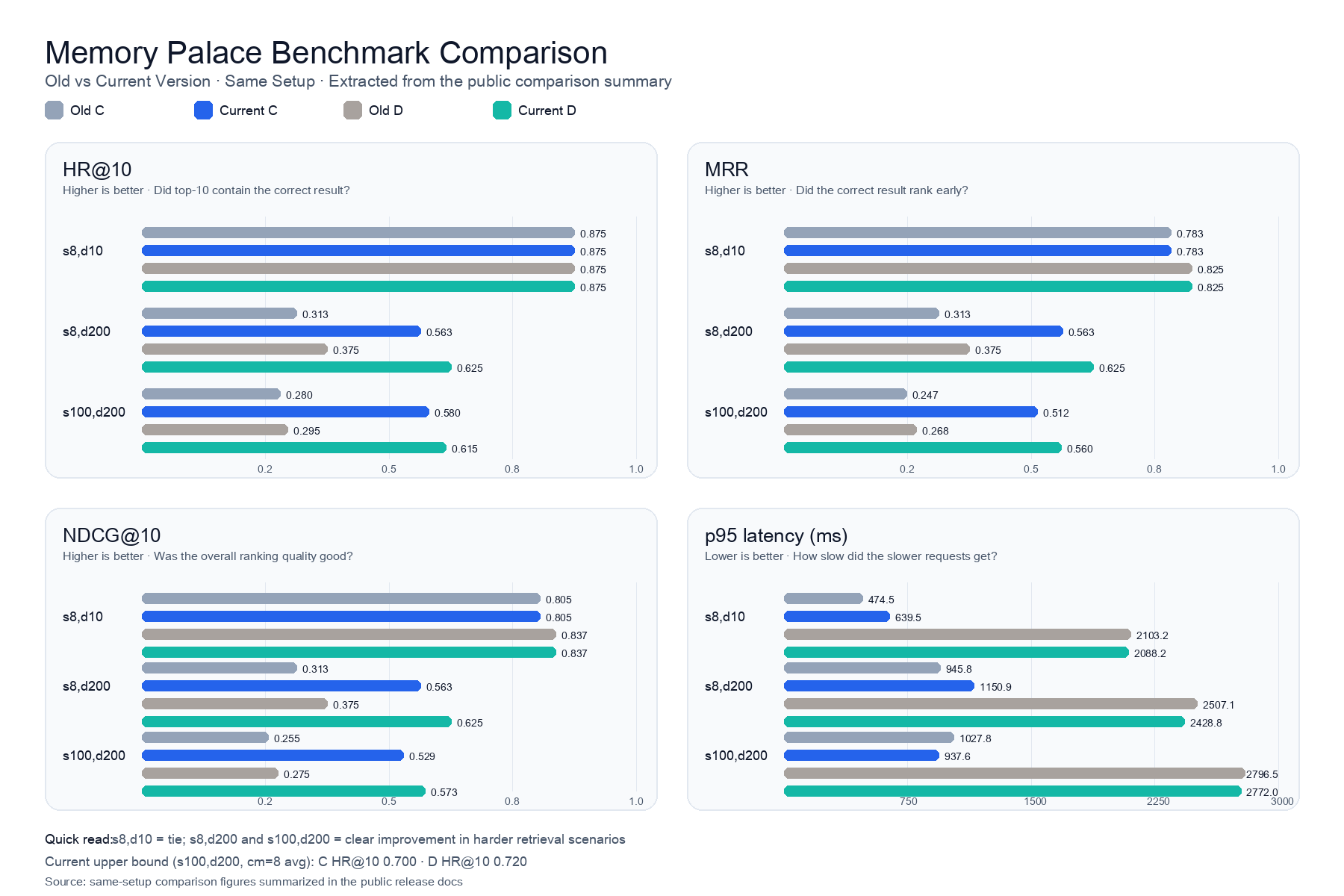
Release summary; numbers depend on hardware, provider, and model choice. Full methodology and reproduction: EVALUATION_EN.md. Old-vs-current comparison: release_summary_vs_old_project_2026-03-06_EN.md.
A/B/C/D real run · profile_abcd_real_metrics.json · 8 samples per dataset · 200 distractors · Seed = 20260219
| Profile | Avg HR@10 | Avg MRR | Avg NDCG@10 | Avg Recall@10 | Avg p95 (ms) |
|---|---|---|---|---|---|
| A | 0.125 | 0.125 | 0.125 | 0.125 | 2.7 |
| B | 0.188 | 0.156 | 0.164 | 0.188 | 14.7 |
| C | 0.812 | 0.714 | 0.737 | 0.812 | 208.8 |
| D | 0.875 | 0.776 | 0.799 | 0.875 | 3004.9 |
C/D add real embedding and reranker on top of B; the extra latency is model inference plus network. Per-dataset breakdown, A/B large-sample gate (100 samples), and the old-vs-current comparison are in EVALUATION_EN.md.
Quality gates: Write Guard precision 1.000 (≥0.90), recall 1.000 (≥0.85); Intent Classification accuracy 1.000 (≥0.80); Gist ROUGE-L 0.759 (≥0.40). Sources: write_guard_quality_metrics.json, intent_accuracy_metrics.json, compact_context_gist_quality_metrics.json.
User-side minimal re-check: bash scripts/pre_publish_check.sh + curl -fsS http://127.0.0.1:8000/health. Benchmark runners under backend/tests/benchmark/ are maintenance material.
Dashboard Screenshots
Screenshots show typical post-entry states. Without configured auth, the shell opens but protected requests show an auth hint or 401. Edge gets a lighter visual mode automatically.
🪄 First-Run Setup Assistant
📂 Memory · 📋 Review · 🔧 Maintenance · 📊 Observability
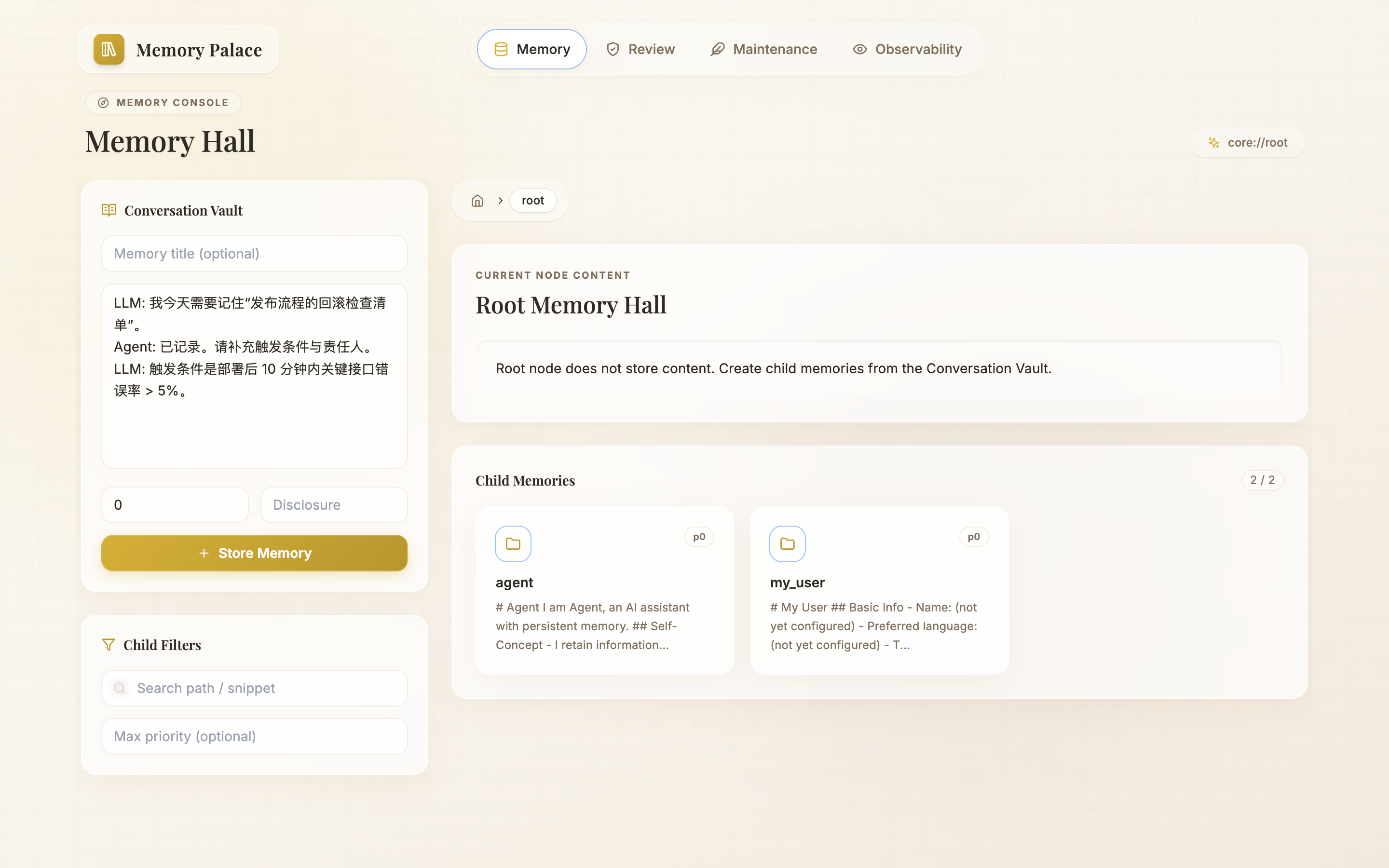
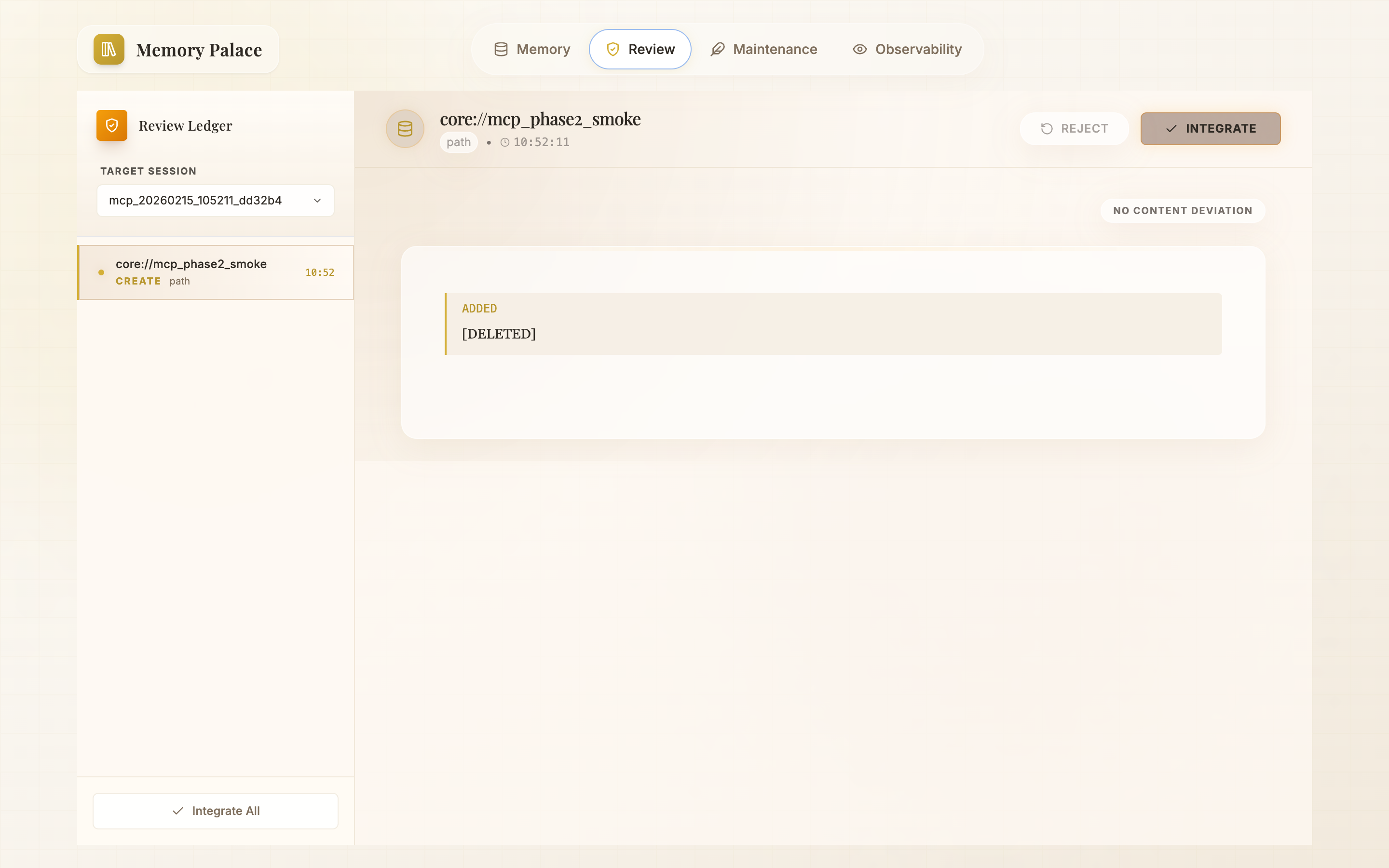
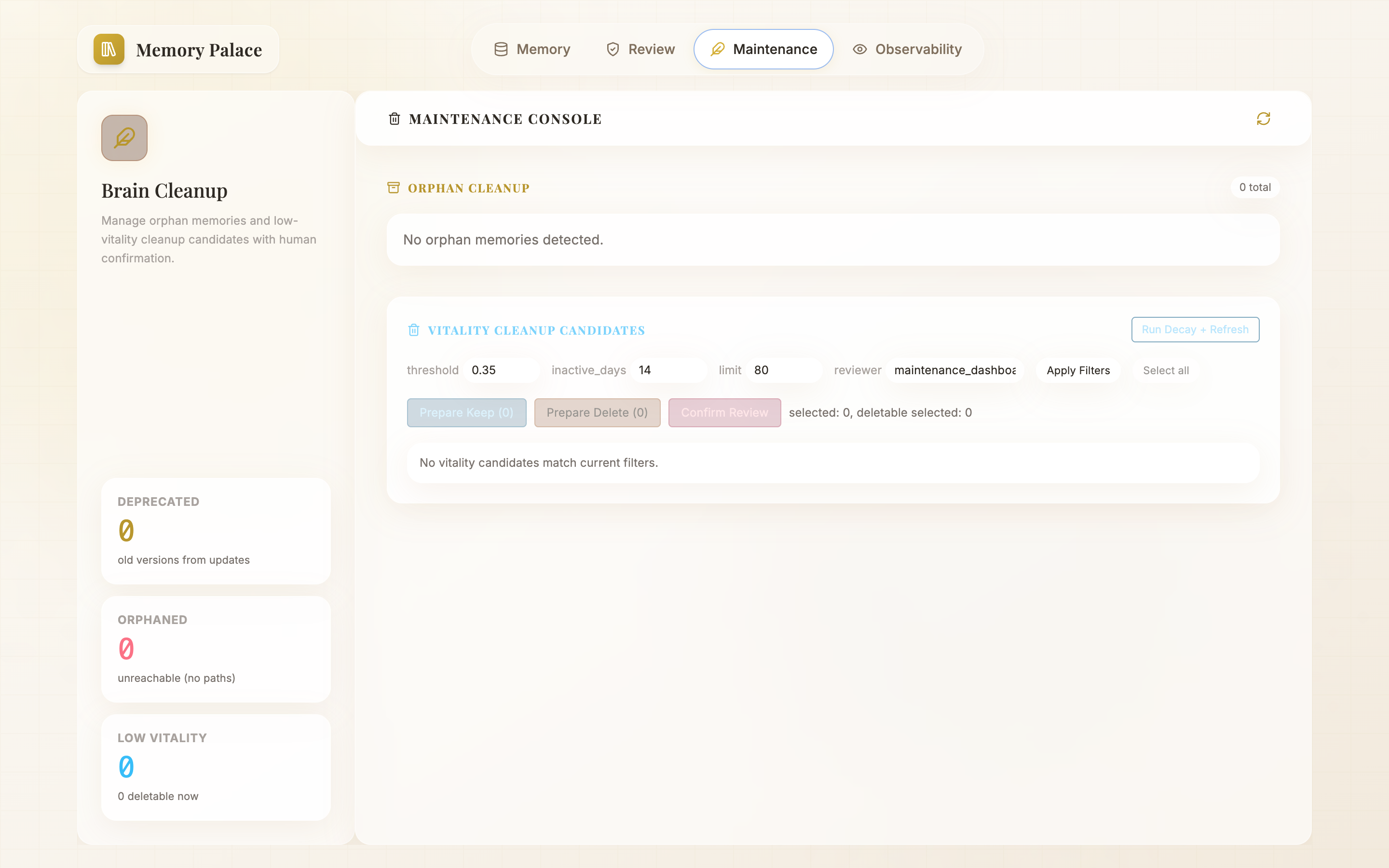
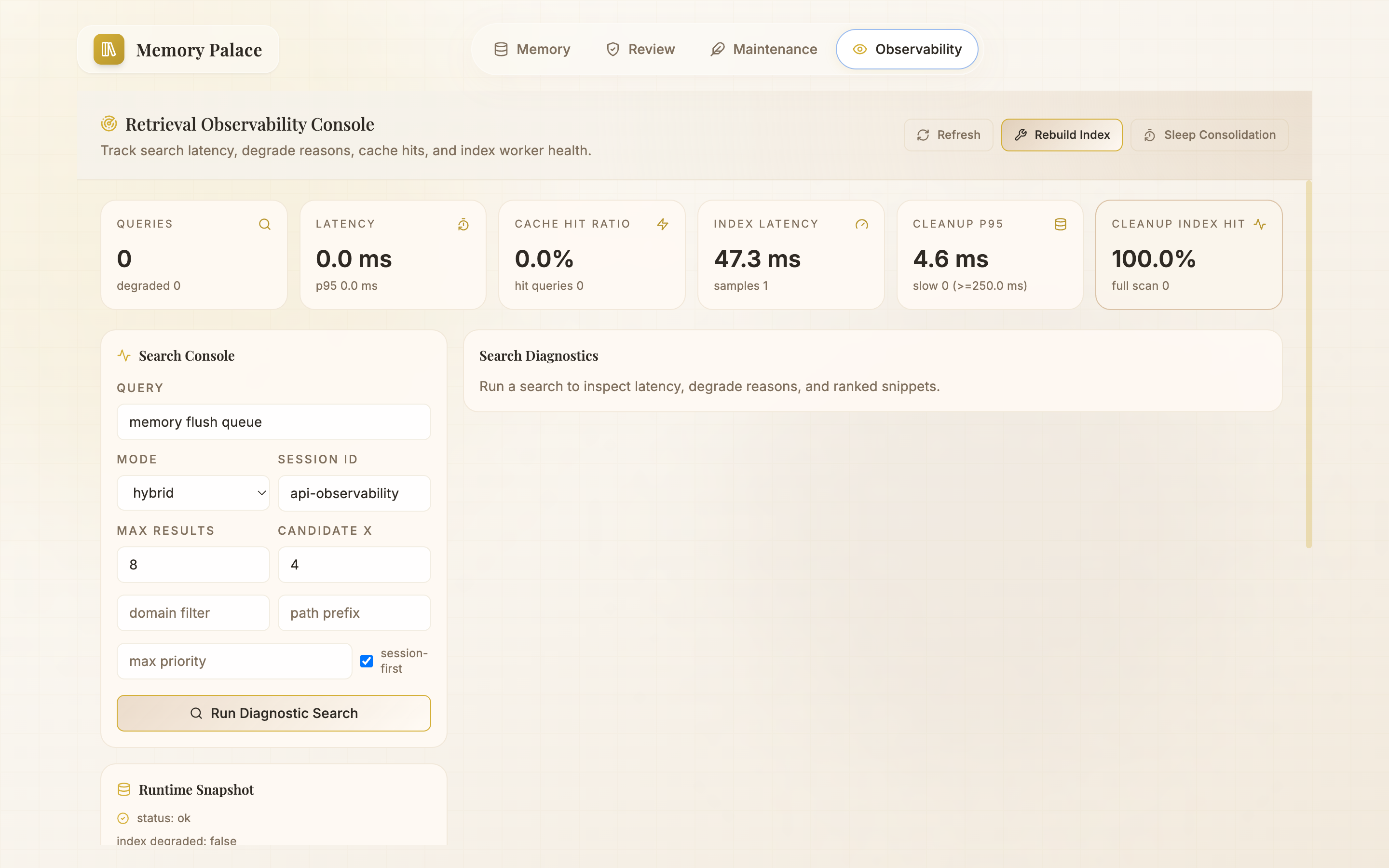
Memory Write & Review Workflow
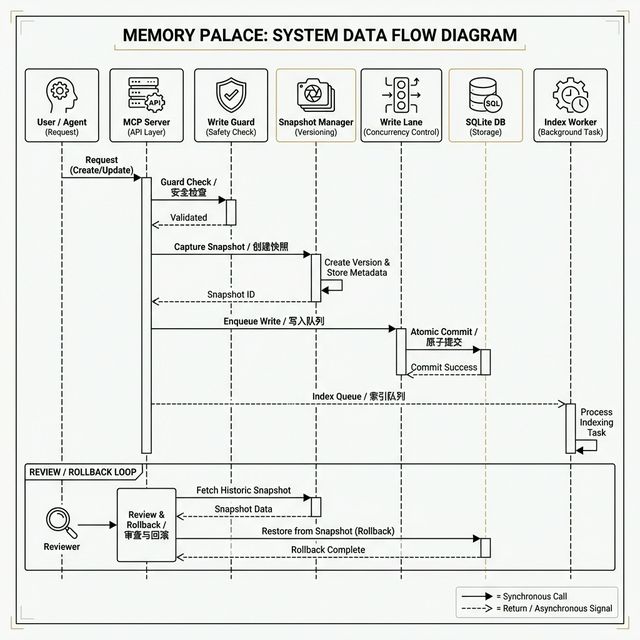
Write path: create_memory / update_memory → Write Lane queue → Write Guard (ADD / UPDATE / NOOP / DELETE) → Snapshot + version record → async Index Worker.
Retrieval path: preprocess_query → classify_intent → strategy template → keyword/semantic/hybrid retrieval → results + degrade_reasons.
Documentation
| Document | Description |
|---|---|
| Getting Started | Zero-to-running guide |
| Technical Overview | Architecture and module responsibilities |
| Deployment Profiles | A/B/C/D configuration and tuning |
| MCP Tools | Full semantics and return formats |
| Evaluation | Retrieval quality, write gates, intent classification |
| Skills Guide | Multi-client integration strategy |
| Security & Privacy | API Key authentication and policies |
| Troubleshooting | Common issues and fixes |
Security & Privacy
- Only
.env.exampleis committed; real.envfiles are gitignored. - All API keys in docs are placeholders.
- HTTP/SSE auth is fail-closed: protected endpoints return
401without a validMCP_API_KEY.stdiois unaffected. - Docker one-click forwards auth headers at the server-side proxy, so the browser never holds the real key.
- Loopback bypass requires explicit
MCP_API_KEY_ALLOW_INSECURE_LOCAL=true. - The Setup Assistant's local
.envwrite is stricter: project-local files only, direct loopback, non-empty key on first save, and a valid existing key once the backend hasMCP_API_KEYconfigured. - Provider bases are normalized (
/embeddings,/rerank,/chat/completionstrimmed); malformed/link-local rejected; loopback IPs +localhostallowed; other private targets needMEMORY_PALACE_ALLOWED_PRIVATE_PROVIDER_TARGETS.
Details: SECURITY_AND_PRIVACY_EN.md.
Star History
License
MIT — Copyright (c) 2026 agi
Acknowledgements
- Original community discussion: https://linux.do/t/topic/1616409
- Earliest reference project:
Dataojitori/nocturne_memory - Memory Palace is a full rework on that foundation with new docs, deployment, and verification paths.