TryVoice
Hands-free voice runtime for AI agents. Talk to your AI coding assistant without touching the keyboard.
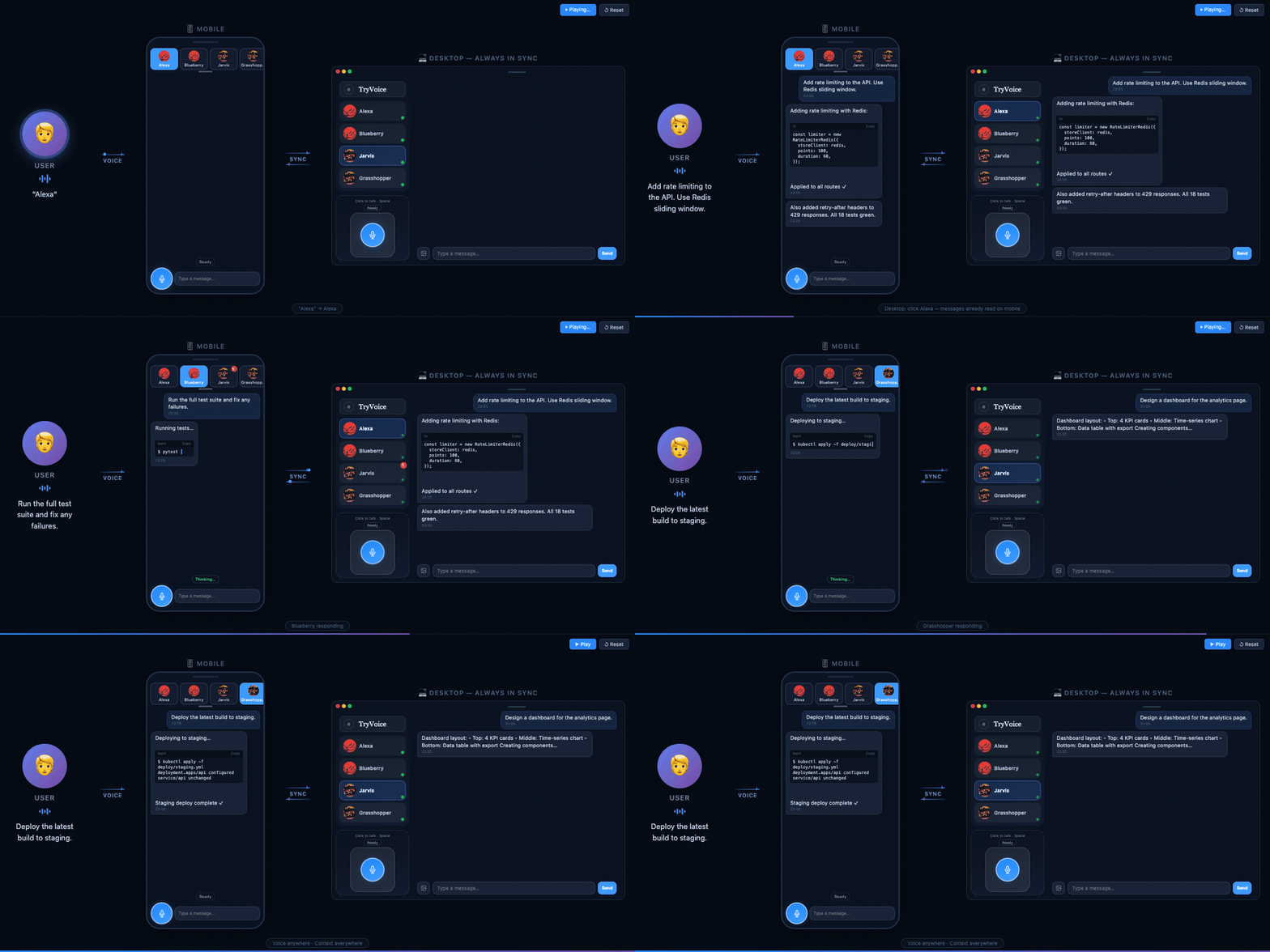
TryVoice wraps AI agents (like OpenClaw and Claude Code) into a voice interface with wake word activation, push-to-talk, and real-time streaming — all running in your browser.
Early Preview (v0.1.0-alpha) — actively developed, expect rough edges.
What It Does
- Wake word activation — say a keyword to start talking, no hands needed (powered by OpenWakeWord)
- Push-to-talk — hold a button to speak, release to send
- Real-time streaming — hear the AI respond as it generates, with interruptible playback
- Multi-bot slots — run multiple independent agent sessions side by side
- Mobile-ready — PWA support, works on phone browsers
- Pluggable adapters — connect any AI agent via the Adapter SDK
Prerequisites
TryVoice is a voice layer on top of existing AI agents. You need at least one of:
- Claude Code — installed on the same machine (
claudeCLI available in PATH) - OpenClaw — running with a gateway endpoint
More agent adapters coming soon. See Building an Adapter to connect your own agent.
Quick Start
Option A: Install from PyPI (recommended)
pip install tryvoice
tryvoice            # Start the server and open browser
# First launch shows Setup Wizard in browser — configure adapter, TTS, etc.

# If "command not found", try:
python3 -m backend.cli
Option B: Install from source
git clone https://github.com/AaronZ021/tryvoice-oss.git
cd tryvoice
bash scripts/setup.sh   # Creates venv, installs packages, builds frontend
source .venv/bin/activate
tryvoice                 # Start the server and open browser
# First launch shows Setup Wizard in browser
Configure
On first launch, the browser opens a Setup Wizard that walks you through:
- API Keys (optional but recommended) — enter a Groq API key for faster speech-to-text (lower latency than local Whisper), and an Azure Speech key for high-quality text-to-speech
- Adapter — choose Claude Code or OpenClaw and enter connection details
- Wake word — pick a keyword (e.g., "jarvis", "americano") for hands-free voice activation
All settings can be changed later from the in-app settings panel.
Docker
git clone https://github.com/AaronZ021/tryvoice-oss.git
cd tryvoice
docker compose up
# Open https://localhost:7860 — Setup Wizard runs on first launch
Architecture
┌─────────────┐     WebSocket      ┌──────────────────┐
│  Browser UI  │◄──────────────────►│   TryVoice       │
│  (PWA)       │                    │   Runtime         │
│              │                    │                   │
│  Wake Word   │                    │  ┌────────────┐   │
│  STT / TTS   │                    │  │  Adapter    │   │──► Claude Code
│  Audio I/O   │                    │  │  Registry   │   │──► OpenClaw
│              │                    │  │  (plugin)   │   │──► Your adapter
└─────────────┘                    └──┴────────────┴───┘
Voice flow: Wake word / PTT → STT (browser Web Speech API or Groq Whisper) → Adapter → Agent → Streaming text → TTS (Edge TTS) → Audio playback
Configuration
| Variable | Default | Description |
|---|---|---|
TRYVOICE_ACTIVE_ADAPTER | echo | Active adapter (claude-code, openclaw, or custom) |
GROQ_API_KEY | — | Groq API key for server-side STT (optional, browser fallback) |
EDGE_TTS_VOICE | zh-CN-XiaoxiaoNeural | Edge TTS voice (300+ voices available) |
PORT | 7860 | Server port |
See .env.example for all options, or run tryvoice --setup for an interactive wizard.
Built-in Adapters
| Adapter | Use Case |
|---|---|
claude-code | Voice control for Claude Code terminal sessions |
openclaw | Voice interface to OpenClaw agent gateway |
echo | Testing and demo (echoes your speech back) |
Building an Adapter
Connect TryVoice to any AI agent by implementing the Adapter protocol:
from backend.adapter_sdk import AdapterCapabilities, AdapterEvent

class MyAdapter:
    def report_capabilities(self) -> AdapterCapabilities:
        return AdapterCapabilities(supports_stream=True, ...)

    async def stream_user_turn(self, session_key, text, ...):
        # Call your agent, yield AdapterEvent chunks
        yield AdapterEvent(kind="token", text="Hello!")
        yield AdapterEvent(kind="turn_end")
Register via entry point in pyproject.toml:
[project.entry-points."tryvoice.adapters"]
my-agent = "my_package.adapter:MyAdapter"
Development
Prerequisites
- Python 3.9+ (3.11 recommended)
- Node.js 20+ (for frontend build)
Setup
git clone https://github.com/AaronZ021/tryvoice-oss.git
cd tryvoice
bash scripts/setup.sh
source .venv/bin/activate
tryvoice
Project structure
tryvoice/
├── apps/
│   ├── host-runtime/      # Python FastAPI backend (adapter layer, session FSM, voice providers)
│   └── client-web/        # TypeScript frontend (Vite, state machine, wake word, audio)
├── scripts/               # Setup and build scripts
├── pyproject.toml          # Python package config
├── Dockerfile              # Multi-stage build (Node + Python)
└── docker-compose.yml      # Single-command deployment
License
Apache License 2.0 — see LICENSE.