Open Builder
AI-Powered Web App Generator — Describe in natural language, instantly generate runnable projects






Deployment · Quick Start · Features · Architecture · Contributing
English | 简体中文
Introduction
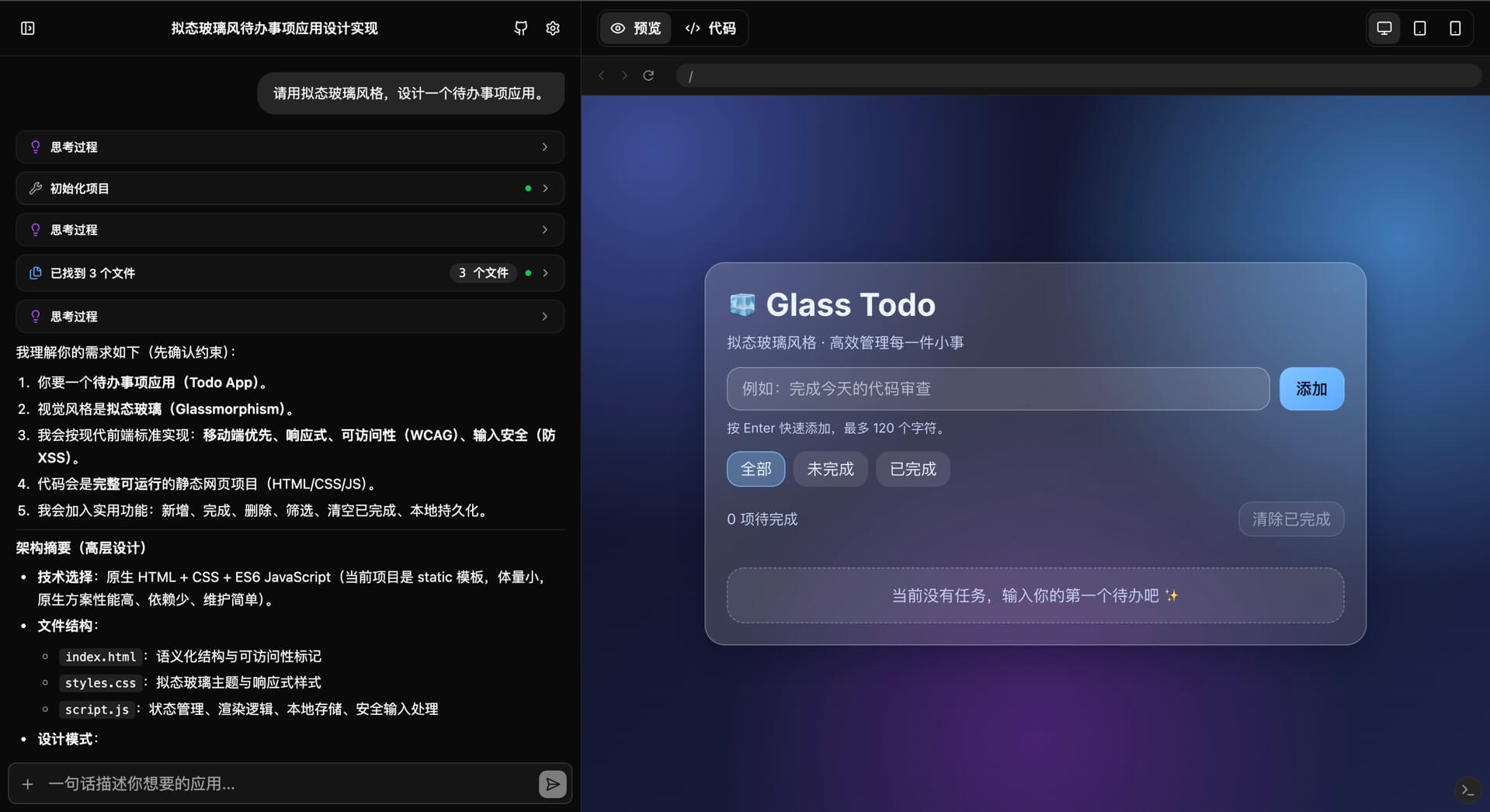
Open Builder is an AI-driven web app generator that runs entirely in the browser. Simply describe the application you want to build in natural language, and the AI will automatically create, modify, and delete files in an in-memory file system through a Tool Call loop, with live preview powered by Sandpack.
No backend server required — all computation happens in the browser. Your API Key is stored only in local browser storage and is never uploaded to any server.
It also supports building as a desktop app (macOS / Windows / Linux) and mobile app (iOS / Android) via Tauri, delivering a native application experience.
An API service compatible with a wide range of mainstream models—such as OpenAI, Anthropic, Google, Ollama, and others.
Demo
Features
Core
- Natural Language to Code — Describe your idea, AI plans and generates the complete project structure
- Live Preview — Browser-based sandbox powered by Sandpack, instant rendering on code changes
- Multi-Framework Support — 20+ templates including React, Vue, Svelte, Angular, SolidJS, Astro, etc.
- Smart File Operations — AI uses
patch_filefor precise modifications, avoiding unnecessary full rewrites - Dependency Management — AI can modify
package.jsonand trigger dependency reinstallation - Project Snapshots — Roll back code to any previous version with one click
- Context Compression — Automatically compresses long conversation context to reduce token usage
- Built-in Search — Supports enabling the model's built-in search service
- CORS Resolution — App Client-side (Tauri) API reverse proxy forwarding effectively resolves CORS issues
User Experience
- Multi-Session Management — Sidebar with create, switch, delete sessions; history persisted locally
- Smart Session Naming — Auto-generates session titles based on conversation content
- Slash Commands — Input box supports
/compact,/review, and other shortcut commands - Image & File Input — Upload screenshots, design mockups, or files as context input
- Streaming Output — Real-time display of AI thinking process and code generation progress
- Extended Thinking — Supports Extended Thinking / Reasoning mode (DeepSeek-R1, Claude 4.6, etc.)
- One-Click Download — Export generated project as a ZIP file
- Flexible Layout — Drag to resize chat and editor panels
- Multi-Language & Themes — Multiple UI languages and appearance themes
- Mobile Responsive — Responsive layout with embedded preview on mobile devices
Web Search (Optional)
- Integrated Tavily, Firecrawl API for real-time web search
- Web content reading with automatic fallback to Jina Reader
Quick Start
Prerequisites
- Node.js 20+ or Bun
- Any OpenAI-compatible API Key
Installation
# Clone the repository
git clone https://github.com/Amery2010/open-builder.git
cd open-builder

# Install dependencies
pnpm install

# Start the development server
pnpm dev
Open http://localhost:5173 in your browser, click the settings icon in the top-right corner to configure your API Key.
Desktop / Mobile App (Tauri)
Requires Rust and Tauri platform dependencies.
# Desktop development
pnpm tauri:dev

# Desktop build
pnpm tauri:build

# iOS development / build
pnpm tauri:ios:dev
pnpm tauri:ios:build

# Android development / build
pnpm tauri:android:dev
pnpm tauri:android:build
Configuration
Click the settings button in the top-right corner and fill in:
| Option | Description | Example |
|---|---|---|
| API Key | Your AI service API key | sk-... |
| API URL | OpenAI-compatible endpoint | https://api.openai.com/v1/chat/completions |
| Model Name | Model ID to use | gpt-5.3-codex, deepseek-chat |
| Tavily API Key | (Optional) Web search feature | tvly-... |
All settings are stored in browser
localStorageand never leave your device.
Architecture
Core Engine: WebAppGenerator
src/lib/generator.ts is the project's core, implementing the full AI Tool Call loop engine:
User Message → AI Planning → Tool Call → Execute → Return Result → AI Continue/End
                                  ↓
                          In-Memory File System
                                  ↓
                         Sandpack Live Preview
Built-in tools:
| Tool | Description |
|---|---|
init_project | Initialize Sandpack project template |
manage_dependencies | Modify package.json to manage dependencies |
list_files | List all project files |
read_files | Batch read file contents |
write_file | Create or overwrite a file |
patch_file | Precise search-and-replace patch |
delete_file | Delete a file |
search_in_files | Global file content search |
web_search | Web search (supports Built-in, Tavily, Firecrawl) |
web_reader | Read web page content |
image_search | Image search (supports Pixabay, Unsplash) |
search_npm_packages | NPM package search |
get_npm_package_detail | Get detailed information about NPM package |
Tech Stack
| Category | Technology |
|---|---|
| Framework | React 19 + TypeScript 5 |
| Build Tool | Vite 7 |
| Styling | Tailwind CSS v4 |
| UI Components | shadcn/ui + Radix UI |
| Code Sandbox | Sandpack (CodeSandbox) |
| State Mgmt | Zustand 5 |
| Local Storage | localforage |
| Icons | Lucide React |
| Markdown | react-markdown + rehype-highlight |
| Desktop/Mobile | Tauri 2 |
Supported Models
Open Builder is compatible with the API formats of mainstream large language models:
| Provider | Recommended Models | API URL |
|---|---|---|
| OpenAI | gpt-5.3-codex, gpt-5.2 | https://api.openai.com/v1/responses |
| Anthropic | claude-4.6-sonnet, claude-opus-4 | https://api.anthropic.com/v1/messages |
gemini-2.0-flash-exp | https://generativelanguage.googleapis.com/v1beta/models | |
| DeepSeek | deepseek-chat, deepseek-reasoner | https://api.deepseek.com/v1/chat/completions |
| Qwen | qwen-3.5, qwen3-coder-plus | https://dashscope.aliyuncs.com/compatible-mode/v1/chat/completions |
| Moonshot | kimi-k2.5 | https://api.moonshot.cn/v1/chat/completions |
| Zhipu AI | glm-5 | https://open.bigmodel.cn/api/paas/v4/chat/completions |
| Ollama | gpt-oss:120b、qwen3:8b | http://localhost:11434/v1/chat/completions |
For best results, use a model with strong Function Calling support.
Deployment
Build for Production
pnpm build
# Output to dist/ directory
GitHub Pages
GitHub Actions is configured — push a version tag to auto-build and deploy:
git tag v1.0.0
git push origin v1.0.0
See .github/workflows/deploy.yml.
Vercel
Or manually: import the GitHub repo, select Vite as framework preset, build command pnpm run build, output directory dist.
Cloudflare Workers
Or manually:
- Log in to Cloudflare Dashboard → Workers & Pages → Create → Worker → Connect to Git
- Select the
open-builderrepo with the following build config:
| Option | Value |
|---|---|
| Build Command | pnpm run build |
| Output Dir | dist |
| Node.js Ver | 20 |
Netlify
Import the repo, build command pnpm run build, output directory dist. No additional configuration needed.
Contributing
Issues and Pull Requests are welcome! Please read the Contributing Guide first.
License
GPLv3 License © 2026 Open Builder Contributors