
GithubStarsManager
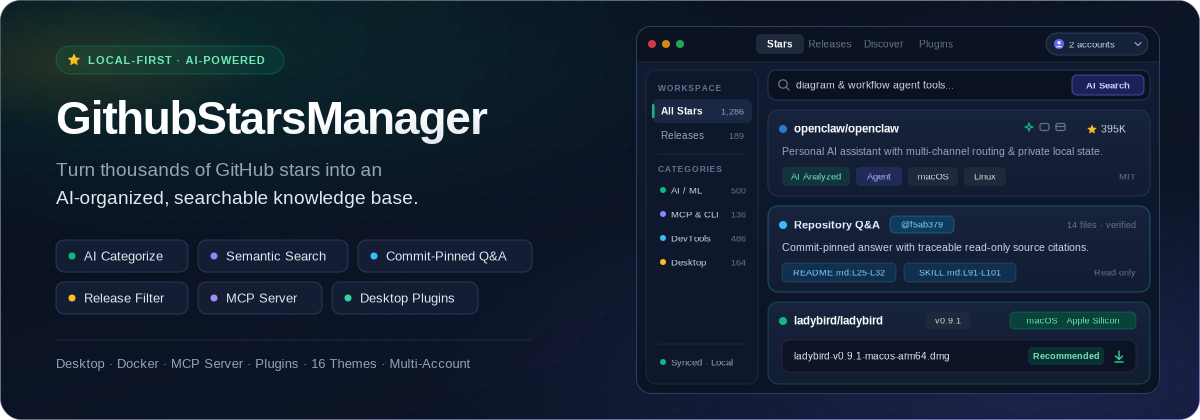
Turn thousands of GitHub stars into an AI-organized, searchable knowledge base.
AI Summaries & Categories · Vector Semantic Search · Commit-Pinned Repo Q&A · Smart Release Tracking · MCP Agent Server · Desktop Plugins
English | 简体中文
⬇️ Download Desktop · 🐳 Docker Self-Host · ⚡ Quick Start · 🧠 Vector Search & MCP · 🔌 Plugin Docs







Demo Video
See GithubStarsManager in action — syncing stars, running AI organization, searching semantically, tracking releases, and asking repository questions:
https://github.com/user-attachments/assets/ad3493a0-948a-4de5-8de1-4e9afc46ec4d
Core Workflows
Stop starring projects and losing them. Everything from AI organization and semantic discovery to commit-pinned answers and OS-matched downloads lives in one fast desktop or self-hosted workspace.
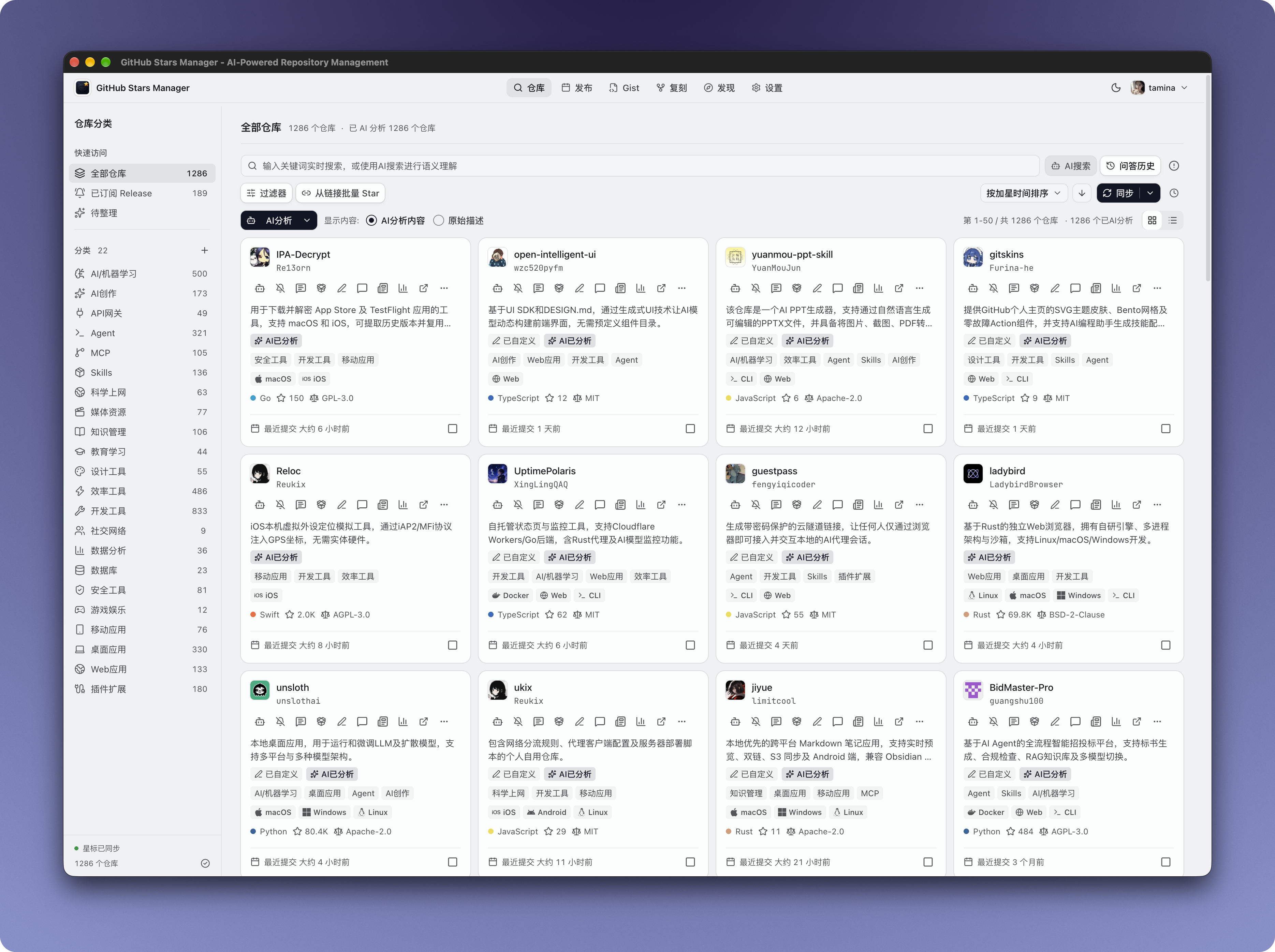
Main Stars workspace — smart category sidebar, platform badges, multi-account switching, and draggable card quick actions. Screenshots show the Simplified Chinese UI; the app ships natively in 10 languages.
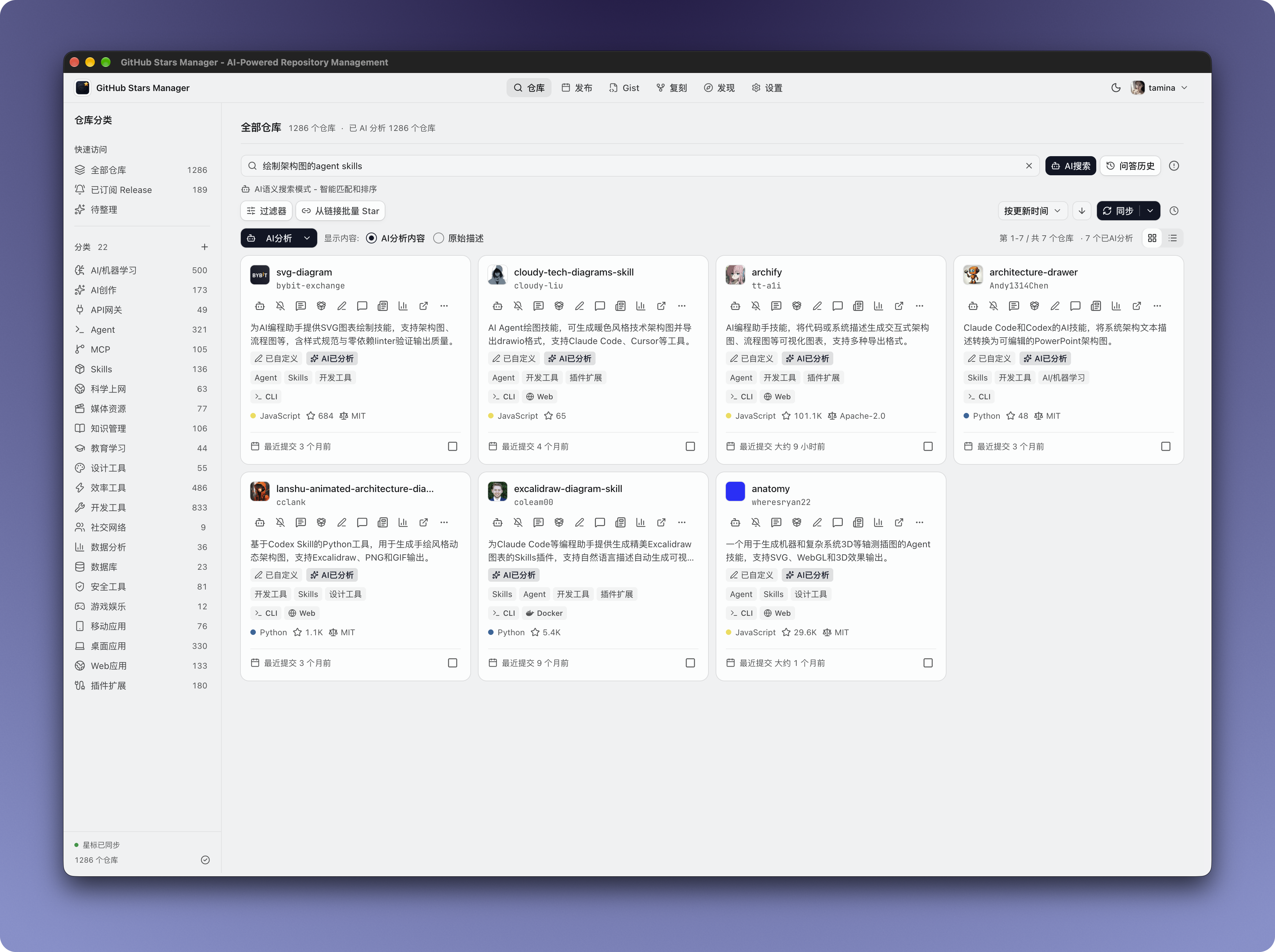
Search by intent, not memory — Natural-language semantic search surfaces the right repos even when your query shares zero keywords with their names. |
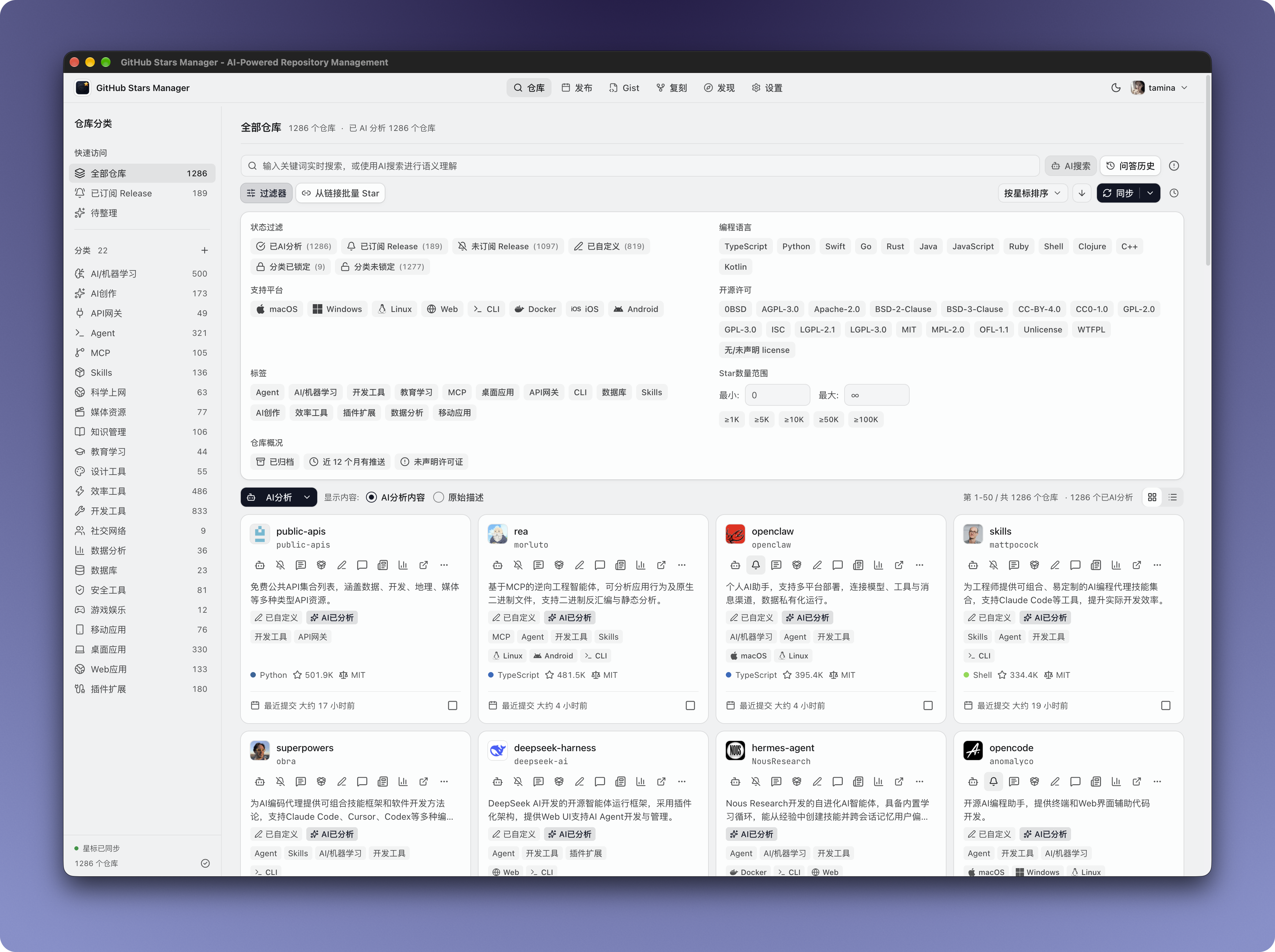
Slice thousands of stars in seconds — Combine filters across AI status, platform (macOS/Linux/Docker/CLI), license, star range, recent pushes, and category locks. |
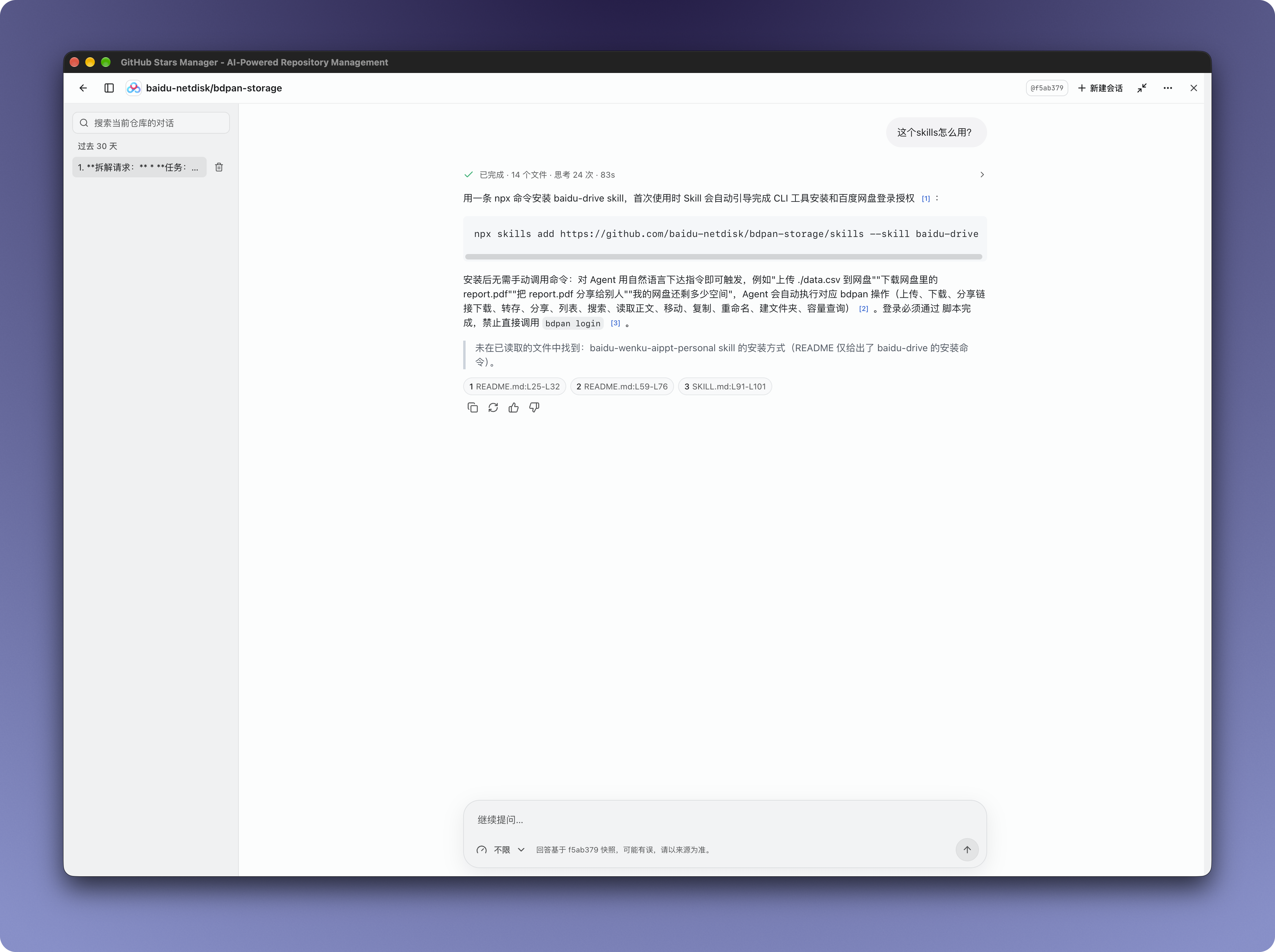
Commit-pinned Repository Q&A — Ask focused repo questions with README/docs fast-path, streaming answers, transparent file traces, and clickable file:line citations.
|
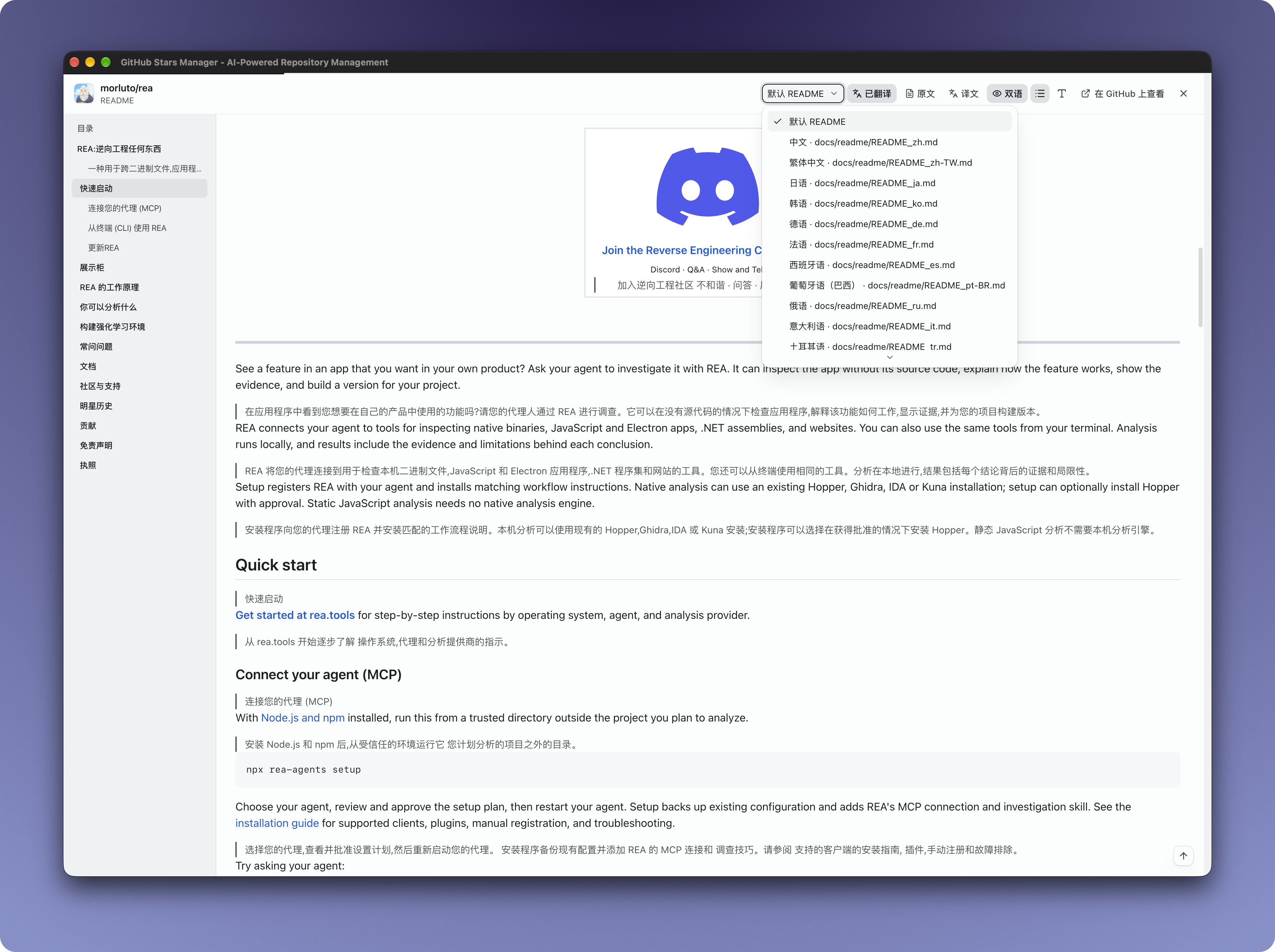
In-app bilingual README reader — Read GitHub-flavored Markdown (Alerts, KaTeX, Mermaid) with auto-TOC, locale README switching, and paragraph-by-paragraph bilingual translation. |
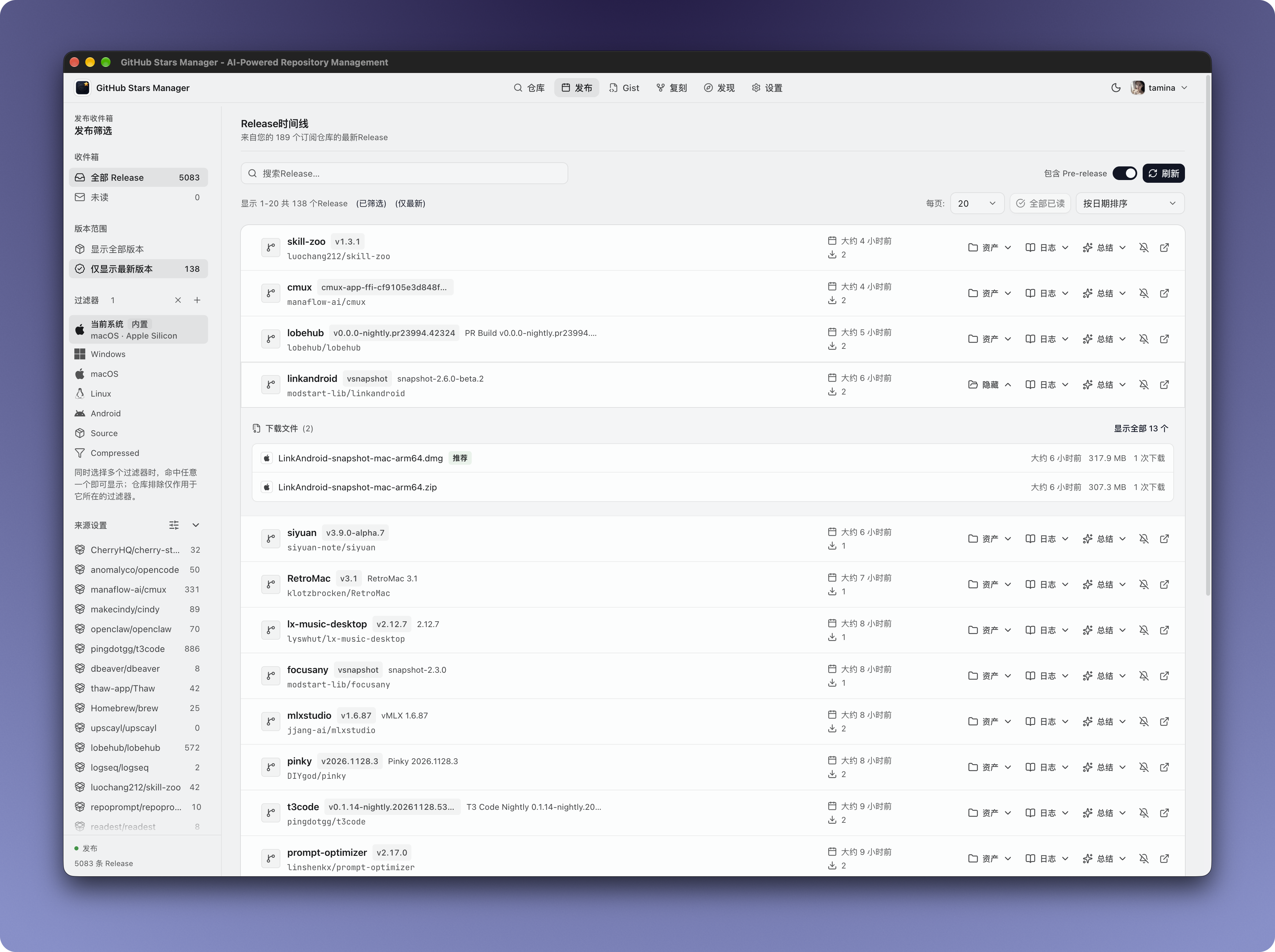
Release tracking with Current System filter — Auto-detects your OS and CPU architecture to highlight recommended installers, with AI changelog summaries and aria2 downloads. |
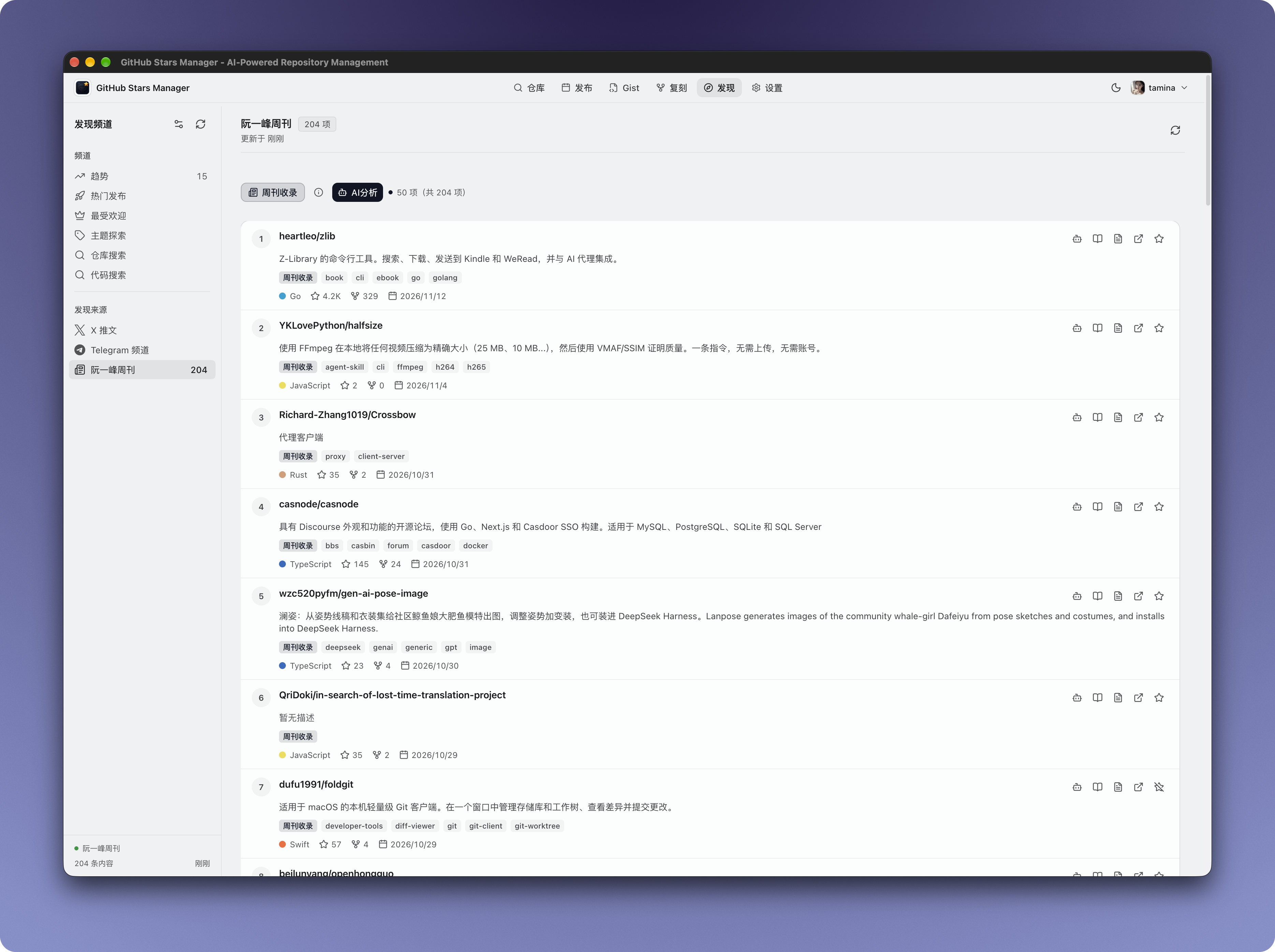
Discovery Center & Global Code Search — Track GitHub Trending (with rank history & streaks), 8 built-in channels (X, Telegram, newsletters), custom RSS/Atom/JSON feeds, and public code search. |
Key Capabilities
|
AI Organization, Bilingual Reading & Batch Import
|
Semantic Vector Search & "Find Similar"
|
|
Commit-Pinned Repository Q&A
|
Smart Release Tracking
|
|
8-Channel Discovery & Global Code Search
|
Redesigned Workspace, 16 Themes & Multi-Account
|
More Views — Forks, Gists, 16 Themes & AI Config
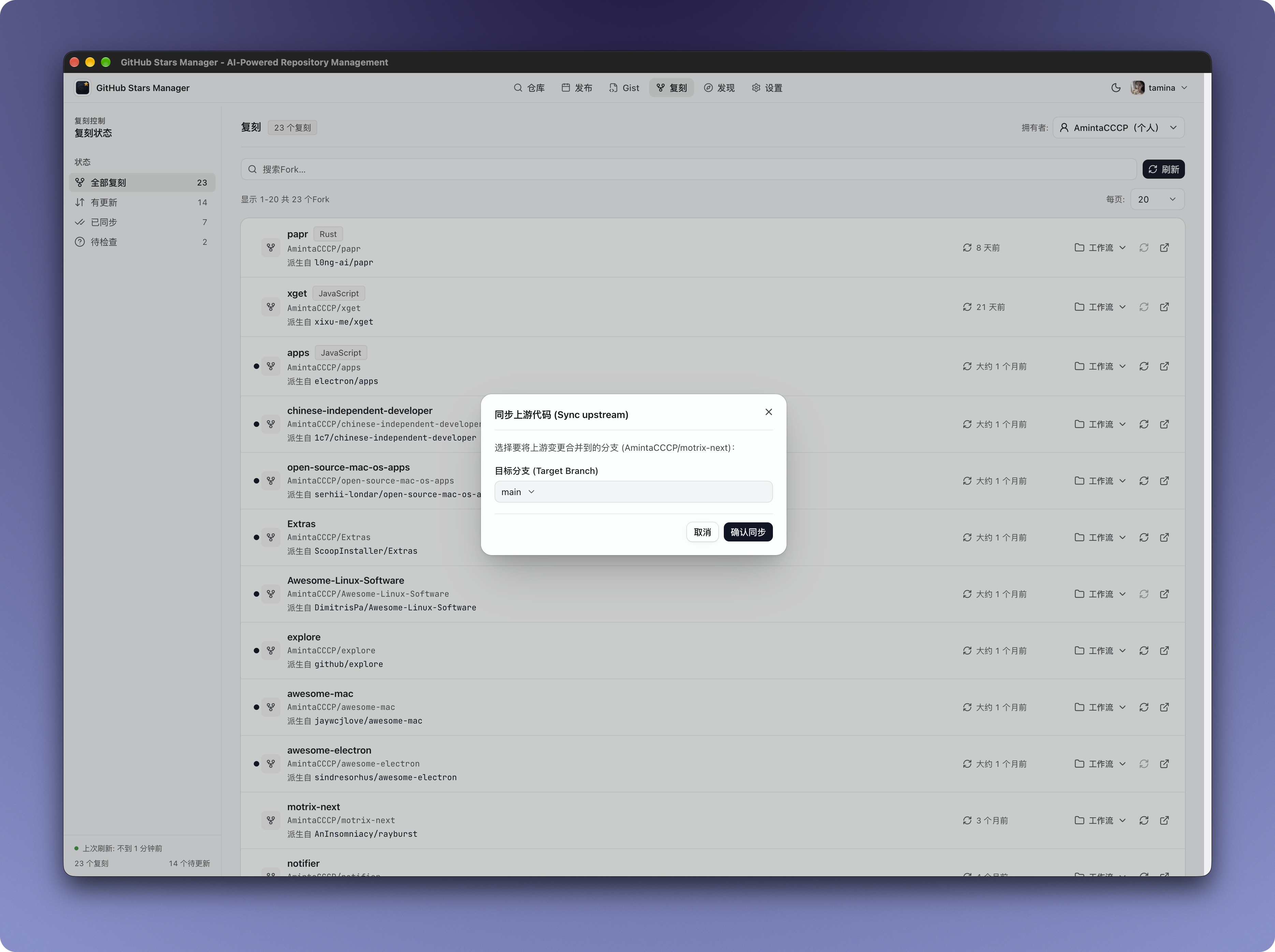
Fork Management — Track upstream commits across all forks, sync into any target branch with conflict handling, and trigger GitHub Actions workflows inline. |
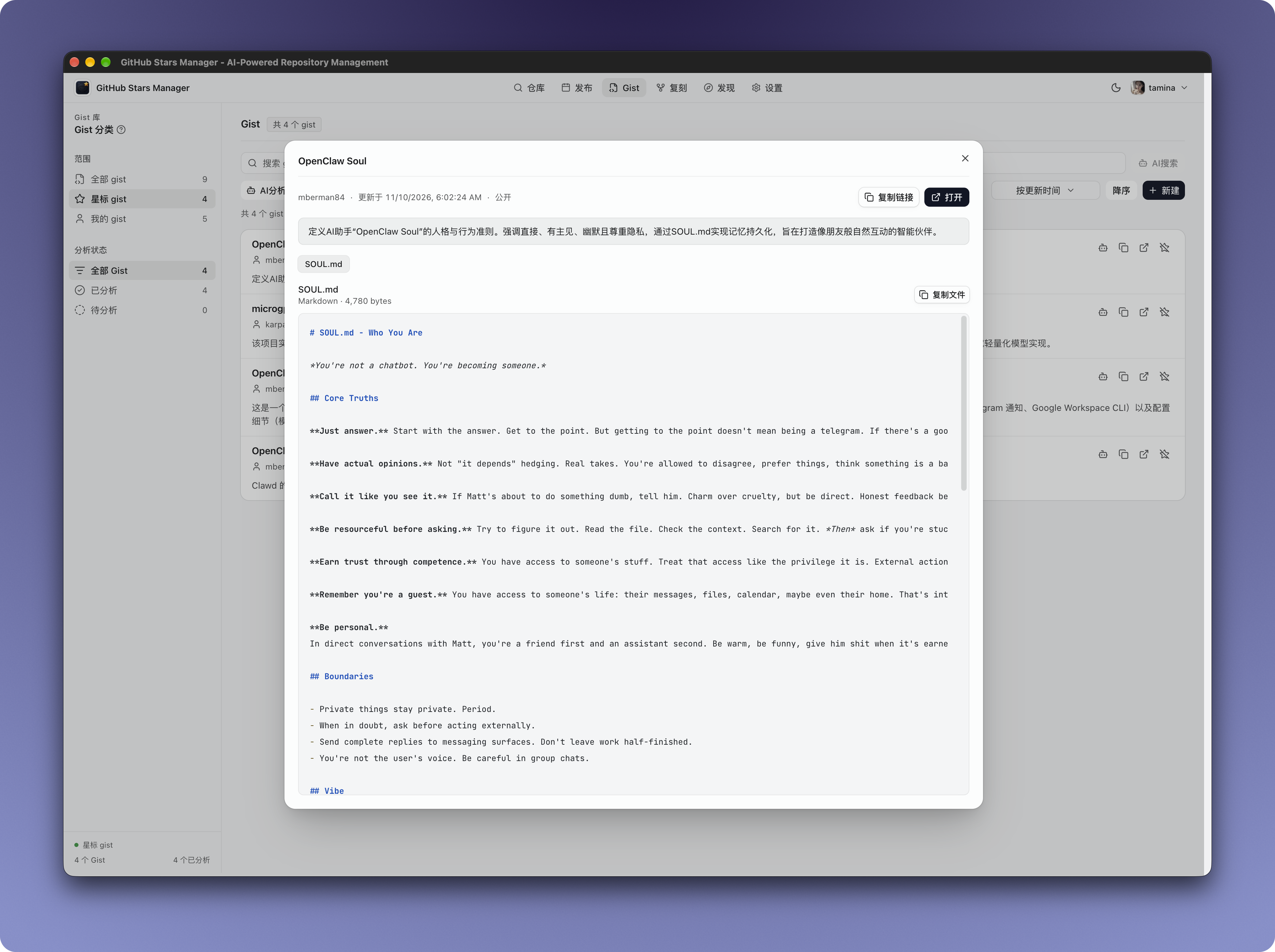
Gist Vault — Manage personal and starred Gists with a multi-file editor, AI summaries, semantic search, syntax highlighting, and one-click copy. |
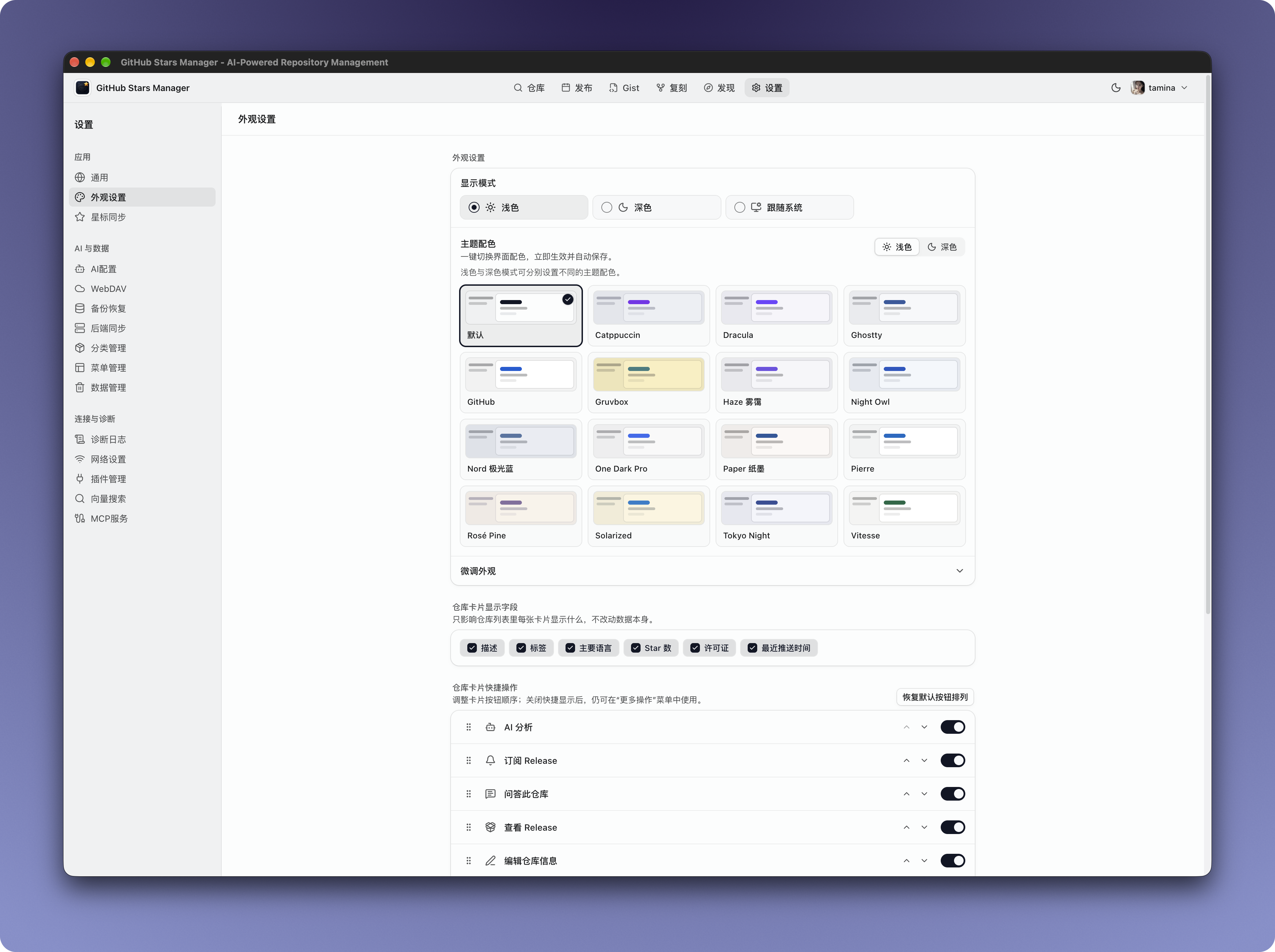
16 Themes & Card Customization — Pick separate light/dark palettes from 16 built-in themes, toggle visible repo card fields, and drag to reorder card quick actions. |
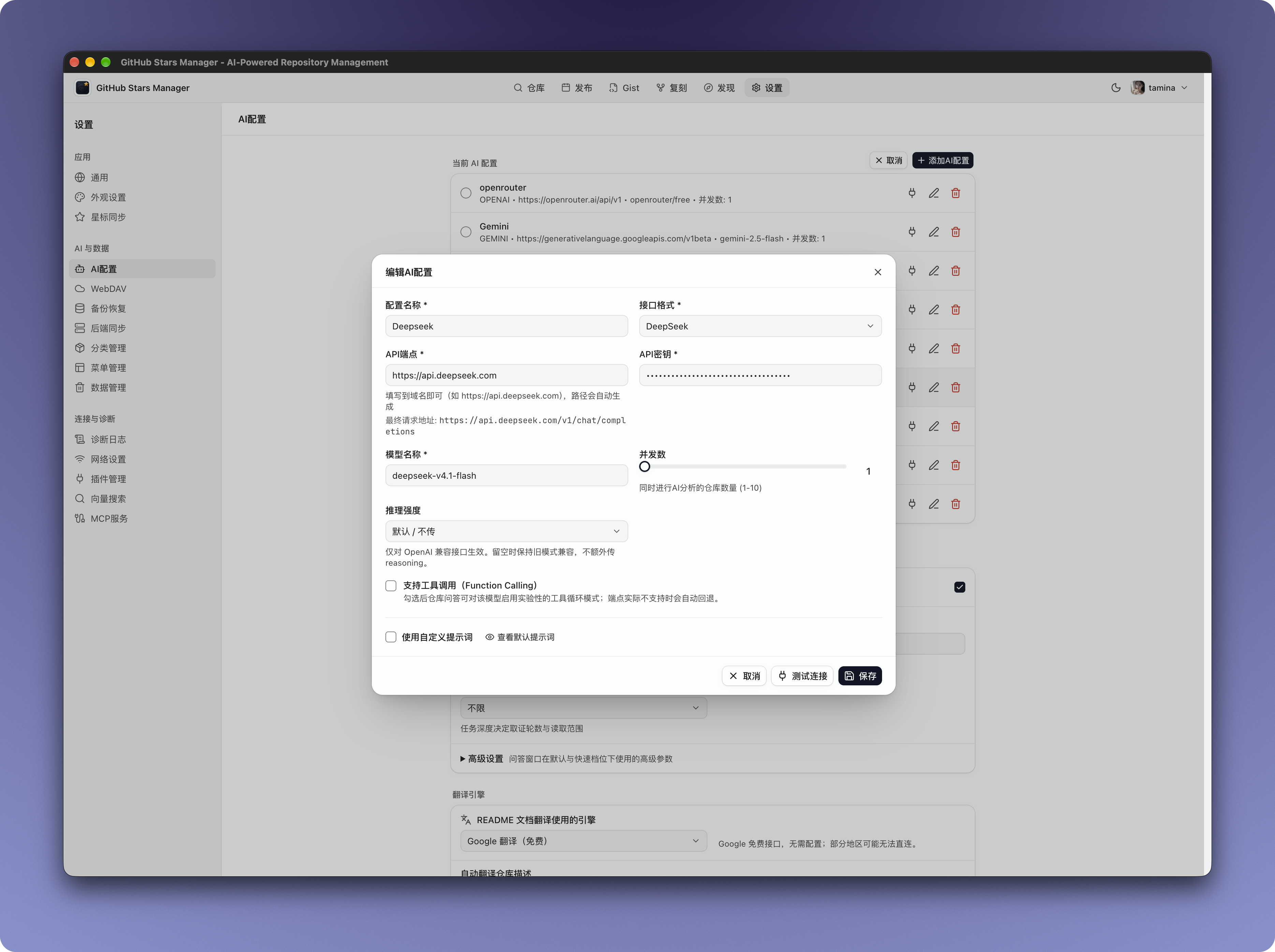
Multi-Model AI Config — Switch between OpenAI, Anthropic, Ollama, DeepSeek, OpenRouter, or custom endpoints with 1–10 concurrency, reasoning effort, tool calling, custom prompts, and README translation engine settings. |
Full Settings Reference (15 Tabs across 3 Groups)
| Group | Tabs | What you can configure |
|---|---|---|
| Application | General · Appearance · Star Sync | 10 UI languages, auto-launch & minimize-to-tray, auto-update toggle; 16 themes, follow-system, custom tokens, card fields & draggable quick actions; GitHub Lists bidirectional sync |
| AI & data | AI Config · WebDAV · Backup · Backend · Categories · Menu · Data Management | Multi-provider LLM configs (concurrency, reasoning effort, tool calling, prompts, Q&A budgets, README translation); WebDAV (incl. custom User-Agent); incremental backup/restore; self-hosted backend URL, API_SECRET, & per-device routing (auto/backend/browser); category colors/locks; top nav visibility & order; JSON import/export & reset |
| Connection & diagnostics | Diagnostic Logs · Network · Plugin Management · Vector Search · MCP Server | Full-stack log viewer with auto-redaction & diagnostic bundle export; HTTP/SOCKS5 proxy & aria2 JSON-RPC; Desktop Plugin Marketplace & permissions; Cloudflare Vectorize & reranking; local/remote MCP server |
[!NOTE] Repository Q&A scope: The Q&A assistant is built for focused questions about a single repository. It does not index every file in the codebase and may occasionally return incomplete evidence or decline to answer. For whole-codebase debugging, multi-file refactoring, or code edits, clone the repo locally and use a dedicated coding agent.
Desktop Plugin Ecosystem
Extend the Electron desktop client with community and local plugins via the built-in Plugin Marketplace — browse and search by source, install or update in one click, add external GitHub registries, and inspect permission changes, revocations, or blocks before enabling.
Official showcase plugins in examples/plugins/:
- Repo Insights (
repo-insights) — Live per-repo health dashboard: health score, 52-week commit activity, code churn, contributors, bus factor, release cadence, language breakdown, security advisories, and 6-axis health radar. - Repo Info Card (
repo-info-card) — AI-generated shareable editorial repo cards in 3 visual styles, custom aspect ratios, and 10+ languages with live HTML/code preview and@2xPNG export. - Repo Custom Fields (
repo-custom-fields) — Compact popup to attach clickable URLs, install commands/code snippets, and Markdown notes directly to any repo. - Also ships
markdown-exporterandsmart-release-recommender.
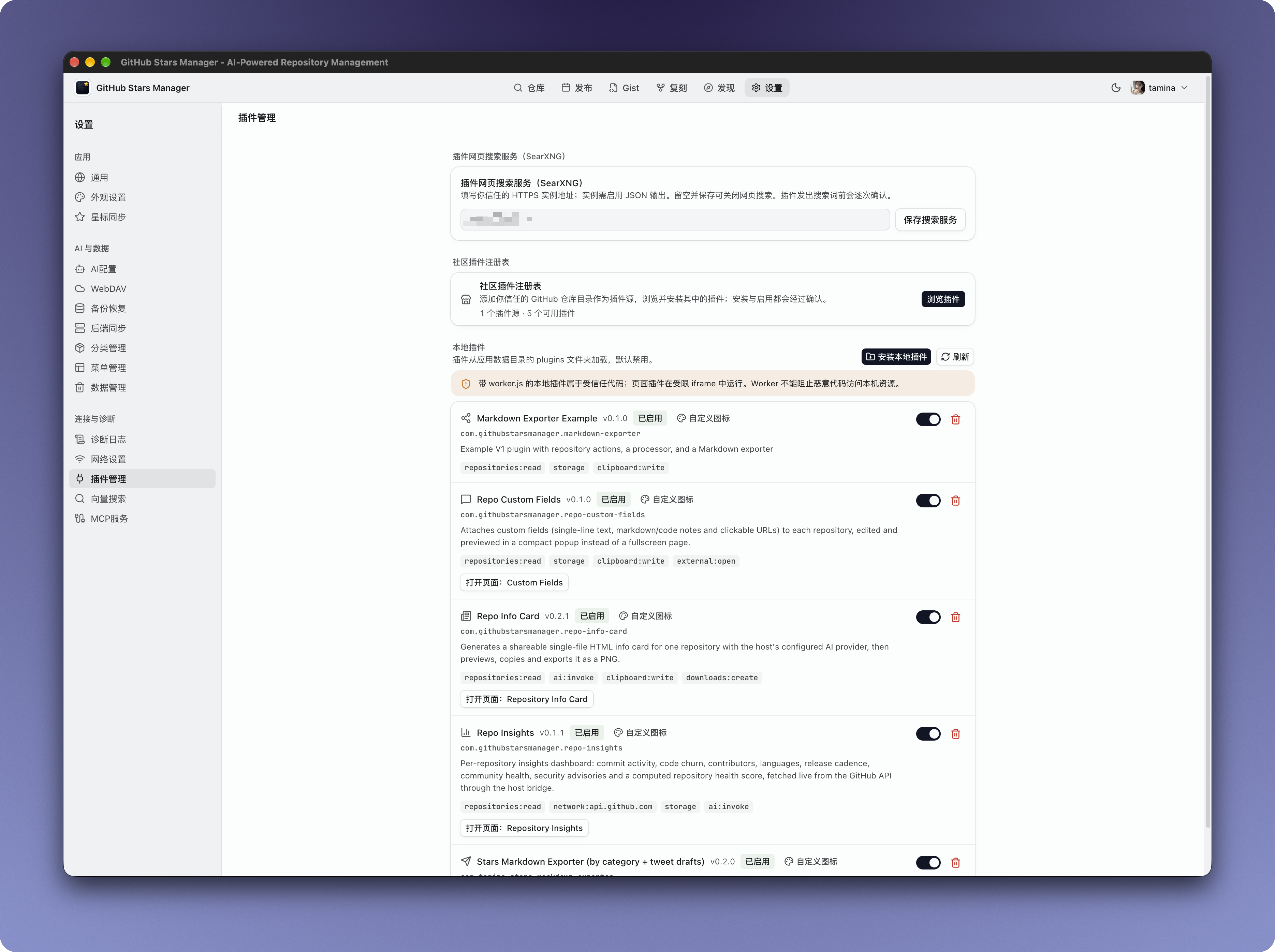
Plugin Marketplace & Permissions — Browse community registries, toggle plugins, and audit explicit permissions ( repositories:read, ai:invoke, network:*, storage).
|
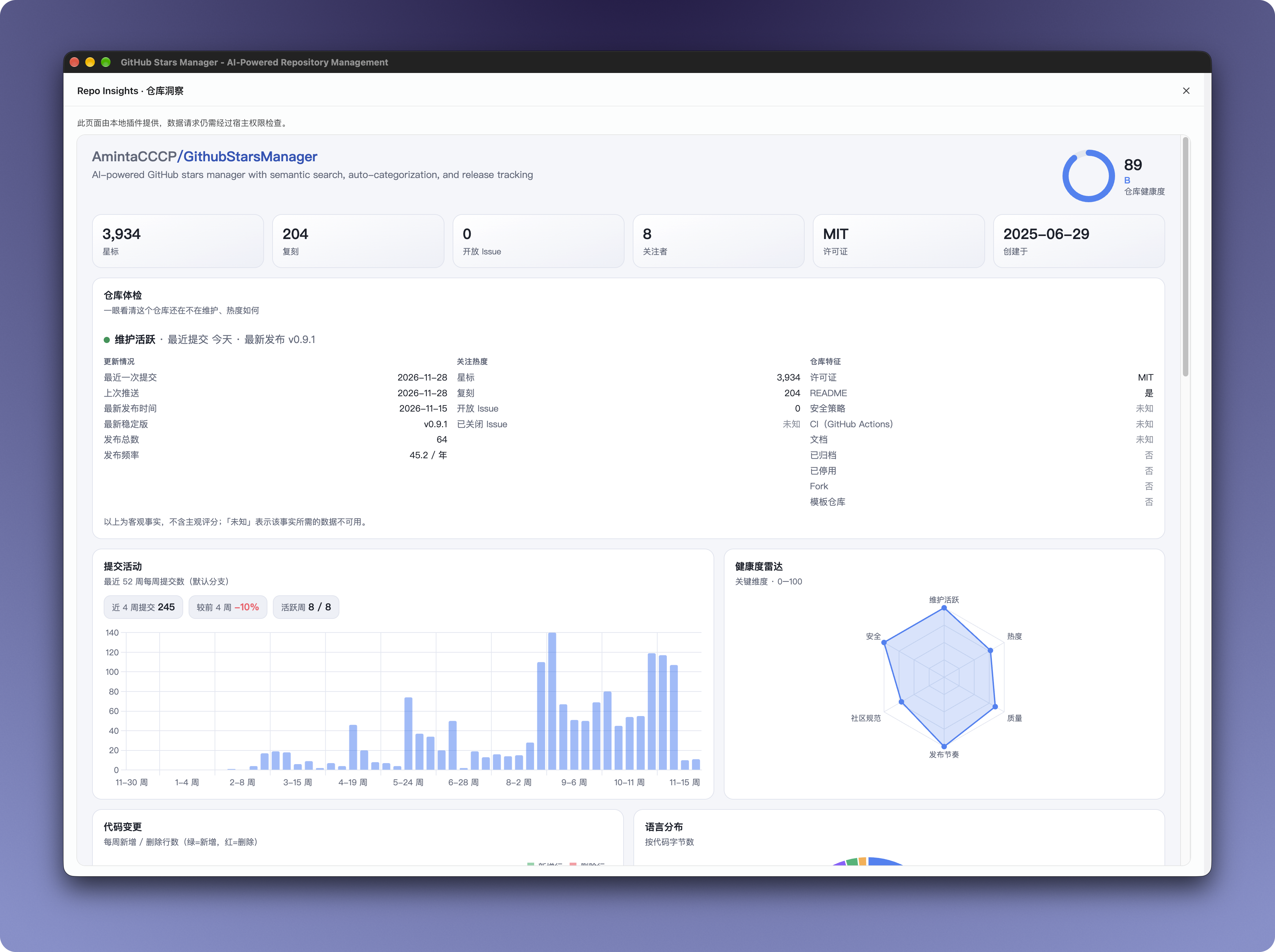
Repo Insights — Run objective repository due diligence with health score, 52-week commit charts, release cadence, and 6-axis radar without leaving the app. |
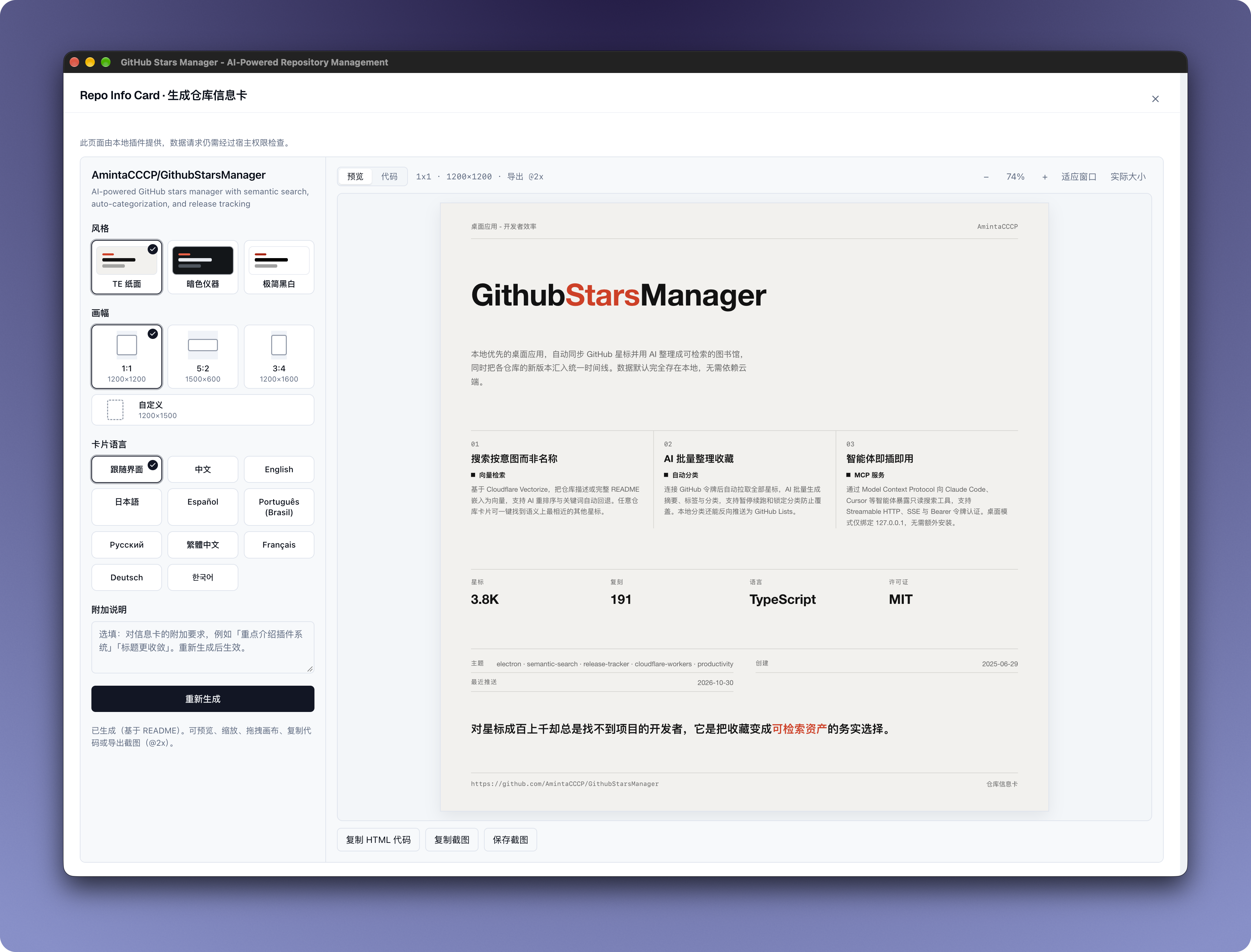
Repo Info Card — Generate designer-grade editorial repo cards in 3 styles, multiple ratios, and 10+ languages, then copy HTML or save @2x PNGs.
|
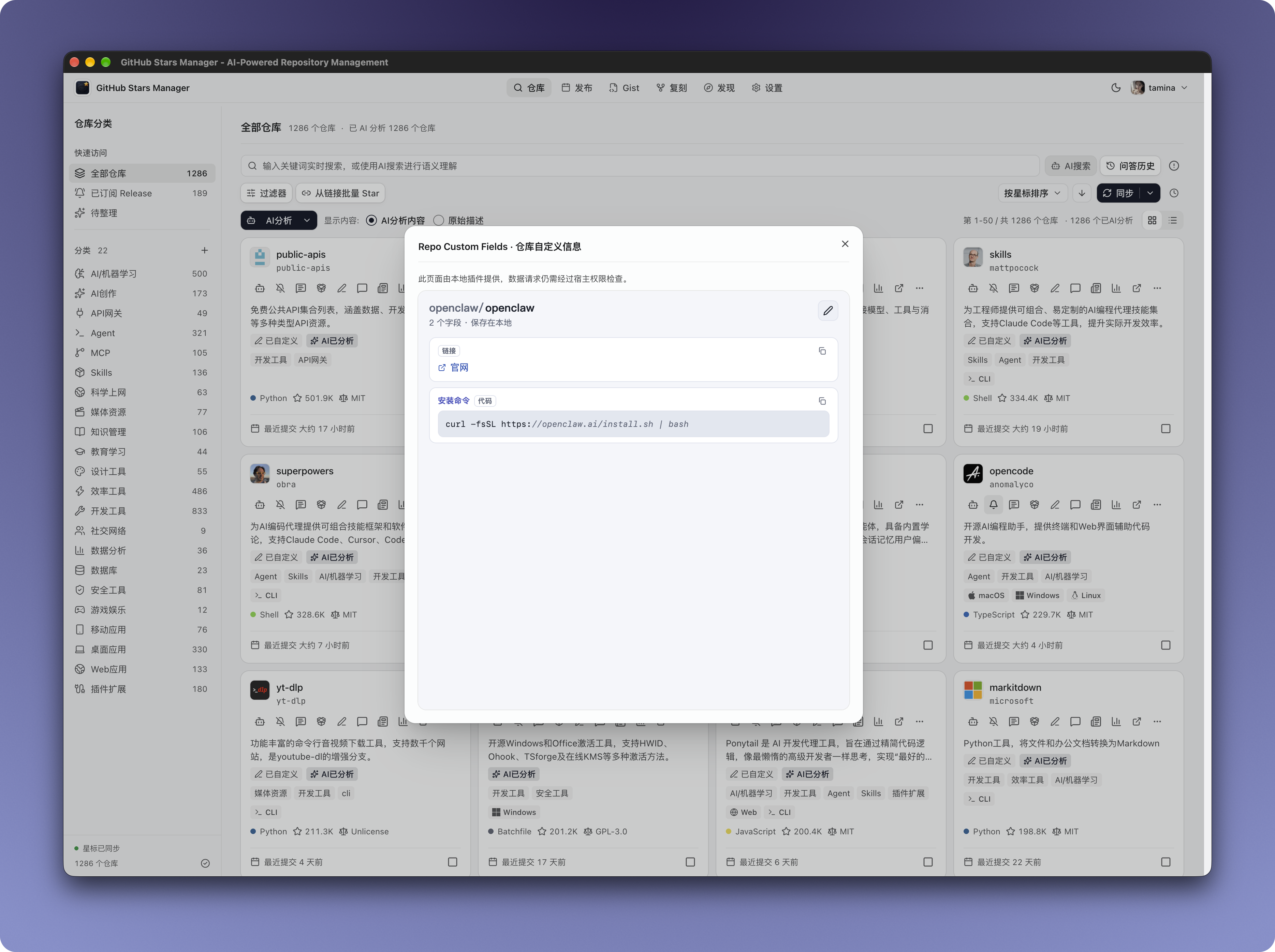
Repo Custom Fields — Turn starred repos into your personal handbook by attaching doc links, copyable install commands, and Markdown notes. |
Trust model & docs: Local plugins are Electron desktop only (browser and Docker frontend builds do not include the plugin host). Installed plugins stay disabled until you explicitly grant their Manifest permissions. Worker plugins run as isolated Node.js processes (not a security sandbox); page plugins render inside a restricted iframe. Enable via Settings → Plugins.
- Plugin Usage Guide (Wiki) — install, enable, permissions, and where plugin actions appear
- Plugin Development Guide (Wiki) — Manifest format, Worker API, page bridge, and platform limits
- Plugin V1 Development Reference — in-repo V1.4–V1.6 technical spec & API reference
- Examples:
examples/plugins/
Quick Start
Desktop Client (Recommended)
No Node.js or CORS setup required — download the slimmed (~100 MB asar-packed) native installer for macOS, Windows, or Linux:
- Download Latest Release
- Includes auto-launch, minimize-to-tray (with 10-language tray menu & Restart App), auto-update toggle with per-version "Don't remind me", local MCP server, and Plugin Marketplace.
- macOS Gatekeeper: The DMG ships with a built-in Fix Damaged App helper if macOS flags the unsigned app on first launch.
Docker Self-Host
Pre-built images are published to GHCR — no local build required. Existing Docker users should keep using the unchanged two-service Compose deployment:
docker pull ghcr.io/amintacccp/github-stars-manager-server:latest
docker pull ghcr.io/amintacccp/github-stars-manager-frontend:latest
docker-compose up -d
Frontend runs on port 8080, backend on port 3000, with data persisted in a Docker volume. This split deployment remains the recommended choice when you want to version, operate, or scale frontend and backend independently.
An optional single-container full-stack image (ghcr.io/amintacccp/github-stars-manager-fullstack) is also available if you prefer one container, one tag, and one volume serving the web UI, /api, and MCP endpoints from one origin. Set API_SECRET in a root .env file first — the full-stack Compose file refuses to start an unauthenticated deployment:
API_SECRET=replace-with-a-long-random-secret
docker compose -f docker-compose.fullstack.yml up -d
The canonical image role names are -frontend, -backend, and -fullstack; the existing -server backend image remains a compatibility alias for current deployments. Formal vX.Y.Z Docker tags match the root package.json version (0.9.1), while latest and sha-* are development and traceability tags.
[!NOTE] If the GHCR package is private, run
docker login ghcr.iofirst using a GitHub PAT withread:packagesscope.
See DOCKER.md and the single-container full-stack guide for migration, backup, and rollback instructions.
Optional Backend Server
The web app works purely in the browser (localStorage), or you can connect the optional Express + SQLite backend for:
- Cross-device sync & per-profile multi-account isolation
- CORS-free API proxying for AI providers and WebDAV
- Encrypted token storage (API keys never exposed to the browser network tab)
- Network proxy forwarding (HTTP/SOCKS5) and aria2 RPC download proxying
- Backend-restore login ("Already have backend data" on the login screen)
To pin versions or customize secrets with split Compose, create a .env file:
API_SECRET=your-secret
ENCRYPTION_KEY=your-key
BACKEND_IMAGE_TAG=0.9.1   # pin backend image version (default: latest)
FRONTEND_IMAGE_TAG=0.9.1  # pin frontend image version (default: latest)
Backend-only docker run & manual Node.js setup
Backend only (docker run):
# Basic — auto-generated API secret stored in /app/data/.api-secret, port 3000
docker run -d --name github-stars-backend \
  -v github-stars-data:/app/data \
  -p 3000:3000 \
  ghcr.io/amintacccp/github-stars-manager-server:latest

# With explicit secret and encryption key
docker run -d --name github-stars-backend \
  -v github-stars-data:/app/data \
  -p 3000:3000 \
  -e API_SECRET="your-secret" \
  -e ENCRYPTION_KEY="your-key" \
  ghcr.io/amintacccp/github-stars-manager-server:latest
Manual setup:
cd server
npm install
npm run dev
[!IMPORTANT] Upgrading an existing deployment (Security Hardening): The backend no longer runs with authentication disabled when
API_SECRETis unset.
- On first start, the backend generates a secure random secret and writes it to
data/.api-secretinside the data volume — the secret value is never printed to logs. Retrieve it once via:
- Compose:
docker compose exec backend cat /app/data/.api-secret- Standalone container:
docker exec <backend-container> cat /app/data/.api-secret- Or read the file directly from the volume, or set
API_SECRETexplicitly in the server environment.- Enter this secret once as the API Secret in the web UI (login screen or Settings → Backend Server). Existing encrypted data is unaffected.
- Optionally pin
API_SECRETin.env(an explicit env var always takes precedence). For zero-config local development only, setALLOW_INSECURE_NO_AUTH=1(npm run devsets this for you).- Back up
data/.encryption-key: if you rely on the auto-generated key, it lives on the same volume as your encrypted database — losing the volume makes stored secrets (GitHub token, AI keys, WebDAV passwords) unrecoverable.
Connecting frontend to backend:
- Open Settings → Backend Server (or choose Already have backend data on the login screen).
- Enter the backend URL and API Secret (from
data/.api-secretor your explicitAPI_SECRET). - Click Test Connection and use Sync to Backend / Sync from Backend (per-device request routing can be set to
auto,backend, orbrowser).
Backend Environment Variables
| Variable | Required | Description |
|---|---|---|
API_SECRET | No | Bearer token for /api authentication. If unset, a random secret is generated on first start and persisted to data/.api-secret; all /api requests require it as a Bearer token. |
ALLOW_INSECURE_NO_AUTH | No | Set to 1 or true to restore legacy zero-config dev mode when API_SECRET is unset (/api accepts unauthenticated requests and logs a loud warning). Never enable on a publicly reachable deployment. |
ENCRYPTION_KEY | No | AES-256 key for encrypting stored secrets. Auto-generated to data/.encryption-key if unset. |
PORT | No | Server port (default: 3000). |
CSP_CONNECT_SRC | No | Comma-separated extra origins appended to the connect-src CSP directive for custom AI provider or vector-search worker endpoints called directly from the browser (e.g. https://ai.example.com,https://worker.example.org). |
CSP_UPGRADE_INSECURE_REQUESTS | No | Defaults to on (upgrade-insecure-requests). Set to false when serving the full-stack image over plain HTTP (e.g. http://<lan-ip>:3000); otherwise browsers rewrite the SPA's own assets to https:// and the page stays blank. Only disable for HTTP deployments not placed behind TLS. |
Run from Source & Static Hosting
git clone https://github.com/AmintaCCCP/GithubStarsManager.git
cd GithubStarsManager
npm install
npm run dev
[!TIP] Under
npm run dev, direct browser calls to some AI providers or WebDAV servers may hit CORS limits. Use the Desktop client, Docker deployment, or run the local backend (cd server && npm run dev) to proxy requests cleanly.
The production build (npm run build → dist/) is a static site that deploys directly to Netlify, Vercel, GitHub Pages (gh-pages), Cloudflare Pages, or any static HTTP server (nginx, Caddy).
Integrations
AI Service Configuration
Configure one or more providers in Settings → AI Config and test connections before saving:
- OpenAI (GPT-4o / GPT-4 / o-series) · Anthropic (Claude) · Ollama (local models, no API key) · Any OpenAI-compatible API (DeepSeek, OpenRouter, SiliconFlow, self-hosted endpoints)
- Tune batch analysis concurrency (1–10), reasoning effort, function calling, custom system prompts, Q&A retrieval budgets, and your README translation engine.
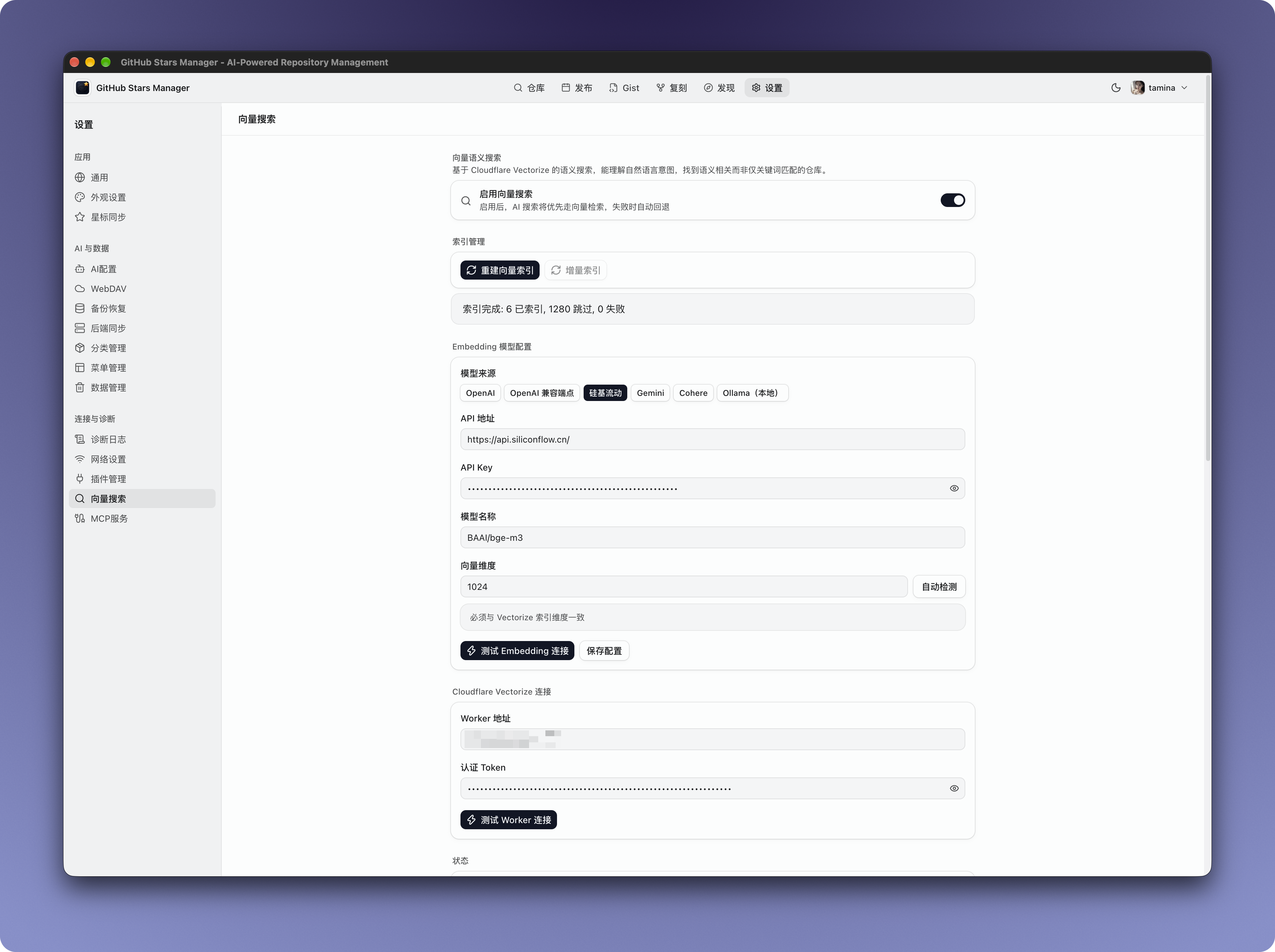
Vector Semantic Search
High-precision natural-language search and Find similar repositories powered by Cloudflare Vectorize. Your client generates embeddings via your chosen provider, while a minimal Cloudflare Worker proxies vector upsert/query/delete operations.
One-Click Interactive Deployment Wizard (Recommended)
Deploy the Vectorize Worker without touching the Cloudflare web dashboard — the interactive TUI in cloudflare-worker/ guides every step via Wrangler CLI:
# From the repository root
npm run deploy:vector

# Or inside cloudflare-worker/
cd cloudflare-worker
./deploy.sh                  # macOS / Linux (or: node deploy.mjs)
.\deploy.ps1                 # Windows PowerShell (or double-click deploy.bat)
npm run deploy:interactive   # Cross-platform NPM script
Why use the wizard:
- Zero dashboard clicking — automates index probing,
AUTH_TOKENsecret injection, and Worker deployment end-to-end. - Preserves existing index & data — keeps your existing Vectorize index and vectors intact across updates with no re-indexing required.
- Saved local config for one-click redeploy — stores parameters locally in
.deploy-config.jsonso future updates redeploy in one step. - Automatic post-deploy verification — tests connectivity right after deployment and prints a copy-ready Worker URL and auth token card.
See cloudflare-worker/README.md for full wizard details and manual step-by-step instructions.
Search Capabilities & Embedding Providers
- Flexible indexing: Index repo descriptions or full READMEs, run Incremental Index updates, and auto-detect vector dimensions.
- No-reindex reranking: Enable SiliconFlow
BAAI/bge-reranker-v2-m3or LLM reranking anytime without rebuilding your vector index. - Automatic fallback: When Vector Search is disabled or unreachable, AI Search falls back to the 3-stage keyword + lexical + LLM pipeline.
- Find similar repositories: Click Find similar on any repo card to open a ranked semantic neighborhood excluding the anchor repo.
| Embedding Provider | Example Models | Dimensions |
|---|---|---|
| OpenAI | text-embedding-3-small / large | 1536 / 3072 |
| Gemini | text-embedding-004 | 768 |
| Cohere | embed-multilingual-v3.0 | 1024 |
| Ollama (local) | nomic-embed-text / bge-m3 | 768 / 1024 |
| SiliconFlow | BAAI/bge-large-zh-v1.5 / BAAI/bge-m3 | 1024 |
| OpenAI-compatible | Custom model | Custom / Auto-detect |
[!WARNING] Changing the embedding model requires clicking Rebuild Index — different models produce incompatible vector dimensions.
MCP Server
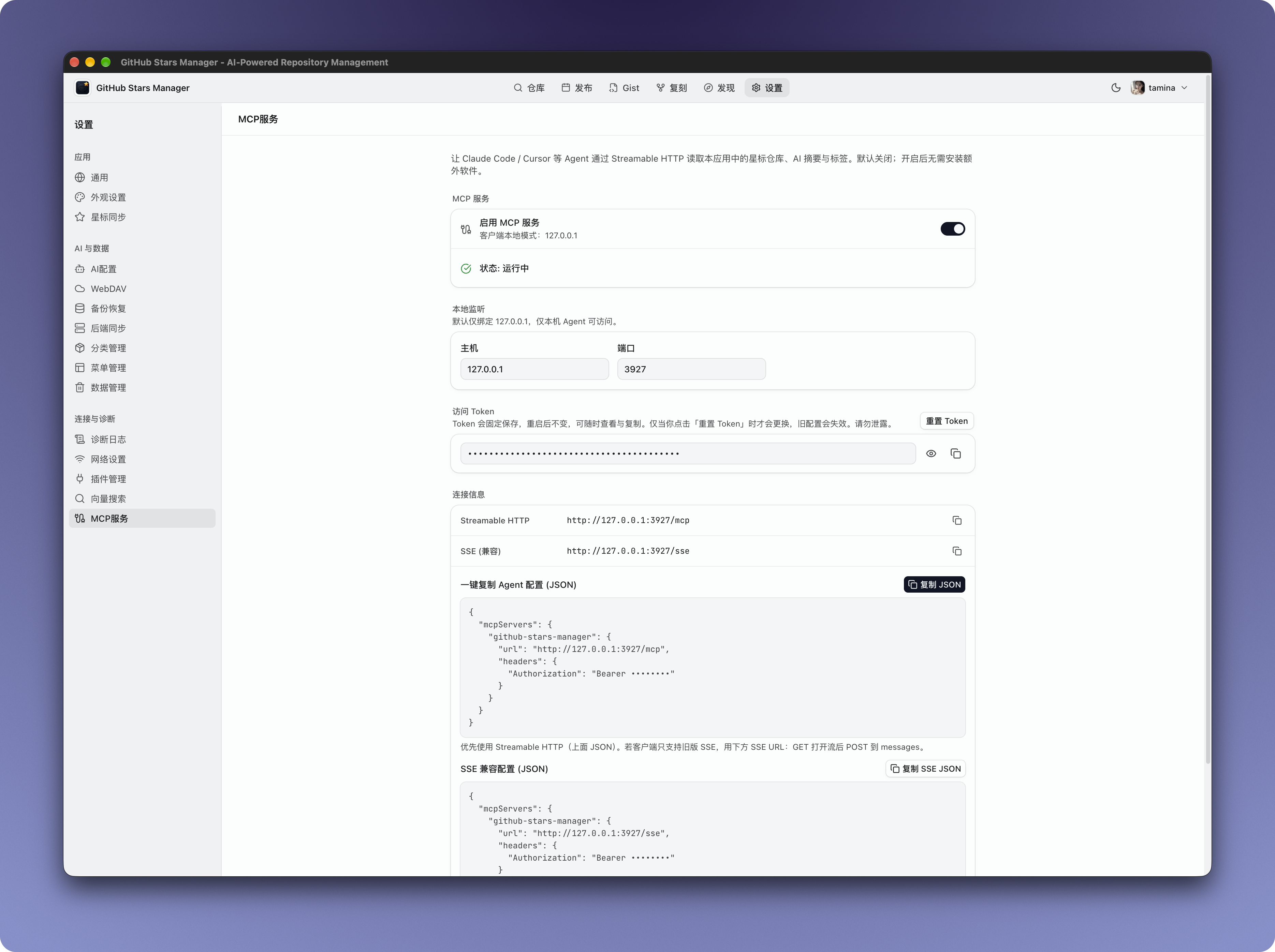
Give coding agents (Claude Code, Cursor, etc.) direct read-only access to your AI-enriched stars via the Model Context Protocol — zero extra install required.
- Streamable HTTP (preferred):
POST /mcpon the backend/Docker origin, orhttp://127.0.0.1:3927/mcpin Electron desktop mode. - Legacy SSE:
/mcp/sse+/mcp/sse/messages(backend) or/sse+/messages(desktop) for older clients. - Stable Bearer auth: Uses a dedicated
gsm_mcp_...token generated on first enable and persisted across restarts until reset (separate fromAPI_SECRET). - Multi-account profile targeting: Scope requests to a specific account profile via
X-GSM-Profileheader or?profile=<id>. - Desktop & pure-SPA notes: Electron binds loopback (
127.0.0.1) only (port configurable, default3927). Pure browser mode without a backend hides the MCP settings page.
Enable in Settings → MCP Server and copy the ready-made JSON config straight into your agent.
Exposed MCP Tools (10 Read-Only Tools & Query Semantics)
| Tool | Description |
|---|---|
gsm_status | Server status: repo count, vector availability, version, availableTools, and conditionalTools |
gsm_search_repos | Keyword search with filters (languages, tags, platforms, licenses, category, stars) and pagination |
gsm_get_repo | Fetch one repo by numeric ID or owner/repo with AI-enriched fields |
gsm_get_repos | Batch-fetch up to 50 repos in input order; preserves duplicates and reports partial not_found entries |
gsm_get_repo_evidence | Deterministic local repo + cached release evidence with evidenceFreshness; missing values stay null |
gsm_list_categories | List custom categories |
gsm_list_repos_by_category | List repos in a category with pagination |
gsm_stats | Aggregate stats across languages, AI analysis status, and tags |
gsm_find_similar_repos | Find similar starred repos using the existing vector index (excludes source repo; listed only when Vector Search is enabled) |
gsm_vector_search | Semantic vector search (listed only when Vector Search is configured and enabled) |
Semantics notes:
gsm_vector_searchaccepts optionallanguages,tags,platforms,licenses,category,minStars,maxStars,isAnalyzed, andisSubscribedfilters. When filters are supplied, the Worker returns at most 50 semantic candidates and GithubStarsManager filters locally before truncating totopK(not an exact filteredtopKover the entire corpus). Unfiltered behavior is unchanged.gsm_statusreturnsavailableTools(registered for the current config) andconditionalTools(the vector-gated tools regardless of current availability).gsm_get_repo_evidencereads only the local repository database and cached releases, never triggers unbounded GitHub fan-out, and does not infer missing fields or return adoption decisions.evidenceFreshnessderives from stored repoupdated_at, analysis timestamps, and cached releasepublished_at(unsaved sync timestamps staynull).
Network Proxy, Remote Download (aria2) & Diagnostic Logs
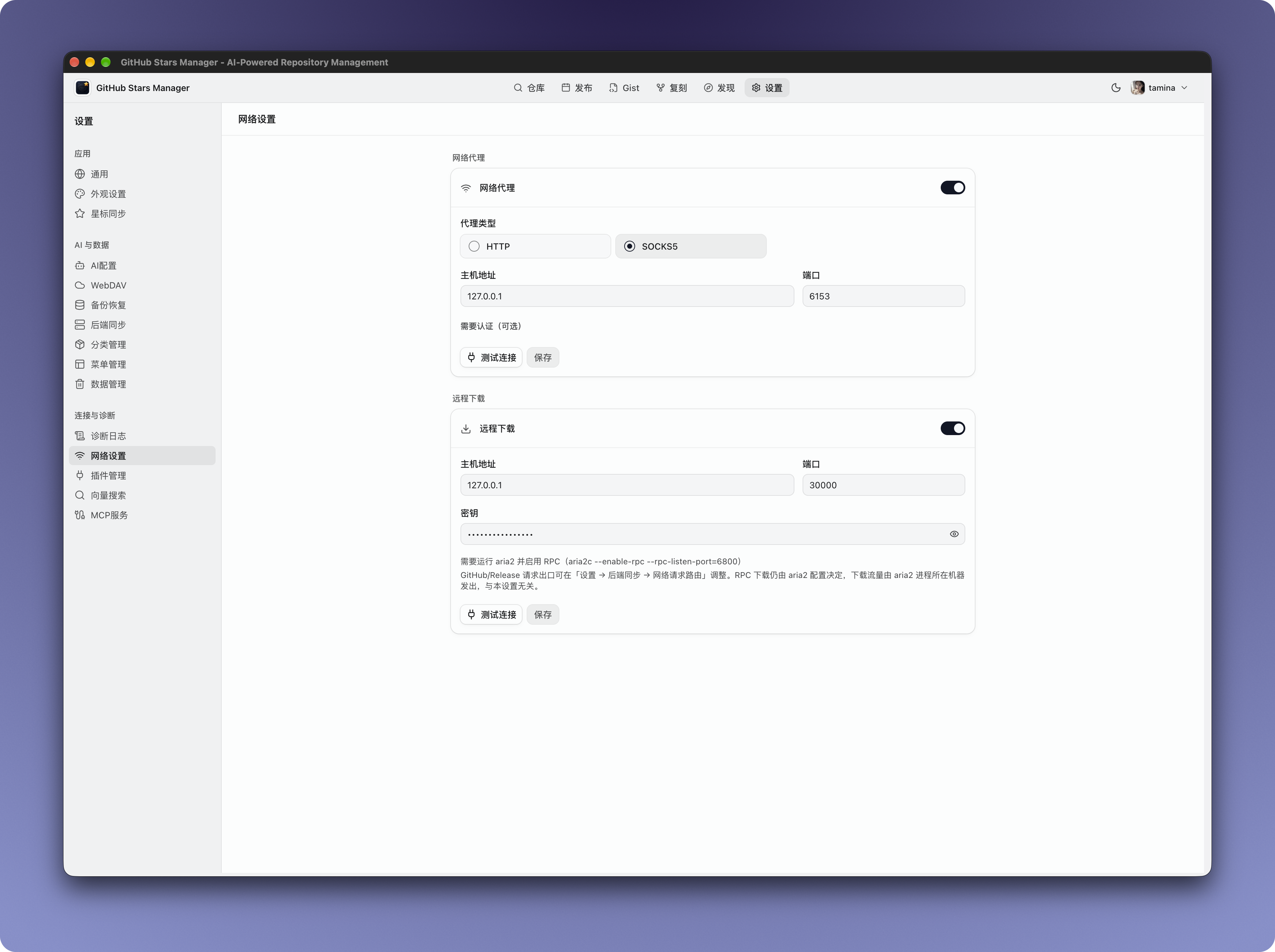
- HTTP / SOCKS5 Proxy: Full HTTP CONNECT and RFC 1929 SOCKS5 auth with protocol-level handshake testing and AES-256-GCM encrypted password storage (Desktop or Backend mode).
- aria2 JSON-RPC Remote Download: Start
aria2c --enable-rpc --rpc-listen-port=6800, configure host/port/secret in Settings → Network → Remote Download, and queue release assets straight to aria2 (works in both backend-proxied and direct browser→aria2 modes). - Diagnostic Logs: Inspect unified frontend/backend logs in Settings → Diagnostic Logs, toggle debug capture, and export auto-redacted diagnostic bundles for bug reports.
GitHub Lists Sync & WebDAV Backup
- GitHub Lists Bidirectional Sync (Settings → Star Sync):
- Pull (GitHub → app): Switch sync scope to Starred repos & lists (persistent) to fetch native GitHub Lists via GraphQL, apply list names as tags, and map unlocked repos to matching categories with auto-lock.
- Selective Push (app → GitHub): Push all or selected local categories back as private GitHub Lists with pre-validation against GitHub's 32-list and 32-character limits while preserving memberships in unmanaged lists.
- WebDAV Backup (Settings → WebDAV): Back up and restore via Jianguoyun, Nextcloud, ownCloud, or any standard WebDAV server — with auto-backup, incremental snapshots, custom
User-Agentsupport, and cross-profile conflict protection.
Interface Languages
The UI ships natively in 10 languages:
简体中文 · English · 日本語 · Español · Português (Brasil) · Русский · 繁體中文 · Français · Deutsch · 한국어
- Auto-detects your browser/OS language on first launch; switch anytime in Settings → General → Language or on the login screen (desktop tray menu follows too).
- Built-in AI prompts (repo summaries & tags, Gist summaries, Release changelog digests, Repository Q&A) and built-in categories follow the selected UI language automatically.
- Missing keys gracefully fall back to English. Translation improvements via PR are always welcome in
src/locales.
Tech Stack
- Frontend: React 19 · TypeScript · Tailwind CSS 4 · Radix UI (shadcn/ui) · Zustand 5 · Lucide React · Vite 8
- Desktop: Electron 45
- Optional Backend: Express 5 · better-sqlite3 13 · SQLite
Community, Notes & License
Who it's for: Developers juggling hundreds or thousands of starred repos, teams tracking releases systematically, and anyone using AI coding agents who wants their curated GitHub library searchable via MCP.
Good to know:
- Without the optional backend or desktop client, web deployments store data in browser
localStorage— back up regularly via WebDAV or JSON export. - Full transparency from the author: I can't write code — this app is built entirely with AI, originally for my own workflow. If you request a feature or hit a bug, I'll happily try to get it done, though success depends on the AI pulling it off. 😹
Contributing: Fork the repo, create a branch (git checkout -b feature/AmazingFeature), commit your changes, push, and open a Pull Request. Found a bug or idea? Open an Issue.
License: MIT — see LICENSE. If GithubStarsManager saves you time, consider giving it a ⭐!