whichllm


Find the best local LLM that actually runs on your hardware.
Auto-detects your GPU/CPU/RAM and ranks the top models from HuggingFace that fit your system.
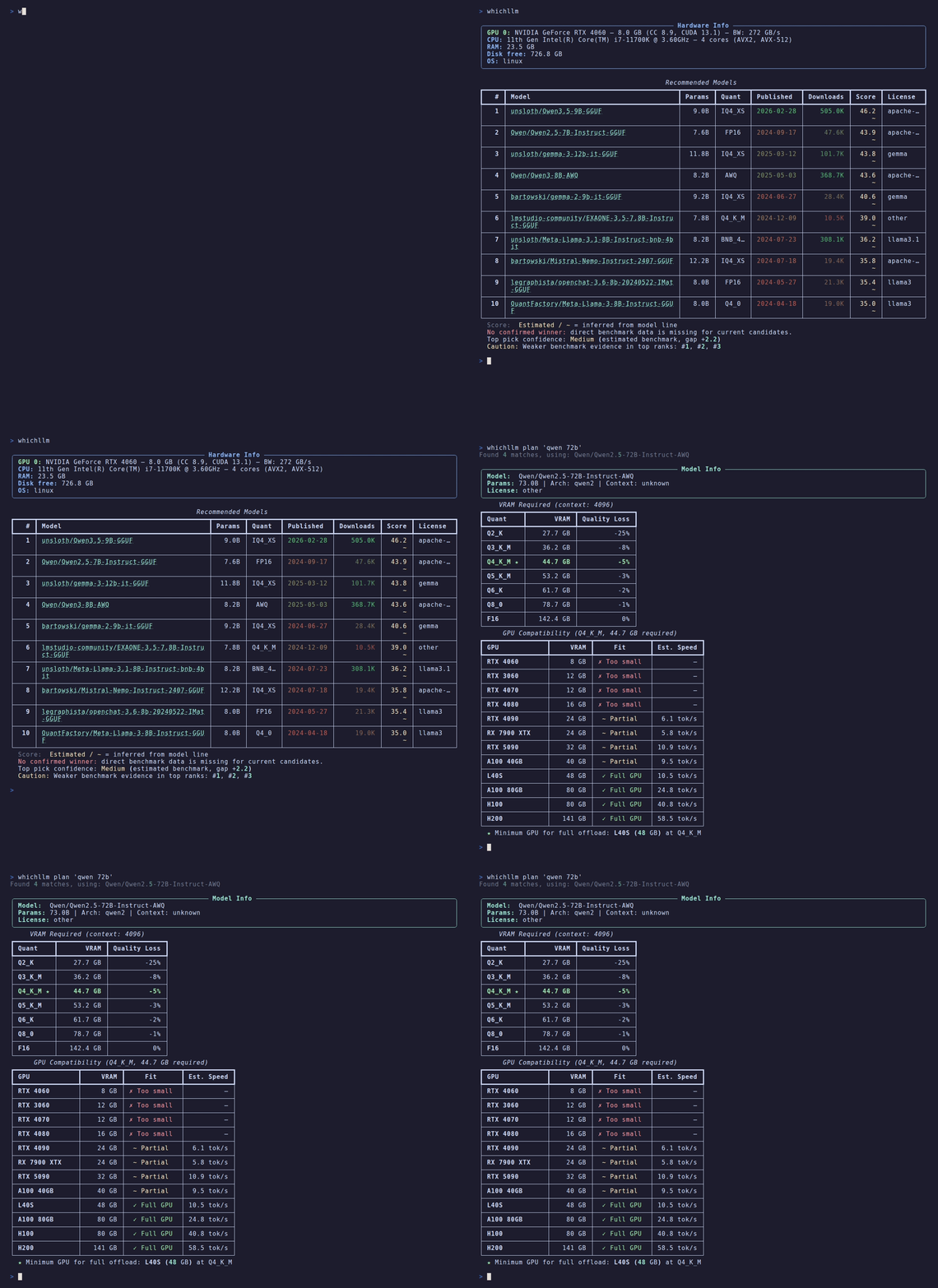
See it
$ whichllm --gpu "RTX 4090"

#1  Qwen/Qwen3.6-27B     27.8B  Q5_K_M   score 92.8    27 t/s
#2  Qwen/Qwen3-32B       32.0B  Q4_K_M   score 83.0    31 t/s
#3  Qwen/Qwen3-30B-A3B   30.0B  Q5_K_M   score 82.7   102 t/s
The 32B model fits your card fine — whichllm still ranks the 27B #1, because it scores higher on real benchmarks and is a newer generation. A size-only "what fits?" tool would hand you the bigger one. That gap is the whole point of whichllm. (Note #3: a MoE model at 102 t/s — speed is ranked on active params, quality on total.)
What can I run?
Real top picks (snapshot 2026-05 — your results track live HuggingFace data, this is not a static list):
| Hardware | VRAM | Top pick | Speed |
|---|---|---|---|
| RTX 5090 | 32 GB | Qwen3.6-27B · Q6_K · score 94.7 | ~40 t/s |
| RTX 4090 / 3090 | 24 GB | Qwen3.6-27B · Q5_K_M · score 92.8 | ~27 t/s |
| RTX 4060 | 8 GB | Qwen3-14B · Q3_K_M · score 71.0 | ~22 t/s |
| Apple M3 Max | 36 GB | Qwen3.6-27B · Q5_K_M · score 89.4 | ~9 t/s |
| CPU only | — | gpt-oss-20b (MoE) · Q4_K_M · score 45.2 | ~6 t/s |
whichllm --gpu "<your card>" to simulate any of these before you buy.
Useful? A GitHub star helps other people find it — and I'd genuinely like to know what it picked for your rig: drop it in Issues.
Star History
Why whichllm?
Fitting a model into your VRAM is the easy part. The hard part is knowing which of the models that fit is actually the best — and that is what whichllm is built to get right.
- Evidence-based ranking, not a size heuristic — The top pick is chosen from merged real benchmarks (LiveBench, Artificial Analysis, Aider, multimodal/vision, Chatbot Arena ELO, Open LLM Leaderboard) — never "the biggest model that happens to fit."
- Recency-aware — Stale leaderboards are demoted along each model's lineage, so a 2024 model can't outrank a current-generation one on an outdated score. The benchmark snapshot date is printed under every ranking, so a stale recommendation is self-evident instead of silently trusted.
- Evidence-graded and guarded — Every score is tagged
direct/variant/base/interpolated/self-reportedand discounted by confidence. Fabricated uploader claims and cross-family inheritance (a small fork borrowing its much larger base's score) are actively rejected. - Architecture-aware estimates — VRAM = weights + GQA KV cache + activation + overhead; speed is bandwidth-bound with per-quant efficiency, per-backend factors, MoE active-vs-total split, and unified-memory vs discrete-PCIe partial-offload modeling.
- One command, scriptable —
whichllmprints the answer; add--json | jqfor pipelines. No TUI, no keybindings to memorize. - Live data — Models fetched directly from the HuggingFace API, with curated frozen fallbacks for offline or rate-limited use.
Features
- Auto-detect hardware — NVIDIA, AMD, Apple Silicon, CPU-only
- Smart ranking — Scores models by VRAM fit, speed, and benchmark quality
- One-command chat —
whichllm rundownloads and starts a chat session instantly - Code snippets —
whichllm snippetprints ready-to-run Python for any model - Live data — Fetches models directly from HuggingFace (cached for performance)
- Benchmark-aware — Integrates real eval scores with confidence-based dampening
- Task profiles — Filter by general, coding, vision, or math use cases
- GPU simulation — Test with any GPU:
whichllm --gpu "RTX 4090" - Hardware planning — Reverse lookup:
whichllm plan "llama 3 70b" - JSON output — Pipe-friendly:
whichllm --json
Run & Snippet
Try any model with a single command. No manual installs needed — whichllm creates an isolated environment via uv, installs dependencies, downloads the model, and starts an interactive chat.

# Chat with a model (auto-picks the best GGUF variant)
whichllm run "qwen 2.5 1.5b gguf"

# Auto-pick the best model for your hardware and chat
whichllm run

# CPU-only mode
whichllm run "phi 3 mini gguf" --cpu-only
Works with all model formats:
- GGUF — via
llama-cpp-python(lightweight, fast) - AWQ / GPTQ — via
transformers+autoawq/auto-gptq - FP16 / BF16 — via
transformers
Get a copy-paste Python snippet instead:
whichllm snippet "qwen 7b"
from llama_cpp import Llama

llm = Llama.from_pretrained(
    repo_id="Qwen/Qwen2.5-7B-Instruct-GGUF",
    filename="qwen2.5-7b-instruct-q4_k_m.gguf",
    n_ctx=4096,
    n_gpu_layers=-1,
    verbose=False,
)

output = llm.create_chat_completion(
    messages=[{"role": "user", "content": "Hello!"}],
)
print(output["choices"][0]["message"]["content"])
Install
uv (recommended)
uvx whichllm
To install permanently:
uv tool install whichllm
Homebrew
brew install andyyyy64/whichllm/whichllm
pip
pip install whichllm
Development
git clone https://github.com/Andyyyy64/whichllm.git
cd whichllm
uv sync --dev
uv run whichllm
uv run pytest
Usage
# Auto-detect hardware and show best models
whichllm

# Simulate a GPU (e.g. planning a purchase)
whichllm --gpu "RTX 4090"
whichllm --gpu "RTX 5090"
# Specify variant
whichllm --gpu "RTX 5060 16"


# CPU-only mode
whichllm --cpu-only

# More results / filters
whichllm --top 20
whichllm --quant Q4_K_M
whichllm --min-speed 30
whichllm --evidence base   # allow id/base-model matches
whichllm --evidence strict # id-exact only (same as --direct)
whichllm --direct

# JSON output
whichllm --json

# Force refresh (ignore cache)
whichllm --refresh

# Show hardware info only
whichllm hardware

# Plan: what GPU do I need for a specific model?
whichllm plan "llama 3 70b"
whichllm plan "Qwen2.5-72B" --quant Q8_0
whichllm plan "mistral 7b" --context-length 32768

# Run: download and chat with a model instantly
whichllm run "qwen 2.5 1.5b gguf"
whichllm run                       # auto-pick best for your hardware

# Snippet: print ready-to-run Python code
whichllm snippet "qwen 7b"
whichllm snippet "llama 3 8b gguf" --quant Q5_K_M
Integrations
Ollama
Find the best model and run it directly:
# Pick the top model and run it with Ollama
whichllm --top 1 --json | jq -r '.models[0].model_id' | xargs ollama run

# Find the best coding model
whichllm --profile coding --top 1 --json | jq -r '.models[0].model_id' | xargs ollama run
Shell alias
Add to your .bashrc / .zshrc:
alias bestllm='whichllm --top 1 --json | jq -r ".models[0].model_id"'
# Usage: ollama run $(bestllm)
Scoring
Each model gets a 0-100 score. Benchmark quality and size form the core; evidence confidence and runtime fit then scale it, with speed, source trust, and popularity as adjustments.
| Factor | Effect | Description |
|---|---|---|
| Benchmark quality | core | Merged LiveBench / Artificial Analysis / Aider / Vision / Arena ELO / Open LLM Leaderboard, weighted by source confidence |
| Model size | up to 35 | log2-scaled world-knowledge proxy (MoE uses total params) |
| Quantization | × penalty | Lower-bit quants discounted multiplicatively |
| Evidence confidence | ×0.55–1.0 | none / self-reported ×0.55, inherited ×0.78, direct full |
| Runtime fit | ×0.50–1.0 | partial-offload ×0.72, CPU-only ×0.50 |
| Speed | -8 to +8 | Usability gate vs a fit-dependent tok/s floor |
| Source trust | -5 to +5 | Official-org bonus, known-repackager penalty |
| Popularity | tie-breaker | Downloads/likes; weight shrinks as evidence strengthens |
Score markers:
~(yellow) — No direct benchmark; score inherited/interpolated from the model family?(yellow) — No benchmark data available
How it works
Data pipeline
-
Model fetching — Fetches popular models from HuggingFace API:
- Text-generation (downloads + recently updated)
- GGUF-filtered (separate query for coverage)
- Vision models (
image-text-to-text) when--profile visionorany
-
Benchmark sources — Current tier (LiveBench, Artificial Analysis Index, Aider) merged live when reachable, plus a curated multimodal / vision index; frozen tier (Open LLM Leaderboard v2, Chatbot Arena ELO). Tiers have separate caps and lineage-aware recency demotion so stale leaderboards stop over-rewarding older generations.
-
Benchmark evidence — Five resolution levels, increasingly discounted:
direct— Exact model ID matchvariant— Suffix-stripped or -Instruct variantbase_model— Base model from cardDataline_interp— Size-aware interpolation within model familyself_reported— Uploader-claimed eval (heavily discounted)
Inheritance is rejected when a model's params diverge more than 2× from its family's dominant member, catching draft / MTP / abliterated forks that share a
family_idwith a much larger base. -
Cache —
~/.cache/whichllm/:models.json— 6h TTLbenchmark.json— 24h TTL
Ranking engine
- Hardware detection — NVIDIA (nvidia-ml-py), AMD (dbgpu/ROCm), Apple Silicon (Metal), CPU cores, RAM, disk
- VRAM estimation — Weights + KV cache + activation + framework overhead (~500MB)
- Compatibility — Full GPU / Partial Offload / CPU-only; compute capability and OS checks
- Speed — tok/s from GPU memory bandwidth lookup (constants.py)
- Scoring — Benchmark (with confidence dampening), size, quantization penalty, fit type, speed, popularity, source trust (official vs repackager)
- Backend filter — Apple Silicon and CPU-only restrict to GGUF for stability; Linux+NVIDIA allows AWQ/GPTQ
Project structure
src/whichllm/
├── cli.py              # Typer CLI: main, plan, run, snippet, hardware
├── constants.py        # GPU bandwidth, quantization bytes, compute capability
├── hardware/
│   ├── detector.py     # Orchestrates GPU/CPU/RAM detection
│   ├── nvidia.py       # NVIDIA GPU via nvidia-ml-py
│   ├── amd.py          # AMD GPU (Linux)
│   ├── apple.py        # Apple Silicon (Metal)
│   ├── cpu.py          # CPU name, cores, AVX support
│   ├── memory.py       # RAM and disk free
│   ├── gpu_simulator.py # --gpu flag: synthetic GPU from name
│   └── types.py        # GPUInfo, HardwareInfo
├── models/
│   ├── fetcher.py      # HuggingFace API, model parsing, evalResults
│   ├── benchmark.py    # Arena ELO, Leaderboard (parquet/rows API)
│   ├── grouper.py      # Family grouping by base_model and name
│   ├── cache.py        # JSON cache with TTL
│   └── types.py        # ModelInfo, GGUFVariant, ModelFamily
├── engine/
│   ├── vram.py         # VRAM = weights + KV cache + activation + overhead
│   ├── compatibility.py# Fit type, disk check, compute/OS warnings
│   ├── performance.py  # tok/s from bandwidth
│   ├── quantization.py # Bytes per weight, quality penalty, non-GGUF inference
│   ├── ranker.py       # Scoring, evidence filter, profile/match
│   └── types.py        # CompatibilityResult
└── output/
    └── display.py      # Rich table, JSON output, hardware/plan displays
Contributing
Contributions are welcome! See CONTRIBUTING.md for guidelines.
Requirements
- Python 3.11+
- NVIDIA GPU detection via
nvidia-ml-py(included by default) - AMD / Apple Silicon detected automatically
License
MIT