







FrontierAgent
FrontierAgent is an open-source agent runtime, terminal product, and evaluation
suite for long-horizon research and file-based work. The frontier-agent TUI
ships two native workflows:
- ReAct — one stateful agent researches, reads files, writes deliverables, runs commands, and iterates in a task-scoped sandbox.
- Agent Team — a coordinator maintains a task board, delegates independent work to parallel sub-agents, collects their reports, and synthesizes the result.
The same workflow engine powers the benchmark runner used to evaluate Apodex models. The framework, tools, workflows, and evaluation layer remain separate, so each can be reused independently.
Want to try FrontierAgent without hosting a model?
Apodex-1.1 is available through the Apodex API Platform. Get an API key, connect its OpenAI-compatible endpoint, and start running FrontierAgent in minutes.
New here? Use the documentation index to find the right installation, SGLang, workflow, evaluation, or developer guide.
Highlights
- Native Agent Team workflow. The coordinator decomposes the request, dispatches bounded parallel assignments, receives structured reports, and can use an optional fast reporter for final evidence review.
- Task Board. Agent Team's
add_taskandupdate_taskevents appear live in the TUI sidebar with pending, active, completed, blocked, and cancelled state. - Sandboxed file work. Shell and file tools share one task-scoped filesystem:
/inputsis read-only,/workspaceis working state, and/outputscontains persistent deliverables. Authorization and sandbox failures are fail-closed. - Asynchronous intervention. Type while an agent is running to queue a new instruction. It is injected at the next safe turn boundary without discarding the active run. In Agent Team mode it steers the coordinator; already-running sub-agents are allowed to finish.
- Transparent deliverables. On macOS/Docker,
/outputsmaps to.apodex/runs/<session-id>/outputson the host. The same run directory also contains its checkpoint, trace, engine log, and trajectories. - Approval, trace, and recovery. Mutating operations show a diff and require
approval unless
--yesis enabled. Sessions are checkpointed, every action is traced locally,/revertrestores session changes, and--resumecontinues a saved run. - Evaluation included. The subprocess runner supports research and file-grounded benchmarks, deterministic artifact collection, concurrency, progress inspection, and rerunning individual failures.
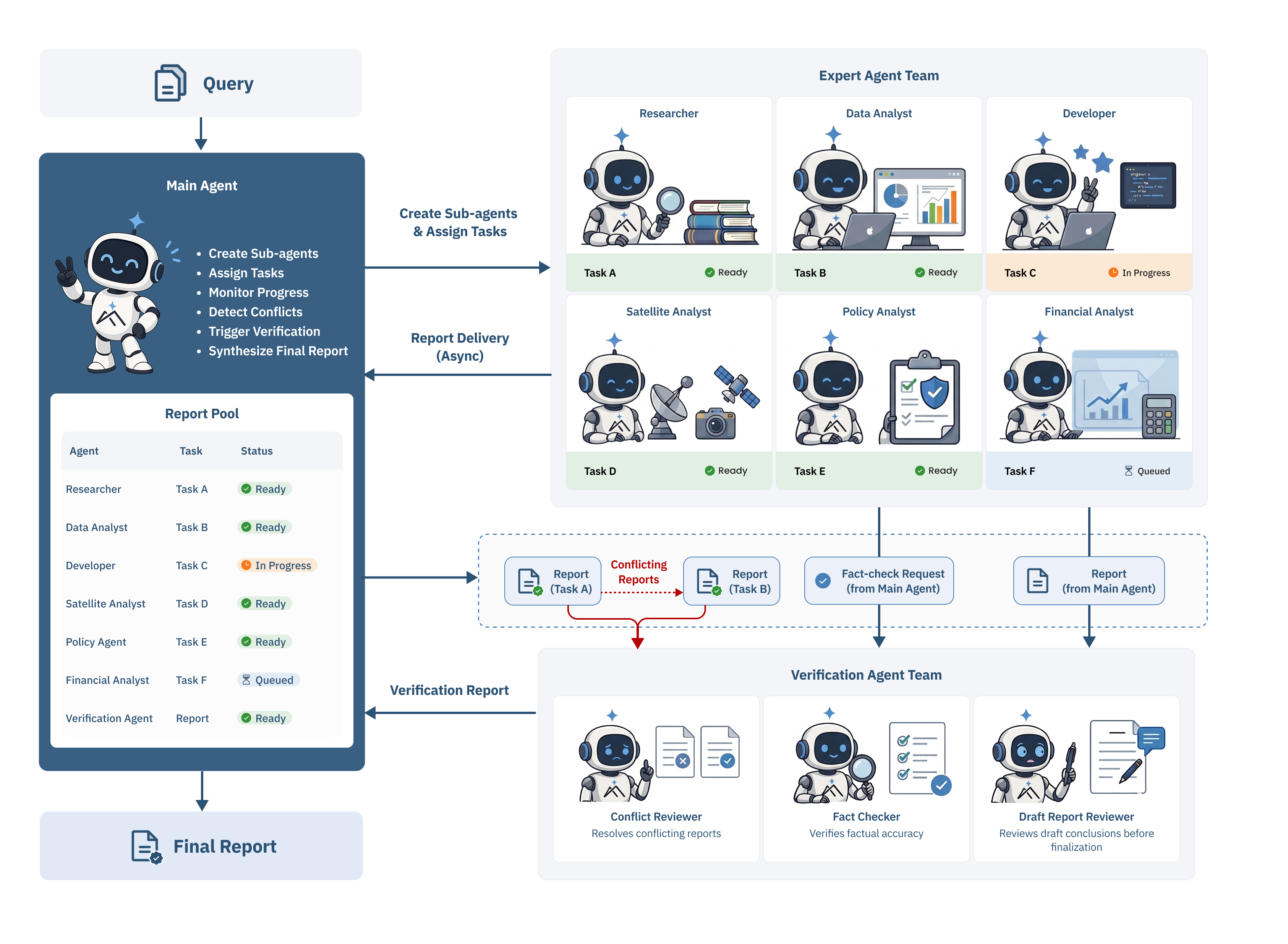
Conceptual Agent Team workflow, from task delegation and asynchronous report collection to verification and final synthesis.
How it fits together
flowchart LR
    U["User / benchmark task"] --> TUI["TUI or subprocess runner"]
    TUI --> R["Stateful ReAct"]
    TUI --> C["Agent Team coordinator"]
    C --> B["Task board"]
    B --> S1["Sub-agent 1"]
    B --> S2["Sub-agent 2"]
    B --> SN["Sub-agent N"]
    R --> FS["Task sandbox"]
    S1 --> FS
    S2 --> FS
    SN --> FS
    FS --> I["/inputs (read-only)"]
    FS --> W["/workspace (working files)"]
    FS --> O["/outputs (deliverables)"]
    S1 --> C
    S2 --> C
    SN --> C
    C --> A["Final answer / report"]
    R --> A
The repository boundaries are intentional:
frontier_agent/  generic loop, scheduling, registries, AgentBus, observers
plugins/tools/   web, shell, file, sandbox, and team tool implementations
workflows/       ReAct and Agent Team pipelines, profiles, prompts, observers
apodex/          terminal CLI/TUI, approvals, sessions, traces, and Docker path
benchmarks/      public benchmark harness plus standalone FrontierSearchBench
More detail: framework architecture, Agent Team, and Stateful ReAct. See run artifacts and timestamps for the on-disk layout.
Quick start
Requirements: Git, Python 3.12, uv, and an OpenAI-compatible model endpoint. Docker is optional.
git clone https://github.com/ApodexAI/FrontierAgent.git
cd FrontierAgent

uv sync --python 3.12 --extra dev
cp .env.example .env
Add your endpoint to .env:
OPENAI_API_KEY=your-key
OPENAI_BASE_URL=https://your-openai-compatible-endpoint/v1
OPENAI_MODEL=your-model-name

# Optional web research tools
SERPER_API_KEY=
JINA_API_KEY=
Start the TUI:
# Stateful single-agent workflow
uv run frontier-agent --mode react --cwd /path/to/project

# Coordinator plus parallel sub-agents
uv run frontier-agent --mode agent_team --cwd /path/to/project
uv sync above installs the lightweight terminal runtime. Scientific and
document packages are intentionally optional in native mode; the agent installs
only what a task actually needs into <project>/.apodex/runtime/native. The
apodex command is retained as a compatibility alias.
Prefer a script that does all of the above? ./scripts/run-macos.sh and
./scripts/run-linux.sh set up a hosted-endpoint install, and
./scripts/run-linux-gpu.sh --install-system-deps --setup-only prepares a native,
isolated SGLang environment on a Linux NVIDIA GPU. The step-by-step equivalent is
the endpoint quickstart
(中文教程), which requires neither
model self-hosting nor Docker.
Local SGLang serving is pinned to reviewed NVIDIA driver / CUDA / SGLang tracks,
and a mismatch surfaces late as opaque CUDA or Triton kernel errors during model
load. Confirm your nvidia-smi driver against the
GPU compatibility matrix before choosing an
image tag or native pin. The GPU helper selects a reviewed userspace track from
the host driver, but never installs or replaces the driver itself.
Deployment model
The operating system, FrontierAgent runtime, and model runtime are independent choices. “NVIDIA” describes the local model service, not how the agent itself runs. Unsure which applies to your machine or GPU provider? Start with the installation chooser.
| Environment | FrontierAgent runtime | Model endpoint | Start here |
|---|---|---|---|
| macOS | native or Docker Desktop | hosted or another OpenAI-compatible endpoint | macOS |
| Linux host/VM | native (default), bubblewrap, or Docker | hosted, native SGLang, or Docker SGLang | Linux |
| managed Linux GPU container | native inside the provider container | custom GPU image or native SGLang | GPU platforms |
| Windows | WSL2, treated as Linux | hosted or a WSL2-reachable endpoint | Linux/WSL2 |
Chinese-speaking macOS users can use the macOS 中文安装与一键启动指南.
Containers and local models
Pre-built linux/amd64 and linux/arm64 images are published to the GitHub
Container Registry, so no local Python environment is needed:
cp .env.example .env
docker compose run --rm agent- Run FrontierAgent in Docker — Compose, image
pinning, direct
docker run, and EC2/ECS deployment. - Docker SGLang on a Linux NVIDIA host — two containers on one network; SGLang owns the GPU.
- Native SGLang without nested Docker — for managed GPU environments that forbid a nested daemon.
- SGLang configuration reference — every
.env.sglangvariable, token-budget invariants, and tuning order. Production 35B templates for RTX 4090, RTX 5090, and two-GPU hosts live underconfig/sglang/.
Using the TUI
Run without a task for an interactive session, or pass one and stay in the session for follow-ups:
uv run frontier-agent --mode agent_team --cwd /repo \
  "Research the alternatives, verify the evidence, and write a report"

# One-shot, line mode, or resume a saved session
uv run frontier-agent --mode react --cwd /repo -p "explain src/main.py"
uv run frontier-agent --mode agent_team --no-tui "compare these implementations"
uv run frontier-agent --resume

# Attach read-only documents before the TUI starts (repeatable)
uv run frontier-agent --mode react --cwd /repo \
  --input ~/Downloads/claim.pdf --input ~/Desktop/photo.jpg
The sidebar carries the plan/task board, live tool activity, deliverables, and a session-scoped diff. While a workflow is busy, typing a follow-up queues it for the next safe turn boundary rather than interrupting the run.
For the four sidebar tabs, previews, approvals, attachments, clipboard support,
keys, and Agent Team live steering, see the
TUI user guide
(中文使用教程). The full slash-command, option,
and theming reference is apodex/README.md.
Workflow modes
| Mode | Best for | Execution model |
|---|---|---|
react | focused research, repository analysis, document/file work | one stateful agent using the tui workflow profile |
agent_team | broad questions that benefit from decomposition and parallel investigation | coordinator, persistent task board, bounded parallel sub-agents, report collection, synthesis |
Agent Team parallelism is additional to benchmark concurrency. When evaluating,
start with --concurrency 1; total simultaneous model calls can approach runner
concurrency multiplied by the team spawn limit.
Set SWARM_NO_WEB=1 to disable Agent Team web tools or REACT_NO_WEB=1 for
closed-book ReAct tasks.
Filesystem and security model
| Path | Policy | Purpose |
|---|---|---|
/inputs | read-only | supplied documents and benchmark inputs |
/workspace | read-write | source checkout, extracted data, scratch work |
/outputs | controlled read-write | final persistent deliverables |
File and shell tools share this one task sandbox and path policy. Interactive
sessions add an approval gate on writes, deletion, package installation, and
risky shell commands; some operations stay denied even with --yes; and file
mutations are journaled so /revert can undo them.
Details: sandboxing and path policy, approval and trace behavior, and the security policy.
Development
uv sync --frozen --extra sandbox --extra document-readers --extra eval --extra dev
uv run pytest -q
uv run ruff check .
See CONTRIBUTING.md for the full development environment, pre-flight checks, session debugging, and submission process. Building the container image is covered in Run FrontierAgent in Docker.
Benchmark evaluation
The evaluation harness runs each benchmark question in an isolated subprocess, supports resumable multi-run experiments, and dispatches benchmark-specific deterministic or model-based judges. A minimal smoke run, once the datasets are downloaded per the evaluation guide, is:
uv sync --extra eval --extra sandbox --extra document-readers
uv run python -m benchmarks.public.runner.run_subprocess \
  --benchmark browsecomp --pipeline stateful-react-agent --profile default \
  --limit 1 --concurrency 1 --out ./results/smoke
The evaluation guide is the canonical operator reference for credentials, judge preflight, datasets, file benchmarks, execution, and result inspection. The benchmark registry lists dataset keys, default pipelines, scoring implementations, and extension points. FrontierSearchBench has its own external scorer and an isolation requirement, so it is documented separately in FrontierSearchBench evaluation.
Supported benchmarks
BrowseComp, BrowseComp-ZH, xbench-DeepResearch, Humanity's Last Exam (text-only), SuperChem, FrontierScience-Research, FrontierScience-Olympiad, DeepSearchQA, WideSearch, FrontierSearchBench, OfficeQA, GDPval, APEX, and OneMillion-Bench.
GDPval uses deterministic deliverable validation in this open-source harness; the agentic pairwise grader is intentionally excluded. The benchmark registry is authoritative for each dataset key, its default pipeline, and its scoring implementation.
Apodex-1.1 performance
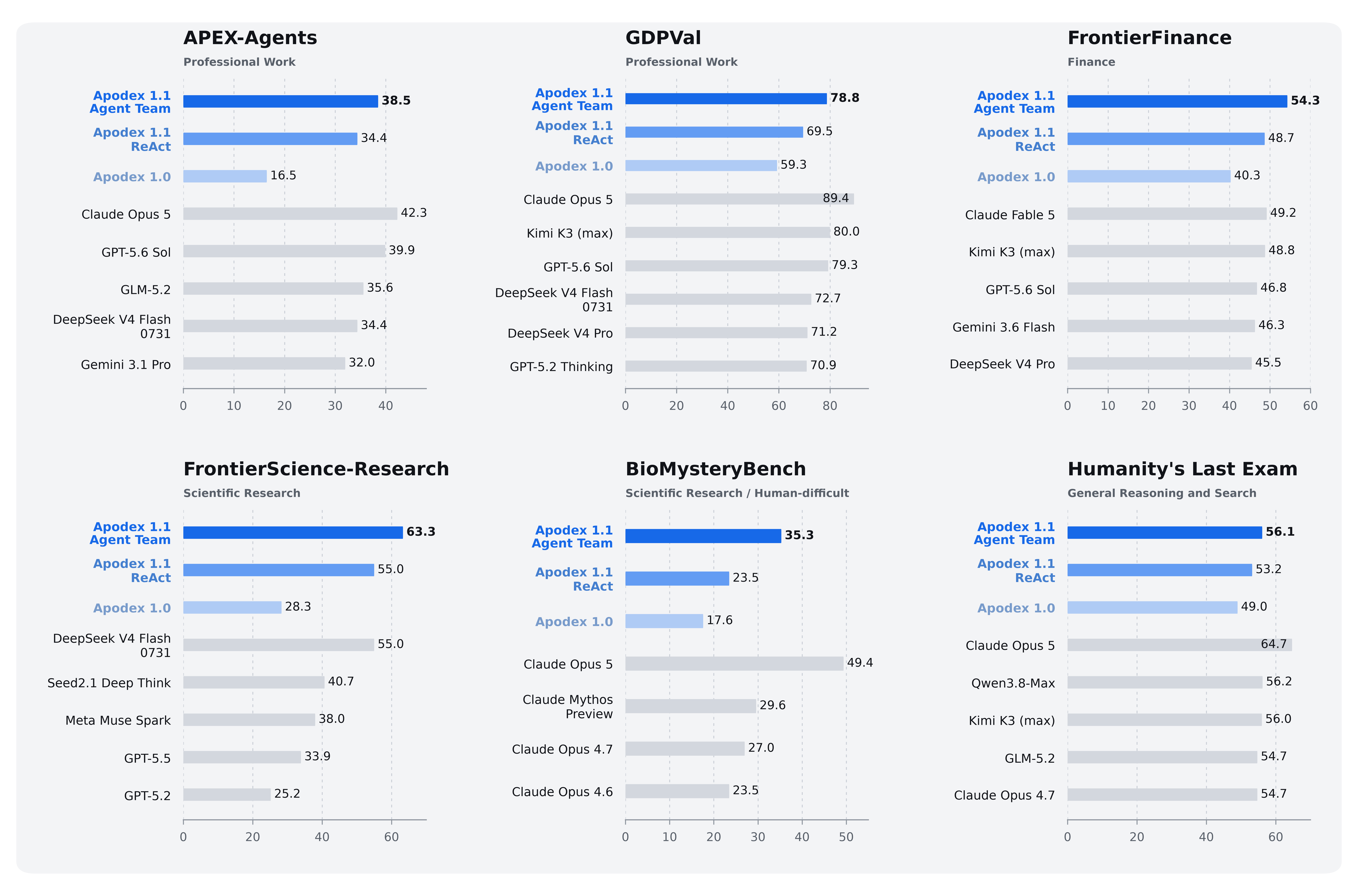
The chart above compares the two FrontierAgent workflows with the Apodex-1.0 baseline and selected external systems. The Apodex results are summarized here:
| Configuration | APEX-Agents | GDPval | FrontierFinance | FrontierScience-Research | BioMysteryBench | HLE |
|---|---|---|---|---|---|---|
| Apodex-1.1 Agent Team | 38.5 | 78.8 | 54.3 | 63.3 | 35.3 | 56.1 |
| Apodex-1.1 ReAct | 34.4 | 69.5 | 48.7 | 55.0 | 23.5 | 53.2 |
| Apodex-1.0 | 16.5 | 59.3 | 40.3 | 28.3 | 17.6 | 49.0 |
Earlier Apodex-1.0 checkpoints remain available in the Hugging Face collection, with model cards and serving guidance.
Citation
Cite the current release:
@techreport{apodex11,
  title  = {Apodex-1.1: Scaling Agentic Intelligence for Complex Work},
  author = {Apodex Team},
  year   = {2026}
}
For work that refers specifically to the previous generation:
@techreport{apodex10,
  title  = {Apodex-1.0: A Verification-Centric Agent Team for Discoverative Intelligence},
  author = {Apodex Team},
  year   = {2026}
}
License
Apache 2.0 — see LICENSE.