

A new infrastructure for Agentic Analog and Mixed-Signal Design. LLM Agents drive Cadence Virtuoso instances — locally or remotely — turning tedious handcrafting into automated design flows.
Why is this a "New Infrastructure"?
1. Deep Virtuoso Integration — Control across Schematic, Layout, Maestro, and Spectre.
- Flexible programming: execute inline SKILL, load
.ilfiles, or use Python APIs - Four design domains: schematic editing, layout generation, simulation setup (Maestro), and standalone Spectre with PSF parsing
- Deterministic schematic planning: explicit connectivity plus hard/soft grid, polarity-row, differential-pair, pin-column, and output-stage constraints
2. Scalable Architecture — Multi-server, multi-session, built for distributed design clusters.
- Multi-profile SSH: connect to N design servers, each with independent tunnel
- Run parallel simulations across servers and accounts
- Verified across macOS, Windows, and Linux
3. AI-Native Design — Built for coding agents (Claude Code, Cursor, etc.) to drive Virtuoso.
- CLI-first lifecycle and diagnostics:
virtuoso-bridge start/status/restart - Ships with pre-defined agent skill files (
skills/) — the agent knows how to use the bridge immediately - Optimized for high-frequency agent interactions with resilient, role-aware SSH routing
If you are an AI agent, read
AGENTS.mdfirst and follow its setup checklist.
Choose your setup
| You want to... | Use this path | Needs |
|---|---|---|
| Drive Virtuoso on a remote EDA server | Remote mode | SSH access, running Virtuoso, load(...) in CIW |
| Drive Virtuoso on the same machine | Local mode | Running Virtuoso, VB_REMOTE_HOST=localhost |
| Run Spectre from netlists | Spectre simulator | spectre on PATH, or VB_CADENCE_CSHRC |
| Run reproducible IC optimization workflows | Optimizer skill + optional external workflow CLI | Spectre/OCEAN setup, requirement files |
| Let a coding agent operate Cadence | Agent skills | Link skills/ into your agent's skill directory |
Virtuoso SKILL execution and Spectre simulation are independent. You can run Spectre without the SKILL bridge, and you can use the SKILL bridge without Spectre.
Python environment selection
Python entry points discover the nearest parent .env containing a bridge host
role (VB_REMOTE_HOST, VB_GUI_HOST, VB_DAEMON_HOST, and related roles) or
VB_LOCAL_PORT, then load it with override=True; this can
change a long-lived process from local to remote mode. Pin the intended file
before constructing a client when embedding the bridge:
from virtuoso_bridge.env import set_runtime_env_file

set_runtime_env_file("/path/to/virtuoso-bridge.env")
Quick Start
# 0. Get the source
git clone https://github.com/Arcadia-1/virtuoso-bridge-lite.git
cd virtuoso-bridge-lite

# 1. Install in a virtual environment
uv venv .venv
source .venv/bin/activate
uv pip install -e .

# 2. Create ~/.virtuoso-bridge/.env
virtuoso-bridge init user@host [-J user@jump-host]
# Or: virtuoso-bridge init      # empty template; edit VB_REMOTE_HOST yourself

# 3. Start and verify
virtuoso-bridge start          # starts tunnel and prints the CIW load(...) line
virtuoso-bridge status         # tunnel + Virtuoso daemon + Spectre availability
If the daemon is not loaded yet, the normal manual load(...) remains valid.
For an opt-in X11 bootstrap, first select an explicit top-level CIW and then
inject only the generated setup command:
virtuoso-bridge list-windows --top-level --json
virtuoso-bridge bootstrap --window 0x3000012
bootstrap refuses windows that are not identified as a CIW and does not
accept arbitrary SKILL text.
Split GUI and daemon hosts
VB_REMOTE_HOST remains the simple one-host setting. In installations where
Virtuoso runs on a GUI/login host but ipcBeginProcess() launches the daemon on
a compute host, configure the roles explicitly:
VB_GUI_HOST=gui-host-a
VB_DEPLOY_HOST=gui-host-a
VB_DAEMON_HOST=compute-host-b
VB_SPECTRE_HOST=compute-host-b
VB_REMOTE_USER=user
VB_JUMP_HOST=gui-host-a

# Must be readable from the CIW and daemon host; /tmp is often isolated.
VB_REMOTE_SCRATCH_ROOT=/home/user/.virtuoso-bridge
The defaults are deployment = GUI and Spectre = legacy/daemon host. The shared
jump host is suppressed automatically when the target itself is the jump host.
status reads a daemon identity file written from the CIW banner, so it can
diagnose a daemon/tunnel host mismatch even when the TCP endpoint is wrong.
On Windows PowerShell, replace the activation line with
.\.venv\Scripts\Activate.ps1.
Single-connection SSH concurrency
OpenSSH ControlMaster is not usable with every Windows SSH build. For real
multi-session multiplexing inside one bridge process, install the Paramiko
backend and select it explicitly:
uv pip install -e '.[ssh]'VB_SSH_BACKEND=paramiko
VB_SSH_MAX_SESSIONS=10
# Optional: route the first SSH hop through an unauthenticated SOCKS5 proxy.
VB_SSH_PROXY=socks5://127.0.0.1:10800Commands and file transfers then share one authenticated target SSH Transport;
each operation opens a channel on that Transport. Bulk and recursive transfers
use the same tar plans as the OpenSSH backend; text uploads use the shared atomic
staging plan, while single-file downloads use SFTP. VB_SSH_MAX_SESSIONS is a
client-side gate and must be no greater than the target sshd MaxSessions.
Waiting work queues at the gate
instead of opening another command connection. There is no automatic fallback
to independent SSH connections.
VB_SSH_PROXY is optional and applies only to Paramiko-backed commands and file
transfers, including SFTP. It does not affect the OpenSSH -L tunnel created by
virtuoso-bridge start; environments that also need this tunnel to traverse
SOCKS5 must configure an OpenSSH ProxyCommand in the SSH config used by the
bridge. VB_SSH_PROXY accepts an explicit socks5://host:port URL without
credentials and asks the proxy to resolve the proxied first-hop hostname. For
direct connections the proxy opens the target SSH socket. With VB_JUMP_HOST
or one ProxyJump hop, it opens the jump-host socket and Paramiko reaches the
target through that SSH transport. Proxy failures are reported directly; the
bridge does not fall back to a direct or OpenSSH command connection.
While the proxy is active, SSH config lookup forces CanonicalizeHostname=no
so OpenSSH cannot resolve the proxied first-hop hostname locally before
Paramiko opens the SOCKS5 connection.
The Paramiko backend reads VB_SSH_CONFIG when set, otherwise the normal user
and system SSH config files. It honors Include, host aliases,
HostName/User/Port, IdentityFile, IdentitiesOnly, and one ProxyJump
hop. Explicit VB_REMOTE_*, VB_JUMP_*, and key arguments take precedence.
ProxyCommand fails during initialization unless an explicit VB_SSH_PROXY
overrides it. Chained ProxyJump routes and a missing explicit VB_SSH_CONFIG
also fail instead of being silently ignored.
Both the target and jump host must already have keys in the applicable user or
system known_hosts files; unknown and changed keys are rejected. The backend
honors UserKnownHostsFile, GlobalKnownHostsFile, and HostKeyAlias. Run the
documented prerequisite ssh <host> echo ok once with OpenSSH to review and
record a new host key before selecting Paramiko. Paramiko cannot enforce an
OpenSSH RevokedHostKeys file or KRL, so any configured value other than none
fails during initialization instead of silently bypassing revocation policy.
MaxStartups governs unauthenticated TCP handshakes, while MaxSessions
governs channels on one authenticated connection. The Paramiko backend avoids
one handshake per parallel job, but it cannot override the server's
MaxSessions. The long-lived Virtuoso TCP port-forward created by
virtuoso-bridge start remains a standalone, non-ControlMaster OpenSSH process
because it must survive after the starting CLI and any shared command master
exit.
from virtuoso_bridge import VirtuosoClient
client = VirtuosoClient.from_env()
client.execute_skill("1+2")  # VirtuosoResult(status=SUCCESS, output='3')
For fail-fast access to standalone Spectre PSF ASCII artifacts, use the strict helpers instead of guessing filenames, keys, or value shapes:
from pathlib import Path
from virtuoso_bridge.spectre import SpectreSimulator
from virtuoso_bridge.spectre.psf import frequency_hz, read_psf_ascii, result_file, vector

result = SpectreSimulator.from_env(work_dir="output").run_simulation("tb.scs")
if not result.ok:
    raise RuntimeError(result.errors)
raw_psf = Path(result.metadata["output_dir"])
ac = read_psf_ascii(result_file(raw_psf, "*.ac"))
frequency = frequency_hz(ac)
vout = vector(ac, "VOUT")  # exact raw PSF key; missing/invalid data raises
Useful first commands after the bridge is up:
virtuoso-bridge windows       # list all open Virtuoso windows
virtuoso-bridge screenshot    # screenshot CIW to the user artifact directory
virtuoso-bridge export-visio MyLib MyCell -o MyCell.vsdx  # Windows + Visio
…or skip Python entirely — run SKILL straight from the shell:
# One-liner — full VirtuosoResult JSON on stdout
virtuoso-bridge eval 'getCurrentTime()'

# Multi-line SKILL via heredoc (auto-wrapped in progn; returns the last form)
virtuoso-bridge eval --stdin <<'EOF'
let((libs)
  libs = mapcar(lambda((l) l~>name) ddGetLibList())
  printf("found %d libraries\n" length(libs))
  libs)
EOF

# Whole .il file — uploaded automatically in SSH mode
virtuoso-bridge load my_script.il
For detailed setup (jump hosts, multi-profile, local mode), see AGENTS.md.
CLI reference
All commands take -p PROFILE / --env PATH to pick a non-default config; run virtuoso-bridge <cmd> --help for full flags.
| Command | What it does |
|---|---|
| Tunnel / lifecycle | |
init [user@host] [-J jump] | Write a starter .env (no args = empty template) |
start [--bind-venv] | Start SSH tunnel + deploy daemon; --bind-venv (with -p X) also binds the active virtualenv to profile X |
stop | Stop the SSH tunnel |
restart | Restart tunnel and refresh the deployed daemon setup |
status | Tunnel + daemon health + Spectre availability |
license | Check Spectre license availability |
| Profile binding | |
profile show | Print the resolved profile, its source, and the active venv binding path |
profile bind PROFILE --venv | Pin the active virtualenv to PROFILE (naked from_env() calls in that venv resolve to it) |
profile clear --venv | Remove the venv binding |
| SKILL execution | |
load FILE.il | Run a .il file in Virtuoso (uploads it in SSH mode). VS Code task–friendly; outputs VirtuosoResult JSON |
eval 'EXPR' / eval --stdin | Run an inline SKILL expression; supports multi-statement via auto-wrapped progn(...) |
| Interaction / diagnostics | |
windows | List all open Virtuoso windows (number + name) |
screenshot [ciw|current|N] [-o DIR|FILE] | Capture a window; defaults to the user artifact screenshots directory |
dismiss-dialog | X11 path: find and dismiss blocking GUI dialogs (saves you when SKILL channel deadlocks on a modal) |
list-windows [--top-level] [--json] | X11 path: enumerate Virtuoso windows; --top-level returns one deduplicated entry per frame for CIW selection |
bootstrap --window WINDOW_ID | Opt-in X11 first load: inject only the generated load(...) into one explicit, verified CIW |
dismiss-window WINDOW_ID [--action enter|escape|alt-y|alt-n] | X11 path: send an explicit action to one window ID returned by list-windows |
snapshot [-o DIR] [--history H] | Dump the focused Virtuoso window (maestro/schematic/...) — brief by default, full disk dump with -o |
| Export | |
export-visio LIB CELL -o OUT.vsdx | Render a Virtuoso schematic to Microsoft Visio (Windows + pywin32) |
| SKILL Finder | |
skill-find <query> | Search SKILL functions by name (fuzzy/prefix/suffix/exact/regex) |
skill-info <fn> | Get detailed More Info docs for a SKILL function |
doc-search <query> | Search installed Cadence documentation through the active bridge, or pass --doc-root for local/offline search |
Snapshot a maestro run
Pull the currently-focused maestro session's setup + latest-run artifacts to a local folder:
virtuoso-bridge snapshot -o output                       # auto-picks newest history
virtuoso-bridge snapshot -o output --history Interactive.160   # pin a specific history
Output tree (one example):
output/20260422_142137__MyLib__myTB/
├── maestro.sdb, active.state                    # raw Cadence files
├── state_from_sdb.xml, state_from_active_state.xml  # filtered, high-signal
├── state_from_skill.txt                         # SKILL-probe setup summary
└── Interactive.N/
    ├── Interactive.N.{log,rdb,msg.db}           # run-level (rdb = SQLite)
    └── <pt>/<tb>/
        ├── netlist/   → netlist, input.scs, qpInformation.ils, exprOutputs.json, paramInfo.ils
        └── psf/       → spectre.out, logFile, dcOp.dc, *.ac, *.tran, ...
Per-point netlist/ keeps only the 5 files that describe the runnable design and outputs (main SPICE netlist, testbench top level, SKILL and JSON output-expression definitions, corner label). Psf keeps stdout + logs + non-binary analysis results. The full rule set — including what's commented out and why — lives in src/virtuoso_bridge/virtuoso/maestro/snapshot_filter.yaml; edit the YAML (uncomment / comment lines) to add or drop files, no code change needed. Binary waveforms (*.raw, wavedb/) are never pulled — read scalar results through client.maestro.read_results() instead.
Exposing skills to your coding agent
The skills/ directory ships Claude Code skills
(virtuoso, spectre, netlist, optimizer). They are not symlinked into the repo's
.claude/skills/ on purpose — repo-tracked symlinks break on Windows and hardcode
one user's absolute paths. Instead, each user links them into their own
~/.claude/skills/ once after cloning:
# macOS / Linux
mkdir -p ~/.claude/skills
ln -s "$(pwd)/skills/virtuoso"  ~/.claude/skills/virtuoso
ln -s "$(pwd)/skills/spectre"   ~/.claude/skills/spectre
ln -s "$(pwd)/skills/netlist"   ~/.claude/skills/netlist
ln -s "$(pwd)/skills/optimizer" ~/.claude/skills/optimizer
# Windows (PowerShell, Developer Mode or elevated shell)
New-Item -ItemType Directory -Force "$env:USERPROFILE\.claude\skills" | Out-Null
New-Item -ItemType SymbolicLink -Path "$env:USERPROFILE\.claude\skills\virtuoso" -Target "$PWD\skills\virtuoso"
New-Item -ItemType SymbolicLink -Path "$env:USERPROFILE\.claude\skills\spectre" -Target "$PWD\skills\spectre"
New-Item -ItemType SymbolicLink -Path "$env:USERPROFILE\.claude\skills\netlist" -Target "$PWD\skills\netlist"
New-Item -ItemType SymbolicLink -Path "$env:USERPROFILE\.claude\skills\optimizer" -Target "$PWD\skills\optimizer"Cursor and other agents that load skills from a user-level directory follow the
same pattern — point their skills path at skills/ in this repo.
Architecture
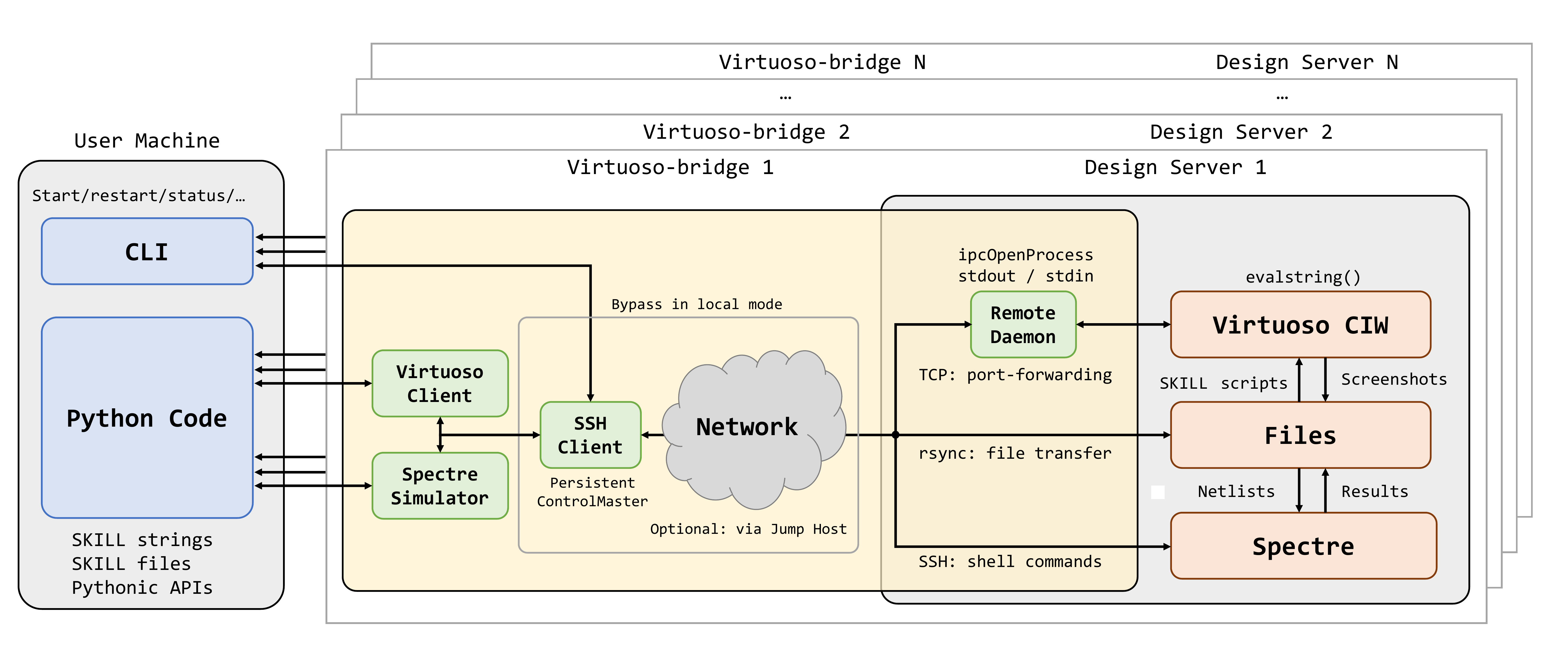
- VirtuosoClient — pure TCP SKILL client. Sends SKILL as JSON, gets results. No SSH awareness.
- SpectreSimulator — runs standalone Spectre simulations locally or through SSH, then parses PSF ASCII results into Python data.
- SSHClient — resolves GUI, deployment, daemon, and Spectre host roles; maintains a standalone TCP port-forward to the daemon host and uses OpenSSH or process-local Paramiko transports for role-specific commands and files. Optional — bypassed in local mode.
Fully decoupled: VirtuosoClient works with any TCP endpoint — SSH tunnel, VPN, direct LAN, or local. Multiple connection profiles are supported, each managing an independent tunnel to a separate design server.
Want to understand the raw mechanism? Start with
src/virtuoso_bridge/virtuoso/basic/resources/ramic_bridge.ilandsrc/virtuoso_bridge/virtuoso/basic/bridge.py.
Want to use Virtuoso locally without SSH? See Local mode in AGENTS.md.
Comparison with skillbridge
| Feature | virtuoso-bridge-lite | skillbridge |
|---|---|---|
| Core mechanism | ipcBeginProcess + evalstring | ipcBeginProcess + evalstring |
| Local mode | Yes | Yes |
| Remote execution | SSH tunnel, jump host, auto-reconnect | Not supported |
| Calling style | String-based: execute_skill("dbOpenCellViewByType(...)") | Pythonic mapping: ws.db.open_cell_view_by_type(...) |
| Load .il files | client.load_il() | Not supported |
| Layout / schematic API | client.layout.create() / modify() context managers | Raw SKILL only |
| Spectre simulation | Built-in runner + PSF parser | Not supported |
| AI agent support | Skill files, CLI-first, command logging | Not designed for agents |
| Python ↔ SKILL types | String-based | Auto bidirectional mapping |
| IDE tab completion | No (not needed by agents) | Yes (Jupyter, PyCharm stubs) |
In short: Both projects are built on the same Cadence SKILL IPC facility, using the same core mechanism: ipcBeginProcess + evalstring + ipcWriteProcess. Here are the core lines from each:
virtuoso-bridge-lite — src/virtuoso_bridge/virtuoso/basic/resources/ramic_bridge.il
RBIpc = ipcBeginProcess(
  sprintf(nil "%s %L %L %L" RBPython RBDPath host RBPort)
  "" 'RBIpcDataHandler 'RBIpcErrHandler 'RBIpcFinishHandler "")

procedure(RBIpcDataHandler(ipcId data)
  if(errset(result = evalstring(data)) then
    ipcWriteProcess(ipcId sprintf(nil "%c%L%c" 2 result 30))
  else
    ipcWriteProcess(ipcId sprintf(nil "%c%L%c" 21 errset.errset 30))
  )
)
skillbridge — skillbridge/server/python_server.il
pyStartServer.ipc = ipcBeginProcess(
  executableWithArgs "" '__pyOnData '__pyOnError '__pyOnFinish pyStartServer.logName)

defun(__pyOnData (id data)
  foreach(line parseString(data "\n")
    capturedWarning = __pyCaptureWarnings(errset(result=evalstring(line)))
    ipcWriteProcess(id lsprintf("success %L\n" result))
  )
)
The divergence is in what's built on top: skillbridge stays thin — a Pythonic RPC client for interactive local use. virtuoso-bridge-lite adds SSH remote access, high-level layout/schematic APIs, Spectre simulation, and an AI-agent-ready harness.
Citation
If you use virtuoso-bridge in academic work, please cite:
@article{zhang2025virtuosobridge,
  title   = {Virtuoso-Bridge: An Agent-Native Bridge for Remote Analog and Mixed-Signal Design Automation},
  author  = {Zhang, Zhishuai and Li, Xintian and Sun, Nan and Jie, Lu},
  year    = {2025}
}
Authors
- Zhishuai Zhang — Tsinghua University
- Xintian Li — Tsinghua University
- Nan Sun — Tsinghua University
- Lu Jie — Tsinghua University