AI-driven quality and governance MCP Server for dbt projects.
Audit coverage, profile data, detect schema drift, and auto-generate documentation—all through natural language with an AI assistant.




Project status
Active alpha. Snapshot date: 2025-12-25. See STATUS.md and KNOWN_LIMITATIONS.md for what is working today, what is planned, and what is not claimed.
What is dbt-doctor?
dbt-doctor is a Model Context Protocol (MCP) server that provides your AI coding assistant with deep context regarding your dbt project's health. Instead of manually running CLI commands and analyzing outputs, you can interact with your AI:
- "What's the overall health of my dbt project?"
- "Profile the fct_orders model and suggest appropriate tests."
- "Auto-document the models that have the lowest test coverage."
The tool handles the heavy operations—reading the manifest, profiling your data warehouse, detecting schema drift, and writing back to schema.yml files—without requiring you to leave the chat.
Note: This tool is designed to complement the official dbt-labs/dbt-mcp. While dbt-labs/dbt-mcp focuses on running dbt commands, dbt-doctor focuses on auditing, profiling, and documentation.
Key Features
Project Auditing
Evaluate your project with a 0–100% score based on documentation, testing, and naming conventions. Access a ranked list of models lacking coverage to prioritize your efforts.
Data Profiling
Perform efficient single-pass column statistics—including NULL rates, cardinality, min/max values, and uniqueness—using one batched SQL query per table to avoid slow row-by-row scanning.
Schema Drift Detection
Compare the current state of your data warehouse against the definitions in your manifest.json. Instantly identify added, removed, or type-changed columns.
Intelligent Test Suggestions
Translate profiling statistics into actionable dbt test recommendations. For example, a uniquely populated column without nulls will prompt suggestions for not_null and unique tests, while low cardinality will suggest accepted_values with predefined options.
Non-Destructive YAML Writing
Update schema.yml files using ruamel.yaml to retain hand-written comments, existing tests, and formatting. The tool only appends missing information and preserves your manual configurations.
End-to-End Documentation Generation
Execute a complete workflow in a single conversational turn: profile a model, suggest tests, preview changes, and write to schema.yml.
Included MCP Tools
| Category | Tool | Description |
|---|---|---|
| Context | list_models | Overview of all models and their coverage status |
| Context | get_model_details | Detailed model information including SQL, columns, lineage, and tests |
| Audit | audit_project | Project health score and naming convention violations |
| Audit | check_test_coverage | Models ranked by their test coverage percentage |
| Audit | analyze_dag | Detection of orphan models and high fan-out nodes |
| Audit | get_project_health | Single-call dashboard summarizing project status |
| Profiling | profile_model | Batched column statistics |
| Profiling | execute_query | Read-only SQL execution against your warehouse |
| Profiling | detect_schema_drift | Comparison of database columns against manifest definitions |
| Generation | suggest_tests | Translation of profile data into dbt test recommendations |
| Generation | update_model_yaml | Safe merging of documentation and tests to schema.yml |
| Generation | generate_model_docs | Complete end-to-end documentation workflow |
Quick Start
Installation
pip install dbt-doctorConfiguration (Claude Desktop)
Add the following to your claude_desktop_config.json:
{
  "mcpServers": {
    "dbt-doctor": {
      "command": "dbt-doctor",
      "args": ["--project-dir", "/absolute/path/to/your/dbt/project"]
    }
  }
}
Configuration (Cursor)
Add the following to your .cursor/mcp.json:
{
  "mcpServers": {
    "dbt-doctor": {
      "command": "dbt-doctor",
      "args": ["--project-dir", "/absolute/path/to/your/dbt/project"]
    }
  }
}
Prerequisite: Run dbt compile prior to usage to ensure target/manifest.json is available for dbt-doctor to parse.
Architecture
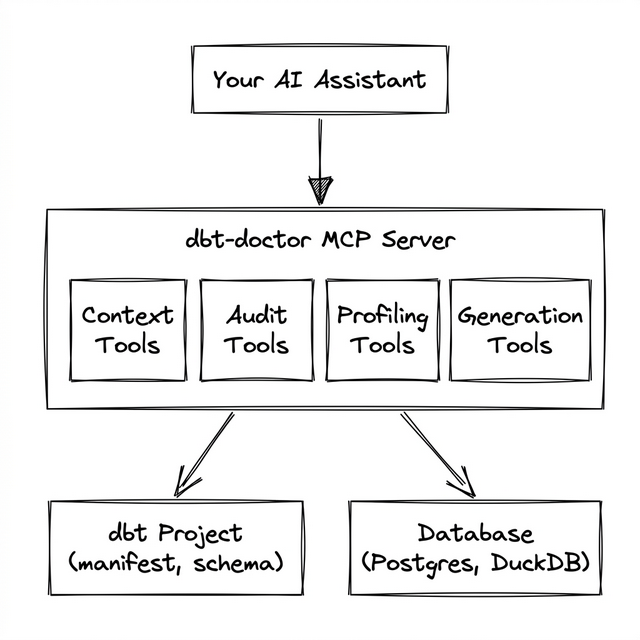
The application connects the AI Assistant with your dbt project and database through the MCP protocol. It features a read-only analysis layer combined with a secure generation toolkit that merges changes seamlessly into your existing YAML schemas.
Security Design
- Read-only execution: All
execute_queryoperations operate within a read-only transaction. Write processes are restricted at the database connector level. - SQL validation: Table and column identifiers are strictly validated against a whitelist to prevent injection.
- Stateless connections: Data warehouse credentials are instantiated per connection and are never cached in memory.
- Preview before commit: The document generation process provides a difference preview prior to rewriting
schema.yml, ensuring you retain control over modifications.
Related Projects
| Project | Description |
|---|---|
| dbt-labs/dbt-mcp | Official MCP focused on dbt command execution |
| dbt-coverage | CLI tool for coverage reporting without AI integration |
| dbt-project-evaluator | dbt package for project evaluation, requiring installation per project |
dbt-doctor uniquely consolidates auditing, profiling, drift detection, and AI-driven YAML updates into a single server interface.
License
MIT — see the LICENSE file.