WhisperSubTranslate
English | 한국어 | 日本語 | 中文 | Polski
Turn any video into multilingual subtitles, locally. Drop in a video, generate an SRT with whisper.cpp, then translate it offline with the bundled Hy-MT2 model or with free/paid online engines.
This app creates new subtitles from your video's audio (speech to text). It does not extract embedded subtitle tracks or read on-screen text (no OCR).
Preview
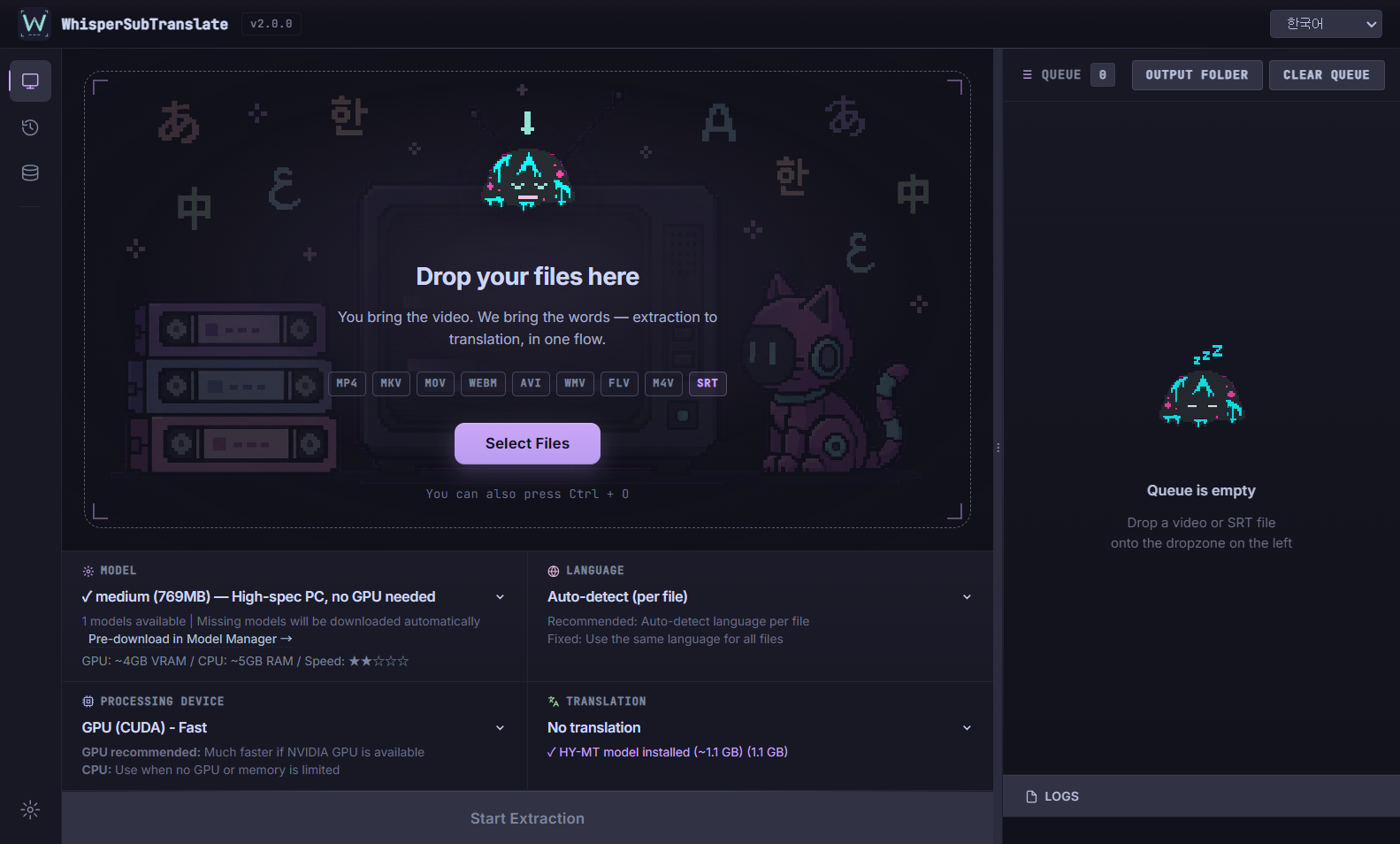
Features
- 100% local speech to text. Your video never leaves your machine, no account, no upload.
- Offline translation with the bundled Hy-MT2 model, or online engines (MyMemory, DeepL, OpenAI, Gemini) with your own keys.
- Automatic model download. No Python, no manual setup.
- Sync repair models (large-v2 Sync and Sync Lite) for videos where normal models drift out of sync.
- Queue, live progress, and local-only job history.
Getting started
Users
Download the latest portable archive from Releases, extract it, and run WhisperSubTranslate.exe. Extraction runs fully offline on your PC. Translation is optional.
Developers
npm install
npm start- Node.js >= 22.12.0 (see
enginesin package.json; Electron 43 toolchain) - whisper.cpp is downloaded during
npm install(Windows gets the CUDA build ~700MB plus a Vulkan build ~23MB) - FFmpeg is included via npm; the selected GGML model downloads on first use
Linux
sudo apt install cmake build-essential git ffmpeg   # Ubuntu/Debian
npm install   # whisper.cpp is built from source
npm start
For CUDA acceleration, install the NVIDIA CUDA Toolkit before npm install. Manual whisper.cpp build steps are in CONTRIBUTING.md.
- Linux keyring: API keys are stored via Electron safeStorage (libsecret). Without a keyring daemon (headless SSH session, minimal desktop/WM), saving falls back to legacy AES with a hardcoded key: the app logs an explicit security warning and marks the save as
insecure. That storage is not secure - installgnome-keyring(or run in a desktop session with a keyring) to enable secure storage.
Build (Windows)
npm run build-win # artifacts are emitted to dist2/Translation engines
Translate subtitles fully offline with the bundled Tencent Hy-MT2 model, or route to free/paid online engines using your own API keys.
| Engine | Offline | API key | Cost | Notes |
|---|---|---|---|---|
| Hy-MT2 1.8B (local, default) | Yes | No | Free | ~1.13GB, VRAM 2GB / RAM 4GB, on-device |
| Hy-MT2 7B (local) | Yes | No | Free | ~6.16GB, VRAM 8GB / RAM 12GB, larger model |
| MyMemory | No | No | Free | ~50K chars/day per IP |
| DeepL | No | Yes | Free 500K/month | Deterministic output |
| OpenAI GPT-5.x (configurable, e.g. gpt-5.6-sol) | No | Yes | Paid | Default model; context-aware |
| Gemini 3.x (configurable, e.g. gemini-3.6-flash) | No | Yes | Free / low-cost | Recommended low-cost route (get key) |
| Claude (configurable, e.g. claude-opus-5) | No | Yes | Paid | Strong at context understanding (get key) |
| Custom OpenAI-compatible providers | No | Yes | Varies | Bring your own endpoint (OpenRouter, Ollama, vLLM, …) |
The local Hy-MT2 engine is the only option that needs no API key, no network, and no per-use cost, so your dialogue never leaves your machine.
Translation quality (offline engine)
WhisperSubTranslate ships Tencent's Hy-MT2 models (1.8B default, 7B optional). Tencent's official evaluation shows the Hy-MT2 family competing with leading commercial translation APIs, and ahead of several of them on some benchmarks.
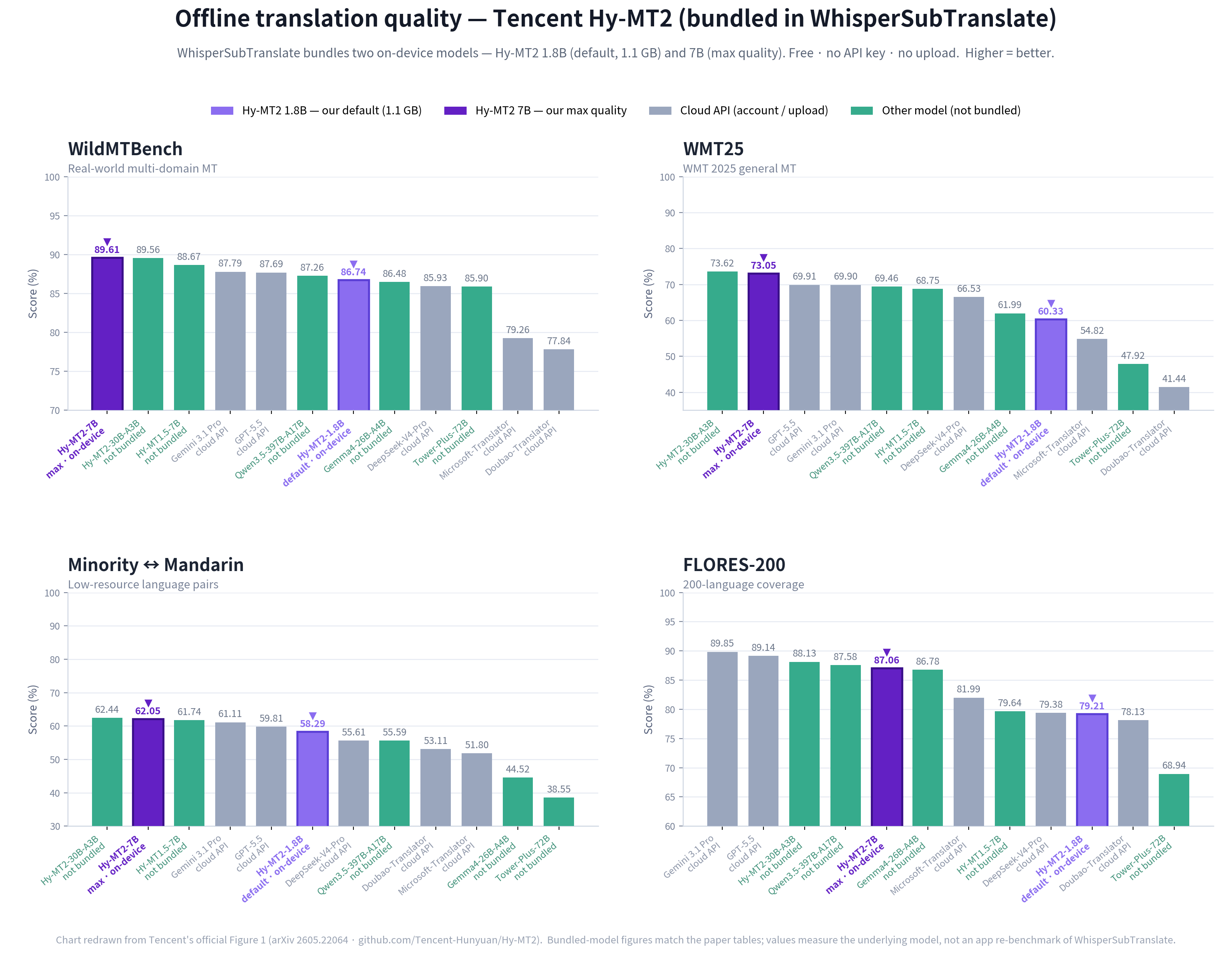
Source: official benchmarks from Tencent: Hy-MT2 repository, technical report, models on HuggingFace. The chart is redrawn from Tencent's official Figure 1, with bundled-model (1.8B/7B) numbers checked against the paper tables. These figures measure the underlying model on standard machine translation benchmarks (WildMTBench, WMT25, FLORES-200, etc.), not a WhisperSubTranslate-specific benchmark.
For long videos (1hr+), MyMemory's daily limit can cause slowdowns. Use Gemini, DeepL, or a configured GPT model instead.
Speech recognition models
Models download on demand into _models/. NVIDIA GPUs use CUDA, other Vulkan-capable GPUs (AMD, Intel) use Vulkan, and CPU is the fallback. Pick a size that fits your GPU.
| Model | Size | VRAM | Speed | Notes |
|---|---|---|---|---|
| tiny | ~75MB | ~1GB | Fastest | Basic |
| base | ~142MB | ~1GB | Fast | Good |
| small | ~466MB | ~1GB | Medium | Better |
| medium | ~1.5GB | ~2GB | Medium | Great |
| large-v3 | ~3GB | ~4GB | Slow | Best transcription |
| large-v3-turbo (default) | ~809MB | ~2GB | Fast | Best all-round |
| large-v2 Sync | ~4.4GB | ~4.5GB | Slow | Separate engine; fixes subtitle sync |
| large-v2 Sync Lite | shared | ~3GB | Slow | Same file as Sync, int8, lower VRAM |
Sync and Sync Lite use a separate Faster-Whisper engine (auto-downloaded once; engine archive ~1.4GB, model file ~3GB, ~4.4GB combined) and share the same model file, so one download covers both. Use them only when normal models drift out of sync; they are most accurate on non-English video (Japanese, Korean, Chinese). English is usually fine with large-v3-turbo.
VRAM figures for whisper.cpp models are with GGML optimization, much lower than PyTorch Whisper (~10GB for large). Sync figures are from the Faster-Whisper benchmark.
Language support
- UI: Korean, English, Japanese, Chinese, Polish
- Translation targets (15): ko, en, ja, zh, es, fr, de, it, pt, ru, hu, ar, pl, tr, fa
- Audio recognition: 100+ languages via whisper.cpp
Data storage
Everything stays local under your user data folder. Nothing is uploaded.
| Data | Location |
|---|---|
| Settings & API keys | %APPDATA%\whispersubtranslate\translation-config-safe.json |
| Job history | %APPDATA%\whispersubtranslate\history.json (up to 200 entries) |
| Error logs | %APPDATA%\whispersubtranslate\logs\errors.log |
| Models | %APPDATA%\whispersubtranslate\_models (user data folder; non-ASCII Windows accounts fall back to C:\Users\Public\WhisperSubTranslate\_models) |
API keys are stored locally with OS-level safe storage, and the config is never committed or bundled. Job history is optional (toggle in Settings) and capped at 200 entries.
Portable data layout
By default models, caches, and settings live under %APPDATA% (system SSD). To keep everything on a USB stick / external drive, create a portable-data/ folder next to the executable (or set the WHISPER_PORTABLE_DATA environment variable to a folder path) — the app then redirects its userData there.
Contributing
Pull requests are welcome. See CONTRIBUTING.md for branch naming, commit style, the manual test checklist, and the manual whisper.cpp build. To add a UI language or translation target, see the Translation Guide.
Help translate the app UI on
Weblate; translatable
UI strings live in locales/*.json.

Contributors
Thanks to everyone who helps make WhisperSubTranslate better.


Support
If this project saves you time, supporting it directly helps with bug fixes, model reliability, and new translation options.



Acknowledgments
- whisper.cpp by Georgi Gerganov: ggml-org/whisper.cpp
- Hy-MT2 by Tencent: Tencent-Hunyuan/Hy-MT2
- FFmpeg: ffmpeg.org
- Faster-Whisper-XXL: Purfview/whisper-standalone-win
- Silero VAD,
deepl-node,node-llama-cpp,axios, and other npm dependencies
See THIRD_PARTY_NOTICES.md for the full list of bundled/downloaded components and their licenses.
License
GPL-3.0. External APIs and services (DeepL, OpenAI, Gemini, etc.) require compliance with their own terms.