ScrollSnap



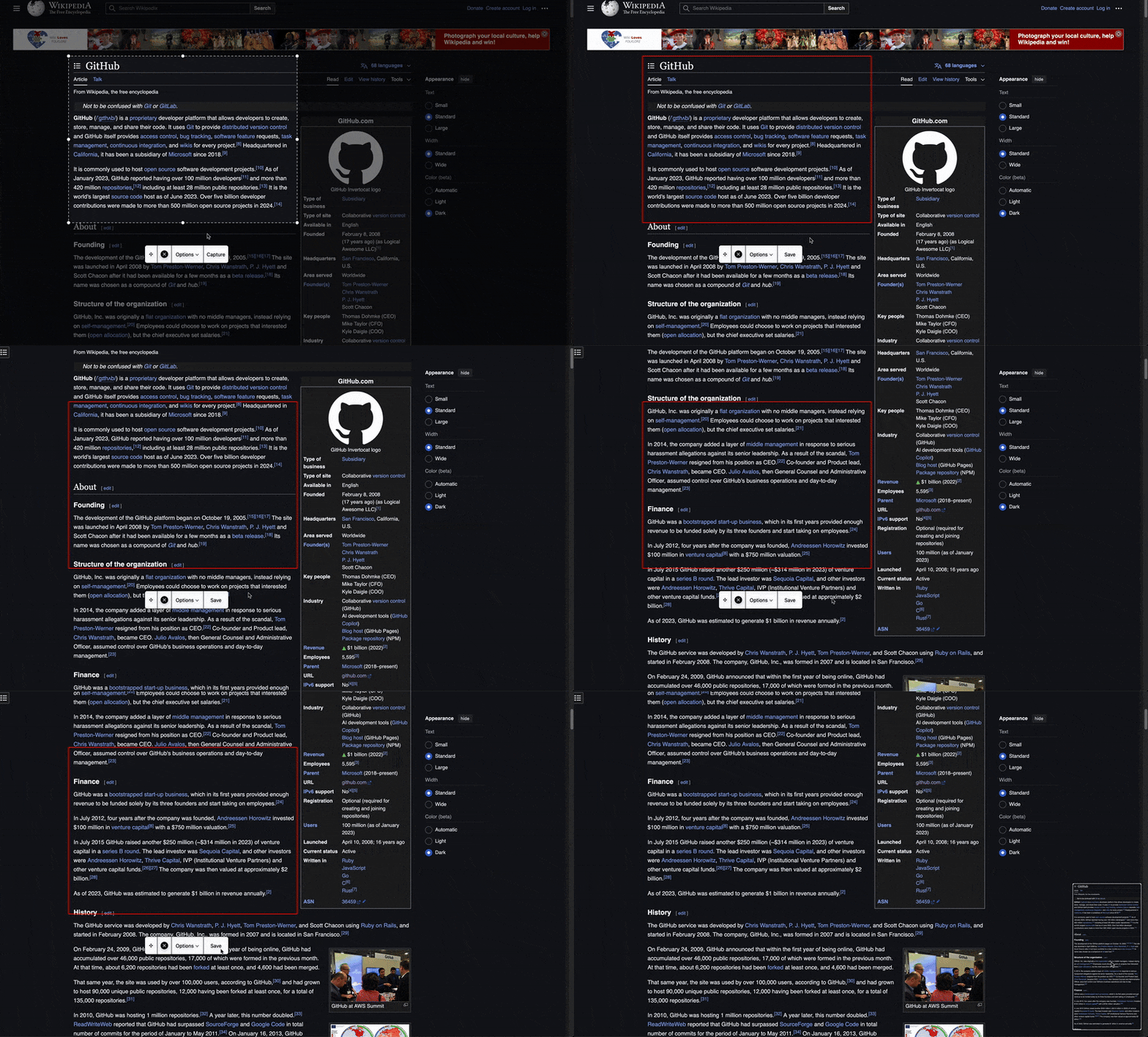
ScrollSnap is an open-source macOS application designed to capture scrolling screenshots with a customizable selection area and menu interface. It allows users to define a capture region, take stitched scrolling screenshots, and save them to various destinations (e.g., Desktop, Clipboard, Preview). Built with Swift and leveraging AppKit and ScreenCaptureKit, ScrollSnap provides a sleek overlay-based UI for precise control.
Download
- 🍎 Download on the App Store – Supports App Store-managed installation and updates.
- 📦 Download ZIP from GitHub Releases - The free, compiled binary. Requires manual downloads to install future updates.
Features
- Customizable Selection Area: Resize and drag a selection rectangle to define the capture region.
- Scrolling Capture: Automatically stitches multiple screenshots into a single image for capturing long content.
- Keyboard Shortcut: Press
Returnwhile the overlay is active to start or stop scrolling capture. - Interactive Menu: Includes options to capture, save, reset positions, or cancel, with a draggable interface.
- Thumbnail Preview: Displays a draggable thumbnail of the captured image with swipe-to-save or right-click options.
- Save Destinations: Supports saving to Desktop, Documents, Downloads, Clipboard, or opening in Preview.
- Settings: Adjust language and reset selection and menu positions via the native settings window (Command + ,).
🌍 Multi-Language Support
ScrollSnap currently supports English, Simplified Chinese, French, German, Japanese, Spanish, and Turkish.
Notice a typo or want ScrollSnap in your language? Contributions are incredibly welcome! As a solo developer, I rely on the community to help make ScrollSnap accessible to everyone.
Whether you want to add a completely new language or improve an existing translation, see Contributing and feel free to open a Pull Request.
Installation
- Clone the Repository:
git clone https://github.com/brkgng/ScrollSnap.git cd ScrollSnap - Open in Xcode:
- Open
ScrollSnap.xcodeproj
- Build and Run:
- Press
Cmd + Rto build and run. - Note: Ensure the app has screen recording permissions enabled in System Settings > Security & Privacy.
- Contributor note: If you are building from source, see
Contributingfor local Xcode signing setup.
Usage
- Launch the App:
- ScrollSnap starts automatically, displaying an overlay with a selection rectangle and menu bar.
- Adjust the Selection:
- Drag the rectangle to move it or use the resize handles to adjust its size.
- Capture a Screenshot:
- For scrolling capture, click "Capture" to start, then "Save" to stop and stitch the images, or press Return or keypad Enter when the overlay is focused.
- Interact with the Thumbnail:
- Drag the thumbnail to copy the image elsewhere, swipe right to save, or right-click for options (Show in Finder, Delete, Close).
- Save Options:
- Use the "Options" menu to set the save destination (Desktop, Clipboard, etc.).
- Settings:
- Press
Cmd + ,to open the settings window, change language, or reset positions if needed.
- Quit:
- Press
Escor select "Quit ScrollSnap" from the main menu.
Project Structure
ScrollSnap
│── App
│   │── ScrollSnapApp.swift         # App entry point (SwiftUI)
│   │── AppDelegate.swift          # Menu and settings setup
│── Utilities
│   │── Constants.swift            # App-wide constants
│   │── ScreenshotUtilities.swift  # Screenshot capture and save logic
│── Views
│   │── OverlayView.swift          # Main overlay coordinator
│   │── SettingsView.swift         # Native SwiftUI settings pane
│   │── ContentView.swift          # Placeholder SwiftUI view
│   │── SelectionRectangleView.swift  # Selection area UI
│   │── MenuBarView.swift          # Menu bar UI
│   │── ThumbnailView.swift        # Thumbnail preview UI
│── Managers
│   │── OverlayManager.swift       # Overlay and state management
│   │── StitchingManager.swift     # Image stitching for scrolling capture
How It Works
- Overlay System:
OverlayManagercreates overlays on all screens, managed byOverlayView, which delegates drawing and interaction toSelectionRectangleViewandMenuBarView. - Screenshot Capture:
ScreenshotUtilitiesuses ScreenCaptureKit to capture the defined rectangle, excluding the app’s UI. - Scrolling Capture:
StitchingManagercombines screenshots into a single image using overlap detection. - Thumbnail:
ThumbnailViewprovides an interactive preview with drag-and-drop and swipe gestures.
Contributing
ScrollSnap is an open-source project, and we welcome contributions! If you’d like to improve it:
Development Signing
If you are contributing locally in Xcode:
- Copy
Config/Signing.local.xcconfig.exampletoConfig/Signing.local.xcconfig. - Set your local
DEVELOPMENT_TEAMin that file. - Uncomment
CODE_SIGN_IDENTITY = Apple Developmentonly if Xcode cannot infer it on your machine. - Reopen the project in Xcode and run normally.
macOS tracks Screen Recording permission by signed app identity. Ad-hoc signing can make a rebuilt app look new after each code change, which causes repeated permission prompts. A real local development signature keeps that permission stable across rebuilds.
- Report Issues: Open an issue on the GitHub repository for bugs or feature requests.
- Submit Pull Requests:
- Fork the repo.
- Create a new branch for your changes (e.g.,
git checkout -b feature/your-feature-name). - Make your changes and commit them.
- Submit a pull request with your improvements.
License
Licensed under the MIT License. See LICENSE.