
Build academic conference posters as a single HTML/CSS file,
rendered to print-ready PDF via headless Chromium.





English · 简体中文
p⊕sterly turns a paper into a print-ready conference poster at the exact canvas size you set — ICML, NeurIPS, ICLR, CVPR, or custom. Command-line checks catch overflow, misalignment, and off-palette styling before you print.
Two ways to use it:
- Open-source skill (this repo). Clone it and drive it from a coding agent — Claude Code, Codex, or any agent that supports skills. Runs on your machine; needs no posterly account.
- Hosted service. tryposterly.com runs it for you — now open to everyone, pay-as-you-go (pricing).
If you don't run a coding agent, or wouldn't trust yours with this, and you want posterly at its best without the setup, use the hosted service. It costs money, and every order comes with a receipt.
The blog walks through how posterly turns a paper into a checked, print-ready poster.
News
- 2026-07-25 · 🎉 The hosted service is open to everyone — no invite, no waitlist. Pay-as-you-go, itemized receipt per order; see pricing.
- 2026-07-19 · 🎨 A dramatically wider design range — posterly now composes many more distinct design directions per paper. See the blog and
templates/DESIGN-AXES.md. - 2026-07-18 · 🚀 tryposterly.com is live — website, blog, and the hosted cloud service.
Private beta; payments not yet enabled. - 2026-07-05 – 07-12 · ⭐ ~50 posters at ICML 2026 were made with posterly.
Showcase
Nine examples, not nine templates. posterly composes each direction from choices in layout, typography, palette, framing, density, and masthead — these nine are a sample of the combinations available. Below is one paper (PowerFlow, ICML 2026) run through it nine times: the paper and content are held fixed, so only the design varies. Every one passes posterly's hard checks.
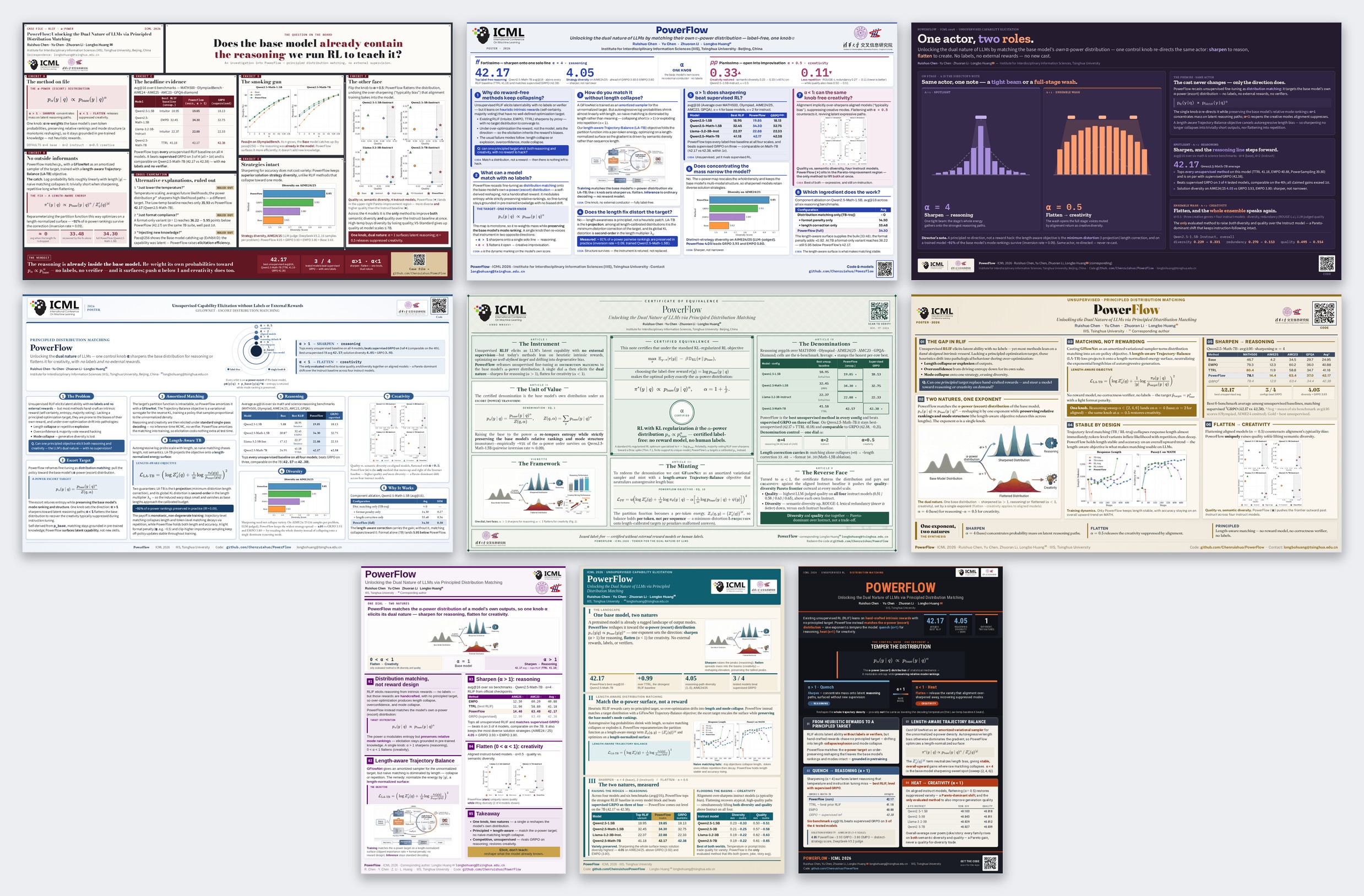
Open any as a print-ready PDF — left to right, top to bottom:
Landscape · 60×36 —
Evidence board ·
Musical score ·
Theatre ·
Orrery ·
Certificate ·
Escort broadside
Portrait · 24×36 —
Control panel ·
Cartographic survey ·
Heat treatment
Why HTML + CSS, not LaTeX?
- Fast preview. Edit CSS and refresh — no recompile step.
- Modern layout. Flexbox, grid, gradients,
text-wrap: balance, and web fonts are available directly, without stacking LaTeX poster packages. - Checkable in code. "Is this column overflowing?" becomes a Playwright geometry query instead of a visual guess.
- Exact print size.
@page { size: 60in 36in }with Chromium'spage.pdf()produces a PDF whose dimensions match the canvas.
Math is typeset with MathJax rather than natively by the browser: templates use the CDN when opened directly, and the gate/preview renders serve a bundled copy, so measurement works offline. SKILL.md has the details.
Install
Install with an agent. Paste to your coding agent:
Install this skill for me: https://github.com/Chenruishuo/posterly
It clones the repo, installs the Python dependencies, and runs the smoke test. The manual steps:
# 1. Clone where your agent discovers skills — e.g. ~/.claude/skills/ for Claude Code
#    (other agents: use their skills directory)
git clone https://github.com/Chenruishuo/posterly ~/.claude/skills/posterly
cd ~/.claude/skills/posterly

# 2. Python deps
python -m pip install "playwright>=1.40"
python -m playwright install chromium
# On a fresh Linux box you may also need the system libs Chromium links against:
#   python -m playwright install --with-deps chromium
#   # or sudo apt install libnss3 libatk1.0-0 libatk-bridge2.0-0 libcups2 \
#   #                     libdrm2 libxkbcommon0 libxcomposite1 libxdamage1 \
#   #                     libxrandr2 libgbm1 libpango-1.0-0 libcairo2 libasound2

# 3. System dep for verify-final's pdfinfo
#    Linux:   apt install poppler-utils
#    macOS:   brew install poppler
#    Windows: choco install poppler

# 4. Smoke test
cd examples/hello_world
python ../../tools/poster_check.py preflight  poster.html
python ../../tools/poster_check.py measure    poster.html
python ../../tools/poster_check.py polish     poster.html
python ../../tools/render_preview.py          poster.html
python ../../tools/poster_check.py verify-final poster_preview.pdf --from-html poster.html

# 5. (dev) run the test suite
python -m pip install "pytest>=7" && python -m pytest
The poster_check.py calls should print PASS, and render_preview.py should write poster_preview.pdf + poster_preview.png. posterly is clone-only (no PyPI); pyproject.toml holds the dependencies and pytest config.
Use the skill
Point your agent at the paper's source directory:
Use the posterly skill to make my ICML 2026 poster from the LaTeX project at ~/papers/mypaper/. Logos are in ~/papers/mypaper/logos/, and the QR code should link to https://github.com/you/yourcode
In Claude Code, /posterly is the shortcut for that.
The LaTeX source is the only required input; the agent reads it directly and is instructed to ground every number and claim in the paper. Venue, logos, a QR target, brand colors, style preferences, and text density are optional — the agent asks for any it needs before drafting.
You don't choose a look from a list. posterly renders two or three different design directions as thumbnails, you pick one by eye, and it then fills, checks, and exports that poster — each one carrying a light touch of posterly's own house style. Read the workflow overview on the blog; the full design reference is in templates/DESIGN-AXES.md.
Direct PDF input (instead of LaTeX) is untested so far.
What's in here
posterly/
├── SKILL.md              ← the workflow your agent follows for /posterly
├── tools/
│   ├── run_gates.py      ← runs the check gates into one report
│   ├── poster_check.py   ← preflight / measure / pack / fit-logos / polish / verify-final
│   ├── render_preview.py ← print-emulated PDF + thumbnail PNG
│   ├── style_check.py    ← design-token gate
│   ├── asset_check.py    ← real-figure provenance (opt-in)
│   ├── extract_pdf_figures.py, preprocess_figures.py
│   └── _posterly/        ← internal modules
├── templates/            ← landscape_4col, landscape_hero, portrait_2col
├── specimens/axes/       ← rendered catalog of the design options
├── examples/hello_world/ ← minimal poster the install smoke test and tests run against
├── docs/showcase/        ← the showcase montage + a PDF per direction
└── tests/                ← pytest suite
The checks, briefly:
run_gates.pyrunspreflight → style → asset → measure → polishinto one report (assetis reportedNOT_RUNwithout a--manifest). It's the default loop while drafting.poster_check.pyexposes the checks individually —preflight(static lint),measure(print-emulated geometry),packandfit-logos(advisory pre-checks),polish(soft visual checks), andverify-final(post-render PDF sanity, run separately on the exported PDF).
Each command supports --help; SKILL.md has the thresholds and tuning flags, and templates/README.md the template conventions.
Editing by hand
For manual editing, copy the closest scaffold from templates/ and change the shared values in its :root token block — the style gate expects colors and sizes to come from there, not from individual elements. A tokenized poster keeps its gate metadata in design_tokens.json.
- Template contracts —
templates/README.md - Design options —
templates/DESIGN-AXES.md - Palette and token reference —
templates/THEMES.md - Full agent workflow —
SKILL.md
(examples/hello_world is a minimal install/test fixture, not a general starting point.)
License
posterly is licensed as a whole under the GNU Affero General Public License v3.0 (AGPL-3.0) © 2026 Ruishuo Chen — see LICENSE. You may use, modify, and commercialize it, but any distributed or network-deployed (SaaS) derivative must release its complete corresponding source under the same license. This is deliberate: it keeps posterly open and prevents closed-source commercial exploitation.
This repository also vendors a few MIT-licensed gate tools from ARIS; those specific files remain available under their original MIT license. MIT is GPL/AGPL-compatible, so the project as a whole is AGPL-3.0 while the vendored files stay individually MIT. Details: NOTICE.md and LICENSES/.
Star History
