Mural
The language app you eventually delete.
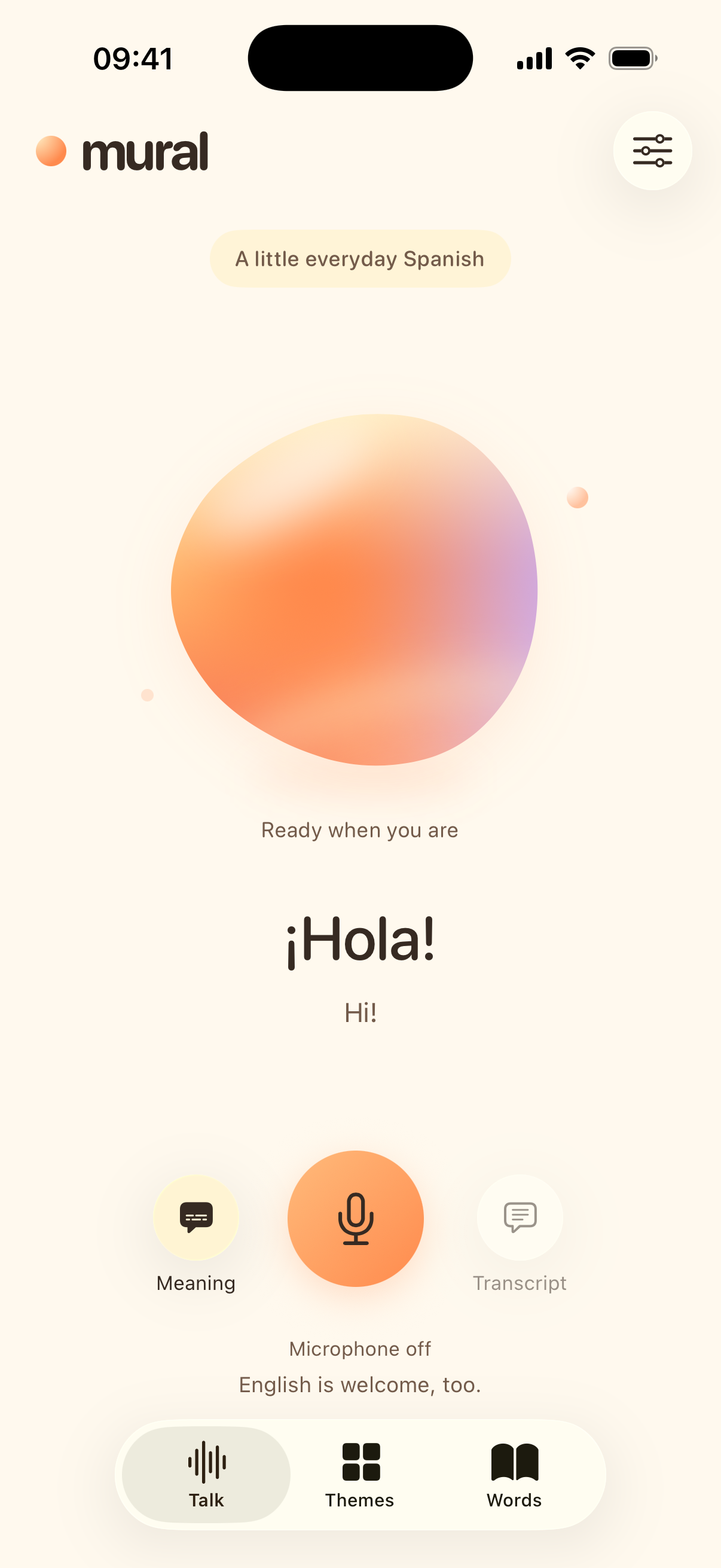
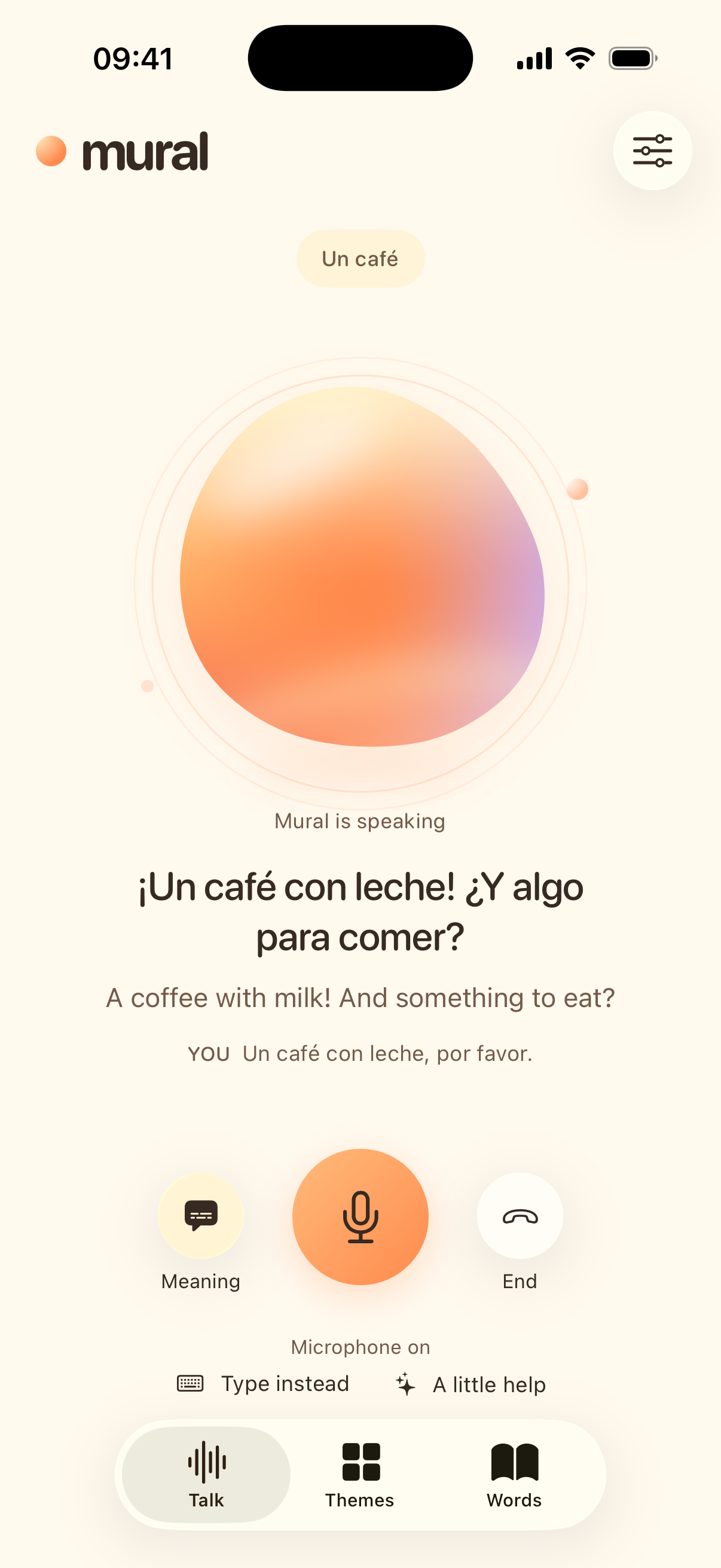
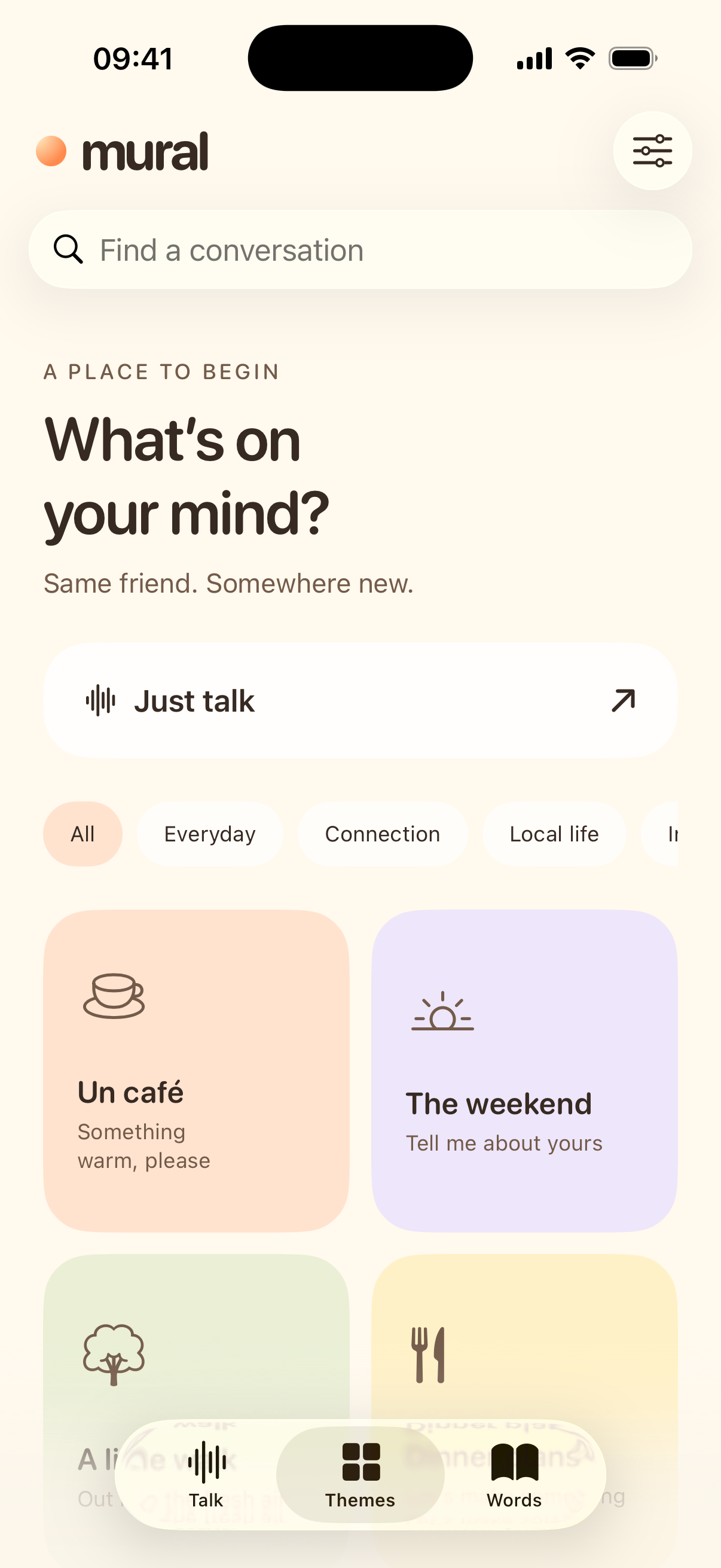
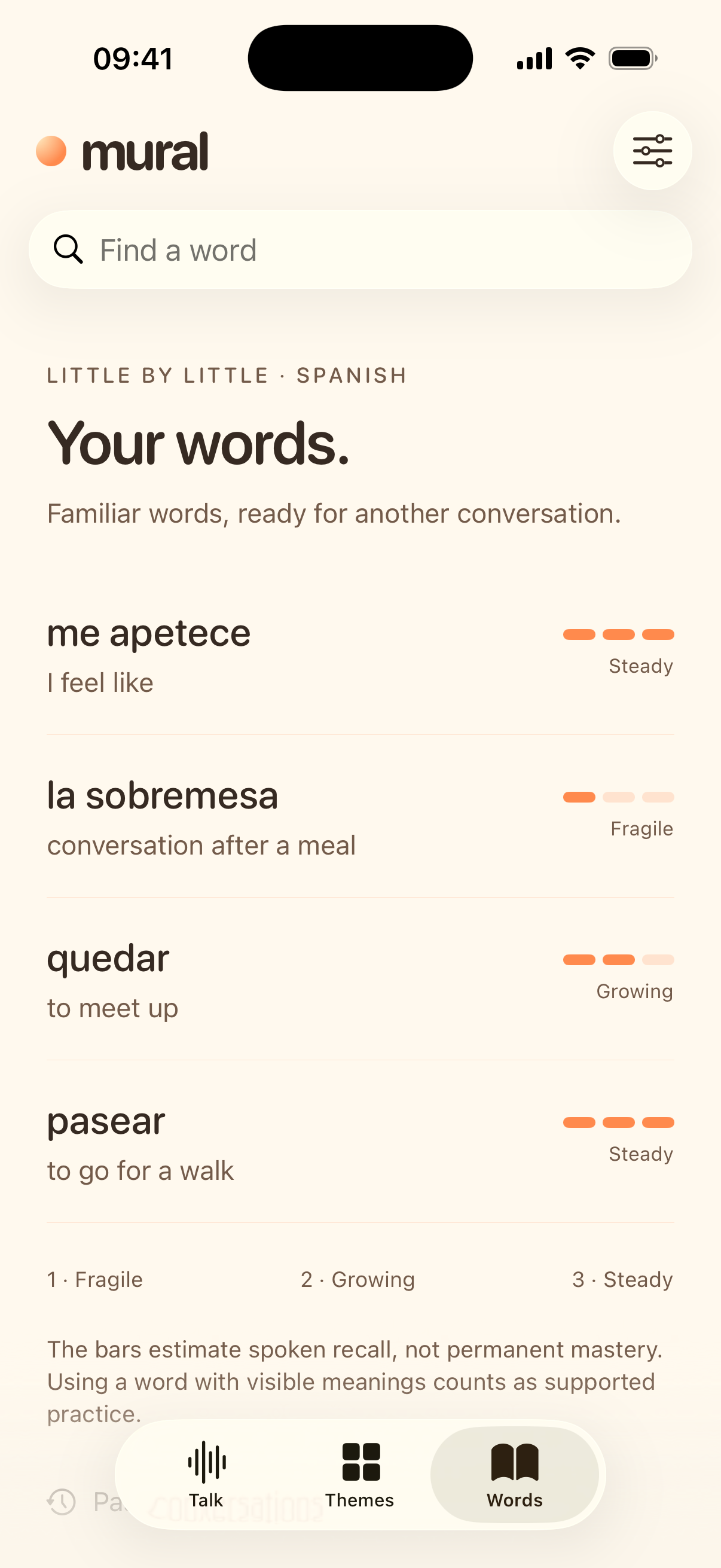
Mural is a native iPhone and Android app for learning through conversation. Speak to a warm, animated orb, follow the meaning when you need it, and practise words again in later conversations. Mural adjusts the challenge from the evidence in your replies.
Built with SwiftUI and Liquid Glass on iPhone, and Jetpack Compose on Android. Learning records stay on your device. This version connects directly to OpenAI using your own API key. It needs an internet connection, but no Mural account or running Mac.
Android
A native Android client is available in apps/android/, with voice and written conversation, the same eight language modules, local learning records and iPhone-compatible JSON backups. Its interface is English, and Spanish on a phone set to Spanish. It runs on Android 8.0 or later and uses your own OpenAI API key stored with Android Keystore. The iPhone client remains available below.
See the Android installation/build guide and Android verification record. Build a personal-install APK with Java 17 and Android SDK 36:
cd apps/android
./gradlew :app:testDebugUnitTest :app:lintDebug :app:assembleDebug
Get started
You need a Mac with Xcode 26 or later, an iPhone running iOS 26.1 or later, an Apple Account, and an OpenAI API project with billing and access to GPT-Live-1 and GPT-5.6 Luna. A ChatGPT subscription does not provide API credit.
Install with a local AI agent
If Codex or another coding agent has access to your Mac's files and terminal, paste the prompt below. The agent can clone, build and install Mural. You handle Apple Account sign-in and team selection in Xcode, device trust and Developer Mode prompts, and API-key entry inside the app. The iPhone installation guide covers each step.
Help me build and install Mural on my iPhone from https://github.com/Chuloo/mural.

Clone the repository into a new local folder, or use this checkout if it is
already open. Read README.md, docs/run-on-iphone.md and docs/build-and-test.md.
Check that Xcode and its iOS tools are ready, resolve the pinned dependencies,
run the offline core tests, and build the iOS Simulator target.

Guide me through adding my Apple Account and choosing my signing team in
Xcode. For a first installation, help me choose a unique bundle identifier if
needed. Preserve the existing team and identifier when updating Mural, and
do not uninstall it or erase its learning data.

Detect my connected iPhone, build with the configured signing team, install
Mural and launch it. Tell me when I need to unlock the phone, trust this Mac
or the developer profile, enable Developer Mode, or approve a system prompt.

I will choose my learning and subtitle languages, then enter my own OpenAI
API key in Settings > Advanced > Use your own API key. Do not ask me to paste
the key into chat, read it from Keychain, or put it in source files or logs.
Leave managed accounts, hosted trials and purchases disabled.

Finish by reporting which build and installation checks passed, and anything
I still need to do on the phone. I will start the first live conversation.
Install with Xcode
Updating an earlier checkout? The iPhone project now lives in apps/ios/. Before opening it, follow the local-settings migration steps to preserve your signing team, account configuration and existing app identity.
- Clone Chuloo/mural, or download its ZIP. Open
apps/ios/Mural.xcodeproj. - In Xcode, open Settings → Accounts and add your Apple Account.
- Select the Mural target, open Signing & Capabilities, enable automatic signing, and choose your team. For your own fork, replace the bundle identifier with a unique value such as
com.yourname.mural. Keep that value stable for later updates. - Connect and unlock your iPhone. Trust the Mac if prompted. Turn on Settings → Privacy & Security → Developer Mode on the phone, restart, and confirm the setting.
- Select Mural as the scheme and your iPhone as the destination, then click Run. If iOS asks you to trust the developer, do so in Settings → General → VPN & Device Management.
- Choose your learning and subtitle languages in the welcome screens. In Settings → Advanced → Use your own API key, save your own OpenAI project key. Start a conversation and allow microphone access.
You should hear Mural greet you in your chosen language. You can now disconnect your phone from the Mac and use Wi-Fi or cellular.
A free Personal Team can run the app on your own phone; TestFlight and App Store distribution require Apple Developer Program membership. Free provisioning profiles expire after seven days. Refresh by running the same project again, preserving the team and bundle identifier. Export a learning backup before changing either or switching phones. See the detailed iPhone guide for common setup problems. Apple membership guidance
What works today
- A warm welcome: choose a learning language and a subtitle language in two short screens, with a greeting that changes languages.
- Conversation practice: live voice, gentle corrections, optional meaning subtitles, word lookup, mute, and a typed reply when speaking is inconvenient.
- Themes: 24 conversation settings, with cultural details supplied by each language module. You can also request a current topic; web search supplies source links.
- Adaptive practice: vocabulary and provisional ability observations come from validated conversation evidence. Each learning language keeps separate progress.
- Recall bars: one to three bars summarise repeated retrieval over time. Three bars require spaced evidence in different contexts. These are product heuristics, not calibrated forgetting probabilities or a language certificate.
- A fresh start: the Talk screen returns to its greeting 15 seconds after a conversation ends. Tap New conversation to reset immediately. Your saved conversations and learning remain.
- Local records: export or import a JSON learning backup, delete a conversation, or delete all learning data from Settings.
The modules teach Norwegian Bokmål with an Eastern Norwegian voice target, Spanish from Spain, international English, French from France, German from Germany, Italian from Italy, Brazilian Portuguese and Standard Mandarin with Simplified Chinese. Each language has its own conversation themes, teaching guidance and progress. Valid regional alternatives are accepted.
On iPhone, Mandarin includes optional pinyin in Talk, transcripts and word details. Chinese word lookup uses word boundaries, and the original characters remain available for copying from transcripts. Pinyin uses system dictionary readings; names, ambiguous words and tone changes in connected speech still need listening checks. Voice accent and teaching guidance are model instructions, and fluent-speaker review is still needed before making pronunciation or learning-effectiveness claims.
Privacy and API costs
Mural stores conversations, vocabulary and preferences on your device. There is no Mural cloud sync, analytics SDK or advertising. The optional iPhone account feature stores signup data on the account service; conversations and vocabulary stay local. Your API key is stored in the device’s Keychain, excluded from learning exports, and sent only to OpenAI.
During practice, audio, selected conversation text, learning context and requested searches go to OpenAI. Mural does not save raw audio. API requests set store: false where supported, but that does not disable all provider retention; OpenAI’s abuse-monitoring rules and your project’s settings still apply. OpenAI data controls
OpenAI bills your project for voice, text and search. The app’s usage display is an estimate, and its conversation time limit is not a billing cap. Check your OpenAI project’s usage and spending settings.
Planned public service
Hosted free conversations and minute purchases are not active. Optional Google sign-in exists on iPhone; Android account integration is in progress. The API foundation contains identity verification, audited minute allowances and guest transfers, plus the earlier sandbox payment support. Minute controls describe what is implemented and what remains disabled. Its runbook lists the remaining work before commercial activation. No shared provider key belongs in this repository or a distributed app binary.
A public TestFlight link and App Store listing are not yet available. Release preparation records the outstanding requirements.
The Mural website lives in the separate Chuloo/mural-website repository.
Build and test
From the repository root:
swift test --package-path apps/ios
xcodebuild -project apps/ios/Mural.xcodeproj -scheme Mural \
  -destination 'generic/platform=iOS Simulator' \
  -derivedDataPath .build/DerivedData \
  CODE_SIGNING_ALLOWED=NO ARCHS=arm64 ONLY_ACTIVE_ARCH=YES build
For UI tests, create or select an iPhone 17 simulator in Xcode, then run Product → Test. The tests use in-memory fixtures and do not require an API key. More commands and preview options are in the build guide.
The iPhone language release recorded on 13 September 2026 passed 70 core tests and 20 native UI tests, including Mandarin pinyin, all four new onboarding choices and the largest accessibility text size. 79 backend tests passed with an isolated PostgreSQL database and no skips. German, Italian, Brazilian Portuguese and Mandarin each passed a live iPhone check using synthetic typed replies and real voice output, meanings and word lookup. These checks do not establish human speech-recognition, pronunciation or correction quality. Verification record
The Android release branch is being prepared separately. See release progress for its checks and remaining gates.
Code map
| Directory | Contents |
|---|---|
apps/android/ | Native Kotlin/Compose Android client and tests |
apps/ios/App/ | SwiftUI views, SwiftData storage, Keychain, WebRTC transport and API coordination |
apps/ios/Core/ | Language modules, teaching policy, transcripts, vocabulary evidence and recall projection |
apps/ios/Tests/ | Core learning and translation tests |
apps/ios/UITests/ | Native interface tests |
shared/ | API contracts and fixtures exercised by both native clients |
scripts/ | Project generation, language export and compatibility checks |
docs/ | Setup, build and language-module guides |
release/ | Submission drafts and public-release checks |
services/api/ | Account, billing and hosted-service foundation; see its runbook before deploying |
Read how the language architecture works and how to add a language. Contributions should follow CONTRIBUTING.md; security issues belong in the private reporting process.
Dependencies and license
The native WebRTC package is pinned to stasel/WebRTC 152.0.0. The app bundles third-party notices and the SDK’s privacy manifest. Review upstream notices when changing the dependency.
Mural is released under the MIT License. Third-party components retain their own licenses. The Mural name and logo identify the original project; the software license does not grant trademark rights.