LibreELEC with Dolby Vision and AMD 3D support
Dolby Vision playback and HDR10 conversion in Kodi, powered by CB1, an open-source Dolby Vision processing engine. Intel and AMD integrated graphics are supported. Dedicated AMD Radeon and NVIDIA GeForce GPUs are experimental.
R1.0.0 Beta5 · LibreELEC 13 · Kodi 22 RC1 · CB1 0.3
Downloads · Release notes · Report an issue
No external player or proprietary Dolby SDK is required.
Supported Dolby Vision profiles
| Profile | Support |
|---|---|
| 5 | Yes |
| 7 MEL | Yes |
| 7 FEL | Yes, including enhancement-layer reconstruction |
| 8.1 / 8.2 / 8.4 | Yes |
| 10 | Yes |
| 9, legacy profiles, 20 | No |
CM2.9 and CM4 metadata are supported. Mode availability depends on the source format and the active output capabilities.
Rendering modes
| Source | Mode | Output | Purpose |
|---|---|---|---|
| Dolby Vision | Dolby Vision Standard | Dolby Vision, TV-Led | Prioritize performance with near-imperceptible image differences |
| Dolby Vision | Dolby Vision Master Reference | Dolby Vision, TV-Led | Preserve original pixels and metadata as accurately as possible, aiming for bit-perfect playback |
| Dolby Vision | Dolby Vision Adaptive HDR Mapping | Dolby Vision, TV-Led | Expand highlights and selected midtones for the configured TV, guided by source metadata |
| Dolby Vision | HDR10 Reference Basic | HDR10 | Convert using source mastering information and scene guidance, without TV configuration |
| Dolby Vision | HDR10 Reference Expert | HDR10 | Map to the configured TV peak and gamut using compatible creative metadata |
| Dolby Vision | Dolby Vision Disabled (native Kodi) | Native Kodi output | Use Kodi's original playback and fallback behavior |
| HDR10 | Dolby Vision Reference (AI) | Dolby Vision, TV-Led | Generate L1/L3 scene metadata using image analysis and LightGBM, without an enhancement grade |
| HDR10 | Dolby Vision Adaptive HDR Mapping (AI) | Dolby Vision, TV-Led | Combine AI scene metadata with controlled highlight expansion |
| HDR10 | HDR10 Native | HDR10 | Keep native Kodi HDR10 playback |
| SDR / HLG | Native | Native SDR / HLG | Keep native Kodi playback |
Adaptive HDR Mapping and HDR10 Expert require a TV profile. Standard, Master Reference, Basic and Reference AI do not. Master Reference vs Standard: image differences and GPU performance
For metadata use, curves and mode differences, see processing and algorithms.
Quick rendering selection
Change rendering mode during playback. The bottom-right menu shows the choices for the current source and explains unavailable modes.
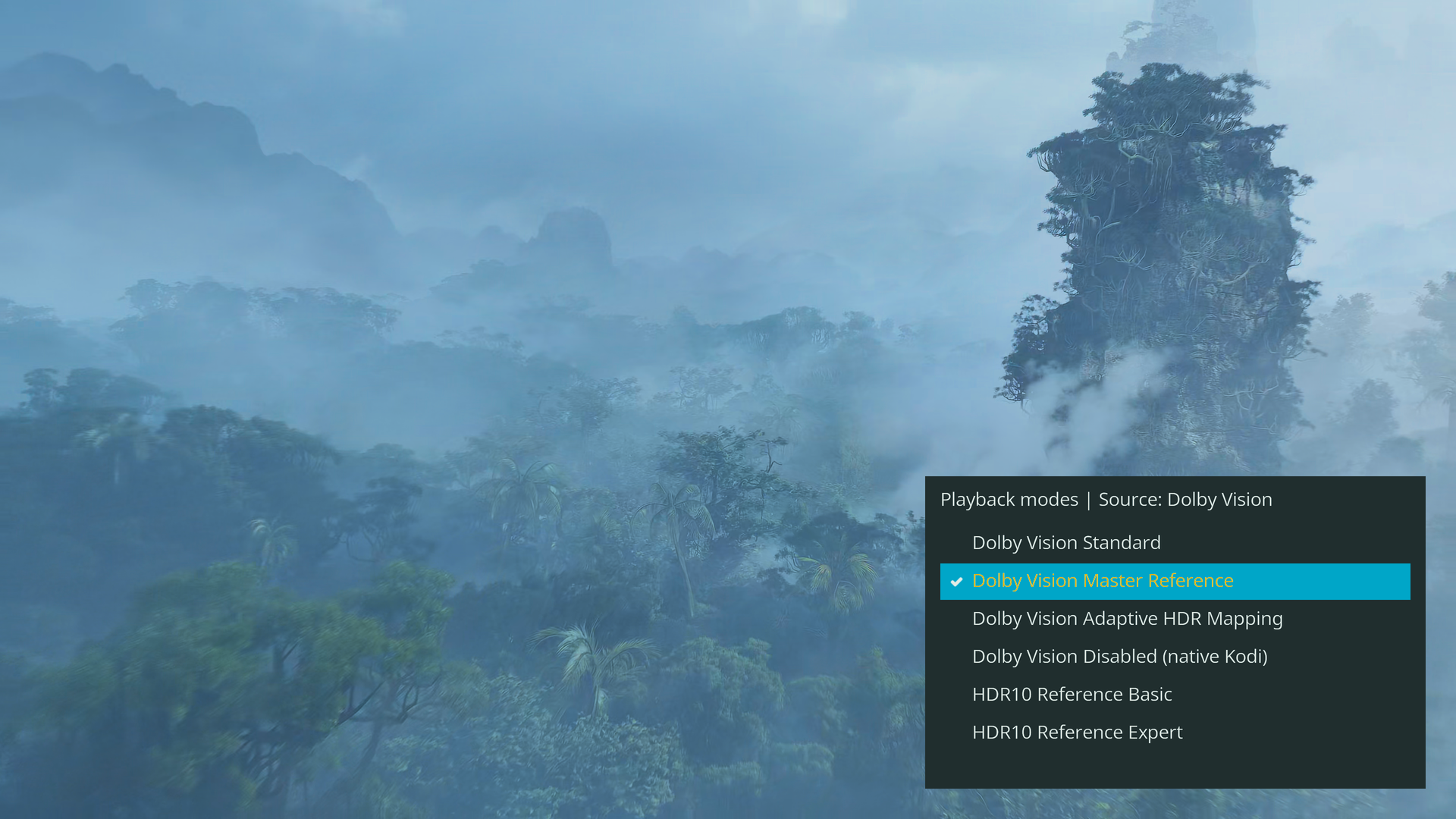
Press O to cycle through Player information, rendering selection and video only. Play/pause and seek remain available with either panel open.
Player information
Source and output formats, Dolby Vision profile, CM version, BL/EL/FEL status, metadata, active rendering mode, Fast state and supported GPU render-engine usage. HDR10 and SDR show their relevant information without empty Dolby Vision sections.
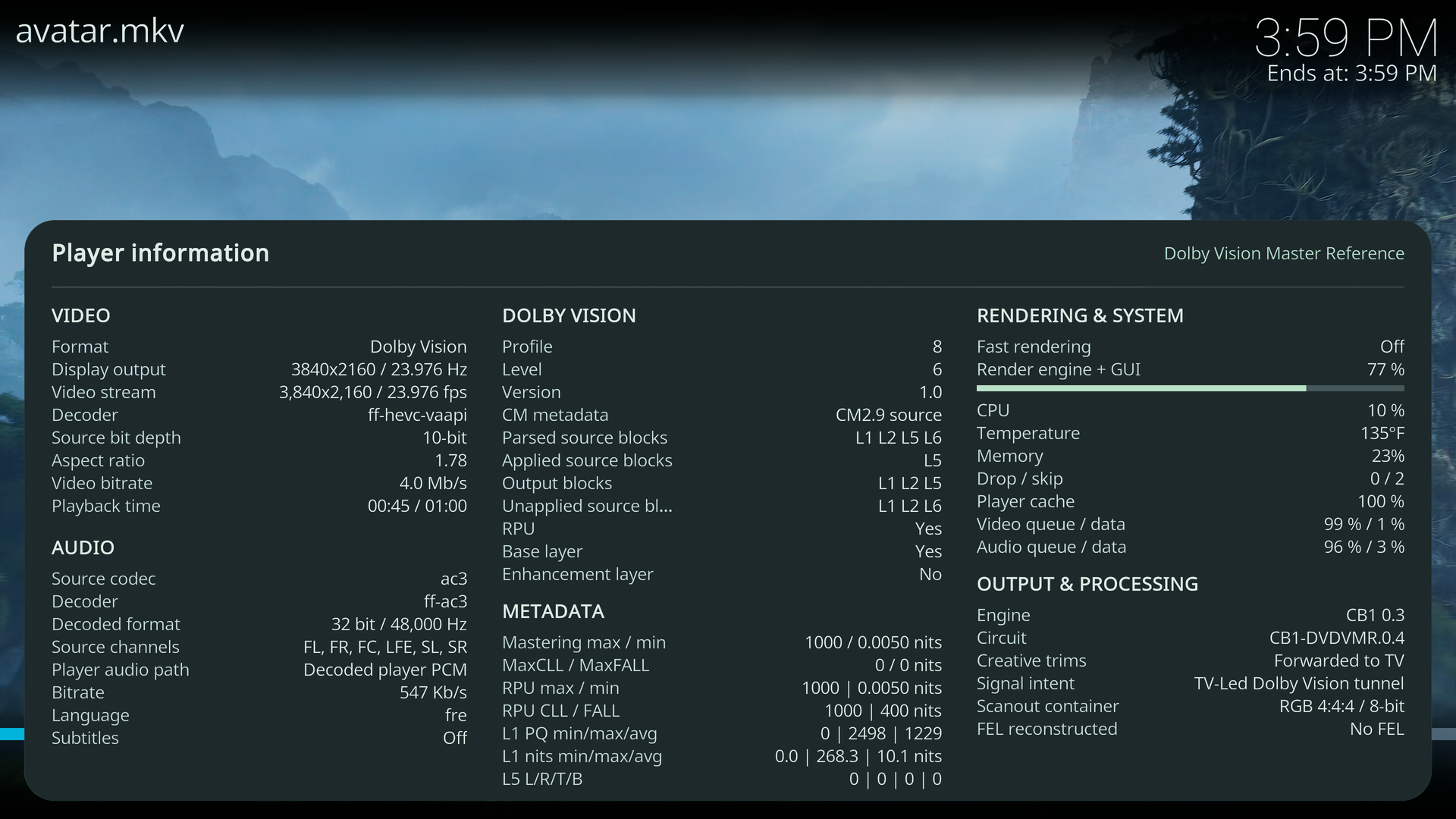
GPU usage is Kodi's render-engine load, including visible menus. It is not total GPU or video-decoder load. Controls and settings.
Install or update
Choose the matching version from releases:
| File | Use |
|---|---|
.img.gz | Write to installation media for a fresh installation |
.tar | Copy into LibreELEC's update directory and reboot |
sources.tar.zst + vendor-inputs.tar.zst | Rebuild the release; not required for installation |
Settings are in Kodi > Settings > Player > Videos. Standard Dolby Vision is the default. Fast rendering defaults to Auto for the other eligible CB1 modes. Build instructions.
AMD HDMI 3D
| Source | Playback |
|---|---|
| MVC Blu-ray ISO | Decode both views and use HDMI frame packing on compatible displays |
| Side-by-side / top-and-bottom | Native Kodi stereoscopic playback and output selection |
| 1080p half-SBS | Additional HDMI stereo modes at 24, 50 and 60 Hz |
3D uses Kodi's native playback path, not CB1 conversion or Adaptive processing. A 3D-capable display and suitable glasses are required. 3D setup and compatibility.
Hardware
| Hardware | Dolby Vision support |
|---|---|
| Intel iGPU: Core 8th gen and newer, Core Ultra Series 1 / 2, N-series | Supported |
| AMD iGPU: Ryzen 2000G / 3000G and corresponding mobile APUs, 4000 / 5000 APUs, 6000, 7030 / 7035, 7040 / 8040, 8000G, AI 300 | Supported |
| AMD dedicated GPU: Radeon RX 5000 / 6000 / 7000 series | Experimental |
| NVIDIA dedicated GPU: GeForce GTX 16, RTX 20 / 30 / 40 / 50 series | Experimental |
| Other hardware | Dolby Vision processing to HDR10 where supported; no custom Dolby Vision HDMI output |
Performance depends on hardware, content and rendering mode. Prior N100 tests covered Master Reference with 4K FEL remuxes and 4K60 content. Heavier conversions require more GPU performance.
For problems, open an issue with the exact CPU/GPU, display, connection chain,
build version and kodi.log. Hardware details.
Known issues or limitation
- Screenshots are unavailable in Dolby Vision Master Reference.
- Heavy conversions and visible menus can exceed N100 rendering capacity, especially at 60 FPS.
- Adaptive HDR Mapping remains subject to visual refinement.
- Dedicated AMD and NVIDIA GPU support is experimental.
- HDR10 Support issue on Intel 8th & 9th gen.
- HDR10+ not supported.
Components and documentation
| Component | Role |
|---|---|
| Linux display drivers | Dolby Vision signaling, output validation and HDMI transport |
| Kodi | Playback, audio, frame pairing, controls, information and CB1 integration |
| CB1 | Dolby Vision open-source engine: reconstruction, conversion, Adaptive processing and output metadata |
| FFmpeg / libplacebo | Matched metadata, decoding integration and rendering patches |
- Processing and algorithms
- Playback and settings
- Hardware support and AMD HDMI 3D
- Build and versions
- Licensing and credits
- Upstream LibreELEC README
No affiliation with or certification by LibreELEC, Kodi, Dolby, Intel, AMD or NVIDIA.