Drift
The free desktop editor that makes your videos look finished — not “good enough.”



GitHub · Download · Issues · License
Drift is a desktop video editor from CutWire Studios. Drop in clips, add effects, captions, stickers, and music, then export a polished video — with no subscription, no watermark, and no account.
It is built for the edits people actually make: Reels and Shorts, game clips, school projects, tutorials, product demos, memes, and anything you want to look sharp without living in a browser or paying a monthly fee.
What you see in the preview is what you export. One compositor, one look, no surprises.
Download


Google Play is closed testing — how to join.
Linux — install from Flathub:
flatpak install flathub org.cutwire.Drift
flatpak run org.cutwire.Drift
macOS — install via Homebrew:
brew install --cask cutwire-studios/tap/driftFirst launch on macOS: Drift is signed ad-hoc. If Gatekeeper blocks opening it, run:
xattr -dr com.apple.quarantine /Applications/Drift.app
Or grab a build for your platform from the latest release:
| Platform | Package |
|---|---|
| Linux | Flathub · AppImage |
| Windows | Microsoft Store · Installer (.exe) · Portable zip |
| macOS | Homebrew Tap · Disk image (.dmg, Apple Silicon) |
| Android | Google Play (closed testing) · APK (arm64-v8a) · APK (armeabi-v7a) · APK (x86_64) |
On a phone, join closed testing on Google Play, or grab Drift-*-arm64-v8a.apk from the latest release and install it (or adb install Drift-*-arm64-v8a.apk). Use x86_64 for emulators.
See all releases for previous versions and full changelogs.
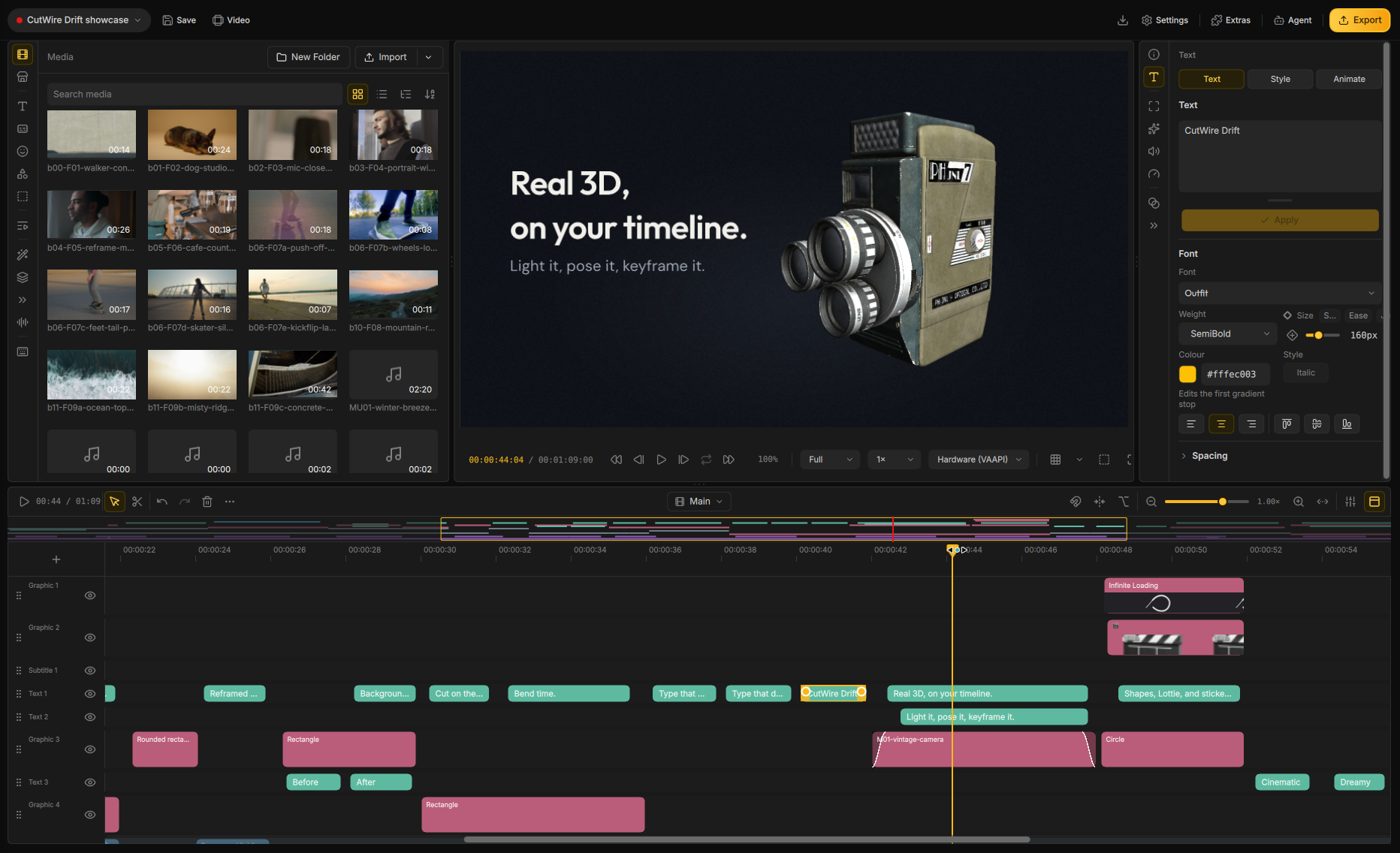
Screenshot
Features
An agent can edit the open project. Import, cut, grade, and export in the project you have open. The same editor can run with no window.
3D on the timeline. Tilt clips in space, light them, and park a title behind the subject. Drop in a 3D model and it plays in the same cut.
Lottie animations. Motion graphics and vector art stay sharp at any size. Recolour or reword them in place.
Advanced keyframing. Animate position, scale, rotation, opacity, and effect parameters over time. Draw the curve yourself.
150+ transitions and 40+ effects. Every look previews on your footage. One click can drop a whole stack — Beat Drop, Glitch Cut, Neon Cutout. Trails of earlier frames, and grades that stick to one clip.
On this machine. Click a subject and lift it off the shot. Add depth of field and lights that belong to the clip. Automatic captions, video upscale, and live face retouch — all on your computer.
Edit the words. Speech becomes text on the clip. Cut phrases, drop fillers, strip silence, pick the best takes, label speakers, and build captions from those times.
Titles with a real look. Thirty-three packs — karaoke, Hormozi-style, neon, chrome, holographic, handwritten. Copy one style onto every subtitle on the track.
Move a whole stack at once. One layer can drag, scale, rotate, tilt, and fade everything under it. Nest layers, or open a composite when the stack needs its own timeline.
Cut to the music. The timeline snaps to the beat. Clips split and land on the bar. Music ducks under speech and comes back to its own level. Reframe a landscape take into a vertical video that follows the face.
A timeline that behaves. Multi-track filmstrips, ripple, snap, masks, freeze frame, bookmarks, a mixer. Split a clip and the grade stays. A crash leaves the last save intact.
Audio that sounds finished. Clean up speech, meter loudness, EQ and compress, keep pitch when you change speed, record a voiceover.
Find shots. Switch cameras. Search footage for what’s on screen. Watch every angle at once and punch the cut.
Stabilise, export, take the project with you. Smooth shaky clips, upscale, play heavy files smoothly. MP4, GIF, audio-only, or just a range. Pack the media with the edit so paths stay whole.
Android is the same editor. Timeline, effects, and export on the phone. Share straight from the app.
Stock, voices, and a small install. Search stock into the bin. Generate voiceover and sound effects. Fonts, stickers, and extra models download when you use them. UI in Arabic, Spanish (Spain and Colombia), French (Canada), Italian, Japanese, Portuguese (Brazil and Portugal), Russian, Sinhala, Tagalog, Vietnamese, and Simplified Chinese.
Why people pick Drift
Most “free” editors want an account, a watermark, or a subscription the moment the video starts looking good. Drift is the opposite: yours, on your computer, GPLv3, no login wall.
It is fast enough for a 30-second social cut and deep enough for a real project — an agent on the timeline, 3D and Lottie, captions, effects, audio, cutouts, and multicam.
Help us translate Drift

For developers
Build, packaging, architecture, and agent protocol live in docs/:
Help and feedback
Found a bug or have an idea? Open an issue on GitHub.
License
GPLv3 — see LICENSE.