Building a Senior Staff Engineer Agent with Claude Code
The difference between a Junior and a Senior engineer isn’t syntax, it’s predictability, risk management, and discipline under pressure. AI agents struggle with exactly this: they skip reviews, rationalize shortcuts, and ship work they are proud of but nobody actually verified. Anthropic shows agents collaborate well but without structure, more agents just mean more chaos and wasted compute. What you need is what real companies have: a Staff Engineer orchestrating specialized sub-agents through a disciplined pipeline from design to deployment, and that is exactly what we are going to build …
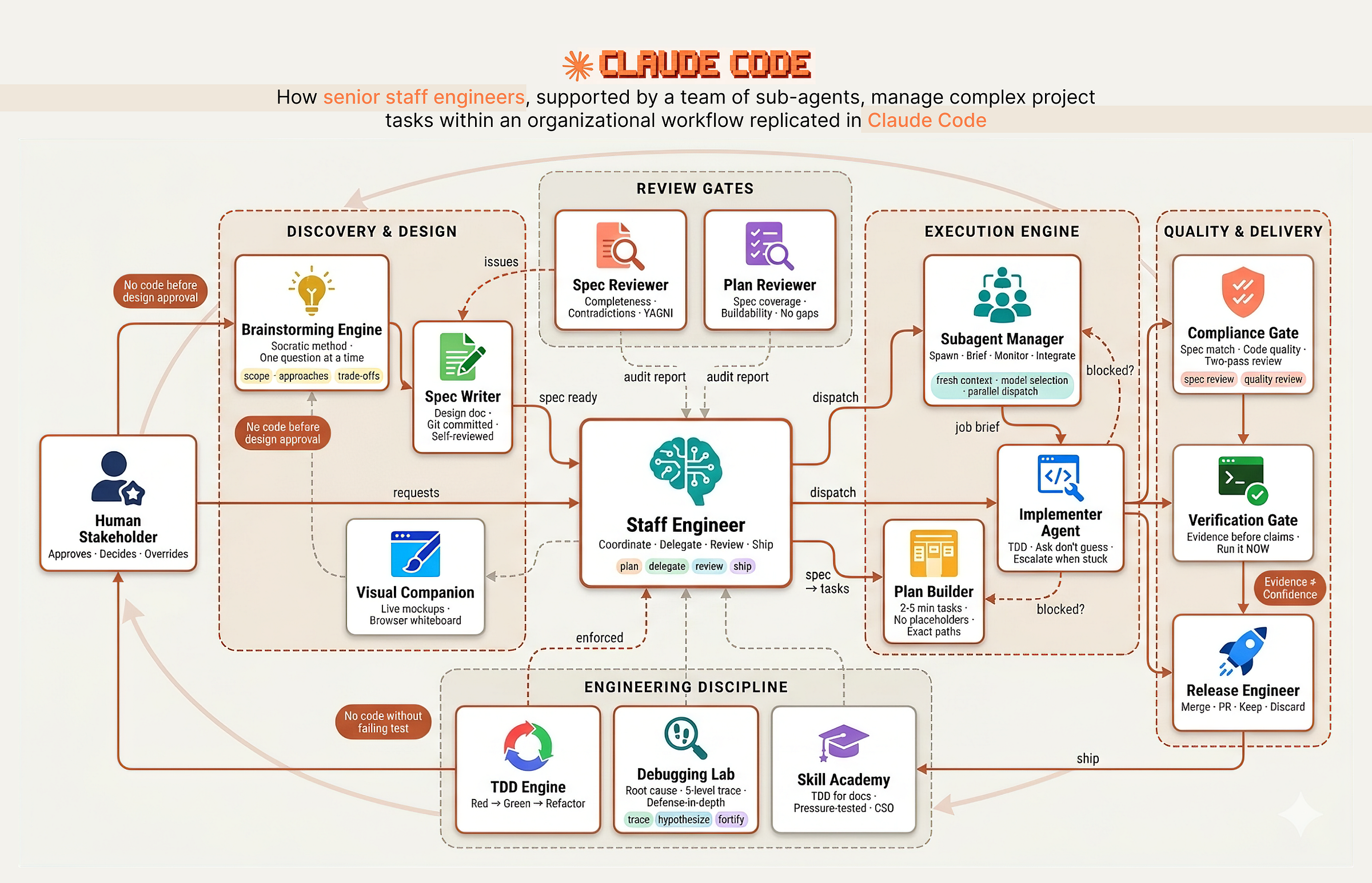 Senior Staff Engineer with teams of sub-agents (Created by Fareed Khan)
The system works like a real engineering organization with clear separation of responsibilities:
- Discovery & Design: The Architect asks questions one at a time, explores 2–3 approaches with trade-offs, and produces a design spec committed to git. No code before human approval.
- Planning & Review: The Tech Lead breaks the spec into 2–5 minute tasks with exact file paths and complete code. A fresh sub-agent audits the plan against the spec to catch gaps and scope creep.
- Execution Engine: The Manager dispatches a fresh sub-agent per task with isolated context. Stuck agents escalate. Bad work gets terminated and re-dispatched.
- Quality Gates: Two sequential reviews: spec compliance (right thing?) then code quality (built well?). A verification gate demands fresh terminal output before any completion claim.
- Engineering Discipline: TDD enforced as iron law. Debugging follows a four-phase forensic process. Root cause tracing goes five levels deep. Skills themselves are pressure-tested against real agents before deployment.
In this blog we are going to …
visually walk through each stage of this workflow, build every component step by step from hooks to skills to agents, and see how they work together as a disciplined engineering team using Claude Code.
Table of Contents
- Creating the Team Codebase
- Hooks (The Management Layer)
- Brainstorming & Design (Planning Phase)
- Finding Logical Loopholes (Spec Review)
- Visual Companion (Whiteboarding Sessions)
- Writing Plans (Backlog Grooming)
- Plan Review (The Grooming Gatekeeper)
- Subagent-Driven Development (Delegation)
- The Implementer Prompt (Developer Job Description)
- Spec & Code Quality Reviewers (Compliance Officers)
- Test-Driven Development (The Iron Law)
- Testing Anti-Patterns (Lazy QA Training)
- Systematic Debugging (Forensic Engineering)
- Root Cause Tracing & Defense in Depth
- Verification Before Completion (Final Sign-off)
- The Peer Review Meeting (Code Review)
- Using Git Worktrees (Bio-hazard Containment)
- Writing Skills (The Academy)
- Agents & Commands (Team Directory)
- Testing the Senior Staff Engineer
- How to Improve It Further
Creating the Team Codebase
In every engineering organization, before the first line of product code is written, someone has to set up the infrastructure. At companies like Spotify, Shopify, and Stripe, this is the staff engineer’s first job on a new initiative.
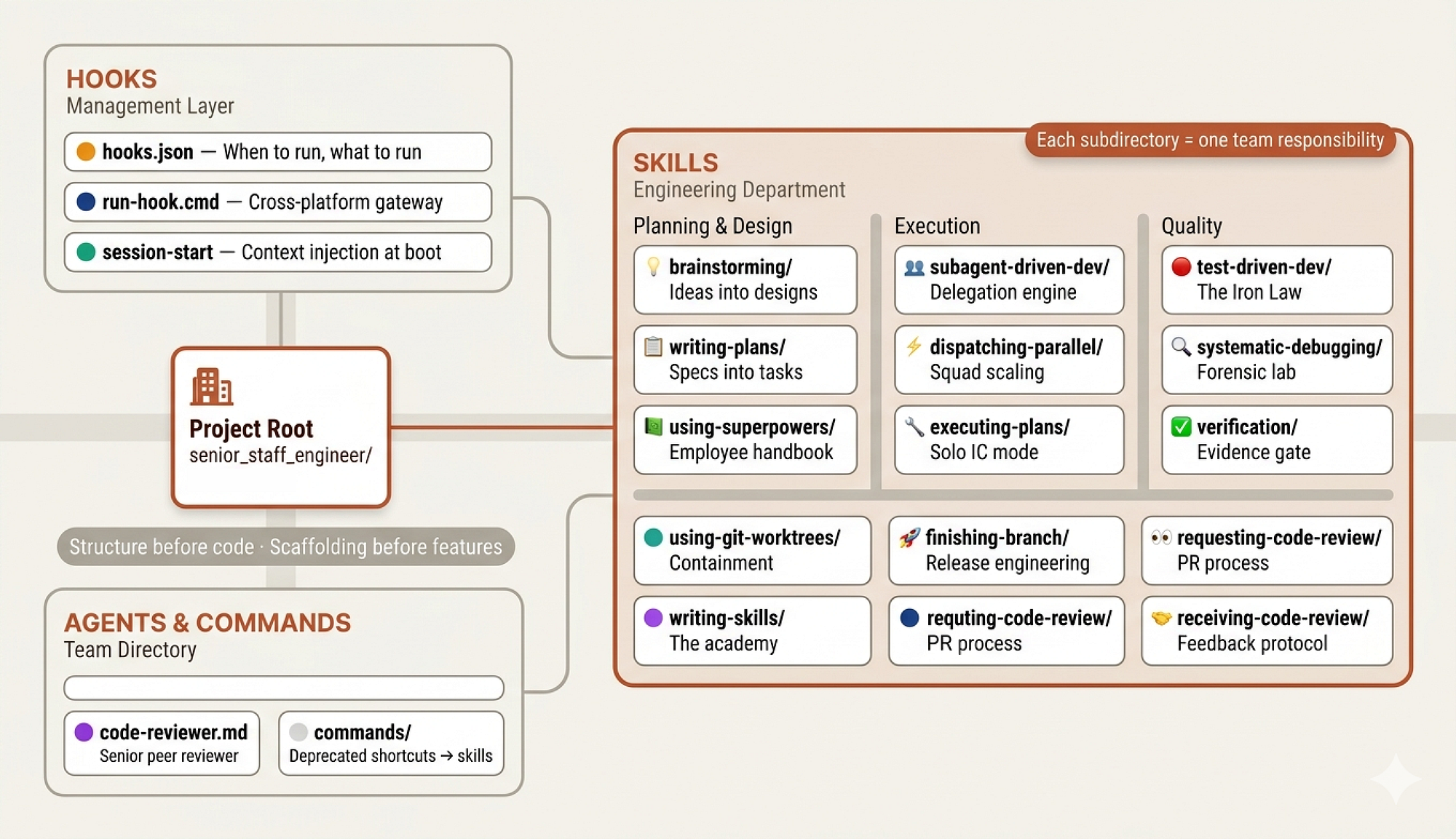 Team Codebase (Created by Fareed Khan)
They don’t start coding features. They establish the project structure, the development workflows, the CI/CD pipelines, and the team norms. They build the organizational scaffolding that makes everyone else’s work possible.
When you work with Claude Code normally, you might use a few skills, an MCP server, maybe some tool scripts, or even start from scratch and let Claude figure it out.
But we are not building a solo developer. We are building a team of agents that need to collaborate, follow processes, and hold each other accountable. That requires structure, the same way a 10 person engineering team requires structure that a solo freelancer doesn’t.
So before we write any skills or define any agents, we need to create the organizational scaffolding:
senior_staff_engineer/
├── agents/                             # agent + sub-agent definitions
├── commands/                           # custom CLI-style agent commands
├── hooks/                              # lifecycle hooks (events, workflow control)
├── skills/                             # core capability modules
│   ├── design-and-discovery/           # idea generation & design
│   │   └── scripts/                    # visual/interactive brainstorming
│   ├── delegation/                     # delegate to sub-agents
│   ├── evidence-verification/          # final validation before completion
│   ├── execution-engine/               # step-by-step plan execution
│   ├── forensic-debugging/             # root-cause analysis
│   ├── orchestration/                  # coordinate multiple agents
│   ├── planning-and-backlog/           # plan creation
│   ├── release-engineering/            # finalize work before merge
│   ├── review-reception/               # process feedback & iterate
│   ├── review-requesting/              # prepare PRs + request reviews
│   ├── skill-academy/                  # authoring new skills
│   ├── tdd-discipline/                 # write tests → implement → validate
│   ├── using-senior-staff-engineer/    # configure & optimize this system
│   └── worktree-management/            # isolate work via worktrees
It might seem complex at first, but each directory maps to a role or function in a real engineering organization.
- The
agents/directory is the team roster, defining who does what. - The
skills/directory is the employee handbook, containing the processes and standards every team member follows. - The
hooks/directory is the management layer, controlling the flow of information and ensuring everyone starts aligned.
We will build each of these one by one and make them act as a cohesive team that handles complex development tasks from planning through deployment.
Hooks (The Management Layer)
In every company, there’s a layer of management infrastructure that operates invisibly. Before the first meeting of the day, the office is already open, the coffee machine is running, the shared calendar is synced, and the team’s Slack channels are populated with overnight updates. Nobody thinks about this infrastructure until it breaks.
In our system,
hooks/is this management layer.
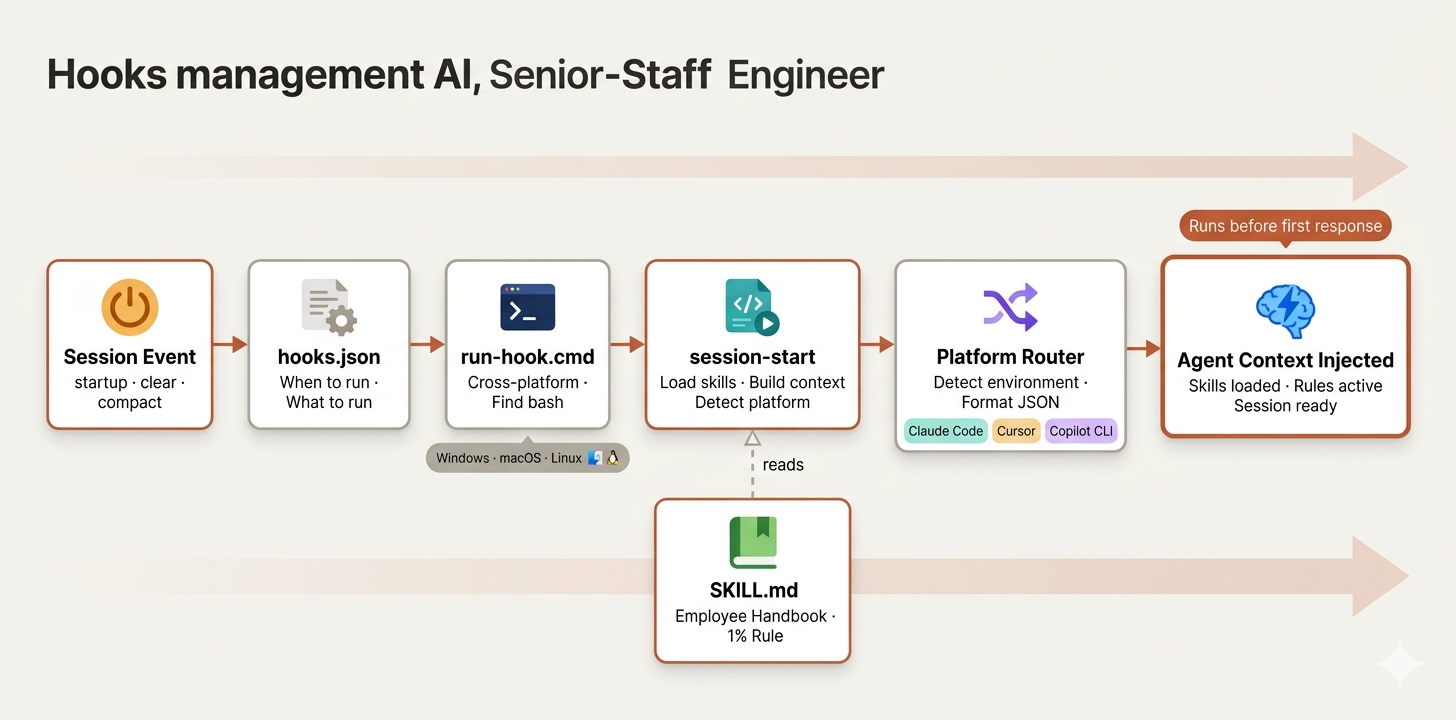 Hooks Management (Created by Fareed Khan)
In Claude Code, hooks let you control what happens at specific lifecycle events, like when a session starts, when context is cleared, or when the agent compacts its memory. For a single developer, hooks are optional. For a team of agents that need to start every session with shared context and consistent rules, hooks are essential.
We start with three files:
hooks/
├── hooks.json    # main configuration file
├── run-hook.cmd  # cross-platform script executor
├── session-start # session initialization logic
The hooks.json is simple. It defines one rule: every time a session starts, run the initialization script.
{
  "hooks": {
    "SessionStart": [
      {
        "matcher": "startup|clear|compact",
        "hooks": [
          {
            "type": "command",
            "command": "\"${PROJECT_ROOT_DIR}/hooks/run-hook.cmd\" session-start",
            "async": false
          }
        ]
      }
    ]
  }
}
The matcher triggers on three scenarios:
startup(fresh session),clear(context reset), andcompact(memory compression).- In organizational terms, this is like having an onboarding checklist that runs not just on day one, but every time someone context-switches back to this project.
Because in AI agent terms, every session IS day one. The agent has no memory of yesterday's session. It needs to be re-onboarded every time.
The async: false flag ensures the hook completes before the agent starts responding. This is the equivalent of saying "the morning standup must finish before anyone opens their laptop." You can learn more about how Claude automates workflows with hooks.
In real companies, not everyone runs the same OS. The engineering team might have Mac users, Linux servers, and the occasional Windows machine. We need to create run-hook.cmd script that handles this by being a polyglot, a script that works on both Windows and Unix:
if "%~1"=="" (
    echo run-hook.cmd: missing script name >&2
    exit /b 1
)

set "HOOK_DIR=%~dp0"

REM Try Git for Windows bash in standard locations

if exist "C:\Program Files\Git\bin\bash.exe" (
    "C:\Program Files\Git\bin\bash.exe" "%HOOK_DIR%%~1" %2 %3 %4 %5 %6 %7 %8 %9
    exit /b %ERRORLEVEL%
)
On Windows, it searches for bash in common Git installation paths. If bash isn’t found anywhere, it exits silently rather than crashing. On Unix, it simply executes the script directly:
# Unix: run the named script directly
SCRIPT_DIR="$(cd "$(dirname "$0")" && pwd)"
SCRIPT_NAME="$1"

shift

exec bash "${SCRIPT_DIR}/${SCRIPT_NAME}" "$@"
The agent doesn’t need to know what OS it’s running on. The gateway script figures it out and routes accordingly. It’s the same principle behind Docker and Kubernetes: abstract away the environment so the application logic doesn’t need to care.
The session-start script is where the actual onboarding happens. When a new session begins, this script loads the squad's core skill file and injects it into the agent's context.
Think of it as the morning standup where the staff engineer reminds everyone of the team's operating principles before work begins.
The script starts by resolving paths and checking for legacy configurations:
#!/usr/bin/env bash
set -euo pipefail

SCRIPT_DIR="$(cd "$(dirname "$0")" && pwd)"
PLUGIN_ROOT="$(cd "${SCRIPT_DIR}/.." && pwd)"

# Legacy config check
warning_message=""

legacy_skills_dir="${HOME}/.config/staff_engineer/skills"

if [ -d "$legacy_skills_dir" ]; then
    warning_message="\n\n<important-reminder>⚠️ **WARNING:**
    staff_engineer now uses Claude Code's skills system.
    Move custom skills to ~/.claude/skills instead.</important-reminder>"
fi
Then it loads the core skill file, which is the employee handbook every agent must read:
using_staff_engineer_content=$(
    cat "${PLUGIN_ROOT}/skills/using-staff_engineer/SKILL.md" 2>&1 \
    || echo "Error reading using-staff_engineer skill"
)
The content gets escaped for JSON and wrapped in a context payload:
session_context="<EXTREMELY_IMPORTANT>\nYou have staff_engineer.

\n\n**Below is the full content of your 'staff_engineer:using-

staff_engineer' skill - your introduction to using skills. For

all other skills, use the 'Skill' tool:**\n\n

\n${using_staff_engineer_escaped}\n\n${warning_escaped}\n

</EXTREMELY_IMPORTANT>"
Finally, the script outputs the payload in a format specific to whichever platform is running it:
if [ -n "${CURSOR_PLUGIN_ROOT:-}" ]; then
    printf '{\n  "additional_context": "%s"\n}\n' "$session_context"

elif [ -n "${CLAUDE_PLUGIN_ROOT:-}" ] && [ -z "${COPILOT_CLI:-}" ]; then
    printf '{\n  "hookSpecificOutput": {\n    "hookEventName":
    "SessionStart",\n    "additionalContext": "%s"\n  }\n}\n' \
    "$session_context"
else
    printf '{\n  "additionalContext": "%s"\n}\n' "$session_context"

fi
Claude Code, Cursor, and Copilot CLI each expect context in a slightly different JSON format. Our script handles all three, which means the same squad can operate across different AI coding platforms without modification.
This is the kind of cross-platform thinking that staff engineers bring to infrastructure work, building things that work everywhere instead of just on their own machine.
The Employee Handbook (The 1% Rule)
In every organization, there’s a founding document that establishes culture. At Amazon, it’s the Leadership Principles. At Netflix, it’s the Culture Deck. At Bridgewater, it’s the Principles. These documents don’t just describe what the company does. They describe how every person in the company should think.
 Employee handbook (created by Fareed Khan)
skills/using-senior-staff-engineer/SKILL.md is our culture deck. It's the first thing loaded into every agent's context at session start, and it establishes the single most important rule of the entire system:
<EXTREMELY-IMPORTANT>
If you think there is even a 1% chance a skill might apply to
what you are doing, you ABSOLUTELY MUST invoke the skill.

IF A SKILL APPLIES TO YOUR TASK, YOU DO NOT HAVE A CHOICE.
YOU MUST USE IT.
This is not negotiable. This is not optional. You cannot
rationalize your way out of this.
</EXTREMELY-IMPORTANT>
This is the 1% Rule, and it’s the foundation everything else is built on. Without it, agents treat skills as suggestions. They skip the brainstorming phase because the task “seems simple”. They skip TDD because “this is just a config change.” They skip code review because “it’s only two lines”.
Every senior engineer has watched a team slowly abandon their processes through exactly these rationalizations, and the result is always the same: quality degrades, bugs ship, and everyone wonders what happened.
The skill must also includes an escape valve for sub-agents. When the main agent dispatches a focused sub-agent to implement a specific task, that sub-agent doesn’t need to go through the full skill discovery flow:
<SUBAGENT-STOP>
If you were dispatched as a subagent to execute a specific task,
skip this skill.
</SUBAGENT-STOP>
This is the organizational equivalent of telling a contractor “you don’t need to attend our all-hands meetings, just do the work you were hired for”. The main agent follows the full process. Sub-agents stay focused.
Instruction Priority (Chain of Command)
Every organization has a chain of command, and conflicts between levels must have clear resolution rules. The skill defines three levels:
## Instruction Priority

1. **Users explicit instructions** (CLAUDE.md, direct requests)
   - highest priority

2. **senior_tech_engineers skills** - override default system
   behavior where they conflict

3. **Default system prompt** - lowest priority

If CLAUDE.md says "don't use TDD" and a skill says "always use

TDD," follow the users instructions. The user is in control.
The human (the VP, the founder, the product owner) always has final authority. In real companies, this is the difference between a process-driven culture and a bureaucracy.
- Process-driven cultures follow processes because they produce better outcomes, but they override processes when the situation demands it.
- Bureaucracies follow processes blindly, even when they’re producing bad outcomes.
The Skill Discovery Flow
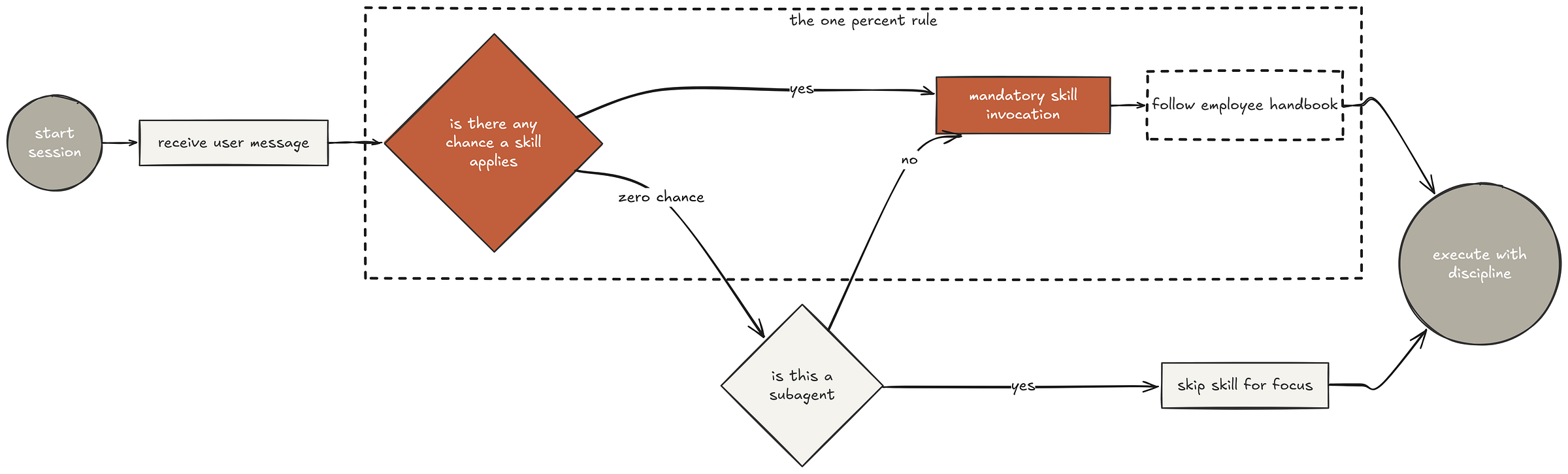
The handbook includes a flowchart that defines exactly how the agent should check for and invoke skills before responding to any message. The flow is: receive message, check if any skill might apply (even 1% chance), invoke the skill if so, announce what skill is being used, follow the skill’s checklist or instructions, and only then respond.
 Skill discovery (Created by Fareed Khan)
What makes this effective is the red flags table, a list of thoughts that indicate the agent is rationalizing its way out of following the process:
| Thought | Reality |
|---------|---------|
| "This is just a simple question" | Questions are tasks. Check for skills. |
| "I need more context first" | Skill check comes BEFORE clarifying questions. |
| "Let me explore the codebase first" | Skills tell you HOW to explore. Check first. |
| "This doesn't need a formal skill" | If a skill exists, use it. |
| "I remember this skill" | Skills evolve. Read current version. |
| "The skill is overkill" | Simple things become complex. Use it. |
| "This feels productive" | Undisciplined action wastes time. |
Every item in this table came from actual testing where agents tried to skip skills. “This is just a simple question” is the most common one. The agent decides the task is trivial, skips the skill, and misses something important.
In real teams, this is the developer who says “it’s just a one-line change” and deploys without testing, only to take down production because that one line had a side effect nobody anticipated.
The handbook also defines skill priority when multiple skills could apply:
## Skill Priority

1. **Process skills first** (brainstorming, debugging) - these
   determine HOW to approach the task

2. **Implementation skills second** (frontend-design, mcp-builder)
   - these guide execution

"Let's build X" → brainstorming first, then implementation skills.

"Fix this bug" → debugging first, then domain-specific skills.
And a distinction between rigid and flexible skills:
**Rigid** (TDD, debugging): Follow exactly. Dont adapt away
discipline.

**Flexible** (patterns): Adapt principles to context.

The skill itself tells you which.
You adapt brainstorming techniques to the problem at hand. The key insight is that the skill itself declares which category it belongs to, removing the agent’s ability to reclassify a rigid skill as flexible when it wants to cut corners.
Finally, the handbook addresses a subtle rationalization that agents (and humans) use constantly:
## User Instructions
Instructions say WHAT, not HOW. "Add X" or "Fix Y" doesnt
mean skip workflows.
- When a user says “add a login page”, the agent might think “they told me what to build, so I should just build it.”
- But “add a login page” is the WHAT. The HOW is still brainstorm, design, plan, implement with TDD, review, and deploy. The user’s instruction doesn’t override the process. It feeds into it.
Now that we have set up the management infrastructure, the onboarding flow, and the cultural handbook, we can start building the actual skills that will allow our senior staff engineer agent to perform its tasks effectively.
Brainstorming & Design (Planning Phase)
There is a moment before any code exists where the most important work happens. At Amazon, they write the press release before building the product. At Basecamp, they write the pitch document. At Google, they write design docs that get reviewed by three levels of engineers before a single function is defined.
The common thread is that thinking happens before building.
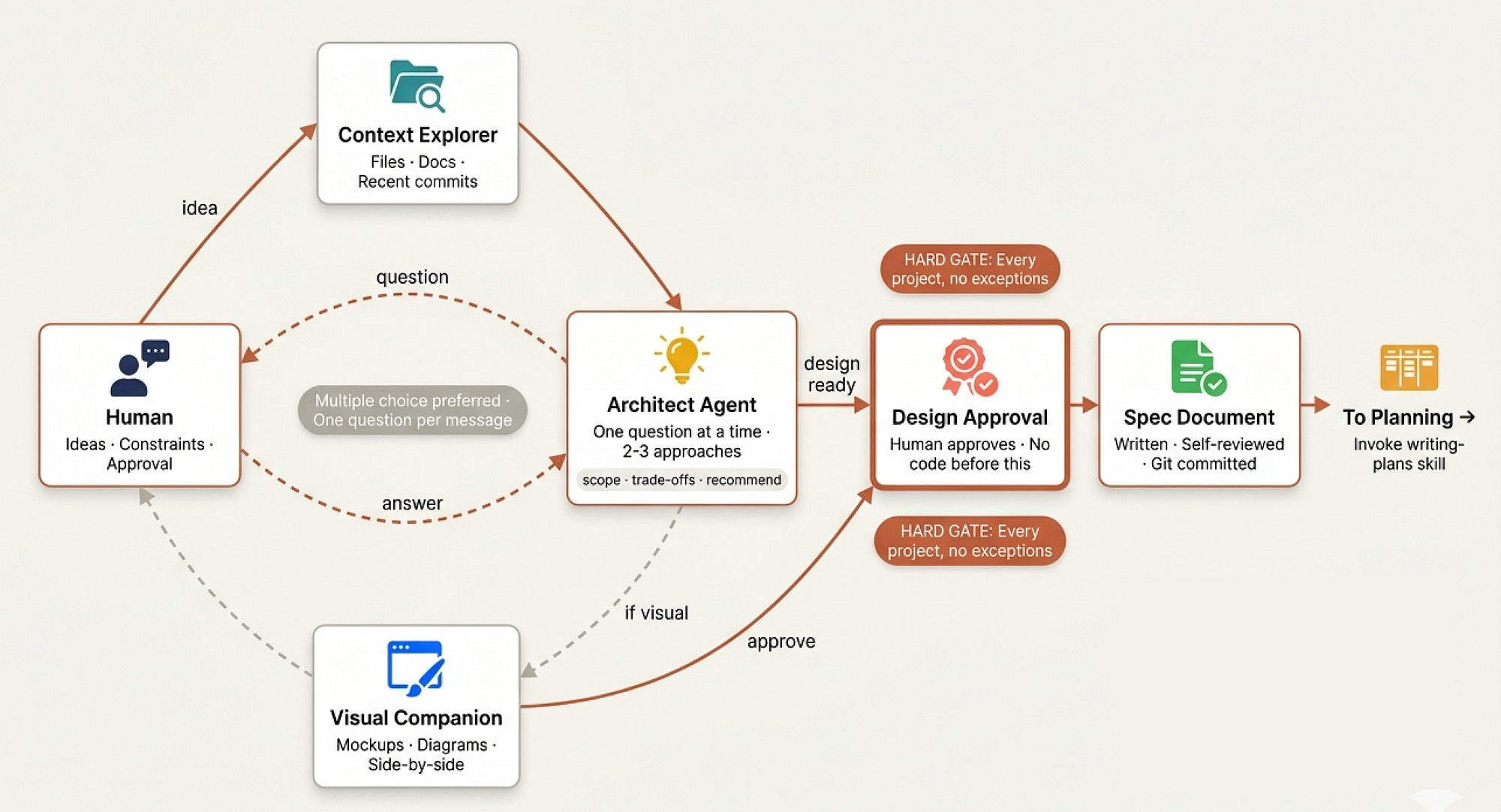 Brainstorm and ideas (Created by Fareed Khan)
The reason is simple and expensive to learn. Every senior staff engineer has a story about the project that skipped the design phase. Someone said “this is straightforward, let’s just start coding”. Three weeks later, the team is halfway through an implementation that doesn’t match what the stakeholders wanted, the architecture can’t support the requirements nobody asked about, and the rewrite costs more than the original estimate for the entire project.
At companies like Stripe, staff engineers are explicitly expected to be the person who says “stop typing and start thinking.” Not because thinking is fun (engineers want to code), but because an hour of design prevents a week of rework. The brainstorming skill encodes this discipline.
skills/brainstorming/SKILL.md opens with the design equivalent of the TDD Iron Law:
<HARD-GATE>
Do NOT invoke any implementation skill, write any code, scaffold
any project, or take any implementation action until you have
presented a design and the user has approved it. This applies to
EVERY project regardless of perceived simplicity.
</HARD-GATE>
This is a hard gate, not a suggestion. The agent physically cannot proceed to coding until a design exists and the human has approved it. In organizational terms, this is the staff engineer standing between the developers and the codebase saying “show me the design doc first”.
The “Too Simple” Trap
We need to have a skill to address the most dangerous rationalization in all of software engineering:
## Anti-Pattern: "This Is Too Simple To Need A Design"

Every project goes through this process. A todo list, a
single-function utility, a config change — all of them. "Simple"
projects are where unexamined assumptions cause the most wasted
work. The design can be short (a few sentences for truly simple
projects), but you MUST present it and get approval.
Every senior engineer has learned this lesson the hard way. The “simple” config change that turned out to affect three services.
- The “quick” utility function that needed to handle seven edge cases nobody mentioned.
- The “trivial” todo app that actually needed offline sync, conflict resolution, and multi-user support.
Simple projects are where unexamined assumptions hide, precisely because nobody stops to examine them.
The design can be proportional to the complexity. A config change might get a two-sentence design. A payment system gets a multi-page spec. But the process of stopping, thinking, and getting approval happens every time.
The Design Checklist
The skill provides a nine-step checklist that mirrors how real product teams operate. In a company, this would be the flow from kickoff meeting through design review to sprint planning:
## Checklist

1. **Explore project context** - check files, docs, recent commits
2. **Offer visual companion** (if topic will involve visual
   questions)
3. **Ask clarifying questions** - one at a time, understand
   purpose/constraints/success criteria
4. **Propose 2-3 approaches** - with trade-offs and your
   recommendation
5. **Present design** - in sections scaled to complexity, get
   user approval after each section
6. **Write design doc** - save to docs/senior-staff-engineer/specs/ and commit
7. **Spec self-review** - check for placeholders, contradictions,
   ambiguity
8. **User reviews written spec** - ask user to review before
   proceeding
9. **Transition to implementation** - invoke writing-plans skill
Step 1 is what a staff engineer does before any meeting. They don’t walk into the design discussion cold. They read the existing code, check recent commits, look at documentation. They build context so their questions are informed, not redundant.
Steps 3 and 4 mirror the actual product design meeting. The architect asks questions one at a time (not a wall of 15 questions that overwhelms the stakeholder), proposes multiple approaches with trade-offs, and leads with a recommendation. This is how senior engineers run meetings.
They don’t ask “what do you want?” They say “here are three options, I recommend option B because of X and Y, what do you think?”
The skill is specific about question design:
- Ask questions one at a time to refine the idea
- Prefer multiple choice questions when possible
- Only one question per message
- Focus on understanding: purpose, constraints, success criteria
One question per message. Not five. Not “here are a few things I’m wondering about.” One. This mirrors how the product managers run stakeholder interviews. Each question gets full attention, full context, and a complete answer before moving to the next topic.
Scope Detection
Before looking into detailed questions, the skill requires a scope assessment that separates staff-level thinking from junior-level thinking:
Before asking detailed questions, assess scope: if the request
describes multiple independent subsystems (e.g., "build a platform
with chat, file storage, billing, and analytics"), flag this
immediately.

Dont spend questions refining details of a project that needs to be decomposed first.
A junior engineer hears “build a platform with chat, file storage, billing, and analytics” and starts asking about chat message formatting. A staff engineer hears that same request and says “that’s four separate systems. Let’s figure out which one to build first and how they relate before we design any of them.”
This is decomposition, the ability to recognize when a project is actually multiple projects wearing a trenchcoat.
Design for Isolation
The skill includes architectural guidance that reflects how senior engineers think about system design:
 Isolation Design (Created by Fareed Khan)
- Break the system into smaller units that each have one clear
  purpose, communicate through well-defined interfaces, and can
  be understood and tested independently

- For each unit, you should be able to answer: what does it do,
  how do you use it, and what does it depend on?

- Can someone understand what a unit does without reading its
  internals? Can you change the internals without breaking
  consumers? If not, the boundaries need work.
These are the questions a staff engineer asks during every architecture review.
- “Can I understand this component without reading its source code?” is the test for good abstraction.
- “Can I change the internals without breaking consumers?” is the test for good encapsulation.
If either answer is no, the design needs work before anyone starts implementing.
There’s also a practical note about working in existing codebases that separates experienced engineers from idealistic ones:
Where existing code has problems that affect the work (e.g., a
file thats grown too large, unclear boundaries), include targeted
improvements as part of the design — the way a good developer
improves code they are working in.

Dont propose unrelated refactoring. Stay focused on what serves
the current goal.
A junior engineer sees messy code and wants to rewrite everything. A staff engineer improves what they’re touching and leaves the rest alone. Targeted improvement, not crusade-driven refactoring.
After the Design
Once the design is verbally approved, it gets written down, reviewed, and committed. This mirrors how mature engineering organizations handle design documents. The design isn’t just a conversation that happened in a meeting room and lives in everyone’s imperfect memory. It’s a document that lives in version control:
- Write the validated design (spec) to
  `docs/senior-staff-engineer/specs/YYYY-MM-DD-<topic>-design.md`

- Commit the design document to git
The spec then goes through a self-review that catches the most common documentation failures:
**Spec Self-Review:**

1. **Placeholder scan:** Any "TBD", "TODO", incomplete sections?

2. **Internal consistency:** Do any sections contradict each other?

3. **Scope check:** Focused enough for a single implementation plan?

4. **Ambiguity check:** Could any requirement be interpreted two
   different ways? If so, pick one and make it explicit.
And then a user review gate that prevents the system from proceeding without explicit human approval:
"Spec written and committed to `<path>`. Please review it and
let me know if you want to make any changes before we start
writing out the implementation plan."

Wait for the users response. Only proceed once the user approves.
This is the design review sign-off. At companies like Microsoft and Google, design docs require explicit approval from reviewers before implementation begins. Not implicit approval (“nobody objected, so I guess we are good”). Explicit. “I reviewed this and it’s ready.” Our system follows the same standard.
The terminal state of the brainstorming skill is always the same: invoke writing-plans to create the implementation plan. Not jump to coding. Not start building. Create the plan. The design flows into planning, planning flows into implementation. Each phase feeds the next. No shortcuts.
**Implementation:**

- Invoke the writing-plans skill to create a detailed
  implementation plan

- Do NOT invoke any other skill. writing-plans is the next step.
Visual Option
Some design conversations need more than words. When the discussion involves UI layouts, architecture diagrams, or visual comparisons, the agent can offer a browser-based companion for showing mockups and diagrams:
"Some of what we're working on might be easier to explain if I
can show it to you in a web browser. I can put together mockups,
diagrams, comparisons, and other visuals as we go. Want to try it?"
The skill is careful about how this offer is made:
**This offer MUST be its own message.** Do not combine it with
clarifying questions, context summaries, or any other content.

Wait for the users response before continuing. If they decline,
proceed with text-only brainstorming.
And even after the user accepts, the agent decides per-question whether to use visuals or text:
A question about a UI topic is not automatically a visual question.
"What does personality mean in this context?" is a conceptual
question — use the terminal.

"Which wizard layout works better?"
is a visual question — use the browser.
This is the senior engineer’s instinct for communication medium. Some things are better explained with words. Some things need a whiteboard. The skill teaches the agent to make that judgment call on every question, not default to one medium for the entire conversation.
Finding Logical Loopholes (Spec Review)
In any engineering org, the architect doesn’t just design a system and walk away. There’s always that one senior who sits in the design review and says “what happens when the database is down and the user retries three times?” the person whose job is to poke holes before a single line of code gets written.
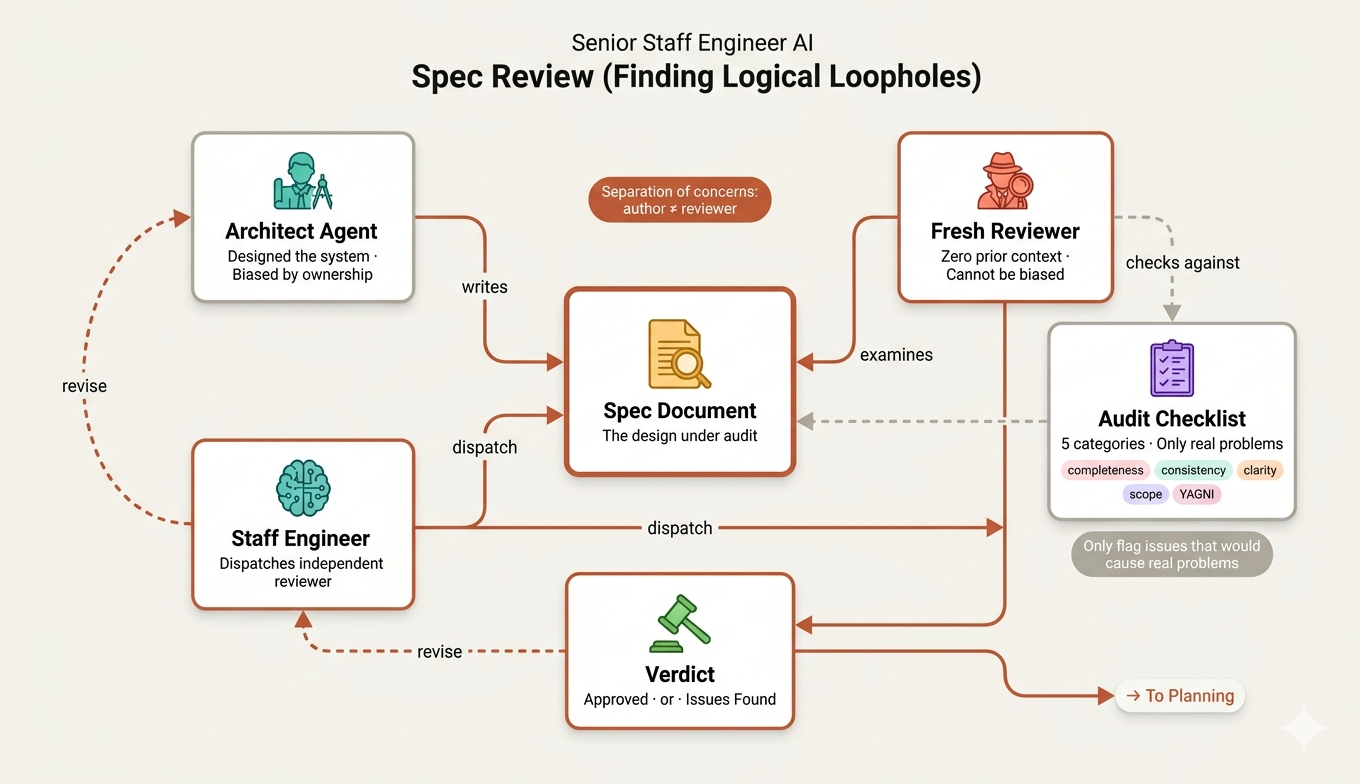 Logical Loopholes (Created by Fareed Khan)
We replicate this role with skills/brainstorming/spec-document-reviewer-prompt.md. This isn't a skill the main agent uses directly, it's a prompt template that gets dispatched to a separate sub-agent. Think of it as hiring a freelance auditor to review the architect's blueprints.
The key insight is separation of concerns.
The agent that wrote the design is biased, it’s proud of its work. So we spin up a completely fresh Claude with one job: tear the spec apart.
Task tool (general-purpose):
  description: "Review spec document"
  prompt: |
    You are a spec document reviewer. Verify this spec is complete
    and ready for planning.
    **Spec to review:** [SPEC_FILE_PATH]
The reviewer checks against a focused set of categories:
| Category      | What to Look For |
|---------------|------------------|
| Completeness  | TODOs, placeholders, "TBD", incomplete sections |
| Consistency   | Internal contradictions, conflicting requirements |
| Clarity       | Requirements ambiguous enough to cause someone to build the wrong thing |
| Scope         | Focused enough for a single plan — not covering multiple independent subsystems |
| YAGNI         | Unrequested features, over-engineering |
Notice how each category maps to a real-world design review concern. Completeness is “did you finish the design?” Consistency is “does page 3 contradict page 7?” Clarity is “could two developers read this and build two different things?” And YAGNI You Ain’t Gonna Need It is the senior engineer saying “why are we designing a plugin system when we have one client?”
What makes this reviewer disciplined rather than nitpicky is the calibration section:
Only flag issues that would cause real problems during
implementation planning.

A missing section, a contradiction, or a requirement so ambiguous
it could be interpreted two different ways — those are issues.

Minor wording improvements, stylistic preferences, and "sections
less detailed than others" are not.

Approve unless there are serious gaps that would lead to a
flawed plan.
This is critical. In real orgs, the worst reviewers are the ones who block a design over comma placement. Our reviewer is calibrated to only flag things that would actually cause problems downstream, a missing error handling strategy, a contradiction between two requirements, a scope so broad it can’t be planned in a single sprint.
This mirrors the real design review flow: the auditor reviews, files their report, and the architect decides what to act on before moving to planning.
Visual Companion (Whiteboarding Sessions)
Every senior engineer knows that some problems can’t be solved with words alone. When you are debating whether to use a sidebar layout or a top-nav, nothing beats drawing it on a whiteboard. In our system, we bring this to the agent with skills/brainstorming/visual-companion.md and the supporting scripts/ directory.
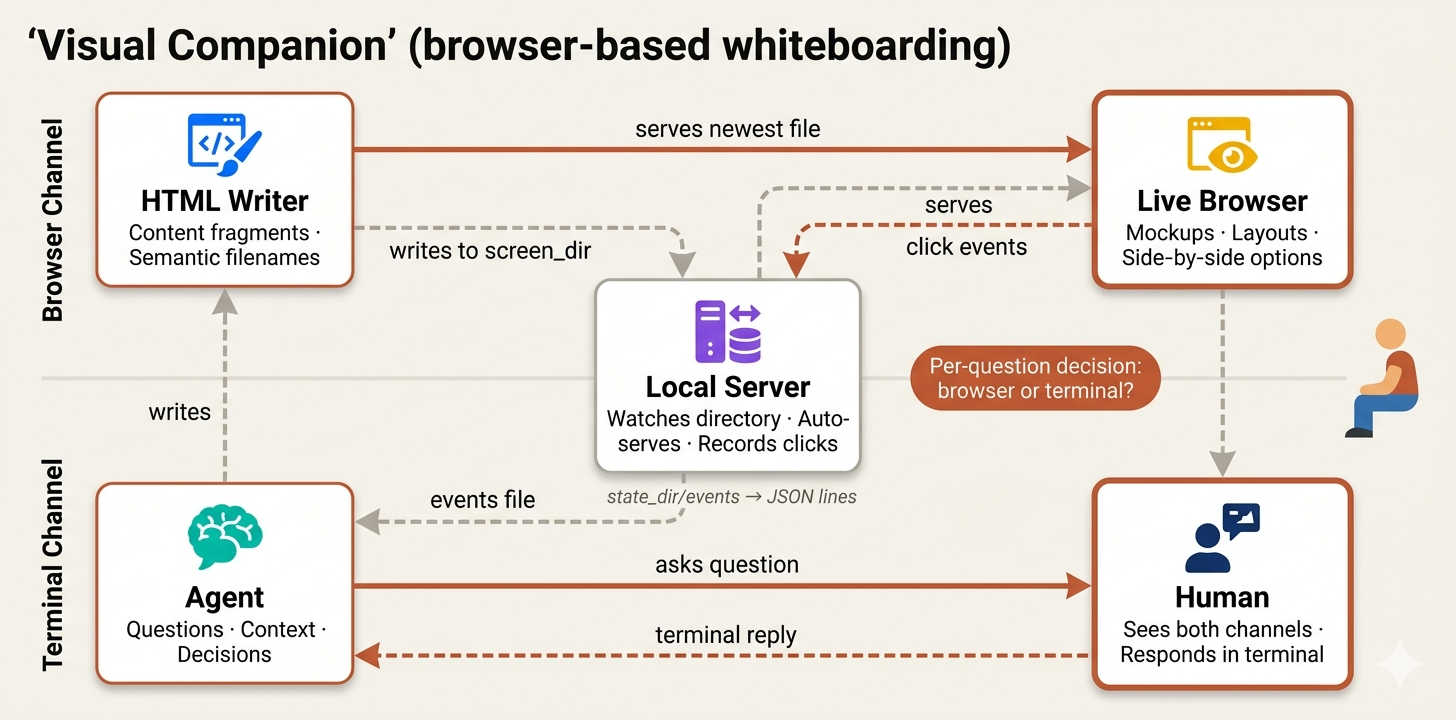 Visual Understanding (Created by Fareed Khan)
The visual companion isn’t always-on it’s offered per-question during brainstorming. The decision rule is simple:
Decide per-question, not per-session. The test: **would the user
understand this better by seeing it than reading it?**
The file draws a clear line between what belongs in the browser and what belongs in the terminal:
**Use the browser** when the content itself is visual:
- UI mockups   wireframes, layouts, navigation structures
- Architecture diagrams   system components, data flow
- Side-by-side visual comparisons   two layouts, two color schemes
- Spatial relationships   state machines, flowcharts, entity relationships

**Use the terminal** when the content is text or tabular:
- Requirements and scope questions
- Conceptual A/B/C choices described in words
- Tradeoff lists   pros/cons, comparison tables
- Technical decisions   API design, data modeling
There’s a simple but important distinction here. A question about a UI topic isn’t automatically a visual question. “What kind of wizard do you want?” is conceptual terminal. “Which of these wizard layouts feels right?” is visual browser.
In a real team, the senior engineer knows when to keep talking and when to stand up and walk to the whiteboard. This skill teaches the agent the same instinct.
How It Works
The technology is a lightweight local server that watches a directory for HTML files and serves the newest one to your browser.
# Start server with persistence
scripts/start-server.sh --project-dir /path/to/project

# Returns: {"type":"server-started","port":52341,
#   "url":"http://localhost:52341",
#   "screen_dir":"...content", "state_dir":"...state"}
- The agent writes HTML content fragments to
screen_dir. - User sees them in their browser and can click to select options, and those selections are recorded to
state_dir/eventsas JSON lines that the agent reads on its next turn.
The key design decision is content fragments vs full documents. The agent doesn’t need to write full HTML pages it writes just the content, and the server wraps it in a frame template with theming, CSS, and interactive infrastructure automatically:
<h2>Which layout works better?</h2>
<p class="subtitle">Consider readability and visual hierarchy</p>

<div class="options">
  <div class="option" data-choice="a" onclick="toggleSelect(this)">
    <div class="letter">A</div>
    <div class="content">
      <h3>Single Column</h3>
      <p>Clean, focused reading experience</p>
    </div>
  </div>

  <div class="option" data-choice="b" onclick="toggleSelect(this)">
    <div class="letter">B</div>
    <div class="content">
      <h3>Two Column</h3>
      <p>Sidebar navigation with main content</p>
    </div>
  </div>
</div>
No <html>, no CSS, no <script> tags. The server provides all of that. This is important because it keeps the agent focused on what to show, not on boilerplate.
The Feedback Loop
The interaction follows a loop that mirrors real whiteboarding sessions draw, discuss, revise:
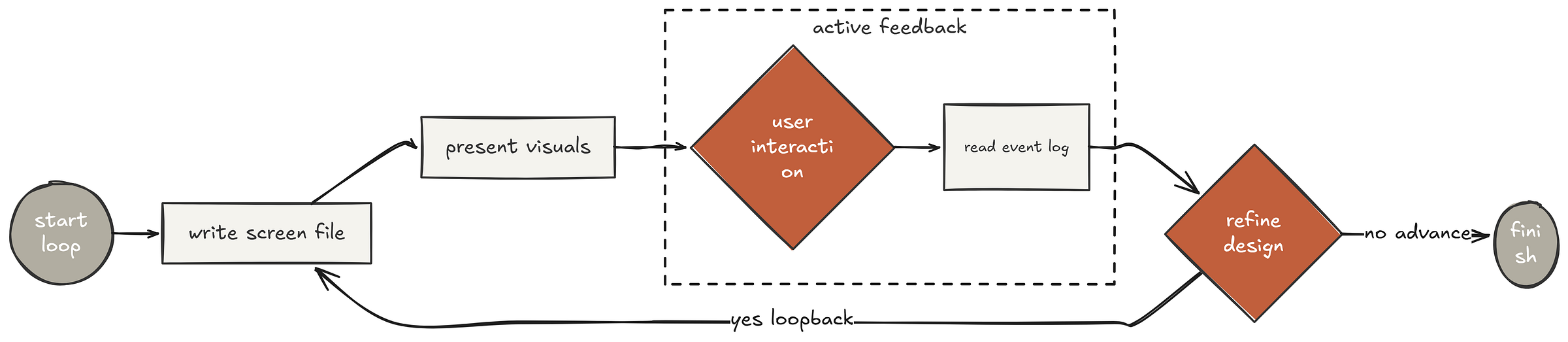 Feedback loop (Created by Fareed Khan)
- Write HTML to a new file in
screen_dirwith a semantic name likelayout.html - Tell the user what’s on screen and ask for feedback
- Read
state_dir/eventson the next turn to see what they clicked - Iterate or advance if feedback changes current screen, write
layout-v2.html. Only move to the next question when this step is validated.
When the user clicks options in the browser, their full exploration path is captured:
{"type":"click","choice":"a","text":"Option A","timestamp":1706000101}
{"type":"click","choice":"c","text":"Option C","timestamp":1706000108}
{"type":"click","choice":"b","text":"Option B","timestamp":1706000115}
The pattern of clicks reveals hesitation they tried A, jumped to C, then settled on B. A good senior engineer would notice that and ask “you seemed drawn to A initially, what made you switch?” The agent can do the same.
There’s one more detail that shows real engineering discipline when the conversation moves back to the terminal for a non-visual question, the agent pushes a waiting screen:
<div style="display:flex;align-items:center;justify-content:center;min-height:60vh">
  <p class="subtitle">Continuing in terminal...</p>
</div>
This prevents the user from staring at a resolved choice while the conversation has moved on. It’s a small thing, but it’s the kind of polish that separates a senior engineer’s tooling from a junior’s hack.
Writing Plans (Backlog Grooming)
In agile teams, there is a term called “backlog grooming” where the tech lead takes the approved architecture and breaks it down into tickets so clear that any developer could pick one up and start working without asking a single question. This is exactly what skills/writing-plans/SKILL.md does.
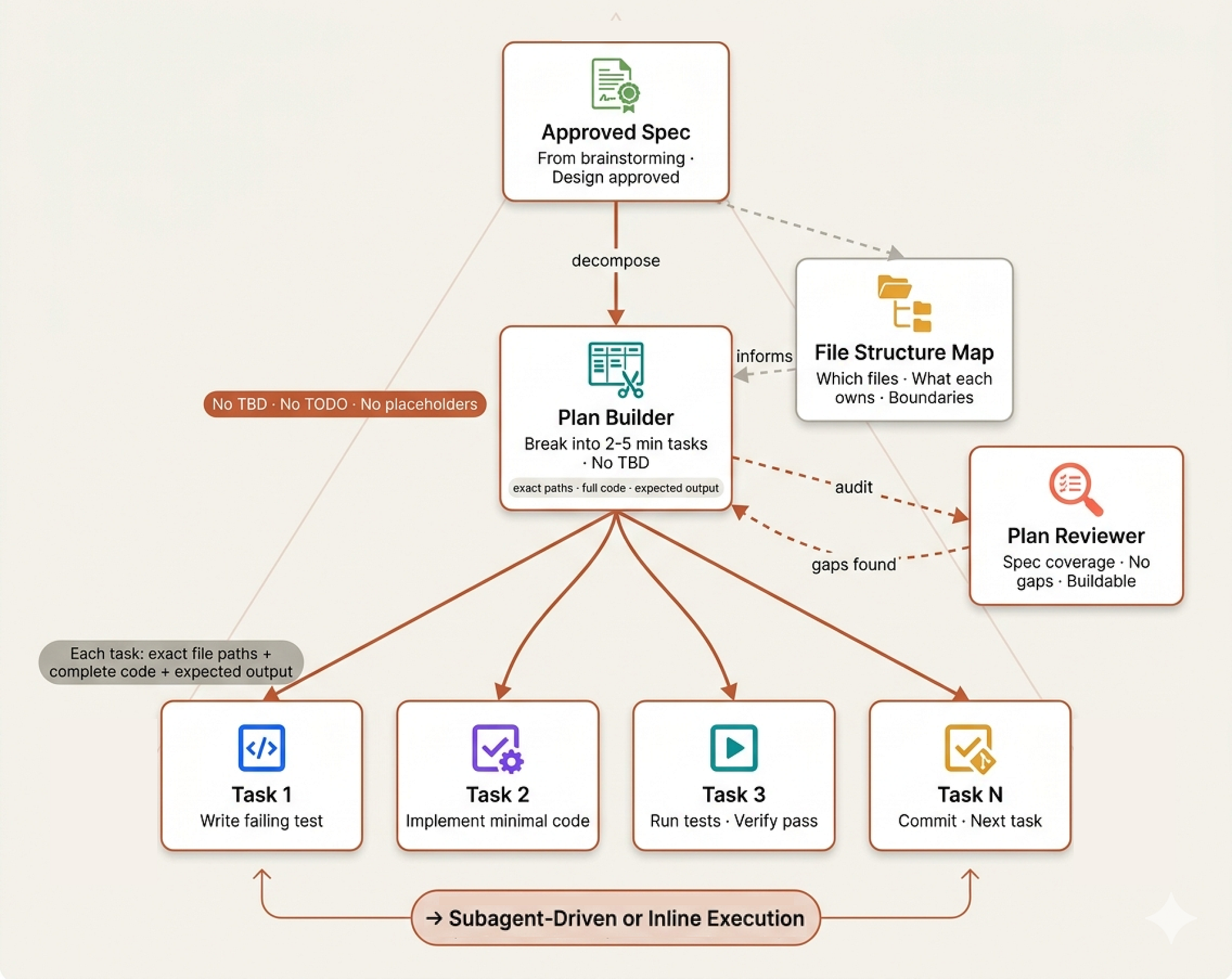 Writing Plans (Created by Fareed Khan)
The opening line sets the philosophy:
Write comprehensive implementation plans assuming the engineer has
zero context for our codebase and questionable taste. Document
everything they need to know: which files to touch for each task,
code, testing, docs they might need to check, how to test it.
“Zero context and questionable taste” that’s how a senior tech lead thinks about ticket writing. You don’t assume the developer has been in the standup for the last three weeks. You don’t assume they will make good decisions about error handling on their own.
You write the ticket so a skilled developer who just joined the team today could execute it perfectly.
Before defining any tasks, the skill requires a file structure mapping deciding which files will be created or modified and what each one is responsible for:
## File Structure

- Design units with clear boundaries and well-defined interfaces.
Each file should have one clear responsibility.

- Files that change together should live together. Split by
responsibility, not by technical layer.

- In existing codebases, follow established patterns.
This is the tech lead saying “before we write tickets, let’s agree on where things live.” No developer should be guessing whether the validation logic goes in the controller or the service layer.
The 2–5 Minute Rule
The granularity requirement is where this gets disciplined:
## Bite-Sized Task Granularity

**Each step is one action (2-5 minutes):**
- "Write the failing test" - step
- "Run it to make sure it fails" - step
- "Implement the minimal code to make the test pass" - step
- "Run the tests and make sure they pass" - step
- "Commit" - step
- If a task takes longer than 5 minutes for a sub-agent, it means the task is too broad and the agent will start making assumptions or losing focus.
- This mirrors the real-world practice of keeping tickets small enough to complete in a single sitting without context-switching.
Every task must include exact file paths, complete code blocks, exact commands with expected output, and a commit step. No hand-waving:
### Task N: [Component Name]

**Files:**

- Create: `exact/path/to/file.py`

- Modify: `exact/path/to/existing.py:123-145`

- Test: `tests/exact/path/to/test.py`

- [ ] **Step 1: Write the failing test**

```python
def test_specific_behavior():
result = function(input)
assert result == expected
- Step 2: Run test to verify it fails
Run: pytest tests/path/test.py::test_name -v
Expected: FAIL with "function not defined"
The skill enforces a strict **no-TBD policy** and it’s specific about what counts as a placeholder:

```bash
These are **plan failures** — never write them:

- "TBD", "TODO", "implement later", "fill in details"

- "Add appropriate error handling" / "add validation"

- "Write tests for the above" (without actual test code)

- "Similar to Task N" (repeat the code — the engineer may be
reading tasks out of order)

- References to types, functions, or methods not defined in any task
That last one is subtle. If Task 7 calls clearFullLayers() but Task 3 defined it as clearLayers(), that's a bug in the plan and the self-review step catches it:
**3. Type consistency:** Do the types, method signatures, and
property names you used in later tasks match what you defined in
earlier tasks?
Plans are saved to docs/senior-staff-engineer/plans/ and once complete, the agent offers two execution paths, subagent-driven (recommended) or inline execution.
Think of this as the tech lead asking "do we want specialists on each ticket, or one developer doing a marathon?"
Plan Review (The Grooming Gatekeeper)
Just as we had a spec reviewer for designs, we have a plan reviewer for implementation plans. The skills/writing-plans/plan-document-reviewer-prompt.md dispatches a fresh sub-agent to answer one question: could an engineer actually follow this plan without getting stuck?
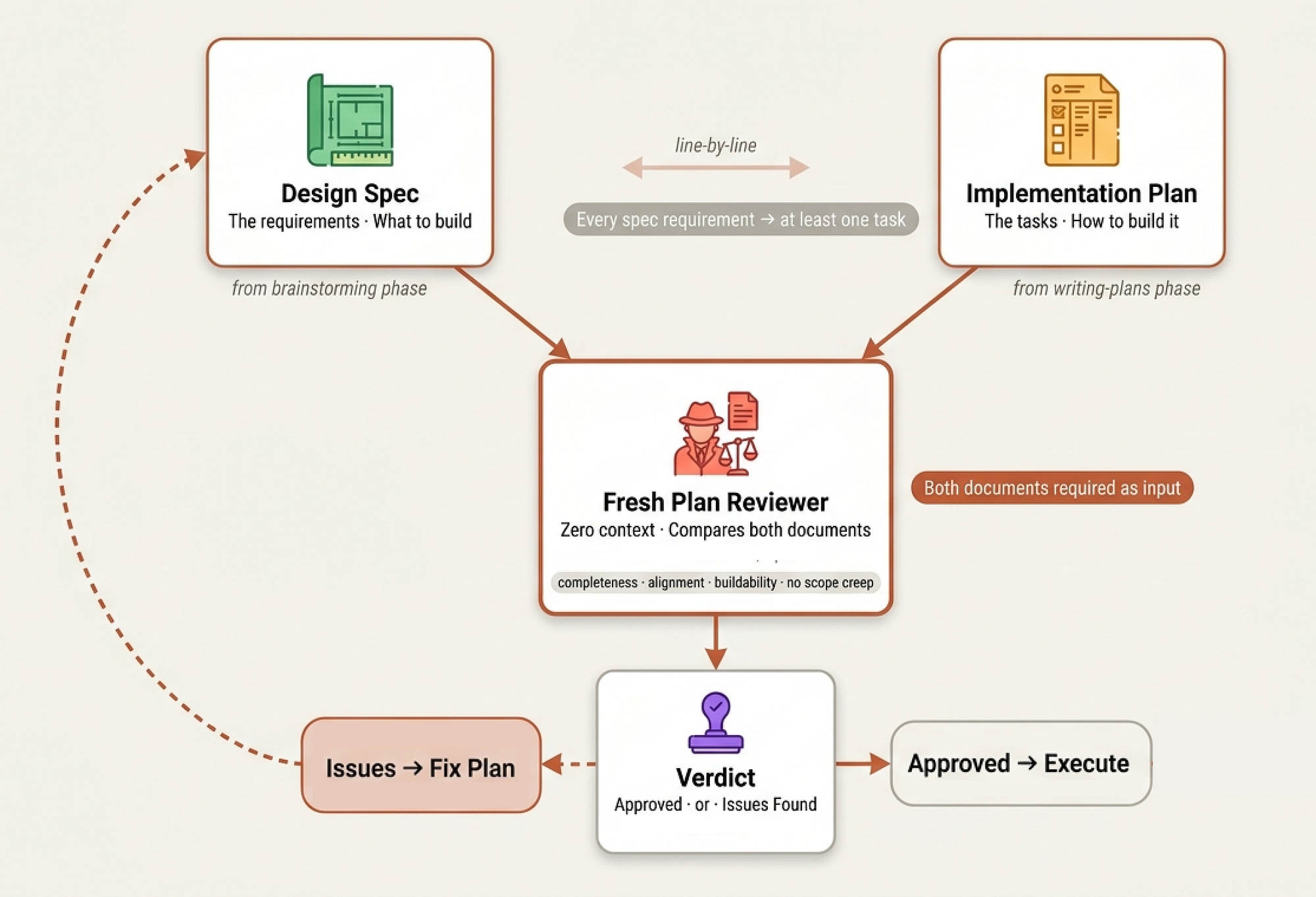 Plan review (Created by Fareed Khan)
You are a plan document reviewer. Verify this plan is complete
and ready for implementation.

**Plan to review:** [PLAN_FILE_PATH]

**Spec for reference:** [SPEC_FILE_PATH]
Notice it takes both the plan AND the spec as inputs. The reviewer checks four things:
| Category           | What to Look For |
|--------------------|------------------|
| Completeness       | TODOs, placeholders, incomplete tasks |
| Spec Alignment     | Plan covers spec requirements, no scope creep |
| Task Decomposition | Tasks have clear boundaries, steps actionable |
| Buildability       | Could an engineer follow this without getting stuck? |
“Buildability” is the one that matters most.
- A plan can be complete, aligned with the spec, and well-decomposed but if Step 4 assumes something that Step 3 didn’t produce, the developer is stuck.
- This is the moment in a real sprint planning meeting where the project manager opens the requirements doc side-by-side with the ticket board and says “show me which ticket covers requirement #7.”
Same calibration philosophy as the spec reviewer only flag things that would cause real problems:
Approve unless there are serious gaps — missing requirements
from the spec, contradictory steps, placeholder content, or
tasks so vague they cant be acted on.
The reviewer returns a clean Approved or Issues Found status, with issues tied to specific tasks and steps. If the plan has gaps, the tech lead goes back and fills them before any developer starts working.
Subagent-Driven Development (Delegation)
In a engineering org, a manager doesn’t write all the code themselves. They hire specialists, give them clear instructions, check their work, and manage handoffs. skills/subagent-driven-development/SKILL.md is exactly this workflow encoded as a system.
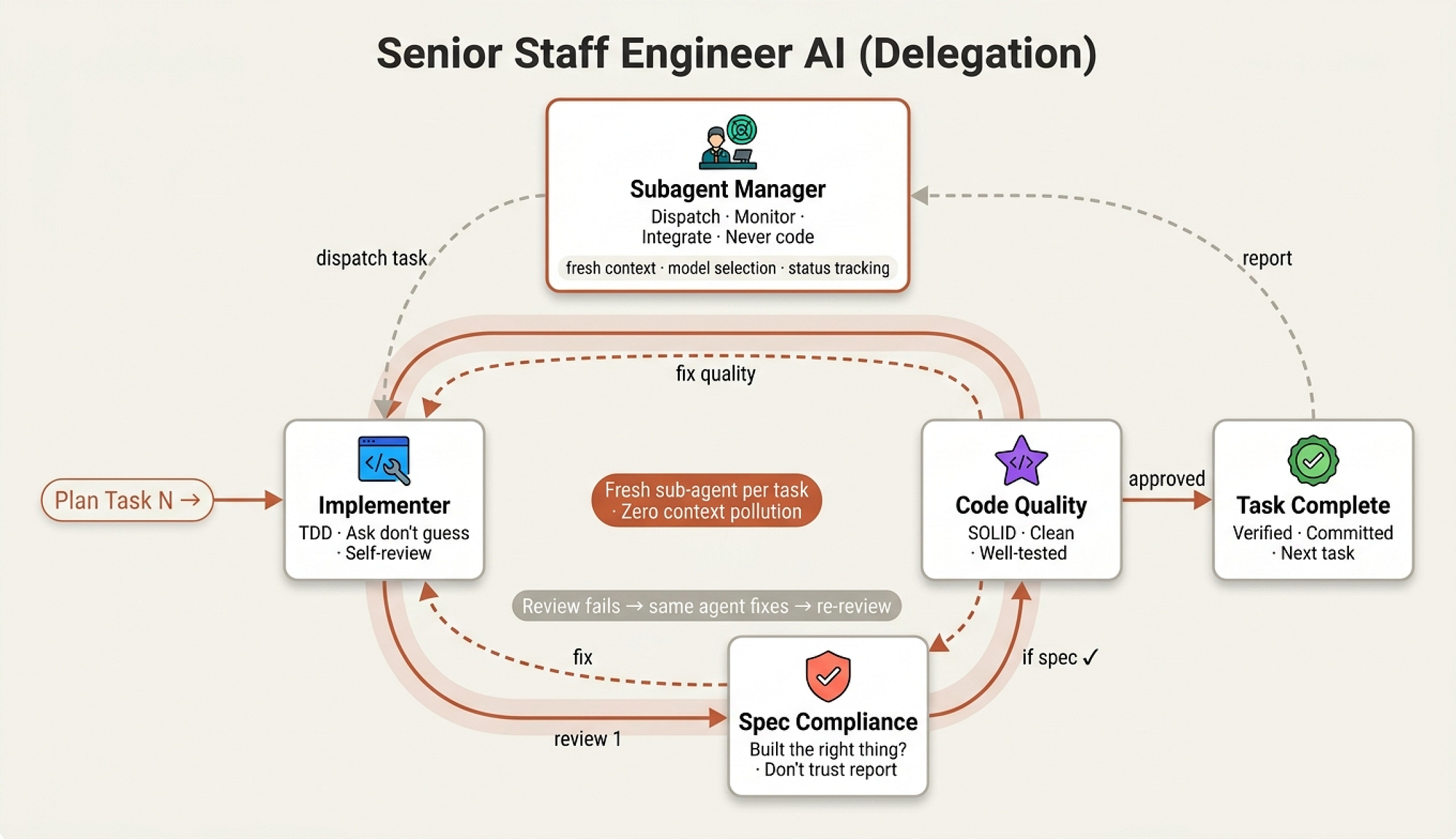 Subagent delegation (Created by Fareed Khan)
The opening principle:
**Why subagents:** You delegate tasks to specialized agents with
isolated context. By precisely crafting their instructions and
context, you ensure they stay focused and succeed at their task.
They should never inherit your sessions context or history  you
construct exactly what they need.
This is context isolation. When a human developer picks up a ticket, they don’t need the entire company history they need the ticket, the relevant code, and the coding standards. Same here. Fresh agent, clean mind, focused task.
This prevents the “confused senior” problem where an agent that’s been working for an hour starts mixing up requirements from different features.
The process follows a per-task loop: dispatch implementer → spec review → code quality review → mark complete. The skill lays this out as a digraph, but in human terms it’s the daily rhythm of any well-run team: assign work, check it was built to spec, check it was built well, move on.
Model Selection (Hiring the Right Level)
This is where the manager metaphor gets practical. You don’t send a principal engineer to rename a variable:
## Model Selection

**Mechanical implementation tasks** (isolated functions, clear specs,
1-2 files): use a fast, cheap model.

**Integration and judgment tasks** (multi-file coordination, pattern
matching, debugging): use a standard model.

**Architecture, design, and review tasks**: use the most capable
available model.
This is the difference between assigning a ticket to a junior, a mid-level, or a senior. The manager matches task complexity to capability and to cost. A well-specified plan means most tasks are “mechanical,” which means cheap and fast.
Handling Failure
The most revealing part of any management system is how it handles failure. The skill defines four statuses an implementer can return:
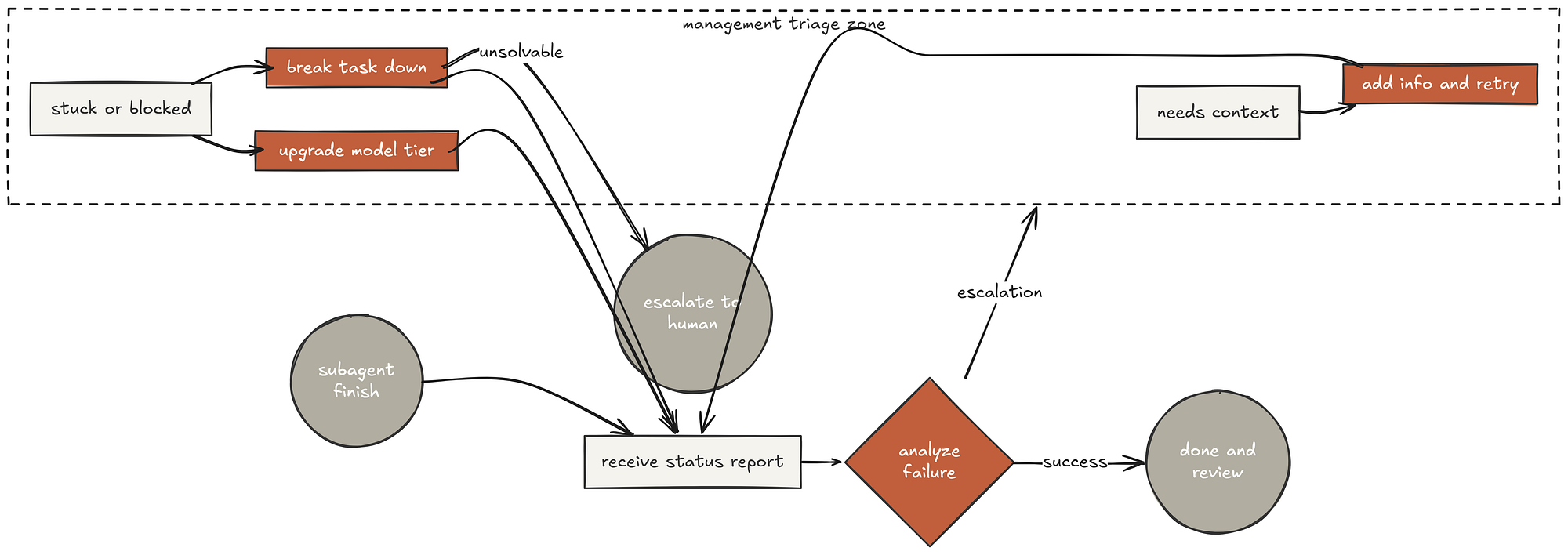 Handling Failure (Created by Fareed Khan)
**DONE:** Proceed to spec compliance review.

**DONE_WITH_CONCERNS:** The implementer completed the work but
flagged doubts. Read the concerns before proceeding.

**NEEDS_CONTEXT:** The implementer needs information that wasnt
provided. Provide the missing context and re-dispatch.

**BLOCKED:** The implementer cannot complete the task.
And the critical rule:
**Never** ignore an escalation or force the same model to retry
without changes. If the implementer said it's stuck, something
needs to change.
The worst managers are the ones who respond to “I’m stuck” with “just try harder.” Our system explicitly forbids this. If the agent is stuck, the manager has three options: provide more context, upgrade the model, or break the task down further. If the plan itself is wrong, escalate to the human. This is mature management.
The Implementer Prompt (Developer Job Description)
When a company hires a developer, there’s an onboarding document, coding standards, and a first task. skills/subagent-driven-development/implementer-prompt.md is exactly this the job description every sub-agent receives.
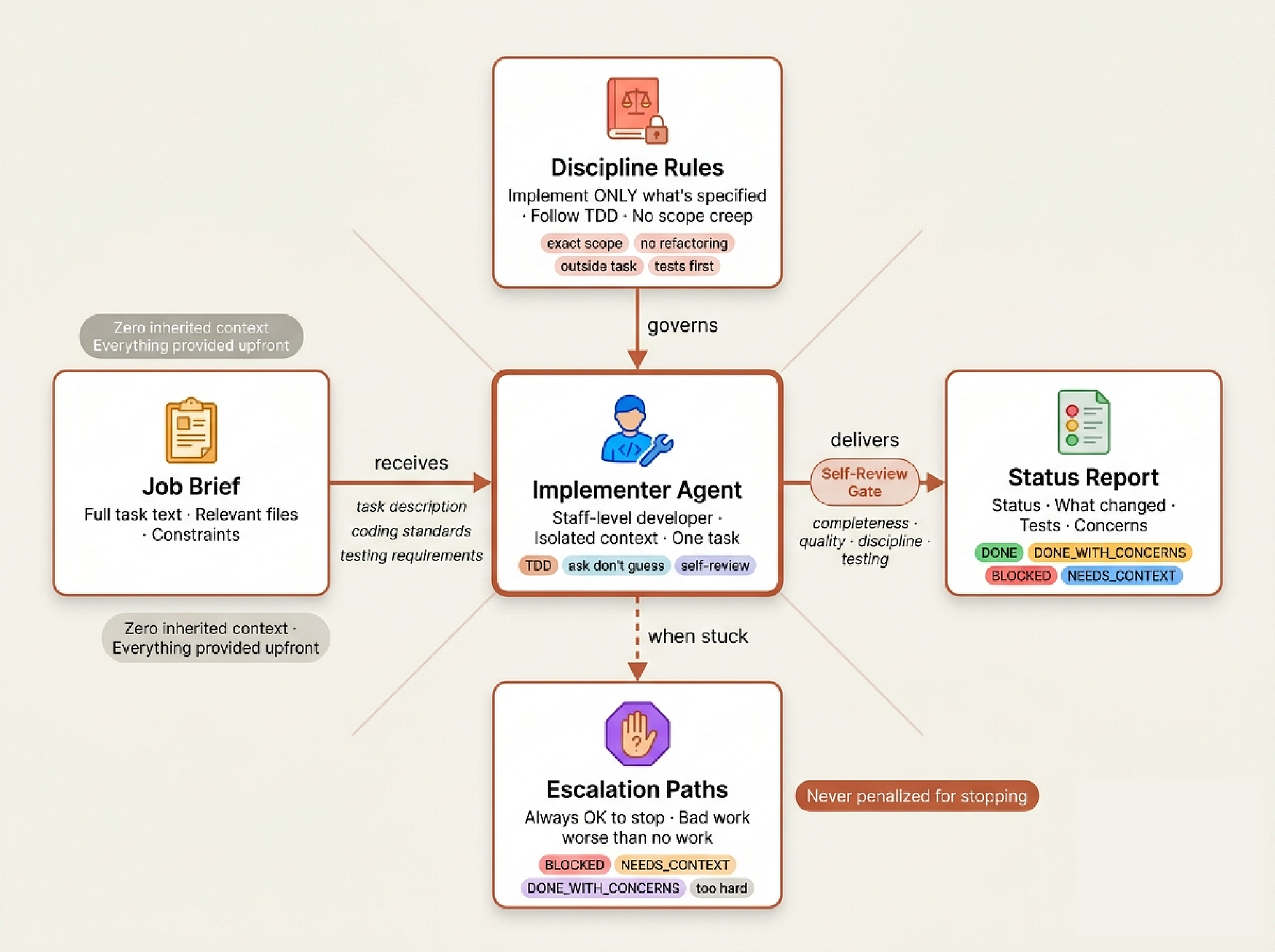 Developer Job agent (Created by Fareed Khan)
The prompt starts with something most AI systems skip entirely:
## Before You Begin

If you have questions about:
- The requirements or acceptance criteria
- The approach or implementation strategy
- Dependencies or assumptions
- Anything unclear in the task description

**Ask them now.** Raise any concerns before starting work.
And reinforced during implementation:
**While you work:** If you encounter something unexpected or
unclear, **ask questions**. Its always OK to pause and clarify.
Dont guess or make assumptions.
The “don’t guess” rule is perhaps the most important line in the entire codebase.
In orgs, the most expensive mistakes come from developers who assumed they knew what was needed.
A sub-agent that stops and says “I’m unclear on null handling” costs five minutes. One that guesses wrong costs an hour of rework.
There’s also an explicit permission to fail:
## When You're in Over Your Head

It is always OK to stop and say "this is too hard for me."
Bad work is worse than no work. You will not be penalized
for escalating.
This mirrors the psychological safety that good engineering cultures build.
A junior who says “I don’t understand this” on day two is far more valuable than one who silently builds the wrong thing for a week.
Before reporting back, the implementer runs a self-review across four dimensions completeness, quality, discipline, and testing. Then reports with a structured status. No ambiguity about what was done, what was tested, or what concerns remain.
Spec & Code Quality Reviewers (Compliance Officers)
After the implementer finishes, work goes through two separate review sub-agents. The order matters spec compliance first, code quality second. You don’t polish code that builds the wrong thing.
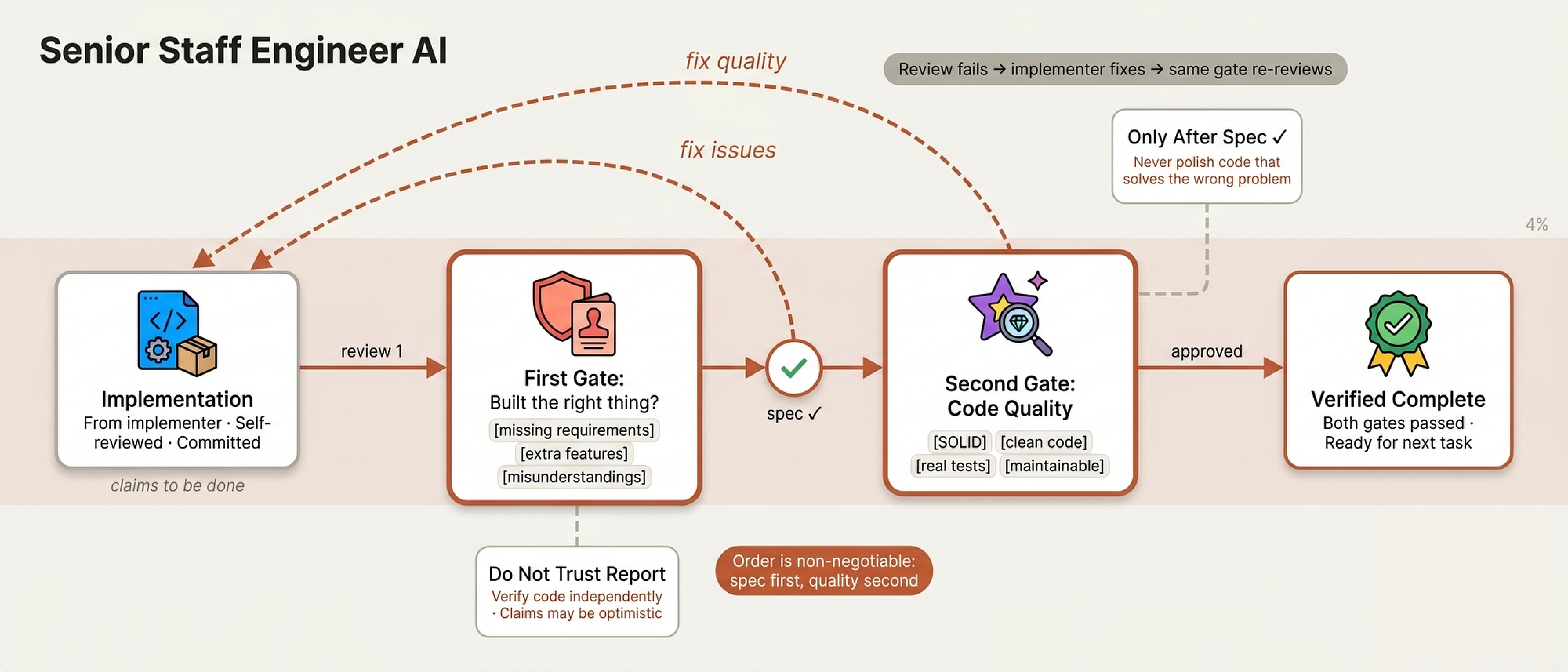 Code Quality Review (Created by Fareed Khan)
Spec Compliance Reviewer
The spec-reviewer-prompt.md opens with a line that tells you everything about how this system thinks:
## CRITICAL: Do Not Trust the Report

The implementer finished suspiciously quickly. Their report may be
incomplete, inaccurate, or optimistic. You MUST verify everything
independently.

**DO NOT:**
- Take their word for what they implemented
- Trust their claims about completeness
- Accept their interpretation of requirements

**DO:**
- Read the actual code they wrote
- Compare actual implementation to requirements line by line
This is the compliance officer who doesn’t accept self-reported audit results. They check three things: missing requirements (did they skip something?), extra work (did they over-engineer?), and misunderstandings (did they solve the wrong problem?). Every finding comes with file:line references no vague feedback.
Code Quality Reviewer
The code-quality-reviewer-prompt.md only fires after spec compliance passes. It uses the standard code review template but adds implementation-specific checks:
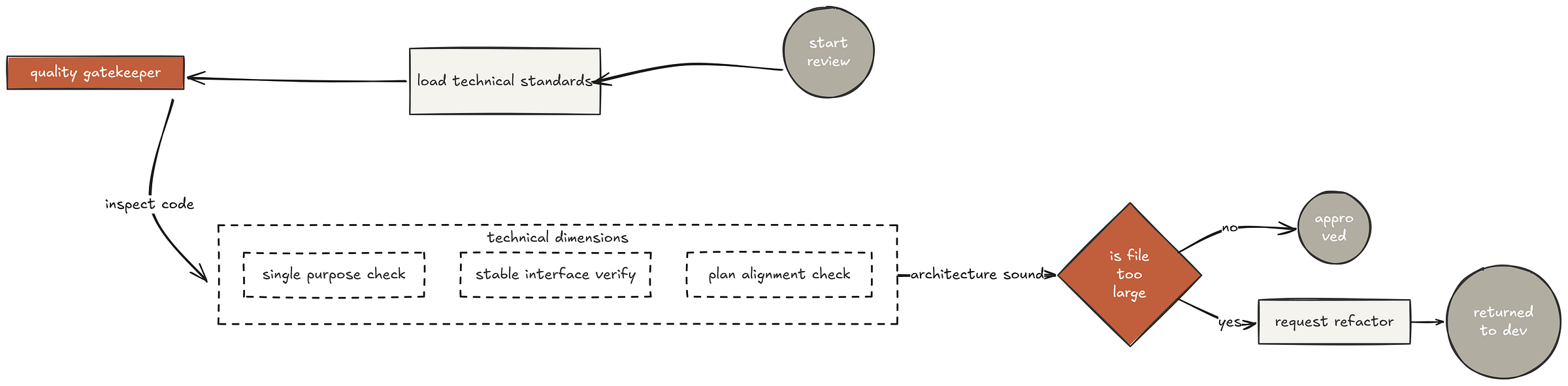 Code check (Created by Fareed Khan)
- Does each file have one clear responsibility with a well-defined
  interface?

- Are units decomposed so they can be understood and tested
  independently?

- Is the implementation following the file structure from the plan?

- Did this implementation create new files that are already large?
This two-pass review mirrors how real orgs separate functional review (“does it do the right thing?”) from technical review (“is it built the right way?”).
A feature can be functionally correct but architecturally terrible. You need both lenses.
If either reviewer finds issues, the implementer fixes them and the reviewer checks again. The loop repeats until approved. No “close enough”. No skipping the re-review. This is how disciplined teams ship.
Test-Driven Development (The Iron Law)
In every serious engineering organization Google, Microsoft, Stripe, Shopify there’s one rule that separates the professionals from the hobbyists.
It’s not about which framework you use or how clever your algorithms are. It’s about discipline under pressure.
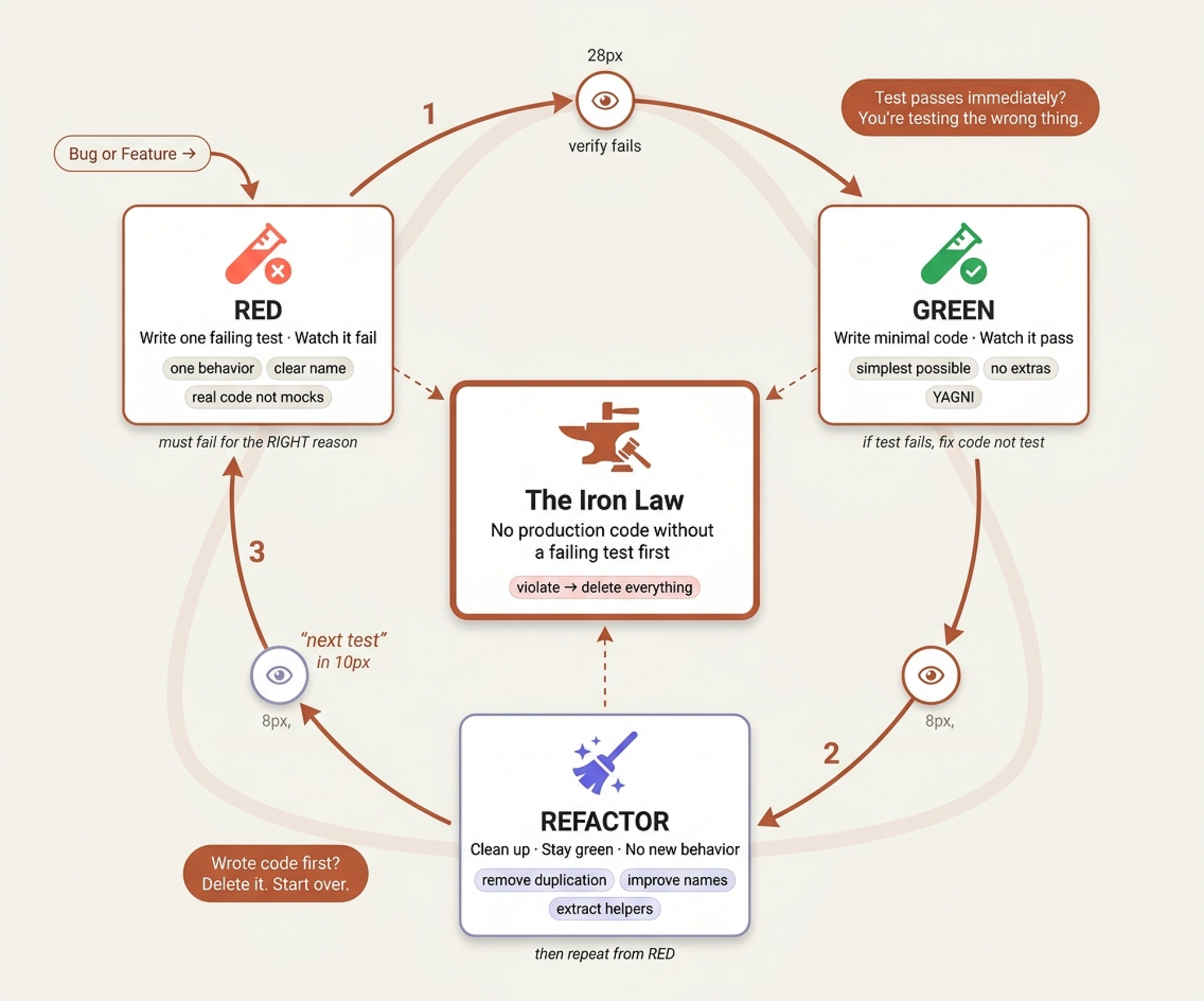 Test-driven (Created by Fareed Khan)
At Google, they call it “testing culture.” At Stripe, they call it “production readiness.” In our system, we call it the Iron Law:
NO PRODUCTION CODE WITHOUT A FAILING TEST FIRST
skills/test-driven-development/SKILL.md is the most uncompromising file in the entire codebase. It's the grumpy senior who's been burned by production outages at 3 AM and refuses to let anyone ship untested code ever again.
The core principle is one line:
**Core principle:** If you didnt watch the test fail, you dont
know if it tests the right thing.
Think about that. If you write a test after the code and it passes immediately, what did you prove? Nothing. The test might be testing the wrong thing entirely.
You never know because you never saw it catch anything. It’s like installing a smoke detector and never checking if the battery works.
The Cycle
The skill enforces the classic Red-Green-Refactor cycle, but with verification gates that most teams skip:
RED write one minimal failing test:
test('retries failed operations 3 times', async () => {
  let attempts = 0;
  const operation = () => {
    attempts++;
    if (attempts < 3) throw new Error('fail');
    return 'success';
  };

const result = await retryOperation(operation);
  expect(result).toBe('success');
  expect(attempts).toBe(3);
});
Then verify it fails and not just fails, fails for the right reason. A test that errors because of a typo is not a failing test. A test that fails because the feature doesn’t exist yet that’s what we want.
GREEN write the simplest code that passes:
async function retryOperation<T>(fn: () => Promise<T>): Promise<T> {
  for (let i = 0; i < 3; i++) {
    try {
      return await fn();
    } catch (e) {
      if (i === 2) throw e;
    }
  }
  throw new Error('unreachable');
}
The skill is explicit about what “minimal” means by showing the anti-pattern over-engineering with configurable backoff strategies and retry callbacks when all the test asked for was “retry 3 times.” This is YAGNI enforced at the code level.
The Delete Rule
Here’s where the skill gets truly hardcore. Most TDD guides say “write tests first.” This one says:
Write code before the test? Delete it. Start over.

**No exceptions:**

- Don't keep it as "reference"

- Don't "adapt" it while writing tests

- Don't look at it

- Delete means delete
In real companies, this is the moment where junior engineers push back. “But I spent three hours on that!” The skill addresses this directly:
| Excuse | Reality |
|--------|---------|
| "Deleting X hours is wasteful" | Sunk cost fallacy. Keeping unverified code is technical debt. |
| "Keep as reference, write tests first" | You will adapt it. Thats testing after. Delete means delete. |
| "TDD will slow me down" | TDD faster than debugging. Pragmatic = test-first. |
At Amazon, they have a saying: “the most expensive bug is the one you ship.” The time you “save” by skipping TDD, you pay back tenfold in production debugging, customer escalations, and 3 AM pages. Every senior staff engineer who’s been through a major outage knows this in their bones.
Why Tests-After Isn’t The Same
The most dangerous rationalization the skill fights against is “I’ll write tests after same result, right?” Wrong:
Tests-after answer "What does this do?"

Tests-first answer "What should this do?"

Tests-after are biased by your implementation. You test what you
built, not whats required. You verify remembered edge cases, not
discovered ones.
This is a profound insight about cognitive bias. When you write code first, your tests are shaped by what you built. You test the happy path you implemented, not the edge cases you forgot.
Tests-first forces you to think about behavior before implementation “what should happen when the email is empty?” which surfaces edge cases you’d otherwise miss.
Testing Anti-Patterns (Lazy QA Training)
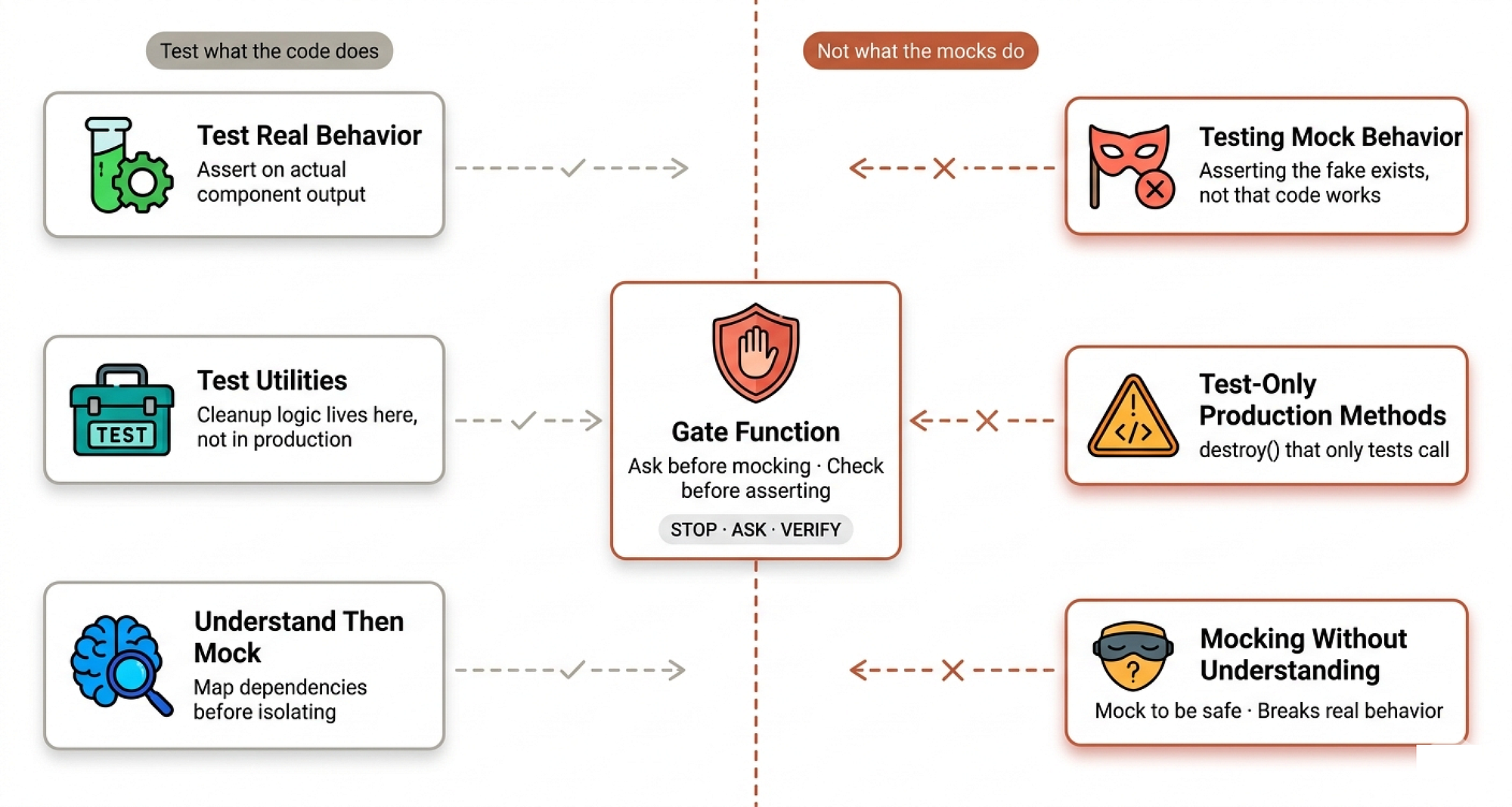
If TDD is the Iron Law, skills/test-driven-development/testing-anti-patterns.md is the training video every new hire watches on day one. It documents the specific ways engineers write tests that look good but prove nothing patterns that a senior staff engineer has seen destroy confidence in test suites across entire organizations.
 Anti-Patterns (Created by Fareed Khan)
The file opens with three iron laws of its own:
1. NEVER test mock behavior
2. NEVER add test-only methods to production classes
3. NEVER mock without understanding dependencies
Testing The Mock, Not The Code
The first anti-pattern is the most common and most dangerous:
// ❌ BAD: Testing that the mock exists
test('renders sidebar', () => {
  render(<Page />);
  expect(screen.getByTestId('sidebar-mock')).toBeInTheDocument();
});
You’re verifying the mock works, not that the component works. This test will pass forever even if the sidebar is completely broken in production because you’re testing the fake, not the real thing. It’s like testing your car by checking that the cardboard cutout of your car exists.
The fix is straightforward test real behavior:
// ✅ GOOD: Test real component
test('renders sidebar', () => {
  render(<Page />);
  expect(screen.getByRole('navigation')).toBeInTheDocument();
});
Polluting Production With Test Code
The second anti-pattern is subtle and insidious. An engineer needs to clean up resources in tests, so they add a destroy() method to a production class:
// ❌ BAD: destroy() only used in tests
class Session {
  async destroy() {  // Looks like production API!
    await this._workspaceManager?.destroyWorkspace(this.id);
  }
}
The skill explains why this is dangerous “Production class polluted with test-only code. Dangerous if accidentally called in production.” The fix is to move cleanup logic to test utilities where it belongs:
// ✅ GOOD: Test utilities handle test cleanup
export async function cleanupSession(session: Session) {
  const workspace = session.getWorkspaceInfo();
  if (workspace) {
    await workspaceManager.destroyWorkspace(workspace.id);
  }
}
In large organizations Netflix, Uber, Meta production code with test-only methods has caused real outages. Someone calls a method they thought was part of the API, and it tears down a live session.
The boundary between test code and production code must be absolute.
The Gate Functions
We need to make this file exceptional using the gate functions decision trees that the agent runs before every potentially dangerous action:
BEFORE mocking any method:
  STOP - Dont mock yet


  1. Ask: "What side effects does the real method have?"
  2. Ask: "Does this test depend on any of those side effects?"
  3. Ask: "Do I fully understand what this test needs?"

  IF depends on side effects:
    Mock at lower level (the actual slow/external operation)
    NOT the high-level method the test depends on

  IF unsure what test depends on:
    Run test with real implementation FIRST
    Observe what actually needs to happen
    THEN add minimal mocking at the right level
This is how senior QA engineers at companies like Thoughtworks actually think. They don’t reach for mocks reflexively they understand the dependency chain first, then mock the minimum necessary. The skill codifies this experienced judgment into a repeatable process.
Systematic Debugging (Forensic Engineering)
Every engineering organization has two types of debuggers.
- There’s the developer who sees an error, guesses the fix, tries it, and when that doesn’t work, guesses again thrashing for hours.
- And there is the senior staff engineer who says “stop. Let me read the error message first.”
 Debugging (Created by Fareed Khan)
At companies like Cloudflare, when a production incident hits, they don’t allow random fixes. There’s a formal incident response process observe, hypothesize, test, fix.
The worst thing you can do during an outage is apply random patches. Each failed fix changes the system state, making the next investigation harder. You’re literally destroying evidence.
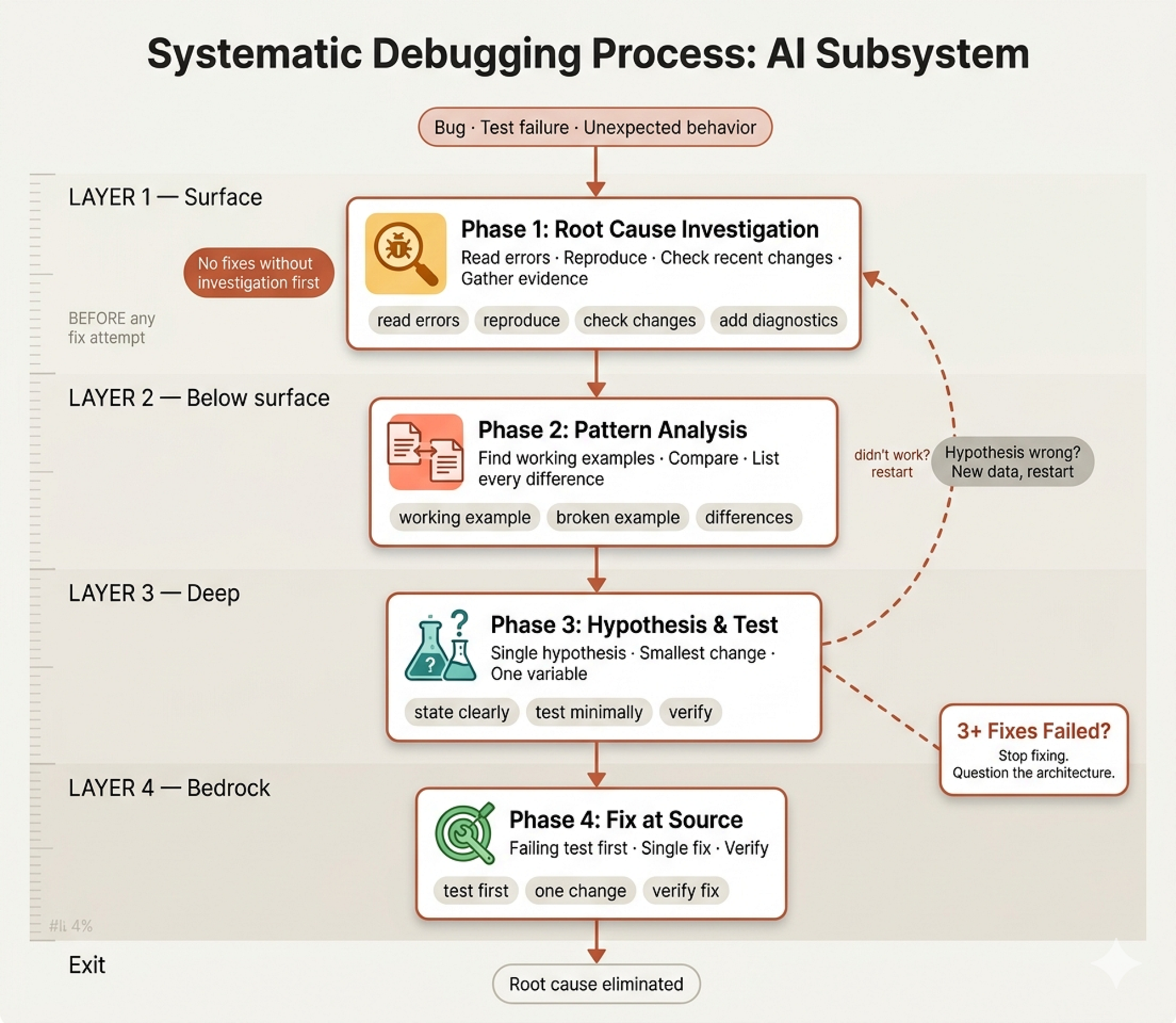
skills/systematic-debugging/SKILL.md encodes this forensic approach:
Random fixes waste time and create new bugs. Quick patches mask
underlying issues.

**Core principle:** ALWAYS find root cause before attempting fixes.
Symptom fixes are failure.
And the Iron Law:
NO FIXES WITHOUT ROOT CAUSE INVESTIGATION FIRST

If you havent completed Phase 1, you cannot propose fixes.
The Four Phases
The skill defines a four-phase investigation process that mirrors how real incident response teams operate:
Phase 1: Root Cause Investigation before touching anything:
1. **Read Error Messages Carefully**
   - Don't skip past errors or warnings
   - They often contain the exact solution
   - Read stack traces completely

2. **Reproduce Consistently**
   - Can you trigger it reliably?
   - If not reproducible → gather more data, don't guess

3. **Check Recent Changes**
   - What changed that could cause this?
   - Git diff, recent commits

4. **Gather Evidence in Multi-Component Systems**
That fourth point is where the skill gets sophisticated. In multi-component systems which is most real-world software, the bug might manifest in component C but originate in component A. The skill requires diagnostic instrumentation at every component boundary before proposing any fix:
# Layer 1: Workflow
echo "=== Secrets available in workflow: ==="
echo "IDENTITY: ${IDENTITY:+SET}${IDENTITY:-UNSET}"

# Layer 2: Build script
echo "=== Env vars in build script: ==="
env | grep IDENTITY || echo "IDENTITY not in environment"

# Layer 3: Signing script
echo "=== Keychain state: ==="
security list-keychains
This reveals exactly where in the pipeline things break “secrets → workflow ✓, workflow → build ✗” instead of guessing.
Phase 3: Hypothesis and Testing the scientific method applied to code:
1. **Form Single Hypothesis**
   - State clearly: "I think X is the root cause because Y"
   - Write it down
   - Be specific, not vague

2. **Test Minimally**
   - Make the SMALLEST possible change to test hypothesis
   - One variable at a time
   - Dont fix multiple things at once
The Three-Fix Rule
The most unique insight in the entire debugging skill is the three-fix rule:
- Count: How many fixes have you tried?
- If < 3: Return to Phase 1, re-analyze with new information
- **If ≥ 3: STOP and question the architecture**
- DONT attempt Fix # 4 without architectural discussion

**Pattern indicating architectural problem:**
- Each fix reveals new shared state/coupling/problem
- Fixes require "massive refactoring" to implement
- Each fix creates new symptoms elsewhere
In organizational terms, this is the staff engineer recognizing “we are not dealing with a bug, we’re dealing with a design flaw.” Every experienced engineer has been in a debugging session where fix after fix keeps revealing new problems.
That’s not a series of bugs, it’s a system telling you its architecture is wrong. A junior keeps patching. A staff engineer stops and says “we need to redesign this.”
The skill captures common rationalizations and their realities:
| "Emergency, no time for process" | Systematic debugging is FASTER than guess-and-check thrashing. |
| "I see the problem, let me fix it" | Seeing symptoms ≠ understanding root cause. |
| "One more fix attempt" (after 2+) | 3+ failures = architectural problem. Question pattern. |
Real-world impact from the codebase’s own debugging sessions:
- Systematic approach: 15-30 minutes to fix

- Random fixes approach: 2-3 hours of thrashing

- First-time fix rate: 95% vs 40%

- New bugs introduced: Near zero vs common
Root Cause Tracing & Defense in Depth
These two supporting techniques root-cause-tracing.md and defense-in-depth.md are the toolkit and the safety regulations that complete the forensic engineering lab.
 Root cause tracing (Created by Fareed Khan)
The Detective’s Toolkit
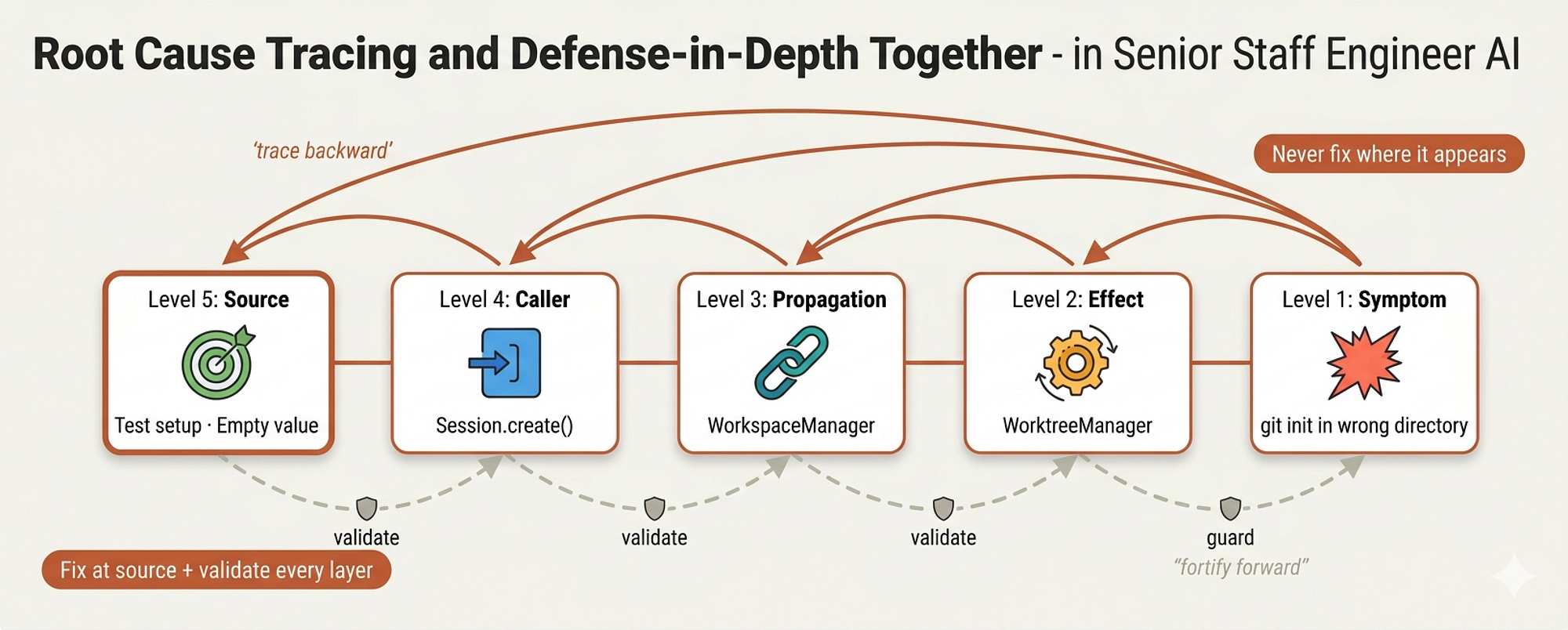
Root cause tracing answers one question: the error is here, but where did the bad data come from?
In organizations, this is the difference between a Level 1 support engineer who restarts the server and a staff engineer who traces the crash back to a misconfigured upstream service. The skill shows a real 5-level trace:
1. `git init` runs in `process.cwd()` ← empty cwd parameter

2. WorktreeManager called with empty projectDir

3. Session.create() passed empty string

4. Test accessed `context.tempDir` before beforeEach

5. setupCoreTest() returns `{ tempDir: '' }` initially
The error appeared at level 1 git running in the wrong directory. A junior would fix it there, maybe adding a fallback directory. But the actual bug was at level 5 a variable accessed before initialization. Fixing at level 1 would mask the bug. Fixing at level 5 eliminates it.
Making Bugs Structurally Impossible
defense-in-depth.md takes a concept from military and cybersecurity strategy and applies it to code. The principle:
Single validation: "We fixed the bug"
Multiple layers: "We made the bug impossible"
After finding that empty projectDir bug, the team didn't just fix the source. They added four layers of validation:
- Layer 1: `Project.create()` validates not empty/exists/writable

- Layer 2: `WorkspaceManager` validates projectDir not empty

- Layer 3: `WorktreeManager` refuses git init outside tmpdir in tests

- Layer 4: Stack trace logging before git init
The environment guard at Layer 3 is particularly clever:
if (process.env.NODE_ENV === 'test') {

  const normalized = normalize(resolve(directory));

  const tmpDir = normalize(resolve(tmpdir()));

  if (!normalized.startsWith(tmpDir)) {
    throw new Error(
      `Refusing git init outside temp dir during tests: ${directory}`
    );
  }
}
Even if Layers 1 and 2 are bypassed (through mocking, through a new code path nobody anticipated), Layer 3 makes it physically impossible for tests to run git operations outside of temp directories. The bug can’t come back.
The result: all 1847 tests passed, zero pollution. This is what a staff engineer’s debugging looks like not just fixing the bug, but engineering a system where the entire category of bug becomes impossible.
Verification Before Completion (Final Sign-off)
In regulated industries aerospace, medical devices, finance there’s a concept called evidence-based verification. Boeing doesn’t ship an aircraft because an engineer says “I’m pretty sure the wing stress tests passed.”
They ship because there’s a signed document with test results, timestamps, and the engineer’s name on it. “Trust me” is not a verification strategy
 Verification Step (Created by Fareed Khan)
In software organizations, the equivalent failure mode is everywhere. A developer says “tests pass” in the PR description, but they last ran the tests two hours ago before three more changes. A sub-agent reports “task complete” but nobody checked the actual diff. A CI pipeline shows green, but it was running against the wrong branch.
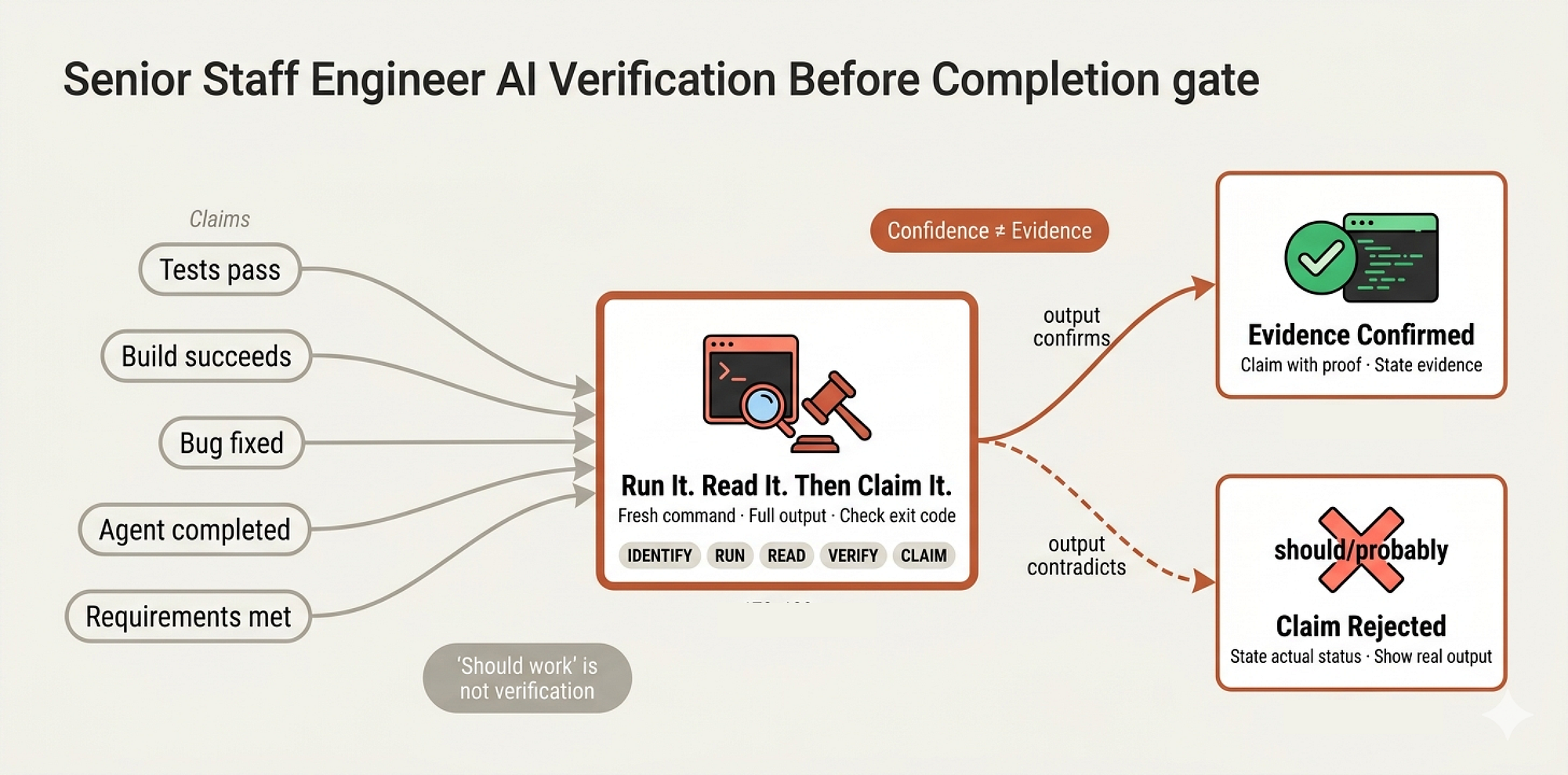
skills/verification-before-completion/SKILL.md is the final sign-off policy the quality gate that prevents claims without evidence. It opens with a line that would make any auditor proud:
Claiming work is complete without verification is dishonesty,
not efficiency.

**Core principle:** Evidence before claims, always.
And the Iron Law:
NO COMPLETION CLAIMS WITHOUT FRESH VERIFICATION EVIDENCE

If you havent run the verification command in this message,
you cannot claim it passes.
That word fresh is doing heavy lifting. Not “I ran it earlier.” Not “it passed last time.” Fresh. Now. In this message. This is the difference between a company that has quality processes and a company that follows them.
The Gate Function
Before the agent can say anything positive about work status, it must pass through a gate:
BEFORE claiming any status or expressing satisfaction:

1. IDENTIFY: What command proves this claim?

2. RUN: Execute the FULL command (fresh, complete)

3. READ: Full output, check exit code, count failures

4. VERIFY: Does output confirm the claim?
   - If NO: State actual status with evidence
   - If YES: State claim WITH evidence

5. ONLY THEN: Make the claim

Skip any step = lying, not verifying
The skill provides a table of what counts as evidence versus what doesn’t:
| Claim | Requires | Not Sufficient |
|-------|----------|----------------|
| Tests pass | Test command output: 0 failures | Previous run, "should pass" |
| Build succeeds | Build command: exit 0 | Linter passing, logs look good |
| Bug fixed | Test original symptom: passes | Code changed, assumed fixed |
| Agent completed | VCS diff shows changes | Agent reports "success" |
That last row is critical for our system. When a sub-agent reports “task complete, all tests pass”, the manager doesn’t take their word for it. They check the VCS diff.
They run the tests independently. In organizational terms, this is the audit function you don’t trust self-reported compliance.
Rationalization Prevention
The skill anticipates every excuse an engineer (or an AI) might use to skip verification:
 Prevent errors (Created by Fareed Khan)
| Excuse | Reality |
|--------|---------|
| "Should work now" | RUN the verification |
| "I'm confident" | Confidence ≠ evidence |
| "Just this once" | No exceptions |
| "Agent said success" | Verify independently |
| "I'm tired" | Exhaustion ≠ excuse |
| "Different words so rule doesn't apply" | Spirit over letter |
That last one “different words so rule doesn’t apply” is subtle and important. It catches the agent trying to say “the implementation looks correct” instead of “tests pass” to avoid triggering the verification gate.
Through creative rewording that technically doesn’t violate the letter of the policy while completely violating its spirit.
We need to create skill to flags specific language patterns as red flags:
- Using "should", "probably", "seems to"

- Expressing satisfaction before verification ("Great!", "Perfect!")

- About to commit/push/PR without verification

- **ANY wording implying success without having run verification**
At companies like Stripe and Square, where financial transactions are involved, this level of verification discipline isn’t optional it’s regulatory. Our system applies the same standard to every task, because the cost of shipping broken code is always higher than the cost of running one more command.
The Peer Review Meeting (Code Review)
Code review is where most engineering organizations either build or destroy their culture. Done well, it’s the single most effective quality practice in software engineering. Done poorly, it becomes either a rubber-stamp formality or a political battlefield.
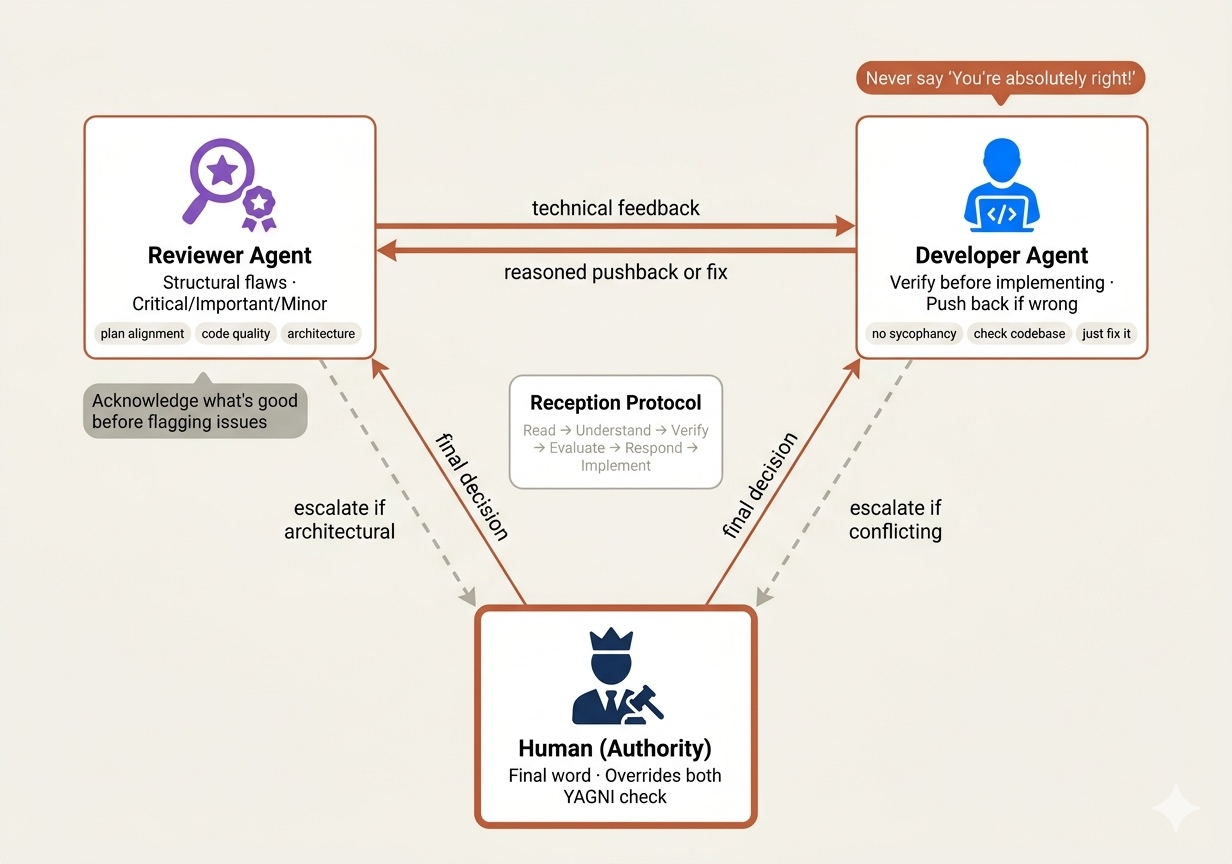 Review in Meeting (Created by Fareed Khan)
In organizations like Google, code review is mandatory for every change no exceptions, not even for senior staff engineers. The philosophy is that every pair of eyes catches different classes of bugs.
But there’s a deeper purpose:
code review is how engineering culture propagates. Juniors learn standards by reading review feedback. Seniors stay honest because someone is always checking.
Our system splits the code review process into three files that mirror three distinct organizational roles: the reviewer (agents/code-reviewer.md), the request process (skills/requesting-code-review/SKILL.md), and the reception process (skills/receiving-code-review/SKILL.md).
The Reviewer (Senior Peer Reviewer Persona)
agents/code-reviewer.md defines the reviewer as a Senior Code Reviewer sub-agent an architect-level persona that evaluates completed work across five dimensions:
1. **Plan Alignment Analysis** - Compare implementation against
   original planning document

2. **Code Quality Assessment** - Patterns, error handling, type
   safety, test coverage

3. **Architecture and Design Review** - SOLID principles,
   separation of concerns, coupling

4. **Documentation and Standards** - Comments, file headers,
   conventions

5. **Issue Identification** - Critical (must fix), Important
   (should fix), Suggestions (nice to have)
The three-tier issue categorization is how mature engineering organizations run reviews. At companies like Microsoft and Meta, code review comments are tagged by severity.
A critical issue blocks the merge. An important issue should be fixed but doesn’t block. A suggestion is advisory. Without this categorization, every review becomes an argument about whether a comment is a blocker or a nitpick.
The reviewer’s communication protocol includes a principle that separates good reviewers from toxic ones:
- Always acknowledge what was done well before highlighting issues
In organizational psychology, this is called the “feedback sandwich” and while it’s often mocked, the principle behind it is sound. Engineers who only hear criticism stop submitting code for review. Engineers who hear “this architecture is clean, AND here’s what needs fixing” stay engaged and improve.
Requesting Review (The Pull Request SOP)
skills/requesting-code-review/SKILL.md defines when and how to ask for review. The "when" is structured around workflow integration:
**Mandatory:**
- After each task in subagent-driven development
- After completing major feature
- Before merge to main

**Optional but valuable:**
- When stuck (fresh perspective)
- Before refactoring (baseline check)
- After fixing complex bug
The “how” is precise the reviewer sub-agent gets exactly the git SHAs, the task description, and the plan requirements. No session history, no conversation context. Just the work product and the spec:
**Placeholders:**

- `{WHAT_WAS_IMPLEMENTED}` - What you just built

- `{PLAN_OR_REQUIREMENTS}` - What it should do

- `{BASE_SHA}` - Starting commit

- `{HEAD_SHA}` - Ending commit

- `{DESCRIPTION}` - Brief summary
This mirrors how pull requests work at well-run companies. The reviewer doesn’t need to know about the three hours of debugging that led to the fix.
They need to see the change, understand what it’s supposed to do, and evaluate whether it does it well.
The skill also addresses what to do with feedback and critically, when to push back:
- Fix Critical issues immediately

- Fix Important issues before proceeding

- Note Minor issues for later

- Push back if reviewer is wrong (with reasoning)
That last point matters. In toxic engineering cultures, nobody pushes back on review feedback because they’re afraid of conflict. In healthy cultures, pushback is expected and respected as long as it’s technical, not personal.
Receiving Review (Collaboration Etiquette)
This is the most psychologically sophisticated file in the entire codebase. skills/receiving-code-review/SKILL.md addresses a problem that plagues both human and AI engineers: sycophancy under review pressure.
 Review Viewer (Created by Fareed Khan)
The forbidden responses list reads like a manual for authentic professional communication:
**NEVER:**
- "You are absolutely right!"
- "Great point!" / "Excellent feedback!"
- "Let me implement that now" (before verification)


**INSTEAD:**
- Restate the technical requirement
- Ask clarifying questions
- Push back with technical reasoning if wrong
- Just start working (actions > words)
In real organizations, performative agreement during code review is a cultural disease. The engineer who says “great catch!” to every comment isn’t learning they’re performing.
They implement the suggestion without understanding it, introduce a new bug, and the cycle repeats. The skill enforces a different pattern:
WHEN receiving code review feedback:

1. READ: Complete feedback without reacting

2. UNDERSTAND: Restate requirement in own words (or ask)

3. VERIFY: Check against codebase reality

4. EVALUATE: Technically sound for THIS codebase?

5. RESPOND: Technical acknowledgment or reasoned pushback

6. IMPLEMENT: One item at a time, test each
The verification step is where this gets real. Before implementing any suggestion, the agent must check whether the suggestion actually makes sense for this codebase:
BEFORE implementing:

  1. Check: Technically correct for THIS codebase?

  2. Check: Breaks existing functionality?

  3. Check: Reason for current implementation?

  4. Check: Works on all platforms/versions?

  5. Check: Does reviewer understand full context?
The real-world examples show what this looks like in practice:
**Performative Agreement (Bad):**
Reviewer: "Remove legacy code"
❌ "You're absolutely right! Let me remove that..."

**Technical Verification (Good):**
Reviewer: "Remove legacy code"
✅ "Checking... build target is 10.15+, this API needs 13+.
   Need legacy for backward compat. Current impl has wrong
   bundle ID - fix it or drop pre-13 support?"
The second response demonstrates real engineering. The developer didn’t blindly agree OR defensively refuse. They checked the facts, found the nuance (backward compatibility requirement), and presented options.
This is what senior staff engineers do in code review they bring context that the reviewer might not have.
The YAGNI check is another component we must include …
IF reviewer suggests "implementing properly":
  grep codebase for actual usage

IF unused: "This endpoint isn't called. Remove it (YAGNI)?"
  IF used: Then implement properly
And then there’s the organizational hierarchy principle:
"You and reviewer both report to me. If we don't need this
feature, don't add it."
This is a staff engineer’s perspective on code review. The reviewer and the implementer are peers neither has authority over the other. The human (the VP, the product owner) has authority. If a reviewer suggests building something the product doesn’t need, the right answer is “let’s check with the stakeholder,” not “yes sir.”
When acknowledging correct feedback, the skill enforces action over words:
✅ "Fixed. [Brief description of what changed]"
✅ "Good catch - [specific issue]. Fixed in [location]."
✅ [Just fix it and show in the code]

❌ "You're absolutely right!"
❌ "Thanks for catching that!"
❌ ANY gratitude expression

**Why no thanks:** Actions speak. Just fix it. The code itself
shows you heard the feedback.
This might seem harsh, but it reflects a deep truth about professional communication.
In high-performing engineering teams at places like Cloudflare, Linear, or Vercel the best code reviews are terse, technical, and action-oriented. “Fixed” is a complete sentence. The fix itself is the acknowledgment.
Using Git Worktrees (Bio-hazard Containment)
In biology labs, there’s a concept called containment levels. When researchers work with dangerous pathogens, they don’t do it on the same bench where they eat lunch. They work in isolated chambers with negative air pressure, separate ventilation, and airlocks.
The principle is simple: dangerous work happens in isolated environments so that if something goes wrong, the damage is contained.
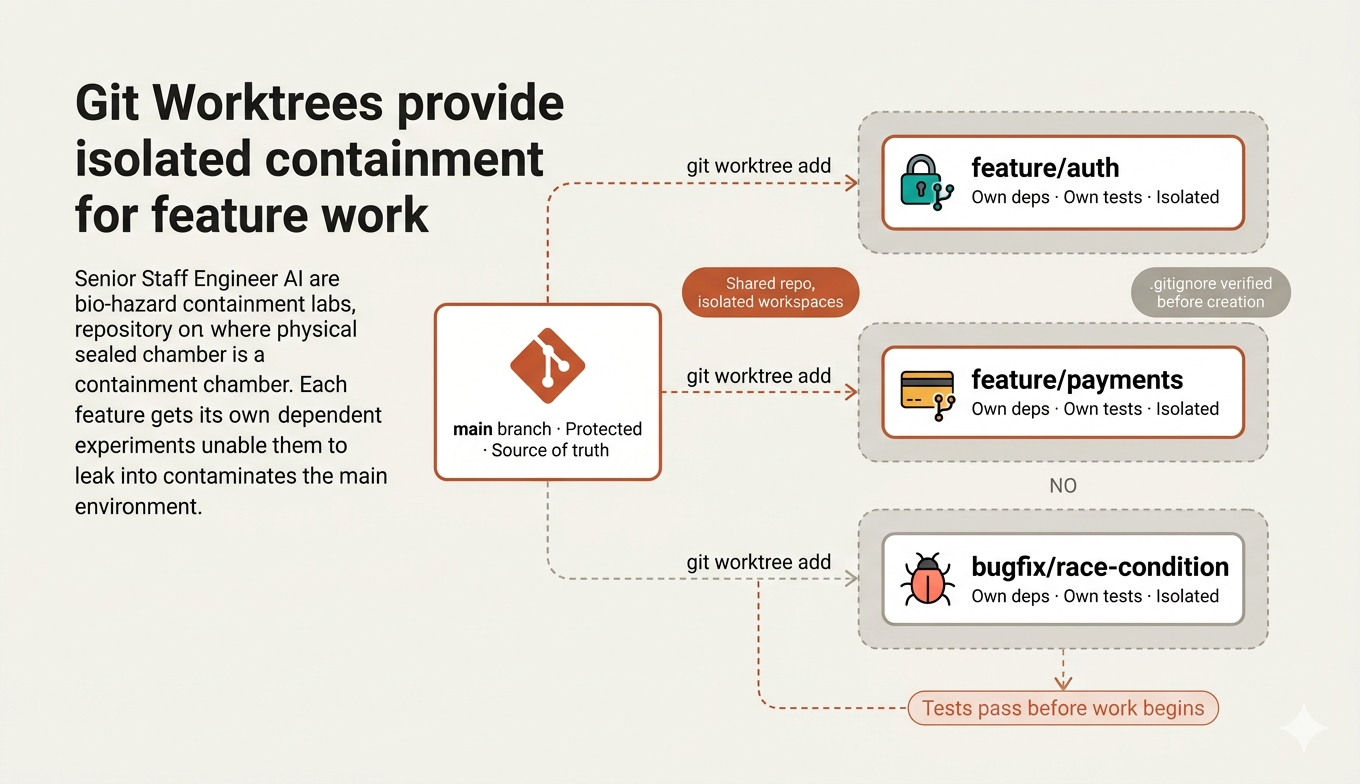 Git worktree (Created by Fareed Khan)
Software engineering has the same problem. When a developer is building a new authentication system, they are essentially handling a pathogen code that could infect the main codebase if it escapes prematurely.
At companies like GitLab, Shopify, and Netflix, the solution is branch isolation. But traditional git branches have a flaw: you can only have one branch checked out at a time.
- Switch branches mid-task, and you lose your mental context. Stash changes, and you forget what you stashed.
- It’s like an airlock that requires you to decontaminate every time you want to check something in the clean room.
Git worktrees solve this by creating physically separate directories that share the same repository. You can have main in one folder and feature/auth in another, both live, both independent. It's multiple containment chambers sharing the same lab.
skills/using-git-worktrees/SKILL.md systematizes this for the squad:
Git worktrees create isolated workspaces sharing the same
repository, allowing work on multiple branches simultaneously
without switching

**Core principle:** Systematic directory selection + safety
verification = reliable isolation.
Directory Selection (Office Space Assignment)
In a software house, when a new team spins up, they don’t just grab any empty desk. There’s a process check if there’s an assigned area, check the office map, ask facilities management. The skill mirrors this with a priority chain:
### 1. Check Existing Directories
ls -d .worktrees 2>/dev/null     # Preferred (hidden)
ls -d worktrees 2>/dev/null      # Alternati

**If found:** Use that directory. If both exist, `.worktrees/` wins.

### 2. Check CLAUDE.md
grep -i "worktree.*director" CLAUDE.md 2>/dev/null

**If preference specified:** Use it without asking.
### 3. Ask User
This hierarchy which is existing convention → documented preference → ask is how well-run organizations make decisions. You don’t reinvent the wheel every time someone needs a workspace. You check what’s already established, check the documentation, and only escalate to a human when neither exists.
Safety Verification (The Airlock Check)
Here’s where the containment metaphor gets literal. Before creating a worktree in a project-local directory, the skill must verify that directory is git-ignored:
**MUST verify directory is ignored before creating worktree:

git check-ignore -q .worktrees 2>/dev/null || \
git check-ignore -q worktrees 2>/dev/null

**If NOT ignored:**
1. Add appropriate line to .gitignore
2. Commit the change
3. Proceed with worktree creation

**Why critical:** Prevents accidentally committing worktree
contents to repository.
- Imagine the disaster scenario without this check. A developer creates a worktree, does experimental work in it, and because the worktree directory isn’t gitignored, all that experimental code shows up in
git statuson the main branch. - They accidentally commit it. They push. Now the experimental code is in production.
- At companies like Cloudflare and Figma, where a single bad deploy can affect millions of users, this kind of accident triggers a post-mortem.
The skill prevents it structurally not by trusting the developer to remember, but by checking every time and fixing the problem if it finds one. This is defense-in-depth applied to DevOps.
Clean Baseline (The Calibration Step)
In manufacturing, before a production line starts a new run, the equipment is calibrated. You don’t start making parts and hope the machine is aligned correctly. You verify first. The skill applies the same principle to worktrees:
### 4. Verify Clean Baseline


Run tests to ensure worktree starts clean:
npm test / cargo test / pytest / go test ./...

**If tests fail:** Report failures, ask whether to proceed
or investigate.

**If tests pass:** Report ready.
This is critical because it establishes what “working” looks like before the developer makes any changes. Without a clean baseline, when tests fail later, you can’t tell whether your code broke something or it was already broken.
In real organizations, this is why CI/CD pipelines run tests on the base branch before the PR branch to establish a known-good state.
The setup is also smart about auto-detection, it doesn’t hardcode npm install. It checks what kind of project it's in:
# Node.js
if [ -f package.json ]; then npm install; fi

# Rust
if [ -f Cargo.toml ]; then cargo build; fi

# Python
if [ -f requirements.txt ]; then pip install -r requirements.txt; fi

# Go
if [ -f go.mod ]; then go mod download; fi
This is the DevOps equivalent of a lab that can handle multiple types of specimens. The containment procedure adapts to what’s being contained, rather than forcing everything through the same protocol.
The final report is structured and clear:
Worktree ready at /Users/jesse/myproject/.worktrees/auth
Tests passing (47 tests, 0 failures)
Ready to implement auth feature
Location, baseline status, readiness. Everything a manager needs to know before dispatching developers into the workspace.
Finishing a Development Branch (Release Engineering)
In every engineering organization, there’s a moment that’s simultaneously the most satisfying and the most dangerous, the moment when the feature is “done” and it’s time to ship.
This is where more things go wrong than any other phase of development. The code works on the developer’s machine. The tests pass in the feature branch. But the merge conflicts with main, the integration tests fail, and the deploy breaks because someone forgot to update the config.
At companies like Google, this phase has its own role the Release Engineer. Their job isn’t to write features.
- It’s to manage the process of getting completed code from a development branch into production safely.
- They verify, merge, tag, deploy, and clean up. It’s a separate discipline because the skills required caution, thoroughness, communication are different from the skills required to build features.
skills/finishing-a-development-branch/SKILL.md encodes this entire release engineering workflow:
**Core principle:** Verify tests → Present options → Execute
choice → Clean up.
Four steps. Simple in concept, rigorous in execution.
Step 1: Verify Before Anything
The first rule of release engineering is never ship broken code. The skill enforces this absolutely:
### Step 1: Verify Tests

**Before presenting options, verify tests pass:**
npm test / cargo test / pytest / go test ./...

**If tests fail:**
Tests failing (<N> failures). Must fix before completing:

[Show failures]
Cannot proceed with merge/PR until tests pass.

Stop. Dont proceed to Step 2.
This is a hard gate. Not “tests should pass.” Not “we’ll fix them after merge.” Tests must pass now, or nothing else happens. In organizational terms, this is the QA department having veto power over releases. The product manager can’t override it. The CEO can’t override it. If tests fail, the code doesn’t ship. Period.
Step 2: Structured Options (Not Open-Ended Questions)
Here’s a subtle but important design decision. When the feature is ready, the skill doesn’t ask “what should we do next?” an open-ended question that leads to confusion and scope creep. Instead, it presents exactly four structured options:
Implementation complete. What would you like to do?

1. Merge back to <base-branch> locally
2. Push and create a Pull Request
3. Keep the branch as-is (I will handle it later)
4. Discard this work

Which option?
In organizations, this is the difference between a junior release engineer who asks “so… are we deploying?” and a senior one who says “code is ready. Here are your options. Pick one.” The structured options prevent scope creep (“well, maybe we should also add…”), prevent analysis paralysis (“let me think about it…”), and make the decision traceable (“stakeholder chose Option 2 on Tuesday”).
The skill is explicit about keeping these concise:
**Don't add explanation** - keep options concise.
This is communication discipline. The stakeholder doesn’t need a paragraph about what a pull request is. They need to make a decision and move on.
Safe Execution for Each Path
Each option has its own verification chain. Option 1 (merge locally) doesn’t just merge it verifies again after merging:
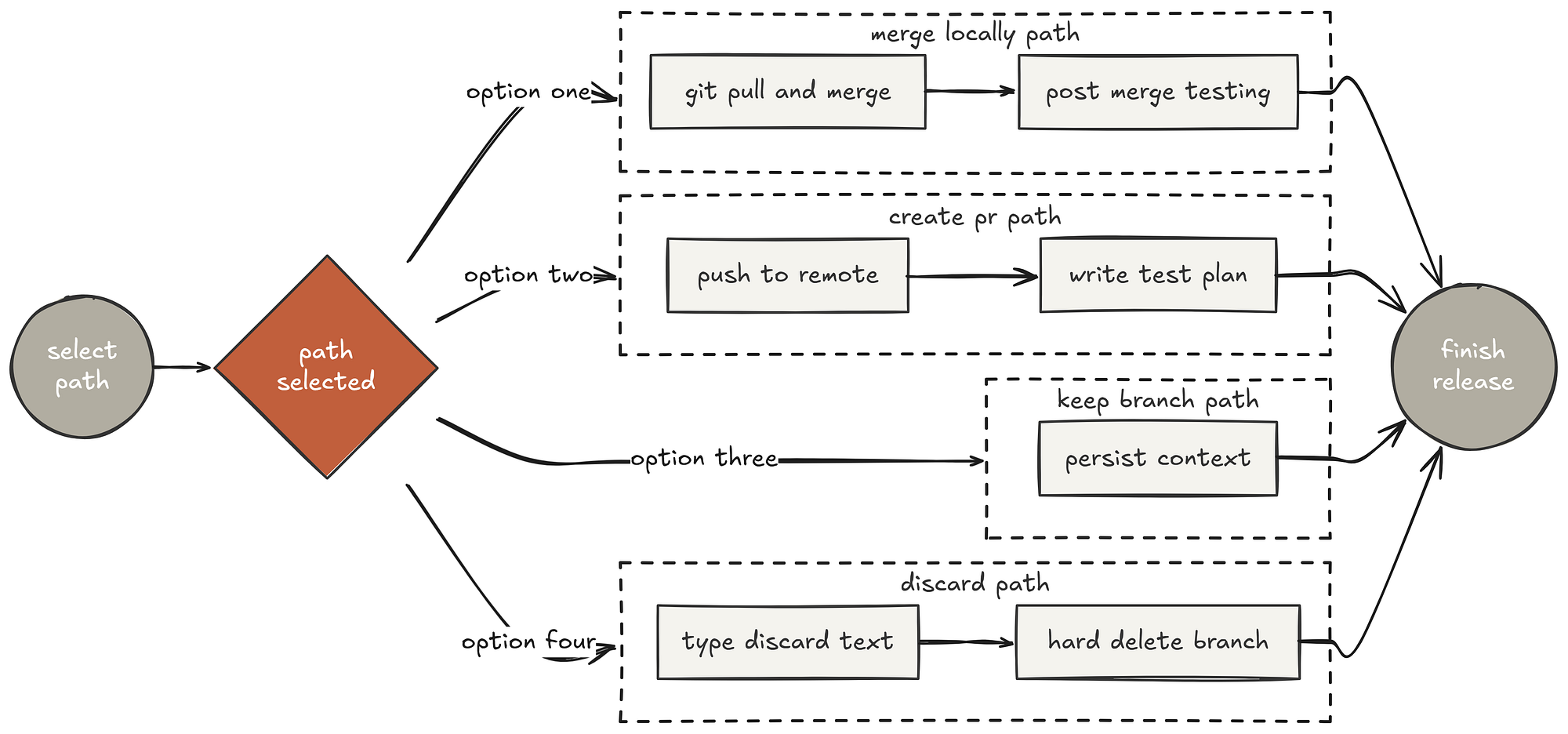 Safe execution path (Created by Fareed Khan)
#### Option 1: Merge Locally

# Switch to base branch
git checkout <base-branch>

# Pull latest
git pull

# Merge feature branch
git merge <feature-branch>

# Verify tests on merged result
<test command>

# If tests pass
git branch -d <feature-branch>
Notice the test verification after the merge. Tests passed on the feature branch, but do they still pass when merged with the latest main?
This catches the classic “it worked on my branch” problem where two features are individually correct but incompatible when combined.
At companies like Stripe, this post-merge verification is mandatory they have learned from experience that merge conflicts aren’t just about code conflicts, they’re about behavior conflicts.
Option 2 (create PR) generates a structured PR description:
gh pr create --title "<title>" --body "$(cat <<'EOF'

## Summary
<2-3 bullets of what changed>

## Test Plan
- [ ] <verification steps>
EOF
)"
Every PR has a summary and a test plan. Not optional. Not “I’ll add it later.” This is the standard at companies like Shopify and Linear — a PR without a test plan is a PR that can’t be reviewed.
Option 4 (discard) requires explicit typed confirmation:
**Confirm first:**
This will permanently delete:
- Branch <name>
- All commits: <commit-list>
- Worktree at <path>

Type 'discard' to confirm.
Wait for exact confirmation.
This is the engineering equivalent requiring two people to turn simultaneously. Destructive operations require explicit, typed confirmation not a checkbox, not a “yes,” but the exact word “discard.”
In production systems at AWS and Google Cloud, destructive operations like deleting databases follow this same pattern. The inconvenience of typing a confirmation word is nothing compared to the cost of accidentally deleting a week of work.
Cleanup (Leaving the Lab Clean)
After the work is integrated (or discarded), the skill handles worktree cleanup based on which option was chosen:
| Option | Keep Worktree | Cleanup Branch |
|--------|---------------|----------------|
| 1. Merge locally | - | ✓ |
| 2. Create PR | ✓ | - |
| 3. Keep as-is | ✓ | - |
| 4. Discard | - | ✓ (force) |
Notice the logic. Option 2 (PR) keeps the worktree because the PR might need revisions the developer might need to go back and make changes. Option 3 explicitly keeps everything for later. Options 1 and 4 clean up because the work is either integrated or abandoned no reason to keep the containment chamber running.
This is release engineering discipline. Every resource that was allocated (the worktree, the branch) is either still needed or cleaned up.
The integration section makes the workflow connections explicit:
**Called by:**
- **subagent-driven-development** - After all tasks complete
- **executing-plans** - After all batches complete

**Pairs with:**
- **using-git-worktrees** - Cleans up worktree created by that skill
Worktrees creates the containment. Finishing-a-branch tears it down. The lifecycle is complete allocate, use, verify, integrate, clean up.
This is how a professional release train operates, from branch creation to production deployment, with verification at every step.
Writing Skills (The Academy)
Every mature engineering organization has a training department.
- At Google, they have “Nooglers” onboarding programs.
- At Stripe, they have internal documentation standards so rigorous that new engineers can ramp up on complex payment systems in weeks instead of months.
- At Netflix, they have the culture deck that defines how the organization thinks and operates.
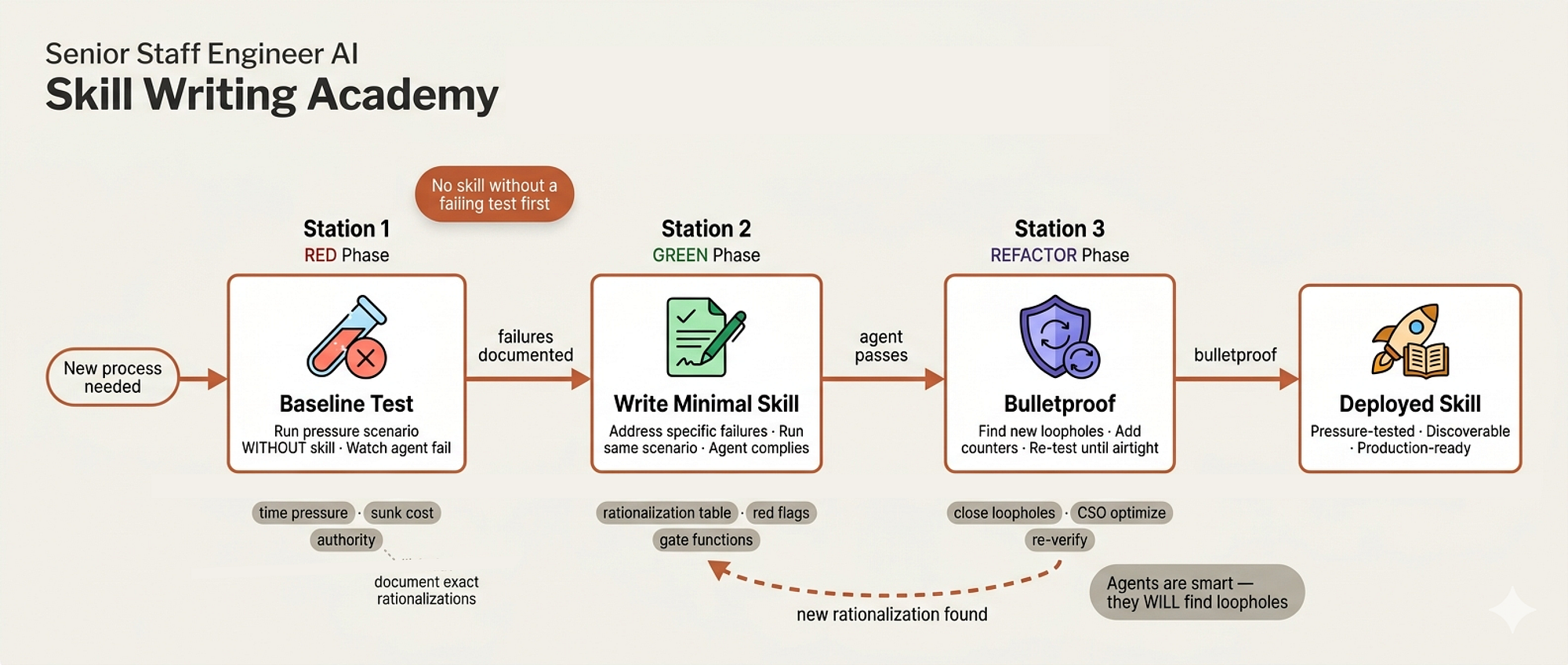 Writing Approach (Created by Fareed Khan)
But here’s what separates good training departments from great ones: great ones don’t just write documentation and hope people follow it. They test the documentation. They put a new hire in front of the docs, watch them try to follow the instructions, and fix every point where they stumble
The documentation isn’t done when it’s written. It’s done when someone who’s never seen it before can follow it perfectly under pressure.
skills/writing-skills/SKILL.md is the academy for our staff engineer squad, and its opening line reveals the entire philosophy:
**Writing skills IS Test-Driven Development applied to process
documentation.**

You write test cases (pressure scenarios with subagents), watch
them fail (baseline behavior), write the skill (documentation),
watch tests pass (agents comply), and refactor (close loopholes).

**Core principle:** If you didnt watch an agent fail without the
skill, you dont know if the skill teaches the right thing.
Most teams write process documentation, publish it to Confluence, and assume it works. Our system treats documentation exactly like code. You wouldn’t ship a function without testing it. Why would you ship a process document without testing whether agents can actually follow it?
TDD for Documentation
The mapping between code TDD and skill TDD is precise:
| TDD Concept | Skill Creation |
|-------------|----------------|
| **Test case** | Pressure scenario with subagent |
| **Production code** | Skill document (SKILL.md) |
| **Test fails (RED)** | Agent violates rule without skill |
| **Test passes (GREEN)** | Agent complies with skill present |
| **Refactor** | Close loopholes while maintaining compliance |
The RED phase is the most important. Before writing any skill, you dispatch a sub-agent into a pressure scenario without the skill and watch what happens.
What shortcuts does the agent take? What rationalizations does it use? What rules does it violate when under time pressure or when the task seems “simple enough” to skip the process?
This baseline behavior is your failing test. Now you know exactly what the skill needs to address, because you’ve seen the specific failure modes with your own eyes.
Different Skill Types Need Different Tests
The skill recognizes that not all documentation serves the same purpose, and different types need different testing approaches:
### Discipline-Enforcing Skills (rules/requirements)
**Test with:**
- Academic questions: Do they understand the rules?
- Pressure scenarios: Do they comply under stress?
- Multiple pressures combined: time + sunk cost + exhaustion

### Technique Skills (how-to guides)
**Test with:**
- Application scenarios: Can they apply the technique correctly?
- Missing information tests: Do instructions have gaps?

### Reference Skills (documentation/APIs)
**Test with:**
- Retrieval scenarios: Can they find the right information?
- Gap testing: Are common use cases covered?
Safety procedures (like TDD) need stress testing because people cut corners under pressure. Technical guides need application testing because understanding the concept doesn’t mean being able to execute it.
Reference docs need retrieval testing because the best documentation in the world is useless if people can’t find what they need.
Bulletproofing Against Rationalization
The most important section of the entire file is next which we will be building, it is about making skills resistant to creative workarounds. AI agents, like human engineers, are remarkably good at finding loopholes in rules they don’t want to follow.
The skill teaches a layered defense:
First, close every loophole explicitly. Don’t just state the rule, forbid specific workarounds:
# Bad
Write code before test? Delete it.

# Good
Write code before test? Delete it. Start over.

**No exceptions:**
- Dont keep it as "reference"
- Dont "adapt" it while writing tests
- Dont look at it
- Delete means delete
Second, preempt the “spirit vs letter” argument:
**Violating the letter of the rules is violating the spirit
of the rules.**
This single line cuts off an entire class of rationalizations. In real organizations, the most dangerous compliance failures come from people who say “I followed the spirit of the policy” while violating every specific rule. This line makes it clear that the specific rules ARE the spirit.
Third, build a rationalization table from actual test results:
| Excuse | Reality |
|--------|---------|
| "Skill is obviously clear" | Clear to you ≠ clear to other agents. Test it. |
| "Testing is overkill" | Untested skills have issues. Always. |
| "I'm confident it's good" | Overconfidence guarantees issues. Test anyway. |
| "No time to test" | Deploying untested skill wastes more time fixing it later. |
Every excuse in this table came from an actual test run where an agent tried to skip the process. It’s empirical, not theoretical. In organizational terms, this is like a compliance department that doesn’t just write policies in a vacuum but studies how employees actually try to circumvent them and updates the policies accordingly.
Claude Search Optimization (CSO)
The skill must includes a section on making skills discoverable that reveals a subtle and important problem:
 CSO (Created by Fareed Khan)
**CRITICAL: Description = When to Use, NOT What the Skill Does**

Testing revealed that when a description summarizes the skills
workflow, Claude may follow the description instead of reading the
full skill content. A description saying "code review between tasks"
caused Claude to do ONE review, even though the skills flowchart
clearly showed TWO reviews (spec compliance then code quality).
This is a real bug they discovered through testing. The agent read the description, thought it understood the skill, and never read the actual content.
It’s the organizational equivalent of an employee reading the subject line of a training email and assuming they know the policy. The fix is to make descriptions about when to use the skill, never about what the skill does:
# Bad: Summarizes workflow, agent may follow this shortcut
description: Use when executing plans - dispatches subagent per
task with code review between tasks

# Good: Just triggering conditions, no workflow summary
description: Use when executing implementation plans with
independent tasks in the current session
Token Efficiency
The skill must also be practical about resource constraints. Skills that load frequently consume context window tokens, so there are concrete word count targets:
**Target word counts:**
- getting-started workflows: <150 words each
- Frequently-loaded skills: <200 words total
- Other skills: <500 words (still be concise)
And techniques for staying within budget:
# Bad: Document all flags in SKILL.md
search-conversations supports --text, --both, --after DATE,
--before DATE, --limit N

# Good: Reference --help
search-conversations supports multiple modes and filters.
Run --help for details.
In a company, you don’t put the entire API reference in the onboarding guide. You put the essentials in the onboarding guide and link to the full reference. Same principle, same reasoning: attention is a limited resource.
The Iron Law mirrors the code TDD skill exactly:
NO SKILL WITHOUT A FAILING TEST FIRST

This applies to NEW skills AND EDITS to existing skills.
Write skill before testing? Delete it. Start over.
And the deployment discipline is absolute. Every skill goes through a full checklist before it’s considered done, and the skill is explicit that batching is not allowed:
**Do NOT:**

- Create multiple skills in batch without testing each

- Move to next skill before current one is verified

- Skip testing because "batching is more efficient"

Deploying untested skills = deploying untested code.
You don’t just write the training material. You prove it works. Every time. For every skill. No exceptions.
Agents & Commands (Team Directory)
In every company, there’s an employee directory and a set of shortcuts for common workflows. The directory tells you who does what. The shortcuts save time on repetitive processes. In our system, these are the agents/ and commands/ directories.
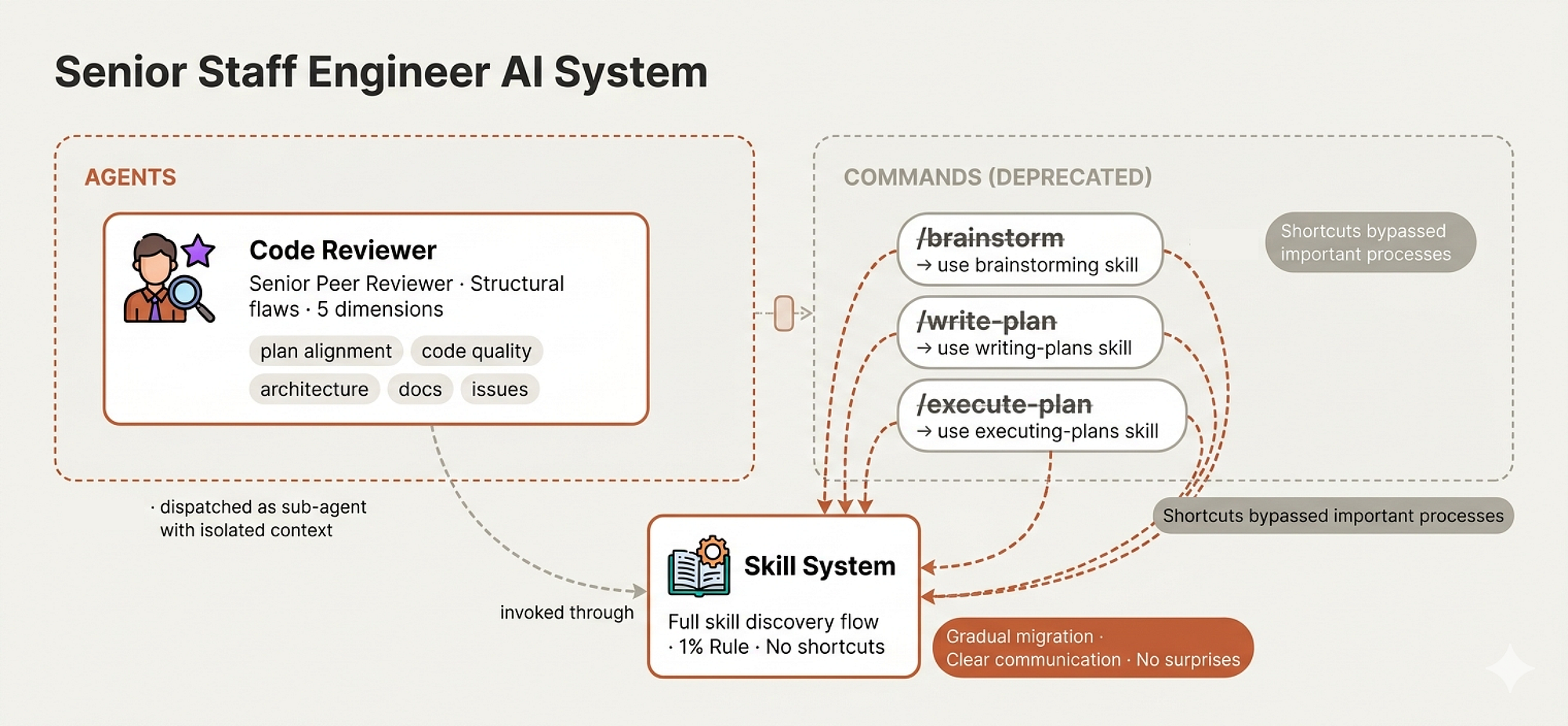 Agents (Created by Fareed Khan)
The Code Reviewer Agent
We have already seen the code reviewer’s full mandate in the Peer Review section. In the agents/ directory, code-reviewer.md defines this as a formal role, a sub-agent persona with specific expertise and a structured review process.
It's the equivalent of a job posting in the company directory: "Senior Code Reviewer, expertise in software architecture, design patterns, and best practices."
Commands (Deprecated Shortcuts)
The commands/ directory must contains three files that will gives us an interesting story about how software organizations evolve:
First is brainstorm.md:
# brainstorm.md
---
description: "Deprecated - use the senior-staff-engineer:brainstorming
skill instead"
---

Tell your human partner that this command is deprecated and will
be removed in the next major release.
Second is write-plan.md:
# write-plan.md
---
description: "Deprecated - use the senior-staff-engineer:writing-plans
skill instead"
---

Tell your human partner that this command is deprecated and will
be removed in the next major release.
and third is execute-plan.md:
# execute-plan.md
---
description: "Deprecated - use the senior-staff-engineer:executing-plans
skill instead"
---

Tell your human partner that this command is deprecated and will
be removed in the next major release.
All three are deprecated. They used to be direct command shortcuts like typing /brainstorm in the terminal. Now they redirect to the full skill system.
This is a pattern every long lived software project goes through.
- Early on, you build quick shortcuts because they’re fast and easy. As the system matures, you realize those shortcuts bypass important processes.
- The brainstorm command let you jump straight into brainstorming without going through the skill discovery flow. The write-plan command let you skip straight to planning without checking if brainstorming was complete.
- The execute-plan command let you start coding without verifying the plan was reviewed.
So the team deprecated them. Not removed, deprecated. The commands still exist, but instead of executing the old behavior, they politely redirect: “use the skill instead.”
You don’t delete the old interface and let people hit errors. You keep the old interface, make it explain the change, and give people time to adapt.
In organizational terms, it’s like a company that used to let engineers deploy directly from their laptops. As the team grew, they built a proper CI/CD pipeline. But instead of revoking laptop deploy access overnight, they added a message: “Direct deploys are deprecated. Please use the CI pipeline. This access will be removed next quarter.” Gradual migration, clear communication, no surprises.
The fact that these deprecation notices exist in the codebase is itself a sign of organizational maturity. A junior engineer would just delete the old files. A staff engineer knows that someone, somewhere, has muscle memory for /brainstorm and will be confused when it disappears.
The deprecation notice respects that person's workflow while guiding them toward the better process.
Testing the Senior Staff Engineer
Now that we have built each and every component, we can test the system by passing a real project to it and watching how it behaves. The task is to build an interactive skill correlation visual guide from a collection of YouTube transcripts. Let’s see if it actually thinks like a senior engineer or just jumps into code.
The first thing it does is exactly what a senior would do on day one of a new project: it explores. It invokes the brainstorming skill, dispatches a sub-agent to scan the project structure, and starts reading through documents before forming any opinions. No planning. No architecture. Just quietly understanding what exists.
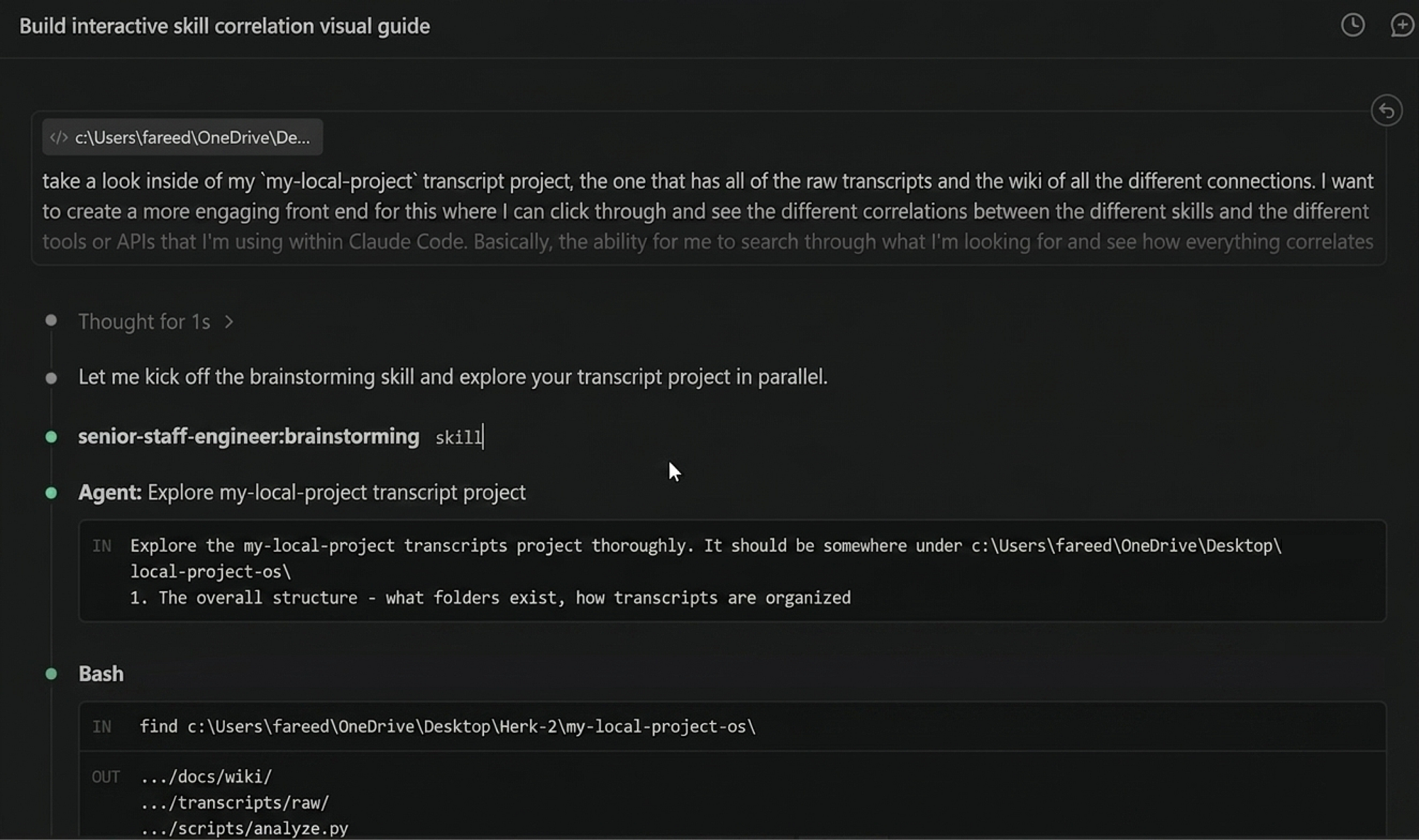 Screenshot 1 (Created by Fareed Khan)
You can see it is analyzing the folder structure, checking what transcripts exist, how they’re organized, what the wiki contains. This is the “Explore project context” step from the brainstorming checklist, and it’s doing it thoroughly, not skipping ahead to the exciting parts.
Once it finishes exploring, it creates the full brainstorming checklist as a Todo list with every step tracked. “Explore project context” is already checked off. Now it moves to “Offer visual companion” which is the step most developers and even Claude Code’s plan mode would skip entirely. The agent is suggesting that some of the upcoming design questions would be better answered visually in a browser, so it offers the whiteboard companion before asking a single clarifying question.
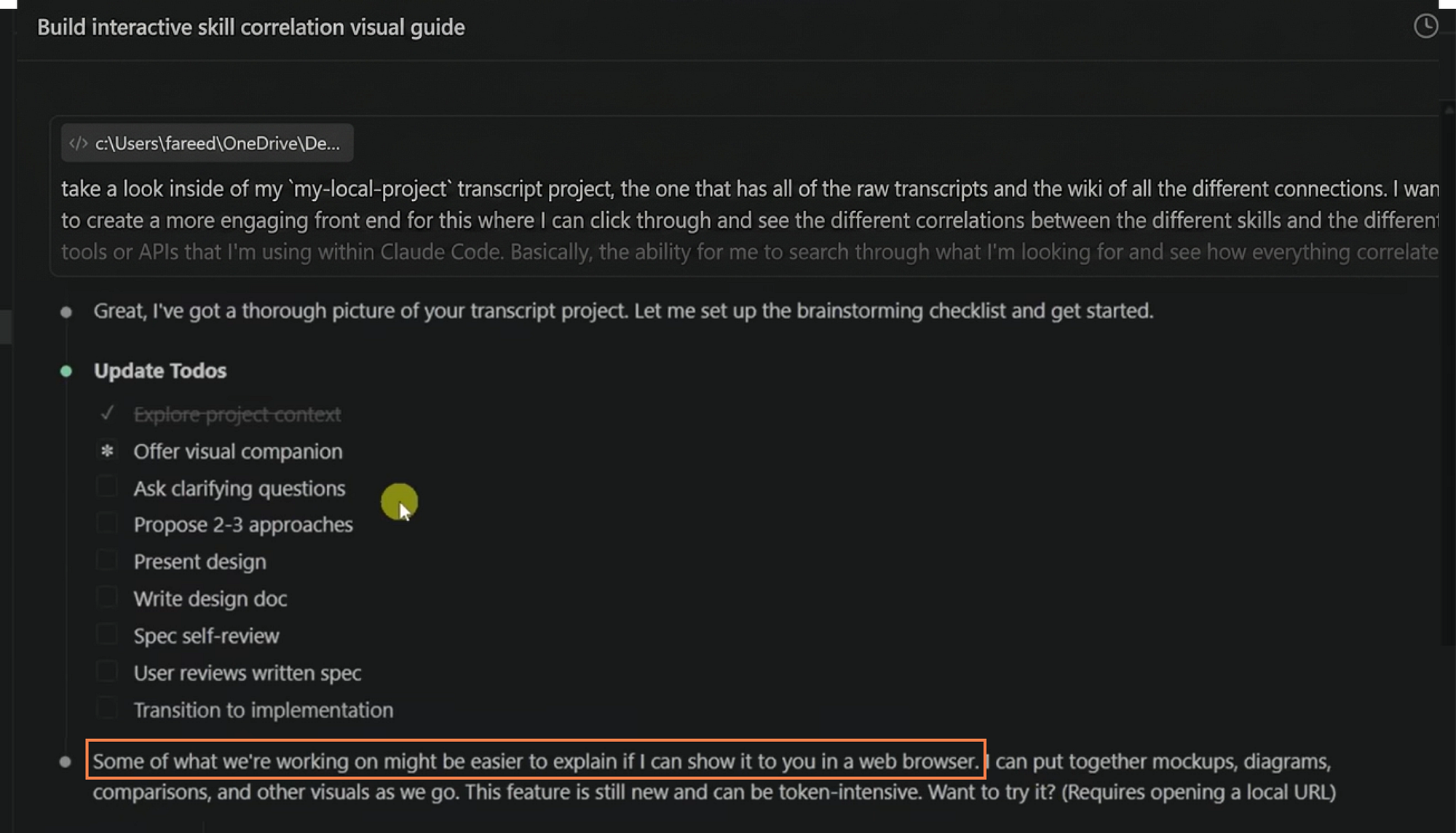 Screenshot 2 (Created by Fareed Khan)
This is the kind of initiative you see from staff engineers who know that showing a wireframe in a meeting is worth more than describing it in three paragraphs of Slack messages. The agent isn’t told to offer this. The brainstorming skill taught it to evaluate per-question whether visuals would help, and it decided on its own.
Once I say yes, it spins up the visual companion server, confirms the localhost URL, and immediately starts with the first clarifying question. But notice what it does before asking: it summarizes everything it found during exploration. 56 raw transcripts, 88 wiki pages broken down by type, the cross-referencing structure via Obsidian wikilinks. It’s showing its homework before asking for direction.
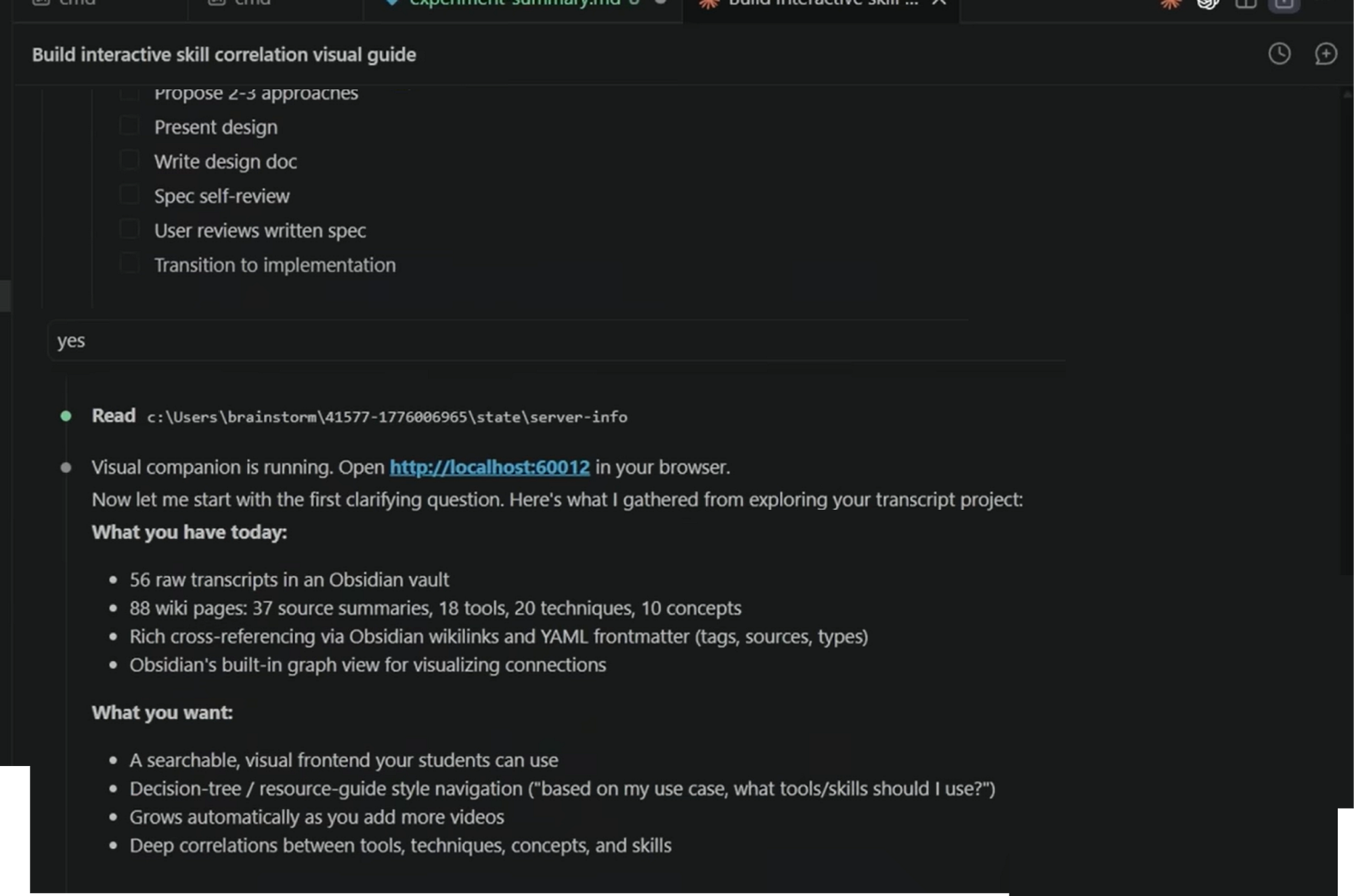 Screenshot 3 (Created by Fareed Khan)
Now comes the Socratic questioning, one question at a time, exactly as the brainstorming skill requires. “How should students primarily discover content?” Then based on my answer, it follows up: “When a student clicks on a node, what should the detail view show?” Then: “How do you want to keep this updated as you publish new videos?” Each question builds on the previous answer. No question dumps. No five-point survey. One thread of thought, pursued to depth.
 Screenshot 4 (Created by Fareed Khan)
This is the behavior that separates a senior architect from a junior who asks “what are all your requirements?” in one message and gets back a wall of text they can’t process. The one-at-a-time approach surfaces nuances that batch questioning misses, like the fact that visual exploration should be the primary mode, which changes the entire architecture.
Once it has enough understanding, it doesn’t jump to code. It writes HTML to the visual companion showing three different approaches for the Knowledge Explorer, each with trade-offs, rendered in the browser so I can see and click rather than read and imagine.
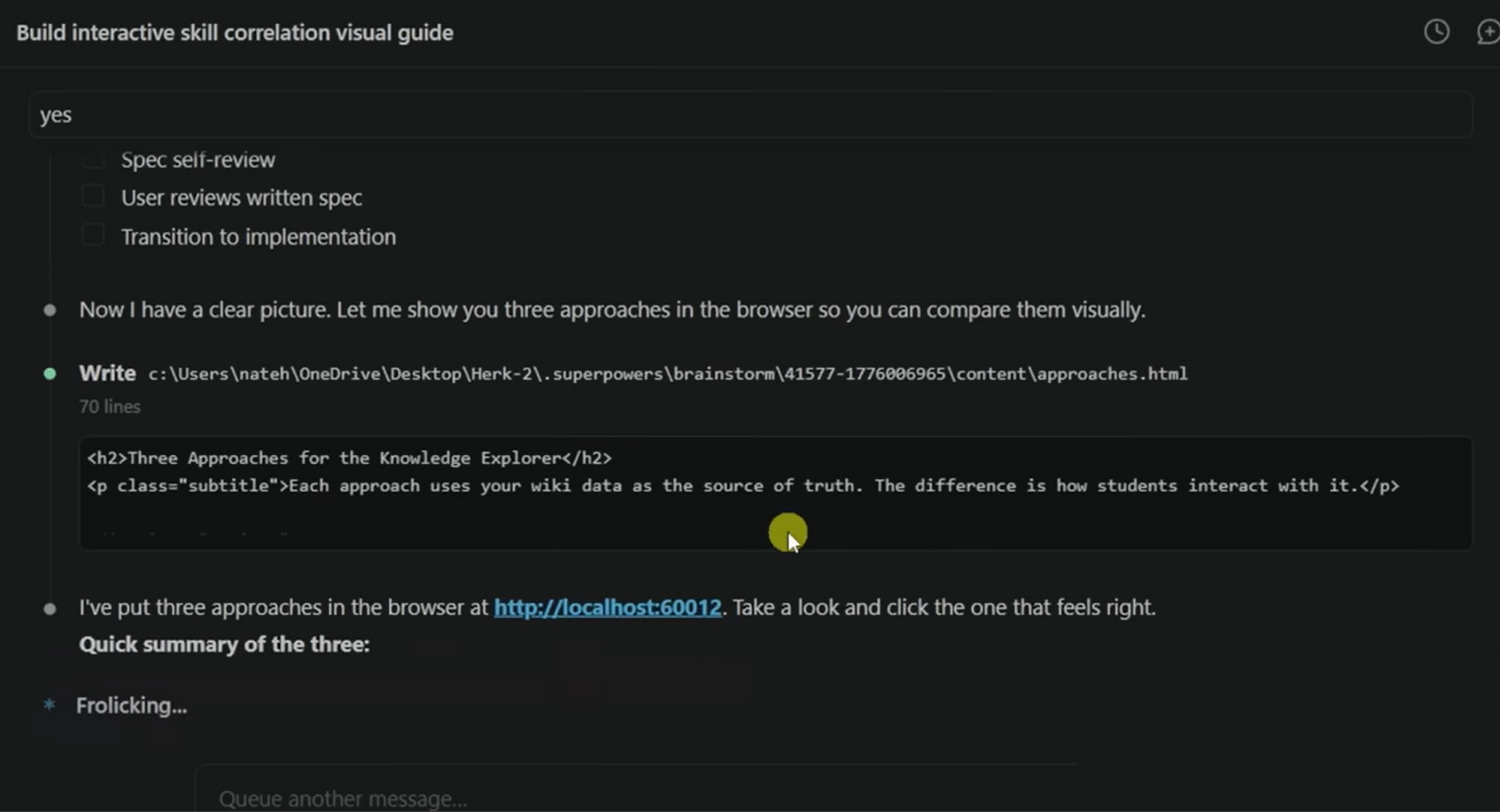 Screenshot 5 (Created by Fareed Khan)
And this is what appears in the browser: a full interactive mockup of the graph layout with force-directed nodes showing Claude Code, MCP, Token Management, RAG, Skills, and their connections. Color-coded by category. Draggable. Zoomable. Clickable for details. This is the design being presented visually for approval before a single line of production code exists.
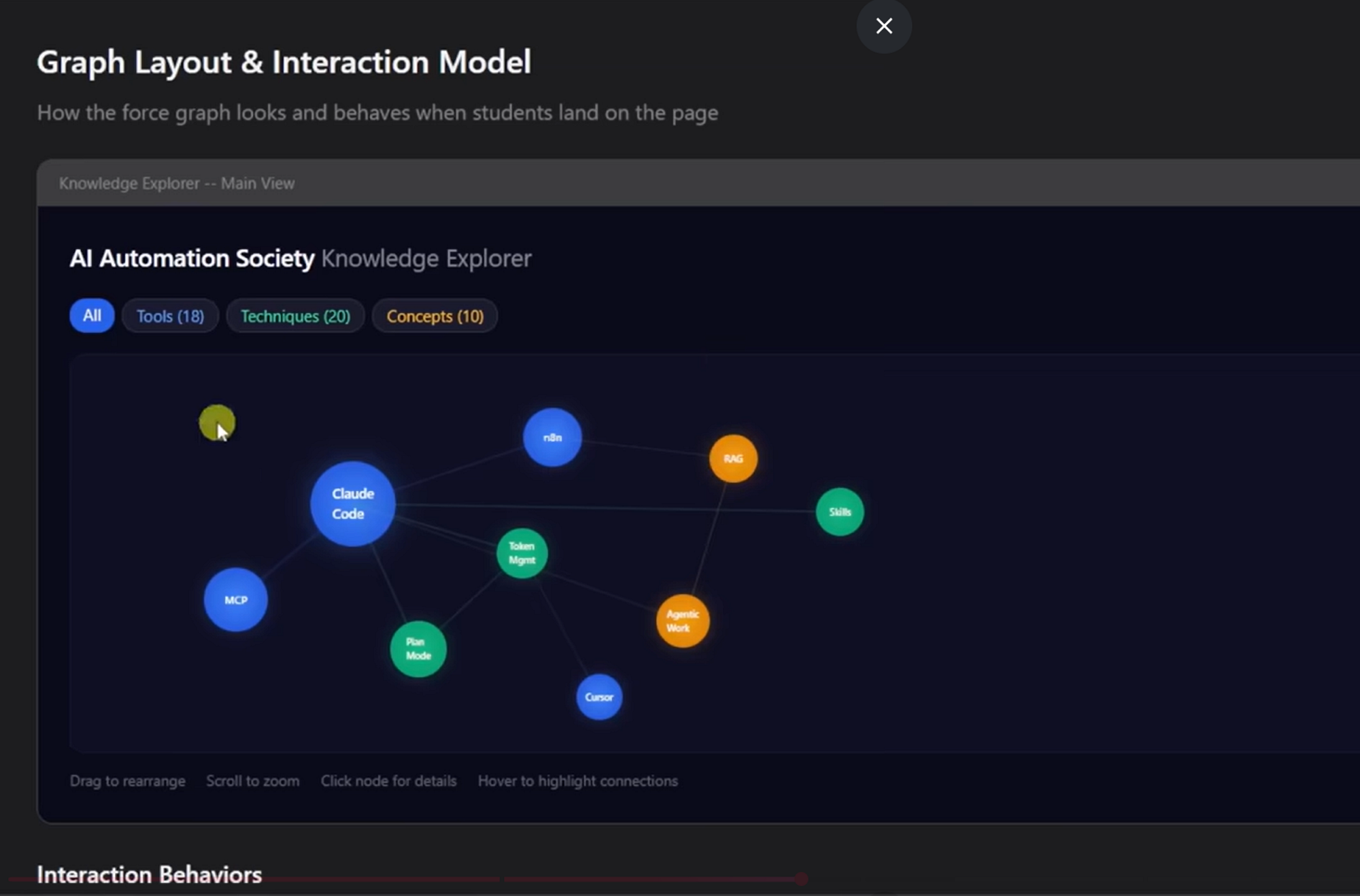 Screenshot 6 (Created by Fareed Khan)
The entire session up to this point has been pure thinking. No implementation. No scaffolding. No “let me set up the project structure.” Just an agent that explored the codebase, asked focused questions, and presented visual approaches for human approval, exactly the way a senior staff engineer would run a design meeting. The brainstorming checklist still has “Write design doc,” “Spec self-review,” and “Transition to implementation” remaining. It won’t touch code until every box is checked and the human says “approved.”
This is what disciplined process looks like when it’s actually followed.
There is already a plugin called superpowers which works in a simialr way but with more advance features.
How to Improve It Further
- Add memory across sessions: right now each session starts fresh. A persistent memory layer that tracks past design decisions, known bugs, and architectural patterns would let the agent build institutional knowledge over time like a real staff engineer who’s been on the team for years.
- Cost-aware model routing: the model selector currently relies on the manager’s judgment. Adding actual token cost tracking per task and automatically routing simple tasks to cheaper models would make the system production-viable for larger projects.
- Inter-agent communication: currently sub-agents report back to the manager and never talk to each other. Adding a message-passing system between parallel agents would let them share discoveries like “I found a shared utility we both need” without going through the manager.
- Automated regression testing for skills: skills are pressure-tested manually when created but can drift as the underlying model changes. A CI pipeline that runs the pressure scenarios nightly and flags when agents start rationalizing past the skill’s defenses would keep the system sharp.
- Human feedback loop integration: when the human overrides a decision or rejects a design, that signal should feed back into the skill system to strengthen the specific rule that was about to be violated, making the squad learn from corrections the way a real team learns from post-mortems.