Win-CodexBar
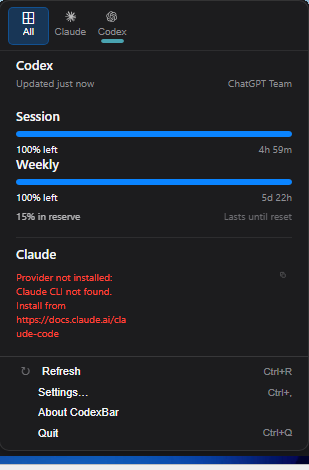
The Windows port of CodexBar — a system tray app that keeps your AI coding-tool usage limits visible at a glance.
Built with Tauri + React on a shared Rust backend. The original CodexBar is a macOS Swift app by Peter Steinberger.
Features
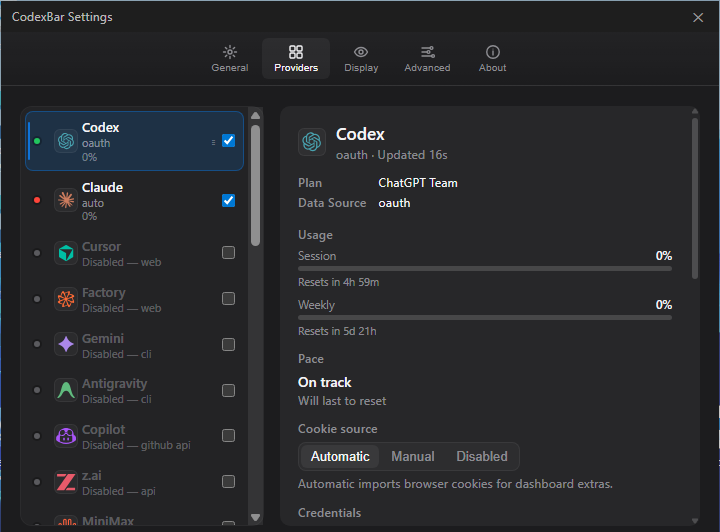
- 49 AI providers — Codex, Claude, Cursor, Factory, Gemini, Copilot, Antigravity, z.ai, MiniMax, Kiro, Vertex AI, Augment, OpenCode, Kimi, Kimi K2, Amp, Warp, Ollama, Azure OpenAI, T3 Chat, OpenRouter, Synthetic, JetBrains AI, Alibaba, Alibaba Token Plan, NanoGPT, Infini, Perplexity, Abacus AI, Mistral, OpenCode Go, Kilo, AWS Bedrock, Codebuff, DeepSeek, Windsurf, Manus, Xiaomi MiMo, Doubao, Command Code, Crof, StepFun, Venice, OpenAI, Grok, ElevenLabs, Deepgram, Groq, LLM Proxy
- System tray icon — dynamic two-bar meter showing session + weekly usage
- Floating Bar — optional always-on-top transparent capacity strip with orientation, opacity, and click-through controls
- Browser cookie import — Chrome, Edge, Brave, Firefox, with browser access kept opt-in
- Per-provider credentials — API keys, cookies, and OAuth all managed from the provider detail pane
- Credential hardening — local secret-bearing stores are protected with Windows DPAPI on save
- Windows release packaging — Inno Setup installer, standalone portable exe, WebView2 runtime bootstrap, VC++ runtime bootstrap, and SHA-256 checksum files
- CLI —
codexbar usage,codexbar cost,codexbar config, and loopbackcodexbar servefor scripting and local integrations - WSL support — CLI works out of the box; desktop shell via WSLg
What's New in v0.29.0
- Adds Alibaba Token Plan tracking for Bailian token-plan credits with protected cookie-header accounts and browser-cookie support.
- Shows OpenCode and OpenCode Go renewal dates as a separate Renews usage window when the provider exposes
renewAt/renew_at. - Splits local Codex cost output into standard vs fast/priority buckets when local logs expose fast model naming.
- Keeps the v0.28 provider work: Azure OpenAI deployment validation, T3 Chat quota tracking, Ollama API-key support, and hardened OpenAI/MiniMax parsing.
Quick Start
# Prerequisites: Node.js + pnpm — Rust and MinGW are installed automatically
git clone https://github.com/Finesssee/Win-CodexBar.git
cd Win-CodexBar
.\dev.ps1
The script installs Rust/MinGW if needed, builds the Tauri desktop shell, and launches the app.
.\dev.ps1 -Release          # optimised build
.\dev.ps1 -SkipBuild        # relaunch last build
Download
Install with Windows Package Manager:
winget install Finesssee.Win-CodexBar
Winget distribution is approved through microsoft/winget-pkgs. New releases may take a little time to appear in Winget after the GitHub release is published because each version is pinned to its own installer URL and SHA-256 hash.
You can also grab the latest build from GitHub Releases.
- Installer:
CodexBar-<version>-Setup.exe - Portable:
CodexBar-<version>-portable.exe - Checksums: each release includes
.sha256files for manual verification
The installer includes the desktop app, Microsoft's Evergreen WebView2 bootstrapper, app icon, Start Menu shortcut, uninstall metadata, and the Visual C++ runtime bootstrap needed on clean Windows machines. The portable exe is the same desktop app without installer integration; release builds statically link the WebView2 loader, so portable users only need the Microsoft Edge WebView2 Runtime installed on the machine.
Fast Windows Release Builds
For local release builds on a Windows machine, use the cached release builder:
.\scripts\windows-release-build.ps1 -Ref v0.29.0
Automated Windows release builds now run through CircleCI hosted Windows instead of GitHub Actions or AWS EC2. Cloudflare R2 can mirror verified artifacts after the Windows smoke install passes. See docs/release/ci-cd.md.
The script keeps a clean managed checkout under C:\code\Win-CodexBar-release\source, stores Rust build output in C:\code\Win-CodexBar-release\cache\cargo-target, stores pnpm packages in C:\code\Win-CodexBar-release\cache\pnpm-store, and reuses signed WebView2/VC++ bootstrapper downloads. It still builds the real release binary, verifies Microsoft signatures for installer dependencies, packages with Inno Setup, and writes the same four GitHub release assets under C:\code\Win-CodexBar-release\assets.
Useful release flags:
.\scripts\windows-release-build.ps1 -Ref v0.29.0 -WarmCacheOnly
.\scripts\windows-release-build.ps1 -Ref v0.29.0 -WarmCliCache
.\scripts\windows-release-build.ps1 -Ref v0.29.0 -SmokeInstall
.\scripts\windows-release-build.ps1 -Ref v0.29.0 -UploadRelease v0.29.0
.\scripts\release-doctor.ps1 -Version 0.29.0
GitHub Actions are manual best-effort only for this project. CircleCI hosted Windows is the primary automated release path for installer and portable artifacts.
First Run
- Launch CodexBar — it sits in the system tray
- Click the tray icon to open the usage panel
- Open Settings → Providers, enable the services you use
- For cookie-based providers, click the provider and use Browser Cookies → Import
- For Claude, browser cookies/sessionKey are preferred because they match the settings-page usage numbers; OAuth and CLI stay as fallbacks
- For CLI-based providers (
codex,gemini), make sure you're logged in
CLI
codexbar usage -p claude          # single provider
codexbar usage -p all             # all enabled providers
codexbar cost  -p codex           # local cost from JSONL logs
Providers
| Provider | Auth | Tracks |
|---|---|---|
| Codex | OAuth / CLI | Session, Weekly, Credits |
| Claude | Cookies / OAuth fallback / CLI fallback | Session (5h), Weekly |
| Cursor | Cookies | Plan, Usage, Billing |
| Factory | Cookies | Usage |
| Gemini | gcloud OAuth | Quota |
| Copilot | GitHub Device Flow / gh CLI / legacy token | Plan usage, Chat |
| Antigravity | Cookies / LSP | Usage |
| z.ai | API Token | Quota |
| MiniMax | API / Cookies | Usage, Billing Summary |
| Kiro | Cookies / CLI | Monthly Credits, Overage |
| Vertex AI | gcloud OAuth | Cost |
| Augment | Cookies | Credits |
| OpenCode | Local Config | Usage |
| Kimi | Cookies | 5h Rate, Weekly |
| Kimi K2 | API Key | Credits |
| Amp | Cookies | Usage |
| Warp | Local Config | Usage |
| Ollama | Cookies / API Key | Usage, Cloud Models |
| Azure OpenAI | API Key | Deployment |
| T3 Chat | Cookies / cURL | Base, Overage |
| OpenRouter | API Key | Credits |
| JetBrains AI | Local Config | Usage |
| Alibaba | Cookies | Usage |
| Alibaba Token Plan | Cookies | Token Plan Credits |
| NanoGPT | API Key | Credits |
| Infini | API Key | Session, Weekly, Quota |
| Perplexity | Cookies | Credits, Plan |
| Abacus AI | Cookies | Credits |
| Mistral | Cookies | Billing, Usage |
| OpenCode Go | Cookies | Usage, Zen Balance |
| Kilo | API Key / CLI | Usage |
| Codebuff | API Key / Local Config | Credits, Weekly |
| DeepSeek | API Key | Balance |
| Windsurf | Local Cache | Daily, Weekly |
| Manus | Cookies | Credits, Refresh Credits |
| Xiaomi MiMo | Cookies | Balance, Token Plan |
| Doubao | API Key | Request Limits |
| Command Code | Cookies | Monthly Credits, Purchased Credits |
| Crof | API Key | Credits, Request Quota |
| StepFun | Oasis Token | 5h, Weekly |
| Venice | API Key | USD / DIEM Balance |
| OpenAI | Admin API / API Key | Usage, Requests, Credit Balance |
| Grok | Cookies / auth.json | Billing |
| ElevenLabs | API Key | Subscription Credits, Voice Slots |
| Deepgram | API Key | Project Usage |
| Groq | API Key | Enterprise Metrics |
| LLM Proxy | API Key | Quota Stats |
Privacy
- On-device only — no data sent anywhere except provider APIs
- No disk scanning — only reads known config paths and browser cookies
- Opt-in cookies — extraction only runs for providers you enable
- Protected credential stores — app-managed API keys, manual cookies, and token accounts are written through the secure-file layer; on Windows this uses user-scoped DPAPI where available
- Safe diagnostics — diagnostic snapshots expose provider/source/status metadata only, never raw cookies, API keys, bearer tokens, or OAuth values
- Verified updates — automatic installer downloads require a GitHub SHA-256 digest and the installer is re-verified immediately before apply
More Docs
| Topic | Link |
|---|---|
| Building from source | extra-docs/BUILDING.md |
| WSL setup & auth tips | extra-docs/WSL.md |
| Browser cookie details | extra-docs/COOKIES.md |
Credits
- Original CodexBar: steipete/CodexBar by Peter Steinberger
- Inspired by: ccusage for cost tracking
License
MIT — same as the original CodexBar.
For the macOS version, visit steipete/CodexBar.