UniMate
One Unified Model to Animate Diverse Skeletons





Linzhan Mou · Jiahui Lei · Zhiyang Dou · Chenyue Cai · Chaoyue Song · Adam Finkelstein · Szymon Rusinkiewicz
Princeton · UC Berkeley · MIT · NTU
🔥 News
- [2026-09-06] The training and inference code is released. 🚀
- [2026-08-30] The UniML3D dataset and its data-processing pipeline are released. 🚀
- [2026-08-01] Our Interactive Demo is live — browse our animation results in 3D. 🎮
- [2026-07-18] UniMate is accepted to SIGGRAPH Asia 2026! 🎉
[Update] Preview checkpoints are released at HuggingFace; new checkpoints will be synced there.
🛠️ Environment Setup
All components share a single conda environment, specified in requirements.txt:
conda create -n unimate python=3.10 -y
conda activate unimate
pip install "setuptools<81"
pip install -r requirements.txt --no-build-isolation
📊 Dataset & Data Processing
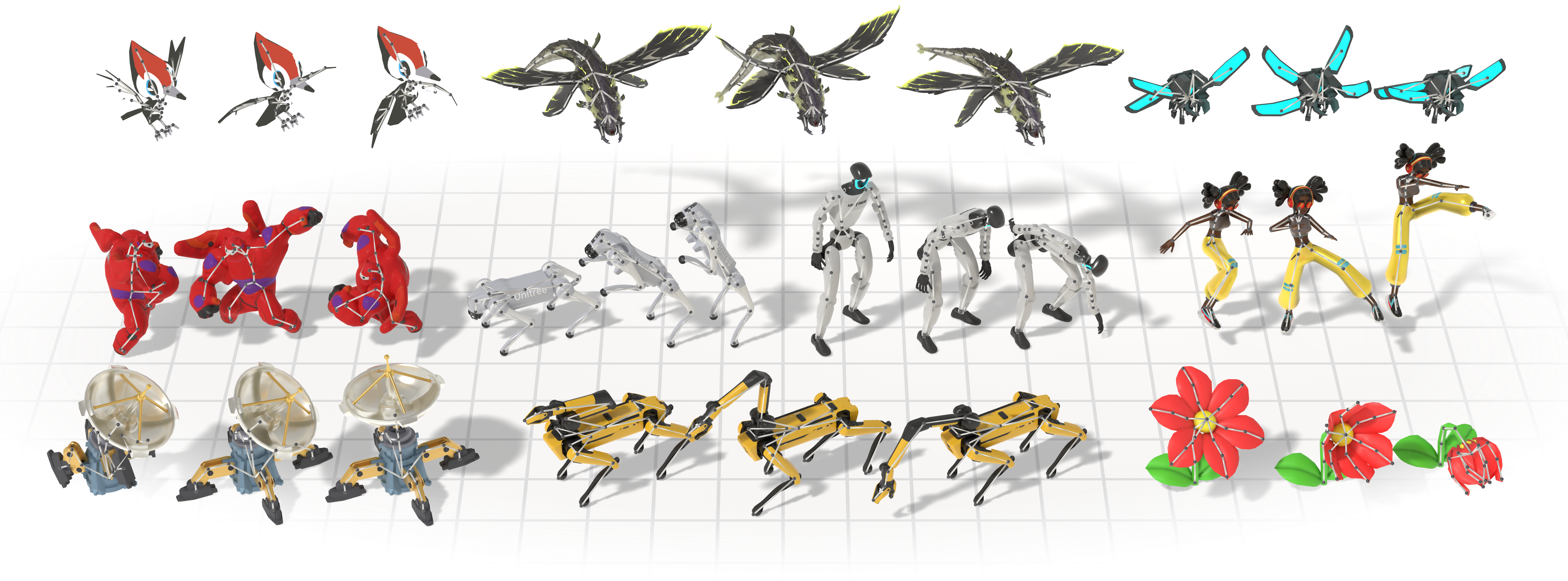
We introduce UniML3D, a large-scale dataset of 13,006 text-paired motion sequences covering diverse skeletal topologies — bipedal, quadrupedal, avian, marine, insectoid, serpentine, and articulated rigid objects — all brought into a unified canonicalization.
The raw source assets are available on the Hugging Face Hub (collected under UniMate): Mixamo-Animations-Characters, Objaverse-XL-Rigged-Animated and Truebones-ZOO-Annotations (prompts, metadata and renders only). The Truebones ZOO animal motions themselves are a commercial asset pack whose license does not permit redistribution — please purchase the pack directly from Truebones; our pipeline consumes the stock Truebone_Z-OO folder layout as-is.
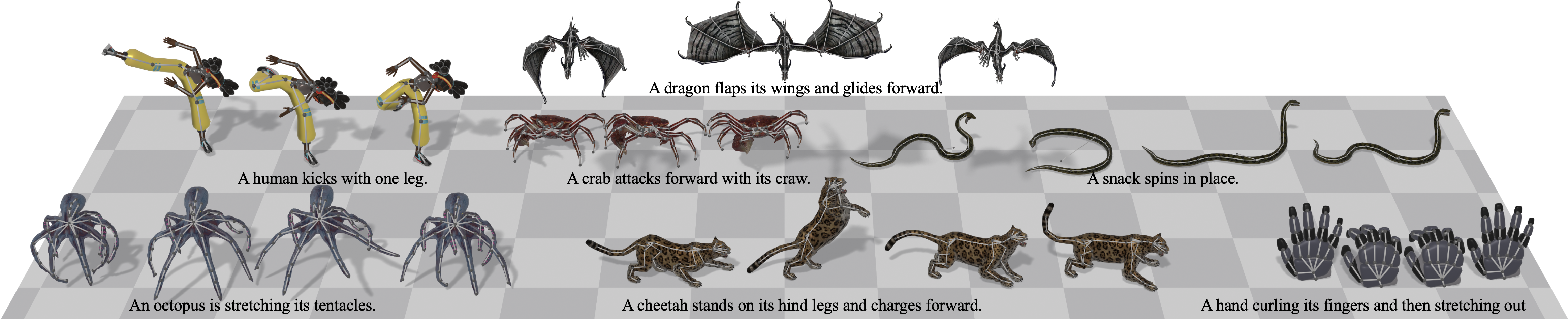
See data_process/README.md for the full data processing pipeline that turns the raw assets into UniML3D (download → export → rendering → captioning → joint annotation → feature extraction → animation).
🏋️ Training
Training reads the canonicalized clips under dataset/features/<dataset>/, produced by stage 4 of the data-processing pipeline.
Runs are configured by the JSON files in configs/.
Config naming — {dataset}_{frames}frames_{attention}_{text_cond}.json
8 configs: 4 data combinations x 2 model variants, all at 60 frames.
| Prefix | Training data |
|---|---|
uniml3d_* | Full UniML3D dataset (Truebones + Mixamo + Objaverse) |
truebones_* / mixamo_* / objaverse_* | A single source |
| Length | dataset.max_motion_length |
|---|---|
60frames | 60 frames per clip |
| Suffix | model.attention x model.text_cond |
|---|---|
_graph_adaln | graph x adaln — attention factored into spatial (per frame) and temporal (per joint) passes with graph-distance, edge-type and depth biases; the caption is folded into the adaLN modulation |
_full_cross_attn | full x cross_attn — one attention over the flattened joint x time tokens; the caption enters every block as cross-attention keys/values |
The two axes are independent and all four combinations are implemented, so full x adaln and graph x cross_attn also run if you set them in a config; the two shipped pairings are the ones the paper compares.
Not shared across configs: training.batch_size, training.num_steps, model.num_layers and dataset.max_joints are tuned per data combination (GPU memory tracks batch x frames x joints; depth grows with the data: 6 layers for a single Truebones / Mixamo source, 8 for Objaverse, 10 for the full mixture). dataset.max_joints is 100 for truebones_* / mixamo_* and 60 for objaverse_* / uniml3d_*; dataset.min_joints is 5 everywhere. Together they bound the skeleton sizes a run admits (object types outside the range are dropped) and, through what survives, the joint-axis padding width. Mixamo is a single skeleton, so its configs also turn off the object-type balancing (a no-op with one type) and, by choice, the topology augmentations. Every other setting is identical.
Launch with 🤗 Accelerate. Single GPU:
accelerate launch -m unimate.training.train --config configs/uniml3d_60frames_graph_adaln.jsonMulti-GPU on one node (e.g. 8 GPUs):
accelerate launch --num_processes 8 -m unimate.training.train --config configs/uniml3d_60frames_graph_adaln.jsonscripts/run_train.sh <config> [-- extra args] wraps the single-GPU command with the conda environment activated, the GPU with the most free memory selected, and anything after -- forwarded to the training module.
--output_dir, --batch_size, --num_workers and --resume <checkpoint.pt> override the config from the command line. Resuming restores model, EMA, optimizer, LR-scheduler and step counter, so a run continues exactly where it stopped.
Each run writes to outputs/<experiment name>/:
| Path | Content |
|---|---|
config.json | Resolved config, including the auto-computed max_joints / max_depth; inference reads it back to rebuild the model |
dataset_stats.npy | Normalization statistics, reused at inference |
checkpoints/checkpoint_step_*.pt | Model, EMA, optimizer and LR-scheduler state, every training.save_interval steps |
debug/ | Sample visualizations, rendered once before training and at every checkpoint (EMA weights, sampling.cfg_scale) |
logs/ | TensorBoard scalars (tensorboard --logdir outputs/<experiment name>/logs) |
What a training step does
Clips are drawn by a power-law-balanced sampler when training.balanced is set — a type with n clips is sampled in proportion to n^(1-sampler_alpha), so at the default sampler_alpha = 0.5 a species with 100 clips is seen ten times as often as one with a single clip rather than a hundred times — then augmented on the fly — joint addition, leaf removal, chain pooling and per-bone length perturbation (dataset.use_*_aug) — so the model sees more topologies than the data literally contains. Every clip is padded to max_joints on the joint axis and max_motion_length on the time axis, with masks carried alongside; nothing padded ever contributes to attention or to the loss.
Training is flow matching (training.diff_model = "flow"): the network predicts the velocity of a linear interpolant between noise and data, under a masked L2 loss plus two auxiliary terms computed on the reconstructed clean motion — a geodesic rotation loss (training.lambda_geo) and a velocity-smoothness loss (training.lambda_smooth). Conditioning is dropped with probability model.cond_mask_prob so the same weights serve the conditional and unconditional branches that classifier-free guidance interpolates at sampling time. AdamW with a cosine schedule and warmup, gradient clipping at training.max_grad_norm, and an EMA copy of the weights (training.use_ema) — the copy inference loads by default.
Pre-computing text embeddings
The text encoder (google/flan-t5-base by default) is fetched from the Hugging Face Hub on first use. Every run loads it once to embed all captions and joint names; pre-computing those embeddings beside the features keeps it out of the run entirely:
python -m unimate.tools.precompute_text_emb --config configs/uniml3d_60frames_graph_adaln.jsonThis writes caption_emb_cache.npz and joint_emb_cache.npz into each dataset/features/<dataset>/ the config uses. Captions are cached per token (the sequence cross_attn attends; adaln mean-pools it), joint names as one pooled vector each, keyed by the cleaned joint vocabulary that stage 3 produces — the shared naming is what lets the same anatomical joint embed identically across rigs. Re-run it after regenerating captions or joint names: anything the cache misses is still encoded at load time, so a stale cache costs speed rather than correctness.
Troubleshooting — unstable training on Objaverse
A non-trivial share of the Objaverse-XL rigs and clips are defective: rest poses that lie flat, are rotated or are inverted, and clips that stitch several unrelated actions together. Training on them can destabilize or collapse a run, and isolated spikes in the training loss are usually a symptom of bad data rather than of optimization.
To localize the problem, first train on Mixamo and Truebones alone — set dataset.dataset_list to ["truebones", "mixamo"] in a copy of a config. If that run is healthy, the fault is on the Objaverse side. From there, inspect the skeleton preview videos of the suspect object types under dataset/features/objaverse/videos/, by eye or with an automated pass, and add the offending rigs and clips to the stage-4 skip lists that tools/patch_annotations.py maintains.
🎬 Inference
Given a rigged 3D asset and a text prompt, UniMate generates articulated motion for arbitrary skeletons in real time — with no per-skeleton retraining and no test-time optimization.
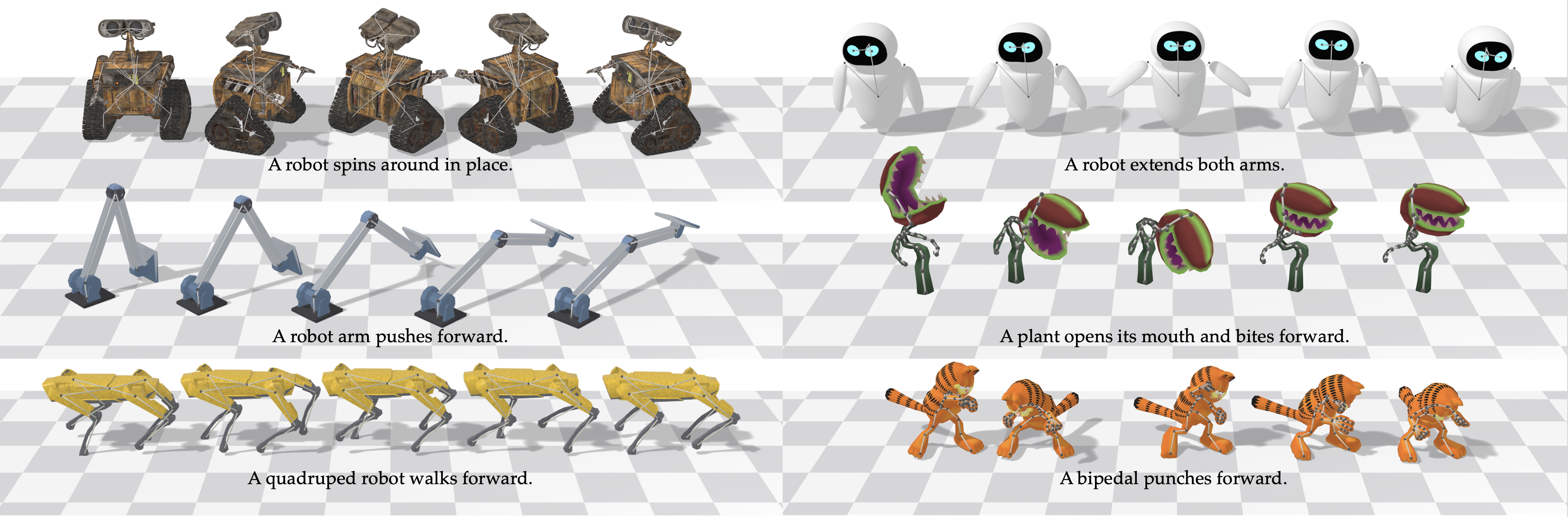
Sampling starts from the output directory of a training run (config.json, dataset_stats.npy, checkpoints/) — the released checkpoints use the same layout. The target skeleton — T-pose and topology conditioning — is taken from the dataset, so the dataset/features/<dataset>/ directory the model was trained on must be present.
python -m unimate.inference.sample \
    --exp_dir outputs/uniml3d_60frames_graph_adaln \
    --test_cases_json test_cases.json \
    --num_repetitions 3
Test cases, flags and outputs
Test cases are a JSON map from <object_type>-<case_id> to a prompt. object_type must exist in the dataset; case_id is a free-form tag that names the output files:
{
  "Dog-walk": "a dog walks forward at a steady pace",
  "Dragon-takeoff": "a dragon flaps its wings and takes off"
}
--test_cases_json is itself optional: without it every clip of the dataset's eval split is enumerated as a test case (falling back to unique (object_type, caption) pairs on train when there is no eval split). --test_cases_txt (one object_type per line) drives unconditional sampling, which requires --cfg_scale 1.0.
| Flag | Effect |
|---|---|
--cfg_scale | Classifier-free guidance scale (>= 1.0); defaults to the value saved in the run's config |
--model_path | A specific checkpoint; defaults to the latest step |
--output_dir | Defaults to <exp_dir>/samples |
--num_repetitions | Samples generated per test case |
--batch_size | Per-chunk inference batch; caps GPU memory regardless of how many cases there are |
--seed | Fixes the sampling noise |
--only_save_motion | Skip the MP4 renders, write only the .npy features |
--save_ric | Add the RIC-recovered render beside the FK one |
Each run writes:
| Path | Content |
|---|---|
motions/<case_id>-rep_<r>-<i>.npy | Generated motion features (T, J, 12), one file per repetition |
animations/<case_id>-rep_<r>-sample<i>_fk.mp4 | Skeleton render of each sample (_ric.mp4 variants with --save_ric) |
animations/<object_type>_tpos.png | The conditioning T-pose |
captions.json | Prompt used for every saved .npy |
scripts/run_sample_motion_text.sh <exp_dir> [test_cases_json] [cfg_scale] runs the command above with the conda environment activated, the GPU with the most free memory selected, and an output directory named after the test-case file. Run it with -h for its options.
Driving a rigged mesh
To animate the original mesh with a generated motion, hand the .npy files to stage 5 of the data pipeline, which exports an animated GLB + FBX:
bash scripts/run_animate_motion.sh objaverse \
    outputs/uniml3d_60frames_graph_adaln/samples/motions/Dog-walk-rep_0-0.npy \
    outputs/animated
It accepts several files or a directory, and reads the rig from dataset/features/<dataset>/cond.npy by default.
🎨 Applications
The same trained model does three more tasks with no extra training. Each is replacement-style sampling: part of the motion is pinned to a known signal and the flow ODE denoises only the rest at every step, so the constraint holds exactly rather than being encouraged by a loss.
Motion in-betweening
Hold chosen keyframes at their ground truth and generate the transitions between them.

How to run it
--keep_frames takes signed indices (negatives count back from the generation window), so "0,-1" fills in everything between a clip's first and last pose.
{ "mixamo-Squat-000": "A human squats and then rises back up" }KEEP_FRAMES="0,-1" bash scripts/run_sample_motion_inbetween.sh \
outputs/uniml3d_60frames_graph_adaln cases.jsonText-guided motion editing
Hold chosen joints at their ground-truth motion for every frame and regenerate the rest under a new prompt — keep what should stay, re-animate the rest.

How to run it
--keep_joints matches case-insensitively against either the rig's own bone names or the cleaned vocabulary.
{ "<objaverse_uid>-turn-head-000": "The robot walks forward." }KEEP_JOINTS="Hips,Spine,Neck,Head" bash scripts/run_sample_motion_edit.sh \
outputs/uniml3d_60frames_graph_adaln cases.jsonMotion expansion
Chain several prompts into one long motion. The first segment is generated freely; every later one pins its first few frames to the previous segment's tail, and the segments are stitched at the seam.

How to run it
Test-case values become lists of prompts, one per segment; --expand_overlap sets how many frames consecutive segments share.
{ "mixamo-sequence": ["A human stands up.", "A human walks forward.", "A human turns around in place."] }EXPAND_OVERLAP=10 bash scripts/run_sample_motion_expand.sh \
outputs/uniml3d_60frames_graph_adaln cases.jsonShared behaviour
Each mode writes into its own subdirectory of --output_dir (inbetween/, motion_edit/, motion_expand/) alongside a small JSON recording the constraint that produced it, and each has a wrapper in scripts/ — run any of them with -h for the full option list.
In-betweening and editing clamp against a real clip, so their test-case keys must be <object_type>-<clip_id> naming a clip the dataset actually holds; that clip's motion is saved beside the result as <case_id>-gt_rep_<r>-<i>.npy for side-by-side comparison. --gt_start_frame pins which window of the clip is used instead of a random one. Editing trims both the sample and the GT to the clip's true length, while in-betweening generates the full window and trims only the GT — so align the two on frame 0 rather than assuming equal lengths. All three modes need --cfg_scale > 1.0 and are mutually exclusive with each other.
📝 Citation
If you find UniMate useful in your research, please consider citing our work:
@article{mou2026unimate,
  title   = {UniMate: One Unified Model to Animate Diverse Skeletons},
  author  = {Mou, Linzhan and Lei, Jiahui and Dou, Zhiyang and Cai, Chenyue and Song, Chaoyue and Finkelstein, Adam and Rusinkiewicz, Szymon},
  journal = {arXiv preprint arXiv:2609.05415},
  year    = {2026}
}
⚖️ License
The code in this repository is released under the MIT License.
The datasets remain governed by the licenses of their original sources: the Mixamo assets by Adobe's Mixamo terms of use, the Objaverse-XL assets by the license attached to each original object, and the Truebones ZOO motions by Truebones' commercial license. Please review and comply with the respective source licenses before using the data.
📌 Note
The processed UniML3D dataset is being prepared for open release. Its captions were re-processed for this release, so they do not necessarily match the prompts shown on the project page or in the paper.