Fuck OpusClip.
... because good video clips shouldn't come with ugly watermarks or platform lock-in.





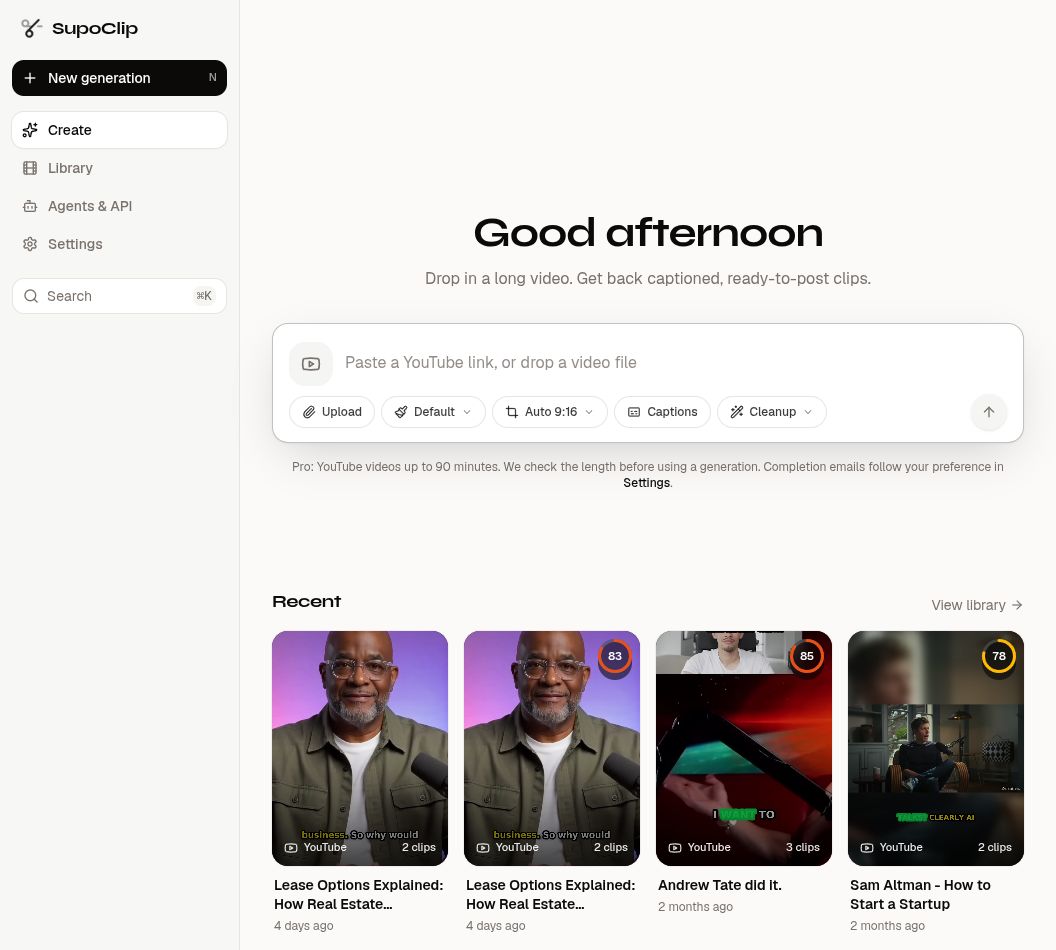
SupoClip is an open-source, AI-powered video clipping tool. Give it a long video — a podcast, a talk, a stream VOD — and it finds the most viral-worthy moments, scores them, and renders them as vertical 9:16 clips with face-centered cropping, word-synced subtitles, hook titles, and optional B-roll. Run it yourself, customize it, inspect it — or use the hosted version and skip the setup.
See it first: watch real clips SupoClip generated from a long-form interview, or follow the self-hosting tutorial to run it on your own machine.
Ways to Use SupoClip
| Option | Details |
|---|---|
| Hosted web app | www.supoclip.com — no infrastructure to run |
| iOS app | SupoClip on the App Store — the same hosted pipeline, from your iPhone |
| Self-host | Docker Compose setup below, or the step-by-step self-hosting tutorial — AGPL-3.0, unlimited usage on your own hardware |
| MCP server | mcp/ — use SupoClip from Claude, Cursor, and other MCP clients |
| REST API | API keys from /settings/api-keys authenticate the backend directly — see the API reference |
Why SupoClip Exists
OpusClip is genuinely good at what it does — AI clip selection, accurate captions, virality scoring. But your usage is metered by plan, some exports carry platform branding, and your content and workflows live on their servers under their terms.
SupoClip gives you the same core pipeline without the leash:
- Self-hostable — run it on your own hardware, process as much as it can handle
- No watermarks — your content stays yours
- Open source — AGPL-3.0, full transparency, fork and extend it however you like
- Hosted option — when you'd rather not manage servers, the cloud version is there
Features
-
YouTube, Twitch, Kick & uploads — paste a YouTube video, a Twitch VOD or clip, or a Kick VOD or clip, or upload your own file (live streams are not supported). Twitch and Kick download providers and the optional Apify fallbacks are set in docs/configuration.md
-
AI clip selection — an LLM (Gemini, GPT, Claude, or a local Ollama model) picks the 3–7 most clip-worthy segments from the transcript
-
Virality scoring — every clip gets hook, engagement, value, and shareability scores
-
Smart vertical cropping — face detection keeps the speaker centered in the 9:16 frame
-
Word-synced subtitles — AssemblyAI word-level timestamps, custom fonts, caption templates with animation styles
-
Hook titles — an AI-written headline burned into the top of each clip's opening seconds
-
B-roll & transitions — optional Pexels stock footage overlays and transition effects
-
Built-in editor — trim, split, and merge clips, then export with platform presets (TikTok, Reels, Shorts)
-
Direct publishing — connect your own YouTube, TikTok and Instagram accounts, then post or schedule clips from the task page
-
Performance loop — views, likes, comments and shares flow back from each platform and steer future clip selection toward what works for your audience
-
Real-time progress — live pipeline updates streamed to the browser while your video processes
Quick Start
You need Docker, an AssemblyAI API key for transcription, and one LLM provider key (Google, OpenAI, Anthropic, or a local Ollama).
git clone https://github.com/FujiwaraChoki/supoclip.git
cd supoclip
Create a .env in the root with your keys:
ASSEMBLY_AI_API_KEY=your_assemblyai_api_key
LLM=google-gla:gemini-3-flash-preview
GOOGLE_API_KEY=your_google_api_key
Then start everything:
docker-compose up -dFirst startup takes a few minutes; watch it with docker-compose logs -f. Once healthy, open http://localhost:3107, create an account, and start clipping. The backend API lives at http://localhost:8000 with interactive docs at /docs.
The template sets FRONTEND_PORT=3107. Existing deployments without this setting keep port 3001; preserve that port if your production reverse proxy uses it. See the setup guide for custom ports and public URLs.
To run fully local with Whisper and Ollama (including the Docker networking Ollama needs), see the self-hosting tutorial. To use a different LLM provider or configure the optional pieces (B-roll, analytics, emails, YouTube metadata), see the configuration guide. If something misbehaves, the troubleshooting guide covers the common failure modes.
Documentation
Everything beyond this page lives in docs/:
| Guide | What it covers |
|---|---|
| Setup | Docker-first install, local development, first-run checklist |
| Configuration | Every environment variable, operating modes, provider options |
| App Guide | Screens, workflows, admin features, hosted vs self-host |
| Architecture | How the frontend, API, worker, queue, and pipeline fit together |
| API Reference | Backend endpoints, API keys, admin and billing routes |
| Development | Running locally without Docker, testing, contributing workflow |
| Troubleshooting | Fixes for the common ways things go wrong |
Development & Testing
The stack runs locally without Docker too — see development for the backend (uv + FastAPI + ARQ worker) and frontend (Next.js + pnpm) commands. The test suite spans pytest, Vitest, and Playwright, all reachable from the repo root:
make testLicense
SupoClip is released under the AGPL-3.0 License.
Contributions are accepted under the terms in CONTRIBUTING.md, including a license grant that allows the project owner to sublicense and relicense contributed code.