tv-vibehack
Your TV, minus the ads. Debloat any Android TV / Google TV over ADB and give it a clean, tvOS-inspired launcher. Hand the prompt to Claude Code or any coding assistant, answer a few questions about which apps you use, and it does the rest on the real TV.
| Stock home screen | After |
|---|---|
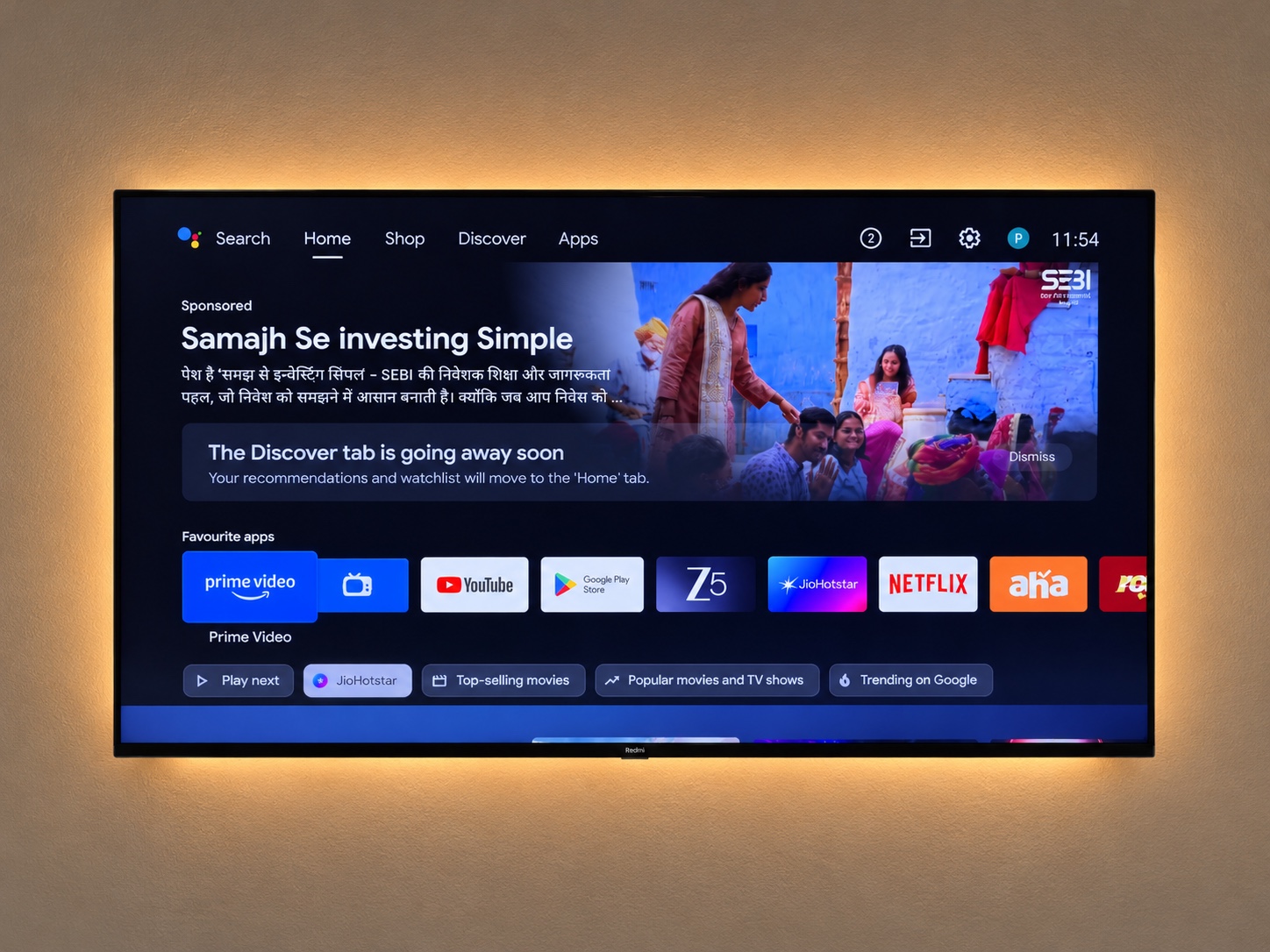 | 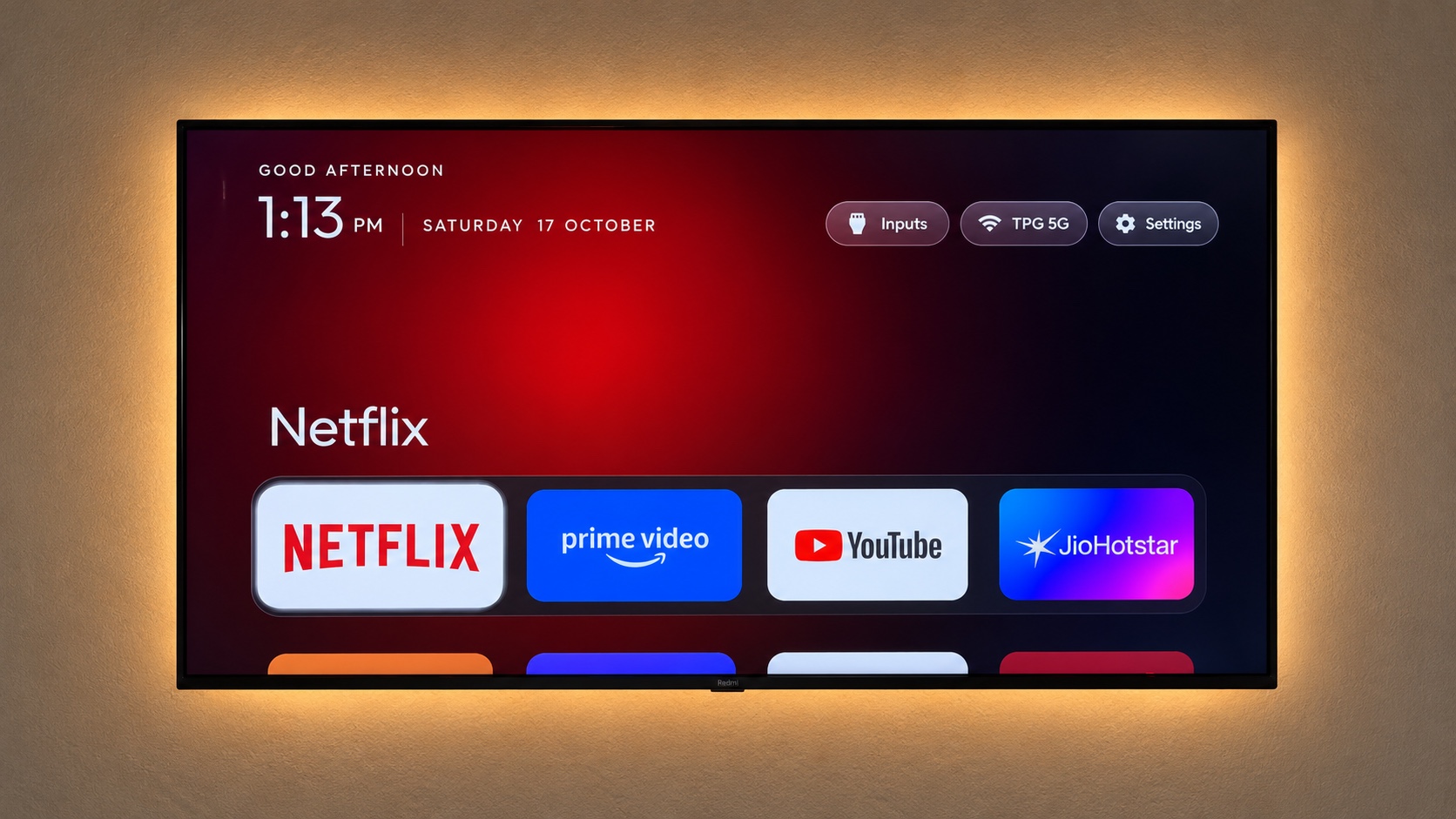 |
Everything is reversible: packages are disabled, never uninstalled, and a restore script puts the stock launcher back.
Quick start
- On the TV: Settings → Device Preferences → About → press OK on Build seven times → back → Developer options → turn on USB debugging (and Network/ADB debugging if your TV shows it). Keep the TV on and on the same Wi-Fi as your computer.
- Open Claude Code (or your assistant of choice) on your computer and paste the prompt from
PROMPT.md, filling in your TV model. - Accept the "Allow USB debugging?" prompt on the TV when told to, then answer the checklist questions (which apps you use, which four go in the dock).
That's it. The assistant backs up, debloats, builds and installs the launcher, and verifies each step with screenshots from the TV. If you'd rather do it by hand, the pieces are below.
What's in the repo
| Path | What it is |
|---|---|
PROMPT.md | The prompt. Brand-neutral; the assistant discovers your TV's bloat. |
launcher/ | The tvOS-style launcher. Edit app/src/main/res/values/config.xml for your dock, hidden apps and Live TV package, then run build-and-install.sh. |
tools/tv.py | Pure-Python ADB client (shell, batch, push, pull). Works where the stock adb is blocked. |
tools/b64push.py | Uploads larger files (APKs) as base64 chunks with an md5 check. |
tools/disable.sh, tools/restore.sh | Apply or undo a debloat list. |
examples/ | Per-TV debloat lists. Add yours, see CONTRIBUTING.md. |
The launcher
A small native Android TV home screen (com.gathin.tvhome), built for sets with 1 GB of RAM:
- Pitch-black background, like Apple TV 4K.
- A dock at the bottom in a lighter rounded band with the four apps you choose. The shelf above shows the focused dock app's name in large type with an ambient glow sampled from its banner. Press Down and the dock slides up to reveal the rest of your apps in a grid.
- One translucent glass highlight springs from tile to tile. The focused tile lifts and shows its name.
- Frosted pills top right: Inputs (a dropdown of HDMI ports, AV and Live TV), Wi-Fi (shows the network name) and Settings. Greeting, a large thin clock and the date top left, set in Outfit.
- Deterministic D-pad navigation, last focused tile remembered, staggered entrance animation. No blur, no video, no network, no background services.
Configure it in launcher/app/src/main/res/values/config.xml:
dock order, hidden apps, Live TV package and columns. Build and install with
TV_HOST=192.168.1.50 launcher/build-and-install.shNeeds JDK 17 and the Android SDK (platform 34, build-tools 34.0.0). On macOS:
brew install openjdk@17 android-commandlinetools && sdkmanager "platforms;android-34" "build-tools;34.0.0".
Talking to the TV by hand
python3 -m venv tools/venv && tools/venv/bin/pip install -r tools/requirements.txt
export TV_HOST=192.168.1.50                                   # your TV's IP
tools/venv/bin/python -I tools/tv.py --probe                 # model, Android version, firmware
tools/venv/bin/python -I tools/tv.py 'pm list packages'      # one command
printf 'cmd1\ncmd2\n' | tools/venv/bin/python -I tools/tv.py --batch
tools/disable.sh examples/xiaomi-mi-tv-4a/debloat.txt        # apply a list
tools/restore.sh examples/xiaomi-mi-tv-4a/debloat.txt        # undo it, restore stock launcher
Gotchas we hit
- macOS:
adb connectsays "No route to host" while the port is clearly open. Recent macOS treats the Google-signedadbas its own app under Local Network privacy and silently blocks it.tools/tv.pyavoids the binary entirely. - No "wireless debugging" toggle on some TVs (Xiaomi among them). USB debugging alone opens network ADB on port 5555.
- Chained
pmcommands (pm disable a; pm disable b) may silently stop after the first. Run one per shell call;--batchdoes this. - Large pushes hang through the Python client. Use
tools/b64push.pyfor APKs. - Disable the stock launcher only after the new one is installed, or the Home button lands on a factory test app.
- Third-party launchers often charge for basics like a custom wallpaper. Hence
launcher/. - No on-screen keyboard after switching launchers (seen on Xiaomi): the default input method
pointed at a Baidu IME that isn't installed. Fix with
tools/tv.py 'ime set com.google.android.inputmethod.latin/com.android.inputmethod.latin.LatinIME'.
Supported TVs
Anything running Android TV or Google TV: Xiaomi/Redmi, TCL, Hisense, Sony, OnePlus, Realme,
Nvidia Shield and most others. Not Samsung Tizen, LG webOS or Amazon Fire TV (different OS, no ADB
launcher replacement). Tested so far on the models in examples/.
Contributing
Add your TV's debloat list, improve the launcher, or sharpen the prompt. See CONTRIBUTING.md.
Licence
MIT, see LICENSE. The Outfit typeface is under the SIL Open Font License, see
launcher/FONT-LICENSE-OFL.txt.