Star 历史趋势
数据来源: GitHub API · 生成自 Stargazers.cn
README.md

Engram — One Brain. Local or Cloud.

Persistent memory for AI coding agents
One brain. Local or cloud. Agent-agnostic, single binary, zero dependencies.

InstallationEngram CloudAgent SetupCodebase GuideArchitecturePluginsTeam UsageContributingFull Docs


engram /ˈen.ɡræm/neuroscience: the physical trace of a memory in the brain.

Your AI coding agent forgets everything when the session ends. Engram gives it a brain.

A Go binary with SQLite + FTS5 full-text search, exposed via CLI, HTTP API, MCP server, and an interactive TUI. Works with any agent that supports MCP — Claude Code, OpenCode, Gemini CLI, Codex, VS Code (Copilot), Antigravity, Cursor, Windsurf, or anything else.

Agent (Claude Code / OpenCode / Gemini CLI / Codex / VS Code / Antigravity / ...)
    ↓ MCP stdio
Engram (single Go binary)
    ↓
SQLite + FTS5 (~/.engram/engram.db)

Quick Start

Install

brew install gentleman-programming/tap/engram

Windows, Linux, and other install methods → docs/INSTALLATION.md

Setup Your Agent

AgentOne-liner
Claude Codeclaude plugin marketplace add Gentleman-Programming/engram && claude plugin install engram
Piengram setup pi
OpenCodeengram setup opencode
Gemini CLIengram setup gemini-cli
Codexengram setup codex
Antigravity CLIengram setup antigravity-cli
Windsurfengram setup windsurf
Qwen Codeengram setup qwen
Kiroengram setup kiro
Cursorengram setup cursor
VS Code (Copilot)engram setup vscode-copilot
Kilo Codeengram setup kilocode
Any other MCP clientSee docs/AGENT-SETUP.md

Full per-agent config, Memory Protocol, and compaction survival → docs/AGENT-SETUP.md

What engram setup does — it writes MCP config and plugin files for the chosen agent. After setup, restart your agent and it is ready. No server to start manually.

Do I need to run engram serve or engram mcp myself?

For most agents (Claude Code, Gemini CLI, Codex, VS Code, Cursor, Windsurf) — no. Your agent launches engram mcp automatically as a short-lived stdio subprocess whenever it starts a session. You never run it manually.

engram serve is only needed when a plugin uses the HTTP API for session tracking: the OpenCode plugin and the Pi extension both talk to engram serve in the background. engram setup opencode and engram setup pi note this; the plugins auto-start the server when possible. If your environment blocks background processes, start it manually in a separate terminal:

engram serve   # runs on port 7437 by default; keep it running

You do not need engram serve at all for stdio-only agents (Claude Code, Gemini CLI, Codex, VS Code, Cursor, Windsurf).

No Node.js, no Python, no Docker. One binary, one SQLite file.

Pi Package

Engram has a first-class Pi package: gentle-engram.

engram setup pi

It gives Pi persistent project memory, compaction recovery, and shared memory with other MCP agents through the same local-or-cloud Engram brain. The package is part of the Gentleman Programming agentic-coding ecosystem alongside Gentle-AI, SDD, skills, and Engram Cloud.

Setup FAQ

When do I need to manually add config to my agent's prompt or settings?

engram setup covers the MCP wiring automatically. Manual config — adding a Memory Protocol snippet to your CLAUDE.md, GEMINI.md, .cursorrules, etc. — is only needed if your agent keeps forgetting to use Engram after long sessions or context compaction. That manual step is called the "nuclear option" in the detailed docs because system prompts survive everything, including compaction. It is a reliability boost for heavy users, not a required first step. See Agent Setup → Surviving Compaction for the snippets.

Can Docker agents (or remote agents) connect to Engram's MCP?

Engram's MCP transport is stdio only — there is no HTTP or network MCP endpoint. engram mcp speaks the MCP protocol over stdin/stdout; it cannot be reached over a TCP port.

If you have agents running in Docker that need to write to Engram on the host, the available paths are:

  • HTTP REST API (engram serve): note that engram serve currently binds to 127.0.0.1 only, so it is not reachable from inside a container out of the box — a container cannot reach the host's loopback, and there is no bind-address flag yet. ENGRAM_URL lets the Pi plugin target an engram serve reachable on a routable host/port (e.g. ENGRAM_URL=http://host.docker.internal:7437 pi), but that only works once the server listens on a non-loopback interface, which is not supported today. The HTTP API is not the MCP protocol; Pi uses it for session capture and Pi-native mem_* tools. For Docker right now, prefer the stdio path below.
  • Stdio MCP (mount the binary): the cleanest path for a Dockerized agent that needs MCP tools is to mount the engram binary into the container and let the agent launch engram mcp locally via stdio, pointing ENGRAM_DATA_DIR at a volume shared with the host.

Full environment variable reference → DOCS.md#environment-variables

How It Works

1. Agent completes significant work (bugfix, architecture decision, etc.)
2. Agent calls mem_save → title, type, What/Why/Where/Learned
3. Engram persists to SQLite with FTS5 indexing
4. Next session: agent searches memory, gets relevant context

Full details on session lifecycle, topic keys, and memory hygiene → docs/ARCHITECTURE.md

MCP Tools (20)

CategoryTools
Save & Updatemem_save, mem_update, mem_delete, mem_suggest_topic_key
Search & Retrievemem_search, mem_context, mem_timeline, mem_get_observation
Session Lifecyclemem_session_start, mem_session_end, mem_session_summary
Conflict Surfacingmem_judge, mem_compare
Lifecycle Reviewmem_review
Utilitiesmem_save_prompt, mem_stats, mem_capture_passive, mem_merge_projects, mem_current_project, mem_doctor

Full tool reference with parameters → DOCS.md#mcp-tools-20-tools

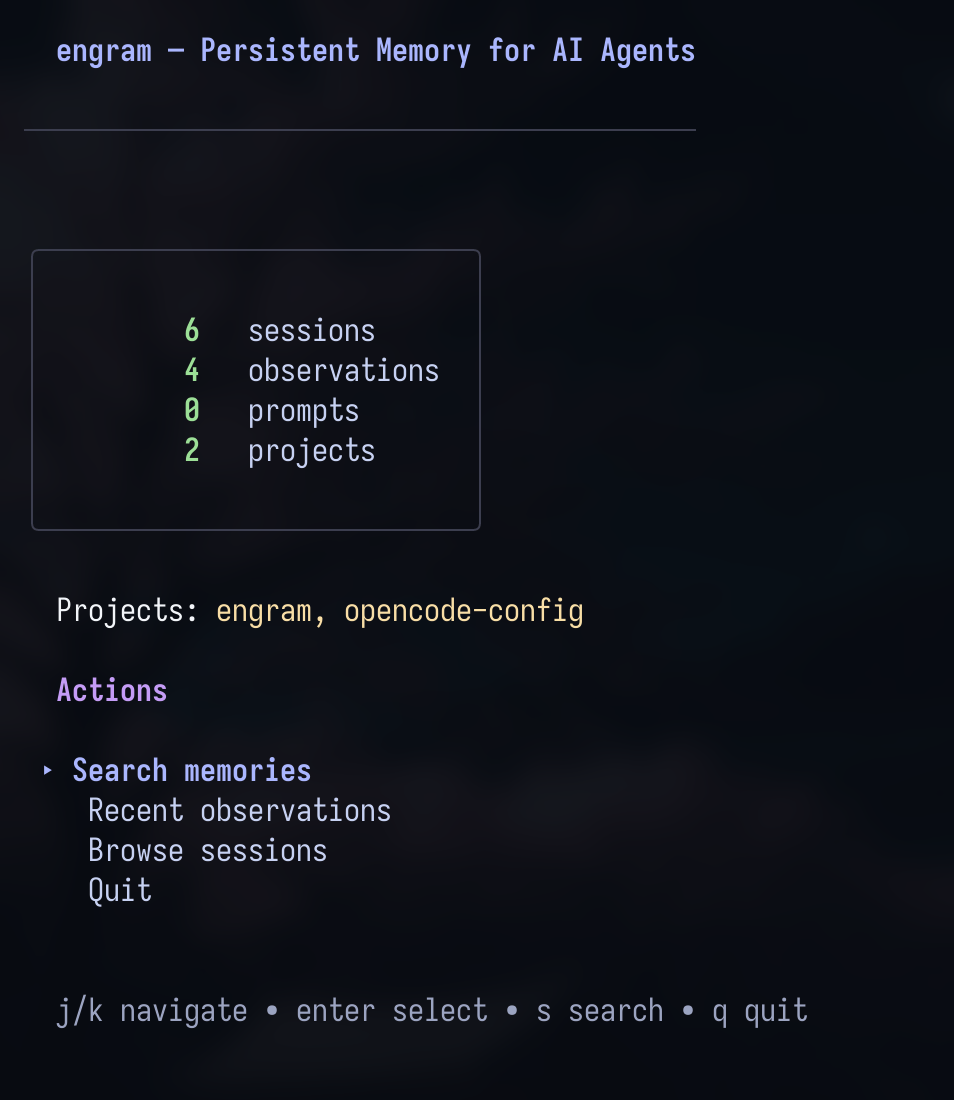
Terminal UI

engram tui

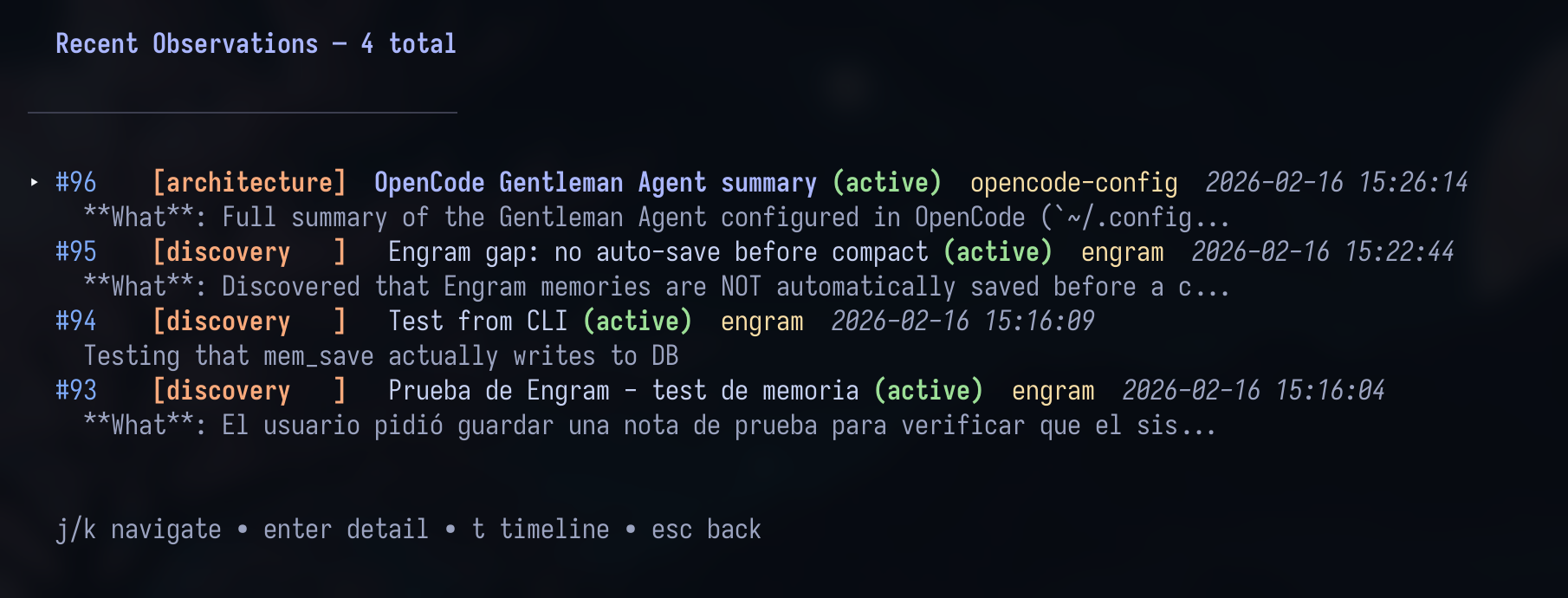
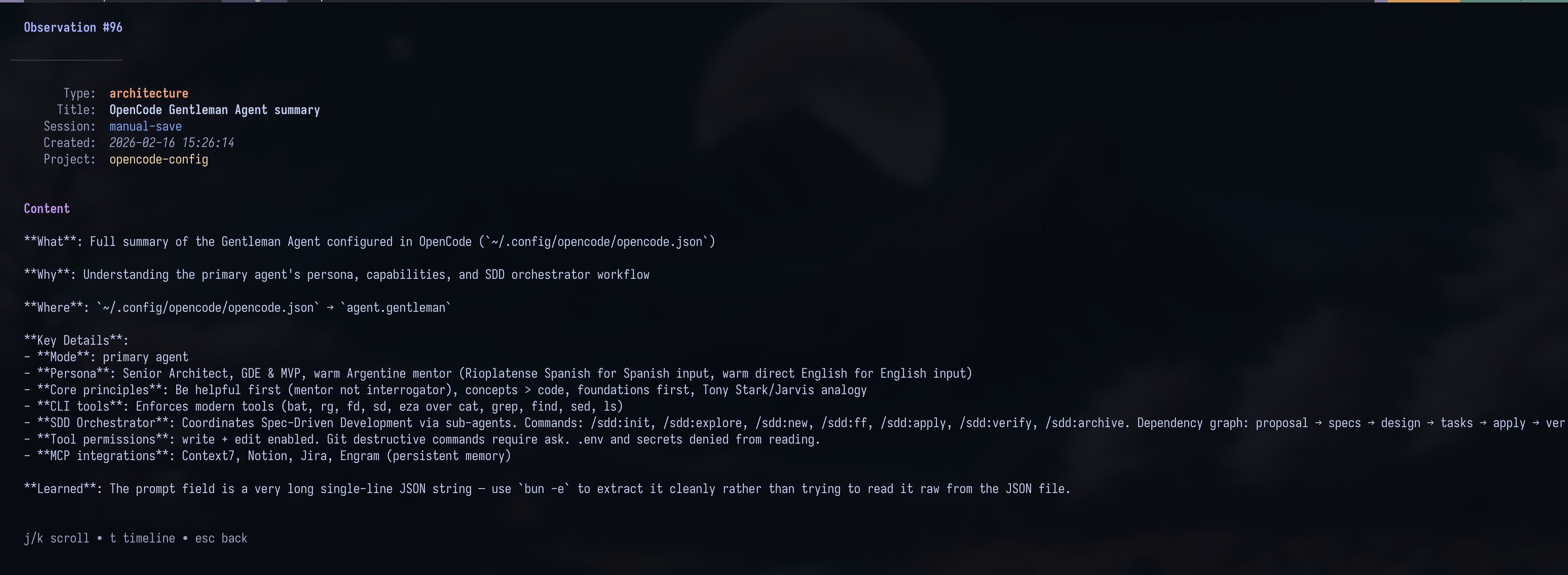
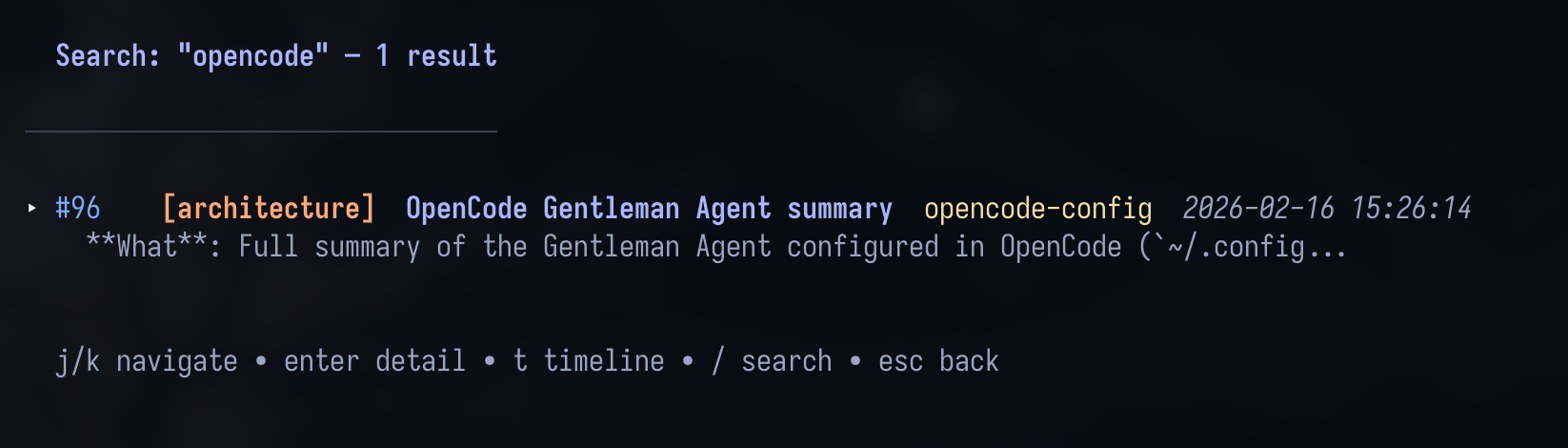
TUI Dashboard image TUI Observation Detail TUI Search Results

Navigation: j/k vim keys, Enter to drill in, c to copy content to clipboard (OSC 52), / to search, Esc back. Catppuccin Mocha theme.

Git Sync

Share memories across machines. Uses compressed chunks — no merge conflicts, no huge files.

Local SQLite remains the source of truth. Cloud integration is opt-in replication.

engram sync                    # Export new memories as compressed chunk
git add .engram/ && git commit -m "sync engram memories"
engram sync --import           # On another machine: import new chunks
engram sync --status           # Check sync status

Full sync documentation → DOCS.md

Cloud Integration (Opt-In Replication)

Cloud is optional. Local SQLite stays authoritative; cloud is replication/shared access only.

Recommended first path (local smoke):

docker compose -f docker-compose.cloud.yml up -d
engram cloud config --server http://127.0.0.1:18080
engram cloud enroll smoke-project
engram sync --cloud --project smoke-project

Cloud mode is always project-scoped (--project is required; engram sync --cloud --all is intentionally blocked). ENGRAM_CLOUD_ALLOWED_PROJECTS is required for engram cloud serve in both token-auth and insecure modes. Set it to * to allow all projects (useful for dev/internal deploys) — this bypasses per-project name enforcement while still requiring a non-empty project on each request. Known repairable cloud sync/upsert/canonicalization failures keep the original error visible and recommend the explicit doctor/repair flow below; Engram never auto-applies repair from sync or autosync. For blocked cloud sync, transport_failed, or legacy session directory repair, see Engram Cloud Troubleshooting. If cloud sync stays blocked after doctor/repair, download the rescue helper and run the recommended exported-row repair:

tools/repair-missing-session-directory.sh --apply --interactive --fix-exported <project>
engram sync --cloud --project <project>

--fix-exported repairs local exported sessions[].directory and observations[] required fields that can still break the final push after doctor reports ready. For sequential legacy sync_mutations blockers, use tools/repair-missing-session-directory.sh --apply --interactive --all <project>.

After upgrading engram while an MCP client is already running:

engram setup claude-code

Then restart Claude Code so it reloads the Engram MCP subprocess and refreshed hook/config files. Updating the engram binary on disk does not replace an already-running stdio MCP process.

Upgrade flow for existing local databases (diagnose → repair → bootstrap → status):

engram cloud upgrade doctor --project smoke-project        # read-only readiness check
engram cloud upgrade repair --project smoke-project --dry-run
engram cloud upgrade repair --project smoke-project --apply
engram cloud upgrade bootstrap --project smoke-project     # resumable enroll + push + verify
engram cloud upgrade status --project smoke-project        # stage/class/reason

See DOCS.md — Cloud upgrade flow for the full state machine.

engram cloud bootstrap admin creates the first managed admin (with optional project grants and a one-time issued token) directly in the cloud database. Set ENGRAM_CLOUD_TOKEN_PEPPER on engram cloud serve to enable managed tokens to authenticate at runtime (resolved first, before falling back to legacy ENGRAM_CLOUD_TOKEN/ENGRAM_CLOUD_ADMIN); without it, the server still starts and continues to authenticate via the legacy env-token credentials only. See DOCS.md — Managed users, tokens, and CLI bootstrap.

For authenticated mode, upgrade flow, dashboard behavior, reason codes, and full runtime/env details:

Steps to Test (Beta — Phases 2+3+4)

Try the new memory-conflict-surfacing features in complete isolation from your existing engram setup. Docker uses non-default ports + a separate data dir + a beta-only token, so your prod cloud and ~/.engram/ are untouched. Cleanup is one command.

What's in the beta:

  • 🔄 Cloud sync of conflict relations cross-machine
  • 🔍 engram conflicts CLI + HTTP API for retroactive audit + scan
  • 🧠 --semantic scan that uses your existing Claude Code or OpenCode CLI to judge FTS5 conflict candidates with LLM reasoning — $0 if you're on a Pro/Max/Plus subscription

Setup (4 commands)

git clone https://github.com/Gentleman-Programming/engram.git engram-beta-repo
cd engram-beta-repo && git checkout feat/memory-conflict-surfacing-cloud-sync
docker compose -f docker-compose.beta.yml up -d
go build -o ./engram-beta ./cmd/engram

# Isolated env (does NOT touch ~/.engram or your prod cloud)
export ENGRAM_DATA_DIR=/tmp/engram-beta-data
export ENGRAM_CLOUD_SERVER=http://127.0.0.1:28080
export ENGRAM_CLOUD_TOKEN=beta-token-CHANGE-ME-please-32chars
mkdir -p "$ENGRAM_DATA_DIR"

Use cases

1️⃣ Phase 1 — Conflict detection on save (sanity)

./engram-beta save \
  "Use Clean Architecture" \
  "Layers: entities, use cases, adapters." \
  --type architecture --project beta-test

./engram-beta save \
  "Use Hexagonal Architecture" \
  "Ports and adapters separate domain from infra." \
  --type architecture --project beta-test

✅ Second save returns candidates[] with the first memory's id.

2️⃣ Phase 2 — Cloud sync of relations cross-machine

./engram-beta cloud enroll beta-test
./engram-beta sync --cloud --project beta-test
./engram-beta cloud status

# Simulate a "second machine"
ENGRAM_DATA_DIR=/tmp/engram-beta-data-2 ./engram-beta cloud enroll beta-test
ENGRAM_DATA_DIR=/tmp/engram-beta-data-2 ./engram-beta sync --cloud --project beta-test
ENGRAM_DATA_DIR=/tmp/engram-beta-data-2 ./engram-beta search "Architecture"

✅ The "second machine" sees memories synced from the first.

3️⃣ Phase 3 — Admin CLI + HTTP API

./engram-beta conflicts list --project beta-test
./engram-beta conflicts stats --project beta-test
./engram-beta conflicts scan --project beta-test --dry-run
./engram-beta conflicts scan --project beta-test --apply --max-insert 10

# In another terminal: ./engram-beta serve
curl -s "http://127.0.0.1:7437/conflicts?project=beta-test" | jq

✅ List/scan/stats return sensible data.

4️⃣ Phase 4 — Semantic LLM-judge (the killer feature) 🎯

export ENGRAM_AGENT_CLI=claude   # or opencode

./engram-beta conflicts scan --project beta-test --semantic --apply \
  --max-semantic 5 --concurrency 3 --yes

✅ Your agent's LLM judges semantic similarity. $0 if on a subscription.

5️⃣ The case where FTS5 finds a candidate, then the LLM judges meaning

Lexically related candidate titles with a semantic conflict:

./engram-beta save \
  "Use Postgres for the user database" \
  "Postgres 15 is our SQL store for users." \
  --type architecture --project beta-test

./engram-beta save \
  "Replace the user database with MongoDB" \
  "Document store now backs the user collection. SQL is gone." \
  --type decision --project beta-test

./engram-beta conflicts scan --project beta-test --semantic --apply \
  --max-semantic 5 --yes

./engram-beta conflicts list --project beta-test --status judged

✅ FTS5 supplies the candidate pair through shared title terms like user / database; the LLM then judges whether it is supersedes / conflicts_with. --semantic does not discover totally lexically unrelated pairs on its own.

Cleanup (zero residue)

docker compose -f docker-compose.beta.yml down -v
rm -rf /tmp/engram-beta-data /tmp/engram-beta-data-2 ./engram-beta

Your production engram is fully untouched throughout.

Full guide + troubleshooting

docs/BETA_TESTING.md

→ Report feedback: issues with beta-phase-2-3-4 label

CLI Reference

CommandDescription
engram setup [agent]Install agent integration
engram serve [port]Start HTTP API (default: 7437)
engram mcp [--tools=PROFILE] [--project NAME]Start MCP server (stdio transport)
engram tuiLaunch terminal UI
engram search <query>Search memories
engram save <title> <msg>Save a memory
engram delete <obs_id>Delete an observation (soft by default; --hard removes permanently)
engram delete session <id>Delete a session by ID (must have no observations)
engram delete prompt <id>Delete a prompt by ID (permanent)
engram delete project <name> [--hard]Cascade-delete a project: soft-deletes observations by default (--hard removes permanently and also removes sessions)
engram timeline <obs_id>Chronological context
engram context [project]Recent session context
engram statsMemory statistics
engram export [file]Export to JSON
engram import <file>Import from JSON
engram syncGit sync export/import
engram conflicts <sub>Inspect and manage memory conflict relations
engram doctorRun read-only operational diagnostics
engram cloud <subcommand>Opt-in cloud config/status/enrollment + cloud runtime (serve)
engram projects list|consolidate|pruneManage project names
engram obsidian-exportExport to Obsidian vault (beta)
engram versionShow version

Full CLI with all flags → docs/ARCHITECTURE.md#cli-reference

Key Environment Variables

VariableDescriptionDefault
ENGRAM_DATA_DIROverride data directory~/.engram
ENGRAM_PORTOverride HTTP server port7437
ENGRAM_URLPoint the Pi plugin at an existing engram serve instance instead of auto-starting one. Not an MCP endpoint — used by the HTTP event-capture path only. (The OpenCode plugin honors ENGRAM_PORT/ENGRAM_BIN, not ENGRAM_URL.)(unset, defaults to http://127.0.0.1:<ENGRAM_PORT>)
ENGRAM_HTTP_TOKENOptional Bearer auth for local HTTP server. When set, destructive and export routes require Authorization: Bearer <token>. Unset = open (zero-config default).(unset)
ENGRAM_TIMEZONETimezone for timestamp display in TUI and cloud dashboard (e.g. America/New_York). Falls back to system local when unset or invalid.system local
ENGRAM_CLOUD_AUTOSYNCSet to 1 to enable background autosync (also requires ENGRAM_CLOUD_TOKEN + ENGRAM_CLOUD_SERVER).(unset)
ENGRAM_CLOUD_ALLOWED_PROJECTSComma-separated project allowlist for engram cloud serve. Use * to allow all projects.(unset)
ENGRAM_CLOUD_TOKEN_PEPPERDedicated secret used to hash managed tokens. Required to issue tokens via engram cloud bootstrap admin --issue-token AND to enable managed-token authentication on engram cloud serve; must differ from ENGRAM_JWT_SECRET. Without it, engram cloud serve still starts and authenticates via legacy ENGRAM_CLOUD_TOKEN/ENGRAM_CLOUD_ADMIN only.(unset)

Full environment variable reference → DOCS.md#environment-variables

Documentation

DocDescription
InstallationAll install methods + platform support
Engram CloudCloud landing page, quickstart, branding, and deep links
Agent SetupPer-agent configuration + Memory Protocol
Codebase GuideGuide to the repository structure, flows, and implementation landmarks
ArchitectureHow it works + MCP tools + project structure
PluginsOpenCode & Claude Code plugin details
ComparisonWhy Engram vs claude-mem
Intended UsageMental model — how Engram is meant to be used
Obsidian BrainExport memories as Obsidian knowledge graph (beta)
ContributingContribution workflow + standards
Full DocsComplete technical reference

Dashboard contributors: if you modify .templ files in internal/cloud/dashboard/, run make templ to regenerate before committing. See DOCS.md — Dashboard templ regeneration.

License

MIT


Inspired by claude-mem — but agent-agnostic, simpler, and built different.

Contributors

关于 About

Persistent memory system for AI coding agents. Agent-agnostic Go binary with SQLite + FTS5, MCP server, HTTP API, CLI, and TUI.

语言 Languages

Go92.7%
TypeScript2.6%
Shell1.8%
templ1.5%
CSS0.7%
JavaScript0.6%
PowerShell0.1%
Dockerfile0.0%
Makefile0.0%

提交活跃度 Commit Activity

代码提交热力图
过去 52 周的开发活跃度
320
Total Commits
峰值: 51次/周
Less
More

核心贡献者 Contributors