
Gentle-AI™
The deterministic engineering environment for the AI agent you already use.





Website • Quickstart • Docs • Wiki
Your agent writes code, then forgets everything. It has no opinion about your project, and no way to prove what it did beyond asking you to read every line. Gentle-AI gives it memory, a workflow, and evidence.
If Gentle-AI made your agent worth trusting, a star helps other people find it.
WORKS WITH THE AGENT YOU ALREADY HAVE
Pi ·
OpenCode ·
Claude Code ·
Codex ·
Cursor ·
VS Code Copilot ·
Gemini CLI ·
Kilo Code
Kimi Code ·
Kiro IDE ·
Qwen Code ·
Hermes ·
Antigravity ·
Windsurf ·
OpenClaw ·
Trae
16 integrations · native configuration · compare capabilities →

Features
Engram™ — Keep your project context
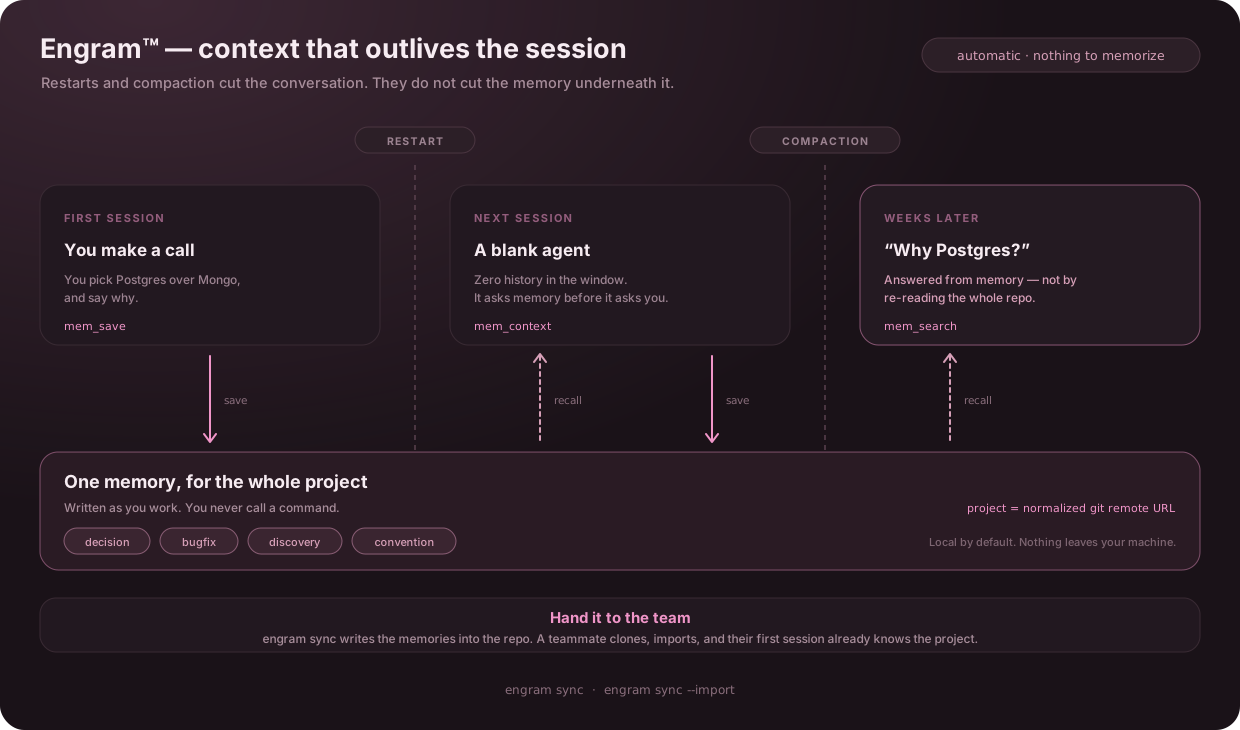
The cost of a fresh session is not the tokens — it is you, re-explaining the same decisions every morning. Engram removes that: your agent writes down what it learns as it goes and reaches for it before it reaches for you, so context accumulates instead of resetting.
ODD — Keep small work small
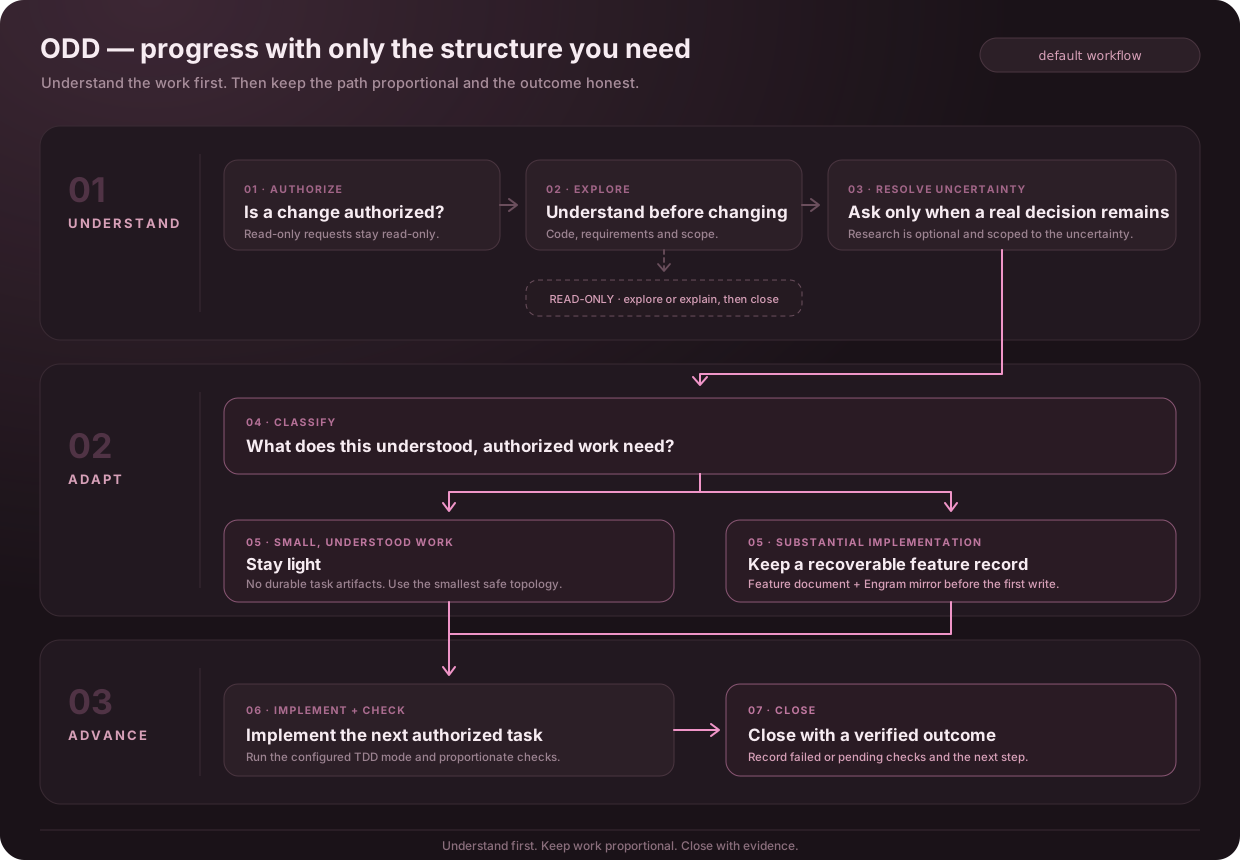
Small changes should not need a planning pipeline, and larger work should not lose its context between sessions. Organic Driven Development (ODD) keeps understood changes lightweight and gives substantial, authorized work one recoverable feature document. The agent explores before changing code, checks the results, and keeps progress current so work can resume without rebuilding the plan.
Strict TDD — Prove behavior when enabled
ODD uses the configured TDD mode and exact test runner. When Strict TDD is enabled, capture a failing behavior test before implementation, make it pass, then refactor while tests stay green. When disabled, run applicable functional checks anyway. The presence of tests alone does not enable Strict TDD.
RDD — Check finished work at the right depth
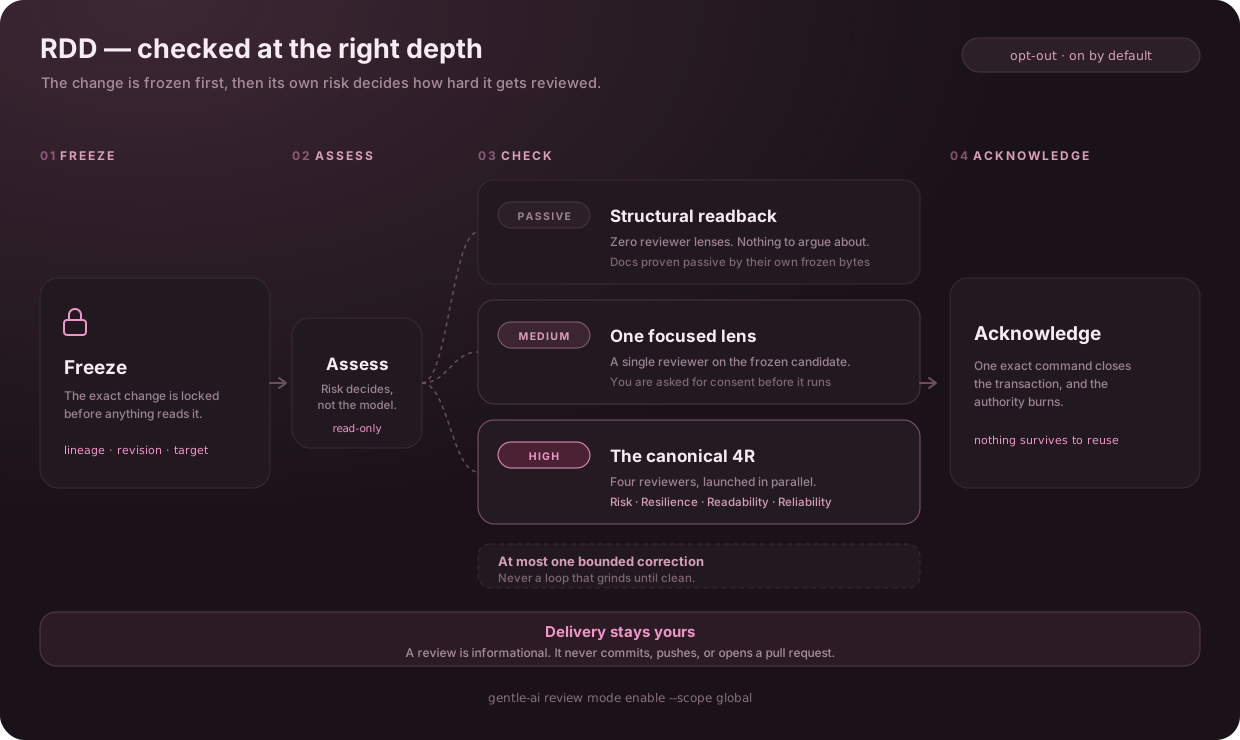
Receipt-Driven Development (RDD) is on by default and opt-out: run gentle-ai review mode disable to turn it off. Explicit global or clone-local OFF choices remain OFF. Its point is that a review cannot drift: the candidate is frozen before anything reads it, so the evidence belongs to the exact version you are about to rely on — not to whatever the worktree looked like a moment later. The depth comes from that frozen candidate rather than from the model's judgment, and the result is informational. Commit, push and release stay your call.
Deterministic by design — Know the next valid step
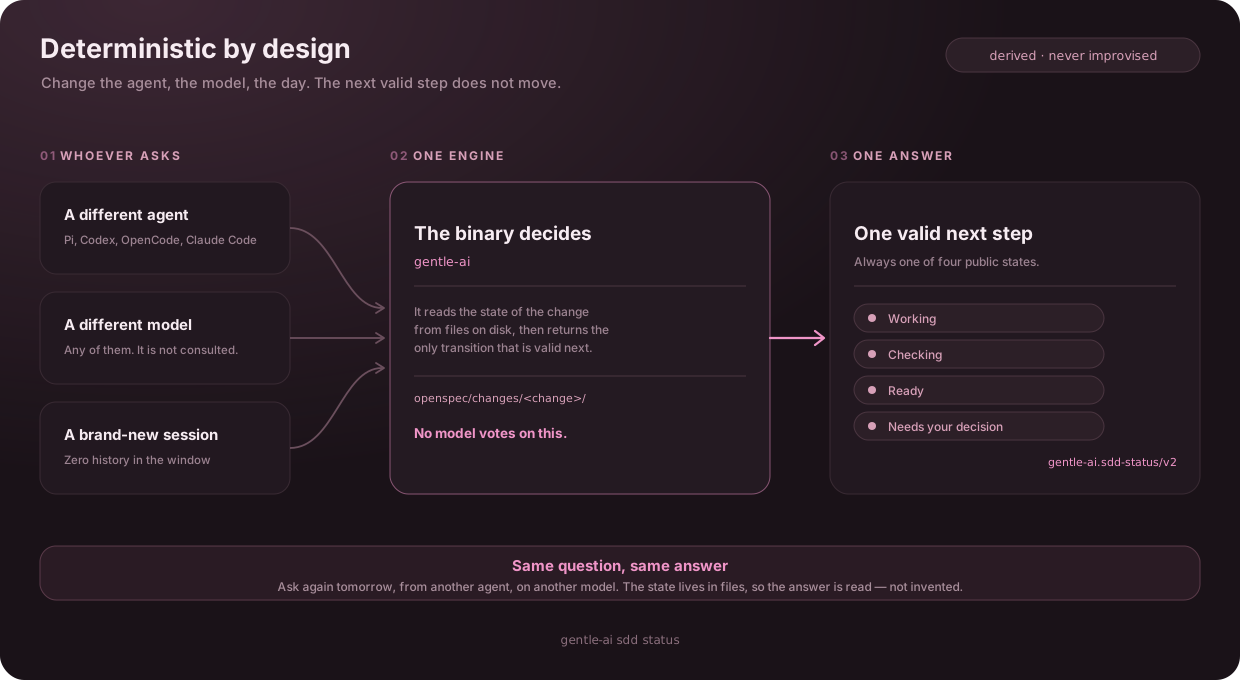
A model that guesses the next step guesses differently tomorrow, and differently again for your teammate. That is the gap between a workflow and a suggestion. The gentle-ai binary owns native RDD review transitions; ODD guidance keeps ordinary work proportional to the request. Review evidence is bound to the candidate rather than a model's recollection.
Gentle Shell — A complete workspace for Pi
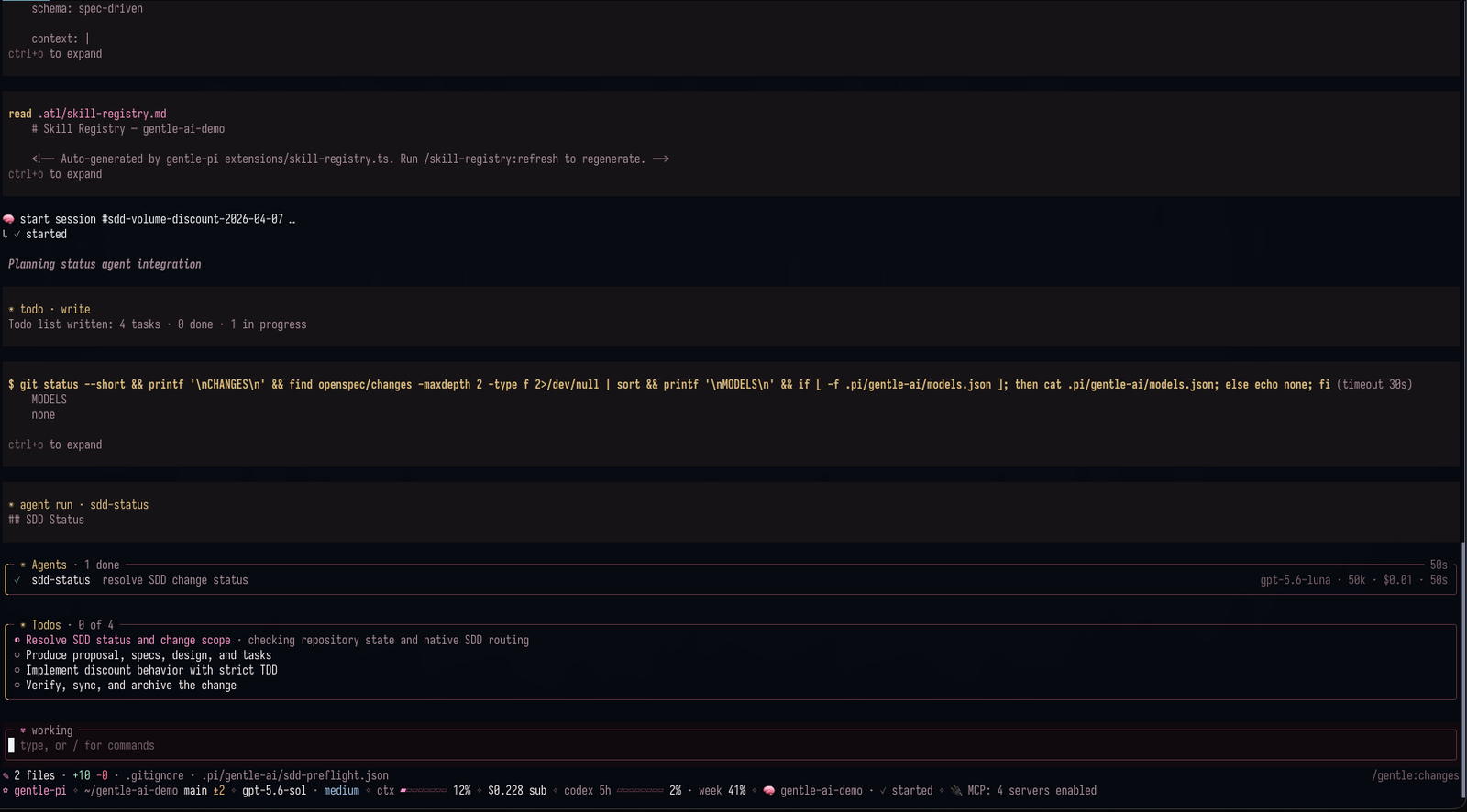
Gentle Shell is a separate Pi integration package. Gentle AI configures supported agents; Gentle Shell owns its own Pi runtime, agents, and interface. Installing or updating this binary does not itself establish Pi behavior parity.
16 agents — Keep the agent you already use
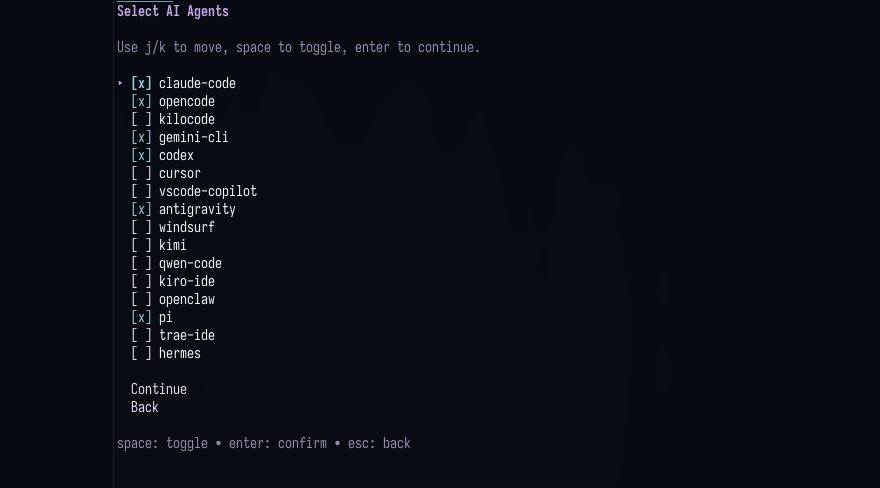
Gentle-AI brings its shared workflow to Pi, OpenCode, Claude Code, Codex, and twelve more agents. Each integration uses that agent's native capabilities, so available features such as delegation and RDD review can differ.
Also in the box
| Component | What it does |
|---|---|
| Skills library | Loaded automatically when the task matches |
| Context7 MCP | Optional, selectable live framework and library documentation |
| CodeGraph | Read-only symbol graph of your codebase |
| Security deny-list | Blocks ~/.ssh, .env and credential files |
| Config backups | Snapshotted before every single write |
| Doctor | gentle-ai doctor — read-only health report |
| Personas | Optional personas; Gentleman is a caring but rigorous mentor who guides you toward your goal |
| Themes | Gentleman and Gentleman-Cute |
| Model assignment | Configure supported agent and review-role models where available |
Every component, skill and preset: Full breakdown →
Get started
# macOS (Homebrew)
brew install gentleman-programming/tap/gentle-ai

# macOS / Linux (curl)
curl -fsSL https://raw.githubusercontent.com/Gentleman-Programming/gentle-ai/main/scripts/install.sh | bash

# Windows (PowerShell) — source install, needs Go 1.25.10+
go install github.com/gentleman-programming/gentle-ai/v3/cmd/gentle-ai@latest
gentle-ai # pick your agents, components and persona
gentle-ai doctor # verify — read-only, changes nothingThen use your agent normally. Your configs are snapshotted before every write, and Gentle-AI never installs an AI agent for you — it configures what you already have.
Beta channel, signature verification and per-distro prerequisites: Quickstart →
Documentation
| Where to go | What you'll find |
|---|---|
| Intended Usage | The mental model. If you read one page, read this one. |
| Quickstart · Usage | Install, prerequisites, every CLI command and flag |
| Agents | Feature matrix and per-agent notes for all 16 |
| ODD · Routing | Everyday direct and delegated work |
| Review · Architecture | The RDD contract, lifecycle and threat model |
| Engram · Components | Memory commands, skills, presets and personas |
| Contributing · Codebase Guide | Extend or contribute |
| Telemetry | What we count, and how to turn it off |
Community
Everything labelled up-for-grabs is scoped, approved and unclaimed — pick one and it's yours.


This project exists because of these people.
Built with Gentle-AI
Shipped something with Gentle-AI? Wear the rose. Paste this into your README and the badge links back here:

<a href="https://github.com/Gentleman-Programming/gentle-ai">
  <img width="220" src="https://raw.githubusercontent.com/Gentleman-Programming/gentle-ai/main/docs/assets/brand/built-with-gentle-ai.png" alt="Built with Gentle-AI" />
</a>
Prefer plain Markdown?
[](https://github.com/Gentleman-Programming/gentle-ai)Keep the image URL exactly as shown — it is how I find and feature the projects that carry the badge.
About the author
Built by Alan Buscaglia (Gentleman Programming): 15 years of enterprise architecture, a community of thousands of developers testing these tools daily, and one rule for AI-assisted work — verifying beats generating.
Teams adopting AI and finding it isn't working — resistance, everyone prompting their own way, no shared quality bar — can reach out about engagements built on these same open-source tools →.


Gentle-AI is crafted with Gentle-AI

Trademark notice: The Gentle AI™ and Engram™ names and logos are trademarks of Alan Buscaglia. Both marks are used throughout this document; the symbol appears on the first prominent mention of each, and this notice covers the rest. The MIT License applies to the code; it does not permit implying endorsement or official affiliation. See TRADEMARKS.md.