

DeepTutor: Lifelong Personalized Tutoring












Features · Get Started · Explore · CLI · Ecosystem · Community
🤝 We welcome any kinds of contributing! Vote on roadmap items or propose new ones at
Roadmap, and see our Contributing Guide for branching strategy, coding standards, and how to get started.
📦 Releases
[2026.10.8] v1.6.14 — Original-source visual practice, recoverable indexing, unified video Reading, scientific research tools, managed plugins, a learning journal, and provider setup improvements.
[2026.10.4] v1.6.13 — Reading and listening improvements, question-bank practice, resilient document parsing, configurable speech, workspace-visible attachments, Polish, and new providers.
Past releases (more than 1 week ago)
[2026.9.27] v1.6.12 — Workspace KB moves, Kiwix archives, source figures, Task Board, German UI, and chat recovery.
[2026.9.24] v1.6.11 — French and Ukrainian interfaces, reading folders with in-chat selection actions, figures sent to vision models, paged Office previews, and self-syncing knowledge bases.
[2026.9.22] v1.6.10 — Native LightRAG role models, a published index that records and enforces what built it, PDF attachments that follow your parsing engine, visible truncation, and unfiltered provider choices.
[2026.9.21] v1.6.9 — Folder-based learning workspaces, daily practice, redesigned Settings, clearer streaming conversations, persistent usage accounting, and recoverable archives with explicit permanent deletion.
[2026.9.14] v1.6.8 — A recycle bin for deleted chats, search across your whole conversation history, a tool that looks past your knowledge base, and a sweep of fixes for quiet failures.
[2026.9.11] v1.6.7 — A fix release: books that arrived as one empty chapter, quizzes that produced nothing, the model's scratchpad in the text, formulas printed raw, and cards you could not submit.
[2026.9.8] v1.6.6 — A fix release: answers that could not submit, a copy button that lied, connected knowledge bases for partners, Codex sign-in inside Docker, and a 100 KB lighter home route.
[2026.9.6] v1.6.5 — A content workspace you point at any folder, one
exectool for every language, Mastery Path modes that gate its tools, and Settings that grades readiness.
[2026.9.3] v1.6.4 — Faster isolated runtimes, controllable Book generation, source-complete Mastery paths and Chat hand-offs, durable Reading, unified activity UI, recoverable sessions, and explicit per-model API capabilities.
[2026.9.2] v1.6.3 — Breaking front/back-end refactor, strict canonical routes and recoverable streams, plus learner/guardian accounts, grounded Reading, WeKnora, broader parsing, Python 3.14, and DashScope media.
[2026.8.31] v1.6.2 — Immersive YouTube learning, a plugin-driven Visualize catalog, three new agent harnesses, safer reading citations, multi-format MinerU, live Partner channel status, and guided updates.
[2026.8.30] v1.6.1 — One vendor key linked to every service it serves, a task model for background work, Settings as a searchable navigator, a sidebar you arrange, and first-party LightRAG.
[2026.8.27] v1.6.0 — Faithful EPUB reading and annotations, Courses with Little Tutor and Ask Questions, bounded web-source sync, shared Books with private learning state, and Serply/native search.
[2026.8.25] v1.5.17 — Partners each member owns with private conversations and linkable chat accounts, GitHub repos as a knowledge source, Antigravity CLI, browser WeChat QR login, and
deeptutor doctor.
[2026.8.22] v1.5.16 — MarginNote 4 libraries you connect and its add-on fills, Book pages that turn again, and tool-call ids, embeddings and temperature limits that stop breaking behind a gateway.
[2026.8.20] v1.5.15 — PageIndex OSS you host yourself with reasoning retrieval, a question bank you can finally file into, third-party tool/capability plugins, and Apache Tika parsing.
[2026.8.19] v1.5.14 — Immersive Reading: a document open beside the thread, cited page by page; DeepTutor configures itself from chat; IMA libraries you browse and write to; a notebook console.
[2026.8.17] v1.5.13 — Books stream while they compile, track your progress, and export to Markdown; a cost estimate before you approve a spine; and home starter suggestions drawn from memory.
[2026.8.13] v1.5.12 — Web search rebuilt with six new providers (Doubao, Bocha, Zhipu, Firecrawl, Qianfan, Aliyun IQS), a LiteParse parsing engine, MCP servers that reconnect on credential change, and CodeBuddy + OrcaRouter.
[2026.8.10] v1.5.11 — Prose around a DSML tool call stops vanishing, a truncated reply continues instead of ending, live memory usage in Settings, and LightRAG indexing off the event loop.
[2026.8.7] v1.5.10 — Every account signs in to its own Codex, model output language becomes its own setting, empty tool calls are rejected instead of retried, and uploads stop blocking the loop.
[2026.8.4] v1.5.9 — Gemini Embedding 2 on its native endpoint, a per-model reasoning effort control, a Novita AI gateway, retrieval roles for queries, and Compose deployments that keep all of
data/.
[2026.8.2] v1.5.8 — Memory: a real heap ceiling for the dev server, source installs serve a production build, bounded LLM client and index caches, and a keep-alive fix for stray 500s.
[2026.7.31] v1.5.7 — A per-account MCP Services store, 101 CLI Apps the tutor can run, credentials moved out of the sandbox's reach, and a mobile layout.
[2026.7.29] v1.5.6 — Remote Codex sign-in completes behind an SSH tunnel, generated files get their own card in Activity, non-English languages stop collapsing to Chinese, and book creation no longer times out.
[2026.7.26] v1.5.5 — Sign in with your ChatGPT plan via OpenAI Codex OAuth, an Eden AI provider, knowledge bases that report what they hold, traceable
ragcitations, and GraphRAG indexing without a workaround.
[2026.7.24] v1.5.4 — Maintenance sweep: the post-answer "generating" stall is gone, IM partners render Markdown tables faithfully, LLM JSON parsing is sturdier, plus quiz, create-KB form, and Math Animator fixes.
[2026.7.24] v1.5.3 — Themeable code blocks, four more coding CLIs in My Agents (Gemini, Kimi, opencode, MiMo), an Atlas Cloud LLM provider, and a broad chat, memory, embedding, and parsing reliability sweep.
[2026.7.19] v1.5.2 — Configurable chat attachment limits, PageIndex retrieval that reasons across your documents via agentic tool calls, broader Anthropic/OpenAI model support, and steadier Book, Knowledge Base, and chat UI.
[2026.7.9] v1.5.1 — Remove a single failed document from a knowledge base — even one stuck in an error state — instead of deleting and rebuilding the whole base.
[2026.7.4] v1.5.0 — LlamaIndex ingestion now honors your Document Parsing engine with multimodal image extraction, Partner & Soul ids stay URL-safe for non-Latin names, and optional RAG extras install cleanly on Python 3.14+.
[2026.6.30] v1.4.15 — A native Mattermost channel for Partners, plus fixes so Guided Learning multiple-choice questions grade correctly and a configured zero chunk overlap is honored.
[2026.6.29] v1.4.14 — Click an assigned partner to chat in one step, Deep Research flags partial reports, LightRAG indexes without MinerU, FAISS handles non-ASCII paths, and PocketBase sessions are isolated per user.
[2026.6.27] v1.4.13 — Partners support non-Latin names and become assignable to users, logos render after login (#599), tiny knowledge bases retrieve reliably, and containers start cleanly under rootless Podman.
[2026.6.24] v1.4.12 — A new LightRAG Server retrieval engine, a lightweight PyMuPDF4LLM parsing engine, and a FAISS vector backend that makes large knowledge-base retrieval dramatically faster.
[2026.6.23] v1.4.11 — Native tool calling on every cloud OpenAI-compatible provider, a redesigned admin Users page, LaTeX in quiz options, an honest session-loading spinner, and configurable container host binding.
[2026.6.21] v1.4.10 — A self-service Profile page with avatars, a rootless-ready container guide with a single-port request-time proxy, and deny-by-default MCP tools for non-admin users.
[2026.6.19] v1.4.9 — Settings polish: Search shows only the fields your provider needs, connection profiles can be renamed and auto-named by provider, and graded Mastery Path questions flow into your Question Bank.
[2026.6.18] v1.4.8 — Connect your own Partners under My Agents and consult them live in chat — answering through their own persona, library and skills — each with its own private memory.
[2026.6.18] v1.4.7 — Connect your local Claude Code / Codex and consult it live mid-turn, My Agents graduates to a top-level
/agents, and Partner conversations gain branch / resume / delete with a replayable trace.
[2026.6.17] v1.4.6 — Four-surface consolidation: a Space learning dashboard with importable My Agents and top-level Memory, a Knowledge Center with GraphRAG / PageIndex / LightRAG / linked-KB / Obsidian, opened-up Settings, and per-model capability gating.
[2026.6.14] v1.4.5 — Guided Learning rebuilt on the chat agent loop with a hard per-type mastery gate and a
/learningdashboard, a new loop-plugin framework, plus Markdown export / save-to-notebook for Partner conversations.
[2026.6.13] v1.4.4 — Install community skills from ClawHub with
deeptutor skill installbehind a security gate, plus real in-browser DOCX/XLSX previews for knowledge-base files.
[2026.6.12] v1.4.3 — TutorBot becomes Partners on a production-grade IM pipeline (15 channels, live streaming), Chat moves to a single agent loop, real per-user isolation, and a rebuilt Visualize.
[2026.5.28] v1.4.2 — Stability + polish: Gemini 2.5+ unblocked across Visualize and Chat, auth-routing fix (#485), smooth-streaming chat UX, a Recents sidebar, and Lemonade local-provider support.
[2026.5.27] v1.4.1 — Security + stability: TutorBot tool sandbox locked down, per-user resource isolation, multimodal image fallback, an HTTP/SSE API for TutorBots, and a v1.4.0 chat regression fix.
[2026.5.22] v1.4.0 — GA cut of v1.4: Auto Mode, three-layer Memory, agentic Deep Research / Solve / Question, LlamaIndex RAG refactor, Visualize/Animator merge, and restart-safe turn runtime.
[2026.5.21] v1.4.0-beta — Three-layer Memory workbench (L1/L2/L3), every chat capability rebuilt on a single agentic engine, LlamaIndex-only RAG, and a unified Settings + Capabilities surface.
[2026.5.10] v1.3.10 — Remote Docker CORS recovery,
DISABLE_SSL_VERIFYacross SDK providers, safer code-block citations, and optional Matrix E2EE add-on.
[2026.5.9] v1.3.9 — TutorBot Zulip and NVIDIA NIM support, safer thinking-model routing,
deeptutor start, sidebar tooltips, and session-store parity.
[2026.5.8] v1.3.8 — Optional multi-user deployments with isolated user workspaces, admin grants, auth routes, and scoped runtime access.
[2026.5.4] v1.3.7 — Thinking-model/provider fixes, visible Knowledge index history, and safer Co-Writer clear/template editing.
[2026.5.3] v1.3.6 — Catalog-based model selection for chat and TutorBot, safer RAG re-indexing, OpenAI Responses token-limit fixes, and Skills editor validation.
[2026.5.2] v1.3.5 — Smoother local launch settings, safer RAG queries, cleaner local embedding auth, and Settings dark-mode polish.
[2026.5.1] v1.3.4 — Book page chat persistence and rebuild flows, chat-to-book references, stronger language/reasoning handling, RAG document extraction hardening.
[2026.4.30] v1.3.3 — NVIDIA NIM + Gemini embedding support, unified Space context for chat history/skills/memory, session snapshots, RAG re-index resilience.
[2026.4.29] v1.3.2 — Transparent embedding endpoint URLs, RAG re-index resilience for invalid persisted vectors, memory cleanup for thinking-model output, Deep Solve runtime fix.
[2026.4.28] v1.3.1 — Stability: safer RAG routing & embedding validation, Docker persistence, IME-safe input, Windows/GBK robustness.
[2026.4.27] v1.3.0 — Versioned KB indexes with re-index workflow, rebuilt Knowledge workspace, embedding auto-discovery with new adapters, Space hub.
[2026.4.25] v1.2.5 — Persistent chat attachments with file-preview drawer, attachment-aware capability pipelines, TutorBot Markdown export.
[2026.4.25] v1.2.4 — Text/code/SVG attachments, one-command Setup Tour, Markdown chat export, compact KB management UI.
[2026.4.24] v1.2.3 — Document attachments (PDF/DOCX/XLSX/PPTX), reasoning thinking-block display, Soul template editor, Co-Writer save-to-notebook.
[2026.4.22] v1.2.2 — User-authored Skills system, chat input performance overhaul, TutorBot auto-start, Book Library UI, visualization fullscreen.
[2026.4.21] v1.2.1 — Per-stage token limits, Regenerate response across all entry points, RAG & Gemma compatibility fixes.
[2026.4.20] v1.2.0 — Book Engine "living book" compiler, multi-document Co-Writer, interactive HTML visualizations, Question Bank @-mention.
[2026.4.18] v1.1.2 — Schema-driven Channels tab, RAG single-pipeline consolidation, externalized chat prompts.
[2026.4.17] v1.1.1 — Universal "Answer now", Co-Writer scroll sync, unified settings panel, streaming Stop button.
[2026.4.15] v1.1.0 — LaTeX block math overhaul, LLM diagnostic probe, Docker + local LLM guidance.
[2026.4.14] v1.1.0-beta — Bookmarkable sessions, Snow theme, WebSocket heartbeat & auto-reconnect, embedding registry overhaul.
[2026.4.13] v1.0.3 — Question Notebook with bookmarks & categories, Mermaid in Visualize, embedding mismatch detection, Qwen/vLLM compatibility, LM Studio & llama.cpp support, and Glass theme.
[2026.4.11] v1.0.2 — Search consolidation with SearXNG fallback, provider switch fix, and frontend resource leak fixes.
[2026.4.10] v1.0.1 — Visualize capability (Chart.js/SVG), quiz duplicate prevention, and o4-mini model support.
[2026.4.10] v1.0.0-beta.4 — Embedding progress tracking with rate-limit retry, cross-platform dependency fixes, and MIME validation fix.
[2026.4.8] v1.0.0-beta.3 — Native OpenAI/Anthropic SDK (drop litellm), Windows Math Animator support, robust JSON parsing, and full Chinese i18n.
[2026.4.7] v1.0.0-beta.2 — Hot settings reload, MinerU nested output, WebSocket fix, and Python 3.11+ minimum.
[2026.4.4] v1.0.0-beta.1 — Agent-native architecture rewrite (~200k lines): Tools + Capabilities plugin model, CLI & SDK, TutorBot, Co-Writer, Guided Learning, and persistent memory.
[2026.1.23] v0.6.0 — Session persistence, incremental document upload, flexible RAG pipeline import, and full Chinese localization.
[2026.1.18] v0.5.2 — Docling support for RAG-Anything, logging system optimization, and bug fixes.
[2026.1.15] v0.5.0 — Unified service configuration, RAG pipeline selection per knowledge base, question generation overhaul, and sidebar customization.
[2026.1.9] v0.4.0 — Multi-provider LLM & embedding support, new home page, RAG module decoupling, and environment variable refactor.
[2026.1.5] v0.3.0 — Unified PromptManager architecture, GitHub Actions CI/CD, and pre-built Docker images on GHCR.
[2026.1.2] v0.2.0 — Docker deployment, Next.js 16 & React 19 upgrade, WebSocket security hardening, and critical vulnerability fixes.
✨ v1.6.14 is live.
pip install -U deeptutorpicks up the latest stable release.
📰 News
- 2026-09-20 🎉 40k stars in 9 months! We'll keep expanding DeepTutor's learning ecosystem.
- 2026-05-22 🌐 Official docs site live at deeptutor.info — guides, references, and capability tours in one place.
- 2026-04-19 🎉 20k stars in 111 days! Thank you for the support toward truly personalized, intelligent tutoring.
- 2026-04-10 📄 Our paper is live on arXiv — read the preprint for the design and ideas behind DeepTutor.
- 2026-02-06 🚀 10k stars in just 39 days! A huge thank you to our incredible community.
- 2026-01-01 🎊 Happy New Year! Join our Discord, WeChat, or Discussions — let's shape DeepTutor together.
- 2025-12-29 🎓 DeepTutor is officially released!
✨ Key Features
DeepTutor is an agent-native learning workspace that connects tutoring, problem solving, quiz generation, research, visualization, and mastery practice in one extensible system.
- One runtime for every mode — Chat, Ask Questions, Quiz, Research, Visualize, Solve, Course Study, Mastery Path, Immersive Reading, and Audio Overview share one capability runtime and session context while keeping purpose-built loops and pipelines.
- Task Board — Track study tasks in To do, In progress, and Done, with notes, drag-and-drop or keyboard-accessible move buttons, and an archive you can restore from. Cards stay in the current workspace and follow the existing appearance and language settings; no model configuration is required.
- Connected learning context — Knowledge bases, books, Co-Writer drafts, notebooks, question banks, personas, and Memory can be reused across the workflows that support them, subject to account grants and learning policies.
- Immersive video learning — add YouTube or Bilibili links to Reading for native playback, transcript search, timestamp-grounded tutoring, saved notes, and resumable progress; YouTube captions and browsing can use an administrator-configured Invidious instance.
- Subagents and Partners — from Chat, consult a live agent harness (Claude Code, Codex, Grok CLI, Antigravity, Kimi, opencode, MiMo, Hermes, OpenClaw, or DeepSeek) or a Partner, import past conversations, and run persistent IM companions on the same brain.
- Multi-engine knowledge — versioned RAG libraries across LlamaIndex, PageIndex, GraphRAG, LightRAG, a remote LightRAG Server, a self-hosted WeKnora knowledge base, a Tencent IMA or MarginNote 4 library, a connected Kiwix ZIM archive, or a linked Obsidian vault, with pluggable document parsing. See native LightRAG role models for independent extraction, query and vision settings, default-only creation and confirmed rebuilds.
- Extensible tools and skills — built-in tools, MCP servers, CLI apps, image / video / voice generation models, and installable community skills from EduHub.
- Inspectable memory — L1 traces, L2 surface summaries, and L3 synthesis make personalization visible and editable; the Memory Graph links L2 facts to L1 evidence and L3 synthesis to contributing surfaces.
🚀 Get Started
Let Your Agent Set Up DeepTutor
Copy this prompt into your terminal-capable AI agent (such as Codex or Claude Code):
Help me install and configure DeepTutor locally from https://github.com/HKUDS/DeepTutor.
Clone the repository, or reuse my existing checkout, and read SKILL.md and
docs-for-user/AGENT_SETUP.md first. Follow that guide to prepare the environment,
configure my model provider, verify the setup, and start the Web app.
Ask me for any missing provider, model, or credential-source information;
do not print API keys. Preserve my existing files and settings, and finish
with the access URL and the results of your checks.
The Agent Setup guide covers the full flow, including non-interactive CLI configuration. To install it yourself, choose one of the paths below.
DeepTutor ships four installation paths. They all share one runtime-home layout: private settings live in data/user/settings/ under the directory you launch from (or under DEEPTUTOR_HOME / deeptutor start --home if you set one explicitly). For the full app, the recommended flow is pick a runtime-home directory → install → deeptutor init → deeptutor start.
One-Command Docker Trial
If Docker is not installed yet, install Docker first. Then try the full app without setting up Python or Node.js:
docker run --rm --name deeptutor \
  -p 127.0.0.1:3782:3782 \
  -v deeptutor-data:/app/data \
  ghcr.io/hkuds/deeptutor:latest
Open http://127.0.0.1:3782, configure model providers in Settings → Providers, and press Ctrl+C when you are done. The named deeptutor-data volume keeps settings and local data for the next run.
Content Workspace
The Content Workspace is separate from DeepTutor's private runtime home. It
is the folder agents may read, with generated files under
outputs/<capability>/<session>/<turn>/. Custom workspaces isolate conversations,
learning materials, progress, and caches in a private .deeptutor/data/ tree
that file tools cannot browse. Settings, credentials, and Memory stay shared
at the account level.
Without configuration, the content workspace is
<runtime-home>/data/user/workspace. Local PyPI, CLI, and source installs can
choose folders in Settings → Workspaces; set the default folder with:
deeptutor workspace show
deeptutor workspace set /absolute/path/to/my-folder
deeptutor workspace reset
Capabilities inspect their selected workspace through the built-in workspace
tools. The model only receives relative paths such as outputs/...; when it
uses workspace_present, the UI renders an authenticated, openable snapshot.
The same exact relative path also works in a normal Markdown link or image.
Changing the source file later does not change an already presented snapshot.
Learning Space manages the resource library. In Settings → Workspaces, assign Skills, MCP services and knowledge bases to each workspace, or retain its existing access rules. Existing workspaces keep their current access until a selection is saved. Assignments reference the original resources without copying credentials or knowledge indexes; workspace-specific skills can override shared versions. See workspace resource assignments.
Execution is read-only outside outputs/. Copying a generated file elsewhere
in the content workspace requires an explicit Allow once confirmation for
that exact source and destination. A system sandbox or the Docker runner
enforces this boundary when available; local restricted-subprocess fallback is
shown as best effort in Workspace settings.
Option 1 — Install From PyPI · full local Web app + CLI, no clone required
Full local Web app + CLI, no clone required. Needs Python 3.11–3.14 and a Node.js 20+ runtime on PATH (the packaged Next.js standalone server is spawned by deeptutor start).
mkdir -p my-deeptutor && cd my-deeptutor
pip install -U deeptutor
deeptutor init     # prompts for ports + LLM provider + optional embedding/search
deeptutor start    # starts backend + frontend; keep the terminal open
deeptutor init prompts for backend port (default 8001), frontend port (default 3782), LLM provider / base URL / API key / model, an optional embedding provider for Knowledge Base / RAG, and an optional search provider for Web Search.
After deeptutor start, open the frontend URL printed in the terminal — by default http://127.0.0.1:3782. Press Ctrl+C in that terminal to stop both backend and frontend. Skipping deeptutor init is fine for a quick trial; the app boots with default ports and empty model settings, configure them later in Settings → Providers and Language models.
Browser microphone transcription: OpenAI-compatible STT adapters forward browser audio to the provider without local conversion. The native DashScope and Volcengine STT adapters convert browser WebM/Opus to 16 kHz WAV and require an ffmpeg executable on DeepTutor's PATH. A canonical 16 kHz mono PCM WAV bypasses this conversion. For Windows PyPI installations using either native adapter, install FFmpeg, add its bin directory to the service's PATH, then restart DeepTutor. Conversion failures appear below the chat input.
Option 2 — Install From Source · develop against a checkout
For development against a checkout. Use Python 3.11–3.14 and Node.js 22 LTS to match CI and Docker.
git clone https://github.com/HKUDS/DeepTutor.git
cd DeepTutor

# Create a venv (macOS/Linux). Windows PowerShell:
#   py -3.11 -m venv .venv ; .\.venv\Scripts\Activate.ps1
python3 -m venv .venv && source .venv/bin/activate
python -m pip install --upgrade pip

# Install backend + frontend deps
python -m pip install -e .
( cd web && npm ci --legacy-peer-deps )

deeptutor init
deeptutor start --dev
deeptutor start builds the local web/ frontend for production once and reuses it; --dev runs Next.js with HMR. Config layout, ports, and Ctrl+C match Option 1.
Conda environment (instead of venv)
conda create -n deeptutor python=3.11
conda activate deeptutor
python -m pip install --upgrade pip
Optional install extras — RAG engines / dev / partners / matrix / math-animator
pip install -e ".[rag-lightrag]"    # Built-in LightRAG engine (exact supported SDK)
pip install -e ".[graphrag]"        # Microsoft GraphRAG engine (Python 3.11–3.13)
pip install -e ".[dev]"             # tests/lint tools
pip install -e ".[partners]"        # Partner IM channel SDKs
pip install -e ".[video-learning]"  # compatibility extra; captions ship in the full/CLI installs
pip install -e ".[matrix]"          # Matrix channel without E2EE/libolm
pip install -e ".[matrix-e2e]"      # Matrix E2EE; requires libolm
pip install -e ".[math-animator]"   # Manim addon; requires LaTeX/ffmpeg/system libs
Frontend dependency tweaks & dev-server troubleshooting
Changing frontend dependencies: run npm install --legacy-peer-deps to refresh web/package-lock.json, then commit both web/package.json and web/package-lock.json.
Stuck dev server: if deeptutor start --dev reports an existing frontend that isn't responding, stop the PID it prints. If no Next.js process is actually running, the lock files are stale — remove them and retry:
rm -f web/.next/dev/lock web/.next/lock
deeptutor start --dev
Option 3 — Docker · one self-contained container
One container for the full Web app. Images on GitHub Container Registry:
ghcr.io/hkuds/deeptutor:latest— latest stable releaseghcr.io/hkuds/deeptutor:<version>— exact release without the leadingv(for example:1.6.3); pre-releases receive only their version tag
See CONTAINERIZATION.md for podman/rootless/read-only-rootfs deployments and the full per-installation guide.
docker run --rm --name deeptutor \
  -p 127.0.0.1:3782:3782 \
  -v deeptutor-data:/app/data \
  ghcr.io/hkuds/deeptutor:latest
To choose a host content folder at container startup, mount it at the stable container path and lock DeepTutor to that path:
mkdir -p "$PWD/deeptutor-workspace/outputs"
docker run --rm --name deeptutor \
  -p 127.0.0.1:3782:3782 \
  -v deeptutor-data:/app/data \
  -v "$PWD/deeptutor-workspace:/workspace" \
  -e DEEPTUTOR_WORKSPACE_ROOT=/workspace \
  -e DEEPTUTOR_WORKSPACE_ALLOWED_ROOTS=/workspace \
  ghcr.io/hkuds/deeptutor:latest
For Compose, set DEEPTUTOR_WORKSPACE_HOST=/absolute/host/folder before
running python scripts/docker_compose.py up -d. When omitted it uses
./data/user/workspace. Docker paths are selected at startup and therefore
appear locked in the Web settings page.
Only
3782needs to be published. The browser talks exclusively to the frontend origin; the Next.js middleware (web/proxy.ts) forwards/api/*and/ws/*to the FastAPI backend inside the container. Publishing8001(-p 127.0.0.1:8001:8001) is optional — handy only for hitting the API directly with curl or scripts.
Open http://127.0.0.1:3782. The container creates /app/data/user/settings/*.json on first boot; configure model providers from the Web Settings page. Config, API keys, logs, the default Content Workspace, memory, and knowledge bases persist in the deeptutor-data volume. A separately mounted Content Workspace persists at its host path instead. Optional extras belong on the deployment, not in a shell: set DEEPTUTOR_EXTRAS (and DEEPTUTOR_APT_PACKAGES for system libraries) and every container started from it re-applies them, where a docker exec … pip install would be lost at the next compose down.
- Different host ports: change the left side of each
-p host:containermapping (e.g.-p 127.0.0.1:8088:3782). If you change container-side ports in/app/data/user/settings/system.json, restart and update the right side of each mapping to match. - Detached: add
-d, thendocker logs -f deeptutorto follow,docker stop deeptutorto stop,docker rm deeptutorbefore reusing the name. Thedeeptutor-datavolume keeps private runtime data and the default Content Workspace across restarts; a separately mounted Content Workspace persists at its host path.
Remote Docker / reverse proxy: the browser only talks to the frontend
origin (:3782); the in-container Next.js middleware forwards /api/* and
/ws/* to the backend server-side. For the common single-container case you
don't configure an API base at all — just point your reverse proxy / TLS
terminator at :3782. You only need an API base for a split deployment
(backend in a separate container/host): set next_public_api_base in
data/user/settings/system.json to the in-network address the frontend server
uses to reach the backend (it's read server-side, never sent to the browser).
{
  "next_public_api_base": "http://backend:8001"
}
next_public_api_base_external (and its alias public_api_base) are accepted as
lower-precedence fallbacks. CORS uses frontend origins, not API URLs. With
auth disabled, DeepTutor permits normal HTTP/HTTPS browser origins by default.
With auth enabled, add exact frontend origins:
{
  "cors_origins": ["https://deeptutor.example.com"]
}
Connecting to Ollama / LM Studio / llama.cpp / vLLM / Lemonade on the host
Inside Docker, localhost is the container itself, not your host machine. To reach a model service running on the host, use the host gateway (recommended):
docker run --rm --name deeptutor \
  -p 127.0.0.1:3782:3782 -p 127.0.0.1:8001:8001 \
  --add-host=host.docker.internal:host-gateway \
  -v deeptutor-data:/app/data \
  ghcr.io/hkuds/deeptutor:latest
Then in Settings → Providers, point the provider Base URL at host.docker.internal:
- Ollama LLM:
http://host.docker.internal:11434/v1 - Ollama embedding:
http://host.docker.internal:11434/api/embed - LM Studio:
http://host.docker.internal:1234/v1 - llama.cpp:
http://host.docker.internal:8080/v1 - Lemonade:
http://host.docker.internal:13305/api/v1
Docker Desktop (macOS/Windows) usually resolves host.docker.internal without --add-host. On Linux, the flag is the portable way to create that hostname on modern Docker Engine.
Linux alternative — host networking: add --network=host and drop the -p flags. The container shares the host network directly, so open http://127.0.0.1:3782 (or the frontend_port in system.json), and host services can be reached with normal localhost URLs like http://127.0.0.1:11434/v1. Note that host networking exposes container ports directly on the host and may conflict with existing services — to keep them on loopback, set BACKEND_HOST=127.0.0.1 and FRONTEND_HOST=127.0.0.1 (see CONTAINERIZATION.md).
Option 4 — CLI Only · no Web UI, from a source checkout
When you don't need the Web UI. The CLI-only package is installed from a source checkout, not from PyPI.
git clone https://github.com/HKUDS/DeepTutor.git
cd DeepTutor

# Create a venv (macOS/Linux). Windows PowerShell:
#   py -3.11 -m venv .venv-cli ; .\.venv-cli\Scripts\Activate.ps1
python3 -m venv .venv-cli && source .venv-cli/bin/activate
python -m pip install --upgrade pip

python -m pip install -e ./packaging/deeptutor-cli
deeptutor init --cli
deeptutor chat
deeptutor init --cli shares the same data/user/settings/ layout as the full app but skips the backend/frontend port prompts. It still offers the Embedding and Search selectors (choose Skip when you do not need them), writes the key runtime files (system.json, auth.json, integrations.json, interface.json, model_catalog.json, main.yaml, agents.yaml), and prompts for the active LLM provider and model.
Common commands
deeptutor chat                                          # interactive REPL
deeptutor chat --capability deep_solve --tool rag --kb my-kb
deeptutor run chat "Explain Fourier transform"
deeptutor run deep_solve "Solve x^2 = 4" --tool rag --kb my-kb
deeptutor kb create my-kb --doc textbook.pdf
deeptutor memory show
deeptutor config show
The local deeptutor-cli install ships no Web assets or server dependencies. Keep the source checkout around — the editable install points to it. To add the Web app later, install the PyPI package (Option 1) and run deeptutor init + deeptutor start from the same workspace.
Code Execution Sandbox (office skills) · running model-generated code for docx / pdf / pptx / xlsx
The built-in office skills — docx / pdf / pptx / xlsx — work by having the
model write a short Python script (python-docx, reportlab, openpyxl, …),
run it through the single exec tool, and present the saved workspace file.
Those tools mount whenever a sandbox backend is active. DeepTutor selects the
strongest configured backend in this order:
- Runner sidecar:
DEEPTUTOR_SANDBOX_RUNNER_URLroutes execution to the hardened, least-privileged service fromDockerfile.runner. - Linux bubblewrap: when available,
bwrapisolates the process and files. - Restricted subprocess fallback: local and single-container installs use this only when allowed; under Docker the container remains another boundary.
The sandbox_allow_subprocess setting in data/user/settings/system.json
(default true) controls only the last fallback. Set it to false (or export
DEEPTUTOR_SANDBOX_ALLOW_SUBPROCESS=0) to refuse subprocess execution when no
runner or bwrap backend is available; it does not disable those stronger
backends.
Configuration reference — config files under data/user/settings/ (JSON/YAML)
Everything under data/user/settings/ is plain JSON/YAML. The Settings page is the recommended editor; workspace registrations live separately in data/user/.runtime/workspaces.sqlite3.
| File | Purpose |
|---|---|
model_catalog.json | Provider connections plus LLM, task, embedding, search, TTS, STT, image, and video profiles, credentials, and active selections |
system.json | Backend/frontend ports, public API base, CORS, SSL verification, attachment directory and upload/extraction limits |
auth.json | Optional auth toggle, username, password hash, token/cookie settings |
integrations.json | Optional PocketBase and sidecar integration settings |
interface.json | UI and model output language / theme / sidebar preferences |
document_parsing.json | Parsing engine and image-description model selection, remote endpoints, and engine-specific options |
video_learning.json | YouTube caption provider, Invidious origins and account access, and transcript settings |
main.yaml | Runtime behavior defaults and path injection |
agents.yaml | Capability/tool temperature and token settings |
Web Search references are filtered by default: only public http/https URLs
without embedded credentials or unusual ports are surfaced. Deployments can add
an education-focused domain policy in data/user/settings/system.json:
{
  "web_search_source_filtering": {
    "enabled": true,
    "blocked_domains": ["spam.example"],
    "trusted_domains": ["edu.cn", "arxiv.org"]
  }
}
When trusted_domains is non-empty, references are limited to those domains
and their subdomains; blocked_domains always takes precedence.
Project-root .env is not read as an application config file. For a minimal model setup, save a Base URL and API key in Settings → Providers, then add and select an LLM in Language models. Add an embedding profile only if you plan to use Knowledge Base / RAG features.
For API Route, select API Route in Settings → Providers and enter an API Route key. The preset uses https://global.api-route.com/v1; then add a model using its API Route model ID in Language models. See the API Route quickstart for key and model setup.
LLM and task-model profiles expose an API format setting when their provider
supports a choice. Keep Auto for normal routing and fallback, or choose
OpenAI Chat Completions, OpenAI Responses, or Anthropic Messages; forced
Responses remains fail-closed. The persisted field is api_format (auto,
openai_chat, openai_responses, or anthropic); wire_api is derived
compatibility state. Per-model Auto / Supported / Not supported overrides
cover tool calling, image input, JSON output, and reasoning controls.
Uninstall and cleanup
DeepTutor separates its installed code, private runtime home, and optional
Content Workspace. By default, the runtime home is the directory where you run
deeptutor init / deeptutor start; --home PATH or DEEPTUTOR_HOME
overrides it. Private application state is the data directory inside that
home, so the startup banner line beginning with Workspace: identifies that
runtime location. If Settings → Workspace points to another folder, back up
or remove that content folder separately; it is intentionally not erased by
uninstalling DeepTutor.
-
Stop the app. Press
Ctrl+Cin the terminal runningdeeptutor start, or rundeeptutor stop [--home PATH]for a launcher started with--detach; stop any running Partner and detached Docker containers before deleting data. -
Remove runtime data only if you also want to erase all local state. This includes settings and API keys, chat history, sessions, Memory, Notebooks, Books, Reading state, Skills, Partners state, logs, Knowledge Bases, parse caches, generated artifacts, and the packaged frontend runtime cache.
First copy the exact
Workspace:path from the startup banner and verify that itsdatachild is the intended DeepTutor data directory. Back it up if anything may be needed later, then move that exact directory to your operating system's Trash/Recycle Bin. Do not run a recursive deletion command against a relative path or an unresolved environment variable. -
Remove the installed package. Use the command that matches the distribution:
python -m pip uninstall deeptutor
python -m pip uninstall deeptutor-cli
If the virtual environment was created only for DeepTutor, remove it through your environment manager. For a source install, deactivate the environment, leave the source directory, and run
git status --shortinside that exact checkout. Only move the checkout to Trash/Recycle Bin after confirming it contains no unrelated or uncommitted work. -
For the Docker path, inspect the exact container and named volume before removing them. Volume removal permanently erases the Docker-managed data:
docker ps -a --filter name=^/deeptutor$
docker volume inspect deeptutor-data
docker rm -f deeptutor
docker volume rm deeptutor-data
📖 Explore DeepTutor
Start with the main surfaces you will use day to day: Chat, Partners, My Agents, Co-Writer, Book, Knowledge Center, Learning Space, Memory, and Settings. The tour then covers Multi-User deployments for shared, isolated workspaces.
If an answer loses an earlier constraint, cites weak evidence, or disagrees with selected material, collect the diagnostics in REASONING_SAFETY_CHECKLIST.md before opening an issue.
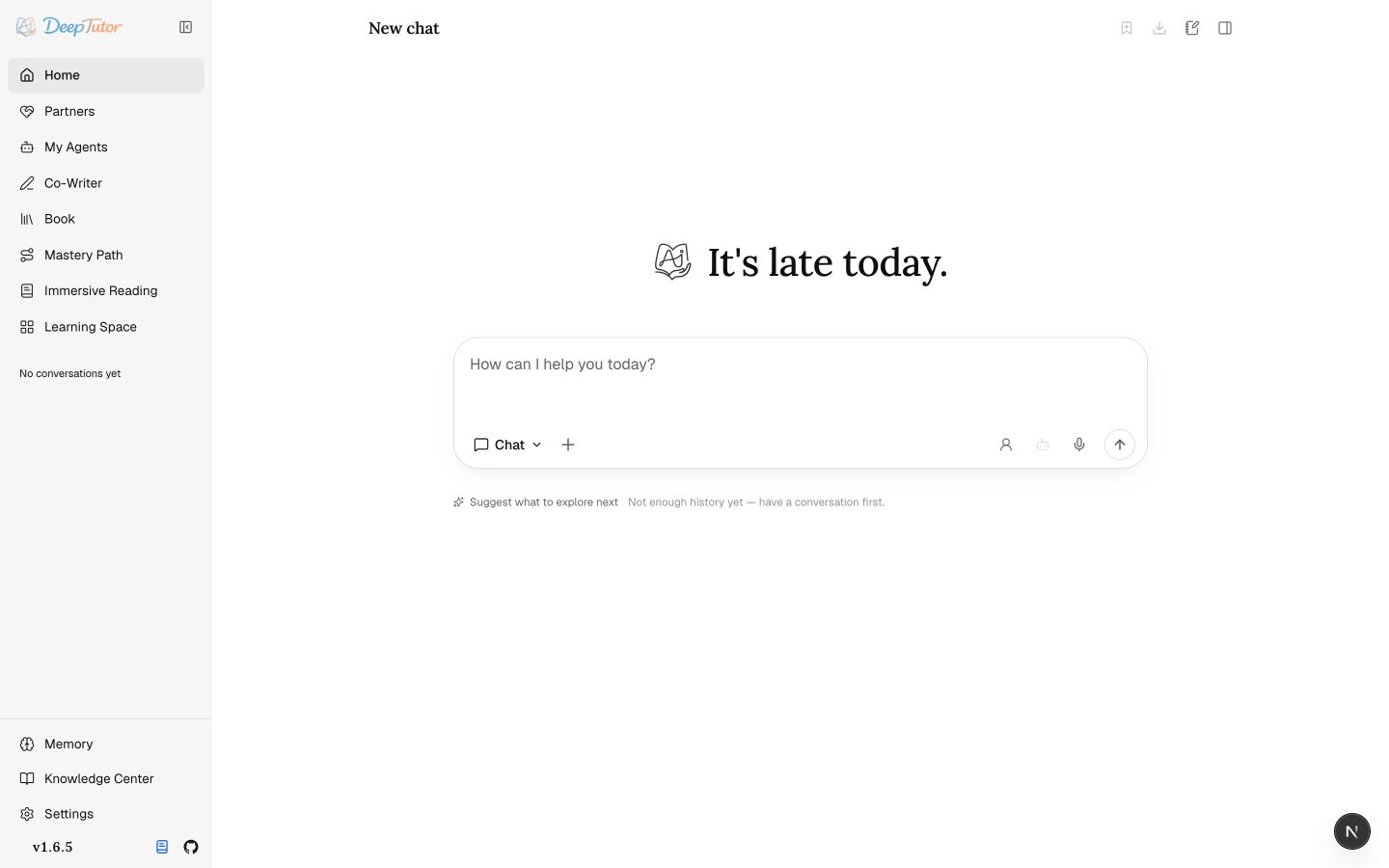
Screenshot status: The overview is current for v1.6.5. The surface screenshots below remain v1.4.6 references while a versioned refresh is in progress. Use them to understand workflows, not as exact navigation.
🏗️ System architecture
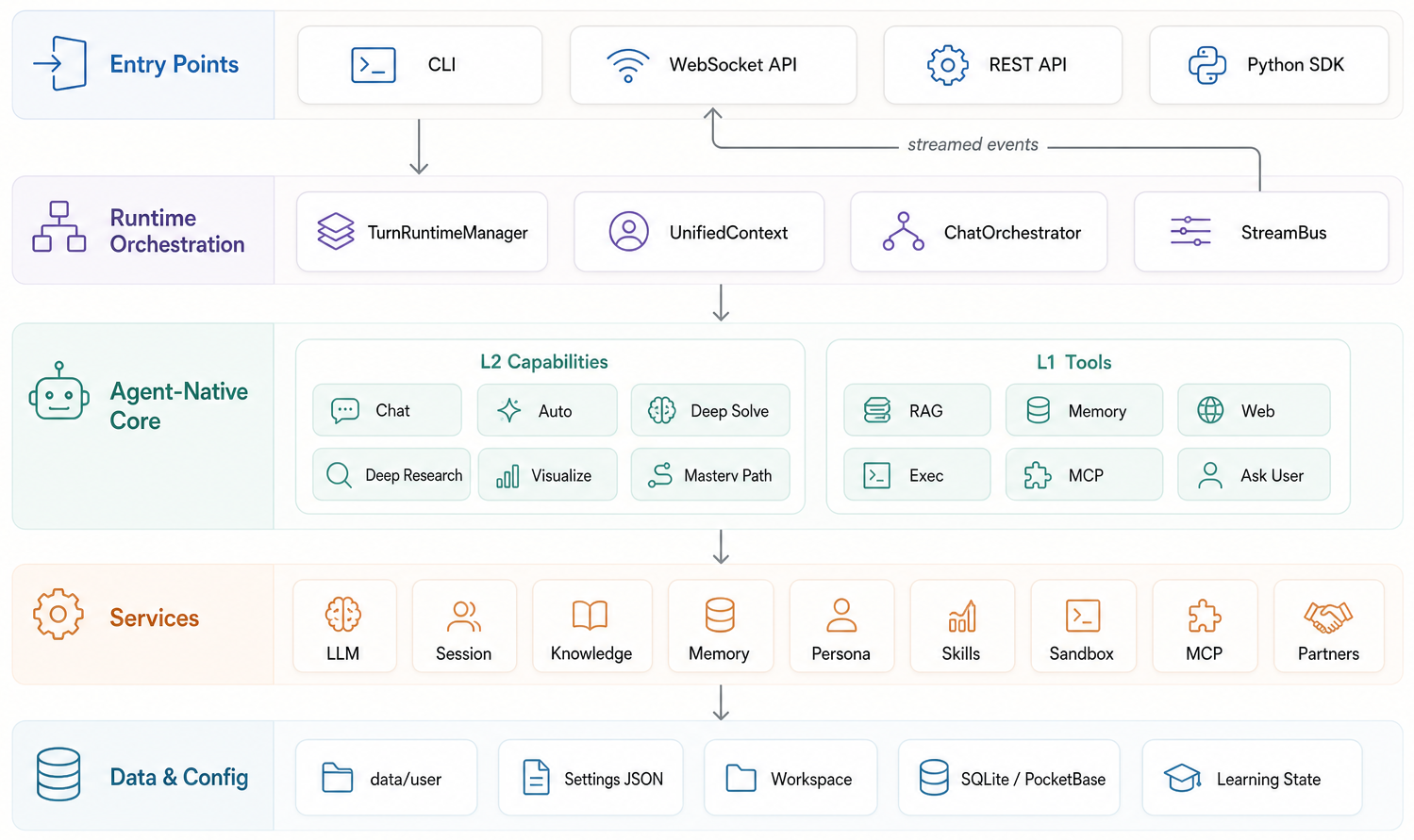
💬 Chat — The Agent Loop You Actually Use
Chat is the default capability and where most work begins. A single thread can talk normally, call tools, ground itself in selected knowledge bases, read attachments, generate images, consult subagents, write notebook records, and continue with the same context across turns.

The loop is deliberately simple: the model thinks in rounds, calls tools when useful, observes the results, and finishes with a tool-free message. ask_user is special — instead of guessing, the agent can pause the turn, ask a structured clarifying question, and resume once you answer.
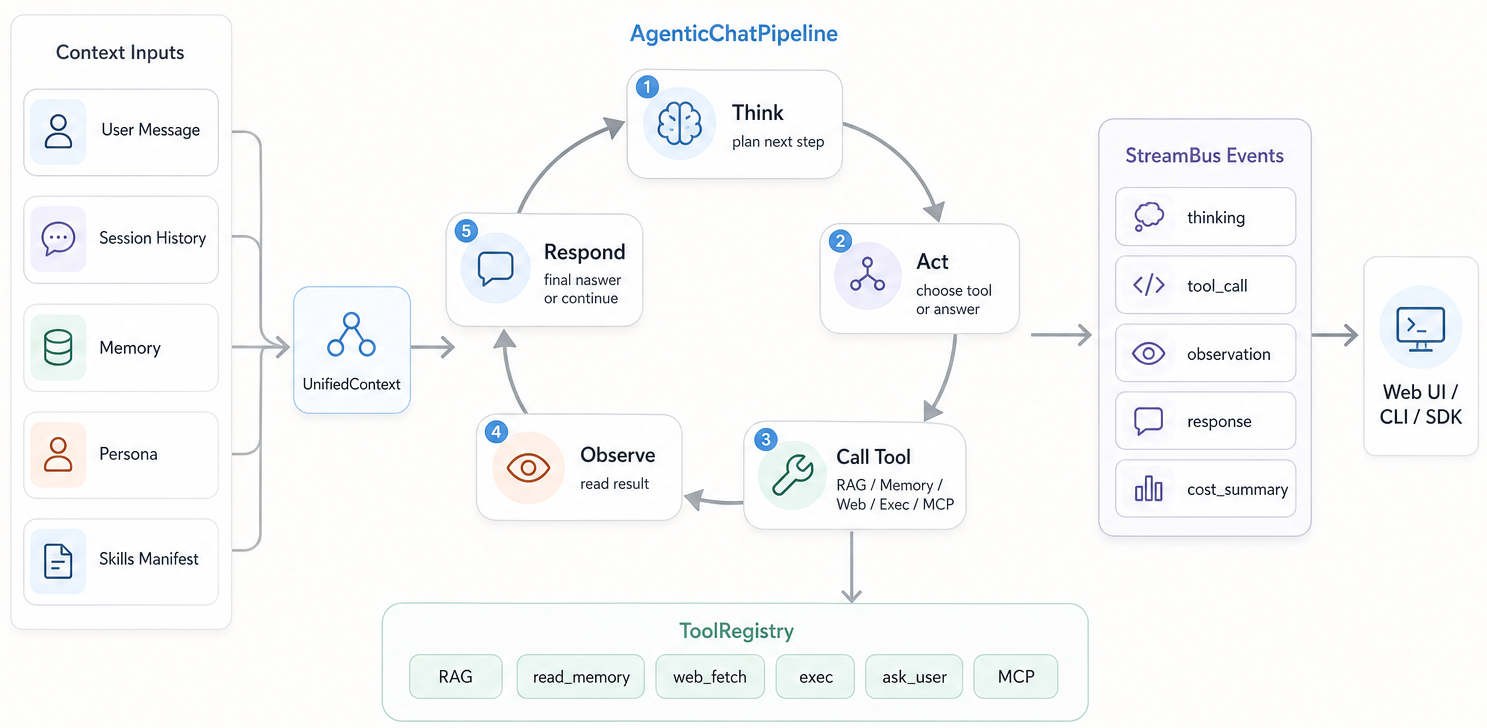
User-toggleable tools are brainstorm, web_search, paper_search, zotero_search, reason, and geogebra_analysis — plus imagegen and videogen once you configure the matching generation model. Contextual tools such as rag, kb_files, knowledge_frontier, read_source, read_memory, write_memory, read_skill, load_tools, exec, web_fetch, ask_user, list_notebook, write_note, question_bank, github, consult_subagent, workspace_list, workspace_read, workspace_search, workspace_present, and workspace_export mount automatically when the turn has the right context.
Context comes in two kinds: sticky session context (capability, workspace or course, tools, knowledge bases, persona, model, and Reading / Mastery state) persists across turns; one-time references (files, chat history, books, reading sections, notebooks, selected question-bank entries, imported agents) come from the + menu for a single turn. The voice button only transcribes the current message.
Home keeps Chat, Ask Questions, Quiz, and Visualize one click away; Research for cited reports and Solve for worked reasoning sit under More Capabilities. Personalized Learning groups Book, Mastery Path, Immersive Reading, and Practice; Reading brings documents, video, and audio together with verified citations, saved notes, natural read-aloud from source passages / study guidance / vocabulary / quiz / translation actions, and notebook capture, while Course Study keeps its course-bound context.
🤝 Partner — Persistent Companions on the Same Brain

Partners are persistent companions with their own soul, model policy, library, memory, and channels. They are not a separate bot engine: every inbound web or IM message becomes a normal ChatOrchestrator turn inside a partner-scoped workspace. A partner is "a chat that has a personality and a phone number."
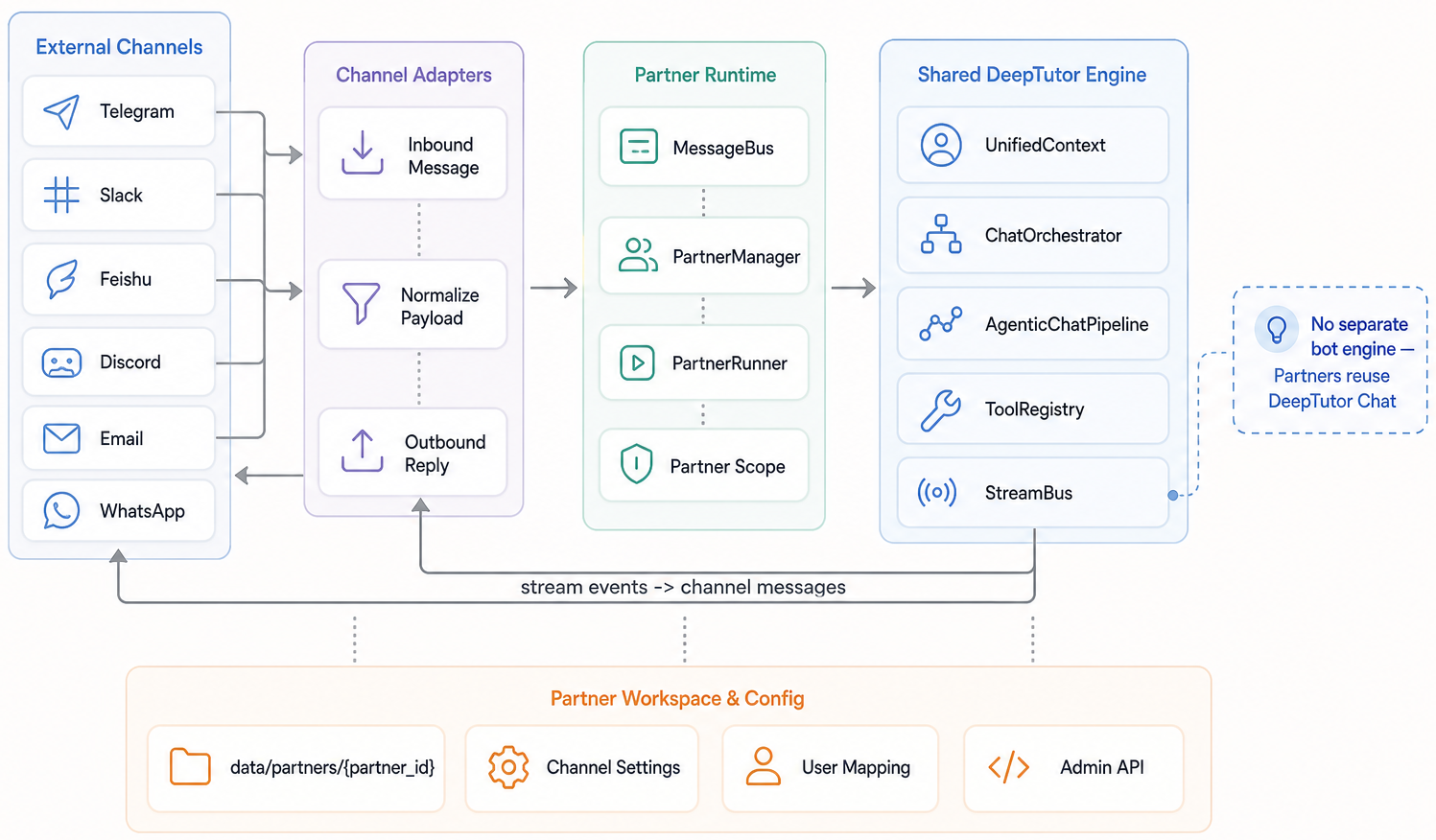
Each partner has a SOUL.md, model selection, channels, tool policy, and assigned library. Its library either copies knowledge bases, skills, and notebooks into data/partners/<id>/workspace/, or stays linked to an existing workspace's files and resources; soul, conversations, and Partner memory remain separate. Authenticated non-admin users keep private partner sessions and relationship memory while the partner reads their personal memory read-only; admin, group, and unbound traffic use the shared partner scope.

The channel layer is schema-driven and can connect to IM platforms such as Feishu, Telegram, Slack, Discord, DingTalk, QQ/NapCat, WeCom, WhatsApp, Zulip, Mattermost, Matrix, Mochat, and Microsoft Teams depending on installed extras and configured credentials. A partner can also be connected as a subagent and consulted from a normal chat turn — see My Agents below.
For faster setup, the Partner channel page can create a Feishu/Lark app or WeCom AI bot, or sign a personal WeChat account in, from a QR scan drawn in the browser rather than the server log. Feishu/Lark detects the account domain and saves the scanning user as the initial allowed sender. WeCom keeps an existing allowlist and otherwise defaults to all users who can reach the bot, with a visible open-access warning; the manual channel forms remain available if a provider's scan protocol changes.
🧑🚀 My Agents — Consult & Import Other Agents

My Agents turns other agents into context for DeepTutor, and does two distinct things. Connect a live agent — Claude Code, Codex, Grok CLI, Antigravity, Kimi, opencode, MiMo Code, Hermes Agent, OpenClaw, or DeepSeek Harness on your machine, a remote Hermes gateway, or one of your Partners — and consult it from inside a chat turn: DeepTutor actually runs the other agent and streams its work into the Activity panel via the consult_subagent tool. Select it and its round limit with the Agent chip, or filter the same connected-agent list with @; the choice stays attached to the session.
Connect Grok CLI. Install xAI's Grok CLI on the machine running the DeepTutor
backend, run grok login there, and verify that grok --help lists
--output-format streaming-json. Then open My Agents → Connect, select
Grok CLI, and choose a working directory. Detection checks the executable's
protocol support; it does not verify login or model access. The connector has
been exercised with Grok CLI 1.0.3; unrelated third-party commands also named
grok are not supported.
In Settings → Partners & Agents → Grok CLI, leave model and reasoning effort
empty to use the CLI defaults, or enter values supported by your account's
grok models output. System instructions are passed through --rules. The
default permission mode is dontAsk: Grok uses its existing rules and built-in
read-only handling, and denies operations that need approval. This is a CLI
permission policy, not a filesystem sandbox. Broader modes can be selected
explicitly in settings; advanced CLI flags remain available through
backends.grok.extra_args in the subagent settings API.
Grok uses its own authentication and session storage; DeepTutor does not copy its credentials. Follow-up consults resume the connection's session in the same working directory. Text and tool activity stream live; private thought payloads are omitted. Cross-session Grok memory is disabled by default. This connector supports text questions and CLI tools, not image forwarding or importing past Grok conversations. In Docker, install and authenticate Grok inside the backend container; a CLI installed only on the browser's computer is not reachable.

Import past conversations — bring in your existing ChatGPT, Claude Code, and Codex history as searchable, resumable conversations. Select conversations.json from an official ChatGPT data export for a safe, idempotent snapshot import, choose Claude history by project / working directory, or choose Codex history by calendar date. Folder-based agents remain refreshable so their selected scope can pull in new conversations. Reference one from a Chat turn via + → My Agents, and DeepTutor reads it as a third-party transcript — it stays their conversation, not DeepTutor's own voice.
✍️ Co-Writer — Selection-Aware Markdown Drafting

Co-Writer is a split-view Markdown workspace for reports, tutorials, notes, and long-form learning artifacts. Documents autosave and render a live preview (KaTeX math, diagram fences), and can be saved back into notebooks when a draft becomes reusable context. Import a .docx to start a new draft, and export the current editor as Markdown or Word.

Its defining idea is surgical editing: select a span and ask DeepTutor to rewrite, expand, or shorten it. Choose the edit model; it can use a knowledge base or web evidence and keeps a trace of its tool calls. If the draft has not changed while it works, the result replaces the selected text directly and remains reversible with Undo.
📖 Book — Living Books from Your Materials

Book turns selected sources into an interactive living book — not a static PDF, but a reading environment built from typed blocks. A book can start from knowledge bases, notebooks, question banks, or chat history; the creation flow proposes a chapter outline before content is generated, so you review the shape instead of accepting a blind one-shot output.


Each chapter compiles into editable typed blocks — text, callouts, quizzes, flash cards, timelines, code, figures, interactive HTML, animations, concept graphs, deep dives, and user notes — with its own Page Chat. Insert, move, regenerate, rewrite, or switch a block type; selected passages enter a reviewable learning-capture inbox. Progress, bookmarks, quiz attempts, captures, and Page Chat stay private per reader even when an admin book is shared read-only or for collaborative editing; shared deletion stays admin-only. Any book exports to Markdown, long compiles pause and resume, and deeptutor book health / refresh-fingerprints flag source drift.
📚 Knowledge Center — Multi-Engine RAG Libraries

Knowledge bases are the document collections behind RAG — they ground Chat turns, Co-Writer edits, Book generation, and Partner conversations. What's distinctive is a choice of retrieval engines: LlamaIndex (the default, hybrid vector + BM25 with optional cross-encoder reranking and exact-flat or HNSW FAISS indexes), PageIndex (reasoning retrieval with page-level citations, hosted or self-hosted OSS), GraphRAG and LightRAG (knowledge-graph retrieval), LightRAG Server (retrieval offloaded to an external LightRAG instance you connect over HTTP), WeKnora (retrieval from a knowledge base in your self-hosted deployment, without a local index or document copy), Tencent IMA (a library you curate in IMA — searched, browsed, and written back to over its OpenAPI), MarginNote 4 (your MN4 study data — documents, excerpts, mind-map cards and the links between them — pushed in by the app's Add-on and navigated with dedicated tools), Kiwix (a searchable ZIM archive served over HTTP without local indexing), or a linked Obsidian vault the tutor reads and writes in place. Each KB is bound to one engine.

Migrating an existing Obsidian, Hermes, or Markdown library? See Knowledge migration guide for connected-vault and indexed-copy paths.
Creating a KB, you can create new (upload and index documents), link existing (reuse an index in place), or connect Kiwix (search one served ZIM archive on demand). Choose its storage workspace at creation; an existing KB can move between workspaces after a preview, keeping assignments and saved references. A KB can also track GitHub repositories (repo, branch, glob) or documentation-site URLs (bounded crawl depth and page count, re-synced every 24 h by default); sync hash-diffs added, changed, and removed content so followed documentation stays current without re-uploading, and linked folders pick up new or changed local files on sync. Re-indexing writes a new flat version-N directory and keeps prior ones, so a working index is never destroyed mid-rebuild. A single document can be removed even from an error-state base — dropping a file that failed to parse without a full delete-and-rebuild. Document parsing — Text-only, MinerU, Docling, Tika, markitdown, PyMuPDF4LLM, or LiteParse — and an optional image-description model are chosen in Settings → Knowledge & documents, with local model downloads off by default. Docling can also run in remote mode against a Docling Serve server (no local install or models needed), configured on that page (mode=remote, a server base URL, and an optional API key) or the DOCLING_MODE / DOCLING_API_BASE_URL / DOCLING_API_TOKEN environment variables. Tika is remote-only and points at the Apache Tika server configured on that page. The CLI mirrors the lifecycle with list/info/create/connect-kiwix/add/search/eval/set-default/delete, source add/remove commands, list-sources, and sync.
The built-in LightRAG engine is installed with pip install 'deeptutor[rag-lightrag]'. That extra contains the supported LightRAG SDK but does not install MinerU. Choose MinerU independently in Document Parsing and either configure its cloud mode or install its current local CLI when structured parsing is wanted. MinerU accepts PDF, common raster images, DOCX, PPTX, and XLSX; the legacy magic-pdf command remains PDF-only. Text-only and the other parsing engines do not require MinerU.
Native LightRAG queries and incremental indexing require the embedding configuration recorded by the published index, including the model, dimension, and endpoint identity. If it changes, restore the original configuration or rebuild with the current embedding; indexes without a recorded embedding identity require a rebuild. The knowledge-base detail and index-version views show recovery guidance, while files remain available for viewing and download.
Scoring a knowledge base. With several engines available, "which one retrieves best here?" is an empirical question — so deeptutor kb eval answers it. Write a QA set (one JSON object per line: a query plus the gold passages an ideal retrieval should return), then score the KB with deeptutor kb eval <name> --dataset qa.jsonl --top-k 5 [--mode hybrid] [--save baseline.json]. Each case is retrieved through the same path a chat turn uses, its ranked citations are matched against the gold passages using exact text or lexical overlap (thresholds are tunable with --min-ratio; semantic equivalence is not assessed), and the run reports Recall@k / Precision@k / nDCG@k / MRR / MAP / Hit@k. Metrics are pure functions over the ranking, so no model judges the output: scores are reproducible and diffable, and a saved baseline turns the set into a regression gate for an embedding switch, a reranker change, or a chunk-size experiment. Cases whose search failed (a missing index, bad credentials) carry no score and are reported separately rather than dragging the means down. PageIndex uses reasoning as retrieval and returns no ranked chunks, so it is excluded.
{"query": "Why do transformers scale attention?", "gold": ["Scaling keeps the dot products from growing with the dimension."]}🌐 Learning Space — Skills, Personas, and Reusable Context

Learning Space is the library, organization, and personalization layer. Conversations & Materials holds Chat History, notebooks with movable records and Markdown export, and a question bank with answers and explanations. Start Practice from a question-bank selection or Personalized Learning for review sessions, mistake tracking, and scheduled repetition. Personalization holds personas, skills (SKILL.md playbooks), one-click MCP Services, and CLI Apps from the CLI-Anything catalog, each with an on-demand usage guide. The separate My Courses workspace groups subject conversations and tutor threads; each asset is offered only in the workflows that support it.

You don't have to write every skill yourself — Import from EduHub browses the community catalog and downloads a skill straight into your library through a security gate (see Ecosystem).
🧠 Memory — Inspectable Personalization

Memory is a file-backed, three-layer system you can read, curate, and audit — deliberately not a hidden vector store. L1 is the workspace mirror plus an append-only event trace (trace/<surface>/<date>.jsonl); L2 is per-surface curated facts (L2/<surface>.md) with references to L1 entities; L3 is cross-surface synthesis (L3/<profile|recent|scope|preferences>.md) that records its contributing L2 surfaces.

The Memory Graph shows the whole pyramid — L3 synthesis at the centre, L2 in the middle ring, L1 traces on the outside — with exact L2 → L1 evidence edges and L3 → contributing-surface links. Memory is tracked across chat, notebook, quiz, kb, book, partner, and cowriter surfaces; the consolidator's Update / Audit / Dedup budgets are tuned in Settings → Memory.
⚙️ Settings — One Control Plane

Settings is the operational control plane, opening on General for interface and model output language. Its searchable navigator links to independent pages: Personal covers Workspaces, Data migration, Appearance, and Usage statistics; Learning & conversation covers starting points, attachments, Video Learning, learner and guardian controls, Learning progress, and Memory; Models & services covers Providers, Language models, Task models, Embedding, Search, Voice, and Multimodal generation; Features & integrations covers tools, capability parameters, Partners & agents, and Knowledge & documents. System holds Network, Runtime status, and About; Archived chats lets you search, restore, or permanently delete archived conversations. Runtime status contains backend health, resident memory, and the Readiness matrix grading capability blockers, warnings, and suggestions. Workspaces keeps topic files and learning state separate, with verified migration and export under Data migration. A provider holds a vendor's address and credential for reuse by its service models; the model pages choose saved providers and configure model names and capabilities. Task models pin a small, fast model for background work — naming conversations and writing starting points — and resolve to the active default when empty. Voice groups speech synthesis and transcription; Multimodal generation groups image and video models. Partners & agents configures local harnesses and a remote Hermes gateway.
Xiaomi MiMo speech. Add a Xiaomi MiMo provider with https://api.xiaomimimo.com/v1 and its API key, then add mimo-v2.5-tts under Settings → Voice. Choose a preset such as mimo_default, 冰糖, or 苏打, use wav or pcm16 output, and audition it before applying. Voice instructions control style and speaking speed. This adapter supports preset speech only; voice design and voice cloning require separate models and are not supported. If an older MiMo speech model was configured through the generic OpenAI-compatible adapter, recreate its speech entry using the Xiaomi MiMo provider so it uses the chat-completions protocol. See the official MiMo speech guide.
MiniMax speech — in Settings → Voice, choose MiniMax for text-to-speech and select speech-2.8-hd. Configure a MiniMax API key and explicitly select a system voice or enter a custom voice ID. The API base defaults to https://api.minimax.io/v1; for the China region use https://api.minimaxi.com/v1. Read-aloud and voice previews use the native speech endpoint, with MP3, WAV, FLAC or PCM output, sample rate, speed and language controls. See the MiniMax speech API for voice IDs and account availability.
Video Learning under Settings → Learning & conversation configures YouTube captions and Invidious access for Reading. To use Invidious, set its administrator-managed backend API origin (for example http://127.0.0.1:3000) and browser-accessible public origin, test the connection, select Invidious, and save. Browse Invidious in Reading's add-material dialog searches videos and accesses connected subscriptions and playlists. YouTube playback uses the official privacy-enhanced player; missing captions remain visible and limit the tutor's evidence without blocking native playback. Install .[video-learning] for the default YouTube caption loader. Existing Watching links migrate into Reading with conversation history, compatible transcripts, notes, and progress preserved; new timestamp notes are Reading annotations. Bilibili uses its own playback and caption path.

Most sections use a draft-and-apply flow, so you can test a provider before committing it. You can also just ask in Chat: the assistant reads the current configuration, applies a change, and says whether it needs a restart or a re-index — probing a new model before it commits, so it cannot switch itself onto something unreachable. API keys never pass through the model, which opens the matching form for you instead. Four themes ship in the box — Default, Cream, Dark, and Glass. Project-root .env files are intentionally ignored; runtime configuration lives under data/user/settings/*.json unless DEEPTUTOR_HOME or deeptutor start --home points the app elsewhere.
OpenAI Codex OAuth (experimental). Adding OpenAI Codex under Settings → Providers opens a browser sign-in that runs against your own ChatGPT plan, so no OPENAI_API_KEY is needed. Tokens live only in data/system/user-secrets/<owner>/private/openai-codex/ — in the multi-container Compose deployment, outside every tree the exec sandbox can reach — and DeepTutor never reads or modifies your ~/.codex CLI login. The model list comes from that account's live catalog; signing in publishes the profile but only becomes the active model when no LLM is configured yet. Because a token authorizes one person's plan, the profile is not shareable through user grants — each account signs in for itself, ordinary users included: their sign-in card sits under Providers, and the resulting models, catalog, and sign-out stay private to that account.
On sign-in and Refresh models, DeepTutor reads the latest stable @openai/codex version from the official npm registry and uses it as the catalog request's client_version. This is metadata-only: it does not install, download, or upgrade the Codex CLI, and the npm request carries no OAuth credentials. Discovery has a three-second deadline and a 64 KiB response limit. If it fails, DeepTutor uses the last successful version for that account, or its built-in fallback when none is cached. Only a successfully parsed live catalog saves a new version; validators are never reused across versions or credential generations. A version rejection or incompatible catalog structure permits one retry with the previous version; authentication, rate-limit, and TLS failures are not retried as version problems. A failed manual refresh reports an error rather than presenting an old cached catalog as refreshed.
Successful version history survives same-account token renewal and catalog authentication errors, without making invalidated model data or ETags usable again. Signing out clears that account's local cache, including the version history. Ordinary status reads and inference do not query npm. New catalog entries do not replace a model you already selected or restart learning sessions; appearing in the catalog does not establish full inference-protocol compatibility. There is no background version updater or user version setting.
Default local Docker and Podman deployments use separate loopback networks and need a temporary bridge during sign-in. Follow the temporary local Codex OAuth bridge guide for the exact Docker, Compose, Podman, and teardown commands.
For a remote deployment, the browser's localhost and the server's localhost are different machines, so an ordinary reverse proxy alone cannot carry the browser's localhost callback to the server. Use an SSH tunnel as the callback bridge. The tunnel reaches the already-published Web port; Next.js rewrites only the exact callback path to the public callback broker, and the broker validates state before routing to the original OAuth operation. The callback listener remains on the backend loopback, ports 1455 and 1457 are not published, and this path supports the default Docker bridge network.
ssh -N -L 1455:127.0.0.1:3782 <ssh-user>@<server-host>If DeepTutor reports fallback callback port 1457, use:
ssh -N -L 1457:127.0.0.1:3782 <ssh-user>@<server-host>Run only the one command that matches the actual callback port; never run both. 3782 is only the example Web port: it is the configured frontend/container port reported as callback_forward_port. That value does not guarantee that the same port is listening on the SSH host's 127.0.0.1. If Docker or Podman publishes a different host port, or a reverse proxy listens on a different port, replace only the right-hand target port (3782 above) with the Web port actually listening on the SSH host's 127.0.0.1; keep the left-hand callback port as 1455 or 1457. <server-host> is the SSH host whose loopback owns that listening port. If the browser URL names a reverse proxy or load balancer, replace it with the correct SSH frontend host.
The CLI prints the tunnel command and then immediately tries to open the browser. On a remote deployment, keep the authorization page open without completing it, establish the printed tunnel in another terminal, and only then continue authorization.
Remote-topology detection has a localhost boundary. If Web itself is reached through an SSH or IDE localhost forward, the browser cannot tell that the server is remote. For the current Web operation, leave its authorization page unfinished, read redirect_uri in that operation's authorize URL to identify callback port 1455 or 1457, and create the second tunnel from that local port to the actual Web port. Alternatively, cancel that Web operation and start a new one with the CLI; the CLI output belongs to the new operation and must not be used for the existing Web operation. Quota errors and catalog failures are reported as-is and never fall back to a paid provider. This compatibility path is experimental: the upstream interface may change.
👥 Multi-User — Shared Deployments · optional auth, isolated per-user workspaces
Authentication is off by default — DeepTutor runs single-user. Turn it on and one data/ tree hosts an admin workspace, isolated per-user workspaces, and partner workspaces side by side:
data/
├── user/                    # Admin workspace + global settings
├── users/<uid>/             # Per-user scope: chat history, memory, notebooks, KBs
├── partners/<id>/workspace/ # Partner (synthetic-user) scope
├── cli-apps/                # Installed CLI apps, mounted read-only into the sandbox
└── system/                  # auth · grants · audit · user-secrets/<owner> (OAuth tokens)
The first registered user becomes admin and owns model catalogs, provider credentials, shared knowledge bases, skills, canonical shared books, and per-user grants. Admin-created local users choose Standard, Learner, or Custom. Learner locks learning capabilities and material policy, adds an adaptive profile, and supports revocable device credentials with expiry and daily limits; authorized guardians can view reports, approve materials, and reset credentials. Other users get isolated workspaces plus scoped models, KBs, skills, partners, and shared-book access without receiving raw API keys. If auth.json already carries a username + password_hash, that account is the admin: /register stays closed and accounts created from /admin/users are always role=user until you promote them.
Enable it: turn auth on in data/user/settings/auth.json, restart deeptutor start, register the first admin at /register, then add users from /admin/users and assign models, KBs, skills, partners, tool/MCP/CLI-app policy, and code-execution access through grants; configure shared books under each user's Book access panel.
For split private/public origins, set auth.private_login_hosts (or AUTH_PRIVATE_LOGIN_HOSTS) to the private frontend hosts that may show password sign-in and registration. The frontend forwards the incoming HTTP Host to the backend as its frontend-host assertion. Preserve the browser's Host through your reverse proxy, and make the public ingress reject requests naming a private host; do not expose a raw Next.js port that accepts arbitrary Host values. HTTP Host can be forged by a direct client, so private-host authorization depends on that ingress boundary. The backend accepts frontend-host assertions only from loopback by default. If the Web frontend connects from another container or host, set AUTH_TRUSTED_FRONTEND_PROXY_IPS to that frontend proxy's exact IP address on the backend process (comma-separated for more than one). Keep the backend API private to the frontend proxy and do not include general client networks in this list. Loopback is always allowed; when the list is non-empty, an authenticated user on a private origin can open Profile → Public device sign-in and create a short-lived, host-bound pairing link for an HTTPS public origin. The public /handoff page exchanges the one-time code for an equally short JWE ticket in a POST body, consumes the ticket once, and receives the normal HttpOnly session cookie.
PocketBase stays a single-user integration — keep
integrations.pocketbase_urlblank for multi-user deployments unless you've wired up an external user store.
⌨️ DeepTutor CLI — Agent-Native Interface
One deeptutor binary, two ways in: an interactive REPL for people who live in the terminal, and structured JSON for other agents that drive DeepTutor as a tool. Same capabilities, tools, and knowledge bases either way.
Drive it yourself
deeptutor chat opens an interactive REPL and selects a mode with --capability; deeptutor run <capability> "<message>" takes that capability as its first positional argument and exits after one turn. Both accept --tool, --kb, --config, and --workspace to select a registered workspace.
deeptutor chat                                              # interactive REPL
deeptutor chat --capability deep_solve --kb my-kb --tool rag
deeptutor run chat "Explain the Fourier transform" --tool rag --kb textbook
deeptutor run chat "Find recent work beyond this material" --kb textbook --tool knowledge_frontier
deeptutor run deep_research "Survey 2026 papers on RAG" \
  --config mode=report --config depth=standard
Core workspace management is here too — knowledge bases (kb), sessions (session), partners (partner), skills (skill), notebooks, memory, and config; course and session organization remain in the Web app. Full list below.
Let an agent drive it
DeepTutor is built to be operated by another agent. Add --format json to any run and each turn streams NDJSON — one event per line (content, tool_call, tool_result, done, …), every line tagged with its session_id. Runs are headless-safe: an ask_user pause with no TTY auto-resolves with an empty reply instead of hanging.
# One shot, machine-readable
deeptutor run deep_solve "Find d/dx[sin(x^2)]" --tool reason --format json

# Chain turns in one stateful session — capture the id, reuse it
SID=$(deeptutor run deep_research "Survey 2026 papers on RAG" \
  --config mode=report --config depth=standard --format json \
  | jq -r 'select(.type=="done").session_id')
deeptutor run deep_question "Quiz me on that survey" --session "$SID" --format json
The repo ships a root SKILL.md — a compact handover doc for the CLI. Ask your agent to read it explicitly; its Agent Setup guide covers installation and configuration. You can also wrap deeptutor run as a tool in a LangChain / AutoGen loop. Full recipes: Agent Handoff.
Command reference
| Command | Description |
|---|---|
deeptutor init [--non-interactive] [--home PATH] | Run the setup wizard, or create missing defaults without prompts |
deeptutor doctor [--online] | Check whether the runtime is ready to start a session; --online also probes the configured model provider, --format json prints the report |
deeptutor start [--home PATH] [--dev] [--detach] [--no-browser] | Launch backend + frontend together; optionally detach or suppress browser opening |
deeptutor stop [--home PATH] | Stop a launcher started with --detach |
deeptutor serve [--port PORT] | Start only the FastAPI backend |
deeptutor workspace show/set/reset | Inspect, select, or restore the per-user Content Workspace |
deeptutor run <capability> <message> | Run a single capability turn (chat, ask_questions, deep_solve, deep_question, deep_research, visualize, math_animator, mastery_path, immersive_reading, course_study, audio_overview); add --format json for NDJSON output |
deeptutor chat | Interactive REPL with capability, tool, KB, notebook, and history controls |
deeptutor partner list/create/start/stop | Manage IM-connected partners |
deeptutor kb list/info/create/connect-kiwix/add/search/eval/set-default/delete/list-sources/sync | Manage knowledge bases, connect Kiwix archives, score retrieval quality against a QA set, and synchronize registered GitHub/web sources (with source add/remove commands) |
deeptutor skill search/install/list/remove/login/logout/publish/update | Manage skills, install from hubs, and publish your own (eduhub:<slug> by default, see Ecosystem) |
deeptutor memory show/clear | Inspect L2/L3 memory docs or clear L1/all memory |
deeptutor session list/show/open/rename/delete | Manage shared sessions |
deeptutor notebook list/create/show/add-md/replace-md/remove-record | Manage notebooks from Markdown files |
deeptutor book list/health/refresh-fingerprints | Inspect books and refresh source fingerprints |
deeptutor plugin list/info/state/search/show/install/approve/enable/disable/rollback/uninstall | Inspect tools and capabilities; manage reviewed plugin packages and their permission approvals |
deeptutor config show [--home PATH] | Show resolved runtime configuration with credentials redacted |
deeptutor config providers | List supported setup providers and defaults as JSON |
deeptutor config apply FILE [--check] [--home PATH] | Apply setup JSON without prompts, or validate it without writing settings |
deeptutor provider login <provider> | Provider auth (openai-codex OAuth login; github-copilot GitHub device login; codebuddy validates CodeBuddy SDK auth and starts login when needed) |
GitHub Copilot credentials belong to the signed-in DeepTutor owner and live only at
<runtime-home>/data/system/user-secrets/<owner-id>/private/github-copilot/credentials.v1.json,
outside sandbox workspaces. CLI/admin partners use the administrator's credentials;
other users sign in separately, and Copilot profiles cannot be shared through model grants.
External nanobot/Copilot token files are never imported: after upgrading, run
deeptutor provider login github-copilot again.
Login validates inference with a currently discovered model; init validates the selected
model and aborts on failure without saving the draft configuration. Successful GitHub
authentication alone does not establish Copilot model access (the saved login is retained
if validation fails). Runtime requests follow the API endpoint returned by token exchange,
including refreshes, and respect each model's Responses/Chat Completions endpoint metadata.
Copilot-specific Responses compatibility is applied at dispatch without rewriting stored history.
CLI-only distribution
The CLI-only package lives in packaging/deeptutor-cli. In this checkout, install it from source:
python -m pip install -e ./packaging/deeptutor-cliIt isn't published to PyPI yet, so the main Get Started section keeps the source-install path.
🧩 Ecosystem — EduHub & the Skills Community
DeepTutor skills use the open Agent-Skills format — a folder with a SKILL.md playbook (YAML frontmatter + Markdown) and optional reference files. Nothing about it is DeepTutor-specific, so any registry that speaks the format becomes a source for your library. DeepTutor ships with EduHub — our own education-focused skill registry — wired in as the default hub.
EduHub — DeepTutor's skill ecosystem
EduHub is the community hub DeepTutor launched for sharing teaching-oriented agent skills — Socratic tutors, flashcard builders, essay feedback, exam blueprints, concept explainers, and more. It is built into DeepTutor, so there's nothing to configure: a bare slug or an eduhub: prefix resolves to it.
Find and install — in the browser, open Learning Space → Skills → Import from EduHub to browse the catalog and download a skill straight into your library. From the terminal:
deeptutor skill search "socratic tutor"               # search EduHub (the default hub)
deeptutor skill install socratic-tutor                # fetch → verify → register
deeptutor skill install eduhub:socratic-tutor@1.2.0   # pin a hub and a version
deeptutor skill list                                  # local skills with their hub provenance
Publish your own — package a SKILL.md and share it back to the community:
deeptutor skill login                                 # browser sign-in to EduHub
deeptutor skill publish ./my-skill                    # interactive: pick a track + tags, then upload
deeptutor skill update                                # roll back or release a new version
EduHub is also a standalone, ClawHub-compatible registry, so agents that aren't DeepTutor (Claude Code, Codex, …) can use it directly through the eduhub CLI — npx eduhub install socratic-tutor.
The import safety gate
Whatever the source, every import passes the same safety gate before anything touches your workspace:
- the registry's security verdict is checked first — flagged packages are refused unless you pass
--allow-unverified; - archives are extracted defensively with path-traversal, entry-count, size, compression-ratio, suffix, and symlink checks; executable bits are stripped, while extensionless files remain allowed;
- frontmatter is normalized to DeepTutor's schema and
always:is stripped, so a downloaded skill can never force itself into every system prompt; - provenance — hub, version, verdict, and install time — is written to
.hub-lock.jsonfor audits and updates.
In multi-user deployments, browser imports land in the authenticated caller's skill layer, while CLI and admin-console installs target the owner/admin workspace; admin skills stay hidden and read-only for ordinary users until granted.
Also compatible with ClawHub
Because DeepTutor speaks the open Agent-Skills format, ClawHub works as a first-class source too — it's built in alongside EduHub. Pick it with the hub prefix:
deeptutor skill search "git release notes" --hub clawhub
deeptutor skill install clawhub:git-release-notes@1.0.1
deeptutor skill install clawhub:udiedrichsen/stock-analysis
When several publishers share the same slug, search shows each publisher and a
fully scoped install ref (clawhub:<ownerHandle>/<slug>).
Add more registries in data/user/settings/skill_hubs.json: a type: "clawhub" entry points at any compatible HTTP API (EduHub and ClawHub both speak it), type: "command" wraps whatever fetch CLI a registry ships, and "default" chooses the hub used for bare slugs. All of them feed the same import gate.
🤝 Open Source Partners

Using code: DEEPTUTOR20 — get $20 off for your first PageIndex subscription!
🌐 Community
🔗 Maintainers
 Bingxi Zhao |  Xingyu Hou |  Jiahao Zhang |
📮 Contact
DeepTutor is an open-source project led by Bingxi Zhao within the HKUDS Group, and it iterates in a fully open-source form, built together with the community. So far, we DO NOT have paid online products of any form. Feel free to reach out at bingxizhao39@gmail.com for discussions, ideas, or collaboration.
🙏 Appreciation
Heartfelt thanks to Chao Huang, director of the Data Intelligence Lab @ HKU, and to our HKUDS labmates for their warm support — especially Jiahao Zhang, Zirui Guo, and Xubin Ren. We're also deeply grateful to the open-source community: your stars, issues, pull requests, and discussions shape DeepTutor every single day.
DeepTutor also stands on the shoulders of outstanding open-source projects that gave us both tools and inspiration:
| Project | Role / Inspiration |
|---|---|
| LlamaIndex | RAG pipeline and document-indexing backbone |
| nanobot | Ultra-lightweight agent engine that powered the original TutorBot (HKUDS) |
| LightRAG | Simple & fast RAG (HKUDS) |
| AutoAgent | Zero-code agent framework (HKUDS) |
| AI-Researcher | Automated research pipeline (HKUDS) |
| OpenClaw | Open agent gateway and skill ecosystem behind ClawHub |
| Codex | Agent-native coding CLI that inspired our CLI workflow |
| Claude Code | Agentic coding CLI that inspired the DeepTutor agent loop |
| ManimCat | AI-driven math animation generation for Math Animator |
🗺️ Roadmap & Contribute
We want DeepTutor to keep iterating and improving — and ultimately to become a gift we give back to the open-source community. Our roadmap is updated continuously; vote on items there or propose new ones. If you'd like to contribute, see the Contributing Guide for branching strategy, coding standards, and how to get started.
We hope DeepTutor becomes a gift for the community. 🎁
Licensed under the Apache License 2.0.
Mastery turn grounding
Mastery turns read the active path's status before the first model request, using
the same status tool and mastery gates as an explicit tool call. This snapshot is
fresh for each turn, includes the active session mode, and is never cached across
turns. A failed read falls back to mastery_status; after changing the path, mode,
outline, or progress, the tutor can refresh through that tool. Card grading and
its existing handoff remain unchanged.
Repeated image attachments
The agent loop sends identical inline user images once per request and replaces later copies with references to the retained image. Stable request-only labels identify the retained inline images across provider translations and appended turns. Unique image blocks, remote URLs, differing image options, assistant messages, and tool results remain complete. Saved history keeps every original attachment; references are rebuilt after history is trimmed. This reduces repeated image payloads, but provider-reported usage remains the source of truth for billing and cache hits.