



English · 中文 · 日本語 · Español · Français · Italiano
Run Mixture-of-Experts models larger than your device's memory. The experts are read from flash as the model needs them. Android, iOS, macOS, Windows and Linux, built on llama.cpp. Unified Streaming Framework - from phones, laptops, consumer and data-center GPUs - Supports any hardware, any OS, any model, any quant. Automated resource scheduling tailor made to optimize tok/s.
| 12 GB Android phone Qwen3.6-35B-A3B · 5-6 tok/s | 12 GB iPhone Qwen3.6-35B-A3B · 6 tok/s |
| 16 GB Apple-silicon laptop Qwen3.6-35B-A3B · 18-24 tok/s | |
Qwen3.6-35B-A3B, larger than each device's memory; any MoE model in GGUF runs, at any quantization. Decode speeds are the Performance table's.
The agent on a 2021 laptop, no GPU: the viral voxel-pagoda prompt to the built-in agent on a ThinkPad with 16 GB of RAM, CPU only, and Qwen3.6-35B-A3B Q4_K_M. 988 lines at 2.3 tok/s, then the page in the app's preview; the speed-ups are marked on screen.
What it does
- Runs models that do not fit. A MoE model uses a few experts per token. The engine keeps the weights every token needs and the experts used most in memory, and reads the rest from flash. The output is the same as with the whole model in memory; the tests check it.
- Sets itself up.
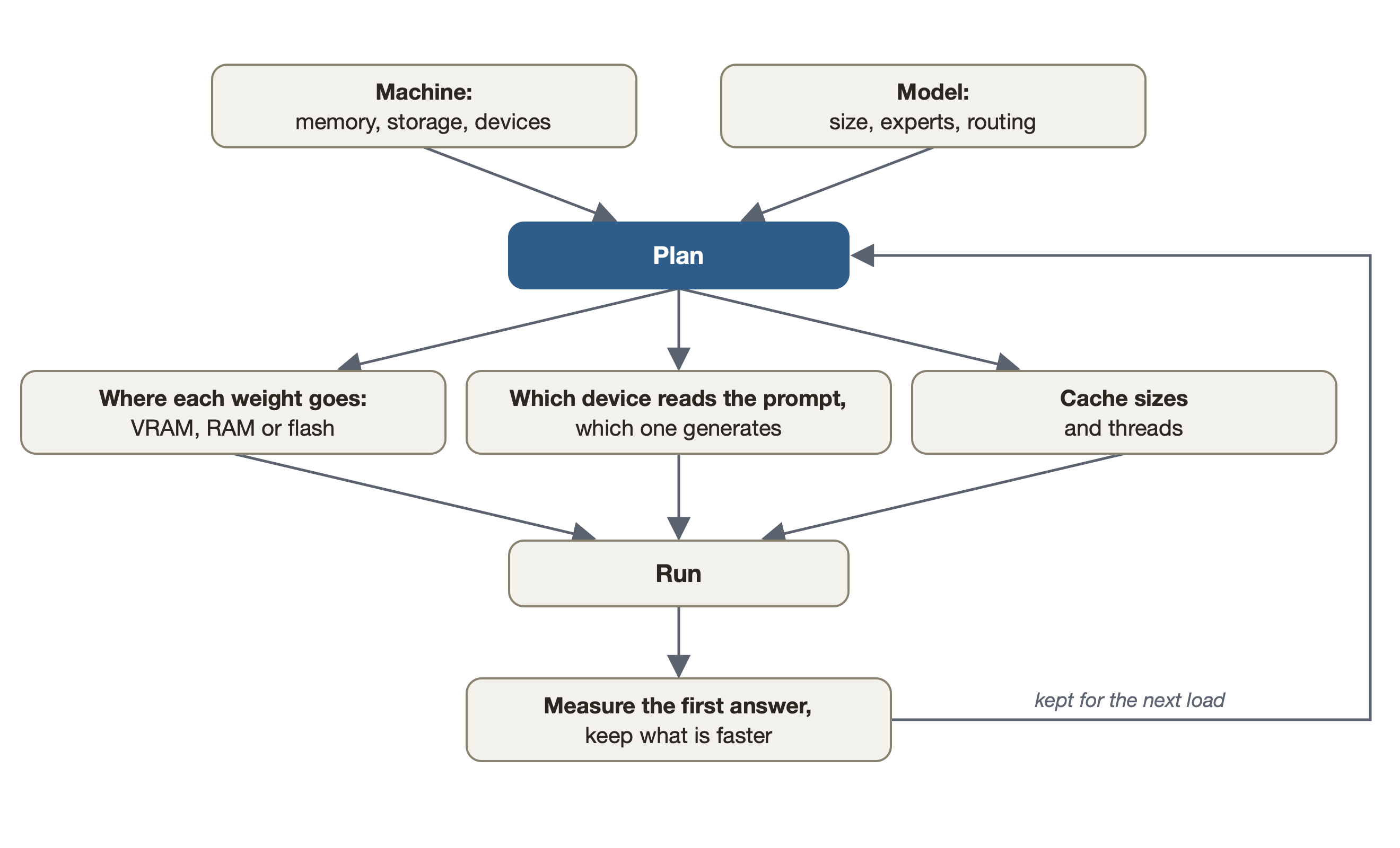
--automeasures the machine and the model and picks the cache size, the threads and which device does what. The Plan screen shows each choice and why. - Any MoE GGUF. Whatever llama.cpp loads, in any quantization. No per-model code.
- Every backend. CPU, Metal, CUDA, HIP, Vulkan, OpenCL and the Hexagon NPU. On a graphics card, the experts used most stay in its VRAM.
- Apps and a server. A desktop app, phone apps, and an OpenAI- and Anthropic-compatible server for coding agents.
- Sees images. Put a model's projector file (
mmproj) beside it and the server reads images on every API; the CLI with--mmprojand--image. Any vision model llama.cpp's projector library knows, any quantization, every backend.
Performance
| Hardware | Memory | Model | On disk | Experts from | Decode tok/s |
|---|---|---|---|---|---|
| Android phone | 12 GB | DeepSeek V4 Flash 284B | 91 GB | flash | 1 |
| Qwen3.8-Flash-Next 125B | 80 GB | flash | 2-4 | ||
| Qwen3.6-35B-A3B | 21 GB | flash | 5-6 | ||
| iPhone | 12 GB | Qwen3.6-35B-A3B | 21 GB | flash | 6 |
| Apple-silicon laptop | 16 GB | Qwen3.8-Flash-Next 125B | 76 GB | flash | 7-9 |
| Qwen3.6-35B-A3B | 21 GB | flash | 18-24 | ||
| Windows laptop | 16 GB | Qwen3.6-35B-A3B | 21 GB | flash | 5 |
| Desktop GPU (NVIDIA) | 12 GB + 128 GB RAM | Qwen3.8-Flash-Next 125B | 84 GB | RAM, GPU cache | 16-17 |
| Desktop GPU (NVIDIA) | 16 GB + 32 GB RAM | Qwen3.8-Flash-Next 125B | 66 GB | flash, GPU cache | 19-21 |
| Desktop GPU (NVIDIA) | 24 GB + 96 GB RAM | Qwen3.8-Flash-Next 125B | 66 GB | RAM, GPU cache | 70 |
| Qwen3.6-35B-A3B | 21 GB | GPU | 217 | ||
| Desktop GPU (NVIDIA) | 24 GB + 62 GB RAM | Qwen3.6-35B-A3B | 21 GB | GPU | 154 |
| 12 GB of it free | Qwen3.6-35B-A3B | 21 GB | RAM, GPU cache | 59-67 | |
| Gemma 4 26B-A4B | 17 GB | GPU | 114 | ||
| Laguna XS 2.1 33B | 20 GB | GPU | 93-94 | ||
| Desktop GPU (NVIDIA) | 8 GB + 125 GB RAM | Qwen3.6-35B-A3B | 21 GB | RAM, GPU | 32-33 |
| Datacenter GPU (AMD, ROCm) | 192 GB | Qwen3.8-Flash-Next 125B | 66 GB | GPU | 53 |
A range is the spread across runs. Method and every run:
docs/benchmarks.md. To add your machine, run
scripts/bench-report.sh model.gguf and open a
benchmark report.
Install
From the latest release:
- macOS (Apple silicon): open the
.dmgand drag the app to Applications. It is not notarised yet; the dmg's README.txt has the one step for the first start. - Windows: run the
-setup.exe. No administrator rights. - Linux: make the
.AppImageexecutable and run it. The window needs WebKitGTK 4.1;--serverruns the server alone. - Android: install
app-dev-release.apk. Each release installs over the previous one. - iOS: build it with Xcode from examples/ios. Experimental.
Open the app and pick a model under Models. An NVIDIA or AMD card gets its backend from Settings (docs/desktop-app.md).
Command-line tools only (bmoe-cli, bmoe-server):
curl -fsSL https://github.com/Helldez/BigMoeOnEdge/releases/latest/download/install.sh | shirm https://github.com/Helldez/BigMoeOnEdge/releases/latest/download/install.ps1 | iexUse
bmoe-cli -m model.gguf --auto -p "Explain MoE routing."   # plan and run
bmoe-cli -m model.gguf --plan                              # print the plan
bmoe-server -m model.gguf -c 32768                         # the server and its web UI, port 8765
The server speaks the OpenAI API (/v1/chat/completions, /v1/responses) and the Anthropic one
(/v1/messages), with streaming, tool calls and reasoning. Add --host 0.0.0.0 --api-key KEY to
serve other machines. Reference: docs/server-api.md.
On a machine that stays on, register it as a service of your login instead: it starts with the machine, comes back with its model, and reloads it when a request finds none loaded (running as a service).
bmoe-server service install --host 0.0.0.0 -m model.gguf -c 65536   # systemd, launchd or Task Scheduler
bmoe-server service status
from openai import OpenAI
client = OpenAI(base_url="http://127.0.0.1:8765/v1", api_key="local")
reply = client.chat.completions.create(model="local", messages=[{"role": "user", "content": "Hello"}])
print(reply.choices[0].message.content)Coding agents need a large context: a few times their first request. 32768 is enough for opencode, 65536 for Claude Code (sizing the context).
// opencode, ~/.config/opencode/opencode.json
{
  "$schema": "https://opencode.ai/config.json",
  "provider": {
    "bmoe": {
      "npm": "@ai-sdk/openai-compatible",
      "options": { "baseURL": "http://127.0.0.1:8765/v1", "apiKey": "local" },
      "models": { "<model id from /v1/models>": { "limit": { "context": 32768, "output": 8192 } } }
    }
  },
  "model": "bmoe/<model id from /v1/models>"
}
# Claude Code
export ANTHROPIC_BASE_URL=http://127.0.0.1:8765
export ANTHROPIC_API_KEY=local
export ANTHROPIC_MODEL=<model id from /v1/models>
export ANTHROPIC_DEFAULT_HAIKU_MODEL=$ANTHROPIC_MODEL
export CLAUDE_CODE_MAX_CONTEXT_TOKENS=65536
claude# Codex CLI, ~/.codex/config.toml
model = "<model id from /v1/models>"
model_provider = "bmoe"
[model_providers.bmoe]
name = "bmoe"
base_url = "http://127.0.0.1:8765/v1"
wire_api = "responses"
env_key = "BMOE_API_KEY" # export BMOE_API_KEY=localUnder Connect apps, the app writes the settings for opencode and Codex CLI and shows the ones for Claude Code.
The agent. The desktop app has its own agent: it works in a folder you choose, reads and edits files and runs commands, and asks before it changes anything unless you allow it. A conversation can also be run by OpenCode, Claude Code, Codex or Pi. See docs/agent.md.
How it works
For each token, the router of each layer picks a few experts. The engine looks for them in up to three tiers, each a cache for the one below:
- VRAM, on a graphics card: the weights every token reads, and the experts used most.
- RAM: a cache of experts. Without a graphics card, also the weights every token reads.
- Flash (the drive): the whole model.
An expert missing from VRAM is copied from RAM; one missing from RAM is read from flash. On a phone or an Apple-silicon Mac the GPU uses the same RAM as the CPU, so there are two tiers. A model that fits the card runs on it whole. Streaming only reads, so it does not wear the drive.
The engine uses llama.cpp's public API, so its quantizations, tokenizers and chat templates work unchanged, and an upgrade is a submodule bump. Which tensors are experts is read from the file (docs/which-models-stream.md). Design: docs/architecture.md.
The planner
The planner reads the model's header and measures the machine: memory, storage speed, each CPU, GPU and NPU. Its rules name no device or platform, so a phone and a desktop get different plans from the same code. Values you set yourself are kept. See docs/hardware-planning.md.
Platforms
| Android | macOS | Windows | Linux | iOS | |
|---|---|---|---|---|---|
| Engine and CLI | arm64 | Apple silicon | x86_64, arm64 | x86_64, aarch64 | arm64 (in the app) |
| App | native app | desktop app | desktop app | desktop app | native app, built from source |
| Accelerators | Hexagon NPU, Vulkan, OpenCL | Metal | Vulkan, CUDA, OpenCL (arm64), Hexagon NPU (arm64) | Vulkan, CUDA, HIP | Metal |
| Tested on | 12 GB phone | 16 GB laptop | 16 GB laptop | rented 12-24 GB NVIDIA and 192 GB AMD cards | 12 GB iPhone |
Details: docs/platforms.md.
How it compares
| BigMoeOnEdge | Strata | ds4 | colibri | KTransformers | |
|---|---|---|---|---|---|
| Android phone (NPU too) | ✅ | ❌ | ❌ | ❌ | ❌ |
| iPhone | ✅ | ❌ | ❌ | ❌ | ❌ |
| Mac | ✅ | ✅ | ✅ | ✅ | ❌ |
| Windows / Linux, CPU only | ✅ | ❌ | Linux, for debugging | ✅ | ❌ |
| NVIDIA | ✅ | ✅ | ✅ | ✅ | ✅ |
| AMD (ROCm) | ✅ (MI300X too) | Radeon RX and Strix Halo | Strix Halo and RDNA | Vulkan | ✅ |
| Any MoE model in GGUF | ✅ | few models | few models | its own format | few models |
| Configures itself | ✅ --auto | picks the model by memory | expert-cache budget | coli tune | ❌ |
Speeds and sources: docs/comparison.md.
Build from source
git clone --recursive https://github.com/Helldez/BigMoeOnEdge.git
cd BigMoeOnEdge
cd ui && npm ci && npm run build && cd ..
scripts/build-host.sh
build/bin/bmoe-server --open
A llama.cpp backend is a CMake flag passed through: scripts/build-host.sh -DGGML_VULKAN=ON (or
-DGGML_CUDA=ON). Tests: cd build && ctest --output-on-failure (needs python3 with gguf). Android:
scripts/build-android.ps1, then the APK in examples/android. More:
CONTRIBUTING.md.
Documentation
docs/. Start with hardware-planning.md, settings.md, server-api.md and limitations.md.
Prior art
AirLLM, Apple's LLM in a flash, FlexGen, PowerInfer, EdgeMoE and flash-moe, a Metal engine that streams a 397B MoE from SSD on Apple silicon.
License
Apache-2.0 (LICENSE). The binaries and apps also carry llama.cpp, ggml and other libraries under MIT, BSD, Apache-2.0 and SIL OFL 1.1: THIRD_PARTY_LICENSES.