CSGOTrading: Multi-Agent LLM Framework for CS2 Market Trading



An intelligent multi-agent system leveraging Large Language Models for automated Counter-Strike 2 market analysis and trading decisions
📋 Abstract
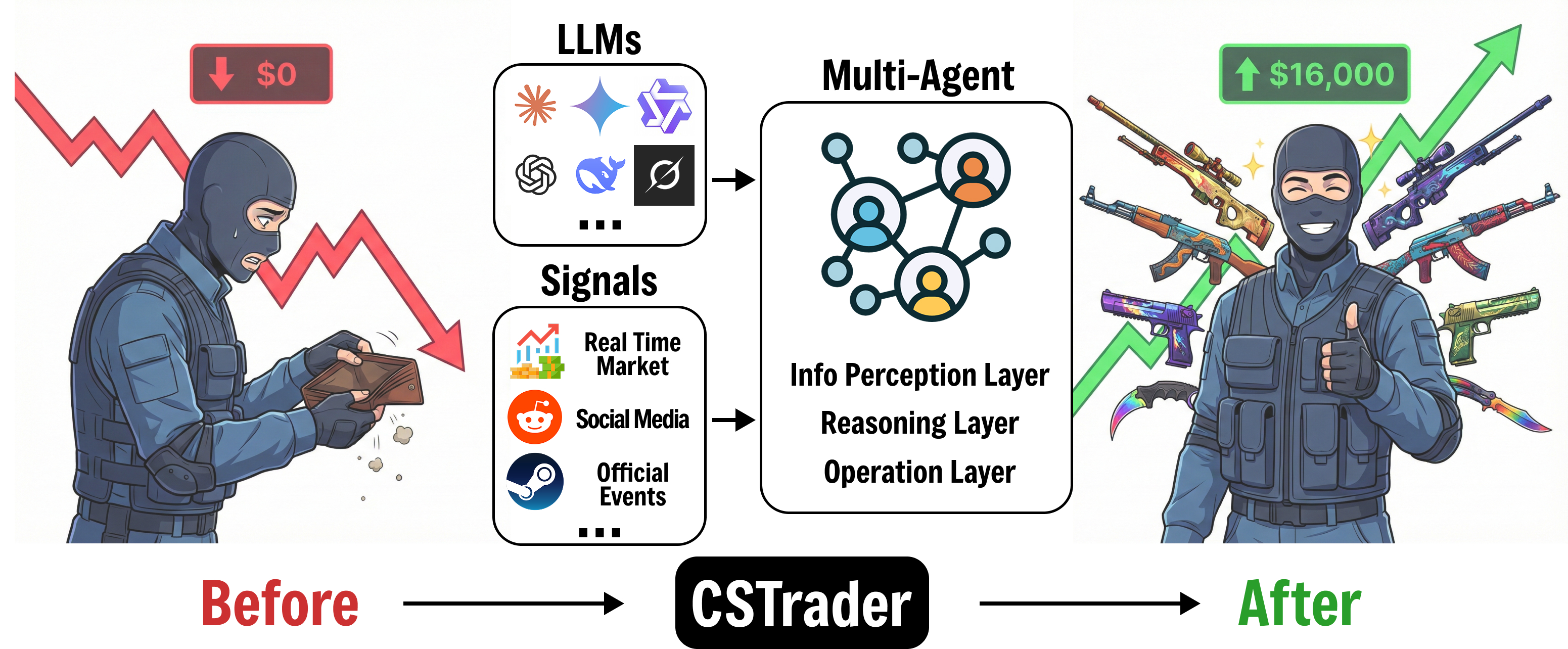
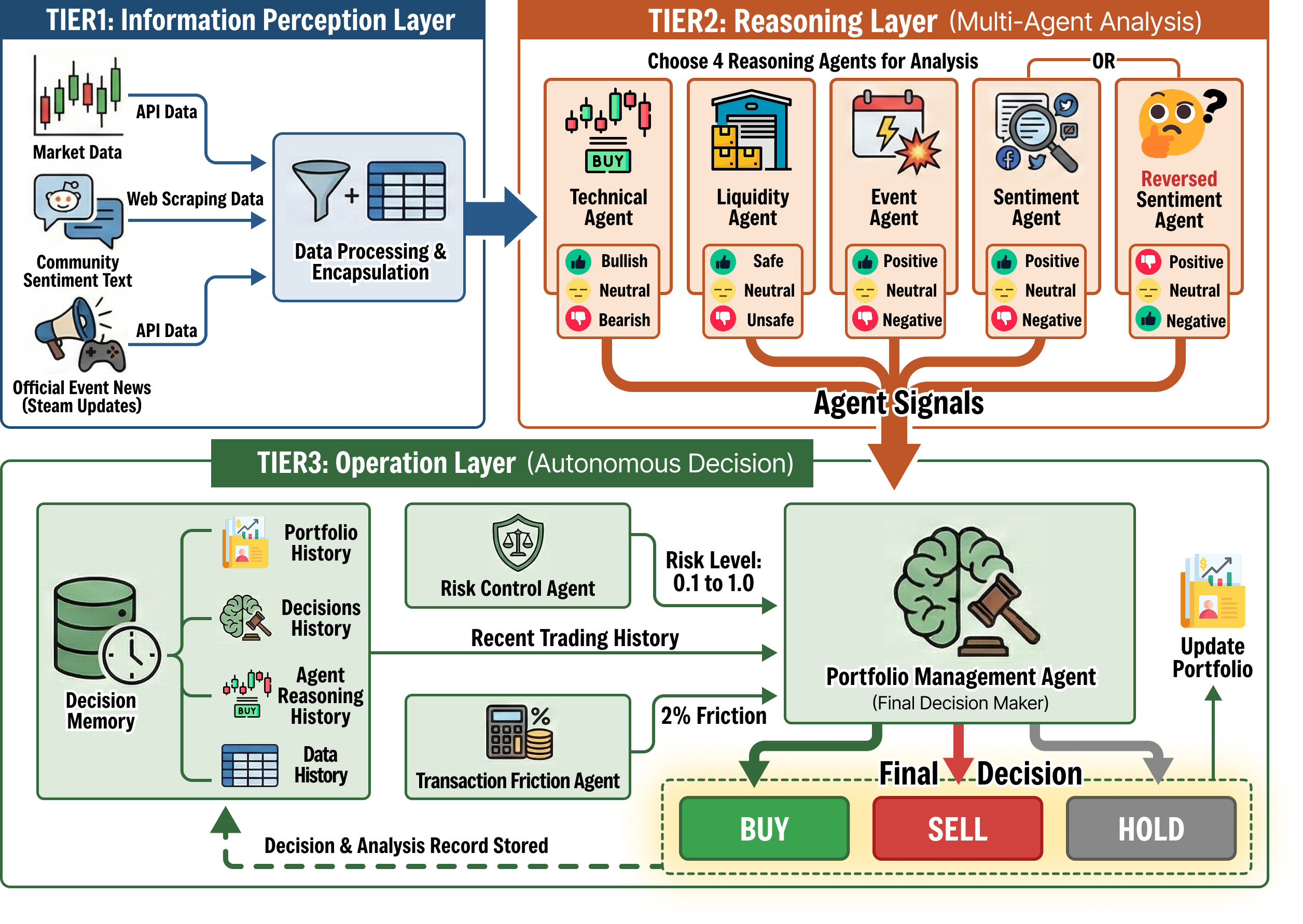
CSGOTrading presents a novel multi-agent framework that applies Large Language Models (LLMs) to the domain of virtual item trading in Counter-Strike 2 (CS2) markets. Our system employs a hierarchical agent architecture built on LangGraph, incorporating specialized analyst agents (technical, sentiment, liquidity, and event-driven) coordinated by a meta-planner agent. The portfolio manager agent synthesizes multi-modal market signals to generate optimal trading decisions while accounting for transaction costs and risk constraints.
Key contributions:
- Multi-Agent Architecture: Modular design with specialized analyst agents for different market aspects
- Dynamic Agent Selection: Meta-planner agent adaptively selects relevant analysts based on market conditions
- Multi-Source Data Integration: Seamless aggregation of CS2 market data, Steam news, and Reddit sentiment
- Configurable Workflow: Support for both agentic workflows and direct LLM analysis modes
- Risk-Aware Portfolio Management: Sophisticated position sizing with transaction cost modeling
🎯 System Concept
🏗️ System Architecture
Agent Specifications
| Agent | Function | Input | Output |
|---|---|---|---|
| Planner | Selects relevant analysts based on market context | Ticker, available analysts | List of selected analysts |
| Technical Analyst | Analyzes price patterns and trends | Historical price data | Technical signals (BUY/SELL/HOLD) |
| Sentiment Analyst | Processes community sentiment | Reddit posts, Steam news | Sentiment score and direction |
| Liquidity Analyst | Evaluates market depth and volume | Order book, trading volume | Liquidity assessment |
| Event Analyst | Identifies market-moving events | News, updates | Event impact analysis |
| Portfolio Manager | Executes risk-aware trading decisions | Analyst signals, portfolio state | Trading actions with position sizes |
✨ Key Features
🤖 Multi-Modal Analysis
- Technical Analysis: Price action, trend detection, support/resistance levels
- Sentiment Analysis: NLP-based sentiment extraction from Reddit and Steam communities
- Liquidity Analysis: Market depth and volume-based assessments
- Event-Driven Analysis: Impact evaluation of game updates and news
🧠 Intelligent Agent Coordination
- Meta-Planner: Dynamically selects optimal analyst combination for each ticker
- Modular Design: Easily extensible agent registry system
- Flexible Workflows: Support for both agentic and direct LLM modes
💼 Advanced Portfolio Management
- Risk Control: Maximum position ratio constraints and drawdown protection
- Transaction Costs: Realistic modeling of 2% trading fees
- Position Sizing: Intelligent allocation across multiple assets
- State Persistence: Complete portfolio history tracking in database
🔧 Production-Ready Infrastructure
- Database Support: SQLite for local development
- Multi-Provider LLM: OpenAI, Anthropic, DeepSeek, Ollama, etc.
- Extensive Configuration: 50+ pre-configured experiment setups
- Comprehensive Logging: Detailed agent execution and decision tracking
📦 Installation
Prerequisites
- Python 3.8 or higher
- pip package manager
- (Optional) SQLite for local database
Setup
- Clone the repository
git clone https://github.com/IatomicreactorI/CSGOTrading.git
cd CSGOTrading- Create virtual environment
python -m venv venv
source venv/bin/activate # On Windows: venv\Scripts\activate- Install dependencies
pip install -r requirements.txt- Configure environment variables
cp .env.example .env
# Edit .env and add your API keys:
# - OPENAI_API_KEY (for OpenAI models)
# - ANTHROPIC_API_KEY (for Claude models)
# - DEEPSEEK_API_KEY (for DeepSeek models)- Initialize database
python database/cs2_sqlite_setup.py- Fetch historical data
Before running experiments, you can pre-fetch historical data to avoid API rate limits during backtesting:
Fetch Reddit data (past 1 year):
# From project root directory
python -m apis.reddit.fetch_reddit_data
This script fetches Reddit posts from the past year and saves them to apis/reddit/reddit_data.csv. No parameters required.
Fetch Steam news data:
# From project root directory
python -m apis.steam.fetch_steam_data \
  --config config/Direct-cd.yaml \
  --start-date 2025-09-25 \
  --end-date 2025-11-15 \
  --limit 15
Parameters:
--config: Path to config YAML file (must containexp_nameandtickers)--start-date: Start date in YYYY-MM-DD format (required)--end-date: End date in YYYY-MM-DD format, inclusive (required)--limit: Maximum news items per ticker per day (default: 15, optional)--output: Output CSV file path (default:<script_dir>/steam_data.csv, optional)
Fetch CS2 market data:
# From project root directory
python -m apis.cs2market.fetch_cs2_data
This script fetches current price data for candidate items from Steam Community Market and saves to apis/cs2market/cs2_data.csv. No parameters required. The script will automatically retry failed items up to 3 times.
Note: These fetch scripts can be run anytime to update the historical data. The main experiment workflow will use these CSV files to avoid making API calls during backtesting.
🚀 Quick Start
Basic Usage
Run a single-day experiment with default configuration:
python run.py --config TS-ds.yaml --start-date 2025-09-25 --end-date 2025-09-25Batch Experiments
Run multi-day backtesting:
python run.py \
  --config TS-ds.yaml \
  --start-date 2025-09-25 \
  --end-date 2025-10-27
Configuration Options
The system supports multiple workflow configurations:
- Direct: Direct LLM analysis without analyst agents
- T: Technical analyst only
- TS: Technical + Sentiment analysts
- TSL: Technical + Sentiment + Liquidity
- TSLE: All analysts (Technical + Sentiment + Liquidity + Event)
- TSrL: Technical + Reverse Sentiment + Liquidity
Each configuration can be combined with different LLM providers:
-ds: DeepSeek-gm: Gemini-gt: GPT-cd: Claude-km: Kimi-qw: Qwen
Example: TSLE-cd.yaml uses all analysts with Claude 3.5 Sonnet.
View Results
# View all information of specified experiment
python view.py TS-ds

# View portfolios
python view.py TS-ds portfolios

# View latest positions
python view.py TS-ds positions

# View daily portfolios and export CSV
python view.py TS-ds daily

# View portfolios of specified date
python view.py TS-ds daily 2025-09-26

# Export thinking process JSON file
python view.py TS-ds thinking

# View data summary
python view.py TS-ds summary

# List all experiments
python view.py list
Clear Results
# Clear experiment data
python clear.py --config-name TS-ds
📊 Configuration
Workflow Configuration (config/)
exp_name: "TS-ds"  # Experiment name
cashflow: 10000    # Initial capital
tickers:           # Assets to trade
  - "AK-47 | Redline (Field-Tested)"
  - "AWP | Asiimov (Field-Tested)"

llm:               # LLM configuration
  provider: "deepseek"
  model: "deepseek-chat"

planner_mode: true        # Enable meta-planner
workflow_analysts:        # Available analysts
  - technical
  - sentiment

enable_transaction_fee: true  # Include trading costs
Database Configuration
Local SQLite (default):
python run.py --config TS-ds.yaml🗂️ Project Structure
CSGOTrading/
├── agents/                  # Agent implementations
│   ├── planner.py          # Meta-planner agent
│   ├── portfolio_manager.py # Portfolio management
│   ├── registry.py         # Agent registry
│   └── analysts/           # Specialized analysts
│       ├── technical.py
│       ├── sentiment.py
│       ├── sentiment_reverse.py
│       ├── liquidity.py
│       └── event.py
├── apis/                   # Data source integrations
│   ├── cs2market/          # CS2 market data
│   ├── steam/              # Steam news API
│   ├── reddit/             # Reddit sentiment API
│   ├── router.py           # API router
│   └── common_model.py     # Common data models
├── database/               # Database layer
│   ├── interface.py        # Abstract interface
│   ├── cs2_sqlite_helper.py
│   └── cs2_sqlite_setup.py
├── graph/                  # LangGraph workflow
│   ├── workflow.py         # Main workflow
│   ├── schema.py           # State definitions
│   └── constants.py
├── llm/                    # LLM integration
│   ├── inference.py        # LLM calls
│   ├── provider.py         # Provider configs
│   └── prompt.py           # Prompt templates
├── config/                 # Experiment configurations
├── util/                   # Utilities
│   ├── config.py
│   ├── cs2_db_helper.py
│   └── logger.py
├── figs/                   # Figures and images
├── run.py                  # Main execution script
├── view.py                 # Results visualization
├── clear.py                # Data cleanup
├── requirements.txt
├── .env.example            # Environment variables template
├── LICENSE
└── README.md
🔬 Advanced Usage
Adding Custom Analysts
- Create analyst implementation in
agents/analysts/:
from graph.constants import AgentKey
from llm.inference import agent_call

def custom_analyst(ticker: str, llm_config, analyst_signal):
    # Your analysis logic here
    return {
        "action": "BUY",
        "confidence": 0.8,
        "justification": "Analysis reasoning"
}- Register in
agents/registry.py:
AgentRegistry.register(
    AgentKey.CUSTOM,
    custom_analyst,
    "Custom analyst description"
)- Add to workflow configuration:
workflow_analysts:
  - technical
  - sentiment
  - custom  # Your new analyst
Custom LLM Providers
Add provider configuration in llm/provider.py:
@dataclass
class ProviderConfig:
    name: str
    model_class: Any
    requires_api_key: bool = True
    env_key: str = "CUSTOM_API_KEY"
    base_url: str = None

# Register provider
Provider.add_provider("custom", ProviderConfig(...))
🤝 Contributing
We welcome contributions from the community! Please follow these guidelines:
- Fork the repository and create a feature branch
- Follow PEP 8 coding standards
- Add tests for new functionality
- Update documentation for API changes
- Submit a pull request with a clear description
Development Setup
# Install development dependencies
pip install -r requirements-dev.txt

# Run tests
pytest tests/

# Run linting
flake8 .
black .
📄 License
This project is licensed under the MIT License - see the LICENSE file for details.
🙏 Acknowledgments
- LangChain & LangGraph: Foundation for agent orchestration
- OpenAI, Anthropic, DeepSeek: LLM providers
- CS2 Community: Market data and insights
- Contributors: All community contributors
🗺️ Roadmap
Upcoming Features
- Reinforcement Learning Integration: Train agents with RL for adaptive strategies
- Real-time Trading: Live market integration and execution
- Advanced Risk Models: VaR, CVaR, and Kelly criterion
- Multi-Asset Correlation: Cross-asset analysis and hedging
- Web Dashboard: Interactive visualization and monitoring
- Distributed Execution: Multi-process and cloud deployment
- More Data Sources: Integration with additional market APIs
Version History
- v0.1.0 (2026-01-05): Initial release with core multi-agent framework
- v0.0.1 (2025-12): Private beta testing
⭐ Star this repository if you find it useful! ⭐
Made with ❤️ by the CSGOTrading Team