🏗️ Azure Landing Zone Lab




🎯 Overview
Azure Landing Zone Lab is a Terraform-first sandbox for building and understanding an enterprise Azure foundation. It brings together hub-spoke networking, identity, governance, security, monitoring, and optional workload services so you can learn the moving parts of a landing zone in a real deployable environment.
- Terraform-first: every resource is defined as code, with reusable modules and environment-driven configuration.
- CAF-aligned architecture: the lab follows Microsoft Cloud Adoption Framework landing zone patterns for platform, governance, and operations.
- Real network and security flows: hub-spoke VNets, Azure Firewall, NSGs, private endpoints, routing, diagnostics, and optional VPN are wired together for hands-on testing.
- Flexible lab profiles: start small, then enable PaaS, Application Gateway, AKS, hybrid connectivity, and observability features as needed.
| What you can practice | How this lab helps |
|---|---|
| Azure learning | Explore networking, security, identity, monitoring, and infrastructure as code in one environment. |
| Architecture testing | Validate hub-spoke, private endpoint, load balancing, firewall, and routing decisions before production. |
| Certification prep | Build hands-on evidence for AZ-104, AZ-305, AZ-700, and AZ-400 study paths. |
| Proof of concept work | Toggle features in terraform.tfvars, run a plan, and compare deployment profiles quickly. |
🏛️ Architecture Diagram
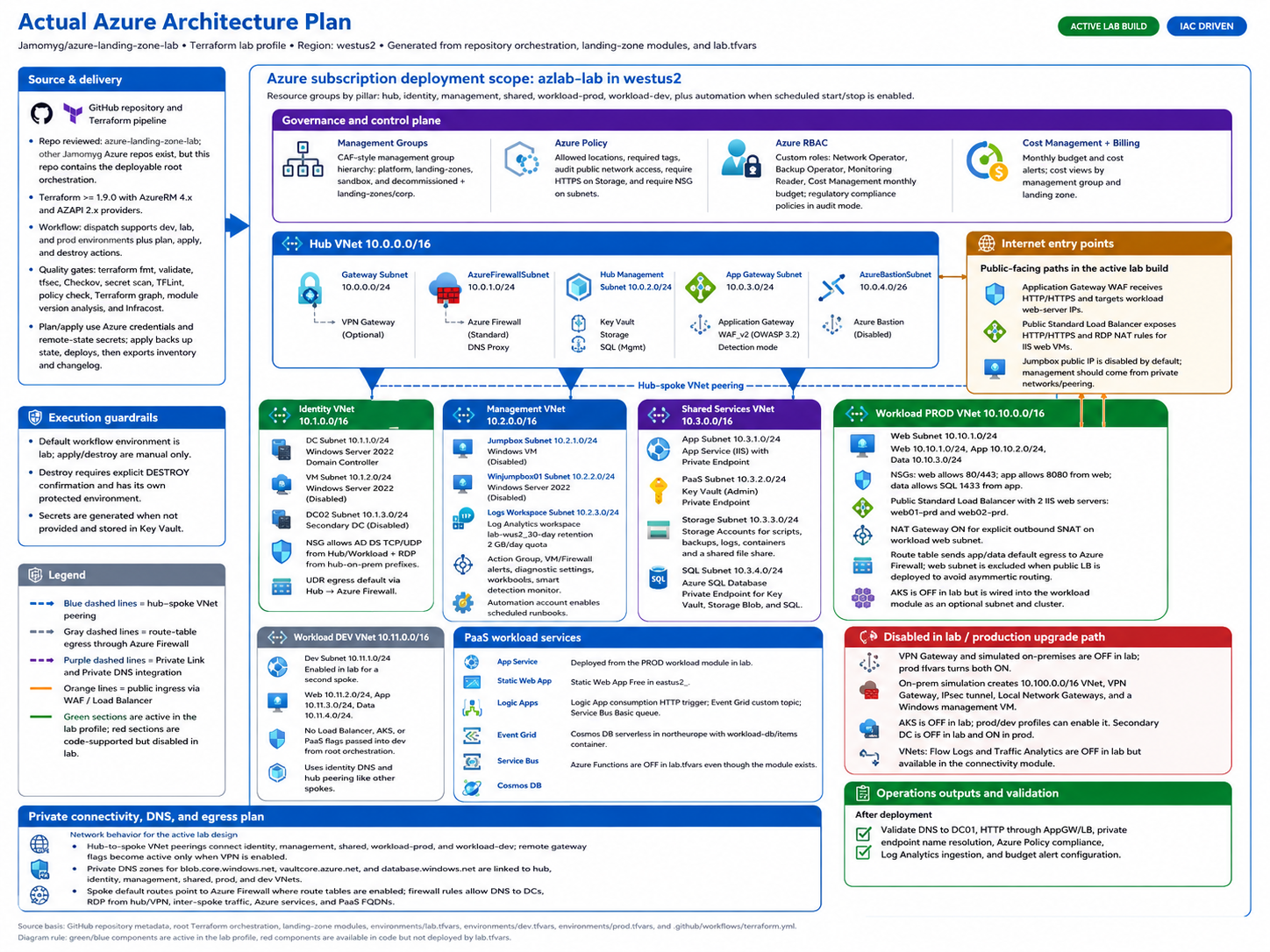
Architecture at a Glance
- Topology: A hub VNet connects identity, management, shared services, workload, dev, and optional on-premises spokes.
- Traffic control: Azure Firewall, route tables, NSGs, NAT Gateway, Load Balancer, and Application Gateway model realistic ingress and egress paths.
- Private access: Private DNS and Private Link can keep Key Vault, Storage, and SQL access on the Azure backbone.
- Operations: Log Analytics, diagnostics, flow logs, alerts, and budget controls show how the landing zone is monitored after deployment.
🎛️ Master Control Panel (feature toggles)
At the top of terraform.tfvars there is a MASTER CONTROL PANEL section that contains all the main deploy_* / enable_* switches in one place. Flip those values to quickly change what gets deployed, then run terraform plan and terraform apply.
📋 Table of Contents
- Overview
- Architecture Diagram
- Quick Start
- Deployment Profiles
- Lab Scenarios
- What Gets Deployed
- Network Add-Ons & Observability
- Network Topology
- Traffic Flow
- CI/CD Pipeline
- Configuration Options
- Testing the Environment
- Live Provisioning Validation
- Security Features
- Cost Estimation
- Troubleshooting
- License
🔌 Network Add-Ons & Observability
Enable these when you need tighter control or visibility. Check prerequisites to avoid failed plans:
| Flag | What it adds | Prerequisites | Cost |
|---|---|---|---|
deploy_nat_gateway | Fixed outbound IP for workload web subnet | deploy_workload_prod = true | ~$4-5/mo + data |
deploy_private_dns_zones | Central Private DNS for blob, Key Vault, SQL | Hub RG present | Minimal |
deploy_private_endpoints | Private Link for Key Vault, Storage, SQL | deploy_private_dns_zones = true | None |
deploy_application_security_groups | ASGs for web/app/data tiers | deploy_workload_prod = true | None |
enable_vnet_flow_logs | VNet flow logs to storage (replaces NSG flow logs) | deploy_storage = true, Network Watcher | Storage ingest |
enable_traffic_analytics | Traffic flow visualization | enable_vnet_flow_logs, deploy_log_analytics, deploy_storage | Log Analytics ingest |
create_network_watcher | Creates NetworkWatcherRG if missing | Set true only for new subscriptions | None |
Note: VNet Flow Logs are the modern replacement for NSG Flow Logs (retired June 2025). Uses AzAPI provider.
☁️ PaaS Services (Cloud-Native Workloads)
All PaaS services are optional and controlled via deployment flags:
| Service | Flag | Tier | Monthly Cost |
|---|---|---|---|
| 🔷 Azure Functions | deploy_functions | Y1 Consumption | FREE |
| 🌐 Static Web Apps | deploy_static_web_app | Free | FREE |
| ⚡ Logic Apps | deploy_logic_apps | Consumption | ~$0 (pay per run) |
| 📬 Event Grid | deploy_event_grid | Standard | FREE (100k ops) |
| 🚌 Service Bus | deploy_service_bus | Basic | ~$0.05/month |
| 🌍 App Service | deploy_app_service | F1 Free | FREE |
| 🗃️ Cosmos DB | deploy_cosmos_db | Serverless | ~$0-5/month |
Note:
deploy_container_appsexists as a placeholder flag but is not currently wired to a module.
🎯 Use Cases
| Use Case | Description |
|---|---|
| 🎓 Learning | Practice Azure networking, security, load balancing, and IaC |
| 🧪 Testing | Validate architectures before production deployment |
| 📚 Training | Teach teams about Azure Landing Zones and CAF |
| 🔬 PoC | Quickly spin up proof-of-concept environments |
| 🏆 Certification Prep | Hands-on practice for AZ-104, AZ-305, AZ-700 exams |
⚡ Deployment Profiles
| Profile | Components | Deploy Time | Est. Monthly Cost |
|---|---|---|---|
| Minimal | Core VNets + Identity + Management (no Firewall) | ~8 min | ~$100-150 |
| Standard | Minimal + Firewall + Load Balancer + IIS | ~15 min | ~$450-500 |
| Standard + PaaS | Standard + All PaaS Services | ~25 min | ~$500-550 |
| Full Hybrid | Standard + VPN + On-Prem Simulation | ~45 min | ~$650-700 |
| Enterprise | Full Hybrid + AKS + App Gateway | ~55 min | ~$850-950 |
Current Default Config (
terraform.tfvars): Standard + PaaS + Network Add-ons + Dev VNet (VPN/AKS/Flow Logs/Backup off; ~$500-600/month)
🧪 Lab Scenarios
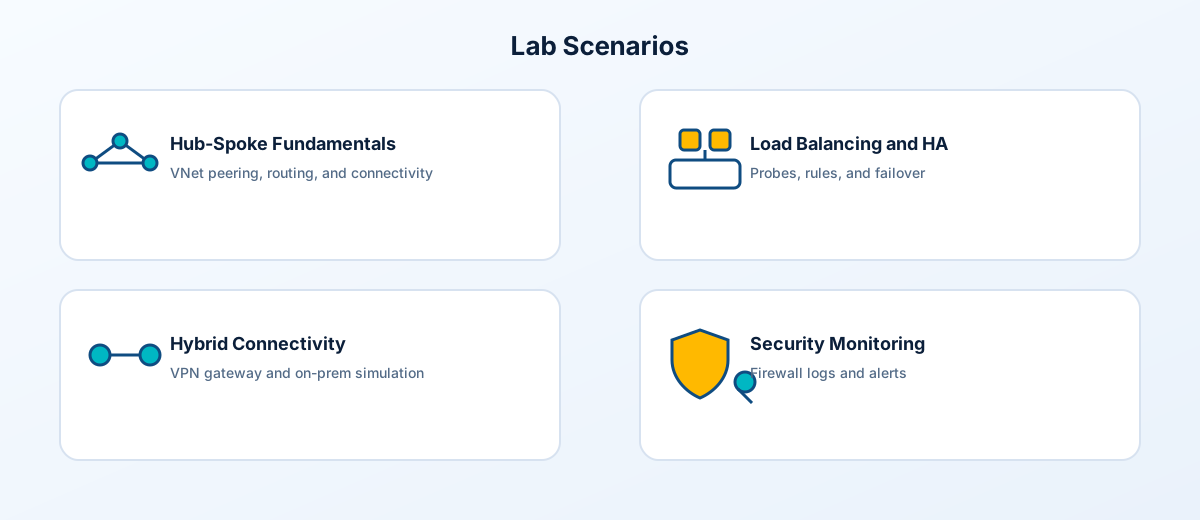
This landing zone supports multiple hands-on lab scenarios for learning and testing. Each scenario builds on the core infrastructure.
Scenario 1: Hub-Spoke Network Fundamentals
Objective: Understand Azure networking concepts and hub-spoke topology
| Task | Skills Practiced |
|---|---|
| Explore VNet peering connections | Virtual network peering, traffic flow |
| Test connectivity between spokes via hub | Route tables, UDRs |
| Analyze Azure Firewall logs | Network security, logging |
| Configure custom NSG rules | Network security groups |
# Deploy minimal infrastructure
deploy_firewall         = true
deploy_vpn_gateway      = false
deploy_onprem_simulation = false
Scenario 2: Load Balancing & High Availability
Objective: Learn Azure Load Balancer concepts and IIS web server deployment
| Task | Skills Practiced |
|---|---|
| Test load balancer distribution | 5-tuple hash, health probes |
| Simulate VM failure (stop a VM) | Backend pool health, failover |
| Configure custom health probes | HTTP probes, intervals |
| Access VMs via NAT rules | Inbound NAT, port mapping |
# Test load balancing
curl http://<lb_frontend_ip>  # Observe round-robin between web01-prd and web02-prd

# RDP to individual servers
mstsc /v:<lb_frontend_ip>:3389  # web01
mstsc /v:<lb_frontend_ip>:3390  # web02
Scenario 3: Hybrid Connectivity (VPN)
Objective: Configure site-to-site VPN and hybrid networking
| Task | Skills Practiced |
|---|---|
| Establish VPN tunnel | IPsec, IKE configuration |
| Test on-prem to Azure connectivity | VPN troubleshooting |
| Configure BGP routing (optional) | Dynamic routing, ASN |
| Access Azure resources from "on-prem" | Hybrid network design |
# Enable hybrid scenario
deploy_vpn_gateway       = true
deploy_onprem_simulation = true
enable_bgp               = true  # Optional: Enable BGP routing
Scenario 4: Azure Firewall & Security
Objective: Implement network security controls
| Task | Skills Practiced |
|---|---|
| Create application rules | FQDN filtering, web categories |
| Configure network rules | IP-based filtering, protocols |
| Set up DNAT rules | Inbound traffic, port forwarding |
| Analyze threat intelligence logs | Security monitoring |
# From jumpbox, test firewall rules
Test-NetConnection -ComputerName google.com -Port 443
Invoke-WebRequest -Uri https://ifconfig.me  # Check SNAT IP
Scenario 5: Containers with AKS
Objective: Deploy and manage Kubernetes workloads
| Task | Skills Practiced |
|---|---|
| Connect to AKS cluster | kubectl, Azure CLI |
| Deploy sample application | Kubernetes deployments |
| Configure ingress | Service exposure, networking |
| Integrate with Log Analytics | Container monitoring |
# Enable AKS
deploy_aks = true

# Connect to cluster
az aks get-credentials --resource-group rg-workload-prod-lab-<location_short> --name aks-prod-lab-<location_short>
kubectl get nodes
Scenario 6: PaaS Services & Private Endpoints
Objective: Work with Azure PaaS services securely
| Task | Skills Practiced |
|---|---|
| Access Key Vault secrets | Secret management, RBAC |
| Connect to SQL via private endpoint | Private Link, DNS |
| Upload files to Storage Account | Blob storage, access tiers |
| Test Azure Functions | Serverless compute |
# From jumpbox, access Key Vault
$secret = Get-AzKeyVaultSecret -VaultName "kv-azlab-xxxx" -Name "admin-password"

# Test SQL connectivity
Test-NetConnection -ComputerName "sql-xxxx.database.windows.net" -Port 1433
Scenario 7: Monitoring & Alerting
Objective: Implement Azure Monitor for infrastructure
| Task | Skills Practiced |
|---|---|
| Review Log Analytics queries | KQL, log analysis |
| Create custom alerts | Metric alerts, action groups |
| Configure diagnostic settings | Resource logging |
| Build monitoring dashboards | Azure Dashboards, workbooks |
// Sample KQL query for VM performance
Perf
| where ObjectName == "Processor" and CounterName == "% Processor Time"
| summarize avg(CounterValue) by Computer, bin(TimeGenerated, 5m)
| render timechart
Scenario 8: Application Gateway & WAF
Objective: Implement Layer 7 load balancing with WAF
| Task | Skills Practiced |
|---|---|
| Configure backend pools | Health probes, routing |
| Test WAF rules | OWASP protection, custom rules |
| Set up URL path-based routing | Multi-site hosting |
| Analyze WAF logs | Security investigation |
# Enable Application Gateway
deploy_application_gateway = true
appgw_waf_mode             = "Detection"  # or "Prevention"
📊 Lab Progress Tracker
Use this checklist to track your learning progress:
-
Core Infrastructure
- Deployed hub-spoke topology
- Verified VNet peering connectivity
- Tested Azure Firewall egress
- Accessed jumpbox via RDP/Bastion
-
Load Balancing
- Tested HTTP load balancing
- Verified health probe behavior
- Used NAT rules for RDP access
- Stopped a VM and verified failover
-
Security
- Reviewed NSG rules
- Created custom firewall rules
- Accessed Key Vault secrets
- Analyzed security logs
-
Hybrid Networking (Optional)
- Established VPN tunnel
- Tested cross-premises connectivity
- Configured BGP (if enabled)
-
Containers (Optional)
- Deployed AKS cluster
- Connected with kubectl
- Deployed sample workload
-
Monitoring
- Queried Log Analytics
- Created custom alert
- Built monitoring dashboard
🔄 Traffic Flow
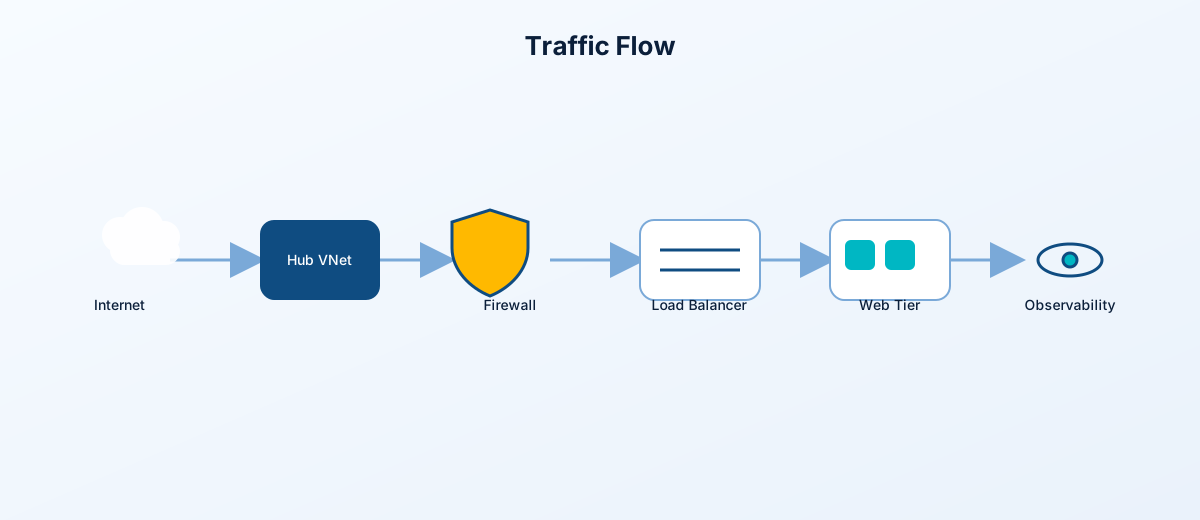
Network Traffic Patterns
┌─────────────────────────────────────────────────────────────────────────────────────────┐
│                                    TRAFFIC FLOWS                                         │
└─────────────────────────────────────────────────────────────────────────────────────────┘

  INTERNET                   INTERNET                    INTERNET
      │                          │                           │
      ▼                          ▼                           ▼
┌───────────┐            ┌───────────────┐            ┌───────────────┐
│   Azure   │            │    Public     │            │  Application  │
│ Firewall  │            │ Load Balancer │            │   Gateway     │
│  (SNAT)   │            │               │            │   (WAF)       │
└─────┬─────┘            └───────┬───────┘            └───────┬───────┘
      │                          │                           │
      ▼                          ▼                           ▼
┌───────────────┐        ┌───────────────┐            ┌───────────────┐
│ Spoke VNets   │        │  Web Servers  │            │  Web Servers  │
│ (Egress Only) │        │  (Direct LB)  │            │  (via AppGW)  │
└───────────────┘        └───────────────┘            └───────────────┘

Flow 1: Outbound         Flow 2: Inbound              Flow 3: WAF
(All Spokes)             (Load Balancer)              (App Gateway)
Flow Details
| Flow | Path | Use Case |
|---|---|---|
| Outbound (SNAT) | VM → Azure Firewall → Internet | All spoke VMs accessing internet |
| Load Balancer | Internet → Public LB → Web VMs | Direct HTTP/HTTPS to web tier |
| App Gateway | Internet → App GW (WAF) → Web VMs | WAF-protected web traffic |
| Spoke-to-Spoke | Spoke A → Hub Firewall → Spoke B | Cross-spoke communication |
| VPN Tunnel | On-Prem → VPN GW → Hub → Spokes | Hybrid connectivity |
Why Web Subnet Bypasses Firewall
When using a Public Load Balancer, the web subnet must have direct internet routing to avoid asymmetric routing:
| Scenario | Inbound Path | Outbound Path | Result |
|---|---|---|---|
| ❌ Web subnet with FW route | LB → VM | VM → Firewall → Internet | Broken (TCP fails) |
| ✅ Web subnet direct | LB → VM | VM → Internet | Works (symmetric) |
The configuration automatically excludes the web subnet from firewall routing when the public load balancer is enabled.
📦 What Gets Deployed
Resource Groups
| Resource Group | Purpose | Key Resources |
|---|---|---|
rg-hub-{env}-{location} | Hub networking | VNet, Azure Firewall*, VPN Gateway*, App Gateway* |
rg-identity-{env}-{location} | Identity services | VNet, Domain Controller (DC01), DC02* |
rg-management-{env}-{location} | Operations | VNet, Jumpbox VM, Log Analytics |
rg-shared-{env}-{location} | Shared services | VNet, Key Vault, Storage Account, SQL Database* |
rg-workload-prod-{env}-{location} | Production workload | VNet, Load Balancer*, Web Servers*, AKS*, PaaS* |
rg-workload-dev-{env}-{location} | Development workload | VNet, similar to prod* |
rg-onprem-{env}-{location} | Simulated on-prem | VNet, VPN Gateway, File Server* |
* = Optional, controlled by deployment flags
Resource Count by Configuration
| Configuration | Approximate Resources |
|---|---|
| Minimal (No firewall, no LB) | ~60-80 |
| Standard (Firewall + LB + IIS) | ~130-150 |
| Standard + PaaS | ~170-190 |
| Full Hybrid (+ VPN + On-prem) | ~190-210 |
| Enterprise (+ AKS + AppGW) | ~220-250 |
Core Infrastructure Breakdown
| Category | Resources | Count |
|---|---|---|
| Networking | VNets, Subnets, NSGs, Route Tables, Peerings | ~30-40 |
| Security | Azure Firewall, Firewall Policy, Rule Collections | ~8-10 |
| Compute | VMs (DC, Jumpbox, Web Servers), NICs, Disks | ~15-25 |
| Load Balancing | Load Balancer, Backend Pool, Health Probes, Rules | ~8-10 |
| Storage | Storage Account, Key Vault, File Shares | ~5-8 |
| Database | Azure SQL Server, Database, Private Endpoint | ~3-5 |
| Monitoring | Log Analytics, Diagnostic Settings, Alerts | ~15-25 |
| Identity | Managed Identities, RBAC Assignments | ~5 |
Load Balancer Configuration
| Resource | Configuration | Purpose |
|---|---|---|
| Public Load Balancer | Standard SKU | Distributes HTTP traffic |
| Frontend IP | Static public IP | Internet entry point |
| Backend Pool | 2 Web Servers | Target VMs |
| Health Probe | HTTP/80, 5s interval | VM health monitoring |
| LB Rule (HTTP) | TCP/80 → 80 | Web traffic distribution |
| LB Rule (HTTPS) | TCP/443 → 443 | Secure web traffic |
| NAT Rule (RDP web01) | TCP/3389 → 3389 | Direct RDP to web01 |
| NAT Rule (RDP web02) | TCP/3390 → 3389 | Direct RDP to web02 |
| Outbound Rule | SNAT via LB PIP | Outbound internet access |
Web Servers (IIS)
| Resource | Configuration | Purpose |
|---|---|---|
| web01-prd | Windows Server 2022 Core, Standard_B1ms | IIS Web Server |
| web02-prd | Windows Server 2022 Core, Standard_B1ms | IIS Web Server |
| IIS Extension | CustomScriptExtension | Auto-install IIS + custom page |
Monitoring & Alerting
| Resource | Configuration |
|---|---|
| Log Analytics Workspace | 30-day retention, 1GB daily quota |
| Diagnostic Settings | Azure Firewall, VPN Gateway, App Gateway |
| CPU Alert | VM CPU > 80% for 5 minutes |
| Disk Read Alert | Disk read ops > 100/s |
| Firewall Alert | Throughput anomaly detection |
| Action Group | Email notifications |
🌐 Network Topology
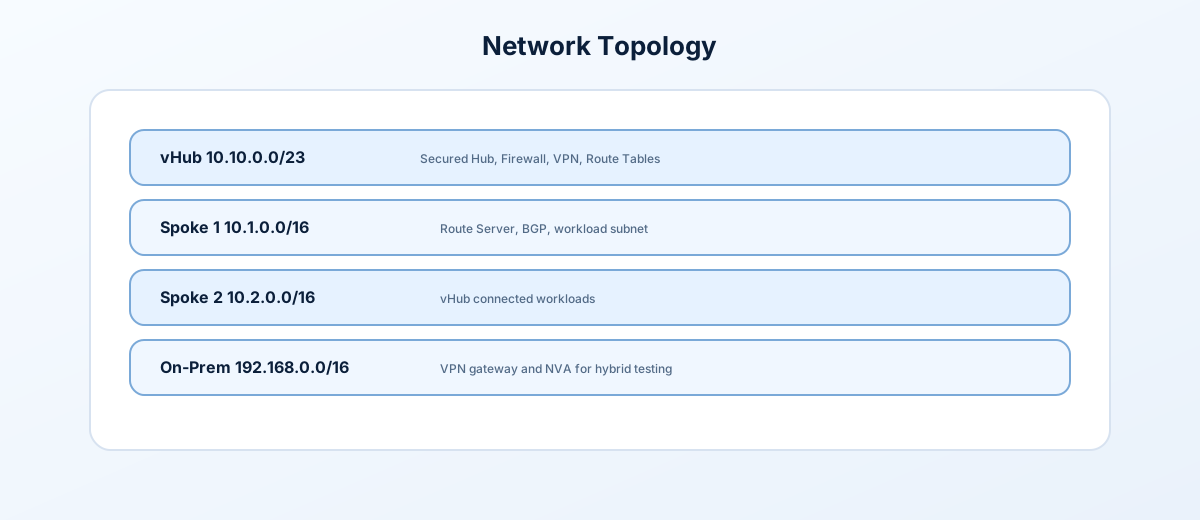
Address Space Allocation
| Network | CIDR | Purpose |
|---|---|---|
| Hub | 10.0.0.0/16 | Central connectivity hub |
| ├─ GatewaySubnet | 10.0.0.0/24 | VPN Gateway |
| ├─ AzureFirewallSubnet | 10.0.1.0/24 | Azure Firewall |
| ├─ ManagementSubnet | 10.0.2.0/24 | Hub management |
| └─ AppGatewaySubnet | 10.0.3.0/24 | Application Gateway |
| Identity | 10.1.0.0/16 | Domain Controllers |
| └─ DCSubnet | 10.1.1.0/24 | DC01 (10.1.1.4), DC02 (10.1.1.5) |
| Management | 10.2.0.0/16 | Operations |
| └─ JumpboxSubnet | 10.2.1.0/24 | Jumpbox (10.2.1.4) |
| Shared | 10.3.0.0/16 | Shared services |
| ├─ AppSubnet | 10.3.1.0/24 | Application tier |
| └─ PrivateEndpointSubnet | 10.3.2.0/24 | Private endpoints |
| Workload Prod | 10.10.0.0/16 | Production apps |
| ├─ WebSubnet | 10.10.1.0/24 | Load Balanced Web Tier |
| ├─ AppSubnet | 10.10.2.0/24 | App tier VMs |
| ├─ DataSubnet | 10.10.3.0/24 | Database VMs |
| ├─ ContainerAppsSubnet | 10.10.8.0/23 | Reserved for future Container Apps support |
| └─ AKSSubnet | 10.10.16.0/20 | AKS node pool (4094 IPs) |
| Workload Dev | 10.11.0.0/16 | Development apps |
| ├─ WebSubnet | 10.11.1.0/24 | Dev web tier |
| ├─ AppSubnet | 10.11.2.0/24 | Dev app tier |
| └─ DataSubnet | 10.11.3.0/24 | Dev data tier |
| On-Premises | 10.100.0.0/16 | Simulated on-prem |
| ├─ GatewaySubnet | 10.100.0.0/24 | On-prem VPN Gateway |
| └─ ServersSubnet | 10.100.1.0/24 | File Server (10.100.1.4) |
| VPN Clients | 172.16.0.0/24 | Point-to-site VPN pool |
🚀 Quick Start
Prerequisites
Note: This project uses both AzureRM (
> 4.0) and AzAPI (> 2.0) providers. AzAPI is required for VNet Flow Logs (the modern replacement for deprecated NSG Flow Logs).
Step 1: Clone and Configure
git clone https://github.com/Jamonygr/azure-landing-zone-lab.git
cd azure-landing-zone-lab

# Copy example config
cp terraform.tfvars.example terraform.tfvars

# Edit configuration (set at minimum subscription_id and admin credentials)
code terraform.tfvars
Step 2: Deploy
# Login to Azure and set the target subscription
az login
az account set --subscription "<your-subscription-id>"

# Initialize Terraform
terraform init

# Plan deployment
terraform plan -out=tfplan

# Apply
terraform apply tfplan
Step 3: Verify Load Balancer
# Get the Load Balancer IP
terraform output lb_frontend_ip

# Test with curl (should alternate between web01-prd and web02-prd)
curl http://$(terraform output -raw lb_frontend_ip)

# Clean up when done
terraform destroy
🔄 CI/CD Pipeline
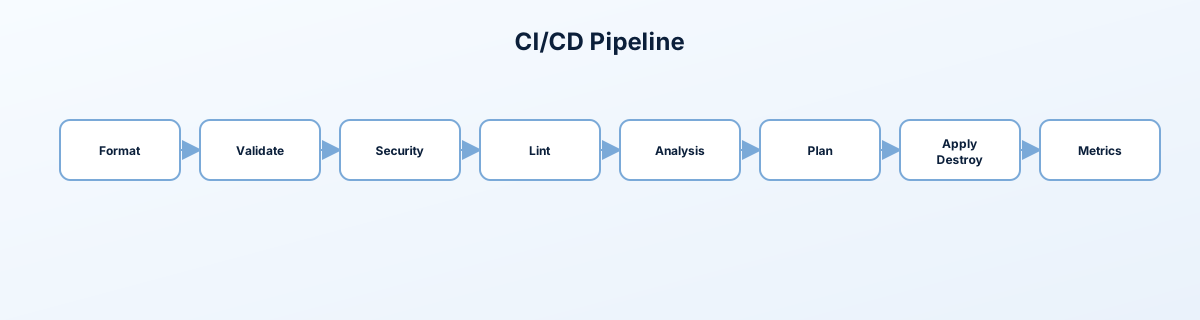
The GitHub Actions workflow (.github/workflows/terraform.yml) now has 16 visible jobs that cover formatting, validation, security, linting, docs, workflow validation, analysis, cost estimation, plan/apply/destroy, and metrics. It orchestrates composite actions in .github/actions/ for Terraform operations, state backup, inventories, changelog generation, graphs, and reporting.
Pipeline Stages
- 1️⃣ Format Check → 2️⃣ Validate
- 3️⃣ Security - tfsec, 3️⃣ Security - Checkov, 3️⃣ Security - Secrets (Gitleaks)
- 4️⃣ Lint - TFLint, 4️⃣ Lint - Policy (Conftest), 4️⃣ Lint - Docs (terraform-docs), 4️⃣ Lint - Actions (actionlint)
- 5️⃣ Analysis - Graph, 5️⃣ Analysis - Versions
- 6️⃣ Analysis - Cost (Infracost, soft-fail)
- 7️⃣ Plan (change detection + plan artifact)
- 8️⃣ Apply (manual
action=apply; includes state backup, resource inventory, changelog) - 9️⃣ Destroy (manual
action=destroy+DESTROYconfirm) - 🔟 Metrics (after successful Apply)
Artifacts include the saved plan, terraform-docs output, dependency graph SVG, module/provider versions, cost report, changelog, resource inventory, and metrics JSON.
Triggers
- Push to
main(repo health paths): runs format/validate → security/linters → docs/graph/version → cost → plan. Apply/Destroy never auto-run. - Pull Request to
main: same checks plus plan for review; no PR comment is posted. - Manual dispatch: pick
action(plan|apply|destroy) andenvironment(lab|dev|prod), plusdestroy_confirm=DESTROYfor destroys. Apply/Destroy only run viaworkflow_dispatch.
Concurrency: one run per branch + environment (
terraform-${ref}-${environment}); newer runs wait rather than cancel.
Remote State Storage
Terraform state is stored in Azure Blob Storage for team collaboration and state locking:
Azure Storage Account
└── Container: tfstate
    ├── lab.terraform.tfstate
    ├── dev.terraform.tfstate
    └── prod.terraform.tfstate
Required GitHub Secrets
| Secret | Description |
|---|---|
AZURE_CLIENT_ID | App registration/client ID used by GitHub OIDC |
AZURE_TENANT_ID | Azure tenant ID used by GitHub OIDC |
AZURE_SUBSCRIPTION_ID | Target Azure subscription |
TF_STATE_RG | Resource group for state storage |
TF_STATE_SA | Storage account for state storage |
INFRACOST_API_KEY | (Optional) enables the cost estimation stage |
The pipeline uses GitHub Actions OIDC federation. Do not store a long-lived Azure client secret JSON in repository secrets.
Quick Commands
# Create an app registration and add a federated credential for this repo.
# Then grant least-privilege Azure roles required by your selected profile.
az ad app create --display-name "terraform-alz-pipeline"

# Deploy infrastructure (manual apply)
gh workflow run "Terraform Pipeline" -f action=apply -f environment=lab

# Destroy infrastructure (requires confirmation)
gh workflow run "Terraform Pipeline" \
  -f action=destroy \
  -f environment=lab \
  -f destroy_confirm=DESTROY

# Watch pipeline progress
gh run watch
📖 Full documentation: See wiki/reference/pipeline.md and wiki/reference/pipeline-templates.md
⚙️ Configuration Options
terraform.tfvars
# =============================================================================
# CORE SETTINGS
# =============================================================================
subscription_id = "00000000-0000-0000-0000-000000000000"  # REQUIRED
project         = "azlab"
environment     = "lab"
location        = "westus2"  # Example: current lab profile region
owner           = "Lab-User"

# =============================================================================
# SECURITY (CHANGE THESE!)
# =============================================================================
admin_username     = "azureadmin"
admin_password     = null                       # Prefer TF_VAR_admin_password or a private tfvars file
sql_admin_login    = "sqladmin"
sql_admin_password = null                       # Prefer TF_VAR_sql_admin_password or a private tfvars file
vpn_shared_key     = null                       # Required only if VPN is enabled

# =============================================================================
# INFRASTRUCTURE FLAGS
# =============================================================================
# Core Networking
deploy_firewall              = true   # Azure Firewall (~$350/mo)
firewall_sku_tier            = "Standard"
deploy_vpn_gateway           = false  # VPN Gateway (~$140/mo, 30 min deploy)
deploy_onprem_simulation     = false  # Requires VPN Gateway
deploy_application_gateway   = true   # App Gateway with WAF (~$36/mo)

# Identity & Management
deploy_secondary_dc          = false  # Second Domain Controller (~$30/mo)
enable_jumpbox_public_ip     = false  # Prefer VPN/Bastion/private management
allowed_jumpbox_source_ips   = []     # Add trusted CIDRs only when public RDP is required
allow_public_rdp_from_internet = false

# Shared Services
deploy_keyvault              = true
deploy_storage               = true
deploy_sql                   = true   # Azure SQL (~$5/mo)

# Monitoring
deploy_log_analytics         = true
log_retention_days           = 30     # Free tier
log_daily_quota_gb           = 2      # Limit ingestion

# =============================================================================
# WORKLOADS
# =============================================================================
deploy_workload_prod         = true
deploy_workload_dev          = true   # Dev environment (similar to prod)

# Load Balancer
deploy_load_balancer         = true
enable_lb_rdp_nat_rules      = false  # Keep web VM RDP NAT closed by default
lb_type                      = "public"
lb_web_server_count          = 2
lb_web_server_size           = "Standard_B1ms"

# AKS (Disabled by default - long deploy time)
deploy_aks                   = false
aks_node_count               = 1
aks_vm_size                  = "Standard_B2s"

# =============================================================================
# PAAS SERVICES (All optional)
# =============================================================================
# Tier 1: FREE
deploy_functions             = false  # Azure Functions Y1
deploy_static_web_app        = true   # Static Web Apps Free
deploy_logic_apps            = true   # Logic Apps Consumption
deploy_event_grid            = true   # Event Grid (100k free)

# Tier 2: Low Cost (~$15-20/mo total)
deploy_service_bus           = true   # Service Bus Basic (~$0.05/mo)
deploy_app_service           = true   # App Service F1 (FREE)

# Tier 3: Data
deploy_cosmos_db             = true   # Cosmos DB Serverless (~$0-5/mo)
paas_alternative_location    = "canadacentral"  # For quota issues
cosmos_location              = "northeurope"    # Example alternate region

# =============================================================================
# NETWORK ADD-ONS
# =============================================================================
deploy_nat_gateway                   = true   # Fixed outbound IP
deploy_private_dns_zones             = true   # Private DNS for PaaS
deploy_private_endpoints             = true   # Private Link
deploy_application_security_groups   = true   # ASGs for segmentation

# Observability
create_network_watcher               = false  # Use existing NW (create only for new subs)
enable_vnet_flow_logs                = false  # VNet flow logs
enable_traffic_analytics             = false  # Traffic visualization

# =============================================================================
# COST OPTIMIZATION
# =============================================================================
enable_auto_shutdown         = true   # Shutdown VMs at 7 PM
vm_size                      = "Standard_B2s"
Replace
<location_short>in CLI examples with the short code derived from your region (e.g.,weufor West Europe,eusfor East US,wus2for West US 2). Seelocals.tffor the mapping logic.
🧪 Testing the Environment
Live Provisioning Validation
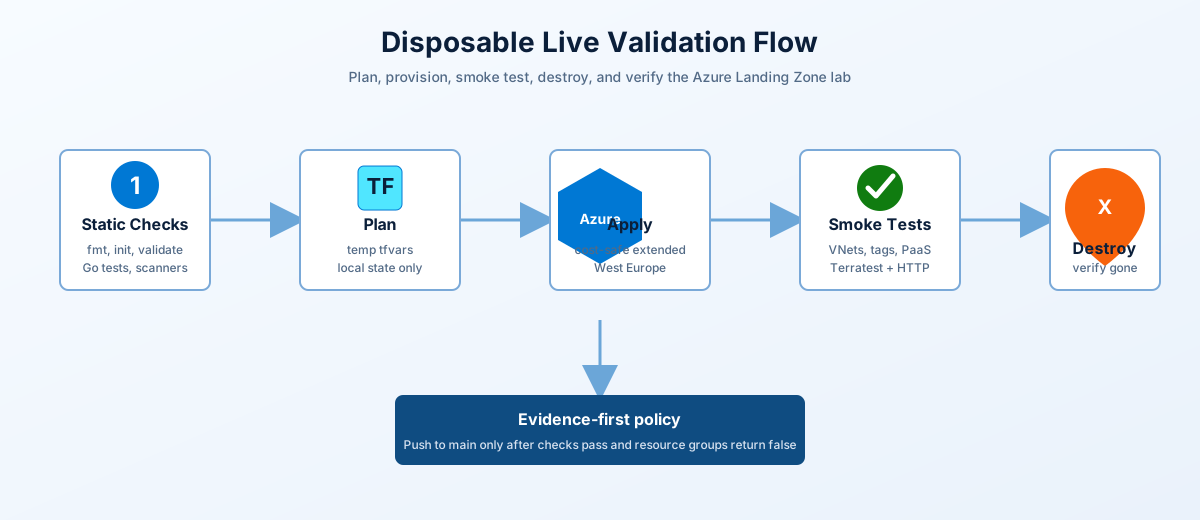
For a disposable end-to-end validation in West Europe, use the live runner after signing in with Azure CLI:
.\scripts\invoke-live-validation.ps1The runner creates a temporary tfvars file and backend-free Terraform workdir outside the repo, provisions the safe extended profile, runs static checks, Terratest, Azure CLI smoke checks, destroys the deployment in a finally block, verifies the resource groups are gone, and removes local Terraform state/plan files. See the live provisioning validation guide for the exact profile, expected resources, failure handling, and teardown checks.
Access Points Summary
| Service | Access Method | Notes |
|---|---|---|
| Web Servers (LB) | http://<lb_frontend_ip> | Load balanced HTTP |
| Web01 RDP | <lb_frontend_ip>:3389 | NAT rule |
| Web02 RDP | <lb_frontend_ip>:3390 | NAT rule |
| Jumpbox | <jumpbox_public_ip>:3389 | If public IP enabled |
| Jumpbox (via Firewall) | DNAT through firewall | If no public IP |
| On-Prem Mgmt VM | <onprem_mgmt_vm_public_ip>:3389 | If deployed |
Test Load Balancing
# From your local machine - run multiple times
# You should see responses from both web01-prd and web02-prd
curl http://$(terraform output -raw lb_frontend_ip)

# Or use PowerShell
1..10 | ForEach-Object {
    (Invoke-WebRequest -Uri "http://$(terraform output -raw lb_frontend_ip)" -UseBasicParsing).Content
}
Expected Response
<h1>web01-prd</h1>
<p>Azure Landing Zone - prod Workload</p>
<p>Load Balanced Web Server</p>
Test Connectivity from Jumpbox
# RDP to jumpbox first, then test internal connectivity

# Test Domain Controller
Test-NetConnection -ComputerName 10.1.1.4 -Port 389  # LDAP

# Test Web Servers
Test-NetConnection -ComputerName 10.10.1.4 -Port 80
Test-NetConnection -ComputerName 10.10.1.5 -Port 80

# Test Key Vault
Resolve-DnsName kv-azlab-xxxx.vault.azure.net

# Test SQL via Private Endpoint
Test-NetConnection -ComputerName sql-azlab-xxxx.database.windows.net -Port 1433

# Test outbound through firewall
Invoke-WebRequest -Uri https://ifconfig.me -UseBasicParsing  # Shows firewall's public IP
Test VPN Connectivity (If Deployed)
# From on-prem management VM
Test-NetConnection -ComputerName 10.1.1.4 -Port 389   # DC in Azure
Test-NetConnection -ComputerName 10.2.1.4 -Port 3389  # Jumpbox in Azure

# From Azure jumpbox
Test-NetConnection -ComputerName 10.100.1.4 -Port 445  # File server on-prem
Health Check Commands
# Check backend pool health
az network lb show \
  --resource-group rg-workload-prod-lab-<location_short> \
  --name lb-prod-lab-<location_short> \
  --query "loadBalancingRules[].backendAddressPool.id" -o table

# Check probe status
az network lb probe list \
  --resource-group rg-workload-prod-lab-<location_short> \
  --lb-name lb-prod-lab-<location_short> -o table

# Check VPN tunnel status
az network vpn-connection show \
  --resource-group rg-hub-lab-<location_short> \
  --name vpn-conn-hub-to-onprem \
  --query "connectionStatus" -o tsv
🔒 Security Features
Network Security
| Feature | Implementation |
|---|---|
| Azure Firewall | Centralized egress control with DNAT/SNAT |
| NSG Rules | Subnet-level traffic filtering |
| Route Tables | Forced tunneling through firewall (except web subnet for LB) |
| Private Endpoints | Private access to PaaS services |
Load Balancer Security
| Feature | Configuration |
|---|---|
| Standard SKU | Secure by default (no public access without rules) |
| Health Probes | Only healthy VMs receive traffic |
| NSG Integration | NSG rules required to allow traffic |
| Outbound Rules | Controlled SNAT for internet access |
Web Subnet NSG Rules
| Priority | Name | Direction | Access | Port | Source |
|---|---|---|---|---|---|
| 100 | AllowHTTP | Inbound | Allow | 80 | * |
| 110 | AllowHTTPS | Inbound | Allow | 443 | * |
| 200 | AllowRDPFromHub | Inbound | Allow | 3389 | Hub VNet |
💰 Cost Estimation
Monthly Cost by Deployment Profile
| Profile | Est. Monthly Cost | Key Cost Drivers |
|---|---|---|
| Minimal | ~$150-200 | VMs only, no firewall |
| Standard | ~$450-550 | Firewall ($350), VMs ( |
| Standard + PaaS | ~$500-600 | Standard + PaaS services (~$60) |
| Full Hybrid | ~$650-750 | Standard + VPN Gateway (~$140) |
| Enterprise | ~$900-1000 | Full + AKS ( |
Detailed Cost Breakdown
| Resource | SKU | Monthly Cost |
|---|---|---|
| Azure Firewall | Standard | ~$350 |
| VPN Gateway | VpnGw1 | ~$140 |
| Application Gateway | WAF_v2 | ~$36 |
| Public Load Balancer | Standard | ~$25 |
| Web Servers (2x) | Standard_B1ms | ~$30 |
| Domain Controller | Standard_B2s | ~$30 |
| Jumpbox | Standard_B2s | ~$30 |
| On-Prem VMs (2x) | Standard_B2s | ~$60 |
| AKS Cluster (1 node) | Standard_B2s | ~$30 |
| Storage Account | Standard_LRS | ~$5 |
| Key Vault | Standard | ~$3 |
| SQL Database | Basic DTU | ~$5 |
| Log Analytics | PerGB2018 | ~$10 |
PaaS Services (Low Cost/Free Tier)
| Service | Tier | Monthly Cost |
|---|---|---|
| Azure Functions | Consumption (Y1) | FREE |
| Static Web Apps | Free | FREE |
| Logic Apps | Consumption | ~$0 (pay per run) |
| Event Grid | Standard | FREE (100k ops) |
| Service Bus | Basic | ~$0.05 |
| App Service | F1 Free | FREE |
| Cosmos DB | Serverless | ~$0-5 |
| Total PaaS | ~$0-10/month |
Note:
deploy_container_appsexists as a placeholder flag but is not currently wired to a module.
💡 Cost Optimization Tips
| Tip | Savings |
|---|---|
✅ Enable auto_shutdown for VMs | ~50% on VM costs |
✅ Use Standard_B1ms for web servers | Sufficient for IIS |
| ✅ Disable VPN Gateway when not testing | ~$140/month |
| ✅ Disable AKS when not using containers | ~$30-150/month |
| ✅ Use Azure Firewall Basic SKU | ~$100/month (vs Standard) |
✅ Set log_daily_quota_gb = 1 | Prevents log overage |
Auto-Shutdown Schedule
VMs are configured to auto-shutdown at 7:00 PM local time when enable_auto_shutdown = true (default). This saves ~50% on compute costs for lab environments.
🔧 Troubleshooting
Common Issues & Solutions
Load Balancer Not Responding
# Check if VMs are in backend pool
az network nic show \
  --resource-group rg-workload-prod-lab-<location_short> \
  --name nic-web01-prd \
  --query "ipConfigurations[0].loadBalancerBackendAddressPools" -o table

# Check health probe status
az network lb probe list \
  --resource-group rg-workload-prod-lab-<location_short> \
  --lb-name lb-prod-lab-<location_short> -o table

# Verify NSG allows HTTP
az network nsg rule list \
  --resource-group rg-workload-prod-lab-<location_short> \
  --nsg-name nsg-web-prod-lab-<location_short> -o table
Asymmetric Routing Issues
If the load balancer is timing out:
- Check route table - Web subnet should NOT route through firewall when using public LB
- Verify
lb_type = "public"in terraform.tfvars - Confirm web subnet has direct internet routing (no UDR to firewall)
IIS Not Installed on Web Servers
# RDP to the VM via NAT rule
mstsc /v:<lb_frontend_ip>:3389  # web01
mstsc /v:<lb_frontend_ip>:3390  # web02

# Check IIS status
Get-WindowsFeature -Name Web-Server

# Manually install if needed
Install-WindowsFeature -Name Web-Server -IncludeManagementTools

# Recreate the default page
$content = "<h1>$env:COMPUTERNAME</h1><p>Azure Landing Zone Web Server</p>"
Set-Content -Path "C:\inetpub\wwwroot\index.html" -Value $content
VPN Tunnel Not Connecting
# Check VPN connection status
az network vpn-connection show \
  --resource-group rg-hub-lab-<location_short> \
  --name vpn-conn-hub-to-onprem \
  --query "{Status:connectionStatus,IngressBytes:ingressBytesTransferred,EgressBytes:egressBytesTransferred}" -o table

# Check VPN Gateway status
az network vnet-gateway show \
  --resource-group rg-hub-lab-<location_short> \
  --name vpngw-hub-lab-<location_short> \
  --query "provisioningState" -o tsv

# Reset VPN connection if stuck
az network vpn-connection update \
  --resource-group rg-hub-lab-<location_short> \
  --name vpn-conn-hub-to-onprem \
  --set connectionProtocol=IKEv2
Cannot Access Key Vault
# Check network access (from jumpbox)
Test-NetConnection -ComputerName kv-azlab-xxxx.vault.azure.net -Port 443

# Verify RBAC access
az role assignment list --scope /subscriptions/<sub-id>/resourceGroups/rg-shared-lab-<location_short>

# Check Key Vault firewall
az keyvault network-rule list --name kv-azlab-xxxx
SQL Connection Failing
# Verify private endpoint DNS resolution
Resolve-DnsName sql-azlab-xxxx.database.windows.net

# Should return private IP (10.3.x.x), not public IP

# Test connectivity
Test-NetConnection -ComputerName sql-azlab-xxxx.database.windows.net -Port 1433
Terraform Apply Errors
# State lock error
terraform force-unlock <lock-id>

# Resource already exists
terraform import <resource_address> <resource_id>

# Quota exceeded
# Request quota increase in Azure Portal or change region

# Provider version mismatch
terraform init -upgrade
Azure Firewall Blocking Traffic
// Check firewall logs in Log Analytics
AzureDiagnostics
| where Category == "AzureFirewallNetworkRule" or Category == "AzureFirewallApplicationRule"
| where msg_s contains "Deny"
| project TimeGenerated, msg_s
| order by TimeGenerated desc
| take 50
Deployment Timing Reference
| Resource | Typical Deploy Time |
|---|---|
| VNets, Subnets, NSGs | ~2-3 minutes |
| Azure Firewall | ~5-8 minutes |
| VPN Gateway | ~25-35 minutes |
| VMs (with extensions) | ~8-12 minutes |
| IIS Extension | ~3-5 minutes |
| Firewall Rule Collections | ~3 minutes each |
| AKS Cluster | ~10-15 minutes |
| Application Gateway | ~8-12 minutes |
| Cosmos DB | ~3-5 minutes |
| Key Vault | ~8-12 minutes (with soft-delete recovery) |
| Private Endpoints | ~2-3 minutes |
| VNet Flow Logs | ~1-2 minutes |
📁 Project Structure
azure-landing-zone-lab/
├── main.tf                    # Root orchestration (5-pillar architecture)
├── variables.tf               # 80+ configurable input variables
├── outputs.tf                 # Key resource outputs (IPs, URLs, etc.)
├── locals.tf                  # Computed local values
├── terraform.tfvars           # Your configuration (gitignored)
├── terraform.tfvars.example   # Example configuration template
├── LICENSE                    # MIT License
├── README.md                  # This documentation
│
├── environments/              # Environment-specific configurations
│   ├── lab.tfvars             # Lab settings (default)
│   ├── dev.tfvars             # Development settings
│   └── prod.tfvars            # Production settings
│
├── landing-zones/             # 5-Pillar Landing Zone Architecture
│   │
│   ├── networking/            # PILLAR 1: Networking
│   │   ├── main.tf            # Hub VNet, Firewall, VPN, App Gateway
│   │   ├── core/              # Hub networking core components
│   │   ├── connectivity/      # VNet peering, flow logs, NAT, ASGs
│   │   ├── onprem-simulated/  # Simulated on-premises for hybrid testing
│   │   └── secondary-region/  # Multi-region support (placeholder)
│   │
│   ├── identity-management/   # PILLAR 2: Identity Management
│   │   ├── main.tf            # Domain Controllers, DNS
│   │   └── core/              # DC VMs, Identity VNet
│   │
│   ├── governance/            # PILLAR 3: Governance
│   │   └── main.tf            # Management Groups, Azure Policy, Cost Mgmt, RBAC
│   │
│   ├── security/              # PILLAR 4: Security
│   │   ├── main.tf            # Shared services VNet, Key Vault, Storage, SQL
│   │   └── shared-services/   # Private DNS, Private Endpoints
│   │
│   └── management/            # PILLAR 5: Management
│       ├── main.tf            # Jumpbox, Log Analytics, Monitoring, Backup
│       ├── core/              # Management VNet, Jumpbox VM
│       └── workload/          # Workload zones (prod/dev), LB, AKS, PaaS
│
├── modules/                   # Reusable infrastructure modules
    ├── aks/                   # Azure Kubernetes Service
    ├── compute/
    │   └── windows-vm/        # Windows Server 2022 VMs
    ├── firewall/              # Azure Firewall
    ├── firewall-rules/        # Firewall policy & rule collections
    ├── keyvault/              # Azure Key Vault
    ├── monitoring/
    │   ├── action-group/      # Alert action groups
    │   ├── alerts/            # Metric alerts
    │   ├── diagnostic-settings/  # Resource diagnostics
    │   └── log-analytics/     # Log Analytics workspace
    ├── naming/                # Resource naming conventions
    ├── networking/
    │   ├── local-network-gateway/  # On-prem gateway definition
    │   ├── nsg/               # Network Security Groups
    │   ├── peering/           # VNet peering
    │   ├── route-table/       # UDR route tables
    │   ├── subnet/            # Subnet with service endpoints
    │   ├── vnet/              # Virtual Networks
    │   ├── vpn-connection/    # Site-to-site VPN
    │   └── vpn-gateway/       # VPN Gateway
    ├── private-endpoint/      # Private Link endpoints
    ├── resource-group/        # Resource group factory
    ├── sql/                   # Azure SQL Database
    └── storage/               # Storage Account
Key Files
| File | Purpose |
|---|---|
main.tf | Orchestrates 5-pillar architecture: Networking → Identity → Management → Security → Governance |
variables.tf | 80+ configurable parameters for customization |
terraform.tfvars | Your environment-specific values (gitignored) |
outputs.tf | Connection info (IPs, URLs, FQDNs) |
locals.tf | Location short codes, naming conventions |
5-Pillar Architecture
| Pillar | Landing Zone | Responsibilities |
|---|---|---|
| 1. Networking | landing-zones/networking/ | Hub VNet, Azure Firewall, VPN Gateway, App Gateway, VNet Peering |
| 2. Identity | landing-zones/identity-management/ | Domain Controllers, DNS servers, Identity VNet |
| 3. Governance | landing-zones/governance/ | Management Groups, Azure Policy, Cost Management, RBAC, Compliance |
| 4. Security | landing-zones/security/ | Shared Services VNet, Key Vault, Storage, SQL, Private Endpoints |
| 5. Management | landing-zones/management/ | Jumpbox, Log Analytics, Monitoring, Backup, Workload zones |
Providers Used
| Provider | Version | Purpose |
|---|---|---|
| azurerm | ~> 4.0 | Primary Azure resource management |
| azapi | ~> 2.0 | VNet Flow Logs (modern API) |
| random | ~> 3.6.0 | Unique naming suffixes |
📚 Configuration Reference
Essential Variables
# terraform.tfvars

# =============================================================================
# REQUIRED - Must be set
# =============================================================================
subscription_id    = "your-subscription-id"
admin_password     = "YourSecureP@ssw0rd!"    # Minimum 12 chars, complexity required
sql_admin_password = "SqlSecureP@ssw0rd!"
vpn_shared_key     = "YourVPNSharedKey123!"   # Required if VPN enabled

# =============================================================================
# CORE SETTINGS
# =============================================================================
project     = "azlab"                          # Resource naming prefix
environment = "lab"                            # Environment tag
location    = "westus2"                        # Azure region
owner       = "Lab-User"                       # Owner tag value

# =============================================================================
# DEPLOYMENT FLAGS - Enable/disable components
# =============================================================================
deploy_firewall          = true                # Azure Firewall (~$350/mo)
deploy_vpn_gateway       = false               # VPN Gateway (~$140/mo)
deploy_onprem_simulation = false               # Simulated on-premises
deploy_load_balancer     = true                # Public Load Balancer
deploy_aks               = false               # Kubernetes cluster
deploy_application_gateway = false             # App Gateway with WAF

# =============================================================================
# VM CONFIGURATION
# =============================================================================
vm_size              = "Standard_B2s"          # Default VM size
lb_web_server_count  = 2                       # Number of IIS servers
lb_web_server_size   = "Standard_B1ms"         # Web server size
enable_auto_shutdown = true                    # Shutdown VMs at 7 PM

# =============================================================================
# PAAS SERVICES (All optional, most are free tier)
# =============================================================================
deploy_functions      = false                  # Azure Functions (FREE)
deploy_static_web_app = false                  # Static Web Apps (FREE)
deploy_logic_apps     = false                  # Logic Apps (pay per run)
deploy_event_grid     = false                  # Event Grid (FREE 100k)
deploy_service_bus    = false                  # Service Bus (~$0.05/mo)
deploy_app_service    = false                  # App Service (~$13/mo)
deploy_container_apps = false                  # Container Apps (placeholder flag; not wired)
deploy_cosmos_db      = false                  # Cosmos DB (serverless)

# =============================================================================
# NETWORK ADD-ONS & OBSERVABILITY
# =============================================================================
deploy_private_dns_zones         = false       # Private DNS zones for PaaS
deploy_private_endpoints         = false       # Private Link endpoints
deploy_nat_gateway               = false       # Fixed outbound IP
deploy_application_security_groups = false     # ASGs for micro-segmentation
enable_vnet_flow_logs            = false       # VNet flow logs (uses AzAPI)
enable_traffic_analytics         = false       # Traffic analytics
create_network_watcher           = false       # Create NW for new subs

# =============================================================================
# GOVERNANCE & COMPLIANCE (Advanced)
# =============================================================================
deploy_azure_policy              = false       # Azure Policy assignments
deploy_regulatory_compliance     = false       # HIPAA/PCI-DSS (audit mode)
deploy_cost_management           = false       # Budget alerts
deploy_backup                    = false       # Recovery Services Vault
All Deployment Flags Reference
| Flag | Description | Default | Cost Impact |
|---|---|---|---|
| Core Infrastructure | |||
deploy_firewall | Azure Firewall for egress control | true | ~$350/mo |
deploy_vpn_gateway | VPN Gateway for hybrid connectivity | false | ~$140/mo |
deploy_onprem_simulation | Simulated on-premises with VPN | false | ~$60/mo |
deploy_application_gateway | App Gateway with WAF | false | ~$36/mo |
| Identity & Management | |||
deploy_secondary_dc | Second Domain Controller | false | ~$30/mo |
enable_jumpbox_public_ip | Public IP on jumpbox | true | ~$3/mo |
deploy_log_analytics | Log Analytics workspace | true | ~$10/mo |
| Shared Services | |||
deploy_keyvault | Azure Key Vault | true | ~$3/mo |
deploy_storage | Storage Account | true | ~$5/mo |
deploy_sql | Azure SQL Database | false | ~$5/mo |
| Workloads | |||
deploy_workload_prod | Production workload VNet | true | Varies |
deploy_workload_dev | Development workload VNet | false | Varies |
deploy_load_balancer | Public Load Balancer + IIS VMs | true | ~$55/mo |
deploy_aks | Azure Kubernetes Service | false | ~$30+/mo |
| PaaS Services | |||
deploy_functions | Azure Functions (Consumption) | false | FREE |
deploy_static_web_app | Static Web Apps (Free) | false | FREE |
deploy_logic_apps | Logic Apps (Consumption) | false | ~$0 |
deploy_event_grid | Event Grid | false | FREE |
deploy_service_bus | Service Bus (Basic) | false | ~$0.05/mo |
deploy_app_service | App Service (F1) | false | FREE |
deploy_cosmos_db | Cosmos DB (Serverless) | false | ~$0-5/mo |
| Network Add-ons | |||
deploy_nat_gateway | NAT Gateway for fixed outbound IP | false | ~$4-5/mo |
deploy_private_dns_zones | Private DNS zones | false | Minimal |
deploy_private_endpoints | Private Link endpoints | false | None |
deploy_application_security_groups | ASGs for segmentation | false | None |
| Observability | |||
create_network_watcher | Network Watcher (new subs) | false | None |
enable_vnet_flow_logs | VNet flow logs | false | Storage |
enable_traffic_analytics | Traffic Analytics | false | Log ingest |
| Governance | |||
deploy_azure_policy | Azure Policy assignments | false | None |
deploy_regulatory_compliance | HIPAA/PCI-DSS policies | false | None |
deploy_cost_management | Budget and alerts | false | None |
deploy_backup | Recovery Services Vault | false | ~$10/mo |
Network Address Space Reference
| Network | CIDR | Subnets |
|---|---|---|
| Hub | 10.0.0.0/16 | Gateway (10.0.0.0/24), Firewall (10.0.1.0/24), Mgmt (10.0.2.0/24), AppGW (10.0.3.0/24) |
| Identity | 10.1.0.0/16 | DC Subnet (10.1.1.0/24) |
| Management | 10.2.0.0/16 | Jumpbox (10.2.1.0/24) |
| Shared | 10.3.0.0/16 | App (10.3.1.0/24), Private Endpoint (10.3.2.0/24) |
| Workload Prod | 10.10.0.0/16 | Web (10.10.1.0/24), App (10.10.2.0/24), Data (10.10.3.0/24), ContainerApps (10.10.8.0/23), AKS (10.10.16.0/20) |
| Workload Dev | 10.11.0.0/16 | Web (10.11.1.0/24), App (10.11.2.0/24), Data (10.11.3.0/24) |
| On-Premises | 10.100.0.0/16 | Gateway (10.100.0.0/24), Servers (10.100.1.0/24) |
| VPN Clients | 172.16.0.0/24 | P2S VPN address pool |
🚀 Quick Command Reference
# Initialize
terraform init

# Plan with specific var file
terraform plan -var-file="environments/prod.tfvars" -out=tfplan

# Apply
terraform apply tfplan

# Get outputs
terraform output

# Get specific output
terraform output lb_frontend_ip
terraform output -raw keyvault_uri

# Destroy everything
terraform destroy -auto-approve

# Destroy specific resource
terraform destroy -target=module.workload_prod

# Import existing resource
terraform import azurerm_resource_group.hub /subscriptions/.../resourceGroups/rg-hub-lab-<location_short>
📄 License
This project is licensed under the MIT License - see the LICENSE file for details.
🙏 Acknowledgments
- Microsoft Cloud Adoption Framework
- Azure Landing Zones
- Terraform Azure Provider
- Azure Architecture Center
📞 Support
| Resource | Link |
|---|---|
| Issues | GitHub Issues |
| Terraform Docs | AzureRM Provider |
| Azure Docs | Azure Documentation |
Built with ❤️ for learning Azure infrastructure
Last Updated: June 2026