Claude Code Remote
Control Claude Code remotely via multiple messaging platforms. Start tasks locally, receive notifications when Claude completes them, and send new commands by simply replying to messages.
Supported Platforms:
- 📧 Email - Traditional SMTP/IMAP integration with execution trace
- 📱 Telegram - Interactive bot with smart buttons ✅ NEW
- 💬 LINE - Rich messaging with token-based commands
- 🖥️ Desktop - Sound alerts and system notifications
🎥 Watch Demo Video
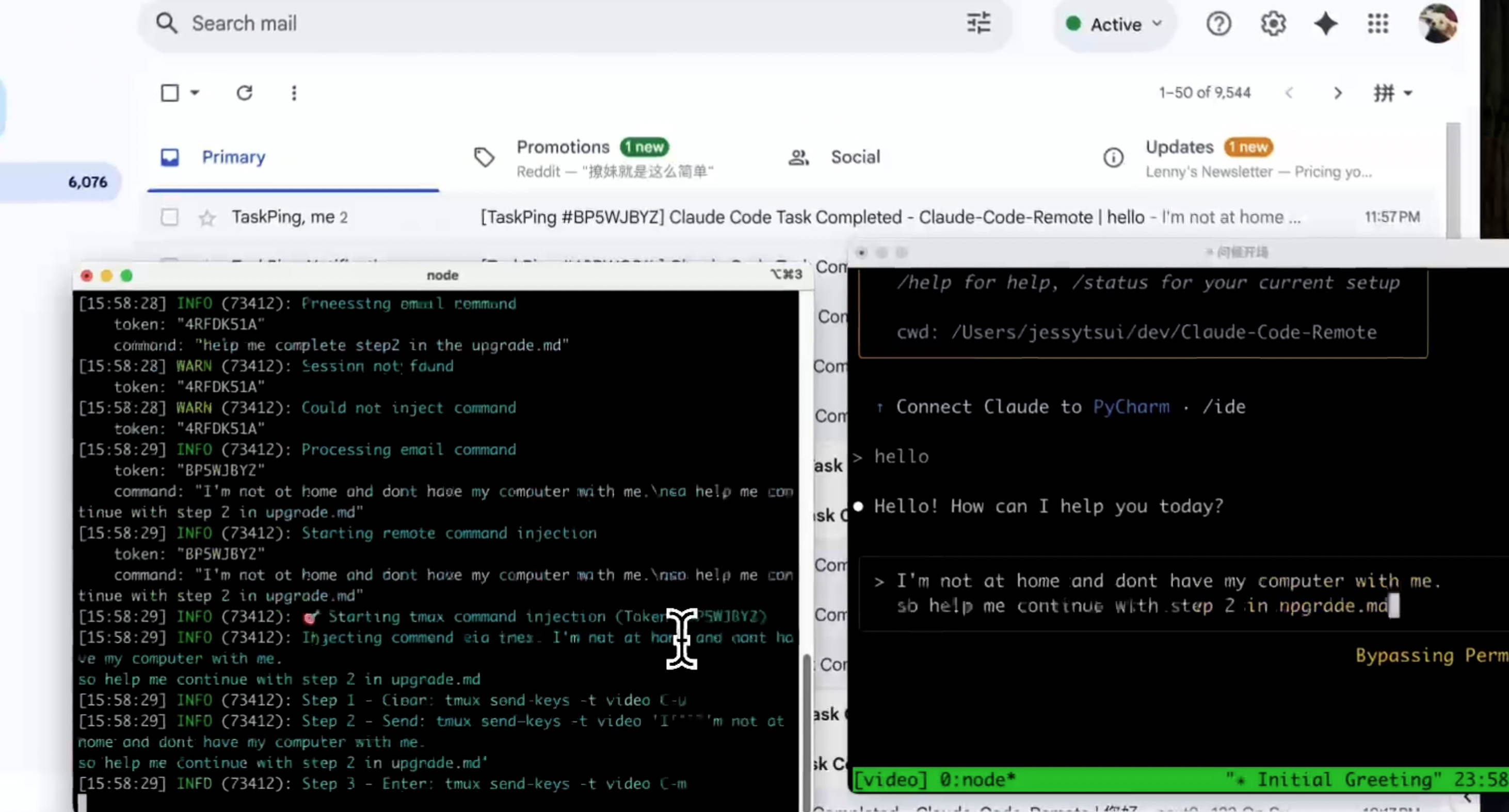

🐦 Follow @Jiaxi_Cui for updates and AI development insights
✨ Features
- 📧 Multiple Messaging Platforms:
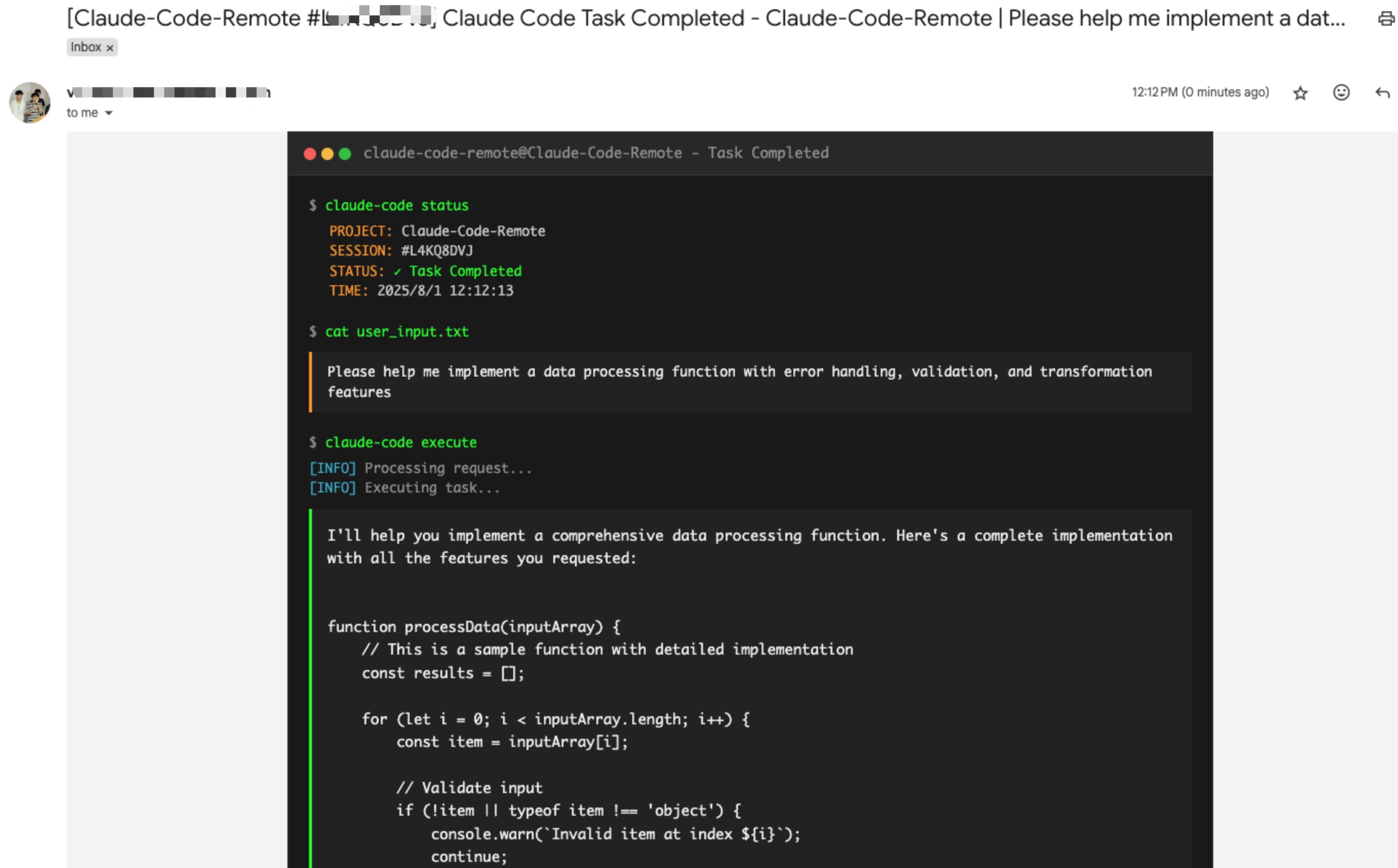
- Email notifications with full execution trace and reply-to-send commands
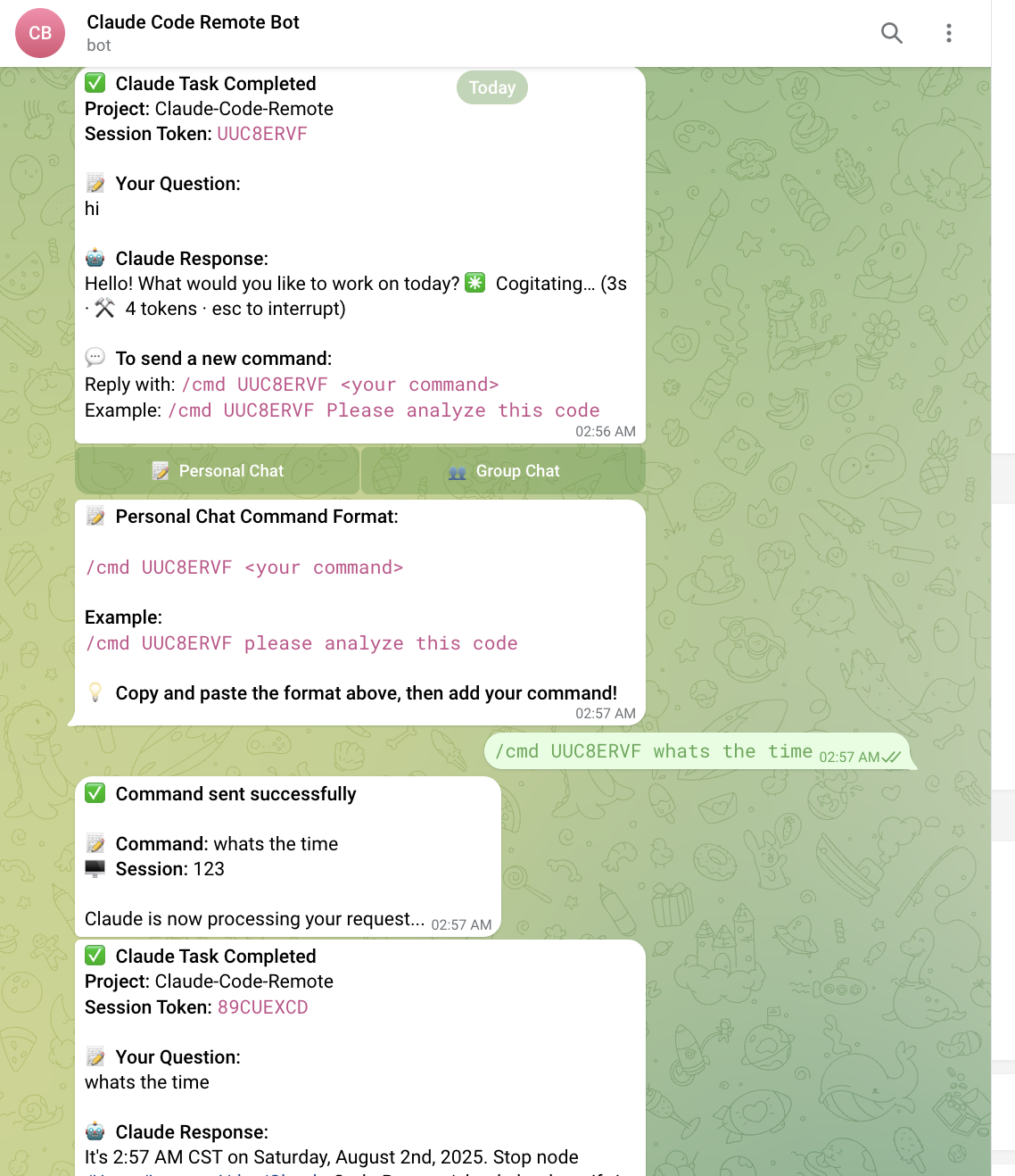
- Telegram Bot with interactive buttons and slash commands
- LINE messaging with token-based commands
- Desktop notifications with sound alerts
- Email notifications with full execution trace and reply-to-send commands
- 🔄 Two-way Control: Reply to messages or emails to send new commands
- 📱 Remote Access: Control Claude from anywhere
- 🔒 Secure: ID-based whitelist verification for all platforms
- 👥 Group Support: Use in LINE groups or Telegram groups for team collaboration
- 🤖 Smart Commands: Intuitive command formats for each platform
- 📋 Multi-line Support: Send complex commands with formatting
- ⚡ Smart Monitoring: Intelligent detection of Claude responses with historical tracking
- 🔄 tmux Integration: Seamless command injection into active tmux sessions
- 📊 Execution Trace: Full terminal output capture in email notifications
📅 Changelog
August 2025
- 2025-08-02: Add full execution trace to email notifications (#14 by @vaclisinc)
- 2025-08-01: Enhanced Multi-Channel Notification System (#1 by @laihenyi @JessyTsui)
- ✅ Telegram Integration Completed - Interactive buttons, real-time commands, smart personal/group chat handling
- ✅ Multi-Channel Notifications - Simultaneous delivery to Desktop, Telegram, Email, LINE
- ✅ Smart Sound Alerts - Always-on audio feedback with customizable sounds
- ✅ Intelligent Session Management - Auto-detection, real conversation content, 24-hour tokens
- 2025-08-01: Fix #9 #12: Add configuration to disable subagent notifications (#10 by @vaclisinc)
- 2025-08-01: Implement terminal-style UI for email notifications (#8 by @vaclisinc)
- 2025-08-01: Fix working directory issue - enable claude-remote to run from any directory (#7 by @vaclisinc)
July 2025
- 2025-07-31: Fix self-reply loop issue when using same email for send/receive (#4 by @vaclisinc)
- 2025-07-28: Remove hardcoded values and implement environment-based configuration (#2 by @kevinsslin)
📋 TODO List
Notification Channels
📱 Telegram Integration✅ COMPLETED - Bot integration with interactive buttons and real-time commands- 💬 Discord Integration - Bot integration for messaging platforms
- ⚡ Slack Workflow - Native Slack app with slash commands
Developer Tools
- 🤖 AI Tools Support - Integration with Gemini CLI, Cursor, and other AI development tools
- 🔀 Git Automation - Auto-commit functionality, PR creation, branch management
Usage Analytics
- 💰 Cost Tracking - Token usage monitoring and estimated costs
- ⚡ Performance Metrics - Execution time tracking and resource usage analysis
- 📧 Scheduled Reports - Daily/weekly usage summaries delivered via email
Native Apps
- 📱 Mobile Apps - iOS and Android applications for remote Claude control
- 🖥️ Desktop Apps - macOS and Windows native clients with system integration
🚀 Quick Start
1. Prerequisites
System Requirements:
- Node.js >= 14.0.0
- For default PTY mode: no tmux required (recommended for本地直接用)
- For tmux mode: tmux + an active session with Claude Code running
2. Install
git clone https://github.com/JessyTsui/Claude-Code-Remote.git
cd Claude-Code-Remote
npm install
3. Interactive Setup (Recommended)
npm run setup
- 引导式填写 Email / Telegram / LINE 配置,生成
.env - 自动把 Claude hooks 合并进
~/.claude/settings.json - 可随时重跑更新密钥/切换渠道
- 如需手动配置或离线编辑
.env,见下方“手动配置”
4. 手动配置(可选,跳过如果已运行 npm run setup)
Option A: Configure Email (Recommended for Beginners)
# Copy example config
cp .env.example .env

# Edit with your email credentials
nano .env
Required email settings:
EMAIL_ENABLED=true
SMTP_USER=your-email@gmail.com
SMTP_PASS=your-app-password
IMAP_USER=your-email@gmail.com
IMAP_PASS=your-app-password
EMAIL_TO=your-notification-email@gmail.com
ALLOWED_SENDERS=your-notification-email@gmail.com
SESSION_MAP_PATH=/your/path/to/Claude-Code-Remote/src/data/session-map.json
📌 Gmail users: Use App Passwords, not your regular password.
Option B: Configure Telegram ✅ NEW
Quick Setup:
chmod +x setup-telegram.sh
./setup-telegram.sh
Manual Setup:
- Create bot via @BotFather
- Get your Chat ID from bot API
- Configure webhook URL (use ngrok for local testing)
Required Telegram settings:
TELEGRAM_ENABLED=true
TELEGRAM_BOT_TOKEN=your-bot-token-here
TELEGRAM_CHAT_ID=your-chat-id-here
TELEGRAM_WEBHOOK_URL=https://your-ngrok-url.app
SESSION_MAP_PATH=/your/path/to/Claude-Code-Remote/src/data/session-map.json
Optional Telegram settings:
# Force IPv4 connections to Telegram API (default: false)
# Enable this if you experience connectivity issues with IPv6
TELEGRAM_FORCE_IPV4=true
Network Configuration Notes:
- IPv4 vs IPv6: Some network environments may have unstable IPv6 connectivity to Telegram's API servers
- When to use
TELEGRAM_FORCE_IPV4=true:- Connection timeouts or failures when sending messages
- Inconsistent webhook delivery
- Network environments that don't properly support IPv6
- Default behavior: Uses system default (usually IPv6 when available, fallback to IPv4)
- Performance impact: Minimal - only affects initial connection establishment
Option C: Configure LINE
Required LINE settings:
LINE_ENABLED=true
LINE_CHANNEL_ACCESS_TOKEN=your-token
LINE_CHANNEL_SECRET=your-secret
LINE_USER_ID=your-user-id
Configure Claude Code Hooks(仅在跳过 npm run setup 时需要)
Create hooks configuration file:
Method 1: Global Configuration (Recommended)
# Add to ~/.claude/settings.json
{
  "hooks": {
    "Stop": [{
      "matcher": "*",
      "hooks": [{
        "type": "command",
        "command": "node /your/path/to/Claude-Code-Remote/claude-hook-notify.js completed",
        "timeout": 5
      }]
    }],
    "SubagentStop": [{
      "matcher": "*",
      "hooks": [{
        "type": "command",
        "command": "node /your/path/to/Claude-Code-Remote/claude-hook-notify.js waiting",
        "timeout": 5
      }]
    }]
  }
}
Method 2: Project-Specific Configuration
# Set environment variable
export CLAUDE_HOOKS_CONFIG=/your/path/to/Claude-Code-Remote/claude-hooks.json
Note: Subagent notifications are disabled by default. To enable them, set
enableSubagentNotifications: truein your config. See Subagent Notifications Guide for details.
5. 启动 Claude(按你的注入模式选择)
- 默认 PTY 模式(无需 tmux):直接在终端运行
claude-code --config /path/to/your/claude/settings.json - 如果你选择 tmux 模式:
tmux new-session -d -s claude-session
tmux attach-session -t claude-session
claude-code --config /path/to/your/claude/settings.json
Detach: Ctrl+B 然后 D
Note: Interactive setup 已合并 hooks 到
~/.claude/settings.json。若跳过,请确保手动配置 hooks。
6. Start Services
For All Platforms (Recommended)
# Automatically starts all enabled platforms
npm run webhooks
# or
node start-all-webhooks.js
For Individual Platforms
For Email:
npm run daemon:start
# or
node claude-remote.js daemon start
For Telegram:
npm run telegram
# or
node start-telegram-webhook.js
For LINE:
npm run line
# or
node start-line-webhook.js
7. Test Your Setup
Quick Test:
# Test all notification channels
node claude-hook-notify.js completed
# Should receive notifications via all enabled platforms
Full Test:
- Start Claude in tmux session with hooks enabled
- Run any command in Claude
- Check for notifications (email/Telegram/LINE)
- Reply with new command to test two-way control
🎮 How It Works
- Use Claude normally in tmux session
- Get notifications when Claude completes tasks via:
- 🔊 Sound alert (Desktop)
- 📧 Email notification with execution trace (if enabled)
- 📱 Telegram message with buttons (if enabled)
- 💬 LINE message (if enabled)
- Reply with commands using any platform
- Commands execute automatically in Claude
Platform Command Formats
Email:
Simply reply to notification email with your command
No special formatting required
Telegram: ✅ NEW
Click smart button to get format:
📝 Personal Chat: /cmd TOKEN123 your command here
👥 Group Chat: @bot_name /cmd TOKEN123 your command here
LINE:
Reply to notification with: Your command here
(Token automatically extracted from conversation context)
Local fallback (no tmux)
- 默认
INJECTION_MODE=pty:命令通过 PTY/智能粘贴注入,不依赖 tmux - macOS 可自动复制/粘贴到 Claude/终端;若自动注入失败,会把命令复制到剪贴板并弹出提醒
Advanced Configuration
Email Notification Options
-
Subagent Activities in Email
By default, email notifications only show the execution trace. You can optionally enable a separate subagent activities summary section:
// In your config/config.json
{
  "showSubagentActivitiesInEmail": true  // Default: false
}
When enabled, emails will include:
- Subagent Activities Summary: A structured list of all subagent activities
- Full Execution Trace: The complete terminal output
Since the execution trace already contains all information, this feature is disabled by default to keep emails concise.
-
Execution Trace Display
You can control whether to include the execution trace in email notifications:
// In your email channel configuration { "email": { "config": { "includeExecutionTrace": false // Default: true } } }- When
true(default): Shows a scrollable execution trace section in emails - When
false: Removes the execution trace section entirely from emails
This is useful if you find the execution trace too verbose or if your email client has issues with scrollable content.
- When
💡 Use Cases
- Remote Code Reviews: Start reviews at office, continue from home via any platform
- Long-running Tasks: Monitor progress and guide next steps remotely
- Multi-location Development: Control Claude from anywhere without VPN
- Team Collaboration: Share Telegram groups for team notifications
- Mobile Development: Send commands from phone via Telegram
🔧 Commands
Setup
npm run setup # Interactive wizard to create .env and merge hooks into ~/.claude/settings.json
Testing & Diagnostics
# Test all notification channels
node claude-hook-notify.js completed

# Test specific platforms
node test-telegram-notification.js
node test-real-notification.js
node test-injection.js

# System diagnostics
node claude-remote.js diagnose
node claude-remote.js status
node claude-remote.js test
Service Management
# Start all enabled platforms
npm run webhooks

# Individual services
npm run telegram         # Telegram webhook
npm run line            # LINE webhook
npm run daemon:start    # Email daemon

# Stop services
npm run daemon:stop     # Stop email daemon
🔍 Troubleshooting
Common Issues
Not receiving notifications from Claude?
- Check hooks configuration in tmux session:
echo $CLAUDE_HOOKS_CONFIG - Verify Claude is running with hooks enabled
- Test notification manually:
node claude-hook-notify.js completed
Telegram bot not responding? ✅ NEW
# Test bot connectivity
curl -X POST "https://api.telegram.org/bot$TELEGRAM_BOT_TOKEN/sendMessage" \
  -H "Content-Type: application/json" \
  -d "{\"chat_id\": $TELEGRAM_CHAT_ID, \"text\": \"Test\"}"

# Check webhook status
curl "https://api.telegram.org/bot$TELEGRAM_BOT_TOKEN/getWebhookInfo"
Commands not executing in Claude?
# Check tmux session exists
tmux list-sessions

# Verify injection mode
grep INJECTION_MODE .env  # Should be 'tmux'

# Test injection
node test-injection.js
Not receiving emails?
- Run
node claude-remote.js testto test email setup - Check spam folder
- Verify SMTP settings in
.env - For Gmail: ensure you're using App Password
Debug Mode
# Enable detailed logging
LOG_LEVEL=debug npm run webhooks
DEBUG=true node claude-hook-notify.js completed
🛡️ Security
Multi-Platform Authentication
- ✅ Email: Sender whitelist via
ALLOWED_SENDERSenvironment variable - ✅ Telegram: Bot token and chat ID verification
- ✅ LINE: Channel secret and access token validation
- ✅ Session Tokens: 8-character alphanumeric tokens for command verification
Session Security
- ✅ Session Isolation: Each token controls only its specific tmux session
- ✅ Auto Expiration: Sessions timeout automatically after 24 hours
- ✅ Token-based Commands: All platforms require valid session tokens
- ✅ Minimal Data Storage: Session files contain only necessary information
🤝 Contributing
Found a bug or have a feature request?
- 🐛 Issues: GitHub Issues
- 🐦 Updates: Follow @Jiaxi_Cui on Twitter
- 💬 Discussions: Share your use cases and improvements
📄 License
MIT License - Feel free to use and modify!
🚀 Make Claude Code truly remote and accessible from anywhere!
⭐ Star History
⭐ Star this repo if it helps you code more efficiently!
💡 Tip: Enable multiple notification channels for redundancy - never miss a Claude completion again!