K-Dense BYOK








🎥 Webinar recording: Getting Started with K-Dense BYOK
An online walkthrough of installing Kady and running your first research task, with live Q&A.
Your own AI research assistant, running on your computer, powered by the accounts and API keys you choose.
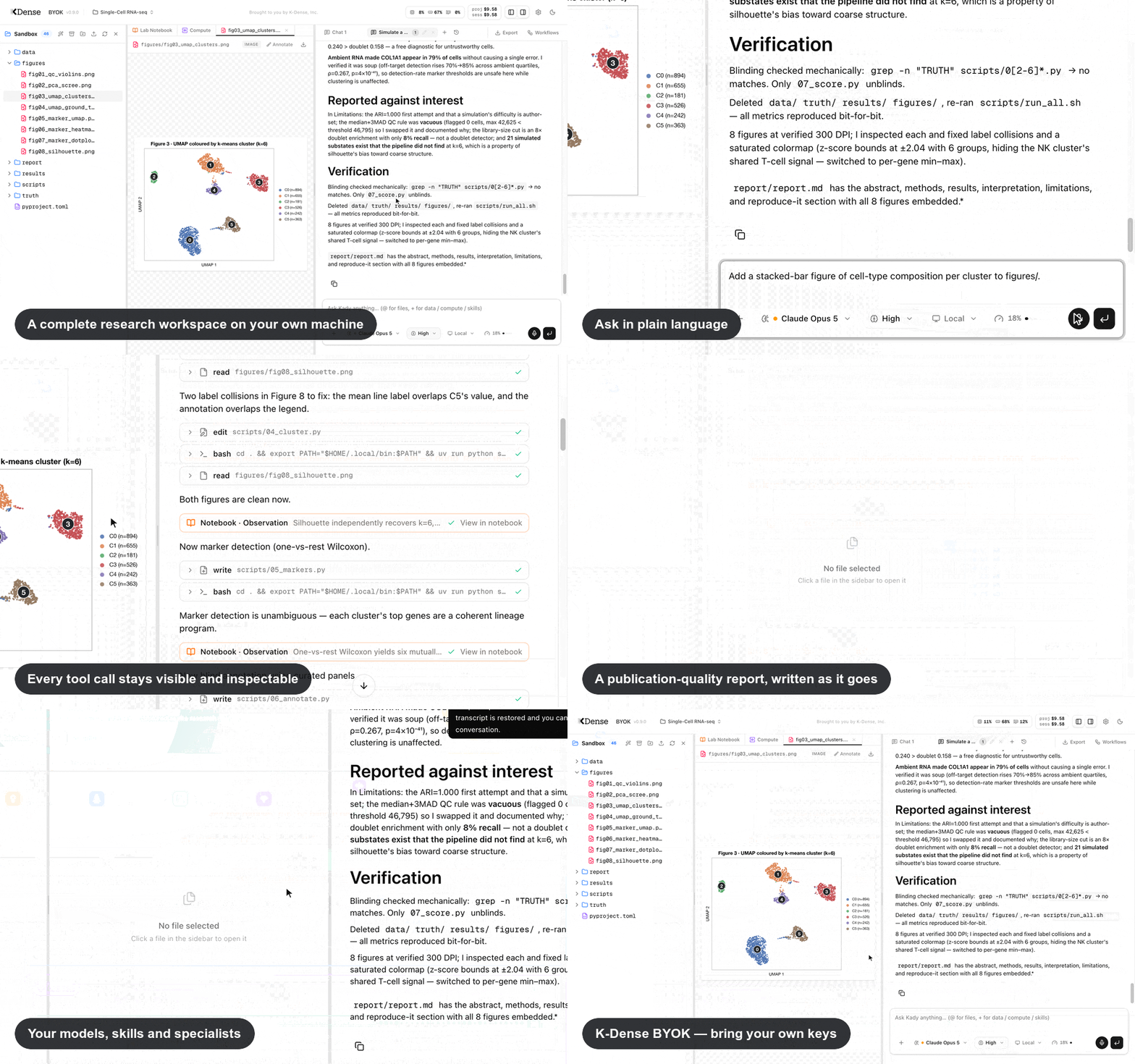
K-Dense BYOK (Bring Your Own Keys) is a free, open-source app that gives you Kady — an AI research assistant for scientists in any field. Describe a task in plain language — analyze this dataset, review my manuscript, search the literature, build this figure — and Kady works through it in a complete research workspace. It can inspect your files, write and run analysis code, search and read sources, create figures and reports, and keep a living record of what it did.
Four things to know up front:
- No coding experience required. You describe what you want; Kady writes and runs the code and shows you its progress as it works.
- Every step is on the record. Kady keeps a lab notebook of its reasoning and a separate, automatically recorded log of what actually ran and which files each step produced, so results can be checked, traced, and reproduced.
- Your workspace stays on your computer. Projects, conversations, notebooks, and results live in ordinary folders on your machine; K-Dense does not host or store them. When you use a hosted AI model, the material needed for that request is sent directly to the provider you selected under that provider's privacy terms. Use a local Ollama model when data must not leave your machine.
- The app itself is free; provider charges and limits remain yours. Use prepaid OpenRouter, connect a supported AI subscription, or run free local models. Kady tracks paid OpenRouter usage and Anthropic OAuth's documented metered extra usage against project spending caps. ChatGPT, Copilot, xAI, Kimi Code, and Meta Muse subscription usage is tracked separately because those providers manage quotas and overages; a subscription login does not imply unlimited or free usage.
Beta: K-Dense BYOK is currently in beta. Many features and improvements are on the way. Star us on GitHub to stay in the loop, and follow K-Dense on X, LinkedIn, YouTube, and Reddit for release notes and tutorials.
🎬 Prefer to watch first? The Future of Research is Open: Introducing K-Dense BYOK walks through what the app does and how to get set up. More walkthroughs in Tutorial videos.
📄 Read the paper: K-Dense BYOK: An Open-Source AI Research Assistant That Runs Locally and Keeps a Hash-Chained Lab Notebook (arXiv:2610.00074). If you use K-Dense BYOK in your research, please cite it.
CompBioBench
As of September 11, 2026, K-Dense BYOK holds #2 on the public CompBioBench v1 leaderboard.
CompBioBench is a Genentech benchmark of 100 computational-biology tasks. Each task has one exact-match answer. The gold answers stay on the leaderboard, so an independent grader scores every run.
We ran the same K-Dense BYOK harness four times through OpenRouter. Each run used one model and one isolated project per question.
| Run | Model | Reasoning | Accuracy | Rank (Sept 11, 2026) |
|---|---|---|---|---|
| r4 | GPT-6 Astra | xhigh | 98% | #2 |
| r3 | Gemini 3.8 Flash | xhigh | 94% | #7 |
| r2 | GPT-5.6 SOL | xhigh | 92% | #11 |
| r1 | DeepSeek V4 Pro | high | 81% | — |
Ranks will move as new submissions arrive. For agreement, failures, and cost on the first three runs, see K-Dense BYOK on CompBioBench.
Internal benchmark
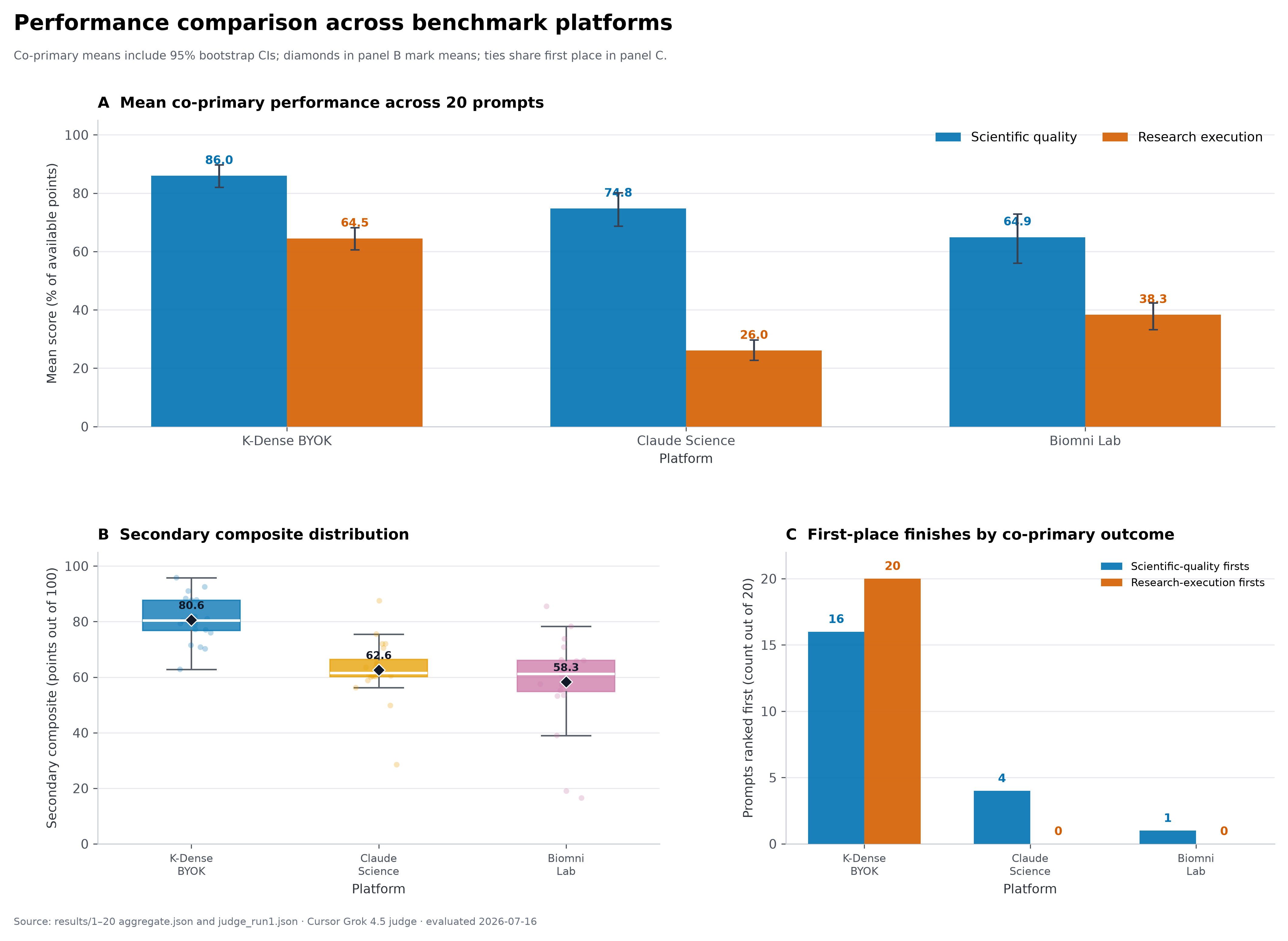
This figure compares K-Dense BYOK, Claude Science, and Biomni Lab across scientific quality and research execution in a 20-prompt benchmark. For these runs, K-Dense BYOK was configured to use Claude Opus 4.8 with the xHigh reasoning level. The benchmark was designed, run, and evaluated internally by K-Dense rather than an independent third party, so the results should be interpreted as an internal evaluation under the tested setup, not as a universal measure of platform performance.
Related reading on how we evaluate: K-Dense Web vs. Claude Science walks through the same 20-task comparison for our hosted platform, and Introducing K-Bench 01 covers our broader benchmark of nine frontier models on 178 real scientific tasks.
What can it do?
Kady is designed to carry out research work, not only answer questions. You remain the scientist in charge: you can watch each step, inspect the code and files it creates, redirect it while it works, and stop a run at any time.
From a research question to usable results
- Analyze real datasets. Ask Kady to clean data, check quality, choose and run statistical methods, compare groups, fit models, or generate publication-ready figures. It writes and runs the code inside the project, so the scripts, intermediate files, tables, figures, and reports remain available for inspection and reuse.
- Search and read the literature. Kady can search the web and read web pages, PDFs, GitHub repositories, and YouTube videos. It can compare papers, extract methods, audit a manuscript, summarize evidence, or check a specific claim against sources with exact quoted passages. Web search works without an additional account; optional search-provider keys improve capacity, and a Paperclip key adds search across papers, preprints, clinical trials, FDA documents, and patents.
- Make figures, diagrams, and documents. Data plots are made with code, so they can be checked and regenerated. For schematics, pipeline diagrams, and graphical abstracts, Kady can generate images with an OpenRouter image model. It can also write Word, Excel, PowerPoint, and PDF files.
- Work with text, data, and images. Type or dictate a request, upload files through the project browser, attach project files to a conversation, or paste/drop images directly into a message for a vision-capable model to inspect.
- Ask before it assumes. If a study design, comparison, output format, or other requirement is ambiguous, Kady can pause and show a short in-chat question form — including multiple choice, free text, and image input — rather than silently guessing.
- Keep working while it works. Add up to five follow-up messages to a running conversation, steer the current analysis, or continue in another chat or project.
A scientific toolkit built in
- 177 scientific skills cover genomics, proteomics, bioinformatics, drug discovery, chemistry, materials science, clinical research, and more, alongside four skills for Word, PDF, PowerPoint, and Excel documents. Kady picks the relevant procedures automatically. In Settings you can browse and disable them, install more from a skills registry, or write your own, for one project or all of them. Learn more.
- 326 guided workflow templates across 22 disciplines turn common analyses into fill-in-the-blank starting points. Choose a workflow, supply the study details, and launch it into the active chat.
- Shortcut commands. Type
/in the message box for reusable prompts such as/qc(dataset quality report),/stats-check,/figure-audit,/methods-review,/replicate, and/prove-verify, or save your own. Learn more. - 229 scientific and financial data resources across 18 categories give Kady guidance for finding information in biomedical, chemical, scholarly, market, earth-science, climate, and space databases. Some resources require their own free key.
- 23 scientific specialists can take focused assignments such as statistical review, citation checking, peer review, data analysis, or literature synthesis. Kady can delegate independent work in parallel and combine the findings, or you can call a specialist by name. You can follow each specialist's live transcript and steer, stop, or resume it; when one needs a decision, Kady answers from your instructions or asks you. Learn more.
- Prove–verify rounds for open questions.
/prove-verify <question>runs rounds in which investigators pursue different directions in parallel, adversarial verifiers and a comparative reviewer check every draft, and a ledger keeps verified results and ruled-out directions for the next round, until a result passes review or the round or dollar limit is reached. Set a verifier model in Settings → Defaults so reviewers check work with a different model than the one that produced it. Learn more. - An optional second reviewer. Turn on the watchdog to have another model review Kady's and its specialists' work as it happens, flagging problems such as unreported data exclusions, completion claims without evidence, deviations from the plan, or altered raw data. It is off by default and adds model cost; no warning is not proof of correctness.
A research record you can check
Kady keeps two complementary records, so you can check what was done instead of taking the AI's word for it.
- A Living Lab Notebook records the reasoning. As Kady and its specialists work, they log hypotheses, methods, observations, decisions, confidence, code, and linked files. Observations can be linked to a hypothesis as supporting, challenging, or inconclusive evidence, and results are labelled as a signal, a null result, inconclusive, or a technical failure. Corrections are added as new entries rather than overwriting old ones, and files cited in an entry are checked later for changes. You can pin and comment on entries, add your own notes, view one chat or the whole project, export Markdown, JSON, or a ZIP bundle with the cited files, and print to PDF. Learn more.
- Provenance shows where every file came from. Separately from the notebook, Kady records what actually ran by watching its tool activity — it has no tool for writing to this record. Open any file and choose Provenance to see which step produced it, from which inputs, with which model and software environment. You can trace a figure back through its script and tables to the uploaded data, and see which files have changed since they were used. Learn more.
- Freeze an analysis plan before looking at results. For a hypothesis, write down the outcomes, inclusion rules, statistical model, quality checks, stopping rules, and datasets, review them, and freeze the plan. Later revisions and deviations are recorded with their reasons, and each revision is chained to the one before it by a cryptographic digest, so gaps or edits in the history are detected. This is a local record, not an external preregistration. Learn more.
- Stress-test a finding. For a hypothesis with a frozen plan, run 2–16 reviewed variations of a Python analysis — different parameters, exclusions, or models — on Modal cloud compute and see how the result holds up. You approve the exact script and estimated cost first, and every attempt stays visible, including failures. Learn more.
- Plan what to test next. What next? on a hypothesis proposes alternative explanations and experiments that could change your decision, with controls, predicted outcomes, and required resources, each linked to the evidence it draws on. You can prioritize, defer, or reject each proposal. Nothing runs without your separate approval. Learn more.
- Search your project's past work. Research memory searches notebook entries, notes, and plans across every chat in a project, including corrections and abandoned approaches, and opens the exact source. Kady and its specialists can search it too. Learn more.
- Draft Methods and package evidence for reviewers. Generate a manuscript-style Methods draft from what was recorded, with planned-but-unfinished work kept explicit. Prepare an evidence package: a ZIP of selected notebook records, provenance, plans, results, and the exact file versions they cite, with checksums, an optional verification script, standard RO-Crate metadata, and a report of anything missing. Learn more.
- Long conversations keep the scientific record. When a chat outgrows the model's memory, Kady summarizes older turns with a dedicated section for hypotheses, results, parameters, failures, corrections, and open work, rebuilt from the notebook and records rather than from memory. You can also compact a chat on demand.
Read, edit, and write scientific files
- Preview 60+ scientific formats alongside everyday CSV, PDF, Markdown, image, code, and Jupyter notebook files. View interactive 3D protein and molecular structures, 2D chemical structures, spectra and chromatograms, sequence alignments, phylogenetic trees, single-cell and array data, and DICOM/NIfTI/microscopy images. See the full format list.
- Edit Word, Excel, and PowerPoint files in the browser. Open a
.docx,.xlsx, or.pptxfor a quick preview, then choose Edit in Office for a full editor that runs inside your browser, with no Office installation required. Saves go back into the project and never silently overwrite newer changes. Learn more. - Edit text and code in place, inspect tables and notebook outputs, annotate images, and highlight and add notes to PDFs, where Kady and its specialists can also add their own annotations while they read. Reveal files cited in chat, ask Kady to organize the project folder, and download an individual result, a folder, or the complete project as a ZIP archive.
- Write papers in LaTeX with a split source/PDF view, automatic compilation, pdfLaTeX/XeLaTeX/LuaLaTeX support, outline and word count, inline errors, autocomplete, spell check, and two-way jumps between source and PDF. AI-assisted edits and compile fixes appear as diffs you can accept or revert.
Run several lines of work at once — and return later
- Projects are independent research workspaces. Each project has its own files, chats, notebook, model choices, tags, archive state, and spending policy. Several projects can run at the same time, and the project directory shows which ones are running, finished, waiting for your input, blocked, or errored.
- Use up to 10 parallel chat tabs per project. Each tab has its own conversation, model, thinking level, compute choice, attachments, draft, queue, and cost, while all tabs share the project's files.
- Schedule recurring work. Ask Kady for something like "Every six hours, have the data validator re-check
user_data/and log changes in the notebook." The project's Automation tab shows each schedule's next run, results, and spend, and lets you run, pause, or delete it. The app must stay running for schedules to fire. Learn more. - Refresh without losing your place. Open projects, tabs, drafts, queued messages, panel sizes, open files, and active turns are restored after a browser refresh or browser-tab closure. A live turn reconnects to the same run and continues streaming as long as the Kady backend remains running. Completed conversations stay on disk and can be reopened from Chat history.
- Arrange the workspace for the task. Resize or collapse the file browser and chat to focus on a figure, report, notebook, or LaTeX document; Kady remembers the layout.
Choose the right model and compute for each task
- Sign in with an AI subscription you already have. In Settings → Providers, connect a ChatGPT subscription (Sign in with ChatGPT), Claude Pro/Max, GitHub Copilot, xAI (SuperGrok / X Premium), Kimi Code, or Meta Muse. Kady walks you through the provider's sign-in and adds its models to the picker. An older OpenAI Codex login keeps working as "OpenAI Codex (legacy)".
- Use major hosted models from OpenAI, Anthropic, Google, xAI, Qwen, and others through one OpenRouter account. Change the model and reasoning level independently in each chat.
- Bring an API key from almost any AI provider. Under Settings → Providers, add a key for Anthropic, OpenAI, Google Gemini, xAI, Meta, DeepSeek, Mistral, Groq, Cerebras, Hugging Face, Fireworks, Together, Baseten, Vercel AI Gateway, Kimi, Moonshot, MiniMax, Z.AI, Qwen and Xiaomi token plans, or your own Azure OpenAI, Amazon Bedrock, Google Vertex AI, or Cloudflare account. Each configured provider gets its own section in the model picker (see Model selection).
- Use NVIDIA NIM models directly with an API key from build.nvidia.com — Nemotron, Llama, GPT-OSS, and more, billed against your NVIDIA API credits rather than per-token dollar pricing.
- Run free local models with Ollama or any OpenAI-compatible server (LM Studio, vLLM, …) when cost or data locality matters, or add your own model server with its pricing. Local models appear in the same model picker.
- Ask a panel of models with OpenRouter Fusion. A preset can send one question to several models and use a judge model to synthesize their perspectives into one response; the picker shows the combined estimated price. Fusion remains OpenRouter-only and requires an OpenRouter API key.
- Move demanding computation to Modal. Pick an on-demand cloud CPU or GPU machine for a chat. Kady sends the needed files, monitors the job, and copies verified results back into the local project, reserving the estimated cost against the project budget. Long jobs survive chat turns and app restarts and stay controllable from the Compute tab.
- Set your defaults once. Settings → Defaults chooses the model, thinking level, and compute that new projects start with, the model used for image generation, and the model reviewer specialists check work with.
Stay in control
- See usage and cost as work happens. Kady records model tokens, specialist usage, and Modal compute by run and project. OpenRouter, direct API-key providers, and Anthropic OAuth metered usage count toward an optional hard dollar limit; provider-managed ChatGPT, Copilot, xAI, Kimi and Meta Muse subscriptions, NVIDIA NIM credits, and prepaid token plans show token and reference-price information without consuming that cap.
- Your raw data is protected. By default, Kady and its specialists can read your uploads in
user_data/but not change or delete them; they work on copies instead. Destructive commands elsewhere, such as deleting a folder, pause and ask for your approval. Choose which folders are protected for each project. This guards against mistakes, not deliberate misuse, so keep backups of irreplaceable data. Learn more. - Give Kady standing instructions. Each project has editable agent instructions (Settings → General) for your lab's conventions — preferred methods, file naming, reporting standards — that Kady follows in new chats.
- Watch local resource use. A compact system monitor shows CPU, memory, and GPU activity while analyses are running on your computer.
- Manage capabilities without editing configuration files. Settings lets you connect model providers, pick default models, add service keys, adjust each project's budget and guardrails, enable or disable skills, create or customize specialists, manage Fusion presets, and change appearance. Disabling a capability does not delete it.
- Connect your existing research tools through MCP, a plug-in standard for AI assistants. Add reference managers, GitHub, databases, and other services for one project or all projects, test the connection, check live status, and sign in through the browser for services that need it. Large servers stay out of the way: by default Kady calls their tools from short scripts instead of loading every tool into the conversation, and you can switch a server to direct tools when a smaller model needs it.
- Your work is stored in ordinary local files. Projects can be backed up, moved, inspected with other software, or archived independently of the app.
- Know the boundaries. Kady runs code with your user account's permissions, like any program you run yourself. For untrusted data or code, use a separate account, virtual machine, or container. See Security and Limitations.
Get started in 5 minutes
You need a compatible computer and at least one model source:
- A computer running macOS, Linux, or Windows 10/11.
- On Windows, install Node.js 22+ (or
winget install OpenJS.NodeJS.LTS) and Git for Windows first — Kady's agent runs its shell commands through the Git Bash that Git for Windows provides. (Prefer a Linux environment? WSL works too.)
- On Windows, install Node.js 22+ (or
- One of:
- an OpenRouter API key for broad pay-as-you-go model access,
- an API key for any provider Pi supports — Anthropic, OpenAI, Google, Groq, Mistral, DeepSeek, NVIDIA NIM, Azure, Bedrock, Vertex, and more — pasted in Settings after launch,
- a supported ChatGPT, Claude Pro/Max, GitHub Copilot, xAI, Kimi Code, or Meta Muse subscription that you connect after launch, or
- free local models through Ollama.
Open a terminal (on a Mac: press Cmd+Space, type "Terminal", press Enter) and run these four lines:
git clone https://github.com/K-Dense-AI/k-dense-byok.git
cd k-dense-byok
cp .env.example .env    # optional: add an OpenRouter key or other settings
./start.sh
On Windows (press Win, type "PowerShell" or "Terminal", press Enter):
git clone https://github.com/K-Dense-AI/k-dense-byok.git
cd k-dense-byok
copy .env.example .env    # optional: add an OpenRouter key or other settings
.\start.cmd
In plain terms: the first two lines download the app and step into its folder; the third creates an optional local settings file; the last starts the app. If you use a supported subscription instead of OpenRouter, connect it in Settings → Providers once Kady opens.
The first start installs everything automatically (it takes a few minutes); then your browser opens to http://localhost:3000 — that address is your own computer, not a website. Press Ctrl+C in the terminal to stop the app. You can connect subscriptions and model keys under Providers and add search or Modal keys under Services anytime — no restart needed. If no model is connected yet, the empty chat shows a Connect a model to get started card that takes you there.
That's it. Create a project, drop in your data, and ask Kady for what you want — for example: "Run a differential expression analysis on counts.csv comparing treated vs control, and plot a volcano plot."
➡️ Step-by-step details, optional API keys, and troubleshooting: Installation guide ➡️ Your first session and everyday features: Basic usage ➡️ Prefer to watch first? Tutorial videos
Tutorial videos
Recorded walkthroughs of Kady working through real research tasks, from the K-Dense YouTube channel:
| Video | What it covers |
|---|---|
| K-Dense BYOK Workflow Demo: Write a Review Article | Using a guided workflow to research and draft a review article |
| K-Dense BYOK in Action: End-to-End Workflow Demo | A full run from research question to results, start to finish |
| K-Dense BYOK Workflow Demo: Write a Rebuttal | Responding to reviewer comments with a point-by-point rebuttal |
| K-Dense BYOK Workflow Demo: Draft a Protocol | Turning a planned experiment into a written protocol |
| The Future of Research is Open: Introducing K-Dense BYOK | What the app is, what it does, and how to get started |
| Literature Review and Hypothesis Generation | Searching the literature and generating grounded hypotheses |
| BYOK Workflow Highlights: Write a Review Paper | Highlights from a guided review-paper run |
| Can AI Reproduce a Nature Medicine Paper? | An end-to-end reproduction attempt on a published analysis |
Documentation
Start with the documentation index, or go directly to Installation, Basic usage, Model selection or Security.
From the K-Dense blog
Background reading on the research and evaluation work behind Kady, from the K-Dense blog:
| Post | What it covers |
|---|---|
| K-Dense BYOK on CompBioBench | Three models on the same harness: Gemini 3.8 Flash 94%, GPT-5.6 SOL 92%, DeepSeek V4 Pro 81% |
| Introducing K-Bench 01 | Our internal benchmark of nine frontier models across 178 real scientific tasks, and how often confident answers are wrong |
| K-Dense Web vs. Claude Science | A 20-task comparison focused on execution and auditable research output |
| AI Scientists Need Lab Escape Rooms, Not More Exams | Why hidden lab environments test AI scientists better than exam-style benchmarks |
| Reproduction, Not Generation, Is AI's Killer App for Science | The case for reproducing existing research over generating novel claims, and why Kady keeps a full record of its work |
| AI Co-Scientists, Answered | 20 questions from a live session with a university research center, including current limitations |
| Benchmarking NVIDIA BioNeMo Agent Toolkit Skills for NIM microservices | A controlled evaluation of ten BioNeMo skills, relevant if you run NVIDIA NIM models |
| Benchmarking Nano Banana 2 Lite for Scientific Image Generation | A 240-image benchmark of scientific image models, speed versus figure quality |
| Benchmarking Google's Omni Flash for Scientific Video | 35 case studies on scientific video generation, strong visuals but unreliable text and physics |
| K-Dense Web and Litmus Science | Closing the loop from hypothesis to experiment with lab execution |
Want more?
K-Dense BYOK is great for getting started, but if you want end-to-end research workflows with managed infrastructure, team collaboration, and no setup required, check out K-Dense Web — our full platform built for professional and academic research teams.
Issues, bugs, or feature requests
If you run into a problem or have an idea for something new, please open a GitHub issue — a free GitHub account is all you need. We read every one.
About K-Dense
K-Dense BYOK is open source because K-Dense believes in giving back to the community that makes this kind of work possible.
Citation
If you use K-Dense BYOK in your research, please cite the paper:
@misc{brueckner2026kdensebyokopensourceai,
      title={K-Dense BYOK: An Open-Source AI Research Assistant That Runs Locally and Keeps a Hash-Chained Lab Notebook},
      author={Aubrey M. Brueckner and Darshil Patel and Yuhuan He and Timothy Kassis},
      year={2026},
      eprint={2610.00074},
      archivePrefix={arXiv},
      primaryClass={cs.AI},
      url={https://arxiv.org/abs/2610.00074},
}