SkyLightWindow
A powerful macOS framework that enables views to be displayed above all other windows using private SkyLight APIs.
Features
- 🚀 Always on Top: Display windows above all other applications, even fullscreen apps
- 🎯 SwiftUI Integration: Simple
.moveToSky()modifier for any SwiftUI view - 🔒 System-Level Positioning: Uses SkyLight framework for maximum window level control
- 🖥️ Multi-Screen Support: Works seamlessly across multiple displays
- 🎨 Transparent Windows: Support for transparent backgrounds and custom styling
Installation
SwiftPM
Add the following to your Package.swift file:
dependencies: [
    .package(url: "https://github.com/Lakr233/SkyLightWindow", from: "1.0.0"),
]
To enable the OpenSwiftUI package trait, use:
dependencies: [
    .package(
        url: "https://github.com/Lakr233/SkyLightWindow",
        from: "1.0.0",
        traits: ["OpenSwiftUI"]
    ),
]
This uses OpenSwiftUI-spm
binary package. Import OpenSwiftUI instead of SwiftUI in your app. At the
time of writing, OpenSwiftUI's macOS binary support requires macOS 15.0 or newer.
Xcode
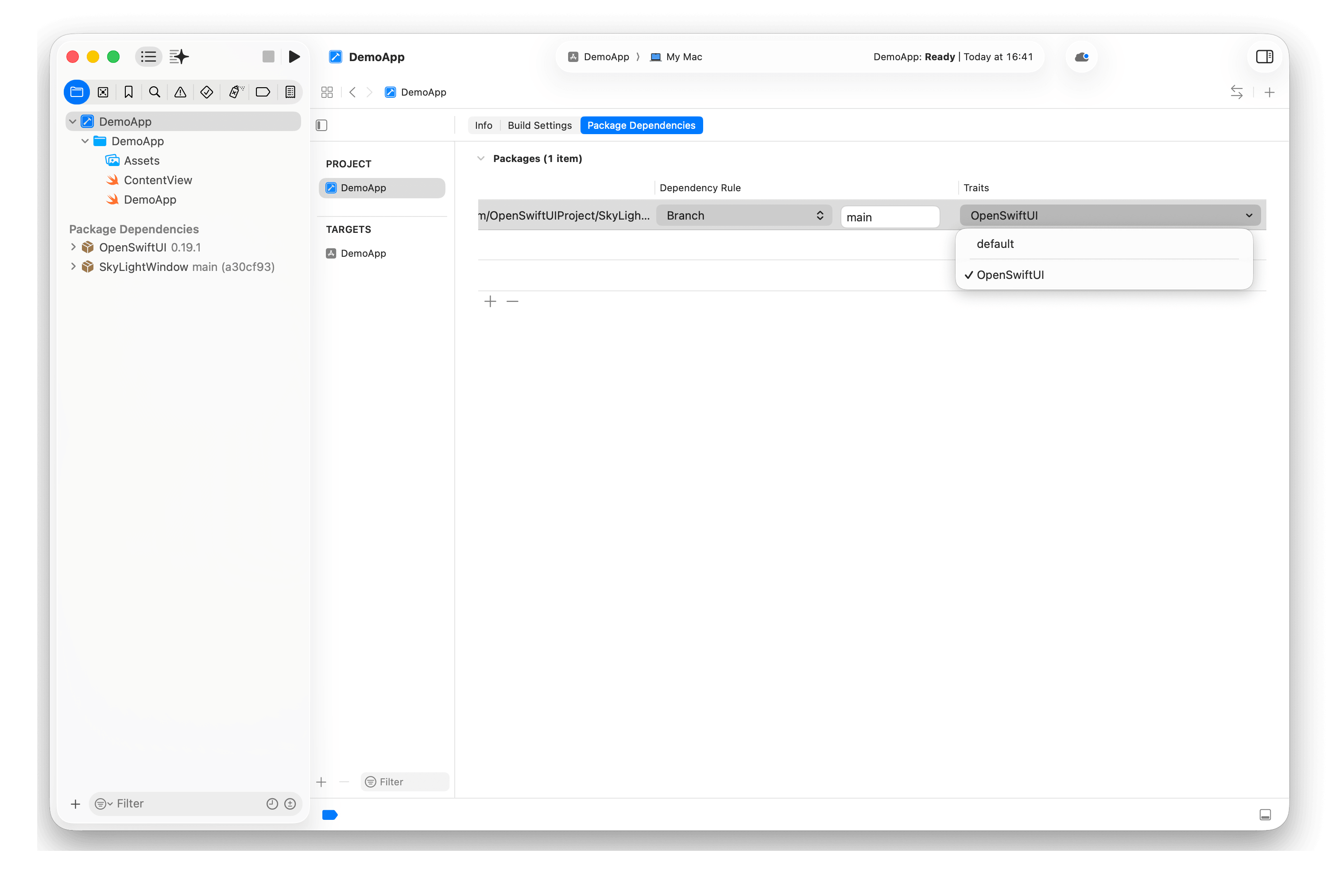
In Xcode, add the package dependency and enable the OpenSwiftUI trait in the package settings.
To enable trait in your Xcode project, Xcode 26.4+ is required.
Platform compatibility for default trait:
- macOS 11.0+
- Swift Compiler 5.9+
Platform compatibility for OpenSwiftUI trait:
- macOS 15.0+
- Swift Compiler 6.1+
Usage
SwiftUI Integration
- Import the framework
import SwiftUI
import SkyLightWindow- Apply the modifier to any view
struct ContentView: View {
    var body: some View {
        Text("This view is always on top!")
            .moveToSky()
    }
}
OpenSwiftUI Integration
Usage is identical to the SwiftUI integration above. Import OpenSwiftUI instead of SwiftUI:
import OpenSwiftUI
import SkyLightWindow
struct ContentView: View {
var body: some View {
Text("This view is always on top!")
.moveToSky()
}
}AppKit Usage
You can also create topmost windows programmatically:
import SkyLightWindow

let screen = NSScreen.main!
let view = AnyView(Text("Overlay Content"))
let controller = SkyLightOperator.shared.delegateView(view, toScreen: screen)

// or you can just delegate a window
How It Works
SkyLightWindow uses macOS's private SkyLight framework to:
- Create a special space at the highest system level
- Move target windows to this space
- Ensure windows remain visible above all other content
The framework handles:
- Connection to the SkyLight service
- Space creation and management
- Window delegation and positioning
- SwiftUI integration through view modifiers
Important Notes
⚠️ Privacy & Security: This framework uses private APIs but works without special entitlements and is available to the Mac App Store.
⚠️ System Compatibility: The default SwiftUI integration supports macOS
11.0 or newer. The OpenSwiftUI trait requires macOS 15.0 or newer. Private
APIs can change between system updates.
Example
cd Example
open MoveToSky.xcworkspace
The Example directory contains two Xcode projects that share the same example
sources:
MoveToSky.xcodeprojuses the default SwiftUI integration.MoveToSkyOpenSwiftUI.xcodeprojenables theOpenSwiftUItrait and requires Xcode 26.4 or newer.
Open the project for the integration you want to test.
License
This project is licensed under the MIT License. See the LICENSE file for details.
Sponsor
LookInside helps you inspect a running iOS or macOS app UI from your Mac.
Copyright 2025 © Lakr Aream. All rights reserved.