spotatui
A Spotify client for the terminal written in Rust, powered by Ratatui.
A community-maintained fork of spotify-tui, actively developed with new features like native streaming, synced lyrics, and real-time audio visualization, and growing beyond Spotify with optional local files, Subsonic/Navidrome, internet radio, and YouTube sources.







Song History
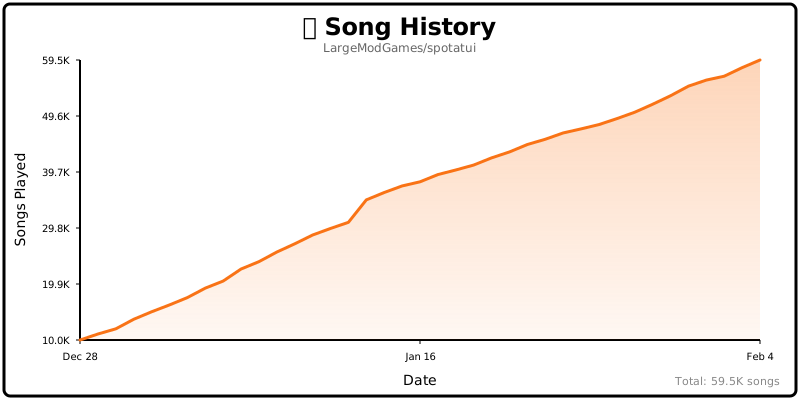
Table of Contents
- Help Wanted
- Performance
- Privacy Notice
- Migrating from spotify-tui
- Installation
- Connecting to Spotify
- Usage
- Native Streaming
- Music Sources (Beyond Spotify)
- Configuration
- Plugins
- Limitations
- Using with spotifyd
- Libraries used
- Development
- Maintainer
- spotatui Contributors
- Upstream Contributors (spotify-tui)
- Star History
- Roadmap
Help Wanted
spotatui is currently maintained by a solo developer. More contributors would be hugely appreciated! Here's how you can help:
- Star the repo to help others discover the project
- Report bugs or request features in Issues
- Join the community in Discussions
- Submit a PR for code, docs, or themes
See CONTRIBUTING.md for more details!
Performance
spotatui is extremely lightweight compared to the official Electron client.
| Mode | RAM Usage |
|---|---|
| Native Streaming (Base) | ~78 MB |
| With Synced Lyrics | ~78 MB |
| With System-Wide Visualizer | ~80 MB |
Tested on Arch Linux (Hyprland).
Privacy Notice
Anonymous Global Counter: spotatui includes an opt-in feature that contributes to a global counter showing how many songs have been played by all users worldwide. This feature:
- Is completely anonymous - no personal information, song names, artists, or listening history is collected
- Only sends a simple increment when a new song starts playing
- Is enabled by default but can be opted out at any time
- Can be disabled by setting
enable_global_song_count: falsein~/.config/spotatui/config.yml
We respect your privacy. This is purely a fun community metric with zero tracking of individual users.
Migrating from spotify-tui
If you used the original spotify-tui before:
- The binary name changed from
spttospotatui. - Config paths changed:
- Old:
~/.config/spotify-tui/ - New:
~/.config/spotatui/
- Old:
You can copy your existing config:
mkdir -p ~/.config/spotatui
cp -r ~/.config/spotify-tui/* ~/.config/spotatui/
You may be asked to re-authenticate with Spotify the first time.
Installation
Important: Spotify Premium is required for playback features (native streaming and Web API playback controls).
# Homebrew (macOS only)
brew tap LargeModGames/spotatui
brew install spotatui

# Winget (Windows)
winget install spotatui

# Cargo
cargo install spotatui

# Arch Linux (AUR) - pre-built binary (faster)
yay -S spotatui-bin

# Arch Linux (AUR) - build from source
yay -S spotatui

# Void Linux (Unoffical Repo)
echo repository=https://raw.githubusercontent.com/Event-Horizon-VL/blackhole-vl/repository-x86_64 | sudo tee /etc/xbps.d/20-repository-extra.conf
sudo xbps-install -S spotatui
# NixOS (Flake)
# Add spotatui to your flake inputs:
inputs = {
spotatui = {
url = "github:LargeModGames/spotatui";
inputs.nixpkgs.follows = "nixpkgs";
};
}
# Add the spotatui package from your inputs to your config:
{ inputs, ...}:{
# Your other configurations
environment.systemPackages = with pkgs; [
inputs.spotatui.packages.${pkgs.stdenv.hostPlatform.system}.default
];
}Or download pre-built binaries from GitHub Releases.
See the Installation Wiki for platform-specific requirements and building from source.
Connecting to Spotify
Run spotatui and follow the on-screen instructions to connect your Spotify account.
You'll need to create a Spotify Developer app at the Spotify Dashboard.
See the Installation Wiki for step-by-step setup.
Usage
The binary is named spotatui.
Running spotatui with no arguments will bring up the UI. Press ? to bring up a help menu that shows currently implemented key events and their actions.
There is also a CLI that is able to do most of the stuff the UI does. Use spotatui --help to learn more.
See Keybindings Wiki for the full list of keyboard shortcuts.
Here are some example to get you excited.
spotatui --completions zsh # Prints shell completions for zsh to stdout (bash, power-shell and more are supported)

spotatui play --name "Your Playlist" --playlist --random # Plays a random song from "Your Playlist"
spotatui play --name "A cool song" --track # Plays 'A cool song'

spotatui playback --like --shuffle # Likes the current song and toggles shuffle mode
spotatui playback --toggle # Plays/pauses the current playback

spotatui list --liked --limit 50 # See your liked songs (50 is the max limit)

# Looks for 'An even cooler song' and gives you the '{name} from {album}' of up to 30 matches
spotatui search "An even cooler song" --tracks --format "%t from %b" --limit 30

# Generate a shareable HTML recap from spotatui's local listening history
spotatui history recap --period 30d --output ./spotatui-recap.html
Native Streaming
spotatui can play audio directly without needing spotifyd or the official Spotify app. Just run spotatui and it will appear as a Spotify Connect device.
- Works with media keys, MPRIS (Linux), and macOS Now Playing
- Premium account required
- Context-backed native playback prefers Spotify-visible playback starts when it is safe to do so, while raw URI-list playback stays on the stable direct native path
- Runs on our maintained librespot fork, which backports upstream fixes for Spotify's evolving audio delivery (e.g. the HTTP 530 CDN issue that silenced native playback)
See the Native Streaming Wiki for setup details.
Music Sources (Beyond Spotify)
spotatui is growing into a general music player. Press d to open the Source & Device
picker and switch between sources; the sidebar and search re-scope to the active source.
Playback for these sources runs through spotatui's own audio engine, so volume control and
the audio visualizer work exactly like they do for Spotify.
| Source | What it does | Needs |
|---|---|---|
| Local Files | Browse and play a folder of audio files (FLAC, MP3, OGG, WAV, …) | Nothing; set local_music_path or use the OS music dir |
| Subsonic | Browse playlists, search, and stream from any Subsonic-compatible server (Navidrome, Gonic, Airsonic, Funkwhale, …) | A server account |
| Internet Radio | Play icecast/shoutcast streams with live now-playing metadata; search the radio-browser.info directory (30k+ stations) | Nothing |
| YouTube | Search YouTube and play audio; build local playlists stored in a plain file | yt-dlp on your PATH (ffmpeg recommended) |
These sources need no Spotify Premium. Combined with YouTube's local playlists, spotatui is fully usable without any paid account.
Resuming your last session: quit while playing from a non-Spotify source and spotatui
remembers that track and its position, bringing it back on the next launch. This follows the
startup_behavior setting: the default continue resumes it exactly as it was (playing if it
was playing when you closed), play always resumes it, and pause cues it paused.
Availability: included in the Linux and Windows release binaries. Not yet available on macOS (the shared audio output path is disabled there pending a fix; contributions welcome). When building from source, enable them with cargo features:
cargo install spotatui --features local-files,subsonic,internet-radio,youtubeLocal Files
behavior:
  local_music_path: "/home/you/Music" # defaults to the OS music directory
Pick Local Files in the d picker; the sidebar lists your folders. Selecting a track
queues the folder with next/previous and auto-advance.
Subsonic / Navidrome
behavior:
  subsonic_url: "https://music.example.com"
  subsonic_username: "you"
  subsonic_password: "secret" # prefer the env var below
Prefer setting the password via the SPOTATUI_SUBSONIC_PASSWORD environment variable so it
never sits in the config file in plaintext.
Internet Radio
Stations come from your config list and from searching the radio-browser.info directory
in-app (the search box searches stations while Radio is the active source; Enter plays one
directly). Press the save/like key (F by default) on a highlighted station, or while
a radio stream is playing, to save it to behavior.radio_stations and show it in the
Radio Stations sidebar. Highlight a saved sidebar station and press D to remove it.
behavior:
  radio_stations:
    - name: "SomaFM Groove Salad"
      url: "https://ice1.somafm.com/groovesalad-128-mp3"
The playbar shows a LIVE badge with the stream's now-playing title as it updates.
YouTube
Requires the yt-dlp binary (install it from your
package manager; ffmpeg is recommended for cleaner audio containers). No Google account,
no API key, no cookies: search and playback are anonymous. If yt-dlp is somewhere unusual:
behavior:
  ytdlp_path: "/opt/yt-dlp/yt-dlp" # optional; defaults to `yt-dlp` on PATH
Search for anything and press Enter on a result to play it (the first play takes a few
seconds while the audio downloads). When YouTube extraction changes and playback breaks,
updating yt-dlp (yt-dlp -U or your package manager) is the fix; no spotatui update needed.
Local YouTube playlists: since there is no usable YouTube login API, playlists live in
~/.config/spotatui/youtube_playlists.yml, a plain human-editable file you can back up or
share:
- Sidebar →
+ New Playlistcreates one won a search result adds it to a playlist (same picker dialog as Spotify)- Enter on a playlist opens it; Enter on a track plays the playlist as a queue
xremoves a track,Ddeletes a playlist (both with confirmation)
Configuration
A configuration file is located at ${HOME}/.config/spotatui/config.yml.
spotatui also stores local listening history at ${HOME}/.config/spotatui/history/listens.jsonl. This powers the spotatui history recap CLI and starts collecting from rollout onward; short or skipped plays are stored but excluded from recap totals.
See the Configuration Wiki for the full config file reference.
You can also configure spotatui in-app by pressing Alt-, to open Settings.
See Themes Wiki for built-in presets (Spotify, Dracula, Nord, etc.).
Discord Rich Presence
Discord Rich Presence is enabled by default and uses the built-in spotatui application ID, so no extra setup is required.
Overrides (optional):
behavior:
  enable_discord_rpc: true
  discord_rpc_client_id: "your_client_id"
You can also override via SPOTATUI_DISCORD_APP_ID or disable in the setting or by setting behavior.enable_discord_rpc: false in ~/.config/spotatui/config.yml.
Plugins
spotatui runs user-written Lua plugins. They react to playback events, add commands and key bindings, draw popups and playbar segments, restyle the theme, and make async HTTP requests.
Install a plugin published as a git repository (requires git):
spotatui plugin add owner/repo
spotatui plugin list
spotatui plugin update
spotatui plugin remove <name>
See PLUGINS.md for the ecosystem overview, examples/plugins/
for runnable examples, and docs/scripting.md for the full API reference.
Limitations
This app uses the Web API from Spotify, which doesn't handle streaming itself. You have three options for audio playback:
- Native Streaming (NEW!) - spotatui can now play audio directly using its built-in streaming feature. See Native Streaming below.
- Official Spotify Client - Have the official Spotify app open on your computer
- Spotifyd - Use a lightweight alternative like spotifyd
If you want to play tracks, Spotify requires that you have a Premium account.
With a free account, spotatui can still authenticate and browse your library/search results, but playback actions (play/pause/seek/transfer) will not work in either:
- Native Streaming (librespot)
- Web API playback control mode
Deprecated Spotify API Features
Note: As of November 2024, Spotify deprecated and removed access to certain API endpoints for new applications. The following features are included in this app but will only work if your Spotify Developer application was created before November 27, 2024:
-
Audio Visualization (press
v): Now uses local real-time FFT analysis of your system audio. The visualization no longer depends on Spotify's deprecated Audio Analysis API.Platform Support:
Platform Status Notes Windows Works out of the box Uses WASAPI loopback Linux Works out of the box Uses PipeWire/PulseAudio monitor devices macOS Requires setup Needs a virtual audio device (see below) macOS Users: macOS doesn't natively expose system audio loopback. To use audio visualization, install a virtual audio device like BlackHole (free) or Loopback (paid). Configure it to capture system audio and set it as your default input device.
Note: The audio visualization is system-wide - it captures all audio playing on your system, not just Spotify. This means it will also react to YouTube videos, games, or any other audio source!
-
Related Artists: When viewing an artist page, the "Related Artists" section shows similar artists based on Spotify's recommendation algorithm. This feature only works if your Spotify Developer application was created before November 27, 2024.
For more information, see Spotify's announcement about API changes.
Using with spotifyd
Note: If you're using native streaming, you don't need spotifyd!
Follow the spotifyd documentation to get set up.
After that there is not much to it.
- Start running the spotifyd daemon.
- Start up
spotatui - Press
dto go to the device selection menu and the spotifyd "device" should be there - if not check these docs
Libraries used
- ratatui - Terminal UI framework
- rspotify - Spotify Web API client
- librespot - Spotify Connect streaming (via our maintained fork spotatui-librespot, which backports fixes for Spotify's CDN changes)
- tokio - Async runtime
- crossterm - Terminal manipulation
- clap - CLI argument parsing
Development
- Install OpenSSL
- Install Rust
- Install
xorg-dev(required for clipboard support) - Linux only: Install PipeWire development libraries (required for audio visualization)
# Debian/Ubuntu sudo apt-get install libpipewire-0.3-dev libspa-0.2-dev # Arch Linux sudo pacman -S pipewire # Fedora sudo dnf install pipewire-devel # NixOS nix develop github:LargeModGames/spotatui - Clone or fork this repo and
cdto it - And then
cargo run
See CONTRIBUTING.md for pull request guidelines.
Windows Subsystem for Linux
You might get a linking error. If so, you'll probably need to install additional dependencies required by the clipboard package
sudo apt-get install -y -qq pkg-config libssl-dev libxcb1-dev libxcb-render0-dev libxcb-shape0-dev libxcb-xfixes0-devMaintainer
Maintained by LargeModGames (@LargeModGames on Twitter).
Originally forked from spotify-tui by Alexander Keliris.
spotatui Contributors
Looking for contributors! spotatui is actively maintained but could use your help. Whether it's bug fixes, new features, documentation, or testing - all contributions are welcome!


Want to see your name here? Check out our open issues or the Roadmap below!
Upstream Contributors (spotify-tui)
Thanks to all the contributors who built the original spotify-tui that this project is forked from:


This project follows the all-contributors specification. Contributions of any kind welcome!
Star History
Roadmap
The goal is to eventually implement almost every Spotify feature.
High-priority features:
- Scroll through result pages in every view
See the Roadmap Wiki for the full API coverage table.