

Query and browse databases—and stage SQL row edits—without leaving Emacs.
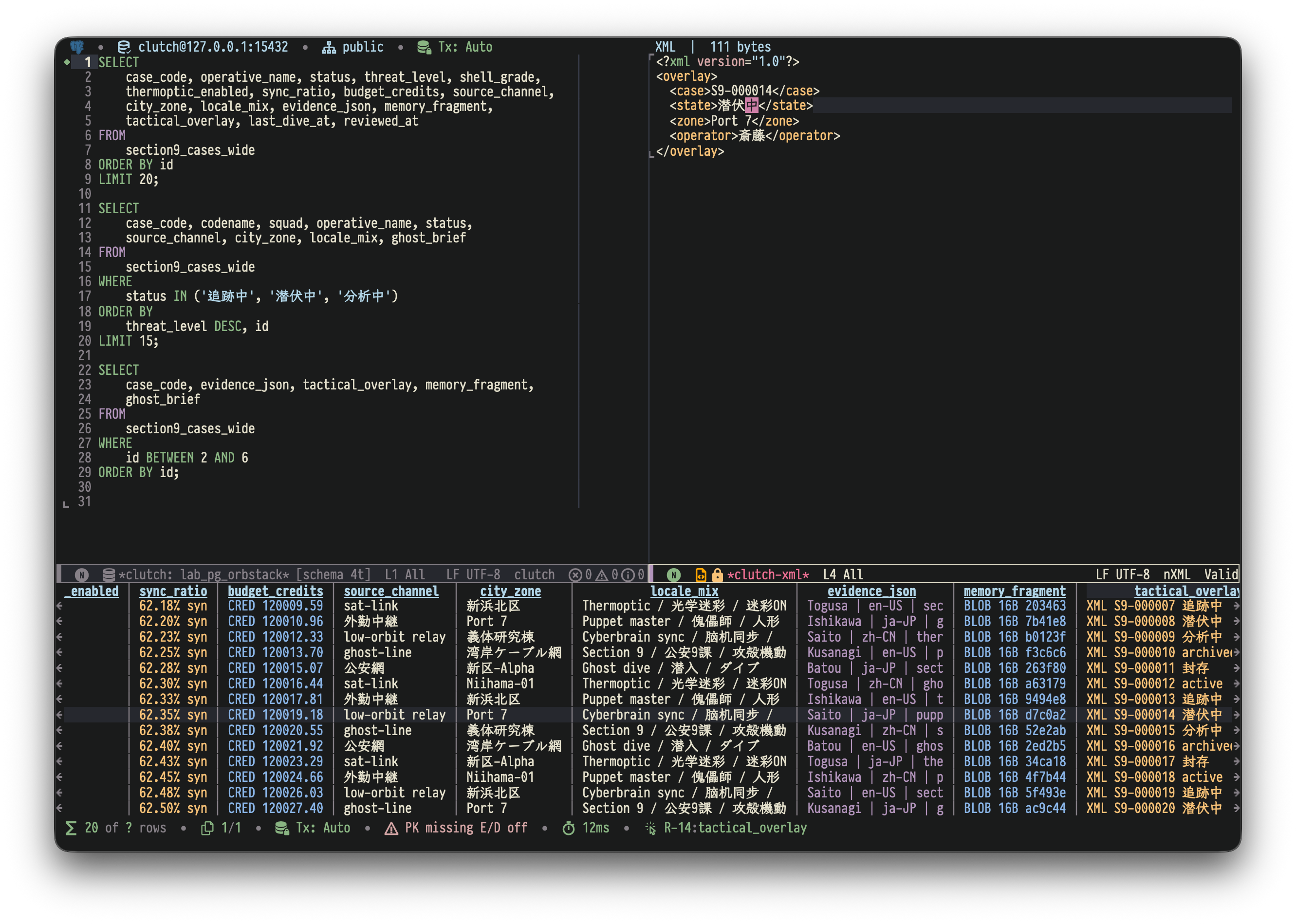
Clutch keeps queries in editable buffers, shows results in an interactive grid, and stages supported SQL row changes for preview before execution. It provides sidecar-free paths for MySQL, PostgreSQL, XTDB, SQLite, MongoDB, and Redis, plus JDBC access to Oracle, SQL Server, DB2, Snowflake, Redshift, ClickHouse, DuckDB, and other databases.
Quick Start
The shortest path uses SQLite, which requires only Emacs 29.1+—no protocol package or Java runtime.
1. Install Clutch
With MELPA or another package archive configured:
(package-install 'clutch)2. Open a SQLite database
M-x clutch-query-sqlite-fileSelect a SQLite database file. Clutch opens a connected query console in an editable SQL buffer.
3. Run a query
SELECT sqlite_version();Press C-c C-c. Clutch executes the region when one is active, otherwise the statement at point, and displays the result below the query buffer.
For MySQL, PostgreSQL, MongoDB, Redis, or JDBC, continue with Installation Details and Saved Connections and Query Workflow.
Key Capabilities
- Keep query context visible: execute a region or statement without leaving the SQL buffer; results refresh in a split grid, the statement Clutch picks at point flashes, a statement that runs without blocking Emacs keeps a background until it finishes, and the last executed statement stays marked in the fringe on graphical displays or the left margin in terminals.
- Inspect wide or structured results: navigate a single-page table, scroll horizontally, open record and full-value views, and preview truncated JSON, XML, text, or BLOB values after a brief pause without dragging the preview across cells during navigation.
- Edit supported SQL results with guardrails: stage inserts, updates, and deletes locally, inspect the execution preview, and submit only after validation and confirmation.
- Navigate with database context: complete scoped tables and columns, inspect Eldoc and object definitions, follow foreign keys, and reuse cache-first metadata without blocking point motion.
- Refine and export results: apply server-side
WHEREandORDER BY, use client-side substring filtering, copy selections as TSV, CSV, or Org tables, and export complete pageable results as CSV or TSV with consistent Transient controls for optional headers and clipboard/file destinations. - See connection state where it matters: keep separate query consoles, reconnect from preserved parameters, and view schema-refresh, transaction, timeout, and diagnostic state in the relevant buffers.
- Choose the backend path you need: use native or pure-Elisp integrations when available, or the Java 17+ clutch-jdbc-agent for JDBC databases.
Native isearch in a result buffer also finds column names. While a search runs, the column names exist as real buffer text, so C-r finds a header above the data and C-s can reach it after wrapping. RET leaves point on the matching column's first data cell; C-g returns to where the search began. The header is not in the buffer otherwise, and the fixed header line stays while browsing. See the interactive guide.
Row-editing boundaries
Clutch stages UPDATE and DELETE only when it can identify a stable source row:
| Backend | No-primary-key support |
|---|---|
| MySQL native | Non-null unique keys; no physical row-locator fallback |
| PostgreSQL native | Non-null unique keys, then ctid for ordinary heap tables |
| XTDB native | Not needed: every XTDB table is keyed by _id |
| SQLite native | Non-null unique keys, then rowid for tables not declared WITHOUT ROWID |
| Oracle JDBC | Non-null unique keys, then ROWID for confirmed base tables |
| Other JDBC backends | Non-null unique keys only |
Joined, grouped, derived, or otherwise ambiguous result sets remain read-only unless Clutch can identify one source table and a matching row identity. A simple query of CTEs that read one table edits that table: Clutch carries the table's row identity out through each CTE and maps column aliases and CTE column lists back to the table's columns. It stays read-only when a CTE on the way joins, groups, aggregates or combines rows, is recursive, is read more than once, or has the name of a column, as in WITH name AS (SELECT name FROM people) SELECT * FROM name, because Clutch counts every use of the name; renaming the CTE makes it editable. A CTE column list over SELECT *, as in WITH c (k, v) AS (SELECT * FROM t), keeps rows deletable but no column editable, because only the table knows the order of *. A query of a table as of another time, with a temporal clause such as FOR SYSTEM_TIME ALL or Oracle's AS OF TIMESTAMP, stays read-only, because its rows may be past versions while an edit by key changes the current row. Schema-qualified JDBC sources retain their schema for identity lookup and staged mutations; Oracle views and synonyms, including dictionary relations such as USER_TABLES, remain read-only and skip unsafe identity probes.
Backend Support
| Backend | Support level | Requirements and notes |
|---|---|---|
| MySQL | Core SQL support | Validated against MySQL 5.6, MySQL 8.0, MySQL 8.4 LTS, and MariaDB 10.11 |
| PostgreSQL | Core SQL support | Requires pgsql, available from MELPA |
| XTDB | Basic SQL support over the PostgreSQL protocol | Requires pgsql; staged changes are submitted in Auto mode, and a column of mixed types, unless they are all numbers, is changed with SQL |
| SQLite | Core SQL support | Uses Emacs 29.1+ built-in sqlite-* functions; no external dependency |
| Oracle / SQL Server | Core SQL support via JDBC | Requires Java 17+ and clutch-jdbc-agent.jar |
| DuckDB | Core SQL model, generic JDBC entry | Uses a file-backed jdbc:duckdb:... URL and the DuckDB JDBC driver |
| MongoDB | Basic native document support; optional SQL Interface surface | Native use requires mongodb.el; SQL Interface uses :surface sql-interface and JDBC |
| Redis | Basic key/value support | Requires redis.el; includes command buffers, bounded key browsing, and type-aware values |
| ClickHouse / Snowflake / Redshift / DB2 / generic JDBC | Basic SQL / query-first support | Backend-specific limits apply to editing, transactions, and dialect behavior |
See Backend support levels for the precise support policy and non-relational boundaries.
Installation Details
The SQLite Quick Start has no optional dependency. For other backends, install only the protocol package you use:
| Backend | Extra Emacs package |
|---|---|
:backend mysql | mysql.el |
:backend pg | pgsql |
:backend xtdb | pgsql |
:backend mongodb | mongodb.el |
:backend redis | redis.el |
:backend sqlite | None; Emacs 29.1+ provides SQLite |
:backend jdbc / Oracle / SQL Server / ClickHouse / DB2 / DuckDB | None in Emacs; uses the bundled JDBC adapter |
If a configured native backend package is missing, Clutch reports it when connecting. Install that package with your package manager, ensure it is on load-path, and reconnect.
nerd-icons is optional: without it, Clutch uses text symbols and backend names instead of icons. Its availability is checked once per Emacs session, including when it is missing; restart Emacs after installing it during a running session.
JDBC support ships with Clutch, but its runtime requires Java 17+, clutch-jdbc-agent.jar, and a database driver jar where applicable. Clutch pins agent 0.2.26, which preserves structured BLOB whitespace, keeps CLOB previews at complete Unicode character boundaries, bounds per-connection lock retention, runs Oracle schema-wide listings on their own session so they cannot delay a query's metadata lookups, and lets a statement run without a time limit when none is configured. On first connection, Clutch can prompt to download the agent and supported drivers; it verifies the configured agent jar against its SHA-256 before startup. See the JDBC backend guide for setup, supported drivers, connection examples, and transaction behavior.
For source checkouts, add Clutch and each native protocol checkout you use to load-path:
(add-to-list 'load-path "/path/to/clutch")
(add-to-list 'load-path "/path/to/mysql.el")   ; only for :backend mysql
(add-to-list 'load-path "/path/to/pgsql.el")   ; only for :backend pg
(add-to-list 'load-path "/path/to/mongodb.el") ; only for :backend mongodb
(add-to-list 'load-path "/path/to/redis.el")   ; only for :backend redis
(require 'clutch)
Org-Babel integration lives in the separate ob-clutch package.
Requirements
- Emacs 29.1+
- MySQL 5.6+, PostgreSQL 12+, or SQLite through Emacs built-in support for the corresponding SQL backends
- Java 17+ only for JDBC backends
- Current
mongodb.elorredis.elfor the corresponding native document/key-value backend
MariaDB 10.11 has been live-validated through the native mysql backend, including TLS with mysql_native_password; other MariaDB versions are expected to be broadly compatible but are not yet part of the regular test matrix. MySQL 5.6 has no native JSON column type, MariaDB exposes JSON as checked text, and the older mysql_old_password plugin is not supported by the native client.
Documentation
- Interactive client guide — key bindings, result workflows, object actions, REPL, transient menus, faces, timeouts, and customization.
- Backend support levels — support contracts for Core SQL, basic integrations, MongoDB SQL Interface, DuckDB, and Redis.
- Native backend guide — MySQL, PostgreSQL, SQLite, SSH tunnels, TLS, timeouts, and native backend examples.
- MongoDB backend guide — supported helper syntax, document workflows, and native/SQL Interface boundaries.
- JDBC backend guide — driver setup, connection examples, Oracle and DuckDB notes, transactions, and generic JDBC URLs.
- Architecture guide — module layers, backend/surface ownership, connection flow, query/object flow, and JDBC runtime diagrams.
- Org-Babel guide —
ob-clutchsetup, source block examples, header arguments, and connection caching. - JDBC agent protocol — sidecar RPC protocol and implementation notes.
- Product requirements — stable scope, required workflows, compatibility, and non-goals.
Upgrading From Pre-Split Checkouts
Current Clutch releases keep native protocol clients and Org-Babel integration in separate packages. If you are upgrading from a checkout that bundled them:
- Install mysql.el separately for
:backend mysql. - Install
pgsqlfrom MELPA for:backend pg. - Install mongodb.el separately for
:backend mongodb. - Install redis.el separately for
:backend redis. - Install ob-clutch separately for Org-Babel source blocks.
- Add an explicit
:backendto every saved connection.
Interactive Client
Saved Connections and Query Workflow
1. Configure connections
(require 'clutch)

(setq clutch-connect-timeout-seconds 10
      clutch-read-idle-timeout-seconds 30
      clutch-query-timeout-seconds 20
      clutch-jdbc-rpc-timeout-seconds 15
      clutch-jdbc-validate-after-idle-seconds 300)

(setq clutch-connection-alist
      '(("dev-mysql"  . (:backend mysql
                          :host "127.0.0.1" :port 3306
                          :user "root"
                          :database "mydb"
                          :connect-timeout 5
                          :read-idle-timeout 60))
        ("dev-pg"     . (:backend pg
                          :host "127.0.0.1" :port 5432
                          :user "postgres"
                          :database "mydb"))
        ("prod-pg-ssh" . (:backend pg
                          :host "pg.internal" :port 5432
                          :user "app" :database "appdb"
                          :ssh-host "bastion-prod"))
        ("remote-pg"  . (:backend pg
                          :host "127.0.0.1" :port 55433
                          :user "app" :database "appdb"
                          :tramp-default-directory "/ssh:devbox:/workspace/"))
        ("dev-redis"  . (:backend redis
                          :host "127.0.0.1" :port 6379
                          :database 0))
        ("dev-sqlite" . (:backend sqlite
:database "/path/to/my.db"))))- Every entry must resolve to a backend (
mysql,pg,sqlite,mongodb,redis, or a JDBC driver symbol such asoracle). Prefer keeping:backendinclutch-connection-alistso completion can show backend icons; if it is omitted, an encrypted:profile-entrymust providebackend. - SQLite is local and file-based: only
:databaseis required; use":memory:"for a transient database. Do not combine SQLite with:ssh-hostor:tramp-default-directory. :passwordis optional for network backends; see Password Management for auth-source integration.:profile-entrycan load missing connection fields from encryptedpassor.authinfo.gpgprofiles when host/user/database metadata should not live in Emacs init files.- Network backends accept
:connect-timeoutand:read-idle-timeout. PostgreSQL and JDBC also accept:query-timeout; JDBC additionally accepts:rpc-timeout. clutch-jdbc-validate-after-idle-secondsis a global JDBC safety threshold, not a saved-connection timeout. It defaults to 300 seconds; set it tonilor 0 to disable the pre-execution validation and retain next-command-only recovery.- TLS can be enabled with
:tls t. For explicit plaintext, prefer:ssl-mode disabledon MySQL and:sslmode disableon PostgreSQL. :ssh-hostand:tramp-default-directoryboth create local forwards for structured:host/:portendpoints.:ssh-hostuses a~/.ssh/confighost alias, while:tramp-default-directoryderives the origin from an ssh-like or container TRAMP directory.- Query-console SQL is saved by connection identity rather than saved connection name, so renaming a saved connection keeps the same console SQL.
JDBC-backed databases use their clutch driver/dialect symbol as :backend, such as oracle; :backend does not merely select the Java driver. Reserve :backend jdbc for databases without a dedicated clutch backend. See docs/jdbc-backend.org for supported databases and setup.
2. Open a query console
M-x clutch-query-console     ;; Select a saved connection, or press RET on an
                              ;; unmatched connection to create a temporary connection
M-x clutch-query-sqlite-file ;; Shortcut: select a SQLite file → opens a connected SQL console
                             ;; Header-line: MySQL[root@127.0.0.1:3306/mydb]
                             ;;         or PostgreSQL[postgres@127.0.0.1:5432/mydb]
                             ;;         or SQLite[my.db]
clutch-query-console lists both open consoles and saved connections. An open saved console appears once, while open temporary and SQLite consoles remain directly selectable. Repeated calls with the same connection switch to the existing buffer instead of opening a new one. Pressing RET with no matching connection starts a temporary connection flow; SQLite is part of that flow and asks for a database file instead of host/user credentials. clutch-query-sqlite-file is the direct shortcut for local SQLite files. If no saved connections or consoles exist, clutch-query-console starts the temporary connection flow immediately.
3. Write and execute SQL
SELECT * FROM users LIMIT 10;Press C-c C-c to execute. If a region is selected, the selected SQL runs; otherwise the statement at point runs. Select a region first when exact execution boundaries matter. Results appear in a split result buffer below.
Use M-x clutch-export-query or Run → Export query to file (C-c ?, then e) to export one SELECT directly to a CSV or TSV file, choosing its format, encoding and destination in the minibuffer. SELECT-only CTEs are supported; multiple statements and data-changing clauses are refused. The query's own row limits are preserved, and the export opens no result grid and leaves an existing result alone. On PostgreSQL, when the installed pgsql.el provides pgsql-copy-out-async, the query runs once as COPY … TO STDOUT and PostgreSQL writes each value in its own text format, such as t/f for booleans, \x… hex for bytea, {…} for arrays and the session time zone's offset for timestamptz; other backends, XTDB and older pgsql.el fetch the query in pages. MySQL, PostgreSQL and JDBC statement waits are asynchronous and C-g requests cancellation; if the backend refuses, Clutch waits for the current query's result, then stops the export without replacing the destination. Writing each batch, and formatting a paged one, still run in Emacs, and JDBC remaining-row fetches and synchronous backends can block. Give a paged export an ORDER BY on a unique key, or a page can repeat or skip rows. The file is replaced only after success.
Configure the offered format with clutch-export-default-format, encoding with clutch-csv-export-default-coding-system, and file destinations with clutch-export-default-directory and, for CSV and TSV, clutch-export-default-file-name. Defaults remain editable in the minibuffer. CSV/TSV copy and export also share the NULL marker clutch-export-null-value-text, and CSV copy and export the field delimiter clutch-csv-delimiter, a comma by default; see the interactive guide for examples and NULL conventions.
Paged query export and all-row result export use clutch-export-page-size (default 2000), independently of the display page size (default 500). Set it to a positive integer, for example (setq clutch-export-page-size 5000) for larger export pages. Larger pages reduce repeated pagination queries but increase memory use and can prolong synchronous JDBC fetches; use a smaller value for wide rows or slow remote connections.
While a long script or a large export runs, the SQL buffer is redisplayed repeatedly to show progress, and display-line-numbers-mode makes each redisplay costlier. On a 3,200-statement batch of UPDATEs it roughly doubled the run time (about 14 s to 28 s), and it added one to a few seconds to a 180 MB export. Turn it off in that buffer with M-x display-line-numbers-mode before such a run, or keep it out of SQL buffers with (add-hook 'clutch-mode-hook (lambda () (display-line-numbers-mode -1))).
By default, TRUNCATE and UPDATE or DELETE without an effective WHERE, including one in a PostgreSQL WITH clause or a DB2 data change table, require entering the exact token YES. Customize clutch-high-risk-query-confirmation to use an ordinary yes-or-no prompt or to disable this high-risk confirmation. Other destructive SQL keeps its ordinary confirmation prompt, and each statement asks at most once.
4. Control transactions
For native MySQL and PostgreSQL, and for JDBC connections that run in manual-commit mode, clutch uses the same transaction keys:
C-c C-atoggles auto-commit when supportedC-c C-mcommitsC-c C-urolls back
The same shortcuts work in an attached Result Browser or Record view when that SQL connection supports manual transactions. Result submission follows the current transaction mode, like DataGrip's data editor: in Auto mode, C-c C-c (clutch-result-submit) submits and automatically commits the locally staged INSERT/UPDATE/DELETE batch on transaction-capable backends; in Manual mode, it uses a savepoint inside the current server transaction, where C-c C-m (clutch-commit) commits and C-c C-u rolls back. If a later staged statement fails, Clutch rolls this submission back to its savepoint while preserving work that was already in the transaction, so the retained staged batch can be corrected and retried safely. On savepoint-capable connections, submitting multiple staged statements never requires changing transaction mode first. Drivers without savepoint support, including the current DuckDB JDBC driver, reject Manual-mode staged submission before running staged DML; switch to Auto mode to submit that batch.
SQLite does not expose these transaction controls; its console header omits the Tx segment.
Native MySQL maps C-c C-a to the server session's autocommit flag directly. Native PostgreSQL uses a clutch-managed manual mode: enabling manual mode does not send BEGIN immediately, the first foreground statement opens the transaction lazily, and transactional DDL also counts as uncommitted work, so toggle/disconnect stays blocked until you commit or roll back.
On native MySQL and PostgreSQL, and on XTDB, the server reports with each reply whether a transaction is open, and Clutch follows it. A write inside an open transaction is uncommitted work in Auto mode too: after a BEGIN or START TRANSACTION typed in Auto mode and an INSERT, the indicator shows Tx: Auto*, and disconnecting, killing the console or connecting elsewhere asks first. End such a transaction with a typed COMMIT or ROLLBACK, or switch to Manual mode with C-c C-a, which keeps it open, uncommitted work and all, for C-c C-m or C-c C-u. The work stays known until the server reports no open transaction, so a MySQL CREATE TEMPORARY TABLE, which commits nothing, keeps it, while DDL that commits clears it.
If recovery of an atomic submission fails, or any COMMIT returns without a known outcome, the transaction indicator changes to Tx: Uncertain. Clutch then blocks further queries, commit, and transaction-mode changes; explicitly roll back with C-c C-u, or reconnect if rollback cannot recover the session. Either action restores a usable session, but it cannot prove that an earlier uncertain commit did not happen, so verify the database before retrying retained work.
After a session is lost, editing a result cell, copying rows as UPDATE statements and submitting staged changes reconnect before contacting the server, keeping the session's Auto or Manual mode. If reconnecting restores another database, schema or search path, these actions refuse until you switch back or rerun the query. An uncertain submission still requires explicit recovery before retrying. After an explicit disconnect, results retain their rows, but commands that need the connection, including copying MongoDB document mutation snippets, report that it is closed.
Password Management
Connection entries may include :password, but auth-source is preferred. When :password is omitted, clutch resolves credentials through:
- an explicit
:profile-entrywhose profile contains a password/secret - pass entries via
auth-source-pass, matching the connection name suffix or an explicit:pass-entry - standard
auth-source-searchby:host,:user, and:port - an interactive
read-passwdprompt as the final fallback
(require 'auth-source-pass)

(setq clutch-connection-alist
      '(("dev-mysql" . (:backend mysql
                         :host "db.example.com" :port 3306
                         :user "alice" :database "mydb"))))
pass insert mysql/dev-mysql ;; or just: pass insert dev-mysqlFor JDBC connections (including Org-Babel blocks), an explicit :pass-entry that resolves to no password now fails fast in Emacs instead of sending a null password to the driver. If you use pass, make sure auth-source-pass is enabled first.
Encrypted connection profiles
If host/IP addresses, usernames, or database names should not live in your Emacs configuration, use :profile-entry. The profile is read before normal connection canonicalization. Keep the transport choice in named connection entries when the same database profile needs both direct and SSH routes.
(setq clutch-connection-alist
      '(("prod-mysql" . (:backend mysql :profile-entry "mysql/prod"))
        ("prod-reporting" . (:backend mysql :profile-entry "mysql/reporting"))))
Clutch treats profile fields as defaults. Explicit keywords in clutch-connection-alist override values from pass or .authinfo.gpg, including :backend, :host, :port, :user, :database, :ssh-host, and :tramp-default-directory. Keeping non-sensitive hints such as :backend in the alist lets Clutch show backend icons in completion without decrypting encrypted profiles just to render the candidate list. If :backend is omitted, Clutch will still read it from the profile when connecting.
With pass, the first line remains the password and the remaining lines use the standard key: value convention:
db-password-here
backend: mysql
host: db.example.com
port: 3306
user: app_user
database: app_db
connect-timeout: 8
read-idle-timeout: 30
Create or edit the entry with:
pass edit mysql/prodWith .authinfo.gpg, use the machine field as the logical profile id. Since auth-source maps machine to :host, put the real database host in db-host:
machine mysql/prod login app_user password db-password-here \
  backend mysql db-host db.example.com port 3306 database app_db
Explicit fields are useful for variants such as a read-only database while still keeping the host and password encrypted:
("prod-mysql-ro" . (:backend mysql :profile-entry "mysql/prod"
                    :database "app_readonly"))
:pass-entry keeps its existing meaning: it is only a password source. Use :profile-entry when the encrypted entry should provide full connection metadata.
See the auth-source manual for supported credential stores.
SSH Tunnels via ~/.ssh/config
For a database that is sometimes reachable directly and sometimes through a bastion, define two saved connections over one encrypted profile:
(setq clutch-connection-alist
      '(("prod-pg" . (:backend pg :profile-entry "pg/prod"))
        ("prod-pg-ssh" . (:backend pg :profile-entry "pg/prod"
                           :ssh-host "bastion-prod"))))
From a local buffer, the first entry connects directly. The second always opens a local SSH forward through the bastion-prod alias in your normal OpenSSH configuration; :ssh-host is an explicit transport request, not a database hostname or an automatic fallback hint. The shared profile holds the database endpoint and credentials without duplicating its password.
Use M-x clutch-prepare-ssh-host, or S from C-c ?, when the first SSH use needs host-key confirmation or a key passphrase. The batch tunnel itself uses non-interactive OpenSSH auth, so load keys into ssh-agent or configure AddKeysToAgent when needed. Clutch does not probe or switch between the two routes; select the connection whose transport you want. Existing explicit and inferred TRAMP forwarding rules remain unchanged. SSH forwarding applies to structured :host / :port entries; opaque :url profiles, including JDBC and MongoDB URLs, still need manual tunnels or backend-level transport support. Backend-specific tunnel details live in docs/native-backends.md.
TRAMP-aware Connection Origin
Opening a TRAMP buffer does not globally change clutch. TRAMP is considered only when a connection is created, and the chosen origin is stored for later reconnect, completion, refresh, and query execution. Configure :tramp-default-directory when a profile should always use a remote-machine or container endpoint:
("remote-pg" . (:backend pg
                 :host "127.0.0.1" :port 55433
                 :user "app" :database "appdb"
                 :tramp-default-directory "/ssh:devbox:/workspace/"))
Without :ssh-host or :tramp-default-directory, commands invoked from a TRAMP buffer can infer that buffer's remote context. clutch-tramp-context-policy controls this:
nil: never infer TRAMP contextask(default): ask before using the current TRAMP contextauto: use the current TRAMP context without asking
Supported origin types, container relay requirements, and forwarding limits are documented in docs/native-backends.md.
Working with SQL files
You can also open any .sql file, enable clutch-mode, and connect manually — the query console is not required.
1. Open a .sql file
2. M-x clutch-mode        — enable clutch (inherits sql-mode syntax/fontification)
3. C-c C-e                 — select a saved connection or enter params manually
                             Mode-line shows MySQL[root@127.0.0.1:3306/mydb]
4. C-c C-c                 — execute region, or the current statement/query at point
In ordinary clutch-mode or REPL buffers, C-c C-e keeps that generic connect flow: select a saved connection, or press RET with no matching connection to enter temporary params. Picking the connection the buffer is already on connects its session anew, keeping the commit mode and moving its results; picking another connects the buffer alone. For SQLite files, prefer M-x clutch-query-sqlite-file, or M-x clutch-query-console followed by RET with no matching connection and backend sqlite; both open a connected SQL console rather than using the database file buffer as the editor. In query-console buffers, C-c C-e connects the console's session anew with the connection already associated with that console, without reopening the global connection picker: its results move to the new connection, which keeps the console's commit mode, unless the saved entry changed in anything but :password or :pass-entry, when the console connects alone. To switch to another saved or temporary connection, use M-x clutch-query-console.
For deeper troubleshooting, enable M-x clutch-debug-mode, reproduce the failure, then inspect *clutch-debug*. Enabling the mode starts a fresh capture window and creates that dedicated buffer automatically. It is the only supported debug UI, and it shows problem records, generated/internal SQL when relevant, recent redacted debug events, and JDBC stderr/debug payload when available.
To activate clutch-mode automatically for .sql files, add to your config:
(add-to-list 'auto-mode-alist '("\\.sql\\'" . clutch-mode)).mysql files activate clutch-mode automatically without any configuration.
Interactive Client Guide
Detailed key bindings, result-browser workflows, object navigation, Embark integration, transient menus, faces, timeouts, and customization now live in docs/interactive-client.org.
Common entry points:
C-c C-cexecutes the region or statement at point- In SQL consoles,
C-c C-zshows the current connection's existing result buffer; the inherited SQLi-onlyC-c C-nbinding is disabled. - Standard completion completes SQL identifiers at point, including empty column positions;
C-c TABinvokes it explicitly - Accepted SQL identifiers retain their catalog spelling and use the connection's identifier escaping, including names with spaces or mixed case. Matching uses the name without surrounding quotes; existing identifier quotes are replaced rather than doubled.
clutch-sql-completion-case-stylecontrols keywords only. Names from derived-query projections retain their original SQL quoting and case-folding semantics. - Cross-schema SQL completion loads metadata on demand: type
schema.afterFROM,JOINor a comma in a FROM list for tables, oralias.for columns fromschema.table alias. Derived-table aliases complete their SELECT output columns, including renamed columns,SELECT ALLstar projections and the first branch of set operations. It keeps the current schema unchanged and reuses cached metadata; see the interactive guide for supported backends and limits. - SQL table/alias context is cached per statement and refreshed after edits or scope changes; incomplete statements do not scan other statements to infer source tables.
M-.jumps SQL aliases to their statement definition; object lookup usesC-c C-d/C-c C-j- In Result Browser buffers,
{and}jump to the first and last visible data columns; Clutch's own row-number column replaces native display line numbers there C-c ?opens the transient menu- Stateful transient entries highlight their current choice; unavailable actions stay visible but inapt when their surrounding context is still useful, while a group that cannot apply to the connection, such as Transaction on one without transaction controls, is hidden
C-c C-jstarts the object workflowRETopens record view from a result row- Pressing
scycles sorting for the result column at point; simple table results, including a simple query of a CTE, use server-sideORDER BY, while UNION, grouped, derived, and other non-rewritable results sort the current page locally. UseCto jump to another visible column first, or click a result header to cycle it i,d, andC-c C-cstage and submit row changes in result buffers- The result footer keeps transaction state and staged-change counts ahead of row statistics and sorting. Long sort/filter labels are shortened; their full text remains available on hover and through the existing sort/filter commands.
/filters only the loaded page. The footer keeps the original page range and reports a separate matching-row fraction; an empty filtered page shows how to change or clear the filter. Clearing it restores the page without querying the database.- Copy (
c) identifies its scope as the current cell or selected cells. Export (e) explicitly targets all result rows, fetching all pages when supported, and warns in its menu when an active local filter is ignored. Export does not adopt the selected cells or local filter; SQLWHEREand explicit row limits still apply. - Insert forms use
C-c C-nfor SQL NULL,C-c C-efor an empty string, andC-c C-dto omit a field and use its server default. TypingNULLinserts literal text; cloning preserves SQL NULL and empty strings as distinct values. Single-row CSV/TSV imports replace a field's previous special state with the imported value. Opening and cancelling a JSON child editor preserves the insert field's value and state. Clones and INSERT exports target the source table, schema included. - JDBC CLOBs longer than the returned preview remain explicitly marked as incomplete. They can be viewed, but editing, cloning a copied incomplete field, and exporting that value are blocked to prevent data loss. Complete short CLOBs, including emoji and empty text, remain usable as ordinary text.
- See the interactive guide for JDBC binary values whose content is unavailable.
- CSV, TSV, INSERT and UPDATE file exports write in batches and replace the destination only after the export succeeds. Symbolic links are preserved and their final target receives the output; the selected filename determines transformations such as
.gzcompression, even if the link target has a different extension. These transformations run on the complete encoded output and may hold it in memory. A failed or cancelled export preserves the existing file. CSV/TSV default to UTF-8 with one BOM for Excel; custom UTF-16 exports retain their byte order and line endings without adding BOMs between batches. Clipboard exports and native documentinsertManyhelpers retain their complete output in memory; backends may also materialize a bounded or nonpageable query before formatting begins. - Explicit SQL row limits (
LIMIT,OFFSET,TOP,FETCH) remain part of the query during pagination and export. Ordinary column, table and alias names such astoporfetchdo not disable pagination. - A statement that writes is not paginated, even when it returns rows.
SELECT ... INTOruns as written and copies every row;INSERT ... RETURNING, a PostgreSQLSELECTwhoseWITHclause modifies data, and a DB2 or H2SELECTover a data change table such asFINAL TABLE (INSERT ...)run once, and all their rows show on one page. C-c 'edits the current result cell or record-view field; staging a field edit returns to that field. JSON columns and text values containing JSON objects or arrays open in a JSON editor, andC-c C-cstages orC-c C-kcancels the edit directly when that JSON editor opened automatically. In ordinary edit buffers, nullable columns offerC-c C-nfor databaseNULL, while columns with a usable default offerC-c C-dfor databaseDEFAULTC-c C-kdiscards the staged change at point from a result cell or record-view field. Closing a result buffer with staged changes asks before discarding them; it does not submit changes or end a database transaction.M-x clutch-copy-context-for-agentcopies SQL, table metadata, and the latest matching visible result sample as Markdown for an external agent; the same command is available askin the main and result transients. Table metadata reuses the existing object describe path.
MongoDB Backend
MongoDB is basic native document support through mongodb.el: ordinary MongoDB deployments, supported MongoDB Shell / MQL helper commands, and shared object/result workflows. It is not a full mongosh JavaScript runtime. MongoDB SQL Interface stays on the same mongodb backend as :surface sql-interface and requires the JDBC sidecar plus MongoDB JDBC driver jar. See docs/mongodb-backend.org.
Native MongoDB updateOne requires update operators such as $set; use replaceOne for a replacement document. Clutch rejects a plain document passed to updateOne before it can replace existing fields.
The shared clutch-switch-schema command lists databases visible to the current MongoDB user and changes Clutch's logical database without reconnecting; the automatic reconnect returns to it and authenticates where the connection first did.
Redis Backend
Redis is basic key/value support through redis.el. It connects to ordinary Redis TCP endpoints, uses line-oriented clutch-redis-mode command buffers, and maps key browsing/type-aware reads into the shared Clutch grid. Redis support is intentionally basic: no SQL row editing, joins, row identity, transaction workflow, pub/sub loops, cluster management, or stream consumer workflows. Generated discovery and collection-browse operations are bounded; use explicit scan/range commands for larger traversals. See docs/backend-support.org and docs/native-backends.md for support boundaries.
Redis profiles may select an initial logical database with :database, and a SELECT run in the console moves the session to another one, which the automatic reconnect after an idle drop selects again; C-c C-e connects to the profile's database, as after clutch-switch-schema. Clutch does not offer it in clutch-switch-schema because Redis has no generally available, ACL-safe command that enumerates every configured logical database.
JDBC Backend
JDBC support covers Oracle, SQL Server, DB2, Snowflake, Redshift, ClickHouse, MongoDB SQL Interface, DuckDB, and generic JDBC URLs through the clutch-jdbc-agent sidecar. For setup, driver installation, connection examples, backend-specific notes, and transaction behavior, see docs/jdbc-backend.org.
For ClickHouse URLs, Clutch decodes the database name for browsing and metadata queries; switching databases encodes the replacement name while preserving the URL's HTTP path and other properties.
The agent keeps stdout exclusively for its JSON protocol and redirects third-party Java console output to captured stderr before loading drivers. Driver messages such as Snowflake external-browser login status therefore remain available to Clutch diagnostics without breaking the connection.
For the sidecar wire protocol and agent internals, see docs/jdbc-agent-protocol.md.
Org-Babel Integration
Org-Babel integration lives in the separate ob-clutch package and supports saved clutch connections plus MySQL, PostgreSQL, SQLite, and generic JDBC-backed clutch source blocks. For setup, block examples, header arguments, and connection caching, see docs/org-babel.org.
Local SQLite filenames are resolved against the command's source directory during connection preparation. With the matching ob-clutch cache fix, relative :database app.db headers in different directories open different databases; :memory: remains an in-memory connection.
Timeouts, Interrupts, and Customization
Timeouts can be configured globally or per connection. On native MySQL and PostgreSQL connections and on JDBC connections a statement runs without blocking Emacs, and C-g in the console, REPL or result buffer cancels it; on other backends the statement blocks and C-g interrupts it. Backend-specific cancel behavior, debug workflow, result displayers, schema warmup, CSV/TSV encoding, and completion customization are documented in Query Timeout and Interrupt.
Testing
Unit tests (no server required)
The non-live CI gate used by GitHub Actions can be run locally:
./test/run-ci.sh allFocused local runs can start with tagged smoke coverage, or pass any ERT selector to main or db. main defaults to the historical clutch-test gate; it can also load a colon-separated module list for focused runs:
./test/run-ci.sh smoke
CLUTCH_TEST_MODULES=clutch-test-sql ./test/run-ci.sh main
CLUTCH_TEST_SELECTOR='"^clutch-test-completion-"' ./test/run-ci.sh main
Backend targets such as db-jdbc, db-mysql, db-pg, db-mongodb, db-redis, and db-sqlite remain available.
Default ERT runs intentionally skip live tests when database credentials are not set. Treat those runs as unit/regression coverage, not proof that real database workflows still work. External protocol packages and the Org-Babel bridge live in separate repositories and carry their own focused test suites.
Native live tests
./test/run-ci.sh native-liveThe native live runner starts or reuses local containers and covers MySQL, PostgreSQL, ordinary MongoDB native protocol, and Redis native protocol connections against real databases. Set CLUTCH_TEST_JDBC_AGENT_JAR to an exact published or locally built agent jar to extend the same run with container-backed Oracle, SQL Server, and ClickHouse plus a local DuckDB database; CLUTCH_TEST_JDBC_AGENT_DIR can select the isolated runtime directory where that jar and the required JDBC drivers are prepared. Without an explicit jar, the costly JDBC extension stays disabled. MongoDB SQL Interface JDBC live tests still require a separate SQL Interface endpoint; ordinary MongoDB work uses the default mongodb document surface. Contributor release gates are listed in AGENTS.md §Pre-Commit Checklist.
Roadmap
- AST-based SQL rewriting is deferred, not planned as a near-term feature. The current top-level clause scanner, direct LIMIT/OFFSET pagination, and conservative result capability checks cover known WHERE/filter/count/ pagination cases without making derived-table wrapping the default escape hatch. Revisit a full parser only if concrete rewrite bugs or optimization features justify the added complexity.
License
GPL-3.0-or-later. See LICENSE.