Agent Skills
A curated collection of agent skills for designers and builders using Codex, Claude, Cursor, and other AI coding agents to build rich user interfaces, playable games, frontend systems, agent loops, automations, and reusable workflows.
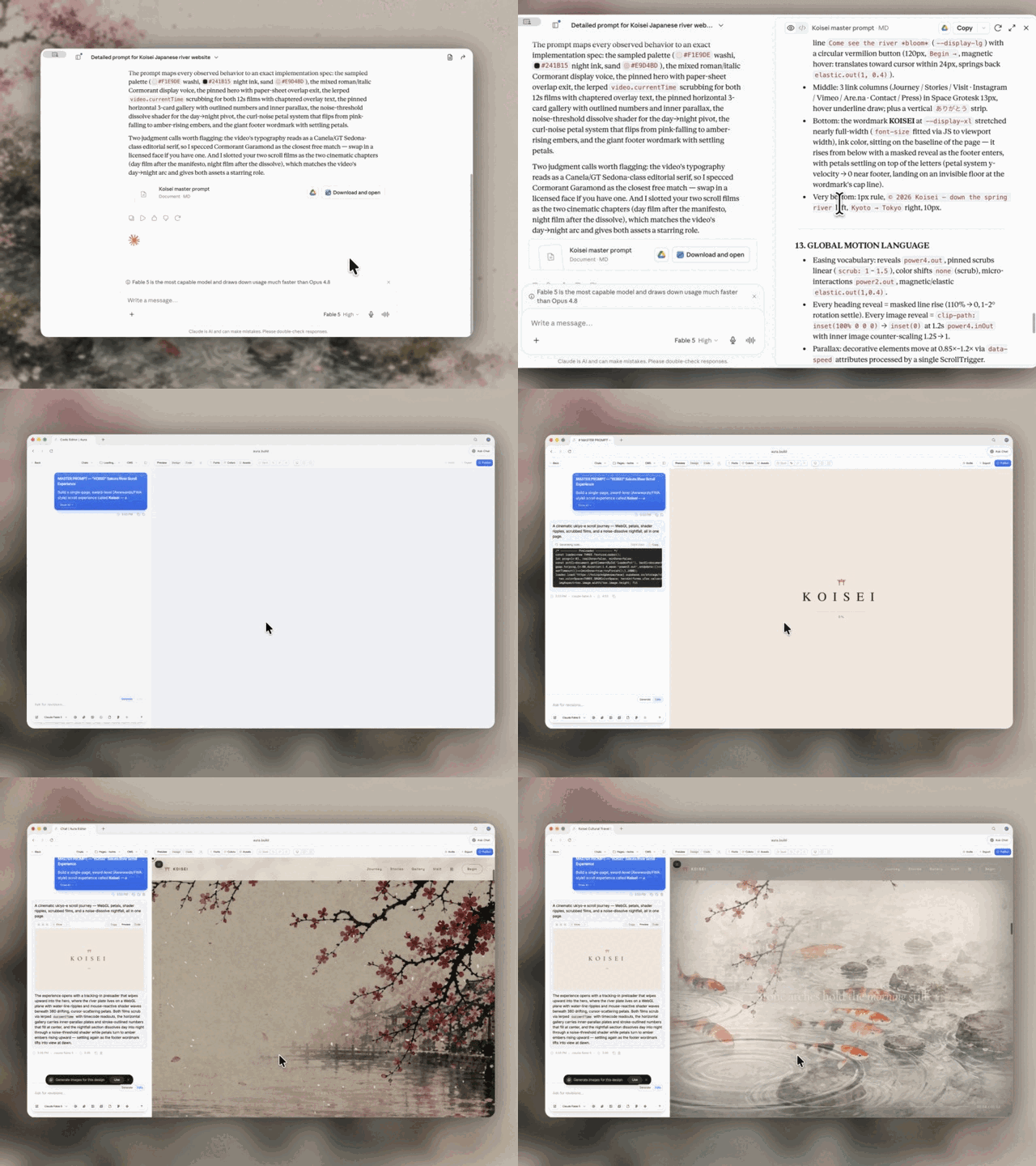
Use these skills with Codex, Claude Design, Aura Build, Lovable, and the rest of your agent stack to turn references into prompts, generate detailed landing pages, build playable Three.js systems, and create reusable implementation workflows.
Start with the flagship web-design workflow:
- Video to Super Prompt Turns a screen recording of a design, landing page, or animation into a super detailed prompt that Fable 5 can use to one-shot HTML.
- HTML to Interaction Prompts Turns an existing HTML page, like an Aura Build page, into reusable prompts for one section, one animation, one button, one hover state, or one WebGL effect.
- Stitched Full Page Capture Captures the entire landing page instead of only the hero, giving your agent a full-page reference for structure, pacing, and visual hierarchy.
- Daily UI Inspiration Combines browsing, capture, reference study, and prompt generation into a useful agent loop that turns strong landing pages into detailed prompt packs.
These are portable agent skill folders: concise SKILL.md playbooks with optional references, articles, scripts, and assets. The goal is simple: turn good prompts, workflows, style systems, capture recipes, and debugging habits into versioned files an agent can load and follow.
Portable by default. Each skill should work for any user, repo, or workspace unless the user supplies project-specific context through local agent instructions.
Browse all runnable demos and recreation prompts.
Explore the 3D rendering skills for ultra-realistic water, underwater god rays, virtual tours, sky rays, sky backgrounds, falling leaves, four seasons, detailed textures and models, and Retina rendering at 200%.
Explore the illustration skills for 14 hand-written SVG illustration styles, from flat and outlined cartoon to halftone, one-line, isometric and vintage emblem, each with example cards, a palette, a drawing kit and a render-and-lint loop.
Use these skills when you want:
- repeatable design direction
- reusable game architecture and gameplay QA
- procedural implementation steps
- copy/paste snippets
- common pitfalls and guardrails
- reusable workflows instead of one-off chat answers
Agent support
The format is intentionally plain Markdown and folder-based.
- Codex: load the relevant
SKILL.mdbefore acting. Repo behavior belongs inAGENTS.md; browser work in this repo should use the Codex browser. - Claude Code: reference the relevant skill from
CLAUDE.md, copy it into a Claude skills setup, or open theSKILL.mddirectly as working context. - Cursor: point Cursor rules or chat context at the specific skill folder. Keep reusable snippets, constraints, and defaults easy to paste.
- Other agents: use the same contract: read the narrowest matching skill first, then follow its steps and linked references.
Philosophy
1) Prompts are assets
If it’s good once, it should be reusable.
- store prompts as files
- version them
- build libraries + stylecards
2) Specs beat vibes
The fastest way to consistent output is:
- clear constraints
- clear hierarchy
- “change 1–2 things only” iteration
3) References beat paragraphs
Screenshots and examples carry:
- fonts, spacing, colors
- layout rhythm
- icon style
4) Skills are operating procedures
Good skills tell the agent exactly when to use them, what to do first, what defaults to apply, and what mistakes to avoid.
Repo structure
agent-skills/
  3d/
    README.md
    3d-ultra-realistic-water/
    3d-underwater-god-rays/
    3d-virtual-tour/
    3d-sky-rays/
    3d-sky-background/
    3d-falling-leaves/
    3d-four-seasons/
    3d-high-resolution-textures/
    3d-high-poly-models/
    3d-retina-resolution/
  codex/
    audit-verify-explain-grade-5/
      SKILL.md
    build-daily-inspiration-sites/
      SKILL.md
    daily-ui-inspiration-capture/
      SKILL.md
  game-combat/
    README.md
    fire-smoke-skill-vfx/
      SKILL.md
      assets/
      demo/
    game-dev-combat-animation/
      SKILL.md
      references/
      scripts/
      templates/
    game-dev-combat-skill-polish/
      SKILL.md
      references/
      scripts/
      templates/
    ice-frost-skill-vfx/
      SKILL.md
      assets/
      demo/
    lightning-energy-skill-vfx/
      SKILL.md
      assets/
      demo/
    water-crystal-skill-vfx/
      SKILL.md
      assets/
      demo/
  game-development/
    README.md
    build-isometric-arpg/
      SKILL.md
    author-game-levels/
      SKILL.md
    design-action-combat/
      SKILL.md
    build-threejs-enemy-systems/
      SKILL.md
    build-game-monster-system/
      SKILL.md
    build-vesperfall-review-assets/
      SKILL.md
    test-playable-web-games/
      SKILL.md
  illustration/
    README.md
    illustration-flat/
    illustration-outlined-cartoon/
    illustration-bold-pop/
    illustration-line-interior/
    illustration-flat-with-black/
    illustration-framed-panel/
    illustration-grainy-gouache/
    illustration-ink-sketch/
    illustration-vintage-emblem/
    illustration-halftone-line/
    illustration-one-line/
    illustration-isometric-mono/
    illustration-teal-spot/
    illustration-two-colour-brush/
  media/
    aura-asset-images/
      SKILL.md
    unsplash-asset-images/
      SKILL.md
  ui/
    design-first-ui-prompting/
      SKILL.md
      ARTICLE.md
      REFERENCES.md
  web-design/
    add-shader-cursor-trail/
      SKILL.md
    build-awwwards-quality-sites/
      SKILL.md
    pricing-page/
      SKILL.md
      REFERENCES.md
    landing-page/
      SKILL.md
      REFERENCES.md
    gsap/
      SKILL.md
      REFERENCES.md
    threejs/
      SKILL.md
      REFERENCES.md
    tailwindcss/
      SKILL.md
      REFERENCES.md
    matterjs/
      SKILL.md
    globe-gl/
      SKILL.md
    css-border-gradient/
      SKILL.md
    progressive-blur/
      SKILL.md
    animation-on-scroll/
      SKILL.md
    css-alpha-masking/
      SKILL.md
    vantajs/
      SKILL.md
      REFERENCES.md
    cobejs/
      SKILL.md
      REFERENCES.md
    unicorn-studio/
      SKILL.md
      REFERENCES.md
  workflow/
    README.md
    workflow-progress-screenshots/
    workflow-score-to-target/
    workflow-ship-change/
    workflow-threads-manager/
Folder contract:
agent-skills/<category>/<skill-name>/
  SKILL.md            # required: frontmatter + workflow
  REFERENCES.md       # optional: links only
  ARTICLE.md          # optional: long-form explanation
  assets/             # optional: images, templates, examples
  scripts/            # optional: helper scripts
  demo/               # optional: visual or interaction proof
    index.html         # standalone HTML, CSS, and JavaScript
    PROMPT.md          # exact recreation and remix prompts
    assets/            # local demo assets when required
Conventions:
SKILL.mdis the skill an agent loads and follows.REFERENCES.mdis links only. KeepSKILL.mdlean.- Visual and interaction skills may include a portable
demo/index.htmlanddemo/PROMPT.md. - Workflow skills may include fictional
demo/input.mdanddemo/expected-output.mdhandoffs when they materially improve proof. - Keep skills procedural (steps, patterns, guardrails), not encyclopedic.
- Prefer explicit triggers: "Use when..." beats vague descriptions.
- Prefer defaults: durations, spacing, hierarchy, commands, and acceptance checks.
Current library
This snapshot contains 176 skills across nine categories.
Use find agent-skills -name SKILL.md | sort for the source of truth.
Codex workflows (19)
Operational skills for repeatable Codex work:
article-prompts-to-skills- turn articles and prompt packs into focused, validated skill packages.audit-reference-originality- compare a website with its references and identify originality risks.audit-verify-explain-grade-5- audit work, verify claims, and explain results simply.browser-video-recording- render polished browser screen-recording videos from scripted UI scenes.build-daily-inspiration-sites- turn five captured references into five original Sites builds.daily-ui-inspiration-capture- recurring UI inspiration bundles with screenshots, motion, and prompts.elevenlabs-tts- generate reusable ElevenLabs voiceovers from local profiles.generate-reference-inspired-brand-worlds- turn reference grammar into original brand-world directions.html-to-interaction-prompts- turn HTML pages into screenshot-backed interaction prompt articles.optimize-web-animations- profile and reduce animation, canvas, and WebGL performance cost.performance-profiling- Apple platform profiling with Instruments, diagnostics, and MetricKit.stitched-full-page-capture- reliable full-page screenshots for lazy, animated, and WebGL pages.video-to-superprompt- analyze reference videos into detailed recreation prompts.web-technique-to-skill- turn an effect you already built into a reusable web-design skill.write-like-meng-on-x- calibrate concise X drafts against an authored voice corpus.x-bookmark-quote-posts- turn recent X bookmarks into source-backed quote-post drafts.
Media (2)
Image sourcing skills:
aura-asset-images- use Aura Assets for stock-style design and marketing imagery.unsplash-asset-images- pick high-quality Unsplash assets by use case, crop, and ratio.
UI (1)
design-first-ui-prompting
Design-first UI prompting system:
- prompt template (goal → format → layout → type → color → constraints)
- “variants > rerolls” workflow
- negative prompts / guardrails
- 2-pass typography workflow (generate layout, typeset in Figma)
Files:
agent-skills/ui/design-first-ui-prompting/SKILL.mdagent-skills/ui/design-first-ui-prompting/ARTICLE.md
Illustration (14)
Original spot illustrations as hand-written SVG, one skill per style, each with three example cards, a measured palette, a drawing kit, a headless renderer and a linter. See the illustration guide.
illustration-flat- no outlines, lavender and sunshine fills, floating confetti.illustration-outlined-cartoon- inked outlines, big heads, sparkle crosses.illustration-bold-pop- navy extrusions, hatching, saturated geometry.illustration-line-interior- thin indigo line, white fills, sparse accents.illustration-flat-with-black- solid black shapes, denim and leaf green.illustration-framed-panel- pastel card, violet frame, pieces breaking out.illustration-grainy-gouache- riso grain, soft shading, cosy animals.illustration-ink-sketch- wobbly brush line, hatching, googly eyes.illustration-vintage-emblem- limited palette, keylines, condensed wordmark.illustration-halftone-line- black line, halftone dots, open contours.illustration-one-line- continuous loop line, off-register colour.illustration-isometric-mono- true isometric, green ramp, platform slab.illustration-teal-spot- teal ramp, hard drop shadow, floating extras.illustration-two-colour-brush- black brush marker, mint blocks, squiggle camo.
Game combat (6)
Combat animation and combat skills that read and look like Diablo IV, measured and judged blind, and reusable effect languages for energy, fire, water and ice skills. See the game-combat guide.
fire-smoke-skill-vfx- a fire skill's effects as one language in Three.js: ray-marched flames whose turbulence rises with buoyancy, from a white-hot core to deep red tips, with detail band-limited to the flame buffer; walls of fire broken into clumps of unequal tongues with detaching licks; a fire whirl in helical sheets; charcoal smoke lit only by the fire (a streaked curtain, cauliflower billows with hot cracks, wisps); embers that cool to ash, heat haze, and a burned ground whose needles smoulder where it is hot, with a reusable module, a five-beat demo on a scanned CC0 floor and a target-image scorecard.game-dev-combat-animation- build, fix and review attacks and move sets to numbered arm, wrist and hand rules, with per-frame tests on the real mesh and blind critics.game-dev-combat-skill-polish- score combat skills out of 10 with two blind judges and raise the weakest to a bar, for readability or for art against a reference such as Diablo IV, with stepped-clock filming, contact strips and judging scripts.ice-frost-skill-vfx- an ice and frost skill's effects as one language in Three.js: dendritic frost grown on the CPU as a competing tree and revealed on the ground by its arrival time, with hairline feathers, rime, crystal glints and a blazing growth tip; faceted ice spikes ray-traced against their own planes (refraction, total internal reflection, Beer-Lambert blue, bubbles, a fracture network) that erupt along the frost line, crack along visible planes and shatter into pieces that land on a face and rest; low mist banks that churn in place, a blizzard column of fine powder on helical strands, and a scanned snow floor with dunes, crust, a raking moon and two populations of glints, with two reusable modules, a five-beat demo on a scanned CC0 floor and a target-image scorecard.lightning-energy-skill-vfx- a skill's effects as one language in Three.js: lightning that reaches out as a stepped leader, flares, holds and fades, one discharge at a time, with forks of forks and hair-fine branchlets; a storm-cloud orb with plasma-globe arcs that churns in place and carries its own torn black shadow; ground strikes that crawl along the stone's cracks; refraction-only air fronts, sparks, fractured debris and ink-negative impact frames, with a reusable module, a five-beat demo on a scanned CC0 floor and a blind-judged scorecard.water-crystal-skill-vfx- a water and crystal skill's effects as one language in Three.js: clear water that bends and mirrors instead of glowing teal; a sphere-traced water orb whose drop modes, capillary rings and drifting warp deform it in place, with a crisp inverted horizon and a silver rim; beaded streams wound up out of tide pools, a lash that whips into a torn, lopsided splash crown, and analytic ripple rings and rain; quartz traced against its own planes (total internal reflection, a clamped dispersion fringe, fracture discs, a white-hot root glow and a climbing resonance band) that grows out of the water and shatters into splinters resting on the rock with real contact; flat mirror pools with a moon-glitter column on a tidal rock flat laid out from target images, with a reusable module, a five-beat demo on a scanned CC0 floor and a target-image scorecard.
Game development (20)
Playable Three.js and browser-game workflows. See the game-development guide for the skill-selection table and system boundaries.
Foundation and world:
build-isometric-arpg,author-game-levels,build-game-camera-controls,build-mobile-threejs-games
Combat, enemies, and encounters:
design-action-combat,build-threejs-enemy-systems,build-game-monster-system,tune-enemy-ai,design-game-encounters
Player systems and feedback:
build-game-inventory,create-game-vfx,build-game-audio-feedback
Assets, performance, QA, and release:
build-hybrid-game-assets,build-vesperfall-review-assets,optimize-threejs-games,test-playable-web-games,ship-web-games
Web design (81)
Conversion and implementation:
build-awwwards-quality-sites,landing-page,pricing-page,tailwindcss,animation-systems,webgl-landing-steering
Motion and scroll:
animation-on-scroll,cinematic-gsap-lenis-motion-system,cinematic-scroll-storytelling,gsap,gsap-scrolltrigger-storytelling,marquee-loop,masked-reveal,staggered-word-reveal
WebGL, canvas, and 3D:
add-shader-cursor-trail,background-grid-webgl,cobejs,globe-gl,globe-particles,matterjs,threejs,threejs-landscape,threejs-towers,threejs-weather,unicorn-studio,vantajs,webgl-3d-object,webgl-laser
CSS treatments and details:
beautiful-shadows,company-logos,container-lines,corner-diagonals,corner-lasers,css-alpha-masking,css-border-gradient,gooey-blob-system,number-details,progressive-blur,solar-duotone-bold
Layout systems:
agency-grid-layout-minimal,book-serif-index,editorial-tech,framed-grid-layout,image-first-grid-layout,nested-container-frames,split-layout-technical,technical-wireframe-info-layout
Visual styles and page moods:
atmosphere-background,blue-cloudy-clean-modern,blue-laser-clean-glass-layout,bright-green-tech-system-webgl,clean-minimal-beige-light-mode,dark-blue-contrasting-clean,dark-glass-clean-layout,dither-background,dither-laser-dark-mode,framed-tech-dark-border-gradient,funky-purple-container-tech,glass-dark-mode-clock,glass-dark-ui,high-contrast-skeuomorphic-clean,light-mode-paper-technical,mesh-gradient-dark-blue-clean,nested-container-clean-agency,orange-clean-paper-saas,skeuomorphic-ui,tech-green-dark-mode-modern
Additional interaction, narrative, and product systems:
ambient-section-particles,beam-glow-states,documentary-brutalist-agency,editorial-portfolio-chapters,editorial-service-booking,falling-leaves,liquid-metal-border,operational-enterprise-ai,pointer-trail-emitter,product-proof-saas,reveal-hover-effect,scroll-progress-timeline,scroll-scrubbed-visual-sequence,scroll-scrubbed-word-reveal,scroll-world-storytelling,shaders-cursor-ripples,thinking-orbs
Workflow (4)
How to work with agents on a real project: the rules repeated in every thread, turned into procedures with scripts. See the workflow guide.
workflow-progress-screenshots- send real screenshots of the start, key moment and result as work progresses, unasked, with headless capture and side-by-side scripts.workflow-score-to-target- score work out of 10 on an anchored rubric, judge it independently, and improve round by round until every item hits the target.workflow-ship-change- ship every change: screenshots, changelog, tests, own files only, fast-forward push, draft-then-live publish, measured sizes and a 50 MB stop.workflow-threads-manager- oversee many agent threads on one repo: what merged, what's live, what's missing from the changelog, what to archive, what got cut off.
How to add a new skill (workflow)
- Create a folder:
agent-skills/<category>/<skill-name>/
- Add
SKILL.md:
- frontmatter:
name,description - content: when to use, workflow, pitfalls, recipes, what to ask
- Add a portable demo when visual or interaction proof is useful:
demo/index.htmlwith inline CSS and JavaScriptdemo/PROMPT.mdwith minimal, recreation, and remix prompts- local files under
demo/assets/
- (Optional) add
REFERENCES.md:
- doc links only
- Test the skill contract:
- clear trigger
- concrete workflow
- reusable snippets or commands
- pitfalls and acceptance checks
- no secrets or private client info
- Commit:
- small commits per skill
- clear message, usually
Add <skill-name> skillorUpdate <skill-name> skill
Writing style
- Write like Meng To: skimmable, practical, confident.
- Prefer constraints and defaults.
- Avoid fluff.
- Keep long explanations in
ARTICLE.md, notSKILL.md. - Keep references in
REFERENCES.md, not the workflow.
Maintenance ideas
- Keep category README files current as the library grows.
- Add install notes for Codex, Claude Code, and Cursor once the preferred setup is stable.
- Add lightweight validation for required frontmatter.
- Keep imported skills portable: no secrets, no private paths, no hidden account assumptions.
Repository
GitHub: https://github.com/MengTo/Skills
Push updates:
cd /Users/mengto/clawd/@MengTo/Skills
git push origin main
License
MIT License. See LICENSE.