Auto Ontology
Agents can retrieve documents and query databases, but reliability gates agentic analytics: a revenue metric answered faster is worth nothing if the number is wrong. Agents need a context layer that tells them where data lives, what it means, whether to use it, how to use it, where it came from, and what is similar. NVIDIA Auto Ontology is an open library that builds that layer from enterprise metadata, reconciles definitions across systems, and exposes it to any agent harness through MCP, CLI, and API. It complements the semantic models customers already own.
It enables developers to:
- Discover: generate enterprise ontologies from metadata; connect existing ontologies and semantic models; build AI-ready knowledge graphs.
- Ground: give agents trusted business meaning for metrics, entities, and relationships; reconcile inconsistent definitions across systems.
- Validate: check generated queries against certified definitions and lineage; return provenance with every answer.
- Expose: serve context to any agent harness through MCP, CLI, and API. Learn: fold certified corrections and usage back into the ontology, so shared context improves with every question.
Benchmarks
To run a text-to-SQL benchmark such as BIRD, refer to the ontology SQL evaluation repository.
Licensing & contributions. Auto Ontology is distributed under the Apache License 2.0. Third-party open-source components bundled, linked, or otherwise used by this project are listed in
THIRD_PARTY_NOTICES.md. This project is currently not accepting external contributions.
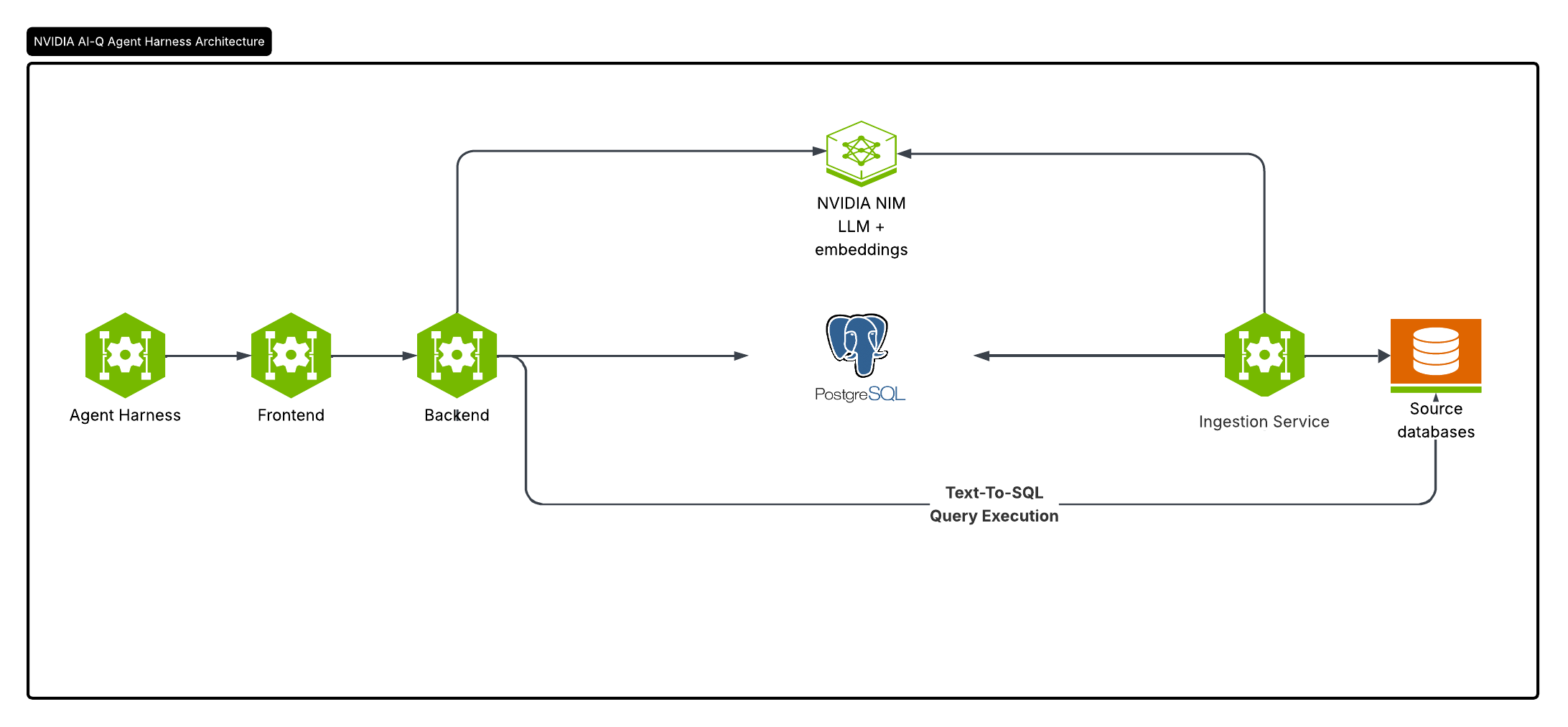
Key Features
- Natural-language querying of structured data — questions are translated to SQL and executed against connected databases, powered by NVIDIA NIM.
- Semantic catalog / ontology layer over relational sources, stored in Postgres alongside the catalog it describes.
- Authentication & RBAC —using Better Auth.
- Web UI for chat, analysis, data catalog, analytics, and settings.
- Flexible deployment — Helm chart for Kubernetes or Docker Compose for a local stack.
Software Components
| Component | Technology | Role | Default port |
|---|---|---|---|
| Frontend | Next.js 16 (React 19, TypeScript, Tailwind CSS 4), Better Auth, Prisma | Web UI, authentication, API gateway | 3000 |
| Backend | FastAPI (Python 3.12+), LangChain | Chat / NL-to-SQL, catalog, datasource APIs | 3001 |
| Ingestion worker | FastAPI (Python 3.12+) | Ingests tabular data and writes embeddings | 3002 |
| Postgres + pgvector | Relational Database | App metadata, the catalog and ontology, vector store | 5432 |
| HashiCorp Vault | Optional | Secure storage of connection credentials | — |
NVIDIA NIM
Auto Ontology uses NVIDIA NIM endpoints for inference — either the hosted
NVIDIA API catalog (integrate.api.nvidia.com) or
self-hosted NIMs. The defaults in .env.example are:
- LLM:
nvidia/nemotron-3.5-lightning-30b-a3b - Embeddings:
nvidia/nemotron-3-embed-1b - Reranking:
nvidia/llama-nemotron-rerank-vl-1b-v2
The endpoints and models are configured via the DEFAULT_MODELS_ENDPOINT, DEFAULT_MODELS_MODEL,
EMBED_ENDPOINT, and EMBED_MODEL environment variables and require a
DEFAULT_MODELS_API_KEY.
Model triplets
Each model role is configured by a triplet of environment variables —
<PREFIX>_ENDPOINT (URL), <PREFIX>_API_KEY, and <PREFIX>_MODEL:
| Prefix | Role |
|---|---|
DEFAULT_MODELS | Shared default; every field below falls back to it. |
REASONING | Main chat / NL-to-SQL model. |
NON_REASONING | Lighter model used for entity extraction. |
EMBED | Text-embedding model (must match between ingest and query). |
RERANK | Reranker used by the retrieval flow. |
You can set a full triplet, only some of its fields, or none at all — any field
left unset falls back to the matching DEFAULT_MODELS_<FIELD>. So the simplest
setup is to fill in DEFAULT_MODELS_* and override per-triplet fields only where
they differ (e.g. EMBED_MODEL, NON_REASONING_MODEL). *_API_KEY also falls
back to the legacy NVIDIA_API_KEY for backward compatibility.
Quickstart
This runs Auto-Ontology with Docker Compose against Wide World Importers,
Microsoft's sample sales database. You need Docker with Compose v2,
uv, and an NVIDIA API key (nvapi-...) from
build.nvidia.com.
-
Clone the repository and create
.env:git clone https://github.com/NVIDIA/auto-ontology.git && cd auto-ontology cp .env.example .envThen set these values in
.env:DEFAULT_MODELS_API_KEY=nvapi-... AUTH_SECRET=<a long random string, e.g. from openssl rand -base64 32> APP_URL=http://localhost:3000 POSTGRES_PASSWORD=<a new password> CONNECTION_STRINGS=postgresql://postgres:<the same password>@postgres:5432/wideworldimporters AUTO_ONTOLOGY_ADMIN_PASSWORD=<a new password> PGADMIN_PASSWORD=<a new password>Compose publishes Postgres, pgAdmin, and the web app on the host, so replace each default password before you start it.
.env.examplealso sets an API key per model role: replace eachnvapi-your-api-key-herewith your key, or delete those lines so they fall back toDEFAULT_MODELS_API_KEY. -
Start Postgres and load the sample database. The seed script lives in auto-ontology-eval; pass it the Postgres password you set:
docker compose up -d --wait postgres git clone https://github.com/NVIDIA/auto-ontology-eval.git ../auto-ontology-eval (cd ../auto-ontology-eval && uv sync && cp .env.example .env && \ POSTGRES_PASSWORD='<the same password>' \ uv run python scripts/seed/seed_wwi.py --database-name wideworldimporters --drop) -
Build and start the rest of the stack:
docker compose up -d --build -
Open http://localhost:3000 and sign in with
AUTO_ONTOLOGY_ADMIN_EMAILandAUTO_ONTOLOGY_ADMIN_PASSWORDfrom.env. Go to Settings → Semantic Compilation and turn it on. Ingestion runs at startup; compilation starts immediately and reports Semantic compilation is ready when it finishes. -
Ask a question in Chat:
What was revenue for the USB food flash drive - sushi roll in Pennsylvania in June 2015?
The agent resolves revenue, product, and state to terms in the ontology, follows their relationships to the joins it needs, and runs the query. The answer comes back with its SQL and the steps that produced it, so you can check the result against the source:
Answer: Revenue for USB food flash drive - sushi roll in Pennsylvania in June 2015 was $588.80, from 3 invoice lines. SQL: SELECT SUM(il.extendedprice) AS revenue, COUNT(*) AS invoice_lines FROM sales.invoicelines il JOIN sales.invoices i ON il.invoiceid = i.invoiceid JOIN warehouse.stockitems si ON il.stockitemid = si.stockitemid JOIN sales.customers c ON i.customerid = c.customerid JOIN application.cities ct ON c.deliverycityid = ct.cityid JOIN application.stateprovinces sp ON ct.stateprovinceid = sp.stateprovinceid WHERE si.stockitemname = 'USB food flash drive - sushi roll' AND sp.stateprovincename = 'Pennsylvania' AND i.invoicedate >= '2015-06-01' AND i.invoicedate < '2015-07-01' Steps: Resolved terms: Invoice Line (revenue), Stock Item, State Province, Invoice Joined: invoice line -> invoice -> customer -> city -> state province Validated the filter values against the data, then executed -
Ask something the data can't answer. Wide World Importers has no advertising data, so a question about ad spend has nothing to resolve against. An agent connected through MCP checks answerability first and asks you to clarify:
You:    What was return on ad spend for the sushi roll flash drive in June 2015?
Agent:  check_answerable -> coverage 0.5; no term covers "ad spend"
Agent:  I can find revenue for that product, but this data has no
        advertising spend, so I can't compute return on ad spend. Do you
        want June 2015 revenue instead, or is ad spend tracked in another
        source I should connect?
If the UI loads without its left navigation after a restart, the browser is
holding a stale session cookie. Clear site data for localhost:3000 and sign in
again. For other setup failures, see the
setup skill's troubleshooting guide.
How it works
Auto-Ontology works in three stages: it generates an ontology, people certify it, and the agent answers questions from it.
The ontology holds three kinds of definition:
- Terms. Business concepts such as Customer or Invoice Line, each with a description and synonyms, mapped to the columns that hold them.
- SQL attributes. Reviewed SQL expressions under a term, such as a margin or a rolling total. The agent reuses them, so answers compute each measure the same way.
- Relationships. How tables join, including bridge tables, inferred from keys and from the data.
Generate. The ingestion service builds a first draft from the source databases:
- Read sources: extract schemas, profile columns, and sample values into the catalog.
- Name entities: extract terms table by table and map each to columns.
- Resolve relationships: infer joins between tables and bridge tables, and suggest SQL attributes from query history.
- Write the ontology: store terms, relationships, and SQL attributes in Postgres, with embeddings in pgvector for retrieval.
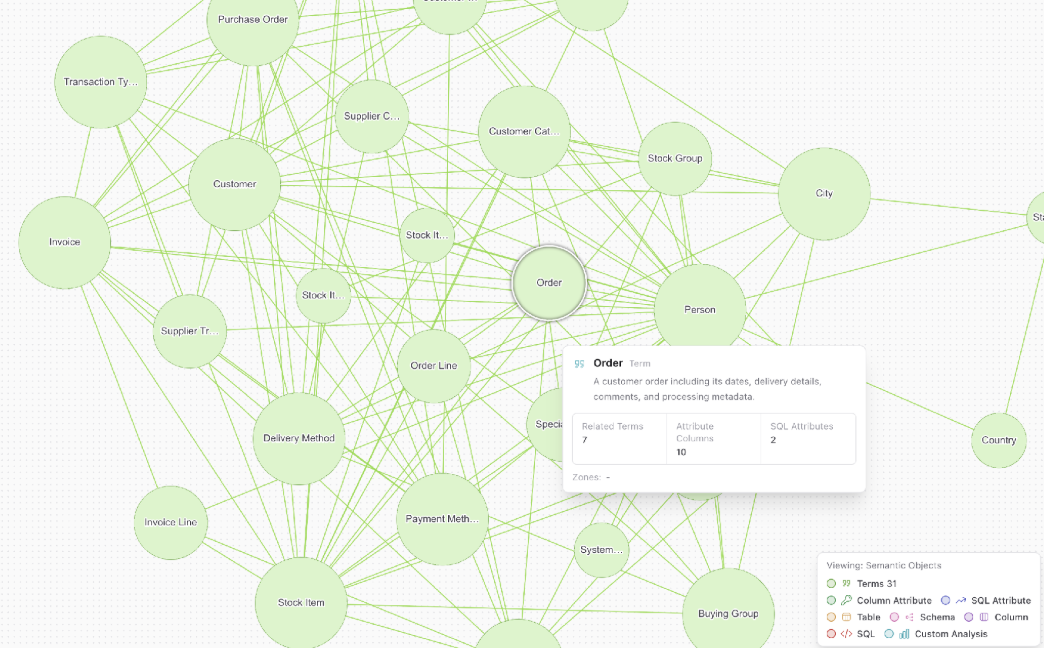
The result is a semantic graph you can explore in the UI. In this example, one compilation of Wide World Importers produced 31 terms; selecting Order shows its description, related terms, mapped columns, and SQL attributes:
Certify. People make the draft trustworthy:
- Test with real questions in Chat, or with
check_answerableandask_questionover MCP. - Refine terms, descriptions, and SQL attributes in the UI or through the API.
- Certify names, descriptions, and SQL attributes once they're correct.
Answer. For each question, the agent:
- Classifies the intent and extracts the entities the question names.
- Retrieves candidate terms, columns, and SQL attributes by embedding search.
- Writes SQL from those candidates.
- Checks the filter values and the query against the database, repairing the SQL when a check fails.
- Runs the query and returns the answer with its SQL and the steps it took.
When the candidates can't support a query, the agent reports that the question can't be answered from this data. Predictive questions go to KumoRFM when it's configured (see Predictions).
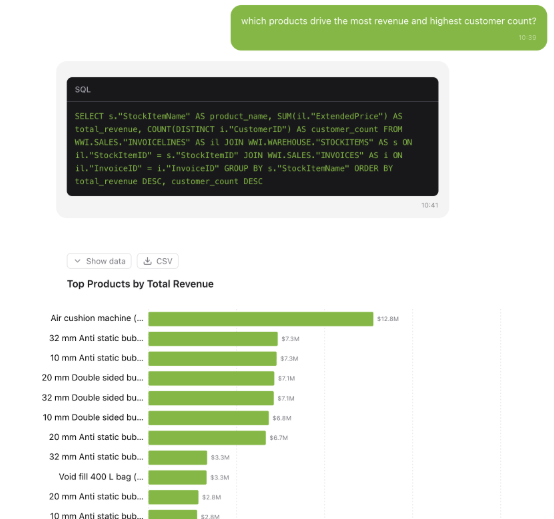
In Chat, each answer shows its SQL, and you can view the rows, download them as CSV, or read them as a chart:
Auto-Ontology is compatible with Apache Ossie, the
open standard for exchanging semantic models. Ossie includes a
converter for Auto-Ontology,
which Auto-Ontology uses to import and export model definitions as Ossie YAML.
Use Settings → Import / Export, or POST /api/model/import and
POST /api/model/export.
| Component | Technology | Role | Port |
|---|---|---|---|
| Frontend | Next.js, Better Auth, Prisma | Web UI, authentication, public API gateway | 3000 |
| Backend | FastAPI (Python 3.12+), LangChain | Text-to-SQL agent, catalog, ontology APIs | 3001 |
| Ingestion service | FastAPI (Python 3.12+) | Ingestion and semantic compilation | 3002 |
| MCP server | FastMCP | Read-only agent tools over the public API | 3003 |
| Postgres + pgvector | PostgreSQL 17 | Catalog, ontology, app data, vector store | 5432 |
| HashiCorp Vault | Optional | Connection credential storage | n/a |
Keep ports 3001 and 3002 on a private network. FastAPI trusts the user identity
the frontend forwards in the x-auto-ontology-user-id header, and the ingestion
service's endpoints (ingest, delete, reset, compile) have no authentication of
their own. Clients go through the web app on port 3000.
Use it from your agent
MCP server
The MCP server gives any MCP client read-only tools over the ontology. Each user signs in through Auto-Ontology, and every call runs with that user's permissions.
| Job | Tools |
|---|---|
| Readiness | check_readiness: can this deployment answer anything at all |
| Terms | search_terms, get_term, get_term_columns, get_term_sql_attributes, get_sql_attribute, describe_table |
| Answerability | check_answerable: does the ontology cover this question |
| Questions | ask_question: the answer, the SQL, and the rows |
Run the server against your deployment:
AUTO_ONTOLOGY_API_URL=http://localhost:3000 \
  uvx --from "git+https://github.com/NVIDIA/auto-ontology.git#subdirectory=mcp" auto-ontology-mcp
Cursor (~/.cursor/mcp.json):
{
  "mcpServers": {
    "auto-ontology": { "url": "http://localhost:3003/mcp" }
  }
}
Claude Desktop (claude_desktop_config.json), bridged with
mcp-remote:
{
  "mcpServers": {
    "auto-ontology": {
      "command": "npx",
      "args": ["mcp-remote", "http://localhost:3003/mcp"]
    }
  }
}
Restart the client after editing its config, then sign in when it prompts. Sign-in, configuration, and troubleshooting are in docs/mcp.md.
Agent skills
Three skills teach a coding agent to work with Auto-Ontology. Start at AGENTS.md.
| Skill | Covers |
|---|---|
nvidia-ontology-setup | Install, connect sources, compile, prove readiness |
nvidia-ontology-management | Inspect, model, certify, import/export, and publish |
nvidia-ontology-query | Ask questions and validate the SQL, rows, and answer |
REST API
Ask a question with POST /api/chat/completions on the web app's origin. Mint
an API token under the user menu → API Tokens. The response is a
server-sent event stream: a result event carries the answer, and
data: [DONE] ends the stream.
curl -N http://localhost:3000/api/chat/completions \
  -H "x-api-key: $AUTO_ONTOLOGY_API_TOKEN" \
  -H "Content-Type: application/json" \
  -d '{"question": "How many orders shipped last week?"}'
import json
import os
import requests
response = requests.post(
"http://localhost:3000/api/chat/completions",
headers={"x-api-key": os.environ["AUTO_ONTOLOGY_API_TOKEN"]},
json={"question": "How many orders shipped last week?"},
stream=True,
timeout=900,
)
response.raise_for_status()
for line in response.iter_lines(decode_unicode=True):
if not line or not line.startswith("data:"):
continue
payload = line.removeprefix("data:").strip()
if payload == "[DONE]":
break
event = json.loads(payload)
if event["type"] == "result":
print(event["answer"]["response"])
print(event["answer"]["sql_code"])
elif event["type"] == "error":
raise RuntimeError(event["message"])Event types, multi-turn conversations, and the gateway trust boundary are in docs/conversation-api.md. Every other operation is in the OpenAPI spec.
Connectors, models, and predictions
Sources
Auto-Ontology connects to ten engines:
- PostgreSQL
- MySQL
- Databricks
- Snowflake
- ClickHouse
- Trino
- Apache Kyuubi
- HeavyDB
- DuckDB
- SQLite
Add connections under Settings → Connections, or list them in
CONNECTION_STRINGS. DuckDB and SQLite are connection-string only. See
docs/connections.md for URL schemes, scoping, and
credential storage.
Models
Auto-Ontology uses four model roles. With an nvapi- key, each defaults to an
NVIDIA NIM on build.nvidia.com:
| Role | Default model | What it does |
|---|---|---|
REASONING | nvidia/nemotron-3.5-lightning-30b-a3b | Builds the ontology (terms, relationships, SQL attributes), writes each answer's SQL and explanation, and grades answerability |
NON_REASONING | nvidia/nemotron-3.5-lightning-30b-a3b | Runs the agent's faster steps: question intent, entity extraction, candidate selection, and SQL checks and repair |
EMBED | nvidia/nemotron-3.5-embed-1b | Indexes tables, columns, terms, and SQL attributes in pgvector, and matches each question to them |
RERANK | nvidia/nemotron-3.5-rerank-8b | Ranks candidate tables when compilation builds bridge-table SQL attributes |
To use self-hosted NIM or any OpenAI-compatible endpoint, set
<ROLE>_ENDPOINT, <ROLE>_API_KEY, and <ROLE>_MODEL. Any field you leave
unset falls back to DEFAULT_MODELS_<FIELD>, so the simplest setup fills in
DEFAULT_MODELS_* and overrides only what differs. Use models
that support structured output, and keep the embedding model the same for
ingestion and queries. .env.example documents every
variable.
Predictions
Set KUMO_RFM_API_KEY and the agent routes predictive questions to KumoRFM.
KumoRFM is a hosted service: to answer, the agent uploads the connected tables
to it, capped by KUMO_MAX_TABLES (20 by default) and
KUMO_MAX_ROWS_PER_TABLE (unlimited unless set). Review what that sends, and
complete your organization's data review, before you enable it.
Integrate with us
To integrate an agent platform, application, or storage provider with Auto-Ontology, open an integration request.
The Auto-Ontology team maintains the code and doesn't accept external pull requests. Integration requests and bug reports are welcome as issues. Report security vulnerabilities through SECURITY.md. Maintainer workflow is in CONTRIBUTING.md.
Reference
| Topic | Doc |
|---|---|
| Kubernetes deployment with Helm | DEPLOYMENT.md |
| Connections, scoping, and Vault | docs/connections.md |
| Authentication, SSO, and API tokens | docs/authentication.md |
| Conversation API | docs/conversation-api.md |
| MCP server | docs/mcp.md |
| REST API | docs/openapi/auto-ontology-api.json |
License
Auto-Ontology is licensed under the Apache License, Version 2.0.
SPDX identifier: Apache-2.0.
Each NVIDIA-authored source file in this repository carries an SPDX header of the form:
SPDX-FileCopyrightText: Copyright (c) 2024-2026, NVIDIA CORPORATION & AFFILIATES.
All rights reserved.
SPDX-License-Identifier: Apache-2.0
Third-party open-source components used by Auto-Ontology are enumerated, with their
upstream licenses and project URLs, in
THIRD_PARTY_NOTICES.md. Components added by the
container images are listed separately in
CONTAINER_THIRD_PARTY_NOTICES.md.
Notice and Disclaimer
NOTICE AND DISCLAIMER: This software automatically retrieves, accesses or interacts with external materials. Those retrieved materials are not distributed with this software and are governed solely by separate terms, conditions and licenses. You are solely responsible for finding, reviewing and complying with all applicable terms, conditions, and licenses, and for verifying the security, integrity and suitability of any retrieved materials for your specific use case. This software is provided "AS IS", without warranty of any kind. The author makes no representations or warranties regarding any retrieved materials, and assumes no liability for any losses, damages, liabilities or legal consequences from your use or inability to use this software or any retrieved materials. Use this software and the retrieved materials at your own risk.
External materials Auto-Ontology interacts with at run time:
- Model endpoints you configure, by default the NVIDIA API catalog
(
integrate.api.nvidia.com,ai.api.nvidia.com), under each provider's and model's terms. - The KumoRFM service, only when
KUMO_RFM_API_KEYis set, under Kumo's terms. - Your source databases, under your agreements for those systems.
Security
Report security vulnerabilities as described in SECURITY.md.