Limbus Company Dialogue Boxes for Enemies & Identities! UPDATED TO v1.106.2, Speech Bubble Mod Update.
PM Added a new setting in options that is disabled by default make sure to enable it, to see the speech bubbles!
REGARDING UNINSTALLATION TO SEE PM's SPEECH BUBBLES
-
Navigate to your Limbus Company folder, and open the 'LimbusCompany_Data' folder Ex.
C:\Program Files (x86)\Steam\steamapps\common\Limbus Company\LimbusCompany_Data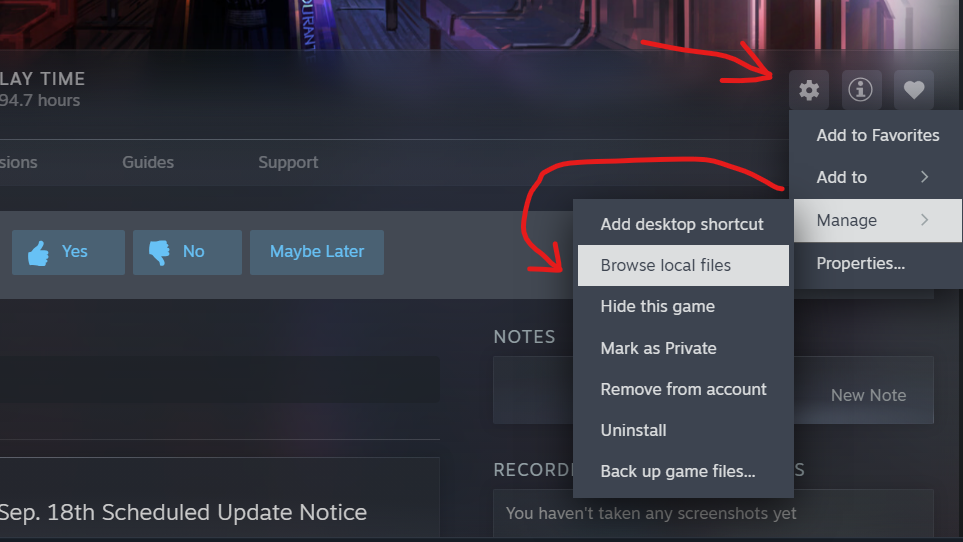
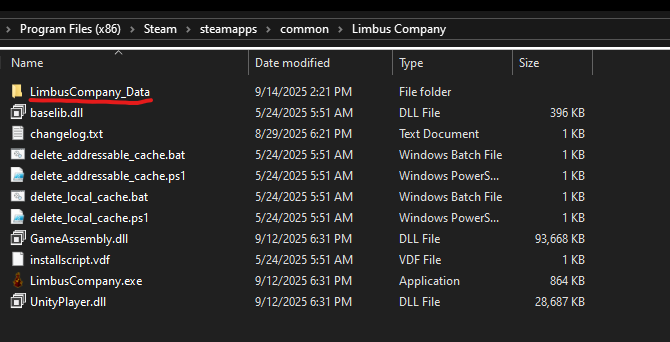
-
Delete the "Lang" in the "LimbusCompany_Data" folder.
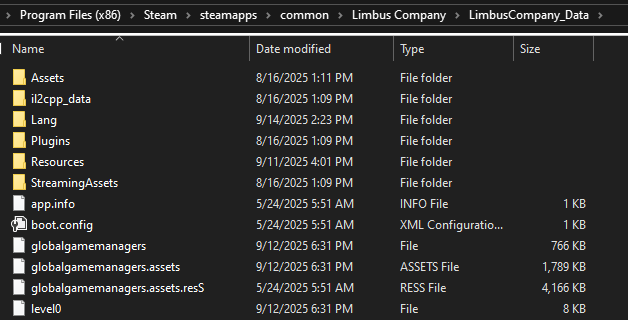
- Note this will remove all other custom translation mods, if you have any.
-
Alternatively to disable the mod instead of uninstalling, Launch Limbus and on the Login Screen, you can click on "Select Custom Language," and choose -, and restart the game.
Changelogs (Click To Expand!)
v1.106.2
- Since PM made the theater lines automatically become speech bubbles, I've removed the theater lines in the mod, reducing line count from 9000+ to 4000+
v1.106.0
- Added Speech Bubbles to The Middle Nursefather Outis.
- Revised The Middle Apprentice Ishmael's New Line. (might be a mistranslation lowkey a confusing line)
v1.105.0
- Added Speech Bubbles to Blade of the House of Spiders Ryōshū, and fixed the unique interaction lines.
v1.104.0
- Added Speech Bubbles to The Middle Big Brother Heathcliff. (COMPLETE AND TOTAL EXTERMINATION!!)
- Fixed Liu Rodion's S3 line typo.
- Added Ricardo & Werner Untranslated missing Speech Bubbbles Voicelines. (Pm forgot peak)
- Sweepers also have untranslated voicelines during battle but they are filtered and i have no idea how to unfilter them. (no unfiltered versions anywhere in the files too)
- Fixed wrong voiceline Ids for Ricardo & Werner (Hotfix 4)
- Shortened Bigbro Heathcliff Substitued In VL (Hotfix 5)
v1.103.0
- Added Speech Bubbles to The Ring Fauvist Student Meursault & The Ring Fauvist Docent Rodion.
- Added a Speech Bubble to W Corp Hong Lu's S3 (Ah-ha~, felt weird for him to say that with no speech bubble.)
- Fixed Installer not updating correctly, update to v1.5 here
- Rewrote the Installer (Again) in C# to finally stop it getting flagged as a virus. here
v1.102.0
- Remade the installer again since the old one started flagging as a virus again...
MAKE SURE TO READ THE INSTRUCTIONS BELOW!!!!
LimbusSpeechBubbleEN_Installer-main.zip - Added Speech Bubbles to The Ring Apperentice Faust & Nursefather Hong Lu.
- Revised Drifting Blade Ryoshu S3 Line.
- Revised Ring Hong Lu's Ring Faust's Death Line.
v1.101.1
- Added Speech Bubbles to the ???s in 'A Midspring Night's Dream 3'
v1.101.0
- Added LCE E.G.O::AEDD Gregor Speech Bubbles.
- Fixed Wildhunt's two other Kill Voicelines not appearing (PM why the hell did the voicefile ID change???)
- Added The Middle Apperentice Ishmael's S2 VL (Though each part of it is a seperate voicefile so it may not show "One, two, Three!" speech bubbles fully, and they may be off-screen too.).
- FA&S Ryoshu Voicelines got fixed so she has some new lines now!
- Fixed Index DonQ S3-1 Line.
- Fixed Hanafuda Ishmael S3-2 Speech Bubble timings.
- Fixed The Pinky Nursefather's S3 Speech Bubble timings (PM why no fix).
- Translation fixes...
v1.100.0
- Added Hornet E.G.O Meursault & Faint Aroma & Solitude E.G.O Ryoshu Speech Bubbles.
Meursault Untranslated battle Voicelines aren't playing and currently broken, and Ryoshu is missing 5 Untranslated Voiceines that aren't playing, Please someone email PM about this issue... it sucks...- PM has now fixed Hornet Meursault Voicelines! and are now going to fix FA&S Ryoshu Voicelines next update!
(Yeah I only now just started logging my changes on v1.100.0...)
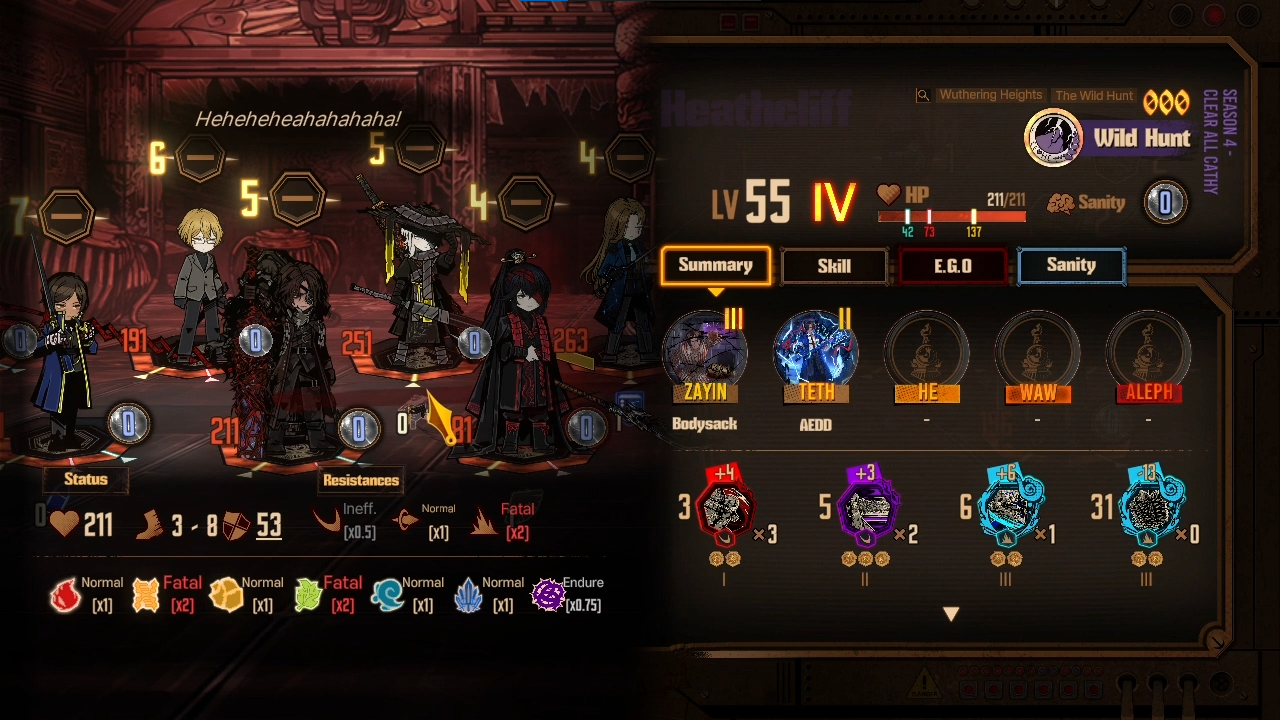
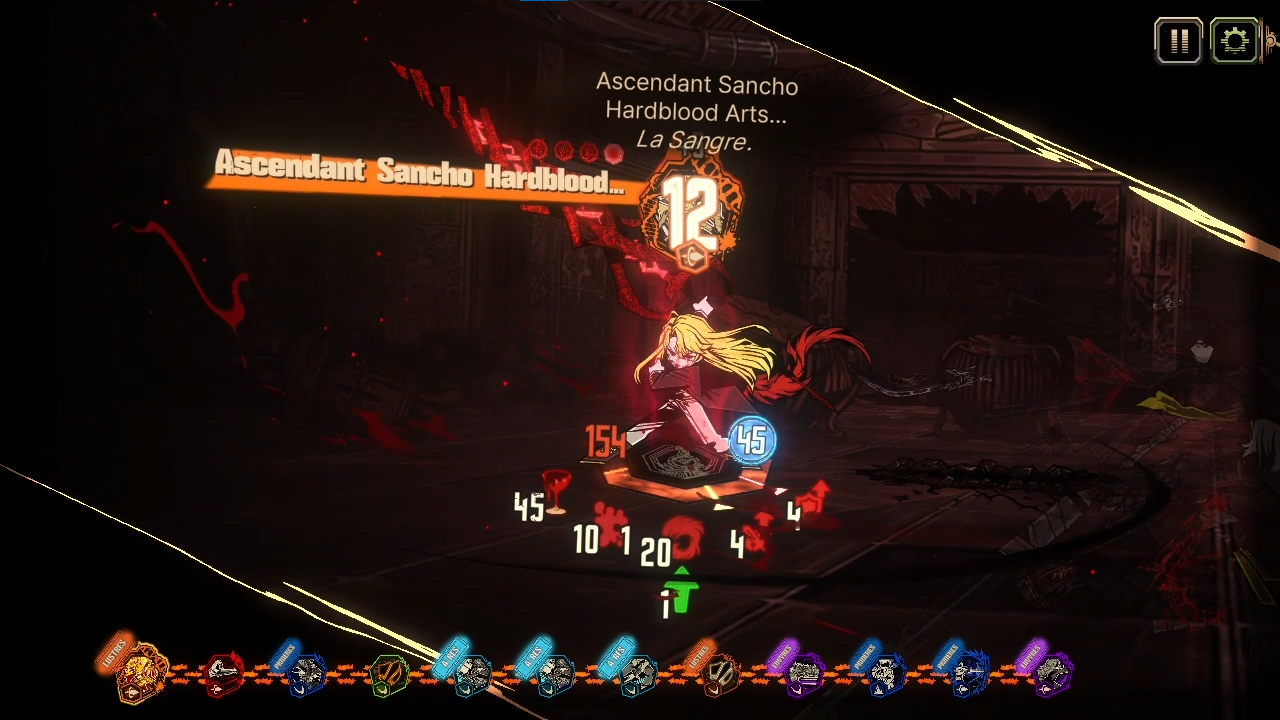
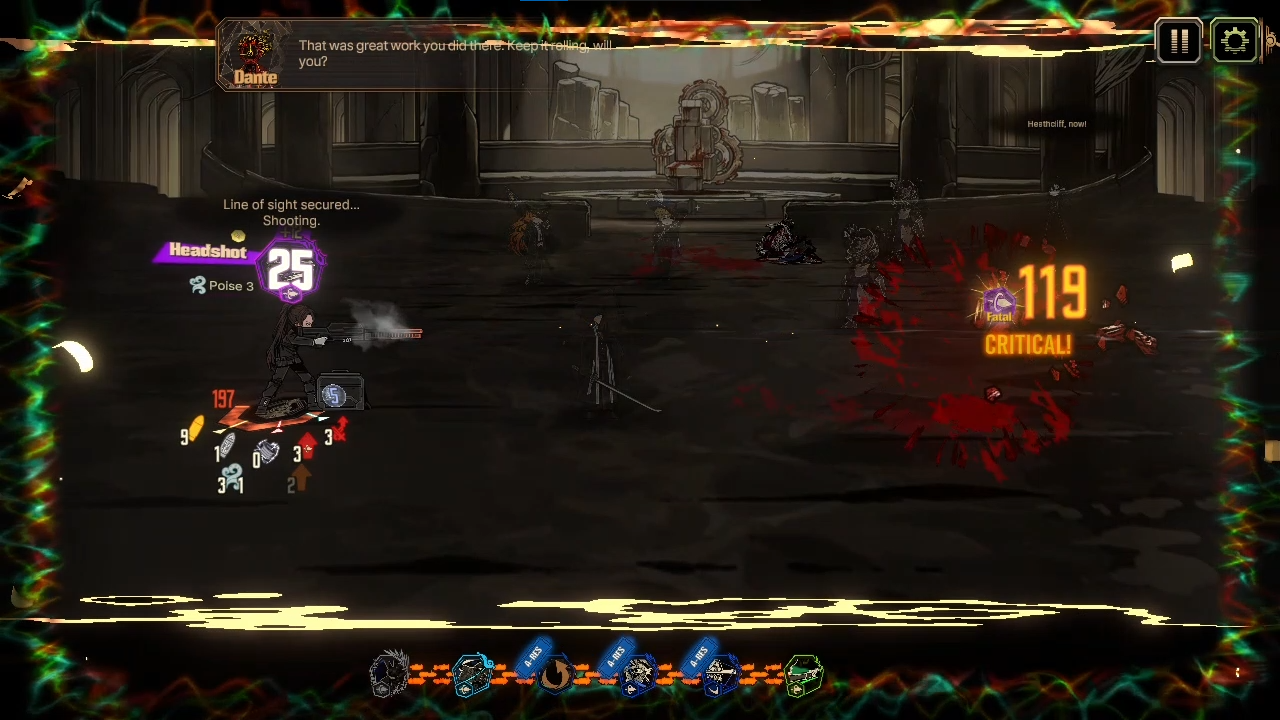
This mod adds speech bubbles for all characters with battle voicelines! (Including Untranslated Lines!)
Do NOTE That The Untranslated Voicelines are Unofficial Can Be Wrong at times!
Installation Warning
Whenever a new UPDATE happens, PLEASE DISABLE the mod!!! and wait for a Vew update on this repository. (or else you would face issues like softlocking)
As of 13th Nov, 2025, You now need to not update on every single new localization content update. Now you ONLY need to update when there are new identities so you can add Speech Bubbles on them. (New Story Enemies too, cause they might not have their speech bubble by PM since this replaces the Speech Bubble file.)
Some users faced problems when their PC Language wasn't set to English, it will cause errors in-game like these Issues
Make sure to enable this setting in-game or else the Speech Bubbles wont appear!
Installation - PC
Using the Installer:
-
Download LimbusSpeechBubbleEN_Installer-main.zip and extract it.
-
Make SURE that the
.dllfiles are next to theLimbusSpeechBubbleENInstaller.exefile or it will NOT open. -
Now open the
LimbusSpeechBubbleENInstaller.exefile It should automatically detect the game folder, if it doesn't, You need to browse it to where your game folder directory is and selectLimbusCompany_Datafolder.
- Check the Original Method below if you don't know where the
LimbusCompany_Datafolder is. - If you see this, click
More InfoandRun Anyway(It's cause its not a signed app from a known publisher which costs money.)
- Click on
[Install / Update Mod] - The mod should now be installed and updated to latest!
- You can also use the installer to easily update the mod instead of having to download again and again from the GitHub repository.
- The installer will not install any Font files if it detects that the
Fontfolder already exists. - If you are facing any issues please try deleting the
Langfolder entirely inLimbusCompany_Datafirst, or do the Original Method. - Don't forget the Launch Setup below, if installing for the first-time.
Using the Original Method:
-
Click Code → Download ZIP on this GitHub repository.
-
Open or Extract the ZIP file.
-
Navigate to your Limbus Company folder, and open the 'LimbusCompany_Data' folder Ex.
C:\Program Files (x86)\Steam\steamapps\common\Limbus Company\LimbusCompany_Data
-
Drag the "Lang" folder from the ZIP file into the "LimbusCompany_Data" folder.
Launch Setup:
- Launch the game, click on "Select Custom Language," choose SpeechDialogBoxesEN - NotherWael, and restart the game.
- If it’s already selected, you can skip this step.
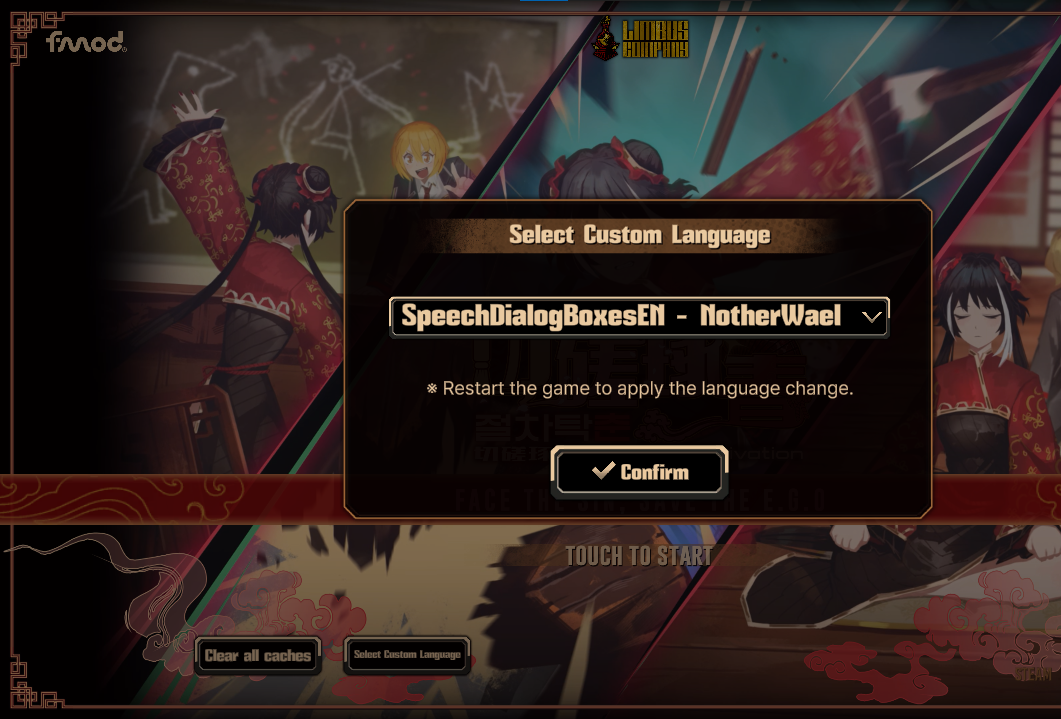
- If it’s already selected, you can skip this step.
- Enjoy the mod!
- To update, Delete
SpeechDialogBoxesEN - NotherWaelin theLangfolder, and put in the new one. (This will remove your custom fonts, so add them back) - To Uninstall the mod, simply delete the
LangFolder and restart the game. - To Disable it Select "-" in "Select Custom Langauge" at the start menu, and restart the game.
Installation - Mobile (ANDROID ONLY)
Note: This method directly replaces the speech bubble localization file, and is not a custom language mod since it's not implemented on mobile, Do it on your own risk!
Note: Everytime you launch Limbus after doing step 6, Limbus will redownload its own file, and will replace the modifed one, so you have to do it all over again everytime you launch Limbus.
- Connect your Android phone to a PC. (or you can do this directly on your phone if you know how to do it, from using something like ZArchiver.)
- Download BattleSpeechBubbleDlg.json
- Rename
BattleSpeechBubbleDlg.jsontoEN_BattleSpeechBubbleDlg.json - Access your phone files, and navigate to
Internal storage\Android\data\com.ProjectMoon.LimbusCompany\files\Assets\Resources_moved\Localize\en - Launch the game Limbus Company, and Touch to Start.
- After the Download finishes or As soon as you see the loading screen (Dante staring at the star), Replace the
EN_BattleSpeechBubbleDlg.jsonfile with the one you downloaded and renamed.- This is to bypass Limbus's auto download that replaces modified files with their own correct one.
- If the download window pop-up appears again while loading just close it, since the game is going to load to the main menu now.
- You HAVE to do this before getting to Lobby screen, or else it will NOT work and you gotta restart and do it again.
- The mod should work now, Enjoy!
Video Setup as an Example:
Custom Font Styles Instructions
- Click Code → Download ZIP at the top of this GitHub repository.
- Open or Extract the ZIP file.
- Navigate to your Limbus Company folder, and open the 'LimbusCompany_Data' folder
- Open the 'Lang' folder and then 'SpeechDialogBoxesEN - NotherWael' folder
- Delete the 'Font' Folder
- From the ZIP file, Open 'Custom Fonts' folder & Choose a Style.
- Open the folder of the style you choose and copy the 'Font' folder
- Paste the 'Font' folder in the 'SpeechDialogBoxesEN - NotherWael' folder
- Done! & Restart the game if open.
Q&A
- Is this safe? is it bannable?
- It's been a while now and a lot of people have used this mod, they have not gotten banned or anything so I assure you that it's safe. And knowing PM they will NOT start banning people without announcing a warning regarding and specificly talking about this mod first.
Old Answer but still important:
-
It’s safe and not bannable. This is a custom language mod implemented by PM, It just changes the localization files.
-
PM stated "Please note that, modification of the game client beyond the language text files, such as modification of client images or in-game data could be met with legal action or bans without prior warning" Link For the Notice
-
But then again it's outside the intented use, cause it's not a different language, so PM may not like this kind of use for the custom language implementation, so it's kinda of a grey area at the moment.
-
PM Recently Announced that they're gonna post new guidelines for modding and fanwork, so they might say something about this mod, if they'll allow it or not. (still no information about this yet...)
-
As for the Mobile method, do it on your own risk! since you directly replace the files, it's kinda similar to current visual modding, where no one has gotten banned yet but could get banned at any time. (but then again this is only modifying the text files, so in the end idk)
- How is this done?
- Using the file
BattleSpeechBubbleDlg.jsonyou can add your own speech bubble text! (just needs the Voiceline ID and the text.) - So the mod is only a localization file to add speech bubbles, there isn't any bepinex dll plugins or asset modification or anything like that.
- Using the file
About the Façade Projection (Skin System)
Unfixable on my Part, PM needs to overwrite the Speech Bubble Data for the base Identity, since it only uses the original Identity's Speech Bubble.
https://github.com/user-attachments/assets/e9ac0fff-8305-47cb-9119-ee1757231154
Downsides & Issues
This covers every battle voiceline in the game!!! So there might be a few characters missing lines if I've missed them, or if I've put the wrong voiceline ID, LMK if there are any!
- PC language may require to be set to English, though this might not apply to all languages.
- Some voicelines cannot display speech bubbles (e.g., Devyat's Polu or Full-stop Heathcliff in Overwatch state).
Font may not match the base game... (like Mikodacs Font, not having Letter Spacing from the base game.) but you can use your own custom fonts!- Added the correct letter-spacing Mikodacs Font! as of 30th Oct 2025
- A green icon appears in the top-right corner during battle or story, indicates you are using a custom language mod.
- Game start-up screen menu loading may take ages! (though it might be cause of my weak device... so i'm not sure)
Speech bubbles stay longer than they have to blocking visibility on skills during combat.Speech bubbles can end early because of the previous speech bubble before it.- As of 5th of Feb 2026, PM Has Made Speech Bubbles more dynamic where it finishes much faster as soon as the voiceline ends which can make slow readers miss out on some words on voicelines with long text but short spoken korean, and on mulitple voicelines it slowly transitions to the next Speech Bubble which causes about 0.7 second delay to see what the text is as the voiceline plays. (The 0.7 sec delay also happens when the Speech Bubble first appears too)
- Retreating IDs VLs move their Speech bubbles to the Substituted ID.
Known Voicelines That Do Not Work
- Devyat North Sinclair & Rodion All Poludnitsa Lines (Except the death ones cause i can fit it in with their death lines.)
- Overwatch Assignment Full-stop Heathcliff Combo Voicelines (He's not in battle, i could try to put it with FS Hong Lu's line, but his line has two variants so... i guess i'll put both!)
- N Corp Ryoshu and Yi Sang Skill Combo I Shall Fire // Anytime (Yeah the speech bubble just doesn't want to appear above her head at all, and yes i did check if it's the correct ID.)
Bloodfiend Trio Stage Turn Start VLs Don't Work Except for The Priest. (Their Skill VLs work tho... and some of these turn start voicelines do work on their respective stages.)- All Bosses Speech Bubbles in Mirror Dungeon sometimes do NOT work. (No idea why, but this effects official Speech Bubbles by PM too, so they'll probably fix it eventually.)
Credits
Goliath for telling me how to do this, they make a Russian translation custom langauge mod. https://github.com/Divine-Company/DivineCompany_RussianTranslationDepartment