MiniCode Python
A lightweight local coding agent for developers who want durable terminal workflows, not just a chat wrapper.
Chinese | MiniCode Main Repo | Python Repo



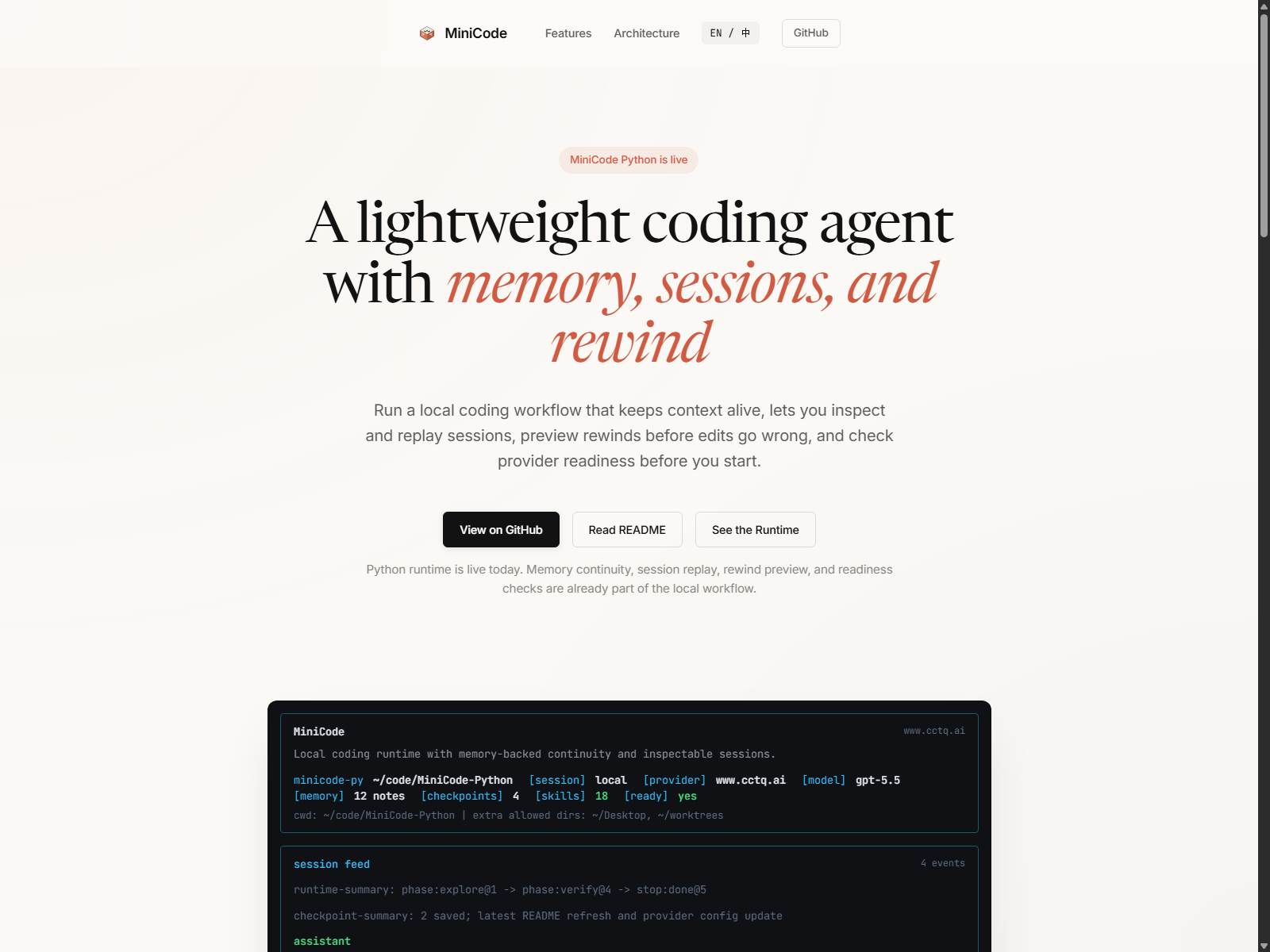
Real MiniCode frontend demo, not a mock: the landing page now reflects the current Python runtime and shows memory, session, rewind, and readiness as first-class product surfaces.
MiniCode Python is the Python runtime in the MiniCode family. It is built for local development where the agent needs to survive long sessions, keep its state inspectable, recover from bad edits, and show what it is doing while it works.
If Claude Code represents the polished terminal-agent experience, MiniCode Python is the lightweight, local-first version that leans harder into runtime transparency, durable sessions, memory-backed continuity, rewindability, and verifiable behavior.
The screenshot above is rendered from the real MiniCode frontend demo. It highlights the four product promises we care about most on day one: memory that keeps context alive, sessions you can inspect and replay, rewind flows that make local edits safer, and readiness checks that tell you whether the runtime is actually ready to work.
At a Glance
MiniCode Python is for you if you want:
- a terminal coding agent that behaves like a runtime, not a chat window;
- durable sessions you can inspect, replay, resume, and summarize;
- a memory stack that can protect working context and re-inject relevant project knowledge;
- safe local editing with checkpoints, rewind preview, and recovery flows;
- explicit signals for verification, widening, provider readiness, and failures.
If you only remember one thing, remember this:
MiniCode Python is optimized for local trust: you should be able to inspect the work, recover the edits, and understand why the agent stopped.
Why This Repo Exists
Most coding-agent READMEs lead with model access and feature lists. MiniCode Python is organized around a different promise:
the runtime should be observable, recoverable, and testable, not just clever.
That changes the product priorities:
| Priority | What it means here |
|---|---|
| Session-first | Sessions can be inspected, replayed, resumed, and summarized. |
| Recovery-first | File edits are checkpointed, previewable, and rewindable. |
| Runtime-first | Widening, verification, compaction, and stop reasons are explicit. |
| Local-first | The agent is built around real repos, local tools, and terminal workflows. |
Why MiniCode Python
| Area | What MiniCode Python emphasizes |
|---|---|
| Durable sessions | Inspect, replay, resume, and summarize live or saved sessions with local commands. |
| Memory as a first-class system | Protect active task context, re-inject project knowledge, compact with memory awareness, and persist useful reflections over time. |
| Safe recovery | Automatic checkpoints, rewind preview, rewind safety groups, and saved-session rewind flows. |
| Runtime control | single and single-deep profiles, phase-aware execution, widening, verification gates, and structured stop reasons. |
| Observable behavior | Runtime timelines, readiness reports, provider diagnostics, transcript summaries, and benchmark artifacts. |
| Local product surface | CLI and TUI commands such as /session, /session-replay, /memory, /checkpoints, /rewind, and /readiness. |
| Verifiable implementation | The root package is backed by an active test suite, not aspirational docs. |
What You Can Do Today
With the current repository state, you can already:
- run an interactive terminal agent with
minicode-py; - run a single-shot command with
minicode-headless; - inspect the current session with
/session; - browse previous sessions with
/sessions; - replay a session with
/session-replay; - inspect memory state with
/memory; - inspect checkpoints with
/checkpoints; - preview or execute rewinds with
/rewind-previewand/rewind; - inspect provider and fallback health with
/readiness.
3-Minute Demo
0. What you need
- Python 3.11+
- a local terminal on Windows, macOS, or Linux
- model/provider credentials if you want live model execution
1. Install and launch
git clone https://github.com/QUSETIONS/MiniCode-Python.git
cd MiniCode-Python
python -m pip install -e .[dev]
minicode-py
2. Ask it to do a real repo task
Explain this repository and tell me which commands matter most for day-to-day use.You should expect the normal MiniCode loop here: inspect repo state, explain findings, then let you inspect, replay, or continue the session.
3. Inspect what the runtime is doing
/session
/memory
/readiness
4. Replay or recover if needed
/session-replay
/checkpoints
/rewind-preview
5. Run one-shot headless mode
minicode-headless "Explain what this repo does."Typical Workflow
flowchart LR
    Start["Start local task"] --> Run["Run minicode-py"]
    Run --> Work["Agent reads, edits, tests, and reports"]
    Work --> Inspect["Inspect with /session, /memory, or /readiness"]
    Inspect --> Replay["Replay with /session-replay"]
    Inspect --> Recover["Preview or use /rewind if edits go wrong"]
    Replay --> Continue["Resume or continue the next turn"]
    Recover --> Continue
The main point is simple: MiniCode Python is not trying to hide the runtime. It lets you see the work, inspect the state, and recover from mistakes without manually cleaning everything up.
That same philosophy applies to memory: active task context is protected, durable project knowledge can be re-injected when it matters, and compaction is allowed to reuse memory instead of blindly dropping context.
Everyday Commands
If you only use six commands at first, use these: /session, /sessions, /session-replay, /memory, /rewind-preview, and /readiness.
| Command | What it does |
|---|---|
/session | Show the current live session snapshot. |
/sessions | List saved sessions for the current workspace. |
/session-replay | Replay the current or a saved session with transcript and runtime context. |
/memory | Show memory system status for the current workspace. |
/checkpoints | Show checkpoint history for the current or a saved session. |
/rewind-preview | Preview what a rewind would restore before changing files. |
/rewind | Rewind the latest edit group, a step count, or a checkpoint id. |
/readiness | Inspect runtime/provider readiness, fallback coverage, and product surface status. |
Current Status
This repository is past the prototype stage. It already behaves like a usable local product, but it is still being tightened into a more polished lightweight Claude Code style experience.
The active package is the root minicode/ package configured by pyproject.toml as minicode-py.
Current local verification result:
1030 passed, 2 skipped, 3 warningsVerification command:
python -m compileall -q minicode tests
pytest -q
Current state, honestly:
- core runtime, session, replay, checkpoint, rewind, and readiness surfaces are in good shape;
- memory is not bolted on: working memory, project memory, memory injection, and memory-aware compaction are already in the runtime path;
- provider and fallback diagnostics are much clearer than before;
- real provider availability still depends on your local credentials and configured channels;
- the project is usable today, but it is still evolving toward a more polished lightweight Claude Code experience.
The 3 warnings are unregistered pytest.mark.benchmark markers in benchmark tests. They are not failing behavior.
Architecture
flowchart LR
    User["User task"] --> Loop["agent_loop.py"]
    Loop --> Kernel["turn_kernel.py<br/>phase policy, widening,<br/>verification gate"]
    Loop --> Memory["Memory stack<br/>working_memory.py,<br/>memory.py, memory_pipeline.py"]
    Kernel --> Tools["Local tools<br/>files, search, edit, shell"]
    Tools --> Loop
    Memory --> Loop

    Loop --> Signals["Signals<br/>context, cost, errors,<br/>progress, provider state"]
    Signals --> Orchestrator["CyberneticOrchestrator"]
    Orchestrator --> Actions["Runtime actions<br/>compact, checkpoint, rewind,<br/>adjust budget, recover, reflect"]
    Actions --> Loop
What matters is not the diagram itself. What matters is that runtime state is treated as something explicit:
- the loop can widen instead of silently stalling;
- verification can block a premature "done";
- memory can preserve task-critical context and re-inject project knowledge instead of relying only on the current chat window;
- session state can survive process boundaries;
- rewind can reverse local edits instead of asking you to clean them up by hand;
- readiness can tell you whether failure is local logic or provider availability.
Repository Guide
| Path | Role |
|---|---|
minicode/ | Canonical Python package used by install and tests. |
tests/ | Active test suite. |
benchmarks/ | Runtime profile and release-readiness runners plus generated reports. |
docs/ | Architecture notes, optimization history, and productization reports. |
openspec/ | Specs, archived change records, and build/verify planning artifacts. |
.mini-code-memory/ | Workspace-level durable memory state created by the runtime. |
Core Modules
| Module | Purpose |
|---|---|
minicode/agent_loop.py | Main model and tool loop, runtime event flow, and product integration. |
minicode/turn_kernel.py | Step policy, phase transitions, widening, and verification gates. |
minicode/session.py | Durable sessions, inspect and replay views, checkpoints, and rewind helpers. |
minicode/cli_commands.py | Local product commands such as session, replay, rewind, and readiness. |
minicode/memory.py | Long-term project memory manager and retrieval surface. |
minicode/working_memory.py | Protected working-memory entries that survive compaction pressure. |
minicode/memory_pipeline.py | Closed-loop memory retrieval, injection, reflection writeback, and optimization path. |
minicode/product_surfaces.py | User-facing summaries for readiness, hooks, instructions, delegation, and extensions. |
minicode/release_readiness.py | Release-oriented runtime smoke and provider-readiness checks. |
minicode/model_switcher.py | Bounded fallback and failover selection. |
minicode/runtime_profiles.py | Runtime profiles such as single and single-deep. |
minicode/cybernetic_orchestrator.py | Runtime control lifecycle facade. |
MiniCode Family
| Version | Repository | Focus |
|---|---|---|
| TypeScript | LiuMengxuan04/MiniCode | Mainline terminal agent, TUI, MCP, skills, sessions, and context controls. |
| Python | QUSETIONS/MiniCode-Python | Local-first Python runtime with stronger session, rewind, readiness, and observability surfaces. |
| Rust | harkerhand/MiniCode-rs | Systems-side implementation and experiments. |
| Java | hobbescalvin414-tech/minicode4j | Java implementation with a TypeScript-style UI direction. |
Documentation
Start here if you want the deeper implementation and productization record:
- Chinese README
- Optimization Summary
- Memory Theory
- Minicode-lite Productization Design
- Minicode-lite Build Plan
- Minicode-lite Verify Report
- Main MiniCode Repository
Design Principles
- Keep the runtime inspectable.
- Treat memory as a controllable runtime subsystem, not an afterthought.
- Prefer measured signals over prompt folklore.
- Make recovery a product feature, not a manual cleanup step.
- Treat verification as part of execution, not just reporting.
- Keep docs aligned with implemented behavior, not future ambition.