Qwen-MM-Plugins
English · 中文
Native multimodal plugins for Qwen models. Make any agent harness multimodal-native.
Contents
- 🧩 Capabilities
- 🏗 Architecture
- 📦 Installation
- 🔧 Dependencies
- 🔑 Configuration
- 🚀 Quick Start
- 🧪 Development
🧩 Capabilities
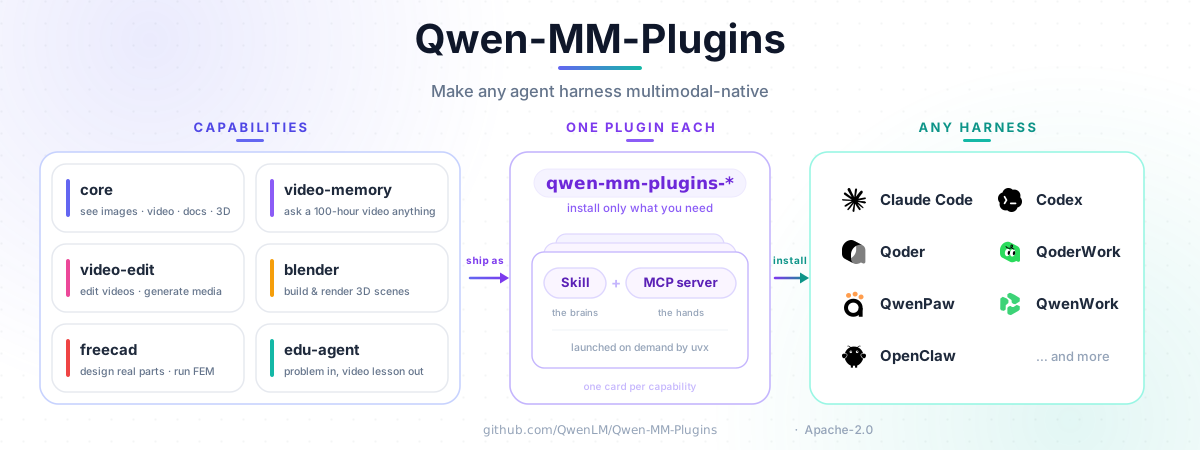
Each capability is installed separately — a skill (so the model knows the toolset exists) plus an optional MCP server (the tools themselves).
| Capability | What it does | Install name |
|---|---|---|
| core | Foundational vision: dynamic-resolution reading of images / videos / documents / 3D models, plus OCR, grounding, segmentation, ASR, vision chat, and web search | qwen-mm-plugins-core |
| video-memory | Long-video memory: a hierarchical graph memory that powers QA over very long videos | qwen-mm-plugins-video-memory |
| video-edit | Video editing + generation: editing workflows + image / video / audio generation | qwen-mm-plugins-video-edit |
| blender | Blender 3D modeling: drive a running Blender via Python (thin client, 22 tools) — modeling / materials / lighting / rendering | qwen-mm-plugins-blender |
| freecad | FreeCAD parametric CAD: drive a running FreeCAD (thin client, 14 tools) — modeling, property edits, STEP/STL import/export, FEM analysis | qwen-mm-plugins-freecad |
| edu-agent | Educational tutorial videos: turn a math/science problem or an image into a step-by-step Chinese explainer video / interactive page (skill-only, no MCP server) | qwen-mm-plugins-edu-agent |
👉 Full tool catalog: docs/en/capabilities.md.
🏗 Architecture
📦 Installation
A capability = a skill (so the model knows the tools exist) + an optional MCP server (the tools themselves, launched on demand by uvx — needs uv, no manual pip).
Recommended: the guided installer
One script handles install · configure · verify · uninstall across every harness it supports (Claude Code · Codex · Qoder · OpenClaw · Qwen Code · Gemini CLI). It drives each harness's own native install under the hood — nothing reinvented — and writes a single shared config file (~/.qwen-mm-plugins/config) that GUI and terminal harnesses both read, so you set things up once:
curl -fsSL https://raw.githubusercontent.com/QwenLM/Qwen-MM-Plugins/main/install.sh | bashOr run one action at a time — bash install.sh install / configure / verify / uninstall (what configure and verify do is detailed under Configuration and Dependencies).
By hand (per-harness)
Prefer your harness's own commands — or you're on opencode / pi / QwenPaw, which the installer doesn't cover? Register the skill + MCP yourself.
Plugin-marketplace harnesses (Claude Code · Qoder · Codex · OpenClaw · Qwen Code) — add the marketplace, then install a capability (replace <cap> with core / video-memory / video-edit / blender / freecad):
# Claude Code
claude   plugin  marketplace add https://github.com/QwenLM/Qwen-MM-Plugins.git
claude   plugin  install       qwen-mm-plugins-<cap>@qwen-mm-plugins
# Qoder
qodercli plugins marketplace add https://github.com/QwenLM/Qwen-MM-Plugins.git
qodercli plugins install       qwen-mm-plugins-<cap>@qwen-mm-plugins
# Codex
codex    plugin  marketplace add https://github.com/QwenLM/Qwen-MM-Plugins.git
codex    plugin  add           qwen-mm-plugins-<cap>@qwen-mm-plugins
# OpenClaw
openclaw plugins install       qwen-mm-plugins-<cap> --marketplace https://github.com/QwenLM/Qwen-MM-Plugins.git
# Qwen Code
qwen extensions install https://github.com/QwenLM/Qwen-MM-Plugins.git:qwen-mm-plugins-<cap> --consent
marketplace add also accepts a local repo path; re-running is safe. On codex, marketplace add does not refresh an already-added marketplace, so run codex plugin marketplace upgrade qwen-mm-plugins before plugin add to pick up newly-published capabilities.
Other harnesses (Gemini CLI · opencode · pi · QwenPaw · …) register the skill + MCP in their own config — exact per-harness blocks are in docs/en/installation.md. Easiest of all: just ask the agent — "install qwen-mm-plugins-<cap>".
🔧 Dependencies
uvx installs the Python dependencies for the chosen profile on first launch — no manual pip. The only things you install yourself are system tools: ffmpeg (video / audio), plus optional libreoffice / blender / texlive / chromium for visualize. Run bash install.sh verify to self-test what's installed — it confirms your API key and reports any missing system tools (fetching each capability's env and running --check-system under the hood). Full system-tool table, the edu-agent (skill-only) setup, and the blender/freecad thin-client notes: see docs/en/installation.md.
🔑 Configuration
The API-based tools need a key — native image / video / document reading doesn't:
DASHSCOPE_API_KEY—vision_chat/ocr/grounding/transcribe_audio/ generation / video-memory buildSERPER_API_KEY—web_search/web_extractor/image_search
Export them in your shell, or persist them to ~/.qwen-mm-plugins/config (read whenever a var isn't already in the environment — so GUI-launched harnesses pick them up too). The guided installer's Configure step writes that file for you:
bash install.sh configureFor non-interactive/automation setup and the full environment-variable catalog, see docs/en/installation.md.
🚀 Quick Start
Once a capability is installed, reference a file in your harness and just ask — the model picks the right tool automatically. Reading is dynamic-resolution: every image, video frame, and document page is auto-scaled to the VL model's patch grid, so a 4K screenshot's fine print and a tiny thumbnail both come in at the detail they need — no manual resizing.
# core — read images / video / docs / 3D models, plus OCR · grounding · segmentation · ASR · web search
@dashboard-4k.png      Read every number in this dashboard.
@report.pdf            Summarize page 3.
@receipt.jpg           OCR this and total the line items.
@street.jpg            Draw a box around every car in the scene.   # grounding

# video-memory — QA over long videos; the first query auto-builds memory
@lecture-2h.mp4        What are the main points, with timestamps?

# video-edit — image / video / audio generation + editing workflows
                       Generate a 1024×1024 image of a red panda coding at night.
@/path/to/media        Help me edit this video down to about 3 minutes.

# blender — drive a running Blender to model / texture / light / render (thin client, 22 tools)
                       Model a low-poly wooden stool, add a warm key light, and render it.

# freecad — parametric CAD in a running FreeCAD (thin client, 14 tools; STEP/STL, FEM)
                       Model an M6 hex bolt 30 mm long and export it as STEP.

# edu-agent — turn a math/science problem into a step-by-step Chinese explainer video (skill-only)
@geometry-problem.png  Explain how to solve this as a narrated video.
See the full tool catalog for every tool and per-capability guide.
🧪 Development
Development setup, contribution guidelines, and verification commands are in
CONTRIBUTING.md. Detailed guides: local development
· adding a capability · testing.
📄 License
Apache-2.0 — see LICENSE. The Blender and FreeCAD capabilities vendor third-party MIT-licensed code; see src/capabilities/blender/NOTICE.md and src/capabilities/freecad/NOTICE.md for attribution.