 Fan Control
A focused and highly customizable fan controlling software for Windows.
Sources for this software are closed.



Featured On
JayzTwoCents — Everyone NEEDS this FREE piece of software... You will thank me!

Table of Contents
- Announcement
- Main Features
- Installation & Uninstall
- Plugins
- Issues & Hardware Compatibility
- FAQ
- Libraries Used
- GitHub Sponsors
Announcement
-
NEW: Fan Control can now be started on boot as a service, without any user session.
-
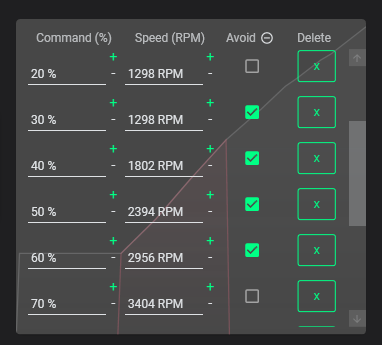
NEW: Calibration avoid points: set avoid points if you want your fans to never run in at a specific % that may rattle or emit an annoying noise.
-
FanControl, its installer and the updater now have a signed executable, which should help with AVs false flagging.
-
V238 and above now ships with a PawnIO build of LHM. This fixes the anti-virus problems encountered with WinRing0, as it is no longer shipped with FanControl. Note that as of 09/04/2025, WinRing0 (FanControl.sys) used in V237 and below is flagged as Trojan:Win32/Vigorf.A by Windows Defender, causing sensors to not be detected — updating to V238 or later is the recommended fix.
-
The FaceIT issue was fixed with the 2.1.0 PawnIO version.
Main Features
- Guided setup process on first launch
- Save, edit and load multiple profiles
- Change the theme and color of the application
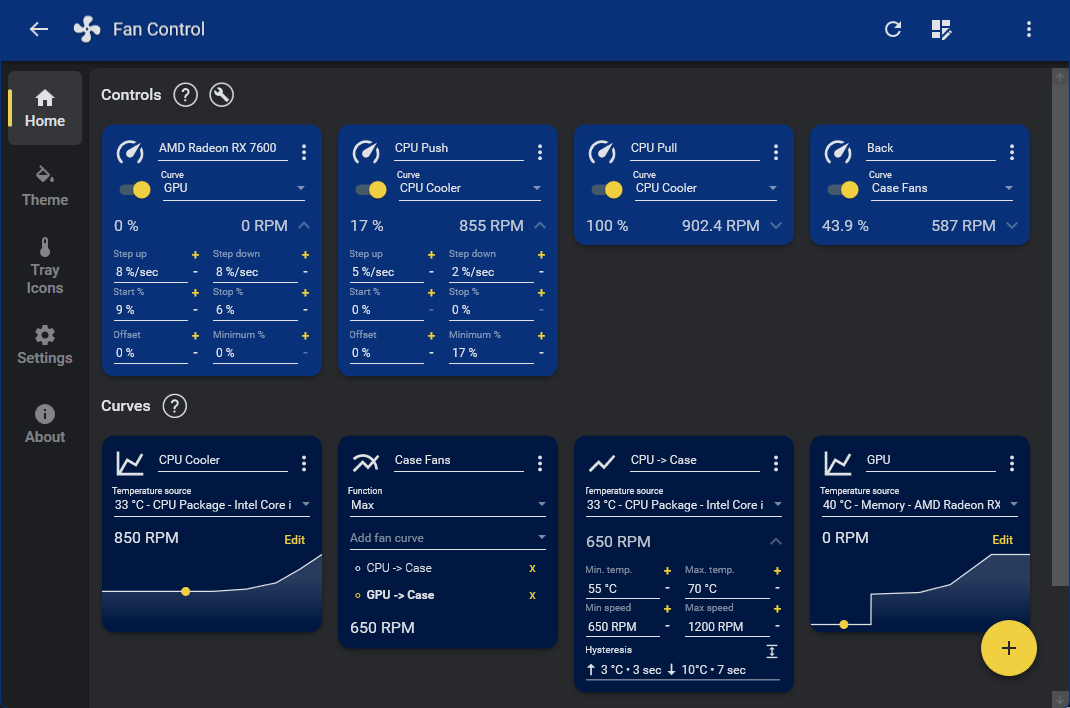
- Multiple temperature sources (CPU, GPU, motherboard, hard drives...)
- Multiple fan curve functions, including a custom graph
- Mix fan curves or sensors together (max, min, average)
- Low resource usage
- Advanced tuning with steps, start %, stop %, response time and hysteresis
Full documentation is available at getfancontrol.com/docs.
Installation & Uninstall
Install
- Download the latest archive or an installer from the release page.
- Extract to the desired installation folder or run the installer.
- Start
FanControl.exe.
Other install methods (Scoop / Winget / Chocolatey)
scoop bucket add extras
scoop install fancontrol
winget install Rem0o.FanControl
choco install fancontrol
Uninstall
Portable — You can leave the files there for future use, or delete them.
Note: If you have Fan Control set to automatically start with Windows, either untick the checkbox in Fan Control, or manually delete the "Fan Control" task in Windows Task Scheduler.
Installer — Uninstall like any other Windows program through the Programs list.
Plugins
The plugin system lets you inject any type of sensor into FanControl. See the Plugins wiki for details.
From Rem0o
| Plugin | Description |
|---|---|
| FanControl.IntelCtlLibrary | Intel ARC GPU support |
| FanControl.HWInfo | Import HWInfo sensor data |
| FanControl.DellPlugin | Dell laptops and some towers |
From the Community
Notify me if I'm missing some.
| Plugin | Description |
|---|---|
| FanControl.Thermaltake | Thermaltake devices (updated fork of fu-raz/FanControlThermaltake) |
| FanControl.LiquidCtl | AIO devices via liquidctl; updated fork with multi-fan controller support |
| FanControl.AsusWMI | ASUS motherboards via WMI |
| FanControl.AquacomputerDevices | Aquacomputer HighFlowNext, Quadro and Octo |
| FanControl.AquacomputerQuadro | Aquacomputer Quadro |
| FanControl.GPU-Z | GPU-Z sensor data |
| FanControl.CorsairLink | Corsair Commander controllers and Hydro liquid coolers |
| FanControl.Razer | Razer devices |
| FanControl.HomeAssistant | HomeAssistant temperature sensors (Philips Hue, HomeMatic, HomeKit, etc.) |
| FanControl.NzxtKraken | NZXT Kraken AIOs not yet in LHM (e.g. Kraken X2, X3 new PID) |
| FanControl.LianLi | LianLi L-Connect 3 fan controllers |
| FanControl.NvThermalSensors | Nvidia GPU Hot Spot and Memory Junction temperatures |
| FanControl.OpenFan | OpenFAN controller |
| FanControl.AIDA64 | AIDA64 sensor readings |
| FanControl.RazerCoolingPadPlugin | Razer Laptop Cooling Pad |
| FanControl.GPDPlugin | GPD devices |
| FanControl.LenovoPlugin | Lenovo laptops with Lenovo ACPI-Compliant Virtual Power Controller |
| FanControl.GigabyteWaterforce | GIGABYTE AORUS WATERFORCE X AIO coolers — X240, X280, X360 |
| FanControl.AcerPredatorPH315 | Native fan control for the Acer Predator Helios 300 (PH315-53) |
Issues and Hardware Compatibility
Fan Control is primarily a UI layer on top of existing hardware libraries. Any hardware compatibility issue is largely dependent on the upstream project:
- LibreHardwareMonitor — the main sensor/driver backend
Please only open issues on this repository for the software itself: UI bugs, feature requests, etc. Hardware support requests will be closed with a link to this section.
If you have a hardware compatibility request and can provide a working code sample usable in .NET (e.g. via a Plugin), feel free to submit that.
FAQ
Q: What BIOS settings work best with FanControl?
Avoid any "smart" fan control from your BIOS. Setting a fixed default speed (e.g. 50%) works great for most people. Also check whether your BIOS uses PWM or DC mode — one may work better depending on your setup.
Q: Does it work on laptops?
Mostly no, as laptops do not interface their fans the same way desktop motherboards do. Most of them are not made to be interfaced by a 3rd party. However, if supported, a plugin may add support for a specific type of laptop. To be clear, you'll be able to install the software, but it won't find any fans or may throw errors.
Q: My NVIDIA GPU has 3 fans but only 2 control cards show up. Why?
Your card only has 2 channels; multiple fans are wired to the same channel.
Q: My NVIDIA GPU won't go below 30% and doesn't reach 0 RPM. Why?
Q: There are no control cards, or control cards aren't changing fan speeds. What's the issue?
Q: How does [FAN CURVE TYPE] work and what do its parameters do?
Click the card's icon at the top left — a dialog will explain it.
Q: What OS does it run on?
Windows 10 and Windows 11.
Libraries Used
| Library | Purpose |
|---|---|
| LibreHardwareMonitor | Main sensor source |
| MaterialDesignInXamlToolkit | UI framework |
| NvAPIWrapper | Nvidia GPU fan control and sensor reading |
| ADLXWrapper | AMD GPU fan control and sensor reading |
| gong-wpf-dragdrop | Drag and drop interactions |
GitHub Sponsors
The GitHub Sponsor button on this page is intended for the open-source work surrounding FanControl. This includes contributions to LibreHardwareMonitor, the plugin system and open-source plugins, and AMD GPU driver support via ADLXWrapper.
Your sponsorship helps maintain existing projects and develop new ones. It does not apply to the main FanControl program itself — use the PayPal button if your intent is to support FanControl directly.