LingBot-Touch: A Foundation Model for Heterogeneous Tactile Representation Learning
Bing Han, Yichuan Peng, Haoyu Dong, Yuanmeng Hu, Yongyi Jia, Fangjing Wang, Kecheng Zheng,
Yiming Zhang, Yanhong Zeng, Xiaoqing Zhang, Chen Song, Rundong Zou, Anqi Dong,
Yuan Guan, Ka Leong Cheng, Xing Zhu, Yujun Shen, Nan Xue, Wei Ning†





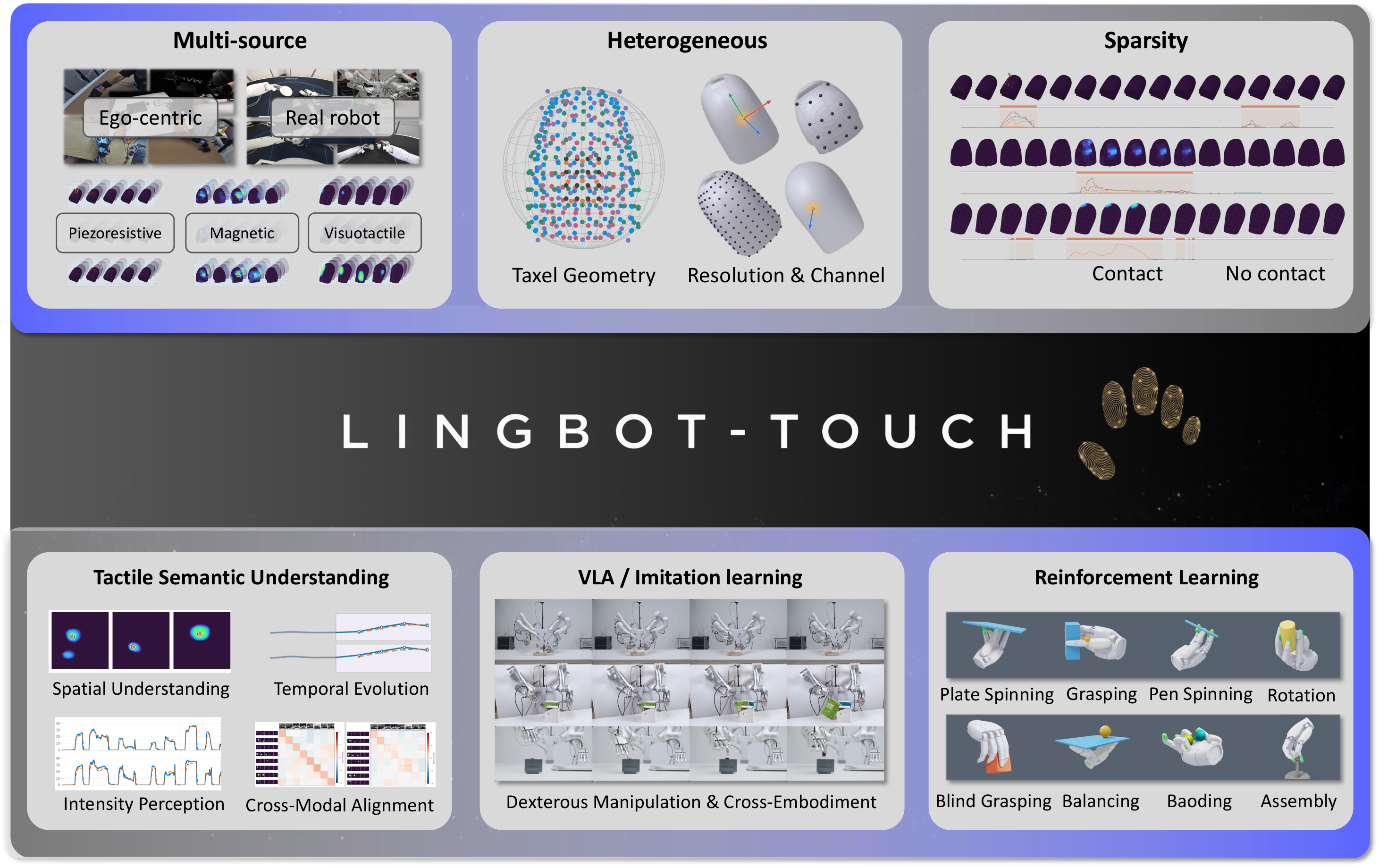
We aim to bridge heterogeneous tactile sensor signals and real-world dexterous robotic manipulation, enabling tactile experience to transfer across hardware platforms and tasks. To this end, we introduce LingBot-Touch, a JEPA-based tactile representation model built around a shared Transformer and latent representation prediction from spatiotemporal tactile context. LingBot-Touch enables a rich understanding of spatiotemporal tactile signals across sensing modalities while supporting high-frequency inference and cross-task transfer.
We demonstrate four key properties:
- Unified. Heterogeneous tactile data from multiple sources mutually enhance representation learning within a unified latent space.
- Transferable. Even when pretrained on entirely different tactile sensors, LingBot-Touch transfers to downstream tactile sensors and real-world dexterous robotic hands without any additional training.
- Efficient. Even with its smallest ViT backbone, LingBot-Touch supports high-frequency downstream inference with a lightweight architecture.
- Scalable. Scaling the amount of tactile training data yields continued performance improvements on both downstream tactile tasks and real-world robotic manipulation tasks.
Contents
- Pretraining
- Open Weights
- Usage of LingBot-Touch Representations
- Getting Started
- Environment Setup
- Inference Steps
- Example
- License
- Citation
- Detailed Data Interface Guide
LingBot-Touch Pre-Training
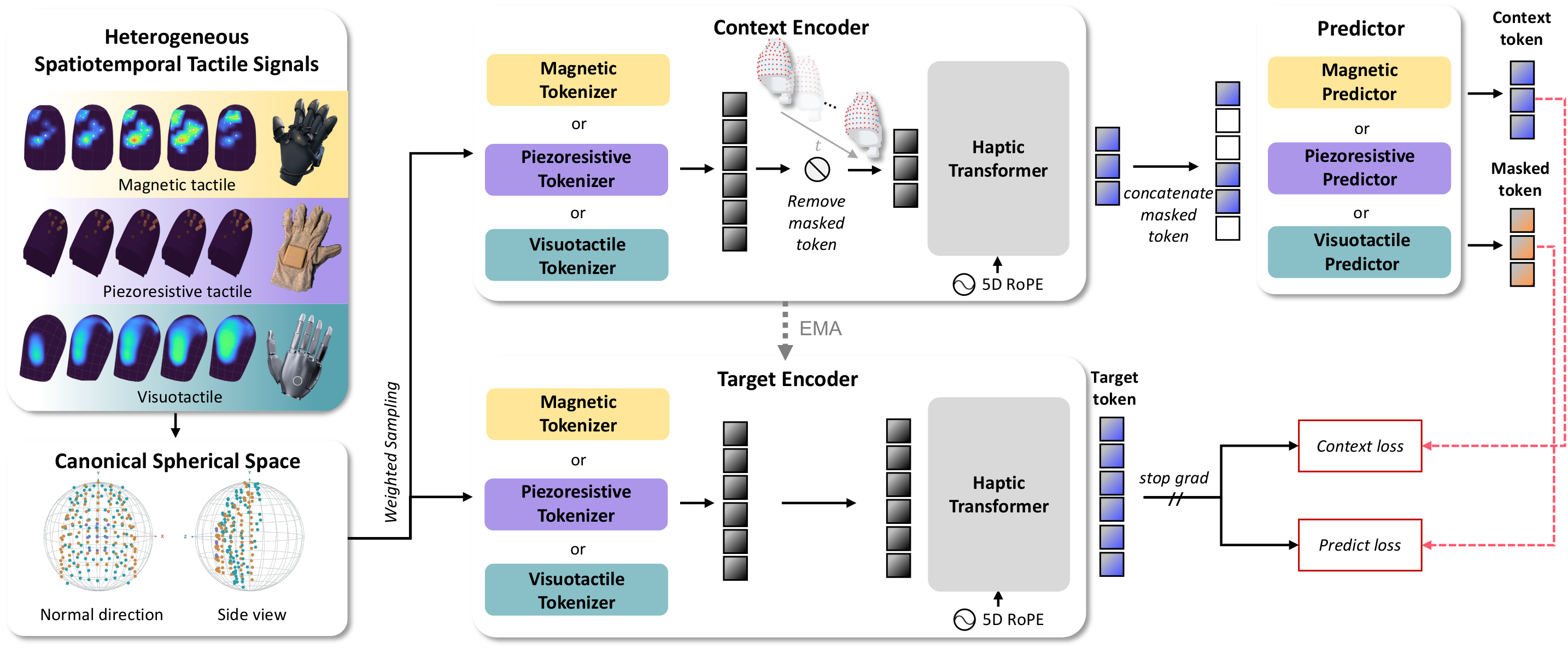
LingBot-Touch learns unified representations of magnetic, piezoresistive, and visuotactile signals through masked prediction in latent space, using modality-specific tokenizers and a shared Transformer. See the paper for method details.
Inference release. This repository provides the frozen target encoder and utilities for extracting token-level tactile features and their spatiotemporal addresses.
Models
LingBot-Touch Pretrained Checkpoints
| Model | ModelScope | Hugging Face |
|---|---|---|
| LingBot-Touch-Tiny | Download | Download |
| LingBot-Touch-Small | Download | Download |
Download the matching config.json and encoder.pt from either platform and place them in checkpoints/lingbot-touch-tiny/ or checkpoints/lingbot-touch-small/. Model files are hosted separately from this source repository. Access requires an account with permission to the model repository.
Usage of LingBot-Touch Representations
After extracting token-level tactile representations with LingBot-Touch, we strongly recommend attention-based querying: use learnable or task-conditioned queries to attend to all output tokens through cross-attention and retrieve information needed by the downstream task, rather than relying on a per-token linear projection or mean/max pooling as the default readout.
Each token retains its temporal, finger, and spatial address, but JEPA representations integrate spatiotemporal context: after self-attention in the shared Transformer, a token contains information from other taxels and time positions rather than an independent measurement of a single taxel. Selecting tokens by address or applying mean/max pooling therefore does not isolate information from a particular finger or time interval.
Getting Started
First download a model bundle from the checkpoint table. Use its matched config.json and encoder.pt together with this code. The three supported modalities are magnetic, piezoresistive, and visuotactile.
Environment Setup
These commands use the verified Linux / Python 3.12 / PyTorch 2.11 environment. Run them from the repository or extracted release root, where pyproject.toml and infer.py are located:
conda create -n lingbot-touch python=3.12.13 pip=26.0.1 -y
conda activate lingbot-touch
python -m pip install "torch==2.11.0" --index-url https://download.pytorch.org/whl/cu130
python -m pip install .
python -m pip check
The installed distribution is lingbot-touch; Python imports use tactile_jepa_inference for the encoder and data_interfaces for sensor adapters. Installation includes the verified numpy==2.4.4 dependency to avoid PyTorch's missing-NumPy warning.
The inference commands below use CPU. For a compatible NVIDIA GPU, replace --device cpu with --device cuda:0. See the detailed guide for environment and device details.
Inference Steps
 Download model weights and configuration.
 Align the data format.
 Normalize geometry and signal values.
 Resample (optional, recommended).
 Select the sensing modality.
 Run inference to obtain representations.
The public sensing-modality interface provides three options: modality="magnetic", "piezoresistive", and "visuotactile".
First, use normalize_positions with verified fingertip spherical calibration parameters to transform the 3D taxel coordinates into canonical space. Then use prepare_sensor_input, which calls normalize_signal, to normalize signal values with fixed sensor ranges: XY in [-1,1] and Z in [0,1]. For scalar visuotactile and piezoresistive signals, place the measurement in Z and set XY to zero.
Here, “calibration parameters” means a fixed geometric transform for each finger: rotation aligns coordinate directions, coordinate_origin specifies the reference origin after rotation, radius specifies the reference radius, and offset_xyz specifies the canonical-space offset. The computation is p_canonical = (p @ rotation.T - coordinate_origin) / radius + offset_xyz. These parameters come from complete taxel geometry and reference templates, not from current tactile values or individual clips, and do not project every point onto a unit sphere.
The included examples do not require you to supply calibration parameters: Sharpa samples already contain canonical coordinates; the XHand adapter includes fixed target coordinates and hand mappings. Do not apply another transformation. Only a new raw taxel layout requires verified geometry calibration; see the detailed guide. For XHand, raw-signal point selection precedes normalization and clipping, as shown below.
Optional point sampling:
Pretraining explicitly supports 96, 76, 64, 48, 32, 24 points per finger for magnetic sensing, 61, 16, 9 for piezoresistive sensing (124 points for the thumb in the 61-point layout), and 200, 96, 32 for visuotactile sensing. In our experience, resampling to a compatible sensor resolution and geometry can further improve representation quality. The package includes sampling code, pretraining sampling maps, and reference geometry.
Example
Example 1: Sharpa Wave → Visuotactile Branch
| Step | Code/input and result |
|---|---|
| Model | Download Tiny's config.json and encoder.pt into checkpoints/lingbot-touch-tiny/. |
| Format | Use the Sharpa sample: raw contains scalar tactile values of shape [1,16,5,200], ordered thumb, index, middle, ring, pinky. These are not RGB images. |
| Normalization | The Sharpa interface calls the signal adapter to produce [0,0,clip(Z/255,0,1)]. Samples already include correct canonical spherical coordinates and hand alignment; do not transform their geometry again. |
| Sampling | This example already has 200 points per finger and requires no further resampling. Other verified layouts may use the optional sampling interface. |
| Branch | The Sharpa interface automatically selects modality="visuotactile". |
| Representations | Run the commands below to obtain separate token-feature files for the left and right hands. |
mkdir -p outputs/sharpa
for HAND in left right; do
  python infer.py --input-format sharpa \
    --bundle checkpoints/lingbot-touch-tiny \
    --input "sample_data/sharpa/001_${HAND}.pt" \
    --output "outputs/sharpa/001_${HAND}_features.pt" \
    --device cpu
done
For new data with sensor-space 3D coordinates, use the geometry normalization code with verified calibration parameters. Input formats and --calibration usage are described in the detailed guide.
Example 2: XHand → Magnetic Branch
| Step | Code/input and result |
|---|---|
| Model | Reuse the two model files in checkpoints/lingbot-touch-tiny/. |
| Format | Use the XHand sample: raw contains three-axis tactile values of shape [1,16,5,120,3], with hand and a verified layout_id. |
| Normalization | The XHand adapter converts point order and signal axes according to handedness, then normalizes by [128,128,255], clipping XY to [-1,1] and Z to [0,1]. |
| Sampling | This example uses the existing 120→96 point-selection method and magnetic96 canonical coordinates, producing [1,16,5,96,3]. You can also use the original 120-point tactile data through the general sensor interface with matching canonical coordinates; we have verified that the 120→96 processing yields better representations. |
| Branch | The XHand interface automatically selects modality="magnetic". |
| Representations | Run the commands below to obtain separate token-feature files for the left and right hands. |
mkdir -p outputs/xhand
for HAND in left right; do
  python infer.py --input-format xhand \
    --bundle checkpoints/lingbot-touch-tiny \
    --input "sample_data/xhand/001_${HAND}.pt" \
    --output "outputs/xhand/001_${HAND}_features.pt" \
    --device cpu
done
This mapping applies only to the verified XHand120 point-order and signal-axis conventions. If hardware or SDK changes the ordering, verify the mapping first; matching tensor shapes alone is insufficient.
Run All Samples and Read the Results
The sample manifest indexes 30 bilateral input pairs per platform, for both Sharpa and XHand, with 16 consecutive frames per hand: 120 single-hand input files in total. See the detailed guide for input contracts.
Run all samples:
for SENSOR in sharpa xhand; do
  mkdir -p "outputs/batch_${SENSOR}"
  for INPUT in "sample_data/${SENSOR}/"*.pt; do
    NAME=$(basename "$INPUT" .pt)
    python infer.py --input-format "$SENSOR" \
      --bundle checkpoints/lingbot-touch-tiny \
      --input "$INPUT" \
      --output "outputs/batch_${SENSOR}/${NAME}_features.pt" \
      --device cpu
  done
done
Existing output files are not overwritten; use a new output directory when rerunning. Read the first result from each batch output directory:
import torch

for sensor in ("sharpa", "xhand"):
    result = torch.load(f"outputs/batch_{sensor}/001_left_features.pt", map_location="cpu", weights_only=True)
    print(sensor, result["latent"].shape)
    print(result["time_id"].shape, result["finger_id"].shape, result["pos_xyz"].shape)
latent contains token-level representations of shape [B,N,C]. time_id, finger_id, and pos_xyz identify each token's time, finger, and spatial location. N depends on frame count, tubelet size, and valid points; C is determined by the downloaded model configuration.
Package layout (top-level):
lingbot-touch/
├── .gitignore
├── README.md
├── DATA_INTERFACE_GUIDE.md
├── LICENSE
├── THIRD_PARTY_NOTICES.md
├── pyproject.toml
├── infer.py
├── assets/
├── paper/
├── data_interfaces/
├── tactile_jepa_inference/
├── tests/
└── sample_data/
License
LingBot-Touch is licensed under the Apache License, Version 2.0. Applicable third-party components retain their original licenses; see Third-Party Notices.
Citation
@article{han2026learningheterogeneoustactile,
  title={Learning Heterogeneous Tactile Representation for General Dexterous Manipulation},
  author={Bing Han and Yichuan Peng and Haoyu Dong and Yuanmeng Hu and Yongyi Jia and Fangjing Wang and Kecheng Zheng and Yiming Zhang and Yanhong Zeng and Xiaoqing Zhang and Chen Song and Rundong Zou and Anqi Dong and Yuan Guan and Ka Leong Cheng and Xing Zhu and Yujun Shen and Nan Xue and Wei Ning},
  year={2026},
  eprint={2611.12806},
  archivePrefix={arXiv},
  primaryClass={cs.RO},
  doi={10.48550/arXiv.2611.12806},
  url={https://arxiv.org/abs/2611.12806}
}
Detailed Data Interface Guide
We provide a detailed data interface guide. Read it directly or share it with your Agent for help understanding and using the interfaces. Have fun!