PLEASE GIVE PROPER CREDITS. JUST DONT REBRAND AND LAUNCH IT AS YOURS.
NEW VERSION-4.0 (Fixed: shared-WARP exhaustion, Tor 403 walls, silent proxy fallback, per-user capacity caps. Adds: two-lane block relay, WarpGate pool, redesigned dashboard)
Opencode-Unlimited-Limit-Bypass




Automatic rate-limit rotator, multi-egress proxy router, and autonomous session auto-resume for OpenCode Desktop and OpenCode CLI.
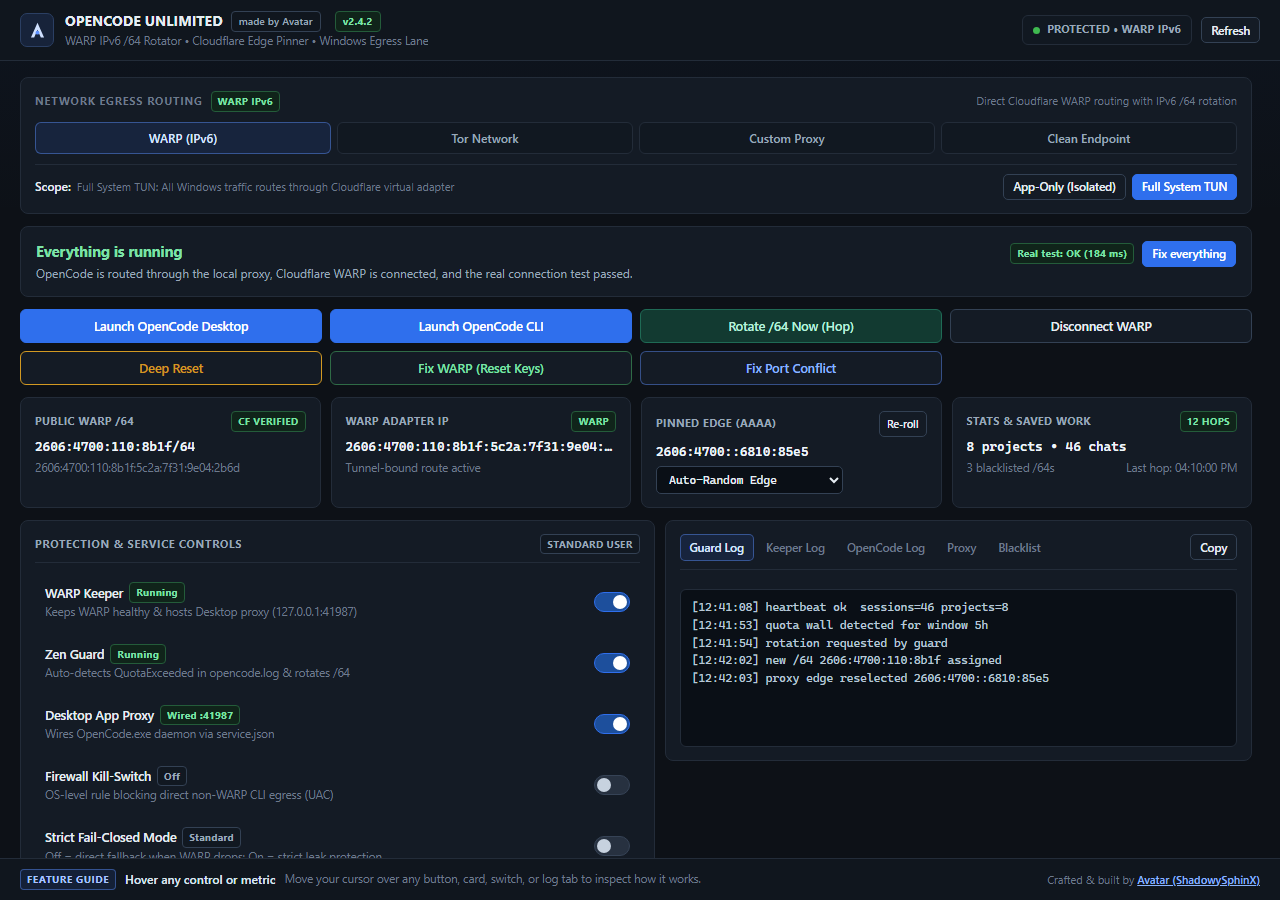
OpenCode's free-tier limits are applied to the inbound public IP address (/64 prefix on IPv6, /32 on IPv4). The rotator changes that address and clears the matching client-side lockout.
This tool monitors OpenCode logs for quota and rate-limit errors, cycles the active identity (fresh IPv6 /64, Tor circuit, or proxy pool node), and tries to continue the running session without starting a new chat.
Table of Contents
- What's New in v4.0
- Prerequisites & Downloads
- Quick Start (Windows)
- Recommended Settings for Every Method
- How Limit Reset Works on Existing Chats
- Restricted Regions Guide (Russia, Iran, China)
- Troubleshooting Playbook ("What to do when something happens")
- Routing Architecture
- Linux Setup (Headless & VPS)
- Building from Source
- Block Relay (stable multi-user egress)
What's New in v4.0
- The free wall moved. The allowance is metered on the egress block, per UTC day,
in requests rather than tokens: a
/64on IPv6 or a/32on IPv4. WARP hands out/64s from a shared pool that is largely spent, so a fresh WARP address is often a fresh bucket for exactly one request. Tor exits are refused outright. - Two-lane block relay (new).
relay/is now a router with two upstream lanes behind one client string.prefixsource-binds a routed IPv6 prefix;warpgatedials through an isolated WARP registration.hybriduses the prefix first and spills into WarpGate. See Method 5. - WarpGate capacity layer (new).
relay/warpgate_pool.pyleases a unique WARP exit per user from a WarpGate instance, so an operator with a single VPS can serve a few hundred distinct exits without owning an IPv6 allocation. - Capacity replaces rationing. The earlier 2-3 rotations per user per day is gone. A spent block is rotated, never throttled, and capacity grows by widening the prefix or adding a WarpGate.
- Silent fallback is dead. While a relay route is selected, a dead relay fails loudly instead of quietly spending the local WARP address. That mismatch was the main reason a rotation looked "patched" while the dashboard claimed success.
- Relay diagnostics in
doctor.opencode-unlimited-doctorprints the lane, the assigned block orunassigned, the exit instance and endpoint, both capacities, and a warning when WarpGate is unreachable. - Dashboard redesign. Dark single-surface layout, segmented egress tabs, health issues as rows with an inline fix button, sticky log panel that fills its column, glass tooltips, and a confirm modal. Same controls, same ids, same API.
- Version 4.0 across
build_exe.ps1,build_multi_exe.ps1, the installers, the window title, and the probe user agent.
What's New in v3.0
- Long responses survive flaky edges (Windows):
- Fixed a relay bug where the proxy's buffered header reader could swallow the first TLS bytes after
CONNECT, leaving the tunnel waiting for a response that had already arrived. - The relay is now unbuffered, enables
TCP_NODELAYand TCP keepalive on both sockets, and drains the client briefly when the upstream sends FIN. Windows closes with FIN instead of turning a completed response into anECONNRESET. - Mid-stream resets are recorded as
stream_resetand counted separately from connection failures when the client was still waiting for data. A response that already completed before the server sent RST is not counted. The Proxy tab and health panel now distinguish "the route never came up" from "a live stream was cut". - A pinned Cloudflare edge that cuts two live streams within five minutes is retired for new connections. Existing streams are left alone.
- If WARP reconnects with a new local IPv6 while a request is connecting, the proxy detects the stale bind (
WinError 10049/EADDRNOTAVAIL) and retries once with the fresh address instead of failing every edge. - WARP tunnel repair is deferred while another proxy tunnel is active, so a repair cannot kill a response that is still generating. The failed request gets one quick retry first.
- Fixed a relay bug where the proxy's buffered header reader could swallow the first TLS bytes after
- Connection Recovery & Diagnostics:
- The local proxy fails over to another Cloudflare edge instead of stalling on one dead address.
- A dropped WARP tunnel or proxy route is recorded, repaired, and surfaced in the dashboard instead of returning an empty
503. - Auto-Repair is on by default and only performs safe actions: start or restart a stopped proxy, reconnect WARP, repair the tunnel, or re-roll the edge. It never changes the selected mode, clears chats, restarts OpenCode, or deletes the WARP registration, and it respects workers you deliberately disabled.
- The Proxy log tab shows edge failover,
stream_reset, direct fallback, and tunnel repair events. - A local
EPIPE: broken pipefrom OpenCode's own console pipe is no longer reported as an upstream network error. - Standard mode still permits a direct fallback so OpenCode stays usable; the health panel labels it Using a direct connection and offers a one-click repair. This now also applies to
opencode.aitraffic in TUN mode, which previously changed the route without recording it.
- Honest IP rotation (new):
- A hop only counts when the public IPv6 address changes. The WARP adapter keeps its old IPv6 when the tunnel stops carrying traffic, so the old check could report a successful rotation while requests were really leaving over IPv4. Users then saw "rotated" followed by the same free-limit error, which looks like the method was patched.
hop_oncechecks that WARP is connected before rotating, and a hop that cannot be confirmed waits 10 minutes instead of reconnecting the tunnel every 75 seconds.- If two confirmed new IPv6 addresses still hit the free wall, rotation pauses until the allowance resets at 00:00 UTC and the dashboard explains why. Press Try now to force one more address.
- WARP Keeper Stability:
- A connected tunnel is left alone unless the selected WARP scope changed; the keeper repairs disconnected or error states.
- Routine repairs renew the WireGuard session keys instead of deleting the device registration.
- In-flight
Connecting/Reconnectingstates get a longer grace period before a repair starts. - Non-destructive key rotation (
tunnel rotate-keys) is used for quota rotation.
- Streaming Responses Survive Rotation:
- Reconnecting WARP tears the tunnel adapter down, which resets every live socket. That is what produced
ECONNRESETin the middle of long answers. - The guard reads the local proxy's live tunnel count and OpenCode's log freshness, and holds the rotation back until the session goes quiet (up to three minutes) instead of reconnecting underneath a streaming response.
- A rotation that cannot be confirmed no longer retries in a loop; the guard stays paused so the tunnel is not reconnected over and over.
- A one-minute watchdog task restarts the keeper or guard if either process dies or stops writing its heartbeat.
- Reconnecting WARP tears the tunnel adapter down, which resets every live socket. That is what produced
- Linux Lane Fixed:
- Linux now runs the same hardened Python HTTP CONNECT proxy as Windows, on an ephemeral loopback port. Bun/OpenCode ignores
socks5://proxy variables, so pointingHTTPS_PROXYat WARP's SOCKS listener was never enough. - The installer deploys
ouc_common.py,zen_proxy.py,proxy_chain.py, andtor_manager.pyto$DEST/python, andzen-lane.shwires the launched OpenCode process to that proxy. There is no dead41987fallback on Linux. - Isolated proxy mode remains the installer default.
OUC_WARP_MODE=warpis the explicit opt-in for full TUN. - Rotation pauses the keeper with a pause file plus a service stop/start, so a keeper tick cannot reconnect WARP underneath a rotation.
opencode-unlimited-doctornow checks the Python proxy modules, WARP port40000, resolved iptables paths, both services, the shim, and stale pause files.
- Linux now runs the same hardened Python HTTP CONNECT proxy as Windows, on an ephemeral loopback port. Bun/OpenCode ignores
- Install/Repair on non-English Windows:
- The
.cmdshims are written as UTF-8 withchcp 65001when the Windows profile path contains non-ASCII characters. Previously the app stopped withUnicodeEncodeError: 'ascii' codec can't encode characters ...on those systems. - ASCII-only paths keep the previous plain shims and do not touch the console code page.
- The
- Existing Chat Auto-Unlock & History Preservation:
- Removes client-side rate limit lockouts (
free-limit,go-upsell) from%APPDATA%\ai.opencode.desktop\drafts.sqliteafter a successful rotation. - Leaves the chat history and session tables untouched.
- Reloads the Desktop window and sends
continuewhen the window can be focused safely; otherwise it falls back to a CLI resume.
- Removes client-side rate limit lockouts (
- Detached Desktop Launching:
- OpenCode Desktop now launches as an independent detached process (
os.startfile), so it stays open even if the launcher or terminal is closed.
- OpenCode Desktop now launches as an independent detached process (
- Fixed a relay bug where the proxy's buffered header reader could swallow the first TLS bytes after
CONNECT, leaving the tunnel waiting for a response that had already arrived. - The relay is now unbuffered, enables
TCP_NODELAYand TCP keepalive on both sockets, and drains the client briefly when the upstream sends FIN. Windows closes with FIN instead of turning a completed response into anECONNRESET. - Mid-stream resets are recorded as
stream_resetand counted separately from connection failures when the client was still waiting for data. A response that already completed before the server sent RST is not counted. The Proxy tab and health panel now distinguish "the route never came up" from "a live stream was cut". - A pinned Cloudflare edge that cuts two live streams within five minutes is retired for new connections. Existing streams are left alone.
- If WARP reconnects with a new local IPv6 while a request is connecting, the proxy detects the stale bind (
WinError 10049/EADDRNOTAVAIL) and retries once with the fresh address instead of failing every edge. - WARP tunnel repair is deferred while another proxy tunnel is active, so a repair cannot kill a response that is still generating. The failed request gets one quick retry first.
- Connection Recovery & Diagnostics:
- The local proxy fails over to another Cloudflare edge instead of stalling on one dead address.
- A dropped WARP tunnel or proxy route is recorded, repaired, and surfaced in the dashboard instead of returning an empty
503. - Auto-Repair is on by default and only performs safe actions: start or restart a stopped proxy, reconnect WARP, repair the tunnel, or re-roll the edge. It never changes the selected mode, clears chats, restarts OpenCode, or deletes the WARP registration, and it respects workers you deliberately disabled.
- The Proxy log tab shows edge failover,
stream_reset, direct fallback, and tunnel repair events. - A local
EPIPE: broken pipefrom OpenCode's own console pipe is no longer reported as an upstream network error. - Standard mode still permits a direct fallback so OpenCode stays usable; the health panel labels it Using a direct connection and offers a one-click repair. This now also applies to
opencode.aitraffic in TUN mode, which previously changed the route without recording it.
- Honest IP rotation (new):
- A hop only counts when the public IPv6 address changes. The WARP adapter keeps its old IPv6 when the tunnel stops carrying traffic, so the old check could report a successful rotation while requests were really leaving over IPv4. Users then saw "rotated" followed by the same free-limit error, which looks like the method was patched.
hop_oncechecks that WARP is connected before rotating, and a hop that cannot be confirmed waits 10 minutes instead of reconnecting the tunnel every 75 seconds.- If two confirmed new IPv6 addresses still hit the free wall, rotation pauses until the allowance resets at 00:00 UTC and the dashboard explains why. Press Try now to force one more address.
- WARP Keeper Stability:
- A connected tunnel is left alone unless the selected WARP scope changed; the keeper repairs disconnected or error states.
- Routine repairs renew the WireGuard session keys instead of deleting the device registration.
- In-flight
Connecting/Reconnectingstates get a longer grace period before a repair starts. - Non-destructive key rotation (
tunnel rotate-keys) is used for quota rotation.
- Streaming Responses Survive Rotation:
- Reconnecting WARP tears the tunnel adapter down, which resets every live socket. That is what produced
ECONNRESETin the middle of long answers. - The guard reads the local proxy's live tunnel count and OpenCode's log freshness, and holds the rotation back until the session goes quiet (up to three minutes) instead of reconnecting underneath a streaming response.
- A rotation that cannot be confirmed no longer retries in a loop; the guard stays paused so the tunnel is not reconnected over and over.
- A one-minute watchdog task restarts the keeper or guard if either process dies or stops writing its heartbeat.
- Reconnecting WARP tears the tunnel adapter down, which resets every live socket. That is what produced
- Linux Lane Fixed:
- Linux now runs the same hardened Python HTTP CONNECT proxy as Windows, on an ephemeral loopback port. Bun/OpenCode ignores
socks5://proxy variables, so pointingHTTPS_PROXYat WARP's SOCKS listener was never enough. - The installer deploys
ouc_common.py,zen_proxy.py,proxy_chain.py, andtor_manager.pyto$DEST/python, andzen-lane.shwires the launched OpenCode process to that proxy. There is no dead41987fallback on Linux. - Isolated proxy mode remains the installer default.
OUC_WARP_MODE=warpis the explicit opt-in for full TUN. - Rotation pauses the keeper with a pause file plus a service stop/start, so a keeper tick cannot reconnect WARP underneath a rotation.
opencode-unlimited-doctornow checks the Python proxy modules, WARP port40000, resolved iptables paths, both services, the shim, and stale pause files.
- Linux now runs the same hardened Python HTTP CONNECT proxy as Windows, on an ephemeral loopback port. Bun/OpenCode ignores
- Install/Repair on non-English Windows:
- The
.cmdshims are written as UTF-8 withchcp 65001when the Windows profile path contains non-ASCII characters. Previously the app stopped withUnicodeEncodeError: 'ascii' codec can't encode characters ...on those systems. - ASCII-only paths keep the previous plain shims and do not touch the console code page.
- The
- Existing Chat Auto-Unlock & History Preservation:
- Removes client-side rate limit lockouts (
free-limit,go-upsell) from%APPDATA%\ai.opencode.desktop\drafts.sqliteafter a successful rotation. - Leaves the chat history and session tables untouched.
- Reloads the Desktop window and sends
continuewhen the window can be focused safely; otherwise it falls back to a CLI resume.
- Removes client-side rate limit lockouts (
- Detached Desktop Launching:
- OpenCode Desktop now launches as an independent detached process (
os.startfile), so it stays open even if the launcher or terminal is closed.
- OpenCode Desktop now launches as an independent detached process (
Prerequisites & Downloads (What You Need)
Install these components before setup:
| Component | Purpose | Requirement | Official Link |
|---|---|---|---|
| OpenCode (Desktop or CLI) | The AI coding assistant | Required | Download OpenCode or GitHub Releases |
| Cloudflare WARP | Egress IPv6 /64 provider | Required (for WARP modes) | Download Cloudflare WARP (1.1.1.1) |
| Microsoft WebView2 Runtime | Powers the modern dashboard UI | Pre-installed on Win 10/11 | WebView2 Evergreen Bootstrapper |
| Python 3.10+ | Only needed if running from source | Optional (binary is standalone) | Download Python |
| Tor Expert Bundle | Decentralized IP circuit rotation | Optional (for Tor mode) | Tor Project Downloads (or use in-app 1-click download) |
| xdotool | Linux window focus & reload | Optional (Linux GUI users) | sudo apt install xdotool / sudo dnf install xdotool |
Quick Start (Windows)
You do not need Python installed. Everything is bundled into a single standalone program.
- Download & Run:
- Download
OpencodeUnlimited-Multi.exefrom the repository root, or clone the source and build it. - Double-click to launch the dashboard.
- Download
- Verify Protection Controls (Left Panel):
- Ensure these switches are ON (they are on by default):
- WARP Keeper: ON
- Zen Guard: ON
- Desktop App Proxy: ON
- Auto-Resume on Bypass: ON (continues the session after a rotation)
- Ensure these switches are ON (they are on by default):
- Use OpenCode Normally:
- Open OpenCode Desktop or run
opencodein your command prompt/terminal. - Work normally. When you hit a free-tier rate limit, the app rotates the egress address and tries to resume the session, which avoids waiting for the quota timer.
- Open OpenCode Desktop or run
Recommended Settings for Every Method
Select the method that best matches your network environment:
Method 1: Cloudflare WARP (Default)
- Best for: General use with IPv6
/64rotation. - Recommended Settings:
- Scope (Windows):
Full System TUN(keeps the WARP adapter active; recommended if App-Only mode shows no adapter). - Scope (Linux / VPS):
App Only (Isolated)on port40000(leaves the system's normal routing and SSH access in place). - Protocol:
WireGuard(MASQUE uses UDP 443, which some ISPs throttle or block). - Switches: Turn ON WARP Keeper, Zen Guard, Auto-Resume, and Auto-Repair.
- Strict mode: Leave it OFF for normal use. It is only for users who prefer a failed request over a direct fallback.
- Scope (Windows):
Method 2: Clean WireGuard Endpoints (Best for ISP Throttling / Restricted Countries)
- Best for: Users in Russia, Iran, China, or university/corporate networks where Cloudflare's default Anycast IPs are throttled or blocked (
CF_HAPPY_EYEBALLS_MITM_FAILURE). - Recommended Settings:
- Open the dashboard and click the Clean Endpoint tab.
- Click Ping Test (benchmarks the built-in Anycast endpoint list).
- Select the node with the lowest ping (e.g.
162.159.192.1:2408or port500/4500). - Click Apply Endpoint. WireGuard connects to the selected endpoint.
Method 3: Tor Network (Best for Strict Censorship & Maximum Privacy)
- Best for: Users whose networks completely block UDP / WireGuard traffic, or who require decentralized exit nodes.
- Recommended Settings:
- Click the Tor Network tab on the dashboard.
- Click Start Tor Daemon (launches an isolated portable Tor daemon on
127.0.0.1:9050with control port9051). - If you already run Tor Browser, the app automatically hooks into port
9150. - On rate limits, a
SIGNAL NEWNYMcommand requests a new circuit and waits for a different IPv4 exit address.
Method 4: Custom Proxy Pool (Clash / V2Ray / Xray / sing-box / Residential)
- Best for: Users with established proxy subscriptions or local proxy clients.
- Recommended Settings:
- Click the Custom Proxy tab.
- Paste your local proxy address (e.g.
127.0.0.1:7890or127.0.0.1:10808). - Format supported: Single address or multi-line pool (separated by newlines, commas, or semicolons).
- Choose protocol: SOCKS5 or HTTP.
- On a rate limit, the guard switches to the next pool node and verifies its exit IP before reporting success.
Method 5: Block Relay (stable, unlimited capacity)
WARP rotation and Tor circuits both burn out. WARP /64s come from a small shared
pool that is mostly spent, and Tor exits are refused with 403 FreeTierError. The
relay replaces both with capacity you own, and it grows with demand instead of
rationing it.
The relay is a blind authenticated CONNECT tunnel: it assigns each user a sticky egress block, dials out from it, and hands out a different block when that one is burnt. The client's TLS session and fingerprint are untouched, which is what the free-tier gate actually checks.
Two upstream lanes, one client string, one config flag:
| Lane | Egress identity | Requirement | Scale |
|---|---|---|---|
prefix | source-bound address from a routed IPv6 prefix | routed /48 or larger on the VPS | 65,536 blocks per /48 |
warpgate | one isolated WARP registration per block (2a09:bacx::/29) | nothing beside a VPS | ~500 unique exits per WarpGate |
hybrid | prefix first, warpgate when the prefix is exhausted | routed prefix plus WarpGate | sum of both |
- Best for: Operators running the app for more than a handful of people.
- Setup: see
relay/README.md- onesystemdunit, one config file, one directory for the ledger, plus a WarpGate container for thewarpgatelane. - Client side, no new tab: Custom Proxy mode, paste the string the relay prints:
Protocolrelay://block:TOKEN@relay.example.com:4443relay(TLS) orrelayplain(no TLS, LAN only). - Rotation: the guard posts
/api/rotate, gets a fresh block, and only reports success once the new block is confirmed from outside. The guard log names the block and the exit address. - No silent fallback: while a relay is selected, a dead relay fails loudly instead of quietly spending the local WARP address. That fallback was the single biggest reason rotations looked "patched" while the dashboard said otherwise.
- No per-user cap: every enrolment gets its own block, and a block that is spent is rotated rather than throttled. Capacity is added by widening the prefix or adding another WarpGate.
- Users do not need IPv6. Only the relay dials over IPv6; the client reaches it over ordinary IPv4/IPv6 TCP.
- Portability: the
warpgatelane needs no kernel feature, so it runs on Windows and Linux alike. Theprefixlane needsIPV6_FREEBIND, which is Linux-only. - Capacity math: a
/48is 65,536 blocks, about 43,000 users/day at 300 requests each. One WarpGate adds roughly 480 usable WARP exits, and each exit can be re-registered for another block.
Desktop Wording (optional)
OpenCode Desktop packs every string it shows into resources/app.asar. The free-tier card that replaces the chat box is the one place the app still asks for a subscription, and it does that even when the allowance is about to refill on its own and the guard is already queuing continue for that chat.
src/desktop_brand.py rewrites that copy, and nothing else:
| Where | Before | After |
|---|---|---|
| Free-tier card, title | Free limit reached | Free allowance used up |
| Free-tier card, body | Subscribe to OpenCode Go for reliable access to the best open-source models for $10/month. | The free allowance refills on a schedule of its own. Nothing needs pressing: chats waiting on it continue by themselves once it reopens. |
| Free-tier card, button | Subscribe | Pricing |
| Inline message in the transcript | Free usage exceeded | Free allowance used up |
| App menu | OpenCode | Opencode Unlimited |
| Window title | OpenCode | Opencode Unlimited |
From the dashboard: the health panel shows The desktop app still pushes a subscription with an Apply button while the copy is still the original. From a terminal:
python src/desktop_brand.py status     # what is installed, what would change
python src/desktop_brand.py apply      # rewrite the copy
python src/desktop_brand.py restore    # put the archive back byte for byte
How it stays safe:
- Only strings move. The changed files are appended to the archive and the header points at the new copies, so every other byte of the 230 MB archive stays where it was. A file that is not patched reads the same bytes it always did, and the read-back check proves it before anything replaces the original.
- Nothing is written while OpenCode is running, because the app holds the archive open. Close it and press Apply, or leave it: the background service retries on its own once the patch has been applied at least once.
- It refuses on builds that check their own files. If Electron's embedded-asar integrity fuse is enabled in
OpenCode.exe, a rewritten archive would stop the app from starting, so the module reports that and leaves the install alone. - Restore is byte-exact. The header that came with the install is kept in
%LOCALAPPDATA%\opencode-unlimited\desktop\header.bin, and restore rebuilds the original file from it — no second copy of the archive is stored, and a stale backup is never used. - An app update is picked up automatically. The background service compares the archive with the one it patched, and if the updater replaced it the copy is applied again. The comparison is a single
stat, so a tick costs nothing when nothing changed.
How Limit Reset Works on Existing Chats
A common concern is whether rotating limits requires starting a brand-new chat. It does not. The reset clears the lockout and continues the existing chat.
[ User Active Chat / Session ]
           |
           v
+------------------------------------+
| Layer 1: Client SQLite Lock        |  -> %APPDATA%\ai.opencode.desktop\drafts.sqlite
|        ('free-limit' key)          |     disables the input bar and shows the upsell banner
+------------------+-----------------+
                   | purged by Zen Guard / Deep Reset
                   v
+------------------------------------+
| Layer 2: Upstream Cloudflare       |  -> evaluated per egress IP (CF-Connecting-IP)
|        Server Rate Limit           |     applies to the egress IP, not the conversation ID
+------------------------------------+
- Server-Side Quota (IP-Based): OpenCode's backend applies free-tier limits to the incoming public IP address, and the allowance is shared across the free models. Rotating the IPv6
/64presents a different address, which is the behavior the rotator relies on. The check now uses the address seen from outside, not the local WARP adapter. If WARP cannot carry IPv6, requests leave over IPv4 or a direct route and no amount of/64rotation changes the server-side bucket. The dashboard reports that case instead of claiming success. - Client-Side Lockout Removal: When OpenCode Desktop hits a rate limit, the local Electron app writes a lockout timestamp into
%APPDATA%\ai.opencode.desktop\drafts.sqlite(statetable). Zen Guard deletes this key (DELETE FROM state WHERE key IN ('free-limit', 'go-upsell')). - History Preservation: The reset only touches those lockout keys. Chat history, system prompts, code blocks, and context in the
documentandsession_v2tables are left unchanged. - Window Reload & Resume: The app reloads OpenCode Desktop, which refreshes the view and clears the banner, then sends
continue{ENTER}. If the window cannot be focused safely, it falls back to a CLI resume. - Resume at the Allowance Window: When the free wall proves it is not following the address, the pause the guard takes is the allowance window. Nothing has to be pressed when it ends: the guard clears the lockout, sends
continueto every chat that was waiting on it, and logsallowance window reopenedso the dashboard history shows why the chat moved. - Chats Left on the Wall Before a Start: A reboot, an update or a manual stop means the wall happened while the guard was not reading the log. On start it looks in
opencode.dbfor recent chats whose newest message is the free-limit error itself (finish = error), queues them and resumes them. A chat that was answered afterwards is not touched, and a rescue that just failed is not repeated for 15 minutes.
Troubleshooting Playbook ("What to do when something happens")
1. What to do when you hit a rate limit wall
- Automatic Behavior: With Zen Guard and Auto-Resume on, the guard rotates the egress address, clears the client lockout, and attempts to resume the session. A rotation usually completes within a minute.
- If the limit comes back on a confirmed new address: the free allowance is not following your IP. After two confirmed new IPv6 addresses, rotation pauses until 00:00 UTC so it stops reconnecting WARP and cutting live streams. That pause is the allowance window itself, so when it ends the waiting chats continue by themselves. Use another provider (
/connect), subscribe to OpenCode Go, or press Try now to force another address. - Manual Override: To rotate now, click the hop button on the dashboard. Its label follows the active mode: Rotate /64 Now (Hop) for WARP, Rotate Circuit (Hop) for Tor, and Rotate Proxy (Hop) for a custom pool.
2. What to do if OpenCode shows "You've reached your free usage limit" banner in an existing chat
- Cause: The client-side Electron app is still holding the lockout timestamp in
drafts.sqlite. - Fix: Click Deep Reset on the dashboard, or press
Ctrl+Rin OpenCode Desktop. This usually clears the banner and unlocks the input bar.
3. What to do if you get Connection lost while reading the response: ECONNRESET
- What it means: OpenCode had already received part of a response when the TCP stream ended abruptly. Common causes are a Cloudflare edge recycling a long-lived connection, an ISP or WARP path reset, or the provider closing an idle stream. It is not automatically a quota error, and it does not prove that WARP is down.
- What v3.0 changed:
- The proxy no longer buffers bytes past the
CONNECTheader. That bug could leave the TLS tunnel half-open until the client timed out or reset. - Both sockets use TCP keepalive and
TCP_NODELAY, and the proxy drains the client briefly when the upstream sends FIN. This makes Windows close with FIN instead of RST. - A reset after response bytes started, while the client was still waiting for data, is logged as
stream_reset(notreset) and counted instream_resets_5m. A completed response that ends with a server RST after the client closed is not counted. - If the same pinned edge cuts two live streams within five minutes, new connections move to another edge. The current stream is not force-killed.
- Tunnel repair waits while another proxy tunnel is active, so a repair cannot tear down a response that is still generating.
- The proxy no longer buffers bytes past the
- If it keeps happening:
- Open the Proxy tab.
stream_resetlines on different edges point at the provider or the local network; repeated lines on one edge are what the reroll handles. - Press Rotate route (or Re-roll) to move to a fresh exit. In Tor mode, restart the circuit instead.
- Keep Auto-Repair on. It retires a repeatedly failing edge without changing your selected mode.
- Do not delete the WARP registration for this error. If WARP itself is disconnected, use Fix WARP (Reset Keys).
- If you use Full TUN, make sure no third-party VPN is bound to the same Wintun adapter. If you use App-Only mode, confirm
127.0.0.1:40000is listening.
- Open the Proxy tab.
- Honest limit: a single reset can still come from the provider side. v3.0 makes it visible and recovers the route; it cannot make a remote server keep a stream open indefinitely.
3.1 What to do if OpenCode returns 503 Service Unavailable
- Cause: The selected Cloudflare edge or WARP tunnel stopped answering. A stale edge, ISP UDP drop, or a proxy that is not running can all produce a 503.
- Fix:
- Open the Proxy log tab and check the last event.
- Press Fix WARP (Reset Keys) if the tunnel is down, or Re-roll if only the edge is failing.
- Leave Auto-Repair on. It retries safe fixes with cooldowns instead of looping.
- If the health panel says Using a direct connection, the app kept OpenCode online through a fallback; press Repair route to put it back on your selected egress.
4. What to do if WARP keeps reconnecting or looping (Connecting...)
- Cause: ISP UDP packet drops or corrupt local WireGuard keys.
- Fix:
- Click Fix WARP (Reset Keys) on the dashboard. This rotates cryptographic keys without deleting your device identity.
- Switch to the Clean Endpoint tab, run a Ping Test, and click Apply Endpoint to bind to a reliable IP/port (e.g. port
2408or500).
5. What to do if WARP shows "Network: unstable"
- Notice: Cloudflare WARP can report
Network: unstablewhen latency is high or during initial packet bursts. It does not necessarily mean your internet is down. - In v3.0, the app treats "unstable" as healthy traffic. Do not disconnect or delete your registration.
6. What to do if you get CF_HAPPY_EYEBALLS_MITM_FAILURE
- Cause: MASQUE protocol (UDP 443) blocked by ISP or stale Anycast routing.
- Fix: Click Fix WARP (Reset Keys) on the dashboard. The app automatically locks the tunnel into WireGuard mode, which bypasses MASQUE MITM checks.
7. What to do if port 42914 or 41987 is already in use
- Cause: OpenCode's managed service (42914) or this proxy (41987) did not release its socket, usually after a forced shutdown.
- Fix: Click Fix Port Conflict on the dashboard. The app stops and restarts the OpenCode service through its own CLI, then re-wires and verifies the local proxy.
8. Windows SmartScreen or antivirus warning
- Cause: PyInstaller one-file executables are occasionally flagged by heuristics or reputation checks. This is more common for unsigned binaries.
- What the build does: The build uses
--noupxand embeds a version resource to reduce avoidable heuristic triggers. - Options: Build from source, verify the downloaded file's SHA-256 hash, or sign the executable with your own code-signing certificate (
OUC_SIGN_PFX+OUC_SIGN_PASSWORD, orOUC_SIGN_THUMBPRINT). A trusted signature is the reliable way to clear SmartScreen reputation warnings.
Routing Architecture
[ OpenCode Desktop / CLI ]
            |
            v  HTTP / HTTPS via service.json
[ 127.0.0.1:41987  Zen Proxy (TCP keepalive, edge failover) ]
            |
   +--------+------------------------------------------------------+
   | Active egress mode                                            |
   +--------+------------------------------------------------------+
            |
            +-- [1] WARP Full TUN      -> Wintun adapter -> system-wide Cloudflare VPN
            +-- [2] WARP Isolated      -> 127.0.0.1:40000 SOCKS5 -> Cloudflare edge / fresh /64
            +-- [3] Clean Endpoint     -> clean WireGuard IP:2408 -> selected Anycast edge
            +-- [4] Tor Network        -> 127.0.0.1:9050 / 9150 -> 3-hop circuit / fresh IPv4
            +-- [5] Custom Proxy Pool  -> node #1 -> node #2 -> ... -> verified upstream
            +-- [6] Block Relay        -> TLS CONNECT -> VPS router
                                            |
                                            +-- prefix   -> bind routed IPv6 -> fresh /64
                                            +-- warpgate -> WARP exit N      -> fresh /64
                                            +-- hybrid   -> prefix, then warpgate overflow
On Linux the lane starts this same proxy on an ephemeral loopback port and exports it only to the launched OpenCode process. Port 41987 is the Windows service proxy.
The block relay counts as mode 5 in the dashboard: it is entered through the Custom Proxy tab with a relay:// string, so there is no extra control to learn.
Linux Setup (Headless & VPS)
Run the automated one-shot installer:
bash install.sh- Compatibility: Debian, Ubuntu, Fedora, Arch Linux, NixOS, and openSUSE.
- Where things go: state and workers live in
${XDG_DATA_HOME:-$HOME/.local/share}/opencode-unlimited; theopencodeshim goes to${XDG_BIN_HOME:-$HOME/.local/bin}. The installer deploys the lane proxy modules to$DEST/python. - Lane proxy:
zen-lane.shstartszen_proxy.pyon an ephemeral loopback port and exportsHTTP_PROXY,HTTPS_PROXY, andALL_PROXYto it for the launched OpenCode process. This is required because Bun/OpenCode ignoressocks5://proxy variables. The lane fails closed if the proxy cannot start; it does not fall back to a dead41987. - WARP mode: the installer pins both units to
OUC_WARP_MODE=proxy, WARP's isolated SOCKS listener on127.0.0.1:40000. This keeps SSH and normal host routing intact. Full TUN is an explicit opt-in: setOUC_WARP_MODE=warpin the keeper and guard units, then restart them. - Systemd Daemons: Installs
opencode-unlimited-keeper.service(root) andopencode-unlimited-guard.service(user). The installer enables lingering where possible so the user guard survives logout on a headless VPS. - Cloud VPS Safe: Adds firewall rules that allow SSH (port 22 and custom ports) and keeps WARP in isolated proxy mode so the system's normal routing stays in place.
- Sudoers: only the exact commands used by the workers are passwordless:
warp-cli,systemctl stop/start opencode-unlimited-keeper, and the resolvediptables/ip6tableslist checks. The guard never falls back to interactivesudo, which would hang without a TTY. - Rotation: the guard writes
$DEST/keeper.pause, stops the keeper, rotates, then removes the pause file and starts the keeper. A keeper tick cannot reconnect WARP in the middle of a rotation. - Existing Chat Unlock: Clears the lockout keys from
~/.config/ai.opencode.desktop/drafts.sqliteand runsnohup opencode run --continue "continue" &after a successful rotation.
If something fails on Linux
- Run
opencode-unlimited-doctor. It checks the lane proxy import from$DEST/python, WARP port40000, the kill-switch (TUN only), both services, the shim, and stale pause files. WARP proxy port 40000 is not listening→ restart the keeper:sudo systemctl restart opencode-unlimited-keeper.Linux lane proxy missing→ rerunbash install.sh; the Python modules were not deployed.- A stuck
$DEST/keeper.pauseafter a killed rotation → remove it, then restart the keeper. The doctor warns about this file. - Do not point OpenCode directly at
socks5://127.0.0.1:40000. Use theopencodeshim; it starts the HTTP CONNECT proxy that Bun actually honors.
Building from Source
git clone https://github.com/ShadowySphinX/Opencode-Unlimited-Limit-Bypass-.git
cd Opencode-Unlimited-Limit-Bypass-
pip install -r requirements.txt
To compile the standalone Windows executable:
powershell -ExecutionPolicy Bypass -File .\build_multi_exe.ps1The build disables UPX, embeds file version metadata, and publishes the result with a retrying file swap so an open executable produces a clear error instead of a Windows WinError 5. To sign the result, set OUC_SIGN_PFX and OUC_SIGN_PASSWORD (or OUC_SIGN_THUMBPRINT) before building; signtool.exe must be on PATH.
Author & Credits
- Built & Maintained by Avatar (ShadowySphinX).
- Official Project Repository: ShadowySphinX/Opencode-Unlimited-Limit-Bypass-
License
MIT License. Copyright (c) 2026 Avatar (ShadowySphinX).