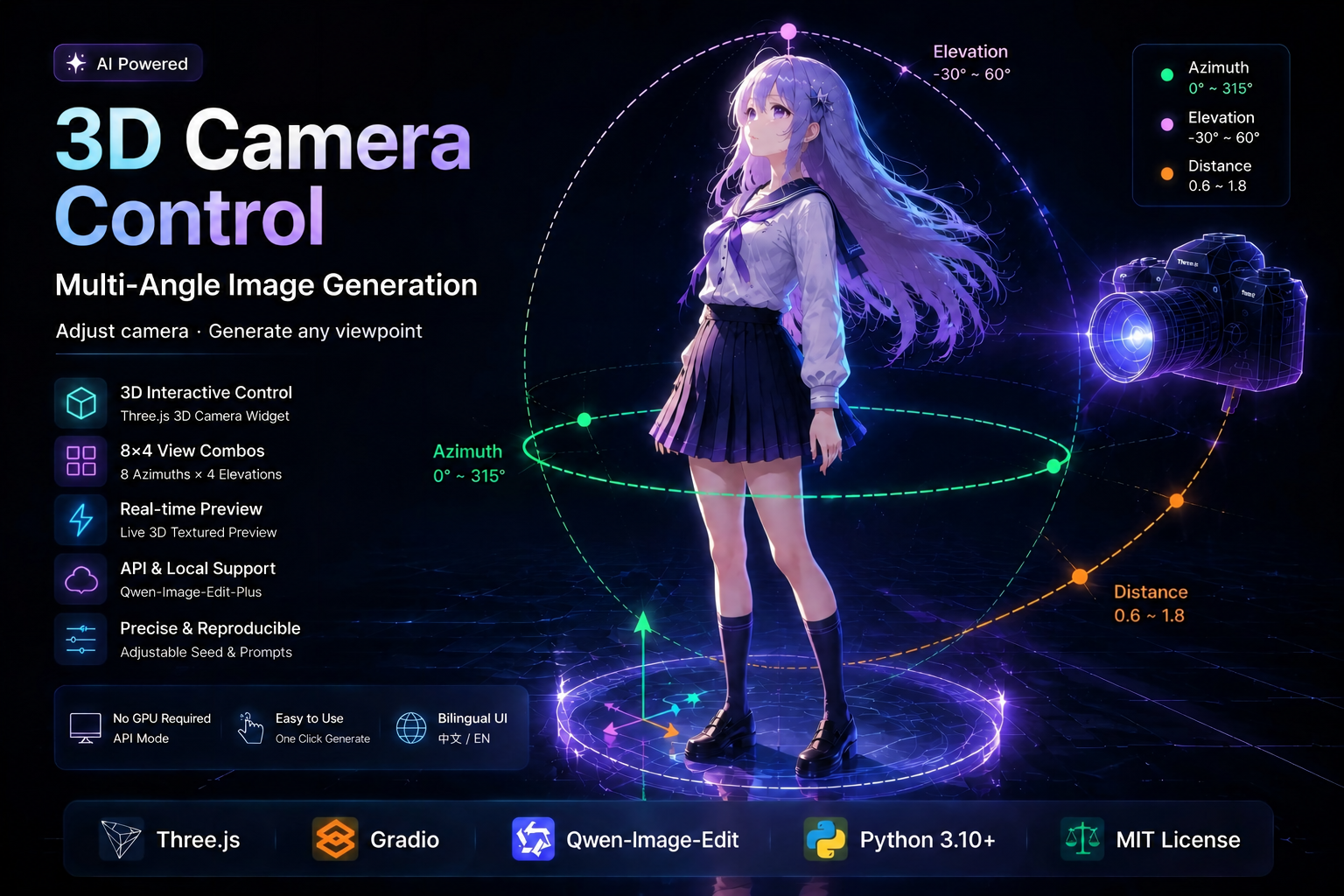
🎬 3D Camera Control · Multi-Angle Image Generation
一键生成任意相机视角的图像 · 中英双语 Web 应用




🎯 通过 3D 交互控件或滑块调整相机方位角 / 仰角 / 距离,一键生成对应视角的新图像。 基于 Three.js 构建,支持中英双语界面切换,默认接入 Qwen-Image-Edit-Plus 后端。
💡 可替换后端 / Pluggable Backend 项目不绑定单一模型——替换
core.py中的infer_camera_edit函数即可接入任意图像编辑模型。 ⚠️ 基于视角 prompt 的精确角度控制是 Qwen-Image-Edit-Plus 的特色能力,其他模型可能无法精确还原指定视角。
📑 目录 / Table of Contents
| 中文 | English |
|---|---|
| 🌱 项目缘起 | 🌱 Origin |
| ✨ 功能特点 | ✨ Features |
| 🎮 相机参数 | 🎮 Camera Parameters |
| 🚀 快速开始 | 🚀 Quick Start |
| 📝 使用方法 | 📝 Usage |
| 🖼️ 效果展示 | 🖼️ Demo |
| 📦 项目结构 | 📦 Structure |
| 🗂️ 架构说明 | 🗂️ Architecture |
| ❓ FAQ | ❓ FAQ |
🌱 项目缘起 / Origin
市面上已有 AI 相机视角转换产品(如 阿里的 MultipleAngles),却往往设有付费门槛。
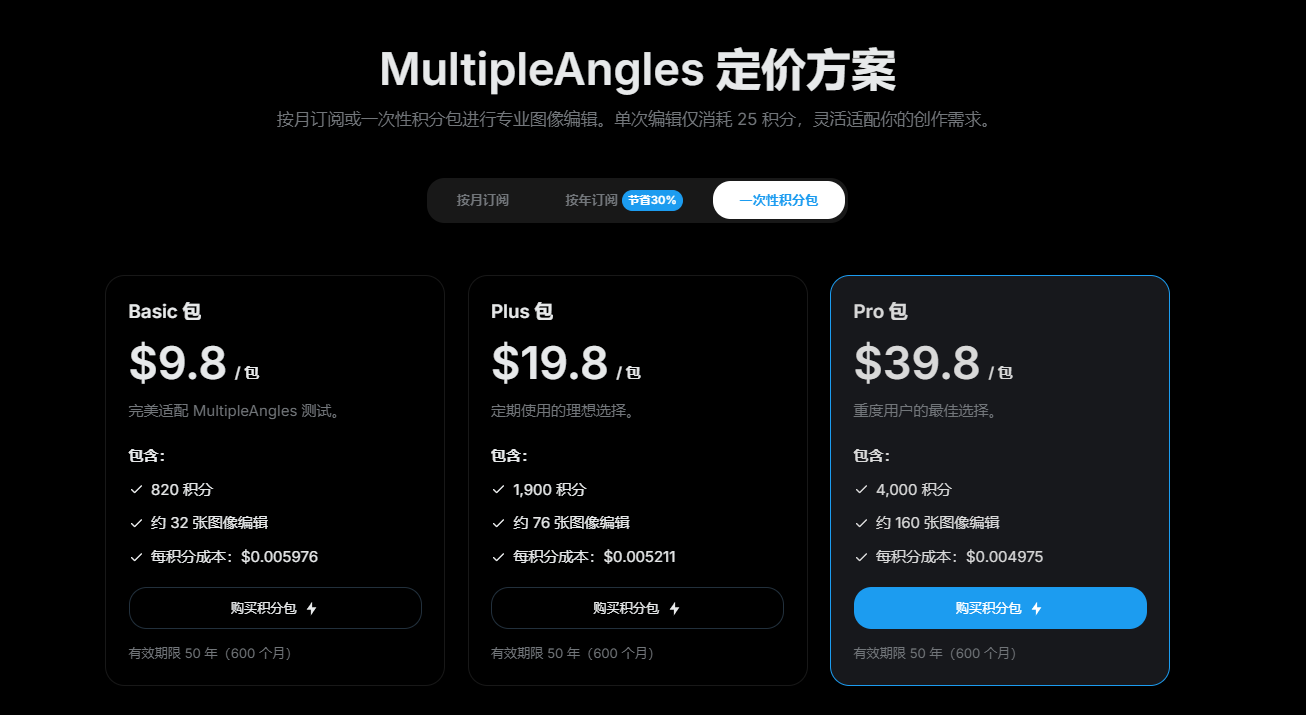
我们相信,好的技术不该被价格挡在门外。这个项目由此而来——基于官方免费 API 额度,复现了同样的 3D 相机视角控制与多角度生成能力。代码透明,自由部署,人人可用。
📖 English
AI camera viewpoint conversion products (e.g. MultipleAngles) already exist — but they often sit behind a paywall.
We believe great technology shouldn't be gated by price. That's why this project exists: built on the official free API quota, it reproduces the same 3D camera viewpoint control and multi-angle generation. Transparent code, self-hostable, free for everyone.
✨ 功能特点 / Features
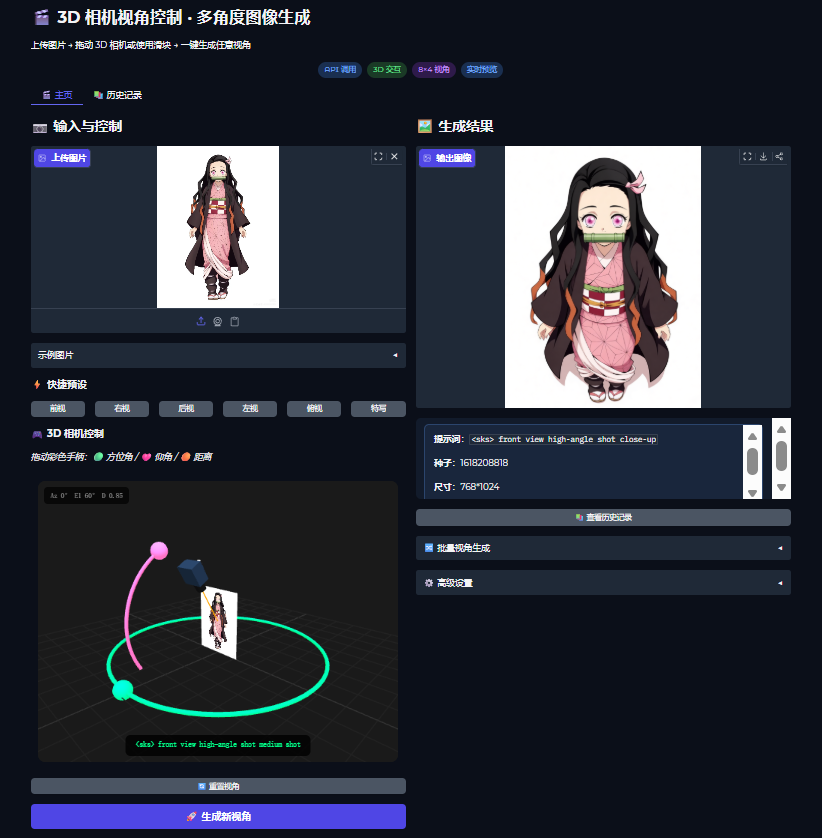
🎮 3D 交互控制Three.js 构建的相机控制器,拖拽彩色手柄即可调整视角,相机模型沿轨道实时飞行。 3D Interactive Control — Three.js camera widget with draggable handles. |
🎯 8×4 视角组合8 个方位角 × 4 个仰角,距离连续可调(步长 0.05),覆盖常用拍摄角度。 8×4 View Combos — 8 azimuths × 4 elevations, continuous distance. |
⚡ 快捷预设一键切换前视 / 右视 / 后视 / 左视 / 俯视 / 特写六种常用视角。 Quick Presets — One-click Front / Right / Back / Left / Aerial / Close-up. |
🔄 实时预览上传图片后在 3D 视图中实时贴图,所见即所得。 Live Preview — Uploaded image is textured onto the 3D plane in real time. |
🌐 中英双语同一份核心代码,运行即可切换中英文界面,新增语言只需翻译文案字典。 Bilingual UI — One core, switchable ZH/EN UI; add languages by translating one dict. |
📚 历史画廊独立 Tab 页大图浏览本会话所有生成结果,支持下载与清空。 History Gallery — Dedicated tab with large thumbnails, download & clear. |
🔀 批量生成勾选多个视角,一次批量生成,结果集中展示。 Batch Generation — Select multiple viewpoints and generate them all at once. |
📦 开箱即用API 模式无需 GPU,仅 3 个 pip 包即可启动;可调种子与负向提示词便于复现。 Out-of-the-box — No GPU, 3 pip packages; adjustable seed & negative prompt. |
🎮 相机参数 / Camera Parameters
| 参数 / Param | 范围 / Range | 说明 / Description |
|---|---|---|
| 方位角 Azimuth | 0° 45° 90° 135° 180° 225° 270° 315° | 水平旋转方向 / Horizontal rotation |
| 仰角 Elevation | -30° 0° 30° 60° | 垂直拍摄角度(不支持正上/正下)/ Vertical angle |
| 距离 Distance | 0.6 ~ 1.8 连续(步长 0.05) | 镜头远近:特写 / 中景 / 远景 / Shot distance |
🚀 快速开始 / Quick Start
方式一:API 调用(推荐)✅
启动快、无需 GPU | Fast startup, no GPU needed 需阿里云账号、按调用计费 | Requires Alibaba Cloud account, pay-per-call
步骤 / Steps
1. 获取 API Key / Get your API Key
访问 阿里云百炼平台 注册并获取。 Register at Alibaba Cloud Bailian.
2. 配置 API Key / Configure the Key
打开 core.py 找到 API_KEY,或设置环境变量 DASHSCOPE_API_KEY:
# Windows PowerShell
$env:DASHSCOPE_API_KEY = "your-api-key"
# Linux / macOS
export DASHSCOPE_API_KEY="your-api-key"
3. 安装依赖 / Install dependencies
pip install -r requirements.txt4. 运行 / Run
# 中文版 / Chinese UI
python app_zh.py

# 英文版 / English UI
python app_en.py

# 兼容入口 / Unified entry (默认中文,参数 en 切英文)
python app.py            # → 中文
python app.py en         # → English
Windows 用户可直接双击
run_zh.bat(中文)或run_en.bat(英文)。 Windows users can double-clickrun_zh.bat/run_en.bat.
5. 访问 / Open
浏览器打开 / Open browser at: http://127.0.0.1:7860
方式二:本地部署(可选)
无需联网、无调用费用 | Offline, no API fee 需下载约 56 GB 模型、NVIDIA GPU(16 GB+ 显存)| ~56 GB download, 16 GB+ VRAM
📖 展开查看本地部署步骤 / Expand for local deployment
硬件要求 / Hardware
- NVIDIA GPU(建议 RTX 3090+)
- 16 GB+ 显存 / 60 GB+ 可用磁盘
步骤 / Steps
- 安装完整依赖:
pip install -r requirements.txt
pip install gradio diffusers transformers accelerate peft safetensors sentencepiece torchvision- 在
core.py中替换infer_camera_edit为本地推理:
import torch
from diffusers import QwenImageEditPlusPipeline

dtype = torch.bfloat16
device = "cuda" if torch.cuda.is_available() else "cpu"

pipe = QwenImageEditPlusPipeline.from_pretrained(
    "Qwen/Qwen-Image-Edit-2511", torch_dtype=dtype
).to(device)

pipe.load_lora_weights(
    "lightx2v/Qwen-Image-Edit-2511-Lightning",
    weight_name="Qwen-Image-Edit-2511-Lightning-4steps-V1.0-bf16.safetensors",
    adapter_name="lightning",
)
pipe.load_lora_weights(
    "fal/Qwen-Image-Edit-2511-Multiple-Angles-LoRA",
    weight_name="qwen-image-edit-2511-multiple-angles-lora.safetensors",
    adapter_name="angles",
)
pipe.set_adapters(["lightning", "angles"], adapter_weights=[1.0, 1.0])- 运行 / Run:
python app_zh.py或python app_en.py
📝 使用方法 / Usage
① 上传图片        ② 调整相机         ③ 生成          ④ 复现
 Upload image  →  Adjust camera  →  Generate  →  Reproduce
                  (3D / 预设 / 滑块)   点击 🚀          固定种子
手柄颜色 / Handle Colors
- 🟢 绿色 Green — 方位角 Azimuth(绕水平环拖拽 / drag along the horizontal ring)
- 🩷 粉色 Pink — 仰角 Elevation(沿弧线拖拽 / drag along the arc)
📌 距离通过下方滑块控制(连续微调,步长 0.05),不再使用 3D 手柄。 Distance is controlled via the slider (continuous, step 0.05), not a 3D handle.
🖼️ 效果展示 / Demo
📦 项目结构 / Project Structure
image-multiple-angles-3d-camera/
├── 📄 app.py              # 兼容入口(默认中文,参数 en 切换英文)
├── 📄 app_zh.py           # 中文版入口 / Chinese UI entry
├── 📄 app_en.py           # 英文版入口 / English UI entry
├── 🧠 core.py             # 共享核心(3D 控件 / API / 工具 / CSS / JS)
├── 📋 requirements.txt    # 依赖列表 / Dependencies
├── 📖 README.md           # 本文档 / This file
├── 🖼️ 1.png               # 示例图 / Demo image
├── 🖼️ 2.png               # 封面图 / Cover image
├── ⚡ run_zh.bat          # Windows 中文快捷启动
└── ⚡ run_en.bat          # Windows 英文快捷启动
🗂️ 架构说明 / Architecture
为同时支持中英双语且避免重复维护 3D 控件与 API 逻辑,项目采用分层设计:
        ┌─────────────┐
        │   app.py    │  ← 命令行入口 / CLI entry
        └──────┬──────┘
               │ 选择语言 / pick language
       ┌───────┴───────┐
       ▼               ▼
 ┌──────────┐    ┌──────────┐
 │ app_zh.py│    │ app_en.py│   ← 仅含界面文案与布局 / UI strings + layout
 └─────┬────┘    └─────┬────┘
       └────────┬───────┘
                ▼
          ┌──────────┐
          │ core.py  │       ← 共享核心 / shared core
          │  3D 控件  │
          │  API 调用 │
          │  工具函数 │
          │  CSS / JS │
          └──────────┘
新增一种语言只需复制
app_zh.py并翻译文案字典T = { ... },无需改动core.py。 To add a language, copyapp_zh.pyand translate theT = { ... }dict — nocore.pychanges needed.
❓ FAQ
报错 API_ERROR:InvalidApiKey / API key invalid?
检查 core.py 中的 API_KEY 或环境变量 DASHSCOPE_API_KEY 是否正确。
Check API_KEY in core.py or env var DASHSCOPE_API_KEY.
3D 控件不显示 / 3D widget blank?
需联网加载 Three.js CDN,请检查网络。如需离线,可把 THREE_JS_HEAD 中的 CDN 换成本地文件。
Three.js is loaded via CDN; check your network. For offline use, replace the CDN URL with a local file.
生成结果视角不准 / Generated view is inaccurate?
方位角和仰角的 LoRA 仅覆盖 8×4 离散档位,3D 拖拽松手后会自动吸附到最近档位。距离已改为连续滑块,可自由微调。 Azimuth & elevation LoRA covers 8×4 discrete steps; free dragging snaps to the nearest step on release. Distance is now a continuous slider.
如何让生成结果更稳定 / How to make results more stable?
关闭"随机化种子",固定一个表现好的种子。 Turn off "Randomize Seed" and pin a good seed.
支持正上方/正下方视角 / Top / bottom view supported?
不支持。仰角仅覆盖 -30° ~ 60°,与 LoRA 训练范围一致。 No. Elevation is limited to -30° ~ 60°, matching the LoRA training range.
🤝 贡献 / Contributing
欢迎 Issue 和 PR!特别是 / Issues and PRs welcome! Especially:
- 🌐 新语言界面 / New language UI
- 🎮 3D 控件交互优化 / 3D widget UX improvements
- 💻 本地部署模式集成 / Local deployment integration
- 🖼️ 更多示例图 / More example images
🔗 相关链接 / Related Links
- 阿里云百炼平台 / Alibaba Cloud Bailian
- Qwen-Image-Edit API 文档 / API Docs
- Gradio 官方文档 / Gradio Docs
- Three.js 官网 / Three.js
💰 费用说明 / Pricing
API 模式按调用次数计费,新用户有免费额度。详见 阿里云百炼计费说明。
API mode is billed per call; new users get free quota. See Alibaba Cloud Bailian Pricing.
📄 License
MIT License — 可自由使用、修改、分发 | Free to use, modify, and distribute.
作者 / Author: AI指挥官Felix(全网同名)
⭐ 如果这个项目对你有帮助,欢迎 Star | If this project helps you, please consider giving it a star