





CrowdSec Web UI
A self-hosted dashboard for CrowdSec: investigate alerts, manage decisions, monitor runtime metrics, and send notifications from one responsive UI.





Features
| Area | Highlights |
|---|---|
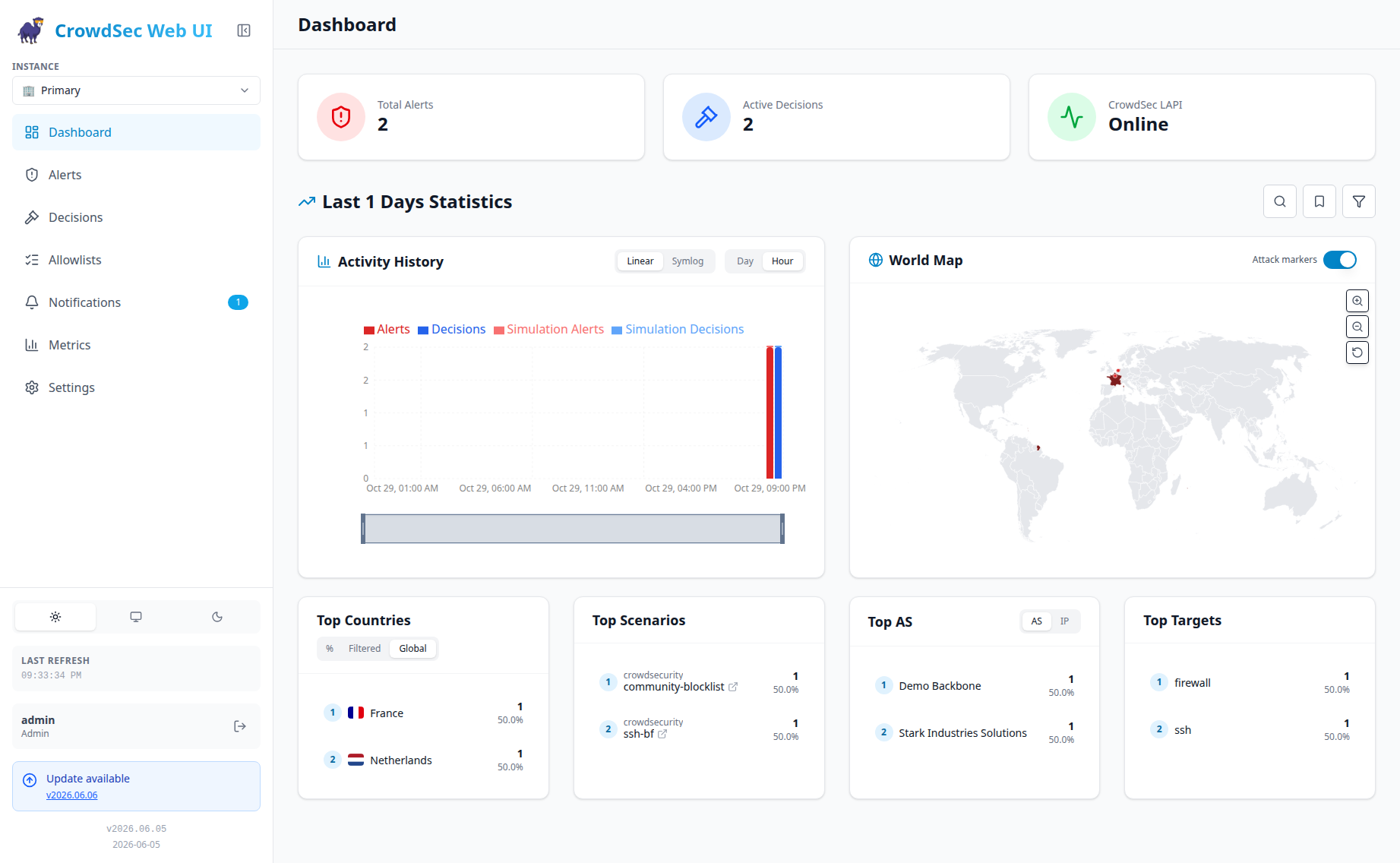
| Dashboard | Alert and active-decision totals, attack map, drilldowns, top lists, shared quick filters, and simulation counts |
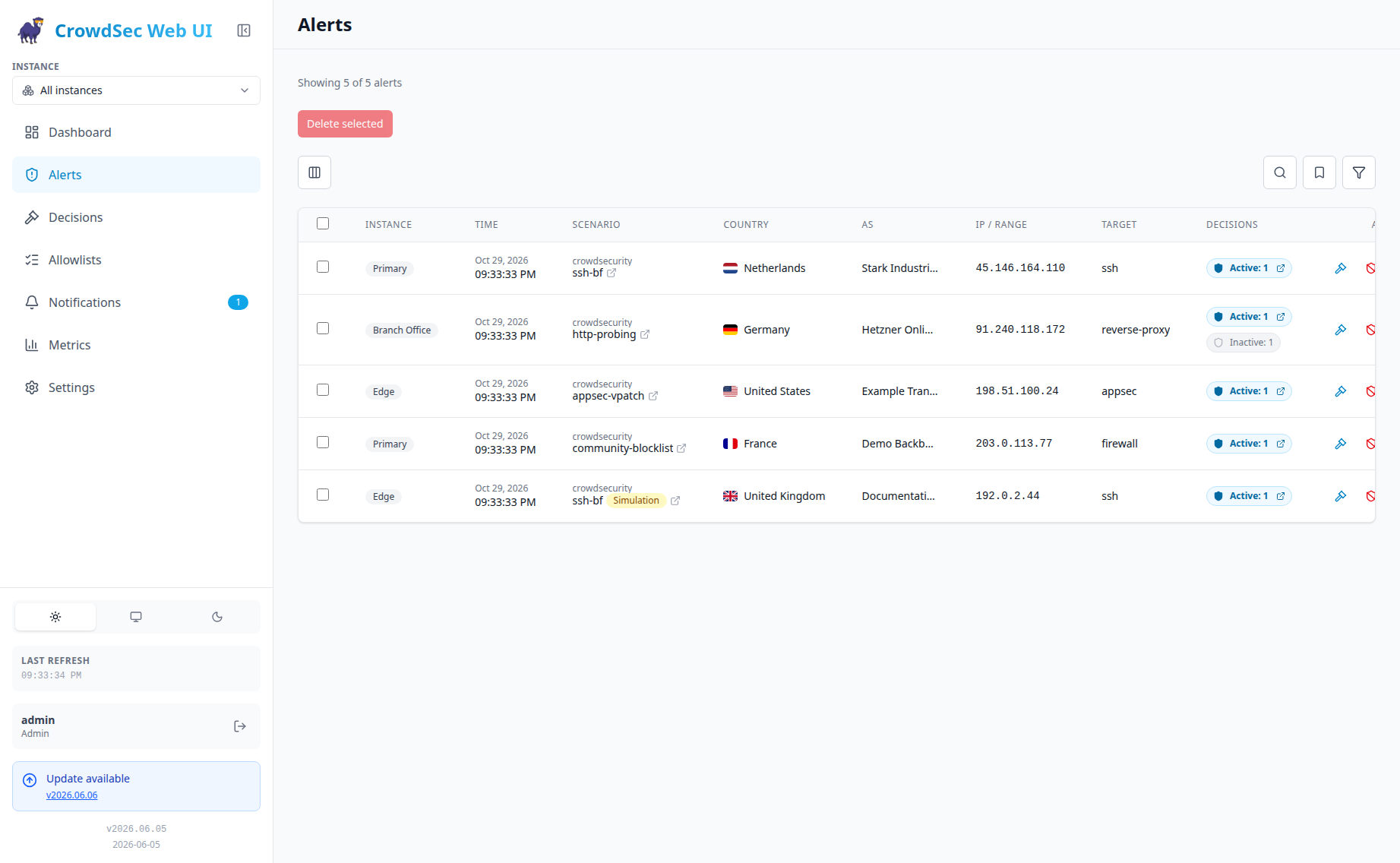
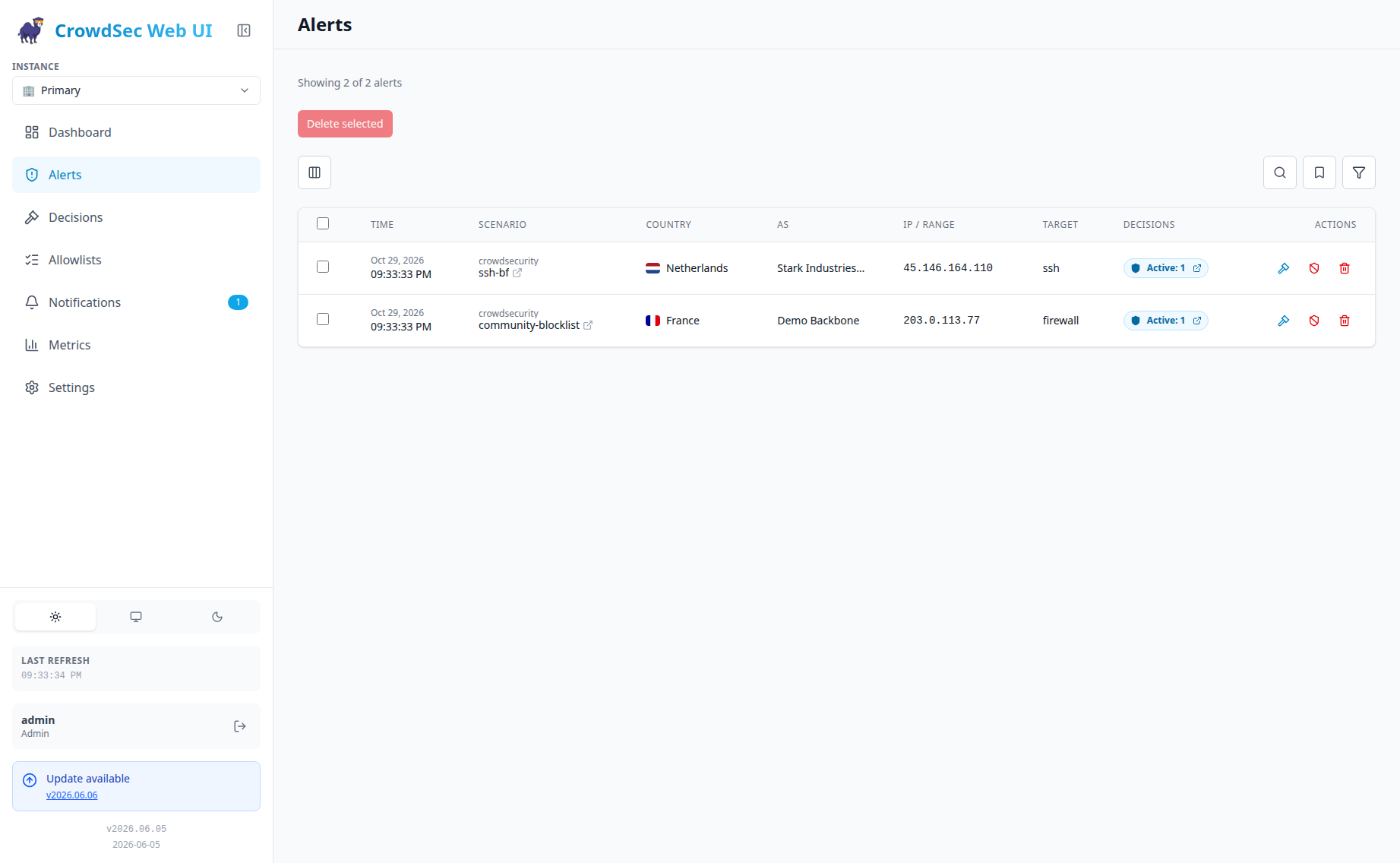
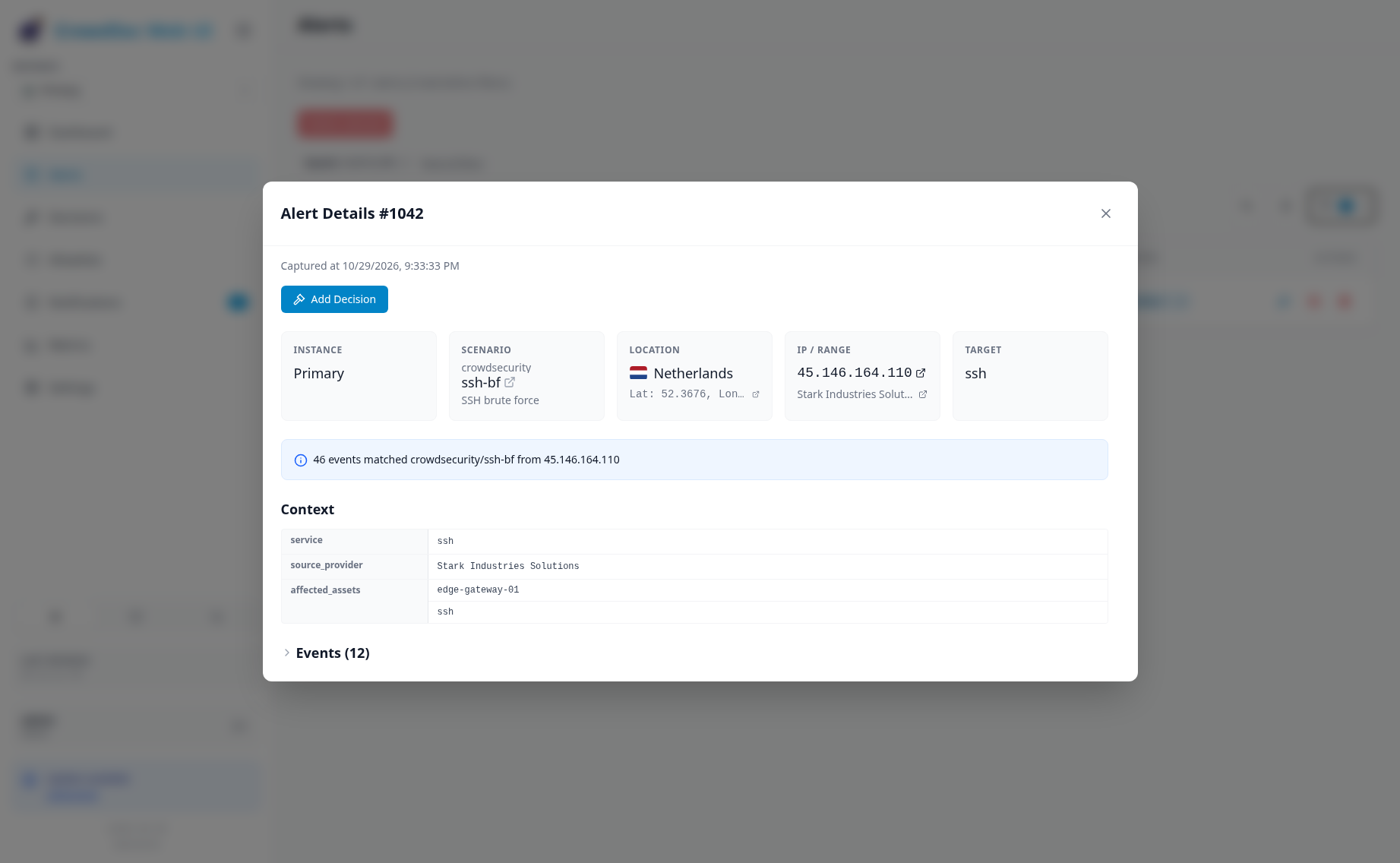
| Alerts | Searchable alert history, persistent count-aware quick filters, CrowdSec alert contexts, IP/AS/location details, event metadata, simulation labels, and configurable columns |
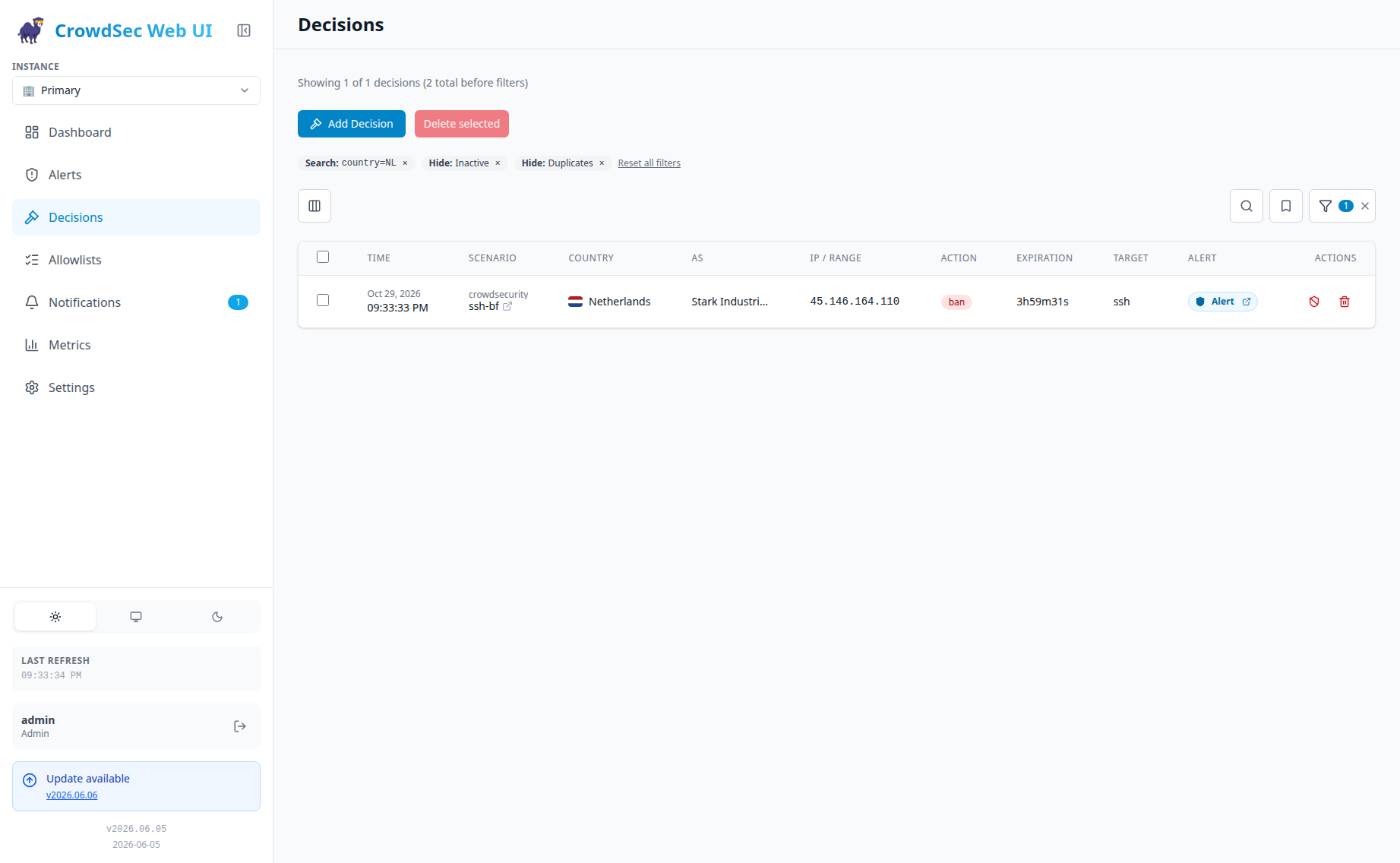
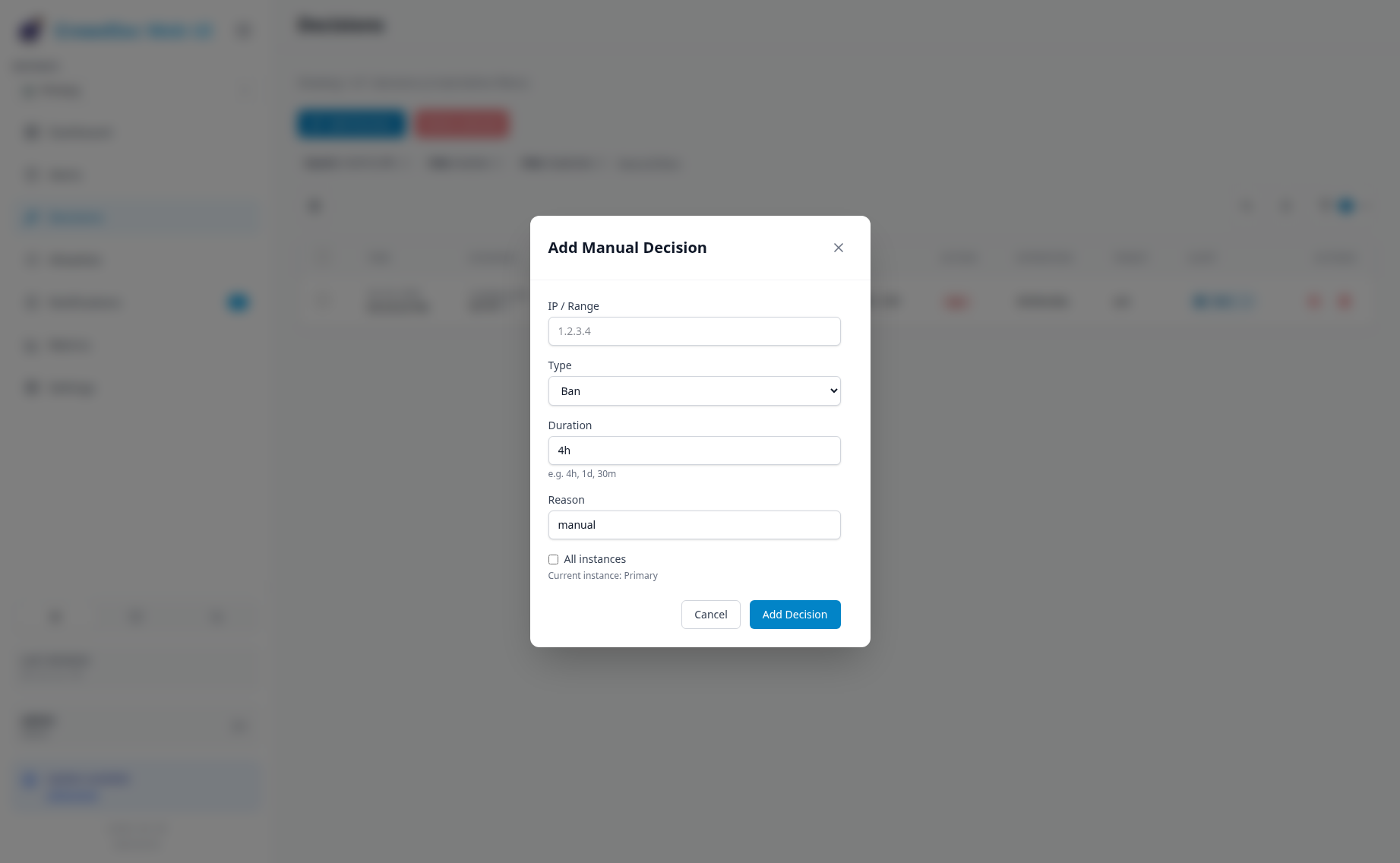
| Decisions | Active and expired decisions, persistent count-aware quick filters, duplicate hiding, manual bans, custom durations, reasons, and cleanup actions |
| Allowlists | Read-only view of CrowdSec centralized allowlists with an IP/range check, cross-instance differences, and allowlist protection for manual decisions |
| Multi-instance | Several CrowdSec LAPIs, per-instance views, and a Combined scope for Dashboard, Alerts, Decisions, and Allowlists |
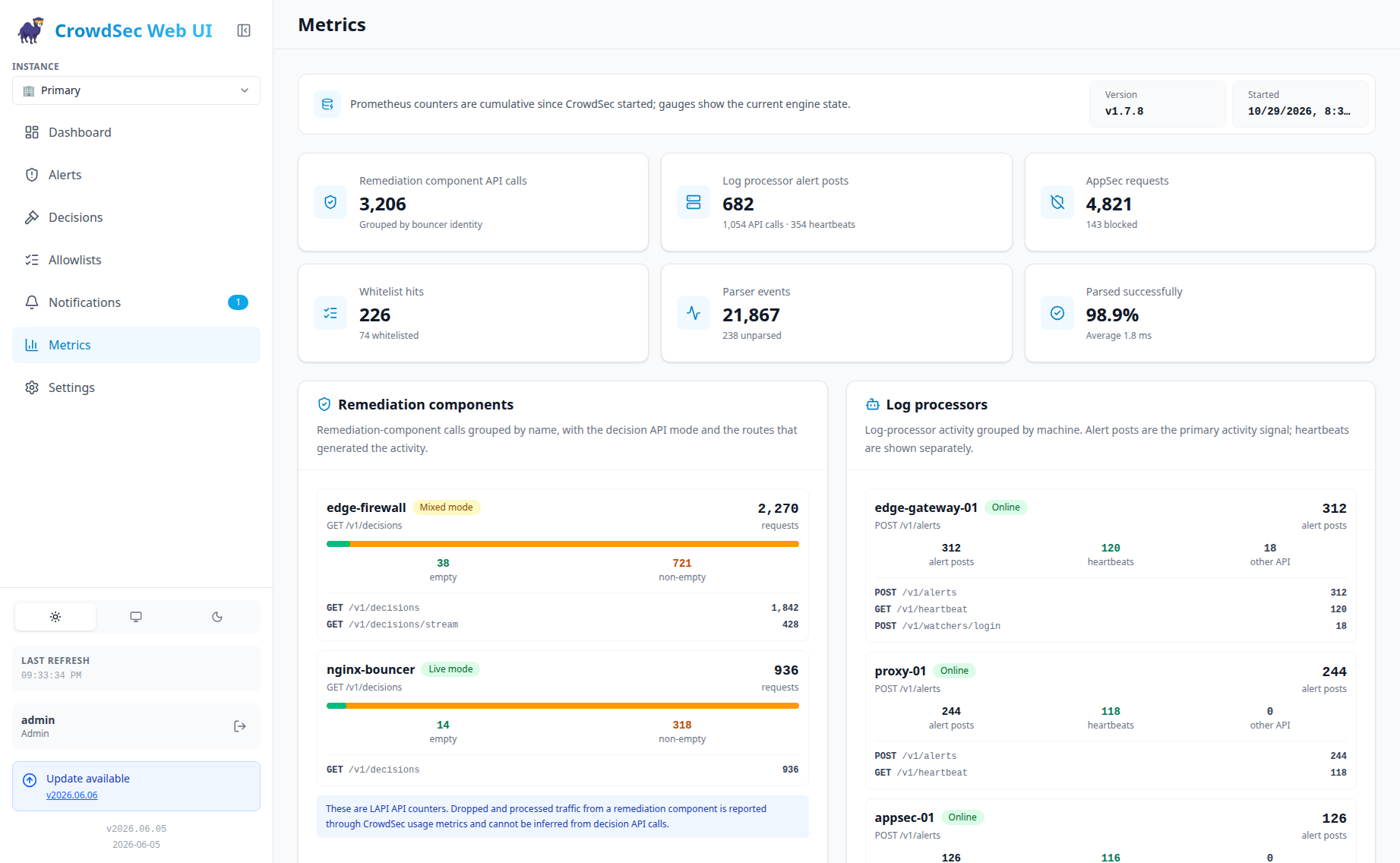
| Metrics | Optional Prometheus views for LAPI activity, bouncers, AppSec, parsers, latency, parsing time, and whitelists |
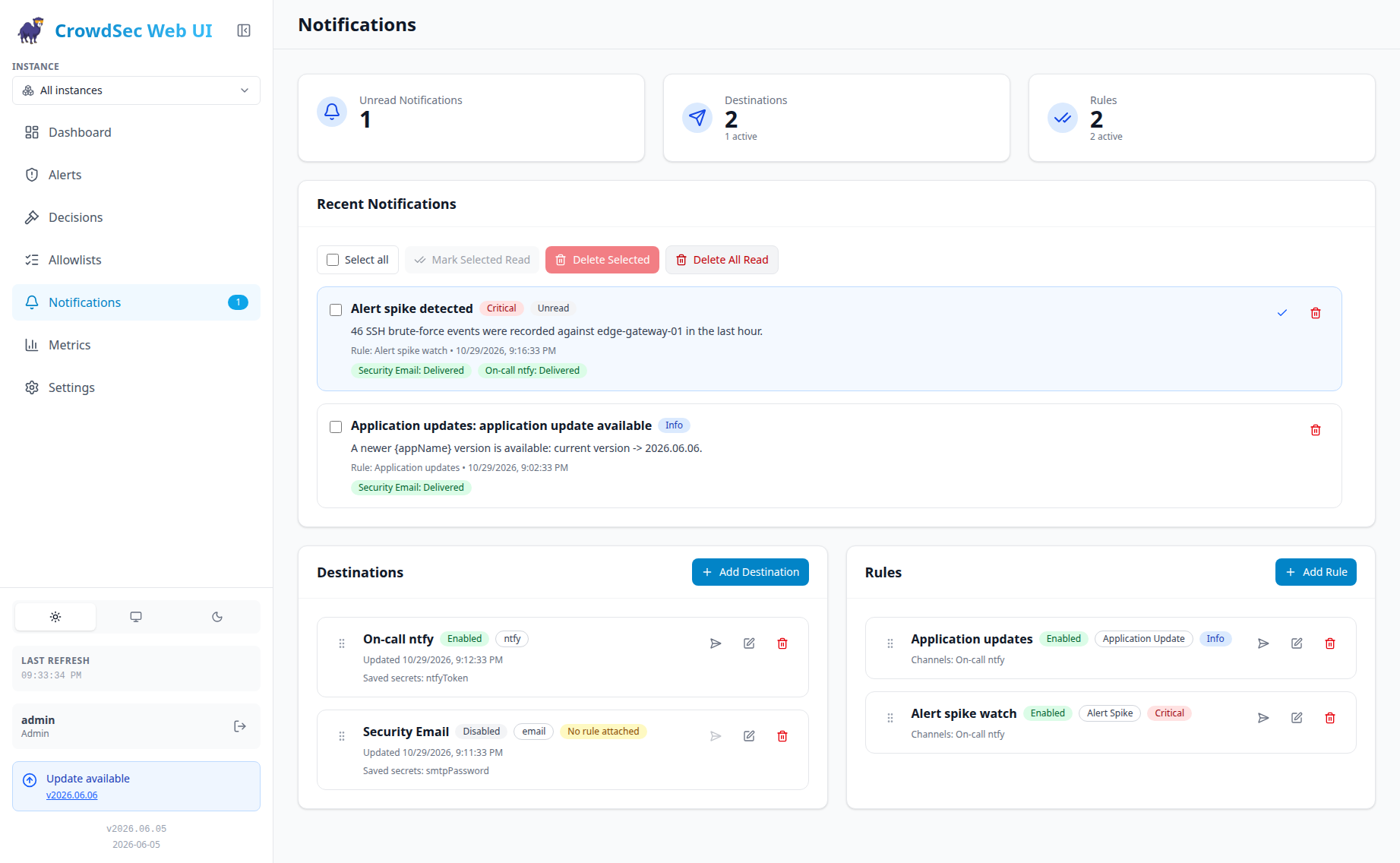
| Notifications | Alert, decision, CVE, availability, and update rules delivered through Apprise, Email, Gotify, MQTT, ntfy, or Webhooks |
| Security | Initial administrator setup, local user management with admin and read-only roles, password and TOTP login, passkeys, OIDC SSO, group roles, and instance-wide read-only mode |
| Localization | Arabic, Chinese, English, French, German, Hindi, Japanese, Korean, Portuguese, Russian, and Spanish |
| Experience | Unified search, server-synced saved and recent filters, dark/light themes, and responsive layouts |
| Branding | Custom application name, light and dark mode logos, and colors for the sidebar, browser tab, sign-in page, notifications, and authenticator apps |
Screenshots
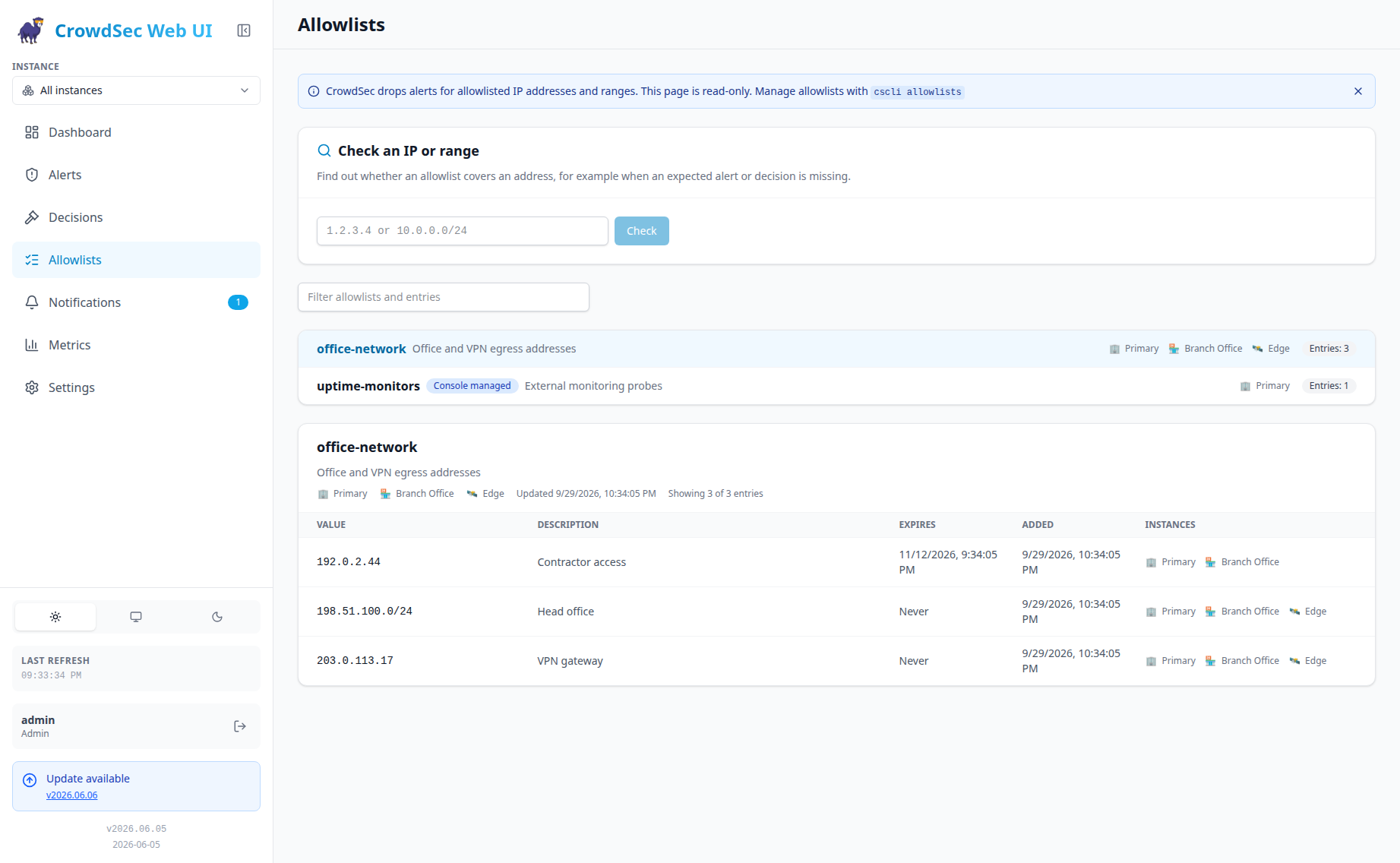
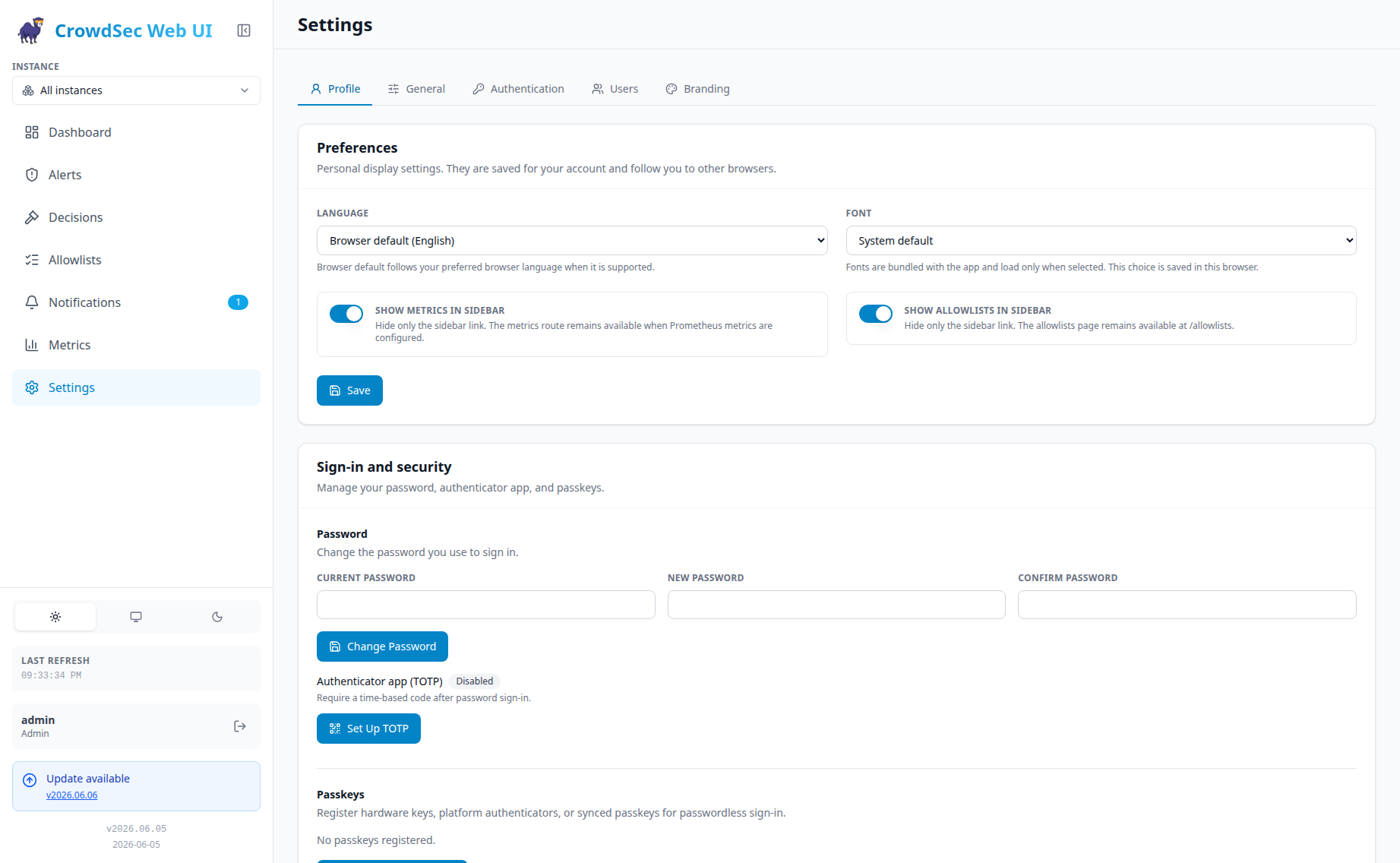
Quick Start
You need a running CrowdSec LAPI. Connect the Web UI using either watcher password authentication or agent mTLS.
1. Register the Web UI
Watcher password
openssl rand -hex 32
docker exec crowdsec cscli machines add crowdsec-web-ui --password 'replace-with-generated-password' -f /dev/null

# For local installations
sudo cscli machines add crowdsec-web-ui --password 'replace-with-generated-password' -f /dev/null
Replace replace-with-generated-password with the value printed by openssl.
[!IMPORTANT] Keep
-f /dev/null. It registers the machine without overwriting the CrowdSec container's existing credentials file.
Agent mTLS
Configure LAPI TLS authentication and create a client certificate/key pair using the CrowdSec TLS authentication guide.
2. Start with Docker Compose
services:
  crowdsec-web-ui:
    image: ghcr.io/theduffman85/crowdsec-web-ui:latest
    container_name: crowdsec_web_ui
    ports:
      - "3000:3000"
    # For local CrowdSec instances
    # extra_hosts:
      # - "host.docker.internal:host-gateway"
    environment:
      CONFIG_INSTANCE_LAPI_URL: http://crowdsec:8080
      # For local CrowdSec instances
      # CONFIG_INSTANCE_LAPI_URL: http://host.docker.internal:8080
      CONFIG_INSTANCE_LAPI_AUTH_USERNAME: crowdsec-web-ui
      CONFIG_INSTANCE_LAPI_AUTH_PASSWORD: your-crowdsec-password
    volumes:
      - ./data:/app/data
    restart: unless-stopped
A ready-to-use docker-compose.yml is included. Add the generated password, make sure the Web UI can reach CrowdSec on the same Docker network, then start it.
docker compose up -dOpen http://localhost:3000 and create the initial administrator account.
Docker Run Alternative
docker pull ghcr.io/theduffman85/crowdsec-web-ui:latest
mkdir -p data
docker run -d \
  --name crowdsec_web_ui \
  -p 3000:3000 \
  -v $(pwd)/data:/app/data \
  -e CONFIG_INSTANCE_LAPI_URL=http://crowdsec:8080 \
  -e CONFIG_INSTANCE_LAPI_AUTH_USERNAME=crowdsec-web-ui \
  -e CONFIG_INSTANCE_LAPI_AUTH_PASSWORD=your-crowdsec-password \
  --network your_crowdsec_network \
  ghcr.io/theduffman85/crowdsec-web-ui:latest
Current images use Node.js and do not have the former Bun/AVX-specific x64 limitation.
mTLS Compose Alternative
services:
  crowdsec-web-ui:
    image: ghcr.io/theduffman85/crowdsec-web-ui:latest
    container_name: crowdsec_web_ui
    ports:
      - "3000:3000"
    environment:
      CONFIG_INSTANCE_LAPI_URL: https://crowdsec:8080
      CONFIG_INSTANCE_LAPI_AUTH_TYPE: mtls
      CONFIG_INSTANCE_LAPI_AUTH_CERT_FILE: /certs/agent.pem
      CONFIG_INSTANCE_LAPI_AUTH_KEY_FILE: /certs/agent-key.pem
      # CONFIG_INSTANCE_LAPI_TLS_CA_FILE: /certs/ca.pem
    volumes:
      - ./data:/app/data
      - /path/on/host/agent.pem:/certs/agent.pem:ro
      - /path/on/host/agent-key.pem:/certs/agent-key.pem:ro
      # - /path/on/host/ca.pem:/certs/ca.pem:ro
    restart: unless-stopped
Adjust the URL and certificate paths. Enable CONFIG_INSTANCE_LAPI_TLS_CA_FILE and its volume when LAPI uses a private CA.
[!CAUTION] Use HTTPS and a hardened reverse proxy for public deployments. Built-in authentication protects the UI and API, but TLS terminates outside the application. OIDC integrations include Authentik, Authelia, and Keycloak. Migrated installations that predate authentication remain unauthenticated until explicitly enabled.
Architecture
| Component | Implementation |
|---|---|
| Client | React, Vite, and Tailwind CSS; builds to dist/client |
| Server | Node.js and Hono; builds to dist/server |
| Storage | SQLite via better-sqlite3: durable state.db and rebuildable cache.db under /app/data |
| CrowdSec | Watcher password or agent mTLS; delta refreshes and chunked historical synchronization |
| Container | Runs as the non-root node user |
Configuration
Configuration files
| Environment | Default path |
|---|---|
| Docker | /app/data/config.yaml |
| Local | ./data/config.yaml |
Use CONFIG_FILE only to select another existing file. config.example.yaml contains the complete commented YAML reference.
Configuration lifecycle
| Stage | Behavior |
|---|---|
| First start | Creates the missing default file. Supplied values become active YAML; defaults and optional examples remain comments. Generated mappings use block rows and the documented order. |
| Later starts | Treats the file as user-managed. CONFIG_* values override it in memory without rewriting it; generated explanations and defaults are not refreshed. |
| Persistent overrides | CONFIG_PERSIST_OVERRIDES: "true" writes validated merged values while preserving comments where possible. Removing a persisted non-secret override leaves its last value in YAML. |
| Precedence | Applies section variables, then field variables, then indexed array variables. Removing a non-persisted override reveals the file value. |
| Logging | Records applied paths and before/after values. Credentials are redacted; secret references show only their environment name or file path. |
| Reloading | Requires a restart after configuration changes or secret rotation. |
Environment overrides
- Values are parsed as YAML and validated.
CONFIG_AUTH_OIDC_CLIENT_IDparses YAML scalars as strings, preserving numeric identifiers and leading zeros. For example,CONFIG_AUTH_OIDC_CLIENT_ID=123456789012345678901keeps every digit; YAML-quoted values also work. Inconfig.yamlor whole-sectionCONFIG_AUTHoverrides, quote numeric client IDs (for exampleclientId: "123456789012345678901").- Arrays use zero-based contiguous indexes:
CONFIG_AUTH_OIDC_ADMIN_GROUPS_0,CONFIG_INSTANCES_0_ID,CONFIG_INSTANCES_0_METRICS_0_URL. - OIDC role groups require YAML arrays (for example
CONFIG_AUTH_OIDC_ADMIN_GROUPS='[crowdsec_admins]'andCONFIG_AUTH_OIDC_READ_ONLY_GROUPS='[crowdsec_users]') or indexed variables, even for a single group. - Whole sections accept YAML through
CONFIG_SERVER,CONFIG_STORAGE,CONFIG_UI,CONFIG_AUTH,CONFIG_NOTIFICATIONS,CONFIG_AUDIT,CONFIG_UPDATES,CONFIG_CROWDSEC, orCONFIG_INSTANCES. CONFIG_INSTANCE_*addresses instance0:CONFIG_INSTANCE_NAMEequalsCONFIG_INSTANCES_0_NAME. Metrics index0may also be omitted:CONFIG_INSTANCES_0_METRICS_URLequalsCONFIG_INSTANCES_0_METRICS_0_URL, andCONFIG_INSTANCE_METRICS_URLapplies both shorthands. Do not set equivalent forms together.- Secrets accept a direct string or exactly one
env: NAME/file: PATHreference. Secret overrides also accept_FILE. - Initial direct secret overrides are stored as environment references, never plaintext. Persisted secret references still require their environment variable.
Settings managed by configuration
Some values can be set either in Settings or in the application config: the refresh interval, manual refresh, password login, and all OIDC fields. A value set in config.yaml or through its CONFIG_* variable takes precedence and is locked in Settings, marked with a lock icon whose tooltip names the CONFIG_* variable or config path that sets it. Leave it unset to manage it in Settings. Manual decision scenarios from the config are always offered and can't be removed in Settings, but more can be added there.
To manage a locked value in Settings again, remove it from both the environment and config.yaml, then restart; the last value saved in Settings applies again. CONFIG_* values are written into config.yaml when the file is first created, and on every start with CONFIG_PERSIST_OVERRIDES: "true", so removing the variable alone may not unlock the setting.
Server, storage, UI, and updates
| YAML field | Default | Purpose | Environment override |
|---|---|---|---|
server.port | 3000 | HTTP listen port. | CONFIG_SERVER_PORT |
server.basePath | "" | Optional URL prefix such as /crowdsec; no trailing slash. | CONFIG_SERVER_BASE_PATH |
server.hostname | Unset (localhost) | Hostname or IP address this installation identifies itself with to remote services. Email destinations announce it in SMTP EHLO; set a FQDN for mail servers that reject localhost. It is not a listen address. | CONFIG_SERVER_HOSTNAME |
storage.dataDir | /app/data | Location of state.db: users, passkeys, notification channels and rules, saved filters, and UI settings. Back it up. | CONFIG_STORAGE_DATA_DIR |
storage.cacheDir | storage.dataDir | Location of cache.db, the alert and decision cache. It is rebuilt from LAPI when lost, so it can live on fast local storage. | CONFIG_STORAGE_CACHE_DIR |
storage.geonamesDir | /app/geonames in Docker; ./geonames locally | Local GeoNames snapshot used for location labels. | CONFIG_STORAGE_GEONAMES_DIR |
storage.walEnabled | true | Enables SQLite write-ahead logging for cache.db. Set to false for filesystems that do not support WAL. state.db always uses a rollback journal. | CONFIG_STORAGE_WAL_ENABLED |
storage.incrementalVacuumEnabled | true | Uses bounded incremental vacuum while idle. Applies when cache.db is created. | CONFIG_STORAGE_INCREMENTAL_VACUUM_ENABLED |
storage.journalSizeLimit | 128MiB | Retained WAL size after checkpoints. This does not cap transactions; use unlimited to disable trimming. Ignored when WAL is disabled. | CONFIG_STORAGE_JOURNAL_SIZE_LIMIT |
storage.queryTimeout | 30s | Maximum execution time for regular database queries, such as list pages and cache synchronization. Raise it for very large databases or slow storage. | CONFIG_STORAGE_QUERY_TIMEOUT |
storage.analyticsQueryTimeout | 60s | Maximum execution time for dashboard statistics queries. | CONFIG_STORAGE_ANALYTICS_QUERY_TIMEOUT |
ui.timeZone | browser | Browser timezone or an IANA zone such as Europe/Berlin or UTC. | CONFIG_UI_TIME_ZONE |
ui.timeFormat | browser | Clock format: browser, 12h, or 24h. | CONFIG_UI_TIME_FORMAT |
ui.dateFormat | browser | Browser date format or a custom pattern such as dd/mm/yyyy, mm/dd/yyyy, or yyyy-MM-dd. | CONFIG_UI_DATE_FORMAT |
ui.readOnly | false | Hides management actions and rejects mutating API operations. | CONFIG_UI_READ_ONLY |
ui.allowlistsSidebarVisible | true | Shows the Allowlists sidebar link. The /allowlists route remains available when hidden. Omit to let each user choose in Settings > Profile. | CONFIG_UI_ALLOWLISTS_SIDEBAR_VISIBLE |
ui.metricsSidebarVisible | true | Shows the Metrics sidebar link. The /metrics route remains available when Prometheus metrics are configured. Omit to let each user choose in Settings > Profile. | CONFIG_UI_METRICS_SIDEBAR_VISIBLE |
updates.enabled | true in packaged images | Enables the built-in update check. | CONFIG_UPDATES_ENABLED |
Date patterns require one day, month, and year token in any order: d/dd (day), m/mm (numeric month), mmm/mmmm (localized month name), and yy/yyyy (year). Punctuation and spaces are literal; wrap words in single quotes, for example d 'of' mmmm yyyy. Date patterns affect full dates and timestamps; compact chart labels keep their own display format. Set ui.timeFormat separately for a 12 or 24 hour clock.
Authentication
| YAML field | Default | Purpose | Environment override |
|---|---|---|---|
auth.enabled | auto | Enables authentication; auto enables new databases while preserving migrated database state. | CONFIG_AUTH_ENABLED |
auth.sessionSecret | Generated and stored | Signs sessions and encrypts saved authentication settings. | CONFIG_AUTH_SESSION_SECRET or CONFIG_AUTH_SESSION_SECRET_FILE |
auth.totpSecret | sessionSecret | Encrypts stored per-account TOTP seeds. | CONFIG_AUTH_TOTP_SECRET or CONFIG_AUTH_TOTP_SECRET_FILE |
auth.totpSeed | Unset | Optional base32 fallback TOTP seed for the password user; minimum 26 characters. | CONFIG_AUTH_TOTP_SEED or CONFIG_AUTH_TOTP_SEED_FILE |
auth.passwordLogin.enabled | Unset (managed in Settings) | Enables or disables password login from deployment config and locks the Settings toggle. false keeps password login enabled until OIDC or an administrator passkey exists. | CONFIG_AUTH_PASSWORD_LOGIN_ENABLED |
auth.oidc.issuerUrl | Unset | OIDC provider issuer URL. | CONFIG_AUTH_OIDC_ISSUER_URL |
auth.oidc.clientId | Unset | OIDC client identifier. | CONFIG_AUTH_OIDC_CLIENT_ID |
auth.oidc.clientSecret | Unset | OIDC client secret. | CONFIG_AUTH_OIDC_CLIENT_SECRET or CONFIG_AUTH_OIDC_CLIENT_SECRET_FILE |
auth.oidc.scope | openid profile email | Requested OIDC scopes; must include openid. | CONFIG_AUTH_OIDC_SCOPE |
auth.oidc.groupsClaim | groups | Claim containing role-mapping groups. | CONFIG_AUTH_OIDC_GROUPS_CLAIM |
auth.oidc.adminGroups | [] | Groups granted administrator access. | CONFIG_AUTH_OIDC_ADMIN_GROUPS or CONFIG_AUTH_OIDC_ADMIN_GROUPS_<INDEX> |
auth.oidc.readOnlyGroups | [] | Groups granted read-only access. | CONFIG_AUTH_OIDC_READ_ONLY_GROUPS or CONFIG_AUTH_OIDC_READ_ONLY_GROUPS_<INDEX> |
auth.oidc.unmatchedRole | deny | Role for unmatched OIDC users: deny, admin, or read-only. | CONFIG_AUTH_OIDC_UNMATCHED_ROLE |
auth.oidc.endSession | false (true on installations that already used OIDC before it defaulted to off) | Also end the identity provider session when an SSO user logs out (RP-initiated logout). | CONFIG_AUTH_OIDC_END_SESSION |
auth.oidc.backchannelLogout | false | Accept back-channel logout notifications, so signing out at the identity provider also ends dashboard sessions. | CONFIG_AUTH_OIDC_BACKCHANNEL_LOGOUT |
auth.oidc.autoLogin | false | Redirect the login page straight to the identity provider. Only active while OIDC is configured and password login is disabled. | CONFIG_AUTH_OIDC_AUTO_LOGIN |
Notifications
| YAML field | Default | Purpose | Environment override |
|---|---|---|---|
notifications.secretKey | Generated and stored | Encrypts saved notification credentials. | CONFIG_NOTIFICATIONS_SECRET_KEY or CONFIG_NOTIFICATIONS_SECRET_KEY_FILE |
notifications.allowPrivateAddresses | true | Allows private, loopback, and link-local notification destinations. | CONFIG_NOTIFICATIONS_ALLOW_PRIVATE_ADDRESSES |
notifications.debugPayloads | false | Logs truncated rendered payloads after failed notification delivery. | CONFIG_NOTIFICATIONS_DEBUG_PAYLOADS |
Audit log
User actions that change CrowdSec state (adding decisions, deleting decisions and alerts, and per-IP cleanup) and user management changes (user.create, user.update, user.password-reset, user.mfa-reset, user.delete) are recorded as single [audit] lines in the application log. Each entry is a JSON object with the timestamp, acting user and role, action, target (IP, range, or entity IDs), and outcome:
[audit] {"time":"2026-08-17T01:30:00.000Z","user":"tommy","role":"admin","action":"decision.add","ip":"192.0.2.10","type":"ban","scenario":"manual/web-ui","duration":"4h","reason":"manual","instances":["CrowdSec"],"outcome":"success"}
Outcomes are success, partial, failure, or queued. Alert deletions handled by the persistent deletion queue are recorded as queued, because CrowdSec may complete them after the HTTP request returns. Multi-target actions include target_results or instance_results so successful, failed, and queued targets remain distinguishable.
| YAML field | Default | Purpose | Environment override |
|---|---|---|---|
audit.enabled | true | Writes audit entries for user actions to the application log. | CONFIG_AUDIT_ENABLED |
audit.logFile | Unset | Also appends audit entries as JSON lines to this file. | CONFIG_AUDIT_LOG_FILE |
Alert handling
Omitting crowdsec.alertFilters uses the standard non-CAPI feed. Setting any explicit filter field enables explicit filtering.
| YAML field | Default | Purpose | Environment override |
|---|---|---|---|
crowdsec.simulationsEnabled | false | Includes simulation-mode alerts and decisions. | CONFIG_CROWDSEC_SIMULATIONS_ENABLED |
crowdsec.alertFilters.includeOrigins | [] | Keeps alerts matching these exact origins. | CONFIG_CROWDSEC_ALERT_FILTERS_INCLUDE_ORIGINS or CONFIG_CROWDSEC_ALERT_FILTERS_INCLUDE_ORIGINS_<INDEX> |
crowdsec.alertFilters.excludeOrigins | [] | Drops alerts matching these exact origins. | CONFIG_CROWDSEC_ALERT_FILTERS_EXCLUDE_ORIGINS or CONFIG_CROWDSEC_ALERT_FILTERS_EXCLUDE_ORIGINS_<INDEX> |
crowdsec.alertFilters.includeCapi | false | Adds the Central API/community-blocklist feed. | CONFIG_CROWDSEC_ALERT_FILTERS_INCLUDE_CAPI |
crowdsec.alertFilters.includeOriginEmpty | false | Keeps empty-origin alerts with explicit include filters. | CONFIG_CROWDSEC_ALERT_FILTERS_INCLUDE_ORIGIN_EMPTY |
crowdsec.alertFilters.excludeOriginEmpty | false | Drops alerts whose effective origin is empty. | CONFIG_CROWDSEC_ALERT_FILTERS_EXCLUDE_ORIGIN_EMPTY |
crowdsec.alertFilters.legacy.origins | [] | Compatibility origin allowlist; CAPI enables the CAPI feed. | CONFIG_CROWDSEC_ALERT_FILTERS_LEGACY_ORIGINS or CONFIG_CROWDSEC_ALERT_FILTERS_LEGACY_ORIGINS_<INDEX> |
crowdsec.alertFilters.legacy.extraScenarios | [] | Compatibility list of additional scenarios. | CONFIG_CROWDSEC_ALERT_FILTERS_LEGACY_EXTRA_SCENARIOS or CONFIG_CROWDSEC_ALERT_FILTERS_LEGACY_EXTRA_SCENARIOS_<INDEX> |
Manual decisions
The Add Decision form always offers manual/web-ui and selects it by default. With no other scenarios available, the scenario field is hidden and manual/web-ui is used; additional scenarios turn it into a dropdown. Admins can also add and remove scenarios under Settings → General → Manual decisions; those are stored in the database, offered for every instance on top of the configured list, and take effect without a restart. Scenarios from config.yaml or CONFIG_ variables are shown there as read-only. When All instances targets instances with different lists, only manual/web-ui is used and the field is hidden. These lists only shape the form: POST /api/decisions accepts any author/name scenario. If crowdsec.alertFilters.legacy.extraScenarios is used to show manual decisions, add the configured scenarios there too.
CrowdSec LAPI does not check allowlists for decisions sent with an alert, which is how the Web UI adds them. Like cscli decisions add, the Web UI therefore checks the target instances' allowlists first and refuses an allowlisted IP or range until Bypass allowlist is confirmed. Instances whose LAPI predates allowlists (CrowdSec 1.6.5) or cannot be checked do not block the decision.
| YAML field | Default | Purpose | Environment override |
|---|---|---|---|
crowdsec.manualDecisions.scenarios | [] | Additional author/name scenarios offered by the Add Decision form. | CONFIG_CROWDSEC_MANUAL_DECISIONS_SCENARIOS or CONFIG_CROWDSEC_MANUAL_DECISIONS_SCENARIOS_<INDEX> |
Global synchronization
Synchronization durations accept ms, s, m, h, or d, for example 500ms, 30s, 5m, or 7d. The lookback fields accept only m, h, or d.
| YAML field | Default | Purpose | Environment override |
|---|---|---|---|
crowdsec.sync.lookback | 168h | Imported history and retention window. | CONFIG_CROWDSEC_SYNC_LOOKBACK |
crowdsec.sync.refreshInterval | 1m | Active refresh cadence; 0 or manual disables scheduling. | CONFIG_CROWDSEC_SYNC_REFRESH_INTERVAL |
crowdsec.sync.manualRefreshEnabled | false | Enables manual refresh controls. | CONFIG_CROWDSEC_SYNC_MANUAL_REFRESH_ENABLED |
crowdsec.sync.idleRefreshInterval | 10m | Refresh cadence while the application is idle; 0 disables it. | CONFIG_CROWDSEC_SYNC_IDLE_REFRESH_INTERVAL |
crowdsec.sync.idleThreshold | 2m | Inactivity before idle refresh behavior begins. | CONFIG_CROWDSEC_SYNC_IDLE_THRESHOLD |
crowdsec.sync.requestTimeout | 30s | Timeout for individual LAPI requests. | CONFIG_CROWDSEC_SYNC_REQUEST_TIMEOUT |
crowdsec.sync.bouncerPropagationDelay | 15s | Grace period before deleting alerts owned by expired decisions. | CONFIG_CROWDSEC_SYNC_BOUNCER_PROPAGATION_DELAY |
crowdsec.sync.deletionQueueMaxAge | 24h | Stops retrying failed queued deletions after this age; 0 disables the limit. Tombstones remain until the retention window passes. | CONFIG_CROWDSEC_SYNC_DELETION_QUEUE_MAX_AGE |
crowdsec.sync.metricsRequestTimeout | 5s | Default timeout for metrics endpoints. | CONFIG_CROWDSEC_SYNC_METRICS_REQUEST_TIMEOUT |
crowdsec.sync.heartbeatInterval | 30s | CrowdSec machine heartbeat cadence; 0 disables it. | CONFIG_CROWDSEC_SYNC_HEARTBEAT_INTERVAL |
crowdsec.sync.alertSyncChunk | 12h | Historical import window size. | CONFIG_CROWDSEC_SYNC_ALERT_SYNC_CHUNK |
crowdsec.sync.alertSyncMinChunk | 15m | Minimum retry window after a timed-out import. | CONFIG_CROWDSEC_SYNC_ALERT_SYNC_MIN_CHUNK |
crowdsec.sync.reconcileWindow | 1h | Fixed alert-history reconciliation window size. | CONFIG_CROWDSEC_SYNC_RECONCILE_WINDOW |
crowdsec.sync.reconcileRecentAge | 24h | Boundary between recent and older windows. | CONFIG_CROWDSEC_SYNC_RECONCILE_RECENT_AGE |
crowdsec.sync.reconcileRecentInterval | 15m | Reconciliation cadence for recent windows. | CONFIG_CROWDSEC_SYNC_RECONCILE_RECENT_INTERVAL |
crowdsec.sync.reconcileActiveInterval | 5m | Reconciliation cadence for windows with active decisions. | CONFIG_CROWDSEC_SYNC_RECONCILE_ACTIVE_INTERVAL |
crowdsec.sync.reconcileOldInterval | 3h | Reconciliation cadence for older windows. | CONFIG_CROWDSEC_SYNC_RECONCILE_OLD_INTERVAL |
crowdsec.sync.reconcileWindowsPerRefresh | 2 | Maximum due windows processed per refresh. | CONFIG_CROWDSEC_SYNC_RECONCILE_WINDOWS_PER_REFRESH |
crowdsec.sync.bootstrapRetryDelay | 30s | Delay between failed initial-sync retries; 0 retries immediately. | CONFIG_CROWDSEC_SYNC_BOOTSTRAP_RETRY_DELAY |
crowdsec.sync.bootstrapRetryEnabled | true | Enables background retry after initial synchronization failure. | CONFIG_CROWDSEC_SYNC_BOOTSTRAP_RETRY_ENABLED |
Instances and LAPI
<INDEX>is zero-based.- ID defaults to the index; name defaults to
Instance <INDEX>; authentication type is inferred from credentials. - Inferred values appear as comments in initial YAML unless compatibility requires an explicit identity.
- Explicit IDs use lowercase letters, digits,
_, and-. Keep them stable after importing data.
[!IMPORTANT] Configure exactly one credential shape:
- Password auth: set
usernameandpassword- mTLS auth: set
certFileandkeyFile
typeis optional and inferred from these fields. Set it explicitly tonone,password, ormtlswhen desired. Do not mix password and mTLS credentials.Plaintext secrets are supported, but mounted secret files are recommended so credentials do not end up in source control, backups, or configuration-management logs.
| YAML field | Default | Purpose | Environment override |
|---|---|---|---|
instances | One generated default instance | Configures one or more CrowdSec connections. | CONFIG_INSTANCES or CONFIG_INSTANCES_<INDEX>_* |
instances[].id | Zero-based instance index | Stable database identity for the instance. | CONFIG_INSTANCES_<INDEX>_ID |
instances[].name | Instance <INDEX> | Unique display name. | CONFIG_INSTANCES_<INDEX>_NAME |
instances[].icon | Unset | Optional short text or emoji shown in the selector. | CONFIG_INSTANCES_<INDEX>_ICON |
instances[].lapi | Required | Complete LAPI connection object. | CONFIG_INSTANCES_<INDEX>_LAPI |
instances[].lapi.url | Required (http://crowdsec:8080 in starter config) | Absolute HTTP(S) LAPI base URL without credentials, a path, or a fragment. | CONFIG_INSTANCES_<INDEX>_LAPI_URL |
instances[].lapi.auth | type: none | LAPI authentication object. | CONFIG_INSTANCES_<INDEX>_LAPI_AUTH |
instances[].lapi.auth.type | Inferred from credentials | Optional authentication mode: none, password, or mtls. | CONFIG_INSTANCES_<INDEX>_LAPI_AUTH_TYPE |
instances[].lapi.auth.username | Required for password | CrowdSec machine username. | CONFIG_INSTANCES_<INDEX>_LAPI_AUTH_USERNAME |
instances[].lapi.auth.password | Required for password | CrowdSec machine password or secret reference. | CONFIG_INSTANCES_<INDEX>_LAPI_AUTH_PASSWORD or CONFIG_INSTANCES_<INDEX>_LAPI_AUTH_PASSWORD_FILE |
instances[].lapi.auth.certFile | Required for mtls | Client certificate path. | CONFIG_INSTANCES_<INDEX>_LAPI_AUTH_CERT_FILE |
instances[].lapi.auth.keyFile | Required for mtls | Client private-key path. | CONFIG_INSTANCES_<INDEX>_LAPI_AUTH_KEY_FILE |
instances[].lapi.tls | Empty mapping | LAPI server-trust settings. | CONFIG_INSTANCES_<INDEX>_LAPI_TLS |
instances[].lapi.tls.caFile | Unset | CA bundle used to verify the LAPI server. | CONFIG_INSTANCES_<INDEX>_LAPI_TLS_CA_FILE |
instances[].metrics | [] | Zero or more metrics endpoints. | CONFIG_INSTANCES_<INDEX>_METRICS or CONFIG_INSTANCES_<INDEX>_METRICS_<METRIC_INDEX>_* |
instances[].manualDecisions | Inherits global values | Per-instance Add Decision settings. | CONFIG_INSTANCES_<INDEX>_MANUAL_DECISIONS |
instances[].manualDecisions.scenarios | Global crowdsec.manualDecisions.scenarios | Replaces the global scenario list for this instance; [] offers only manual/web-ui. | CONFIG_INSTANCES_<INDEX>_MANUAL_DECISIONS_SCENARIOS as a YAML list (indexed entries are not supported) |
instances[].sync | Inherits global values | Per-instance synchronization overrides. | CONFIG_INSTANCES_<INDEX>_SYNC or CONFIG_INSTANCES_<INDEX>_SYNC_* |
Metrics endpoints
<INDEX>selects the instance; zero-based<METRIC_INDEX>selects its endpoint.- Endpoint ID defaults to
<METRIC_INDEX>and name toMetrics <METRIC_INDEX>. - Endpoint icons are optional short text or emoji values and appear in the metrics source selector.
- Inferred values appear as comments in initial YAML.
| YAML field | Default | Purpose | Environment override |
|---|---|---|---|
instances[].metrics[].id | Zero-based metrics index | Stable identifier unique within the instance. | CONFIG_INSTANCES_<INDEX>_METRICS_<METRIC_INDEX>_ID |
instances[].metrics[].name | Metrics <METRIC_INDEX> | Display name. | CONFIG_INSTANCES_<INDEX>_METRICS_<METRIC_INDEX>_NAME |
instances[].metrics[].icon | Unset | Optional short text or emoji icon. | CONFIG_INSTANCES_<INDEX>_METRICS_<METRIC_INDEX>_ICON |
instances[].metrics[].url | Required | Absolute HTTP(S) Prometheus endpoint URL. | CONFIG_INSTANCES_<INDEX>_METRICS_<METRIC_INDEX>_URL |
instances[].metrics[].requestTimeout | Global 5s | Request timeout for this endpoint. | CONFIG_INSTANCES_<INDEX>_METRICS_<METRIC_INDEX>_REQUEST_TIMEOUT |
instances[].metrics[].auth | type: none | Complete metrics authentication object. | CONFIG_INSTANCES_<INDEX>_METRICS_<METRIC_INDEX>_AUTH |
instances[].metrics[].auth.type | Inferred from credentials | Optional authentication mode: none, basic, or bearer. | CONFIG_INSTANCES_<INDEX>_METRICS_<METRIC_INDEX>_AUTH_TYPE |
instances[].metrics[].auth.username | Required for basic | Basic-auth username. | CONFIG_INSTANCES_<INDEX>_METRICS_<METRIC_INDEX>_AUTH_USERNAME |
instances[].metrics[].auth.password | Required for basic | Basic-auth password or secret reference. | CONFIG_INSTANCES_<INDEX>_METRICS_<METRIC_INDEX>_AUTH_PASSWORD or CONFIG_INSTANCES_<INDEX>_METRICS_<METRIC_INDEX>_AUTH_PASSWORD_FILE |
instances[].metrics[].auth.token | Required for bearer | Bearer token or secret reference. | CONFIG_INSTANCES_<INDEX>_METRICS_<METRIC_INDEX>_AUTH_TOKEN or CONFIG_INSTANCES_<INDEX>_METRICS_<METRIC_INDEX>_AUTH_TOKEN_FILE |
instances[].metrics[].tls | Empty mapping | Metrics TLS settings. | CONFIG_INSTANCES_<INDEX>_METRICS_<METRIC_INDEX>_TLS |
instances[].metrics[].tls.caFile | Unset | CA bundle used to verify the metrics server. | CONFIG_INSTANCES_<INDEX>_METRICS_<METRIC_INDEX>_TLS_CA_FILE |
instances[].metrics[].tls.certFile | Unset | Optional metrics client certificate; requires keyFile. | CONFIG_INSTANCES_<INDEX>_METRICS_<METRIC_INDEX>_TLS_CERT_FILE |
instances[].metrics[].tls.keyFile | Unset | Optional metrics client private key; requires certFile. | CONFIG_INSTANCES_<INDEX>_METRICS_<METRIC_INDEX>_TLS_KEY_FILE |
Per-instance synchronization overrides
Every field inherits its corresponding global value when omitted.
| YAML field | Default | Purpose | Environment override |
|---|---|---|---|
instances[].sync.lookback | Global 168h | History and retention window for this instance. | CONFIG_INSTANCES_<INDEX>_SYNC_LOOKBACK |
instances[].sync.refreshInterval | Global 1m | Active refresh cadence. | CONFIG_INSTANCES_<INDEX>_SYNC_REFRESH_INTERVAL |
instances[].sync.idleRefreshInterval | Global 10m | Idle refresh cadence. | CONFIG_INSTANCES_<INDEX>_SYNC_IDLE_REFRESH_INTERVAL |
instances[].sync.idleThreshold | Global 2m | Time before this instance is considered idle. | CONFIG_INSTANCES_<INDEX>_SYNC_IDLE_THRESHOLD |
instances[].sync.requestTimeout | Global 30s | LAPI request timeout. | CONFIG_INSTANCES_<INDEX>_SYNC_REQUEST_TIMEOUT |
instances[].sync.heartbeatInterval | Global 30s | Machine heartbeat cadence. | CONFIG_INSTANCES_<INDEX>_SYNC_HEARTBEAT_INTERVAL |
instances[].sync.alertSyncChunk | Global 12h | Historical import window size. | CONFIG_INSTANCES_<INDEX>_SYNC_ALERT_SYNC_CHUNK |
instances[].sync.alertSyncMinChunk | Global 15m | Minimum retry window. | CONFIG_INSTANCES_<INDEX>_SYNC_ALERT_SYNC_MIN_CHUNK |
instances[].sync.reconcileWindow | Global 1h | Reconciliation window size. | CONFIG_INSTANCES_<INDEX>_SYNC_RECONCILE_WINDOW |
instances[].sync.reconcileRecentAge | Global 24h | Recent-window age boundary. | CONFIG_INSTANCES_<INDEX>_SYNC_RECONCILE_RECENT_AGE |
instances[].sync.reconcileRecentInterval | Global 15m | Recent-window reconciliation cadence. | CONFIG_INSTANCES_<INDEX>_SYNC_RECONCILE_RECENT_INTERVAL |
instances[].sync.reconcileActiveInterval | Global 5m | Active-decision reconciliation cadence. | CONFIG_INSTANCES_<INDEX>_SYNC_RECONCILE_ACTIVE_INTERVAL |
instances[].sync.reconcileOldInterval | Global 3h | Older-window reconciliation cadence. | CONFIG_INSTANCES_<INDEX>_SYNC_RECONCILE_OLD_INTERVAL |
instances[].sync.reconcileWindowsPerRefresh | Global 2 | Due-window budget per refresh. | CONFIG_INSTANCES_<INDEX>_SYNC_RECONCILE_WINDOWS_PER_REFRESH |
instances[].sync.bootstrapRetryDelay | Global 30s | Initial-sync retry delay. | CONFIG_INSTANCES_<INDEX>_SYNC_BOOTSTRAP_RETRY_DELAY |
instances[].sync.bootstrapRetryEnabled | Global true | Enables background initial-sync retry. | CONFIG_INSTANCES_<INDEX>_SYNC_BOOTSTRAP_RETRY_ENABLED |
instances[].sync.bouncerPropagationDelay | Global 15s | Alert-deletion grace period. | CONFIG_INSTANCES_<INDEX>_SYNC_BOUNCER_PROPAGATION_DELAY |
Multiple CrowdSec instances
Use zero-based CONFIG_INSTANCES_<INDEX>_* overrides to define each instance. Indexes must be contiguous, starting at 0.
services:
  crowdsec-web-ui:
    image: ghcr.io/theduffman85/crowdsec-web-ui:latest
    environment:
      CONFIG_INSTANCES_0_ID: eu-prod
      CONFIG_INSTANCES_0_NAME: EU Production
      CONFIG_INSTANCES_0_LAPI_URL: http://crowdsec-eu:8080
      CONFIG_INSTANCES_0_LAPI_AUTH_USERNAME: crowdsec-web-ui
      CONFIG_INSTANCES_0_LAPI_AUTH_PASSWORD_FILE: /run/secrets/eu-lapi-password
      CONFIG_INSTANCES_0_METRICS_0_ID: lapi
      CONFIG_INSTANCES_0_METRICS_0_NAME: EU LAPI
      CONFIG_INSTANCES_0_METRICS_0_URL: http://crowdsec-eu:6060/metrics

      CONFIG_INSTANCES_1_ID: us-prod
      CONFIG_INSTANCES_1_NAME: US Production
      CONFIG_INSTANCES_1_LAPI_URL: http://crowdsec-us:8080
      CONFIG_INSTANCES_1_LAPI_AUTH_USERNAME: crowdsec-web-ui
      CONFIG_INSTANCES_1_LAPI_AUTH_PASSWORD_FILE: /run/secrets/us-lapi-password

      # For mTLS, replace instance 1's URL and password credentials above with:
      # CONFIG_INSTANCES_1_LAPI_URL: https://crowdsec-us:8080
      # CONFIG_INSTANCES_1_LAPI_AUTH_TYPE: mtls
      # CONFIG_INSTANCES_1_LAPI_AUTH_CERT_FILE: /certs/us-client-cert.pem
      # CONFIG_INSTANCES_1_LAPI_AUTH_KEY_FILE: /run/secrets/us-client-key.pem
      # CONFIG_INSTANCES_1_LAPI_TLS_CA_FILE: /certs/us-ca.pem
    volumes:
      - ./secrets/eu-lapi-password:/run/secrets/eu-lapi-password:ro
      - ./secrets/us-lapi-password:/run/secrets/us-lapi-password:ro
      # Mount these files when using the commented mTLS configuration:
      # - ./certs/us-client-cert.pem:/certs/us-client-cert.pem:ro
      # - ./secrets/us-client-key.pem:/run/secrets/us-client-key.pem:ro
# - ./certs/us-ca.pem:/certs/us-ca.pem:ro- Use indexed variables for every instance in a multi-instance setup; reserve the
CONFIG_INSTANCE_*shorthand for single-instance deployments. - Each instance needs a stable ID, unique display name, LAPI URL, and one authentication method.
- Add metrics endpoints with
CONFIG_INSTANCES_<INDEX>_METRICS_<METRIC_INDEX>_*. - Mount password files read-only. When using the optional mTLS configuration, mount its private keys and certificates read-only as well, then restart the container.
YAML alternative
Add entries to the top-level instances array. Each entry defines one LAPI connection and zero or more metrics endpoints.
instances:
  - id: eu-prod
    name: EU Production
    icon: 🇪🇺
    lapi:
      url: http://crowdsec-eu:8080
      auth:
        type: password
        username: crowdsec-web-ui
        password:
          file: /run/secrets/eu-lapi-password

    metrics:
      - id: lapi
        name: EU LAPI
        icon: 🧠
        url: http://crowdsec-eu:6060/metrics
        auth:
          type: bearer
          token:
            file: /run/secrets/eu-metrics-token

      - id: edge-engine
        name: EU Edge Engine
        icon: 🛡️
        url: http://crowdsec-edge:6060/metrics

    sync:
      requestTimeout: 45s
      alertSyncChunk: 6h

  - id: us-prod
    name: US Production
    icon: 🇺🇸
    lapi:
      url: http://crowdsec-us:8080
      auth:
        type: password
        username: crowdsec-web-ui
        password:
          file: /run/secrets/us-lapi-password
      # For mTLS, replace url and auth above with:
      # url: https://crowdsec-us:8080
      # auth:
      #   type: mtls
      #   certFile: /run/secrets/us-client-cert
      #   keyFile: /run/secrets/us-client-key
      # tls:
      #   caFile: /run/secrets/us-ca
Configuration rules
- Instance and endpoint IDs are unique, URL-safe, and immutable database identities. They are 1–63 characters long, start with a lowercase letter or digit, use only lowercase letters, digits,
_, or-, and must never be reused for another LAPI. - Display names are unique but editable.
iconaccepts up to eight Unicode code points of text or emoji without control characters; omitted icons use colored squares and Combined uses a grid. - Password secrets accept a direct value or exactly one
env/filesource. mTLS requires bothcertFileandkeyFile;tls.caFilecontrols server trust. - Metrics authentication supports
none,basic, andbearer; metrics TLS supportscaFileplus an optional complete client certificate/key pair. - Embedded URL credentials, URL fragments, ambiguous secret sources, partial certificate pairs, unreadable files, and TLS verification bypasses fail validation. LAPI base URLs also reject paths.
- Prefer mounted secret files. Restart after configuration, certificate, or secret changes.
Multi-instance behavior
| Area | Behavior |
|---|---|
| Dashboard, Alerts, Decisions | Support one instance or Combined scope |
| Metrics | Defaults to a source-aware Combined view when the selected scope has multiple endpoints; individual endpoints remain selectable |
| Allowlists | Combined scope groups allowlists by name and marks entries missing on some instances |
| Add decision / clean IP | Runs against every LAPI in Combined scope and reports partial failures; an allowlist match on any target instance requires a bypass |
| Row deletion | Uses the row's owning instance; numeric upstream IDs are never broadcast |
Authentication
Authentication covers the browser UI and protected APIs; /api/health remains public.
auth.enabled | Behavior |
|---|---|
auto | Enables authentication for new databases; preserves the state of migrated databases |
true | Requires authentication and initial administrator setup |
false | Disables authentication; this deployment setting is not available in the UI |
Upgraded installations
Enable authentication explicitly on installations migrated from older releases.
auth:
  enabled: true
Local accounts
- Password changes and passkey registration/removal under Settings → Profile. A new password must differ from the current one.
- Optional TOTP enrollment through a QR code, mobile setup link, or manual key.
- An enrolled TOTP seed overrides the optional base32
auth.totpSeedfallback. - Enabling or disabling TOTP signs out the account's other sessions. Disabling it requires a current authenticator code.
- Local sessions last up to 30 days. Logging out revokes the session on the server, so a copied session cookie stops working too.
- Administrators can disable password login under Settings → Authentication, or pin it from deployment config:
auth:
  passwordLogin:
    enabled: false # CONFIG_AUTH_PASSWORD_LOGIN_ENABLED=false
When auth.passwordLogin.enabled is set, it overrides the Settings value and the toggle is shown as managed by configuration. Removing it restores the last value saved in Settings. To avoid a lockout, false only takes effect while OIDC or an administrator's passkey is configured; otherwise password login stays enabled and a warning is logged. Password hashes are kept, so setting enabled: true and restarting restores password login if the identity provider is unreachable.
Personal settings
Every user has a Settings → Profile tab with their language, font, and Metrics and Allowlists sidebar visibility, plus their own password, TOTP, and passkeys. The display preferences are saved for the account and follow the user to other browsers; without dashboard authentication they apply to the whole instance. Profile remains editable in read-only mode, including when dashboard authentication is disabled. Read-only users only see Profile, because they cannot change anything else; General, Authentication (password login and OIDC), Users, and Branding are shown to administrators.
Users
Administrators manage accounts under Settings → Users:
- Create local users with a username, an initial password, and the
adminorread-onlyrole. Read-only users have the same permissions as OIDC users in a read-only group. - Change a local user's role, or disable and re-enable the account. Disabling ends the user's sessions.
- Reset a local user's password. By default, the user must choose a new password at the next password sign-in before using anything else; new users start the same way.
- Reset a local user's TOTP and passkeys, for example after a lost phone. The user's sessions end and both can be set up again.
- Delete users. OIDC users are listed after their first sign-in; their role comes from the identity provider, so they can only be deleted. A deleted OIDC user is added again on the next sign-in if the identity provider still allows it.
Administrators cannot change, disable, or delete their own account there, and the last active administrator cannot be demoted, disabled, or deleted. While passkeys are the only sign-in method (password login disabled, no OIDC), changes that would leave no enabled administrator with a passkey are rejected. A user with a pending password change cannot register passkeys or set up TOTP until the password is changed. Changes are written to the audit log.
OIDC
Configure OIDC in Settings or YAML. Fields set in YAML are locked in Settings; see Settings managed by configuration.
auth:
  enabled: true
  oidc:
    issuerUrl: https://idp.example.com/application/o/crowdsec-web-ui/
    clientId: crowdsec-web-ui
    clientSecret:
      file: /run/secrets/oidc_client_secret
    scope: openid profile email
    groupsClaim: groups
    adminGroups: [crowdsec-admins, secops]
    readOnlyGroups: [crowdsec-viewers]
    unmatchedRole: deny
    endSession: true
    backchannelLogout: true
    autoLogin: false
Callback URL
Register this callback URI with the identity provider.
https://<crowdsec-web-ui-host>/api/auth/oidc/callbackRequirements and roles
- The callback must exactly match the public scheme, host, port, and base path. For
basePath: /crowdsec, usehttps://<host>/crowdsec/api/auth/oidc/callback. - Reverse proxies must forward
HostorX-Forwarded-HostandX-Forwarded-Proto. - Saved Settings override YAML. Scopes must include
openid; add provider-specific scopes such asgroupsonly when required. - Admin-group matches have full access; read-only-group matches can view data and keep permitted preferences; unmatched users follow
auth.oidc.unmatchedRole(denyby default). - Set an unmatched fallback role only when every user who can sign in should receive it.
ui.readOnly: trueoverrides all roles for the deployment. It blocks CrowdSec writes, refresh changes, notification destination/rule management, test sends, and notification deletion. Personal preferences under Profile (language, font, and Metrics and Allowlists sidebar visibility) and marking notifications read remain available. This is not per-user RBAC.- Identities use stable issuer and subject claims. Username collisions with local accounts remain separate.
- Sessions have a 24-hour absolute lifetime. OIDC-only users cannot add local passkeys; password-backed local accounts retain passkey support.
- Existing OIDC rows migrate on their next successful SSO login.
Logout
With auth.oidc.endSession: true or the matching Settings toggle, logging out of the dashboard also ends the SSO user's session at the identity provider (OpenID Connect RP-initiated logout), so the next SSO sign-in asks for credentials again. It is off by default because the provider may reject the redirect until the URI below is registered. Installations that already used OIDC when upgrading keep the earlier default of on unless the configuration or Settings sets a value. This requires the provider to advertise an end_session_endpoint; otherwise only the dashboard session is cleared. Register this post-logout redirect URI with the identity provider:
https://<crowdsec-web-ui-host>/loginInclude the base path when one is configured, for example https://<host>/crowdsec/login. Leave it off to only clear the dashboard session.
Back-channel logout
To end dashboard sessions when a user signs out at the identity provider, enable auth.oidc.backchannelLogout or the matching Settings toggle and register this back-channel logout URI with the provider (OpenID Connect Back-Channel Logout):
https://<crowdsec-web-ui-host>/api/auth/oidc/backchannel-logoutInclude the base path when one is configured. While the setting is off, logout notifications are rejected. The provider must be able to reach the dashboard directly, and logout tokens must be signed with a key from the provider's JWKS or, for HMAC tokens, with the client secret. A logout token with a session ID (sid) ends only the sessions from that provider sign-in, even when it also names the user (sub); if it names the user, it also ends that user's sessions that carry no sid, such as sessions from before the upgrade. Without sid, it ends all dashboard sessions for the named user. Repeated notifications with the same issuer and token ID (jti) are acknowledged without revoking later sign-ins; this protection survives restarts.
Auto-login
With auth.oidc.autoLogin: true or the matching Settings toggle, the login page redirects straight to the identity provider. It only applies while OIDC is configured and password login is disabled; otherwise the setting stays inactive and the server logs why. After a logout, the login page is shown once instead of redirecting, so users are not signed straight back in. Open /login?local=1 to reach the login page anyway, for example to sign in with a passkey.
Deployment and Security
Trusted IPs for Alert Deletion
[!IMPORTANT] CrowdSec only permits alert deletion when the request comes from loopback or an address listed in
api.server.trusted_ips. Registering the Web UI as a CrowdSec machine authenticates it, but does not grant this IP-based permission.
When the Web UI runs in Docker, add the Web UI container's source IP or, preferably, its Docker network CIDR to CrowdSec's /etc/crowdsec/config.yaml. This is not the browser's IP or the Docker host's public IP. Without this entry, decision operations can still work while alert deletion fails with 403 Forbidden.
api:
  server:
    trusted_ips:
      - 127.0.0.1
      - ::1
      - 172.16.0.0/12  # Docker default bridge network
Use the narrowest CIDR that contains the Web UI container and LAPI network. Container IPs can change when containers are recreated, so the Docker network CIDR is usually more reliable than one container IP. Restart CrowdSec after updating the file. The current CrowdSec container does not provide a TRUSTED_IPS environment override. See the CrowdSec configuration reference.
Local or Custom LAPI Certificate
A self-signed certificate or internal CA may produce the following error.
Login failed: unable to get local issuer certificate
Mount the CA certificate and configure it for the LAPI instance.
services:
  crowdsec-web-ui:
    image: ghcr.io/theduffman85/crowdsec-web-ui:latest
    container_name: crowdsec_web_ui
    ports:
      - "3000:3000"
    environment:
      CONFIG_INSTANCE_LAPI_URL: https://crowdsec:8080
      CONFIG_INSTANCE_LAPI_AUTH_USERNAME: crowdsec-web-ui
      CONFIG_INSTANCE_LAPI_AUTH_PASSWORD_FILE: /run/secrets/crowdsec_password
      CONFIG_INSTANCE_LAPI_TLS_CA_FILE: /certs/root_ca.crt
    secrets:
      - crowdsec_password
    volumes:
      - ./data:/app/data
      - /path/on/host/root_ca.crt:/certs/root_ca.crt:ro
    restart: unless-stopped

secrets:
  crowdsec_password:
    file: ./secrets/crowdsec_password.txt
Keep the CA mount read-only. CONFIG_INSTANCE_LAPI_TLS_CA_FILE maps to instances[0].lapi.tls.caFile; no image rebuild is needed.
HTTPS Reverse Proxy
CrowdSec Web UI listens for HTTP on port 3000 and does not obtain or terminate TLS certificates itself. Put a reverse proxy in front of it for HTTPS deployments and keep port 3000 private to the proxy.
HTTPS is required for passkeys because browsers expose WebAuthn only in a secure context. http://localhost is suitable for local testing, but a remote deployment needs a stable hostname and a certificate trusted by the browser. Passkeys registered for one hostname cannot be used from a different hostname.
The proxy must preserve Host (or set X-Forwarded-Host) and set X-Forwarded-Proto to the original scheme. The application uses these headers for WebAuthn origins, secure session cookies, OIDC callback URLs, and mutation-origin checks.
Traefik example
This minimal example assumes Traefik already has a websecure entrypoint, a Let's Encrypt resolver named letsencrypt, and an external Docker network named proxy. Add the labels and proxy network to the existing Web UI service, replacing the hostname and CrowdSec settings.
services:
  crowdsec-web-ui:
    image: ghcr.io/theduffman85/crowdsec-web-ui:latest
    expose:
      - "3000"
    environment:
      CONFIG_INSTANCE_LAPI_URL: http://crowdsec:8080
      CONFIG_INSTANCE_LAPI_AUTH_USERNAME: crowdsec-web-ui
      CONFIG_INSTANCE_LAPI_AUTH_PASSWORD: your-crowdsec-password
      # For https://crowdsec.example.com/crowdsec/:
      # CONFIG_SERVER_BASE_PATH: /crowdsec
    volumes:
      - ./data:/app/data
    labels:
      - traefik.enable=true
      - traefik.docker.network=proxy
      # For /crowdsec/, append: && PathPrefix(`/crowdsec`)
      - 'traefik.http.routers.crowdsec-web-ui.rule=Host(`crowdsec.example.com`)'
      - traefik.http.routers.crowdsec-web-ui.entrypoints=websecure
      - traefik.http.routers.crowdsec-web-ui.tls.certresolver=letsencrypt
      - traefik.http.services.crowdsec-web-ui.loadbalancer.server.port=3000
    networks:
      - proxy
      - crowdsec
    restart: unless-stopped

networks:
  proxy:
    external: true
  crowdsec:
    external: true
    name: your_crowdsec_network
Traefik supplies the forwarded headers and WebSocket upgrade handling automatically. See the Traefik ACME documentation if the letsencrypt resolver is not configured yet.
Nginx example
This equivalent example assumes Nginx already terminates HTTPS and the Web UI port is published only on loopback, for example 127.0.0.1:3000:3000.
# For https://crowdsec.example.com/crowdsec/, set
# CONFIG_SERVER_BASE_PATH=/crowdsec and replace both `/` paths below
# with `/crowdsec/`.
location / {
    proxy_pass http://localhost:3000/;
    proxy_http_version 1.1;
    proxy_set_header Host $host;
    proxy_set_header X-Forwarded-Host $http_host;
    proxy_set_header X-Real-IP $remote_addr;
    proxy_set_header X-Forwarded-For $proxy_add_x_forwarded_for;
    proxy_set_header X-Forwarded-Proto $scheme;
    proxy_set_header Upgrade $http_upgrade;
    proxy_set_header Connection "upgrade";
}
Proxy requirements
- The base path starts with
/and has no trailing slash. /redirects to it; APIs, assets, and navigation follow it automatically.- With Traefik on a shared hostname, add
CONFIG_SERVER_BASE_PATH: /crowdsecand use a router rule such asHost(`example.com`) && PathPrefix(`/crowdsec`). Do not configureStripPrefix; the application expects to receive the base path. - The backend checks browser mutation origins, applies a Content Security Policy, limits API bodies to 1 MiB, and marks API responses
private, no-store. - Command-line and service clients without browser
OriginandSec-Fetch-Siteheaders remain compatible. - Configure HSTS at the TLS-terminating proxy; the application does not emit it.
Health Check
The public endpoint is GET /api/health. Startup does not wait for LAPI: bootstrap retries in the background, so the container can become healthy before synchronization completes.
curl http://localhost:3000/api/health
# {"status":"ok"}
The built-in check runs every 30 seconds with a five-second timeout, a 10-second start period, and three retries.
docker inspect --format='{{.State.Health.Status}}' crowdsec_web_uiserver.basePath does not affect the internal check at localhost:3000/api/health. If server.port changes, update the health-check command and port mapping.
Runtime Behavior
Prometheus Metrics Page
- Reads a configured raw CrowdSec Prometheus endpoint. The Web UI does not configure one by default; CrowdSec normally exposes its local scrape at
http://127.0.0.1:6060/metrics. - Shows remediation-component and log-processor LAPI activity, AppSec, parsers and datasources, scenarios, LAPI latency, parsing time, and whitelist hits. Log-processor activity uses
POST /v1/alerts; CrowdSec builds that expose an exact last-heartbeat timestamp also provide the processor health badge. - When the current instance scope has multiple endpoints, Combined is selected by default. Headline totals sum successful sources, detailed rows retain their instance and endpoint, and unavailable endpoints produce a partial-data warning instead of hiding healthy sources.
- Combined counters are cumulative across processes that may have different start times. Configuring the same Prometheus scrape more than once counts it more than once; endpoint roles and automatic duplicate detection are not applied.
- Alert and decision analytics remain on the main dashboard.
Enable full metrics in CrowdSec's /etc/crowdsec/config.yaml.
prometheus:
  enabled: true
  level: full
  listen_addr: 127.0.0.1
  listen_port: 6060
For separate containers, bind listen_addr: 0.0.0.0 on a trusted network, then configure the matching Web UI instance.
environment:
CONFIG_INSTANCE_METRICS_URL: http://crowdsec:6060/metrics| CrowdSec level | Result |
|---|---|
full | All supported details, including per-machine, per-bouncer, and per-node metrics |
aggregated | Less detail; omits those per-entity metrics |
none | Disables metrics registration |
AppSec and latency sections appear only when CrowdSec emits those metrics. Time-window-only rate()/increase() metrics are intentionally omitted. See the CrowdSec Prometheus documentation.
Display Preferences
crowdsec.simulationsEnabled: truefetches non-remediating simulation alerts/decisions and shows badges, filters, and dashboard counts. Default:false.- Alerts and Decisions column layouts persist per browser profile in local storage.
ID,Machine, andOriginare hidden by default.Machineprefersmachine_alias, thenmachine_id; multiple alert decision origins display asMixed.- Hidden columns remain searchable through fields such as
id:,machine:, andorigin:.
Branding
Administrators can replace the application name, logo, and colors from Settings > Branding. The name is used in the sidebar, browser tab title, web app manifest, sign-in and setup pages, TOTP issuer, passkey relying-party name, test and application update notifications, and the {{event.app_name}} webhook template variable. The logo replaces the sidebar, sign-in, and setup logos as well as the browser favicon and home screen icon.
- Names are limited to 60 characters; leave the field empty to restore
CrowdSec Web UI. - Logos may be PNG, JPEG, GIF, WebP, or SVG images up to 512 KB. The image type is detected from the file content, and SVG logos are served with a sandboxed Content Security Policy.
- An optional dark mode logo replaces the sidebar, sign-in, and setup logos while the dark theme is active. Without one, the main logo is used in both themes. The favicon and home screen icon always use the main logo.
- Colors can be set separately for light and dark mode: an accent color, from which the full accent palette is generated, and a neutral tone (gray, slate, zinc, neutral, or stone) for backgrounds, borders, and text. Dark mode uses the light mode colors unless it has its own. Status colors such as red for bans stay unchanged. The settings page previews both modes and warns when the accent has low contrast.
- The server injects the branded title, icons, and colors into the page shell, so the page is branded before JavaScript loads.
- Branding is stored in the application database and requires admin mode to change.
Quick Filters
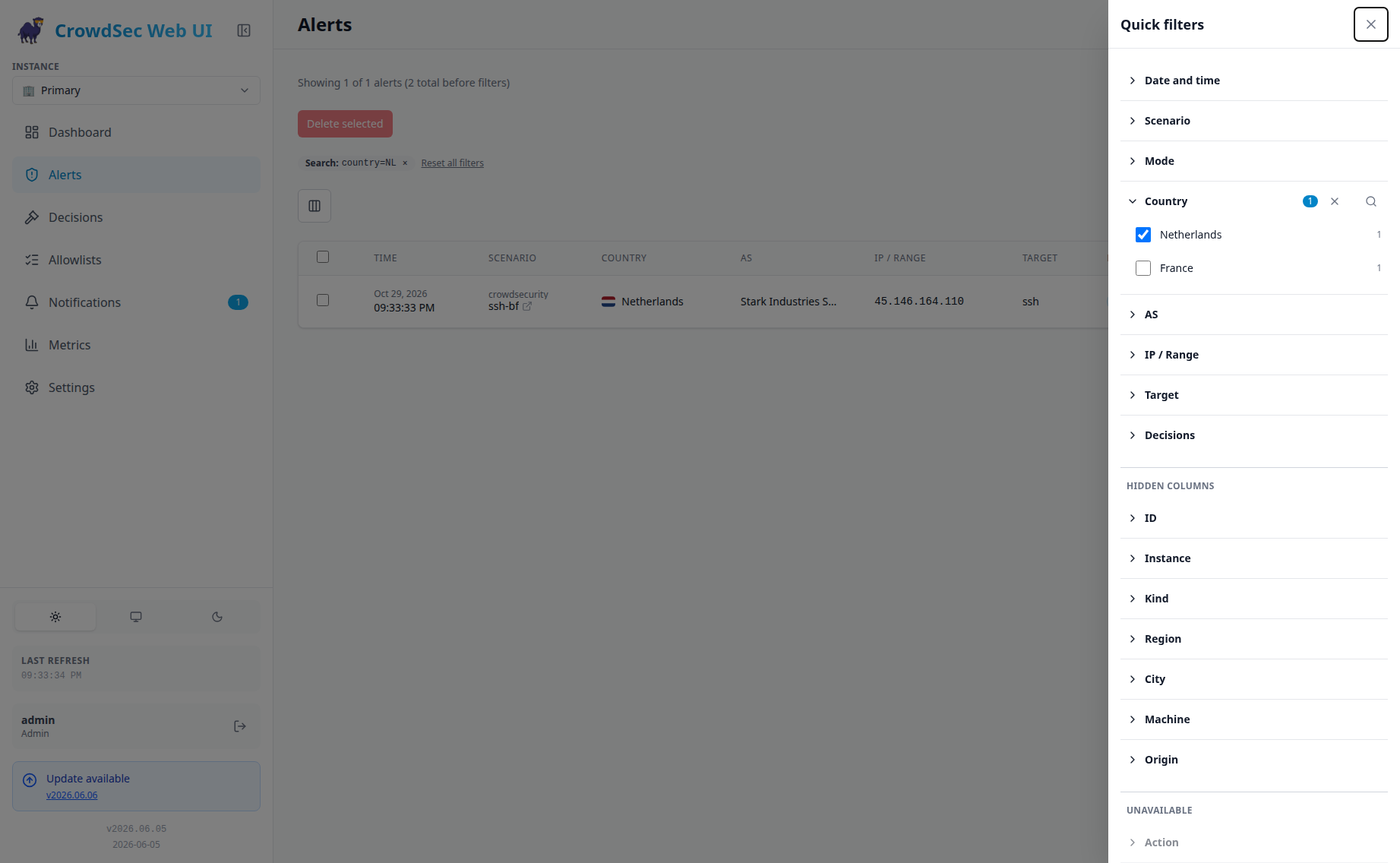
Dashboard, Alerts, and Decisions share one count-aware Quick Filters drawer. Its trigger shows the number of active selections, and the clear control in the drawer header resets all stored quick filters.
Instance and machine options use stable IDs for filtering while displaying their configured names or aliases. Country, instance, and machine searches match the displayed label as well as the stored value. Alerts with several origins or targets contribute to each distinct facet option instead of exposing a combined bucket.
- Filter selections, date range, and simulation mode persist in local storage for the current browser profile and are restored when navigating between the three pages.
- Changing a structured search field updates the matching quick-filter selection, and changing a quick filter updates the structured search. A field supplied explicitly in a page URL takes precedence over its stored value; stored values fill fields that are absent.
- Dashboard top countries, scenarios, AS numbers, targets, the world map, and the Activity History range update the same shared state. Changes made in the drawer update those widgets in return.
- Filtered Dashboard alert and active-decision counts use the same indexed predicates as the Alerts and Decisions lists. The alert card links with the alert-compatible query, while the decision card links with the decision-compatible query.
- The drawer follows each table's configured column order. Filters for hidden columns are grouped under Hidden columns.
- Page-only filters remain visible under Unavailable when another page cannot apply them. Alerts lists
Action,Status, andAlertthere; Decisions listsDecision; Dashboard lists all four. Their stored selections are preserved for the page that supports them and can be cleared from any drawer. - Facet selections use exact equality. Selecting the target
tausend.megeneratestarget=tausend.meand does not includebw.tausend.me. Manually enteringtarget:tausend.meremains a broader contains search. - Each facet reports counts after the other active filters have been applied. Use the facet search control to find values beyond the initially loaded list.
Dashboard applies the shared fields Country, Scenario, Kind, AS, IP / Range, Target, ID, Instance, Region, City, Machine, and Origin. Filters that depend on decision-only or alert-list-only data are retained in Unavailable instead of being silently discarded.
Active decisions are deduplicated by instance, value, and simulation mode. When filters exclude the globally preferred decision, the best matching decision is promoted so enabling Hide duplicates cannot make an otherwise matching duplicate group disappear.
Saved and Recent Filters
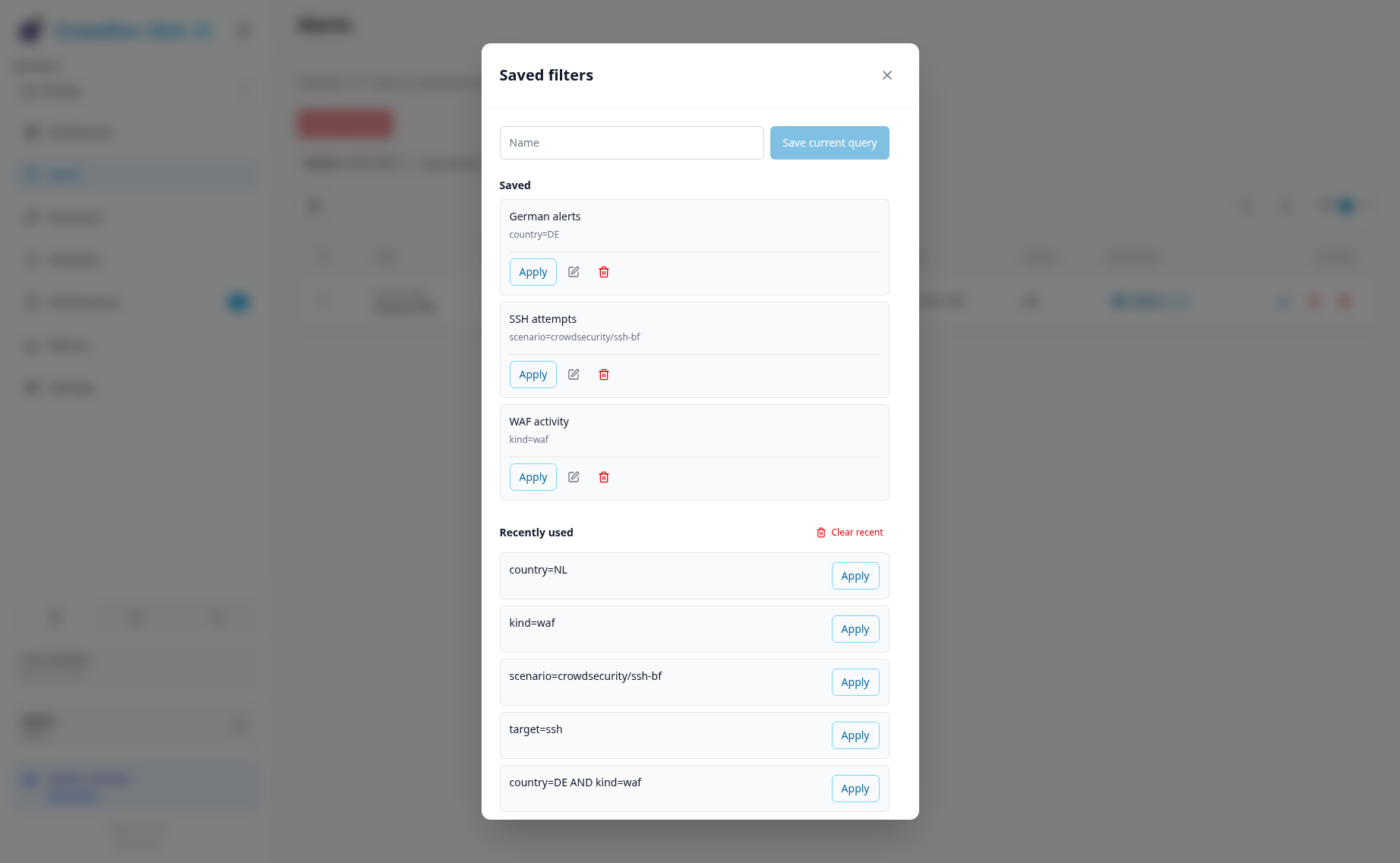
Use the bookmark button beside search on Dashboard, Alerts, or Decisions to save the current valid query under a name. The menu lets you apply, rename, and delete saved filters, reuse the five most recently used queries, or clear recent history. Queries are shared across these pages; Apply is disabled when a query is not valid for the current page. Applying one changes the search query while keeping the selected instance and other page settings.
Saved filters and recent history are stored on the server for the signed-in user, so they are available on other devices. Read-only users can manage their own filters. If authentication is disabled, everyone using the installation shares one list. Valid nonempty queries enter recent history after a brief pause, including searches opened from bookmarked URLs. Quick Filter queries enter recent history only after the Quick Filters drawer closes.
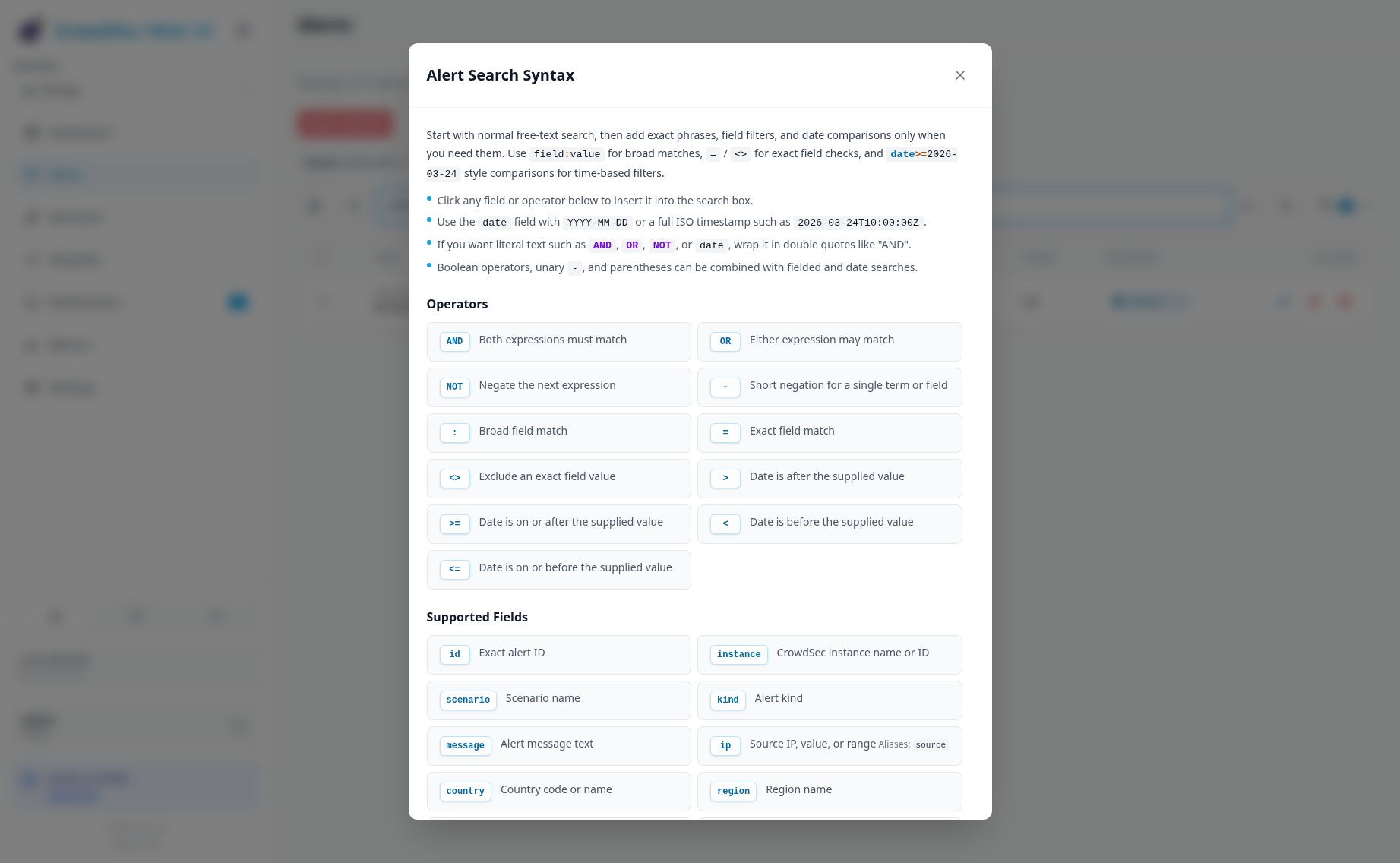
Search Syntax
| Syntax | Example |
|---|---|
| Free text / quoted phrase | ssh hetzner, "nginx bf" |
| Field contains / exact value | country:germany, country=DE |
| Date comparison | date>=2026-03-24, date<2026-03-25T12:00:00Z |
| Negative / empty | -sim:simulated, sim<>simulated, origin:"", origin<>"" |
| Boolean / grouping | country:(germany OR france) AND -sim:simulated |
| Decision filters | status:active AND action:ban, alert:123 OR ip:"192.168.5.0/24" |
The : operator performs a case-insensitive contains match, while = matches the complete field value. Quick Filter selections use =. Date fields support <, >, <=, >=, and =>. A bare field name is free text unless followed by :. Quote literal AND, OR, or NOT. The search Info button lists page-specific fields and examples.
Examples
| Page | Query |
|---|---|
| Alerts | country:germany ssh |
| Alerts | date>=2026-03-24 AND date<2026-03-25 |
| Alerts | country:(germany OR france) AND -sim:simulated |
| Alerts | kind=waf |
| Alerts | origin:"" |
| Decisions | status:active AND action:ban |
| Decisions | date>=2026-03-24 AND action:ban |
| Decisions | alert:123 OR ip:"192.168.5.0/24" |
| Decisions | kind=waf |
Alert Source Filtering
Limit the local cache by origin when CrowdSec ingests automation, blocklists, or community feeds.
crowdsec:
  alertFilters:
    includeOrigins: [crowdsec, cscli-import]
    excludeOrigins: [cscli]
    includeCapi: true
    includeOriginEmpty: true
excludeOriginEmpty: false| Origin | Source |
|---|---|
crowdsec | Security-engine decisions |
cscli | Manual cscli decisions add |
cscli-import | cscli decisions import |
lists | Imported list feeds |
CAPI | Central API / community blocklist |
Behavior
- No explicit filters fetches the normal non-CAPI/non-lists feed.
- Includes are pushed upstream where possible. Generic excludes and empty-origin handling run locally because LAPI lacks those filters.
includeCapi: trueadds CAPI to the default feed;includeOrigins: [CAPI]selects only CAPI.- If any origin is excluded, the whole alert is dropped.
- Origins prefer associated decisions, then blocklist/list source scopes for alerts without decisions.
includeOriginEmptyretains origin-less alerts alongside includes;excludeOriginEmptyremoves them.- Because Decisions is built from synchronized alerts, filters also change which imported decisions appear.
Examples
| Setting | Result |
|---|---|
includeOrigins: [crowdsec] | Keeps security-engine alerts only |
includeOrigins: [lists] | Keeps list-based alerts only |
includeCapi: true | Adds CAPI to the default feed |
includeOrigins: [CAPI] | Keeps CAPI alerts only |
includeOriginEmpty: true | Keeps origin-less alerts alongside explicit includes |
excludeOriginEmpty: true | Removes origin-less alerts |
excludeOrigins: [cscli, lists] | Removes manual and imported-list alerts |
Notifications
Rules run against locally cached CrowdSec data, create in-app notifications, record delivery status, and optionally deliver outbound messages.
Rules
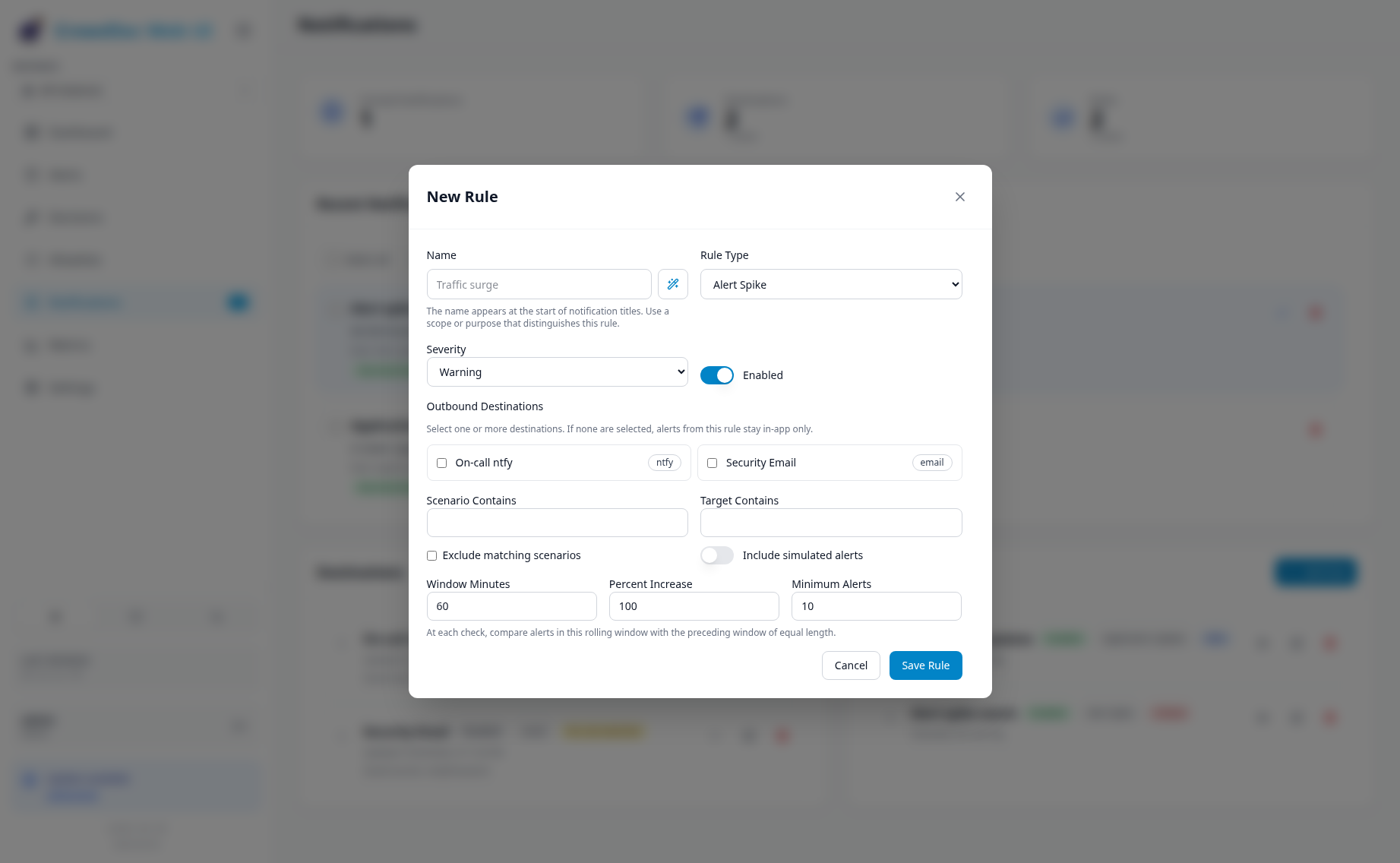
Every rule has a name, severity (info, warning, critical), incident deduplication, and destination channels. Alert rules filter scenario, target, and simulation state; the scenario filter can include or exclude matching names. IP Ban and New Alert/Decision also accept exact IP/CIDR filters. Window Minutes sets the rolling lookback for each rule evaluation; Alert Spike also compares it with the preceding period of equal length. It does not set how often rules are evaluated.
| Rule type | Behavior |
|---|---|
Alert Spike | Compares the current window with the previous window and triggers when percentage increase and minimum alert count are exceeded. |
Alert Threshold | Triggers when matching alerts in the configured time window reach the threshold. |
New Alert/Decision | Creates one notification for every matching alert, decision, or both within the lookback window. Includes record ID, timestamps, scenario, target, source/value, and related alert/decision details. Stable per-record deduplication prevents repeats. |
IP Ban | Triggers once for each active ban decision in the configured window, supports exact IP/CIDR filters, and deduplicates duplicate active decision rows for the same ban. |
Recent CVE | Extracts CVE IDs from matching alerts and checks publication age before notifying. |
LAPI Availability | Triggers when CrowdSec LAPI stays unavailable past the outage threshold, with optional recovery notifications. |
Application Update | Uses the built-in update check and triggers when a newer CrowdSec Web UI version is available. |
Multi-instance behavior
| Scope | Rules |
|---|---|
| Aggregate matching alerts across instances | Alert Spike, Alert Threshold, Recent CVE |
| Evaluate each matching record | New Alert/Decision, IP Ban |
| Evaluate each instance | LAPI Availability |
| Evaluate each Prometheus endpoint | CrowdSec Update |
| Application-wide | Application Update |
Instance-backed titles and metadata identify the contributing instance or instances.
[!NOTE] The
Recent CVErule queries the NVD API to determine when a CVE was published. If outbound access toservices.nvd.nist.govis blocked, recent-CVE notifications may be skipped.The
CrowdSec Updaterule requires a configured Prometheus endpoint with acs_infoversion metric and outbound access to the CrowdSec GitHub release API. It checks the latest stable release and notifies once per outdated endpoint and target version.
Destinations
Destinations are independently enabled and reusable across rules. Send Test validates saved settings immediately; results are stored as delivered or failed.
| Destination | Settings |
|---|---|
| Apprise | Apprise API URL, then either a configuration key with optional tags (POST /notify/{key}, URLs stay on the Apprise server) or notification URLs sent with each request (POST /notify, stored encrypted). Optional basic auth for a reverse proxy, title prefix, and notification type (auto, info, success, warning, failure). Auto type maps info to info, warning to warning, and critical to failure. Use it to reach any Apprise-supported service such as Matrix, Discord, Slack, Telegram, or Pushover. |
SMTP host/port/security (Plain SMTP, STARTTLS, SMTPS / Implicit TLS), optional user/password, from address, comma-separated recipients, importance (auto, normal, important), and optional insecure TLS for trusted self-signed SMTP endpoints. Auto importance maps info to normal and warning/critical to important. The EHLO name comes from server.hostname. | |
| Gotify | Gotify URL, app token, and priority (auto or explicit integer). Auto priority maps info to 5, warning to 7, and critical to 10. |
| ntfy | Server URL, topic, optional access token, and priority (auto, min, low, default, high, urgent). Auto priority maps info to default, warning to high, and critical to urgent. |
| MQTT | Generic publish-only output with broker URL, optional username/password/client ID, QoS 0 or 1, keepalive, connect timeout, topic, and retain flag. It does not include Home Assistant discovery, entity sync, or command handling. |
| Webhook | Custom HTTP delivery with method (POST, PUT, PATCH), URL, optional query parameters/headers, auth (none, bearer token, or basic auth), body mode (JSON, Text, Form), timeout, retries, retry delay, and optional insecure TLS for trusted self-signed HTTPS endpoints. |
Payloads and security
- MQTT JSON contains
title,message,severity,metadata,sent_at,channel_id,channel_name,channel_type,rule_id,rule_name, andrule_type. Tests userule_id=test,rule_name=Test notification, andrule_type=test. - Webhook templates expose dotted
event.*fields fortitle,message,severity,metadata,sent_at,channel_name,rule_id,rule_name,rule_type, andapp_name(the configured branding name). Each has a*Jsonvariant; nullable rule fields also haveOrUnknownandOrUnknownJsonaliases. - Failed webhooks store HTTP status and a truncated response.
notifications.debugPayloads: truealso logs a truncated rendered body with sensitive form fields redacted; enable it only while troubleshooting. - Destination secrets are masked and encrypted by
notifications.secretKey, or an auto-generated key stored instate.db. notifications.allowPrivateAddresses: falseblocks private, loopback, and link-local destinations; default:true. Hostnames are checked when the connection is made, so a DNS change cannot point a destination at a blocked address. IPv4 addresses embedded in IPv6 forms (for example::ffff:7f00:1) are blocked like their IPv4 equivalents.- Apprise, Gotify, and ntfy follow only same-origin
307/308redirects, and each redirect target is checked again. - Telegram is not supported natively; use Apprise to reach it. Home Assistant discovery/state and inbound MQTT commands are not supported.
Kubernetes
A Helm chart for CrowdSec Web UI is maintained by zekker6.
Persistence and Alert History
Data is split into two SQLite files:
| File | Location | Contents | When lost |
|---|---|---|---|
state.db | storage.dataDir | Users, passkeys, notification channels, rules and history, saved filters, queued alert deletions, and UI settings | Gone; restore it from a backup |
cache.db | storage.cacheDir | Alerts and decisions synchronized from LAPI | Rebuilt by the next synchronization |
Mount the directories, not single files: WAL mode also uses cache.db-wal and cache.db-shm.
volumes:
  - ./data:/app/data
To keep the cache on fast node-local storage while state.db and config.yaml stay on backed-up or network storage, set storage.cacheDir to a separate mount. The container only fixes ownership of /app/data, so a cache mount elsewhere must be writable by the container user. state.db uses a rollback journal and is written rarely, so it works on network filesystems that do not support WAL.
Upgrading from a version that used a single crowdsec.db copies its durable data into state.db on the first start and then deletes crowdsec.db. Cached alerts and decisions are not copied; the first start runs a full synchronization of crowdsec.sync.lookback. Back up the data directory before upgrading. Older versions cannot read the new files.
- History survives restarts, merges with new LAPI data, and expires after
crowdsec.sync.lookback(default: seven days). - Initial imports and reconciliation retry in smaller windows after timeouts.
- During LAPI outages, the application serves its available cache and retries in the background; partial imports are marked.
Use POST /api/cache/clear for a full cache reset. Synchronization internals are documented in DEVELOPMENT.md.
SQLite database maintenance
cache.db uses SQLite incremental auto-vacuum by default and reclaims free pages while idle. A cache created with storage.incrementalVacuumEnabled: false keeps that format. If startup reports reclaimable space, stop CrowdSec Web UI, delete cache.db, cache.db-wal, and cache.db-shm, and start it again. The cache is recreated with incremental auto-vacuum and refilled by a full synchronization.
Documentation
| Guide | Contents |
|---|---|
| Configuration example | Complete commented YAML configuration |
| API reference | Authentication, routes, parameters, and request/response shapes |
| Development guide | Local setup, builds, tests, metadata, translations, and synchronization internals |
| Load testing guide | Synthetic profiles, overrides, benchmarks, and container workflow |
Star History
Related Projects

|
Linux Update Dashboard A self-hosted dashboard for checking and applying Linux package updates across multiple servers. |