






This projects aims to fix some issues in Grand Theft Auto IV: The Complete Edition, as well as add various new features for modern systems.
Also available for Max Payne 3 and other games.
Installation:
[!NOTE] Install Grand Theft Auto IV: The Complete Edition from your library, then:
- Download GTAIV.EFLC.FusionFix.zip and unpack its contents to the game's root directory, where the exe is located.
- Or get the installer from fusionfix.io (FusionFixHub; it installs and updates the fix, with the settings you choose there).
[!WARNING] Non-Windows users (Proton/Wine) need to perform a DLL override.
Click here for details
You need to tell Wine explicitly that the
dinput8.dllfile is to be used. There's more than one way to achieve it. Note that Proton Experimental already loads it by default, so you may skip this step.Method 1:
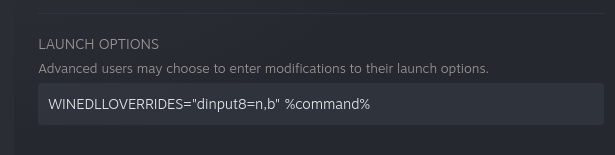
WINEDLLOVERRIDESvariable lets you temporarily specify DLL overrides. It can be used from a command line as well as in the Steam launcher. In case of command line, simply prepend the usual start command withWINEDLLOVERRIDES="dinput8=n,b". For Steam, head to game’s properties and setLAUNCH OPTIONStoWINEDLLOVERRIDES="dinput8=n,b" %command%.
Method 2: Use
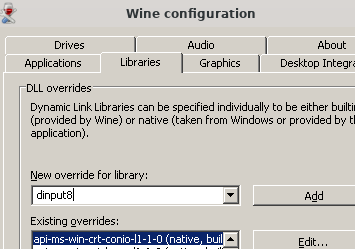
winecfgtool to make a permanent override for a specific Wine prefix. In case of Proton, Steam creates the Wine prefix for Grand Theft Auto IV: The Complete Edition in$HOME/.steam/steam/steamapps/compatdata/12210/pfx. Then you need to runwinecfgwith that path:WINEPREFIX="$HOME/.steam/steam/steamapps/compatdata/12210/pfx" winecfgSelect
Librariestab and fill the combo box with the name of the library you wish to override and hitAdd. You can verify that it’s been added to the list below with(native, builtin)suffix. Then close the window withOKbutton.
Related Wine documentation:
Additionally:
- Install and run Protontricks.
- Select "Grand Theft Auto IV" -> "Select the default Wineprefix" -> "Install a Windows DLL or component".
- Search for "d3dx9_43", select it and click OK.
[!IMPORTANT] Only The Complete Edition is fully supported. Legacy versions of the game (e.g., v1.0.7.0 or v1.0.8.0) additionally require the installation of the Legacy Addon, which is done by unpacking its contents to the game's root directory.
Multiplayer is not supported. Take-Two has agreed that it generally will not take legal action against third-party projects involving Rockstar’s PC games that are single-player, non-commercial, and respect the intellectual property (IP) rights of third parties. This does not apply to (i) multiplayer or online services; (ii) tools, files, libraries, or functions that could be used to impact multiplayer or online services, or (iii) use or importation of other IP (including other Rockstar IP) in the project; or (iv) making new games, stories, missions, or maps. Forking this project or creating any derivative software intended for use with multiplayer of any kind is forbidden. Any persons or entities who do so are not associated with this project.
No support will be provided for illegal copies of the game. Purchase an official copy from either Steam or Rockstar Games Launcher.
New menu options
FusionFix adds new options to the in-game menu that can be easily toggled and customized in real time. The config file allows for further customization by advanced users.
Display
- FOV, adjusts in-game field of view
- Language, switch languages in-game like in previous versions
- Definition, toggle the old fuzzy look from consoles
- Console Gamma, restores contrasted look from consoles
- Console Auto Exposure, restores the stronger auto exposure / eye adaptation effect from consoles
- Motion Blur, a separate toggle for motion blur with several intensity levels
- Depth of Field, controls how intense the distant blur is during gameplay and whether it's enabled in cutscenes
- Tree Lighting, offers "PC", "PC" with some improvements ("PC+") and "Console" style tree lighting
- Tree Alpha, offers "PC", "PC" with some improvements ("PC+") and "Console" alpha test reference for trees
- Bloom, a global toggle for bloom
- Screen Filter, an option to change color filters in the main game and episodes
Graphics
- FPS Limiter, set a custom FPS limit, selects from a list of predefined values, or turn it off
- Anti-aliasing, a toggle for FXAA or SMAA
- Volumetric Fog, a more advanced fog shader that hides the edges of the world
- Sun Shafts, a godrays implementation faithful to the original art style
- Extended Sunlight Reach, allows sunlight to reach surfaces that it couldn't before, and increases cloud shading
- Tone Mapping, prevents highlights from being blown out (in HDR with Tone Mapping off, highlights wash out to white like in the original game, only brighter), more operators can be found here
- Ambient Occlusion, a toggle for scalable ambient obscurance
- Shadow Filter, toggles between sharp, soft, or contact hardening shadows
- Streetlight Shadows, what streetlights cast shadows of at night: off like on consoles, scenery, scenery and people, or scenery, people and vehicles
- Headlight Shadows, the headlights of the player's vehicle cast shadows
- Vehicle Night Shadows, vehicles receive shadows from streetlights and other lights at night
- Graphics API, selects between DirectX 9, Vulkan (through DXVK) and DirectX 12 (through D3D9On12, a custom build); FusionFixHub installs DXVK and D3D9On12 on its Graphics enhancements page. The plugin applies it itself (no
d3d9.cfg); a start that fails on Vulkan or DirectX 12 falls back to DirectX 9. A ReShade, ENB or dxwrapperd3d9.dllstays on top of the chosen API. Requires a restart
Game
- Skip Intro, added an option to skip intro
- Skip Menu, added an option to skip main menu after startup
- Letterbox, draws cutscene borders on top and bottom of the screen
- Pillarbox, draws cutscene borders on screen sides in ultrawide
- Transparent Map Menu, makes the map screen background transparent
- FPS Counter, shows an episode colored FPS counter on the top left of the screen
- Windowed, toggle windowed mode
- Windowed Borderless, toggle borderless mode
- Pause Game On Focus Loss, pauses the game when it's minimized
- Distant Lights, offers "PC" and "Console" distant streetlights and traffic, the console ones with denser streetlights and moving traffic lights
- LightSyncRGB, custom ambient lighting for IV, TLAD and TBOGT, health indication on G-Keys, police lights, ammo counter, only Logitech hardware is supported, requires Logitech G HUB app, watch full clip on YouTube
- Seasonal Events, enables added seasonal events at specific date
- Check For Fusion Fix Updates, checks if there's an update available on startup
Audio
- Alternative Dialogues, when enabled, forces the game to use alternative dialogues in some missions
Controls
- Always Run, allows running by default and sprinting in interiors, tap Sprint button to toggle between walk and run
- Allow Movement When Zoomed, allows movement when aiming with a sniper rifle
- Extended Sniper Controls, allows aiming with sniper rifles without using the scope, press Jump button to toggle between third-person aim and the scope
- Auto Climb Ladders, makes player climb ladder automatically when getting close to ladder
- Jump Ragdoll Control, allows pressing Reload during a jump to enter ragdoll, with an option to also allow it while climbing or vaulting
- Camera Shake, shake effect has been fixed to work consistently at any frame rate and can be disabled with this option
- Stunt Jump Camera, can be disabled to skip the cinematic camera and slow motion during unique stunt jumps
- Fence Climb & Car Jack Camera, can be disabled to skip the cinematic camera when climbing fences and stealing cars
- Ladder Camera Tilt, can be disabled to keep the camera from tilting down while climbing ladders
- Guided Ladder Camera, the camera follows the player's height on ladders, limits how far it orbits sideways and keeps the player framed around obstructions
- Automatic Camera Centering, can be disabled to stop the controller camera from leveling itself on foot and turning behind vehicles
- Centered Vehicle Camera, makes vehicle camera centered, for more options install the original mod separately
- Centered On Foot Camera, makes on foot camera centered, also for more options install the original mod
- Turn Indicators, allows the player to use vehicle turn indicators and hazard lights
- Always Show Bullet Traces, shows bullet traces on every shot instead of randomly, like in the older games
- Disable Wardrobe Transition, disables all screen fading in/out process when switching clothes in the wardrobe or buying clothes in the clothes stores
- Instant Taxi Stop, makes the taxi stop immediately after skipping taxi ride journey
- Look-Around Sensitivity, controls the look sensitivity when using controller
- Aiming Sensitivity, controls the aim sensitivity when using controller
- Mouse Look Sensitivity, controls the look sensitivity when using mouse
- Mouse Aim Sensitivity, controls the aim sensitivity when using mouse
- Vehicle Camera Centering Delay, controls the time until vehicle camera auto centering kicks in after moving it
- On Foot Camera Centering Delay, controls the time until on foot camera auto centering kicks in after moving it
- Vehicle Camera Turn Speed, controls the camera turn speed when driving a vehicle and turning
- Gamepad Icons, allows to select various controller icon styles (Xbox 360, Xbox One, PS3, PS4, PS5, Nintendo Switch, Steam Deck)
- Raw Input, raw input for menu and adjustments for in-game camera mouse look
Core/Gameplay Changelog
General
- Comprehensive shader overhaul with fixes for several longstanding issues, and various improvements
- Fixed recoil behavior that was different when playing with keyboard/mouse and gamepad
- Fixed forced "definition off" setting in cutscenes, now cutscenes will respect the menu setting
- Fixed DLC car lights in TBoGT
- Fixed various issues related to frame rate
- Restored the console stick response and smoothing when free aiming with a controller
- Fixed crouching and standing camera transitions speeding up at higher frame rates, including while aiming
- Cutscene animations follow their audio smoothly at any frame rate, without trembling and without drifting out of sync
- Fixed the game, script and screen fade timers running slow at high frame rates, which caused the infinite loading screen around some cutscenes (Off Route)
- Fixed an infinite loading screen before cutscenes after minimizing or alt-tabbing
- Fixed cops and other peds staying in cover and doing nothing at frame rates above 30
- Fixed aiming zoom in TBoGT
- Fixed possible crash when manually dialing a phone number using the keypad in TLAD
- Fixed possible crash in TLAD mission "Marta Full of Grace"
- Fixed only taxis spawning when car mods with bigger models fill the car budget: the car and ped budgets follow the size of the models
- Added a file overload solution that allows to replace game files without actually replacing them
- Added IMG Loader (from update folder)
- Added GXT Overloading, allow game to load additional gxt files to overwrite vanilla lines or add new lines, without editing vanilla gxt files
- Added a solution to add entries to shader preload list dynamically
- Increased corona limit to avoid heavy flickering of game's lights
- Power lines and cables are drawn opaque, so they stay visible along their whole length and cast shadows
- Improved ultrawide support
- Fixed improper VRAM detection on some setups
- About 500 MB more memory for streaming: the game's system-memory copies of its textures are kept outside its address space until needed
- Fewer stutters while driving: the game no longer pins its main thread to the first CPU core
- Shorter hitches when the game has to load the area at once (after a teleport, mission start or fast travel): it continues as soon as the data is read instead of sleeping between checks
- The streaming memory follows the game's free address space: more detail and more varied traffic when there is room, less before the game would run out of memory
- Fixed a freeze when the game ran out of room for the models of objects around the player, and a crash when very many textures were unloaded at once (big texture mods)
- Fixed draw distance sliders not being applied on startup
- Fixed mouse cursor scale, and hidden mouse cursor when using controller
- Significantly sped up loading screens
- Added various fixed weapon, movement and other animations
- Added various fixed vehicle models
- Fixed Johnny and Luis' broken head models
- Workaround for Johnny's broken facial animations in cutscene
- Restored missing lamppost coronas and uncompressed corona texture from console
- Added new tree LOD atlas based on the PC trees
- Fixed PC grass models stuck underground
- Fixed jagged vehicle reflections
- LOD lights now appear at the appropriate time and can render in cutscene, like on the console version
- Added an option to allow depth related postfx effect to render behind transparent objects properly
- Added an option to apply MSAA for various reflection maps
- Restored higher shadow render distance from old versions of the game
- Improved cascaded shadows performance, and added an option to double their resolution
- Fixed sun shadows appearing a frame late when turning the camera
- Added dynamic shadows for trees
- Restored night shadow for vehicles
- Made night shadows resolution be adjusted by night shadows option
- Reworked night shadows: sharper, the most visible lights get them first and keep them, and they fade with distance instead of popping in and out
- Camera cuts and look-behind refresh world and cutscene night shadows immediately
- Streetlights keep the shadows of buildings, trees and props from frame to frame, so every nearby streetlight casts them at almost no cost; people and vehicles are added for the nearest ones
- Vehicles and the people in them keep their night shadows while the player's headlights cast theirs; lampposts no longer shadow their own light
- The player's headlights cast shadows: the game never passed their shadow to the lighting, so nothing ever showed it. Their shadows are aimed along the beam, much sharper, and fade out 35 metres ahead
- Interiors seen through doorways and windows now block the sun, so their shadows no longer go missing
- Streetlights and other lamps just behind the camera keep lighting the ground in view, instead of switching off when the camera turns slightly
- Added several cheat code to enable seasonal events, restore some unused player assets for Niko and Johnny, speed up game physics, and spawn some vehicles in TLAD and TBoGT, they can be found hidden in relevant locations, or finding them here
Scripts
General
- Fixed various script issues related to frame rate
- Fixed police computer softlock where one interface from it couldn't be closed with the keyboard
- Fixed too sensitive arrow keys inputs in police computer virtual keyboard
- Fixed possible issue where player gets stuck on buying food for several seconds in fast-food restaurants
- Fixed possible crash when The Lost clubhouse memorial wall photos are full
- Fixed busker script terminating too early in TBoGT, now Luis can give money to buskers normally
- Fixed Armando and Henrique's respect not increasing after finishing hang out friend activity
- Restored Star Junction Burger Shot blip in TBoGT
- Improved various scripted camera mouse controls
- Added a new phone option to save game anywhere
Models
- Fixed pool ball shadows flickering in Playboy apartment's pool table
- Restored transparency on pool minigame
- Restored console player transparency on air hockey minigame
- Restored traffic cops in toll booths
- Restored non-cop pedestrians in helicopters flying around city
- Restored missing book from one kind of preacher in IV
- Restored own unique soda can model for eCola vending machines instead of reusing Sprunk ones
- Restored TLAD combat shotgun own unique prop model (prop_e1_pumpshot) instead of reusing IV model (cj_prop_pumpshot)
- Restored the gun shop owner own unique model (M_M_GunNut_01) instead of using the strip club bouncer model (M_Y_bouncer_01)
- Fixed two bought PC Perseus suits textures not matching prop models
- Fixed Niko's hands being forced back to vanilla while switching clothes to Perseus suits
- Fixed Esperanto being spawned instead of Roman's Taxi in Roman's cab depot
Voice Lines
- Fixed incorrect voice lines after exiting Chinatown gun shop when not buying something
- Fixed Johnny's incorrect voice lines after exiting the gun shop when buying something (used to use voice lines from Higgin's Heli Tours)
- Restored Luis' voice lines when exiting the gun shop (buying/not buying)
- Restored missing voice lines from Luis & Johnny when exiting the Broker gun shop
- Restored missing voice lines from Johnny when triggering pool minigame
- Restored non-friend NPC voice lines on air hockey minigame
- Restored Jim, Terry, Clay own voice lines on hi-lo cards minigame
- Restored Uptown Riders' own voice lines on arm wrestling minigame (used to use Angels of Death's voice lines)
- Restored Clay's voice lines, he'll now respond to Johnny's arrival in hang out friend activity
- Restored Armando and Henrique's voice lines, they'll now greet Luis when he is close to them in strip club
- Restored Luis' voice lines, he'll now respond to what the pilot tells him about the landmarks during Heli Tours
- Workaround for TLAD Heli Tours, now pilot voice trigger time won't be affected by Johnny voice text clear bug
Missions
Note: this section contains story spoilers.
- Fixed scripted depth of field not being removed properly in several missions (e.g. "Catch the Wave")
- Fixed Faustin execution animation sync issue in mission "The Master and the Molotov"
- Fixed one dialogue couldn't be restored and continue if Niko is too far away from Packie in mission "Diamonds are a Girl's Best Friend"
- Fixed the FIB arriving too early at the abandoned mansion in mission "To Live and Die in Alderney"
- Workaround for a bug where Niko dies after being kicked off of Dimitri's helicopter and falling into the water (Deal Ending)
- Workaround for a bug where one burned target fails to fall from hotel rooftop in mission "Late Checkout"
- Fixed Ilyena call and Brycebug content not triggering after loading save (From Ilyena's random encounter and Stubbs' job)
- Fixed damaged vehicles increasing payment, rather than decreasing payment, in Brucie's web email vehicles theft
- Fixed vehicles being removed too early after parking it in garage in Brucie's web email vehicles theft
- Fixed TLAD intro scripted cutscene cutting off distant world in several shots
- Fixed Johnny being invisible in the second intro cutscene
- Fixed possible issue where mission fails to continue even though Johnny has been close to Roman's Taxi in mission "Roman's Holiday"
- Fixed Roman sometimes lacking clothes model or using incorrect clothes textures in TLAD ending credits
- Fixed Malc's motorcycle using incorrect colors in TLAD ending credits
- Fixed Yusuf's incorrect position during one scripted cutscene in mission "Caught With Your Pants Down"
- Fixed delayed animations in two scripted cutscenes in mission "Departure Time"
- Fixed Luis sometimes leaving cover automatically while shooting behind cover in Bulgarin's plane in mission "Departure Time"
Misc
- Fixed ammo reset when buying different pistol from gun shop in IV
- Fixed ammo reset when buying different weapon from gun shop in TLAD/TBoGT
- The Desert Eagle and Micro SMG are now using their unique sounds when viewing them (required modifying the animation dictionary "missgunlockup.wad")
- Restored the temporary ban from the gun shop when attacking the owner in TLAD/TBoGT
- Re-enabled Roman's cab depot script in TLAD
- Superd2 is now accepted by car wash, meanwhile packer2, police3, police4, policew are now not accepted
- Fixed incorrect car wash price help text for a one type of taxi
- Fixed time won't advance after skipping taxi ride journey
- Fixed 200 pigeons extermination annihilator reward preventing Brucie from landing helicopter at Star Junction landing site
- Fixed damaged vending machines being usable
- Fixed phone being not usable after giving money to buskers
- Fixed using phone camera will terminate beggar script immediately
- Fixed NPCs driving away with a delay after finishing paying in toll booths
- Workaround for NPCs abnormal overtaking behavior in toll booths
- Added support to use mouse wheel when using phone keypad
- Fixed memorial wall photos not spawning while entering The Lost clubhouse from roof entry in TLAD
- Fixed several motorcycles using incorrect paying animation in toll booths in TBoGT
- Fixed Luis' vehicle always being removed after playing golf and drinking minigame
- Fixed scripted depth of field not being removed after playing drinking minigame
Episodic content
Note: most of this content requires additional modifications by the end user to the game in order to fully use these features.
- Added an option to enable support for APC, buzzard, smuggler, floater, blade and all their abilities in IV and TLAD
- Added an option to enable support for DSR1, grenade launcher, pipe bomb, sticky bomb, AA12 explosive shells, P90 vehicle check, partially parachute and all their abilities in IV, TLAD and TBoGT
- Added an option to enable explosive rounds on annihilator in IV
- Added an option to enable camera bobbing in clubs, cell phone switching, altimeter in helicopters and parachute, explosive sniper and fists cheats in IV and TLAD
- Added an option to raise height limit for helicopters in IV and TLAD to match TBoGT level
- Added an option to give P90 and AA12 to SWAT and FIB and M249 to police in helicopters in IV and TLAD
- Added an option to disable SCO signature check, allow game to use any episodic SCO on all episodes
Misc
- Restored timecycles from consoles with improved auto exposure and restored missing moon in certain weather
- Fixed glass shards lacking colors
- Fixed particles flickering in some situations
- Restored particle file from console and fixed some broken particles
- Restored environment reflection intensity from consoles
- Added an option to restore the more reflective cars from consoles
- Fixed incorrect water texture and post processing noise tiling on Water Quality levels other than medium
- Restored Xbox360 contrast slider behavior
- Disabled Z-write behavior for emissive shaders to fix some visual issues
- Improved phone screen resolution
- Fixed offset mirrors
- Fixed washed out mirror reflections on some graphics cards
- Significantly reduced pop-in on higher graphics settings
- Restored functionality of some rain parameters from visualsettings.dat
- Fixed black rain droplets and missing refraction
- Restored console rain density
- Sped up menu and pause transitions
- Pressed radar zoom out button now will make it stay zoomed out for a few seconds
- Fixed date won't advance after dying, being busted or respraying at certain time
- Fixed helicopter searchlights flickering violently when more than one helicopter is present
- Restored dynamic console pause-menu music in IV, TLAD and TBoGT
- Fixed radio reset after cutscene
- Fixed incorrect TBoGT bullet tracer position
- Fixed NPC lanes swerving suddenly on the Algonquin Bridge when there is a train under it
- Partially fixed P90 being selectable in vehicles on keyboard
- Fixed lights and motion blur flickering around the player while the camera shakes (drunk, explosions, impacts)
- Fixed the player's vehicle losing its engine sound in heavy traffic: it always gets an engine sound slot first
- Fixed a held horn that kept sounding after the vehicle was wrecked
- Fixed a crash at start with audio mods that add wave slots (more engine sound slots): the audio memory grows to fit them
- Fixed a crash at start with mods that change the game's CPU core usage, such as Mjolnir IV
- Made stunt jump camera speed be controlled by mouse wheel when using keyboard and mouse
- Added an option to restore unused death music in IV
- Fixed not being able to give money to beggars normally on PC
- Fixed TLAD phone keypad rendering on top of the plastic cover
- Fixed TLAD incorrect traffic cops head texture
- Fixed some cutscenes and interiors models
- Fixed and improved some lights and emissive materials
- Fixed one font '9' using incorrect style in TBoGT
- Restored missing color combination for blade
- Added an option to enable shadows for some objects and vegetation that lack them
- Added options to customize shadow blur, bias and cascade blending
- Various other fixes, like now driveby is disabled when using cellphone
Some details
- AimingZoomFix - set to 1 for proper fix, so it behaves like on Xbox360 (memorize the zoom level from the last time aiming was canceled), set to 2 to have this fixed feature enabled in IV and TLAD, set to -1 to disable this feature. 0 disables the fix, as usual.
- FpsLimit - enter a desired value to specify the number of frames per second you want for the game. Like 30, 45, 60 or more. This will affect all gameplay. Refresh rate offsets may also be used.
- CutsceneFpsLimit - enter a desired value to specify the number of frames per second you want for the game to use on cutscenes only.
- DefaultCameraAngleInTLAD - TLAD uses a different camera angle on bikes, this option can force the original IV camera angle. Enabled / Disabled
- PedDeathAnimFixFromTBoGT - when you perform a counter attack after a dodge in IV & TLAD, the ped after falling and dying performs an additional death animation, which doesn't happen in TBoGT. Enabled / Disabled
- DisableCameraCenteringInCover - see issue 20.


Shaders Changelog
General
- Fixed z-fighting
- Restored deferred object and LOD fading
- Restored console screen door transparency
Lighting
- Fixed volumetric lights occlusion
- Improved light volume transparency
- Restored XBOX foliage translucency
- Improved PC foliage lighting
- Fixed mismatched AO behavior of shadow casting lights
- Fixed lights that were made invisible with patch 1.0.6.0
- Fixed black normal map halos on several surfaces such as asphalt, sidewalks and rocks
Shadows
- Restored rotated disk filter from versions prior to 1.0.6.0
- Fixed large shadow rectangles visible from high altitudes
- Fixed shadowmap being erroneously blurred before the lighting pass
- Fixed shadows stretching at certain camera angles
- Fixed shadow view distance being lower than the actual rendered distance
- Fixed distant shadows with cutoff edges
- Restored normal offset bias from versions prior to 1.0.6.0
- Added contact hardening shadows
- Fixed displaced night shadows
- Fixed blur artifacts between shadow cascades under some conditions
- Added basic cascade blending
- Fixed pitch black shadows under vehicles
- Added wind sway for real tree shadows
- Fixed incorrectly offset shadows on water
- Fixed flickering when shadows of transparent objects overlap
- Fixed dark lines in night shadows
Post processing
- Split depth of field, motion blur and stippling filter into separate passes to prevent overlap
- Fixed color banding, most noticeably in the sky
- Added alternative bloom threshold that doesn't cause color shifting
- Added a mask to selectively filter screen door transparency
- Fixed depth of field and bloom becoming weaker at resolutions higher than 720p
- Reduced depth of field haloing and increased bokeh intensity
- Improved bloom weights and stability in motion
- Fixed excessively blurry screen compared to consoles caused by leftover anti aliasing code
- Restored console bloom dilation
- Fixed flickering auto exposure under some conditions
- Fixed motion blur becoming weaker at high frame rates
- Fixed motion blur affecting props attached to the player, like guns and parachutes
- Fixed phone camera aspect ratio
- Fixed TLAD noise aspect ratio
Reflections
- Restored tree and terrain reflection behavior from XBOX
- Fixed excessive specularity of several meshes in Alderney
- Restored corona depth test in water reflections
- Added fading to coronas in paraboloid reflections
- Fixed anisotropic filtering affecting vehicle reflection intensity
- Fixed distorted mirror reflections at certain camera angles
- Improved vehicle and ped normal map quality
Particles
- Fixed soft particles
- Fixed particles flickering in some interiors
- Fixed stuttery particle animations caused by patch 1.0.5.0
- Fixed rain being almost invisible, especially at night
- Fixed rain streaks becoming shorter at high frame rates
Water
- Fixed flickering outlines around shores and thin objects
- Fixed offset water reflections
- Restored water foam from consoles
- Improved shallow water transparency and improved foam texture
- Fixed flat, mirror-like water surface on some graphics cards
Misc
- Fixed outlines around objects when using some versions of DXVK
- Partially fixed building windows visible near the far plane if emissive depth write is disabled
- Restored gta_cutout_fence mipmap bias from versions prior to 1.0.6.0
- Fixed incorrect texture filtering used in several shaders
- Added AO to gta_normal_spec_reflect_emissive if emissivity is 0 so it can be used to disable night shadows for certain objects
- Added support to instantaneously turn lamppost bulbs on or off alongside their lighting
Contributing
If you have an idea for a fix, add a module with its implementation to source directory and open a pull request. See contributing.ixx for reference.
Building
Run premake5.bat to generate the Visual Studio solution in build, then build it.
To deploy to your game automatically after each build, create a .env file in the repository root pointing GTAIV_DIR at the folder containing GTAIV.exe, then run premake5.bat again, for example:
GTAIV_DIR=C:\Program Files (x86)\Steam\steamapps\common\Grand Theft Auto IV\GTAIV
The build then copies the built GTAIV.EFLC.FusionFix.asi into the plugins folder of that game folder, replacing the plugin that is already installed there, and debugging launches GTAIV.exe from there. The .env file is ignored by git. Without it, nothing is copied.
Reporting more issues
We're making a list of GTA IV issues that weren't addressed in official patches.
If you can think of one, submit it here.
If you've encountered an issue, caused by this fix, report it here.