42 Video Effects for Claude
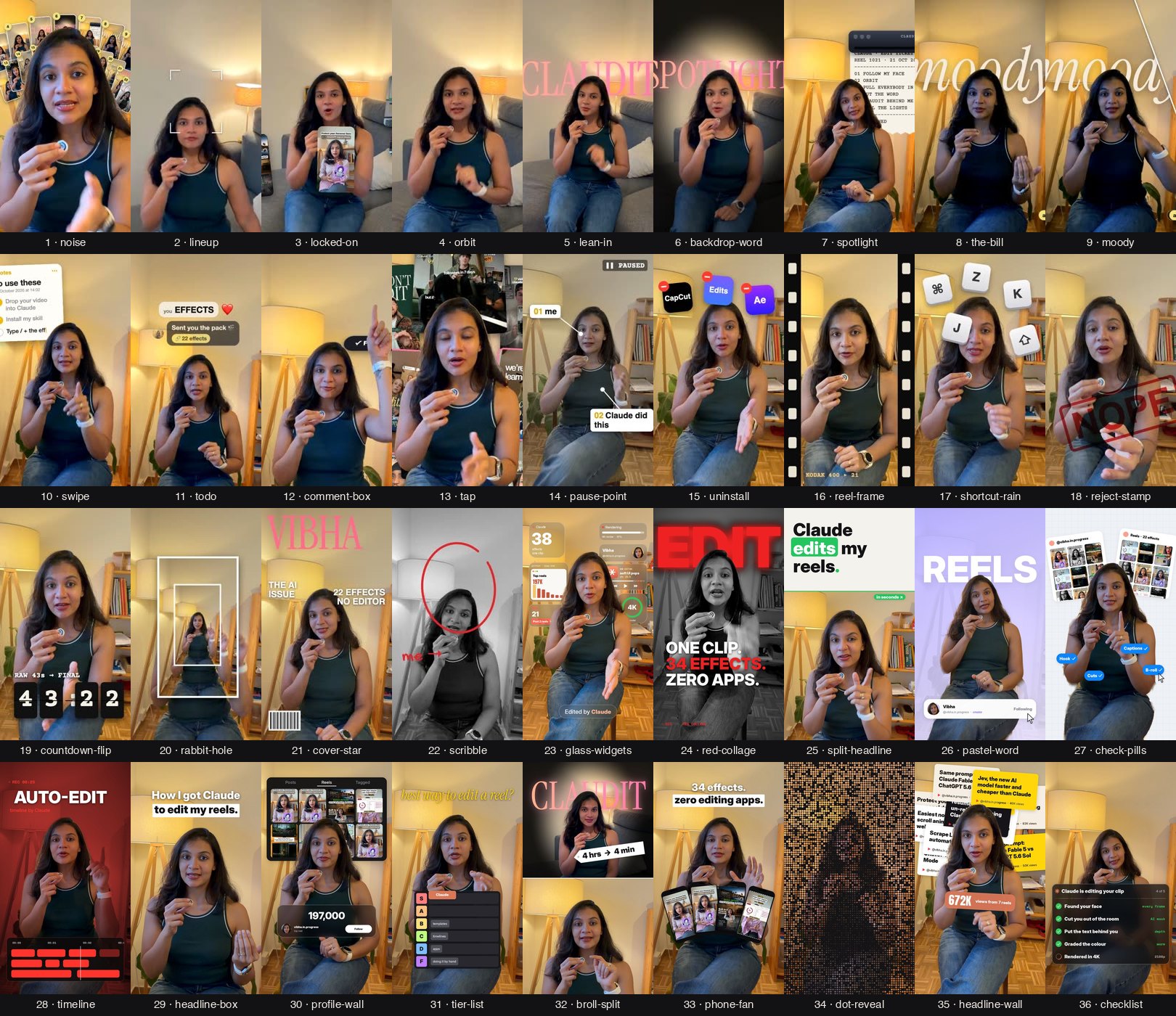
Drop your video into Claude, type /effects and the name of an effect. That's the whole edit.
Made by @vibha.in.progress 💛
Install (one line)
Open the Terminal app (or the terminal inside Claude Code) and paste:
git clone https://github.com/Vibha-Ramprakash/claude-video-effects ~/.claude/skills/effectsOn Windows (PowerShell), use $HOME\.claude\skills\effects instead of ~/.claude/skills/effects.
Then restart Claude Code. That's it.
Not sure how? Open Claude Code and paste: "Install the skill from github.com/Vibha-Ramprakash/claude-video-effects into ~/.claude/skills/effects". Claude will do it for you.
Use it
- Open Claude Code (the app or the terminal).
- Drag your video into the chat.
- Type the effect you want:
/effects orbit from 3 to 6 seconds
/effects spotlight when I say "kill the lights", with the word Claudit behind me
/effects comment-box at the end, typing CLAUDE
/effects glass-widgets for the first 3 seconds
The very first time, Claude sets itself up (about 2 minutes). It needs ffmpeg and Python, and it installs them for you if they're missing.
Claude checks a few frames first, fixes anything that covers your face, then renders yourvideo_effects.mp4 right next to your original. Your audio stays as it was.
You can stack effects in one go: "Add locked-on from 6 to 10s, then orbit from 10 to 13s, then a reject stamp on 'no'."
The 42 effects
| # | Type this | What happens |
|---|---|---|
| 1 | noise | Reels pile up behind your head |
| 2 | lineup | Numbered tiles fan out above your head |
| 3 | locked-on | Brackets lock onto your face and the camera follows you |
| 4 | orbit | Your reels circle your head, behind you at the top |
| 5 | lean-in | A quick punch-in on one word |
| 6 | backdrop-word | A giant word drops in behind you |
| 7 | spotlight | Kill the lights, keep you lit |
| 8 | the-bill | Your instructions print out like a receipt |
| 9 | moody | A moody colour grade |
| 10 | swipe | A before and after slider |
| 11 | todo | A checklist beside your head that ticks off as you talk |
| 12 | comment-box | An Instagram comment types itself and posts |
| 13 | tap | A Follow button flips to Following |
| 14 | pause-point | Freeze frame with a hand-drawn arrow |
| 15 | uninstall | A glitchy uninstall bar breaks the frame |
| 16 | reel-frame | Your video shrinks into a reel card |
| 17 | shortcut-rain | Keyboard keys rain down behind you |
| 18 | reject-stamp | A big red stamp slams down |
| 19 | countdown-flip | A 3, 2, 1 flip clock above your head |
| 20 | rabbit-hole | The room tunnels away behind you |
| 21 | cover-star | You become a magazine cover |
| 22 | scribble | Marker doodles draw themselves around you |
| 23 | glass-widgets | Frosted glass widgets and mini artifacts float around your head |
| 24 | red-collage | Black and white you, a giant red word behind, three lines slam in |
| 25 | split-headline | A headline card slides down and pushes you to the bottom half |
| 26 | pastel-word | Lavender room, a giant word behind you, a profile card gets followed |
| 27 | check-pills | Grid-paper room, your reels pinned behind you, blue pills get clicked |
| 28 | timeline | A dark red film look with an editing timeline and a glowing playhead |
| 29 | headline-box | A punch-in with a clean two-line headline |
| 30 | profile-wall | Your reels grid fills the wall while a counter ticks up |
| 31 | tier-list | A tier list drops in and Claude flies into S tier |
| 32 | broll-split | B-roll on top with a price-tag sticker, you below |
| 33 | phone-fan | Your reels fan out like a hand of phones |
| 34 | dot-reveal | Your shot builds out of glowing dots, then snaps into focus |
| 35 | headline-wall | Your headlines pile up behind your head, then a total pops in front |
| 36 | checklist | A Claude task list under your chin, each step ticks green |
| 37 | liquid-glass-graph | A liquid glass card with a graph that climbs and a number that counts up |
| 38 | carousel-spin | Your reels spin around you in a 3D carousel |
| 39 | match-cut | News pages cut on one word, locked in place behind your head |
| 40 | apple-toggles | iPhone switches flip on under your chin, one line at a time |
| 41 | led-sign | The lights drop and a glowing LED sign types itself out behind you |
| 42 | slow-push | A slow cinematic push-in while the room melts out of focus |
Bonus looks: /effects glitter-spotlight (golden rays and sparkles), cover-star look=editorial (a classic magazine cover) and liquid-glass-graph look=bento (a glass dashboard around you).
Every effect follows your face. Anything that would cover your face goes behind your head instead.
Tips
- Vertical phone videos with you in frame work best.
- Say the timing in plain words ("when I say 'watch'"). Claude finds the exact second.
- Want your own reels in
orbit,noise,phone-fanorprofile-wall? Give Claude a folder of screenshots. - Charts, counters and headlines should use your real numbers. Tell Claude what they are.
- It renders in 1080p. Ask for 4K if you want it (slower).
Honest notes
- These are starter versions. They won't match the exact edit in my reel, which also has sound design and hand-tuned timing.
- It drafts, you approve. Watch the result before you post.
- No sounds or captions are added. Add those in CapCut.
- My full edit style is coming later. Follow @vibha.in.progress to hear first.
If something goes wrong
Just tell Claude what you see ("the word covers my face", "it's too fast"). It will fix the plan and render again.
Credits
Face tracking: OpenCV YuNet (MIT). Person cut-out: MediaPipe Selfie Segmenter (Apache 2.0). Fonts: Archivo Black, Instrument Serif, Space Mono, Inter, Anton, Montserrat (SIL OFL) and Permanent Marker (Apache 2.0); licences are in fonts/. Everything else: MIT, see LICENSE.