
WhiteDNS 3X-UI Wizard
WhiteDNS is a Cloudflare-first provisioning wizard for setting up a managed 3x-ui/Xray VPN stack on a VPS. It runs locally, connects to the VPS over SSH, manages Cloudflare DNS and certificates, installs or repairs a Docker-based 3x-ui stack, and generates copyable client import strings.
The wizard focuses on a practical default setup:
- Cloudflare-proxied WebSocket TLS profiles.
- DNS-only direct profiles for protocols Cloudflare proxy cannot handle.
- Server-side Tor exit variants users can import separately.
- A managed 3x-ui Docker stack with PostgreSQL.
- Encrypted local project secrets and repeatable reset/repair flows.
Quick Start
1. Build the binary
go build -o whitedns ./cmd/whitedns2. Run the interactive wizard
./whitednsThe root command opens the menu. Select:
0) Init setupThe wizard will ask for:
- Cloudflare account ID.
- Cloudflare API token.
- Domain name.
- VPS IPv4 address.
- SSH host, user, key/passphrase, or password.
3. Cloudflare token permissions
Create an Account API token in Cloudflare:
- Go to
Manage Account > Account API Tokens > Create Token. - Choose the
Edit zone DNStemplate.
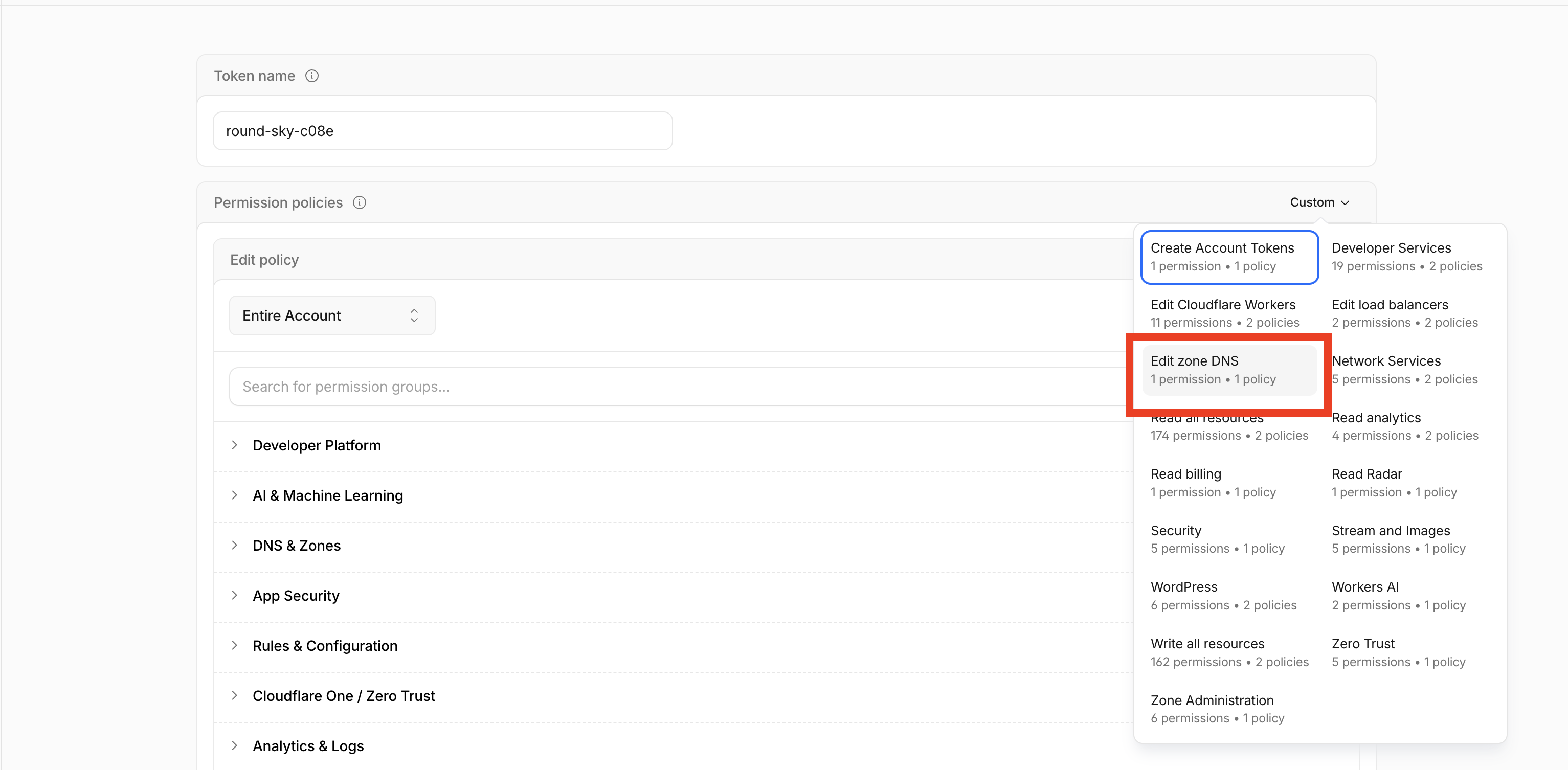
- Scope it to the owning Cloudflare zone when possible. For subdomain projects such as
team.example.com, this may be the parent zoneexample.com. Use all domains only when needed. - Keep
DNS: Read + Edit. - In
DNS & Zones, addZone: ReadandZone Settings: Edit.
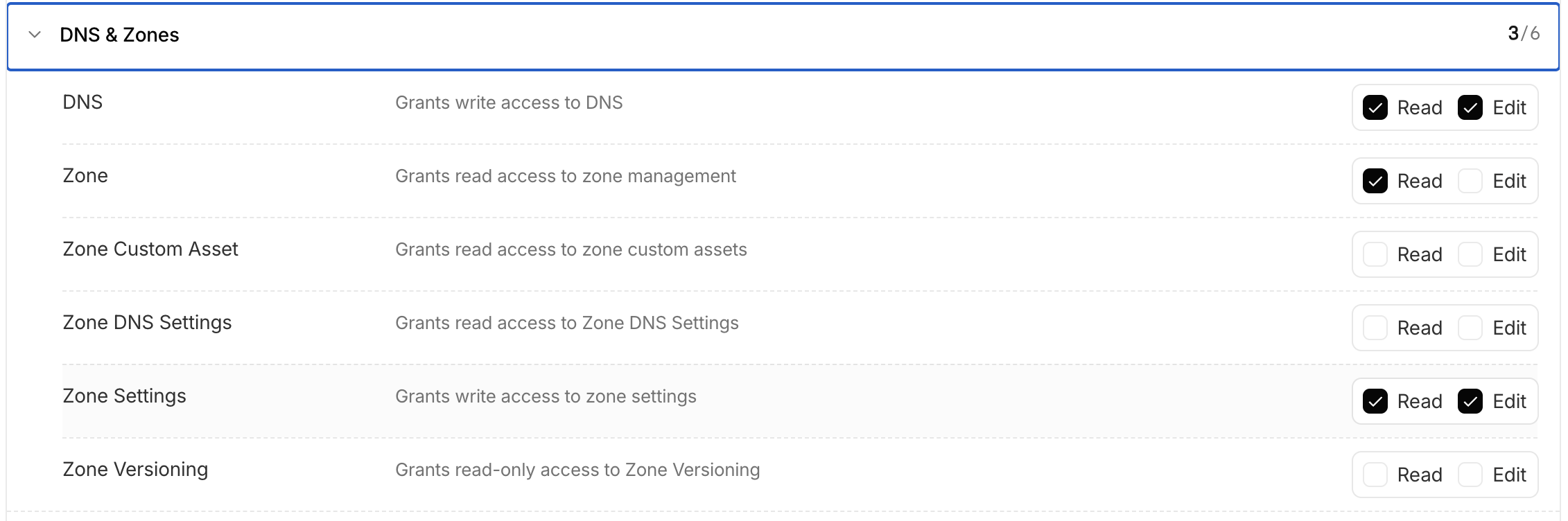
- In
Cache & Performance, addZone SSL & Certificates: Edit.
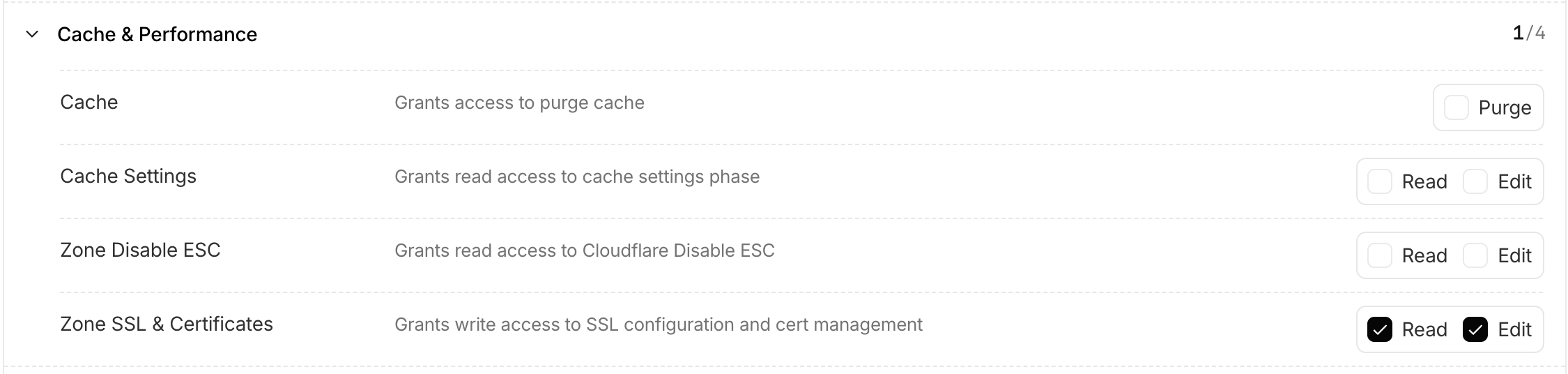
The final required permissions are:
DNS & Zones / DNS: Read + Edit
DNS & Zones / Zone: Read
DNS & Zones / Zone Settings: Edit
Cache & Performance / Zone SSL & Certificates: Edit
Cloudflare API docs may call Edit permissions Write. WhiteDNS uses the account ID you enter for:
GET /client/v4/accounts/<account-id>/tokens/verifyTroubleshooting:
| Error area | Usually means |
|---|---|
| Token validation | Wrong token, wrong account ID, expired/disabled token, or incompatible token type. |
| Zone lookup | Missing Zone: Read or token is not scoped to the selected domain. |
| DNS or ACME DNS-01 | Missing DNS: Edit. |
| ACME connectivity | Local network, DNS, proxy/VPN, firewall, or ISP path cannot reach Let's Encrypt. WhiteDNS retries public certificate issuance from the VPS when this happens. |
| Nameserver delegation | The registrar/domain nameserver settings do not point to Cloudflare. This is not fixed by deleting or adding rows in the Cloudflare DNS records table. |
| SSL mode strict | Missing Zone Settings: Edit. |
| Origin CA certificate | Missing Zone SSL & Certificates: Edit. |
4. What the init flow does
The setup flow:
- Validates the Cloudflare token.
- Detects the Cloudflare zone.
- Creates or updates DNS records.
- Sets Cloudflare SSL mode to
strict. - Creates a Cloudflare Origin CA certificate for proxied profiles.
- Issues a public ACME wildcard certificate for DNS-only TLS profiles.
- Installs or repairs managed Docker 3x-ui and PostgreSQL.
- Adds a private Tor sidecar for Tor-profile outbound routing.
- Replaces only WhiteDNS-managed inbounds/outbounds after confirmation.
- Prints and saves client import strings.
DNS Records
WhiteDNS creates these A records for the selected domain. Replace <domain> and <vps-ip> with your real values.
| Host | Type | Value | Proxy | Purpose |
|---|---|---|---|---|
vpn.<domain> | A | <vps-ip> | Proxied | VLESS WS TLS through Cloudflare |
trojan.<domain> | A | <vps-ip> | Proxied | VLESS WS TLS on 8443 through Cloudflare |
panel.<domain> | A | <vps-ip> | DNS-only | 3x-ui dashboard |
direct.<domain> | A | <vps-ip> | DNS-only | Direct VLESS TCP TLS |
hy2.<domain> | A | <vps-ip> | DNS-only | Hysteria2 UDP |
reality.<domain> | A | <vps-ip> | DNS-only | Reality TCP Vision |
ss.<domain> | A | <vps-ip> | DNS-only | Shadowsocks 2022 |
tor-vless-ws.<domain> | A | <vps-ip> | DNS-only | VLESS WS routed through Tor |
tor-vless-ws-8443.<domain> | A | <vps-ip> | DNS-only | VLESS WS 8443 routed through Tor |
tor-hy2.<domain> | A | <vps-ip> | DNS-only | Hysteria2 routed through Tor |
tor-direct.<domain> | A | <vps-ip> | DNS-only | Direct VLESS routed through Tor |
tor-reality.<domain> | A | <vps-ip> | DNS-only | Reality TCP Vision routed through Tor |
tor-ss.<domain> | A | <vps-ip> | DNS-only | Shadowsocks routed through Tor |
ACME also creates temporary TXT records during public certificate issuance:
_acme-challenge.<domain>The app requests a wildcard certificate for *.<domain>, so one challenge covers the DNS-only TLS hostnames.
If the local machine cannot complete the TLS connection to Let's Encrypt, WhiteDNS falls back to issuing the same DNS-01 certificate from the VPS over SSH. The fallback uses an installed lego binary when available, or a short-lived goacme/lego:v4.24.0 Docker container.
Generated Client Profiles
WhiteDNS creates import strings for:
| Remark | Host | Port | Transport | Route |
|---|---|---|---|---|
VLESS WS @whiteDNS | vpn.<domain> | 443/tcp | WebSocket TLS | Cloudflare proxied |
VLESS WS 8443 @whiteDNS | trojan.<domain> | 8443/tcp | WebSocket TLS | Cloudflare proxied |
Hysteria2 @whiteDNS | hy2.<domain> | 443/udp | Hysteria2 TLS | Direct |
Direct VLESS @whiteDNS | direct.<domain> | 2087/tcp | TCP TLS | Direct |
Reality TCP Vision @whiteDNS | reality.<domain> | 2083/tcp | TCP Reality Vision | Direct |
Shadowsocks @whiteDNS | ss.<domain> | 8388/tcp,udp | Shadowsocks 2022 | Direct |
VLESS WS Tor @whiteDNS | tor-vless-ws.<domain> | 2097/tcp | WebSocket TLS | Server-side Tor exit |
VLESS WS 8443 Tor @whiteDNS | tor-vless-ws-8443.<domain> | 2098/tcp | WebSocket TLS | Server-side Tor exit |
Hysteria2 Tor @whiteDNS | tor-hy2.<domain> | 2099/udp | Hysteria2 TLS | Server-side Tor exit |
Direct VLESS Tor @whiteDNS | tor-direct.<domain> | 2100/tcp | TCP TLS | Server-side Tor exit |
Reality TCP Vision Tor @whiteDNS | tor-reality.<domain> | 2101/tcp | TCP Reality Vision | Server-side Tor exit |
Shadowsocks Tor @whiteDNS | tor-ss.<domain> | 8390/tcp,udp | Shadowsocks 2022 | Server-side Tor exit |
Reality profiles currently use either apple.com or docker.com as the saved SNI and Reality target. Normal TLS profiles keep their own hostnames as SNI so public certificate validation continues to work.
Tor profiles mean:
client -> VPS -> Tor -> destinationThe VPS still sees the client IP. Destination sites see the Tor exit IP. The Tor SOCKS service is internal to Docker and is not published as a public proxy.
Tor is TCP-oriented. UDP destination traffic from Tor Hysteria2 or Tor Shadowsocks profiles may fail rather than route through Tor.
Menu Items
Run:
./whitednsThe interactive menu provides:
| Shortcut | Menu item | What it does |
|---|---|---|
0 | Init setup | Runs the full setup flow: Cloudflare DNS/SSL/Origin CA, local plans, SSH, Docker 3x-ui, certificates, inbounds, outbounds, clients, and import strings. |
1 | Current setup info | Shows saved project details, VPS IP, zone status, DNS/protocol plan summary, remote host, container name, last apply time, and client-links path. |
2 | Diagnostics | Checks local files, certificates, DNS, Docker port publishing, Tor sidecar status, panel/API access, Xray config, and common protocol issues. |
3 | Repair installation | Re-ensures the managed Docker stack, uploads certificates, repairs/restarts 3x-ui, reapplies WhiteDNS-managed inbounds/outbounds, and regenerates links. |
4 | Backup installation | Creates a local backup of the project files and a remote archive of the managed /var/lib/whitedns/3x-ui installation. |
5 | Restore latest backup | Restores the latest available WhiteDNS backup for the selected project and managed remote installation. |
6 | Support bundle | Writes a troubleshooting bundle with diagnostics, plans, state, logs, Docker status, 3x-ui logs, Tor logs, and relevant remote config snapshots. |
7 | Get list of inbounds | Logs into the saved 3x-ui panel over SSH tunnel and lists inbound ID, state, remark, protocol, port, transport/security, and client count. |
8 | Get list of outbounds | Reads the Xray outbound config from 3x-ui and lists outbound tags/protocols, including WhiteDNS direct, blocked, and Tor outbounds. |
9 | Get list of clients (10 only) | Shows the first 10 clients across inbounds with inbound remark, email, enabled state, masked identifier, expiry, and traffic limit. |
d | Dashboard credentials and login info | Shows the public panel URL, username, password, base path, and private SSH tunnel fallback command. |
c | Change Cloudflare domain | Prompts for a new domain/VPS IP, provisions Cloudflare for the new domain, reuses saved secrets where possible, and reapplies 3x-ui. |
r | Reset installation | Replaces WhiteDNS-managed inbounds/outbounds and reapplies the managed stack while preserving local secrets and client identities. |
x | Delete installation | Removes WhiteDNS-managed remote inbounds/outbounds, managed stack files, managed Docker images, and Docker build cache when detected. Local project files are kept. |
Navigation:
escorbreturns from submenus to the main menu.qexits.- Destructive actions require typed confirmation.
CLI Commands
The interactive menu is the preferred workflow, but the CLI also exposes subcommands:
./whitedns cloudflare check --domain example.com
./whitedns cloudflare apply --domain example.com --ip 1.2.3.4
./whitedns plan show example.com
./whitedns xui check --domain example.com --ssh-host 1.2.3.4
./whitedns xui plan --domain example.com --ssh-host 1.2.3.4
./whitedns xui apply --domain example.com --ssh-host 1.2.3.4 --yes
Useful XUI flags:
--ssh-user root
--ssh-port 22
--ssh-key ~/.ssh/id_ed25519
--ssh-key-passphrase <passphrase>
--ssh-password <password>
--panel-username <username>
--panel-password <password>
--panel-base-path /tp-example/
--acme-email admin@example.com
Output Files
Local project files are written under:
~/.wdns-wizard/projects/<domain>/Important files:
config.yaml
secrets.enc.yaml
cloudflare-state.json
xui-state.json
client-links.yaml
origin/origin.pem
origin/origin.key
certs/public.pem
certs/public.key
plans/dns-plan.yaml
plans/protocol-plan.yaml
plans/xui-plan.yaml
logs/provision-*.log
logs/xui-provision-*.log
Remote managed files are kept under:
/var/lib/whitedns/3x-ui/Older managed installs under /opt/wdns-wizard/3x-ui/ are migrated to this path automatically when possible.
Privacy Policy
WhiteDNS is a local CLI/TUI tool. It does not include telemetry, analytics, tracking pixels, remote reporting, or a WhiteDNS-hosted backend.
What WhiteDNS stores locally
WhiteDNS stores project data on the machine where you run the tool:
~/.wdns-wizard/projects/<domain>/This can include:
- Domain, VPS IP, DNS/protocol plans, state files, logs, and generated client import strings.
- Cloudflare Origin CA certificate material.
- Public ACME certificate material.
- Encrypted secrets in
secrets.enc.yaml.
Secrets are encrypted locally using a key stored under the WhiteDNS root or provided through:
WDNS_WIZARD_SECRETS_KEYThe 3x-ui panel password, Cloudflare token, generated client IDs/passwords, and protocol secrets are not intentionally written in plaintext logs. The Origin CA private key and public ACME private key are written as key files because the server needs them for TLS.
What WhiteDNS sends to third parties
WhiteDNS communicates only with services needed for provisioning:
- Cloudflare API: token validation, zone lookup, DNS records, SSL mode, Origin CA, and ACME DNS-01 TXT records.
- Let's Encrypt ACME: public certificate issuance for
*.<domain>. - Your VPS over SSH: Docker installation, 3x-ui setup, certificates, inbounds, outbounds, diagnostics, backups, and support bundles.
- Docker/GitHub package endpoints when installing Docker Compose plugin fallback binaries.
When local ACME connectivity fails, WhiteDNS temporarily uploads the Cloudflare token to the VPS as a 0600 environment file so the VPS can complete the DNS-01 challenge. The temporary file and remote ACME working directory are removed after the attempt.
WhiteDNS does not sell, share, or upload your project data to a WhiteDNS service.
User responsibility
You control the Cloudflare account, VPS, generated clients, and local project files. Anyone with access to your local machine, project directory, VPS, 3x-ui dashboard, or client import strings may be able to access sensitive configuration.
Keep these private:
- Cloudflare API token and account ID.
~/.wdns-wizardproject directory.WDNS_WIZARD_SECRETS_KEYor.secrets.key.- 3x-ui dashboard credentials.
- Client import strings and private keys.
Build And Develop
Requirements
- Go
1.24.2or newer compatible toolchain. - SSH access to the VPS for live provisioning.
- Docker-capable Linux VPS for the managed 3x-ui stack. If Docker exists but the Compose plugin is missing, WhiteDNS tries distro packages first, then falls back to the official Docker Compose v2 CLI plugin binary.
- Cloudflare zone and API token.
Run tests
go test ./...When using a local project cache:
env GOCACHE="$PWD/.cache/go-build" go test ./...Build
go build -o whitedns ./cmd/whitednsRelease builds
GitHub Release builds are handled by:
.github/workflows/release.yml
scripts/build-release.sh
scripts/release-targets.txt
When a GitHub release is published, the workflow runs tests, builds archives for every target in scripts/release-targets.txt, writes SHA-256 checksums, stores the files as a workflow artifact, and uploads the same files to the GitHub release.
Run the release builder locally with:
VERSION=v0.1.0 ./scripts/build-release.shArtifacts are written to:
dist/The default targets include Linux, macOS, Windows, FreeBSD, OpenBSD, NetBSD, and Termux-compatible Android ARM64. The Termux build uses Go's android target and is named like:
whitedns_<version>_termux-android-arm64.tar.gzFormat
find cmd internal pkg -name '*.go' -print0 | xargs -0 gofmt -wDevelopment notes
- Keep local state paths stable:
~/.wdns-wizard/.... - Keep remote state paths stable:
/var/lib/whitedns/3x-ui/.... - Use the interactive menu for end-to-end testing.
- Use
xui planbeforexui applywhen testing conflict detection. resetpreserves local secrets and client identities.deleteremoves only WhiteDNS-managed remote resources; local project files are kept.