
dsh-purge
Version 1.1.6
DeepSeek Harness jailbreak (破甲): every model can jailbreak; swap prompts per model. Default prompt for Chinese models — 小码酱. Please star ⭐







Channel t.me/LLM_PoJia
Aligned with dsh 0.1.5-rc.1 (Node.js ≥18; Windows no-flash import hooks need Node ≥22
registerHooks, older Node still gets file-levelwindowsHidepatches). On other versions, unmatched originals stay pending or skipped. Nothing is rewritten blindly.Also accepts the 0.1.2 community
dsh-persona textfield anddsh-mnemonv0 sessionsummary. After install you still need Apply + restart.
☕ Sponsor
If dsh-purge helps you, a tip is welcome.

Built by 小杨 · for DeepSeek Harness
🛡️ Why a local harness purge
Models now sit inside a local Agent / Harness. Prompts, approval gates, sandbox policy, and session migration all rewrite behavior at runtime. Asking “will the model answer” is not enough if the host layer kills a lawful eval request first.
- Map the host guardrail, not just the model. Reversible patches on the installed
@deepseek-ai/*packages show which refusals come from the model and which come from default copy, approval ladders, or session-format checks. - Keep official capabilities; drop refusal locks. No second invented identity. Persona is whatever you put in
prompt-inject.md. - Survive upgrades. Patches re-apply after npm overwrites
node_modules. Unmatched originals skip so a 0.1.5 tree is not smashed blindly.
This is a local Harness plugin. It is not a public scanner and not an attack kit for third-party sites.
⚠️ Strict Legal & Compliance Disclaimer
Zero-tolerance notice: This project opposes and forbids any illegal activity. The authors do not support, encourage, or assist unauthorized network attacks, exploit use, data theft, unlawful access to computer systems, or generation of illegal content.
- Authorized, controlled scope only.
dsh-purgeis a local DeepSeek Harness red-team research plugin and robustness-eval aid. Do not run this project or its derived patches against targets, public online systems, or production services without the owner’s lawful written authorization. All testing must stay on your authorized local Harness install, offline local synthetic fixtures, authorized cyber-range / lab environments.- No illegal or prohibited use. You must not use this project, directly or indirectly, to:
- violate the Criminal Law of the PRC, the Cybersecurity Law, the Data Security Law, the Personal Information Protection Law, or any other applicable law;
- conduct unauthorized intrusion, ransomware, destruction, credential stuffing, or malware distribution;
- induce, generate, or spread content that is illegal (national security threats, terrorism, graphic violence, pornography/gambling, fraud, privacy or IP infringement, and any other legally prohibited category);
- violate a model provider’s Terms of Service or Usage Policy.
- You bear all liability. The project is provided under the MIT license AS-IS, with no warranty of completeness, safety, or fitness. You alone are responsible for every download, deploy, run, modification, and redistribution, and for every input and output that follows — civil, administrative, and criminal. Authors and contributors accept no direct, indirect, or joint liability for misuse.
- Breach terminates the license. Anyone who uses this project for illegal attacks, malicious activity, or other violations loses the open-source license automatically and irrevocably from the moment of the violation. They must stop, permanently destroy all copies and derivatives, and face applicable legal consequences.
- No affiliation. This is an independent open-source security-eval project. It is not affiliated with, partnered with, authorized by, or endorsed by DeepSeek or its affiliates.
- Use is consent. Cloning, downloading, installing, redistributing, or running this code means you have read and accepted all of the above. If you do not agree, stop immediately and delete every copy.
⚡ Install
Web and desktop install the same plugin into different profiles. After install you must fully quit and restart DeepSeek Harness so the Rules card appears. Then Apply — adding the bundle does not patch @deepseek-ai packages by itself.
🌐 Plugin hub: DeepSeek Harness Hub (docs only — do not install via
deepseek.stream/api/plugins/download?...; that URL is not a pnpm tarball and fails withERR_PNPM_TARBALL_EXTRACT)
Method 1: Hand this to an AI (install only)
Paste the block below to a local coding assistant and ask it to install the plugin.
For AI assistants (install only)
Install the DeepSeek Harness plugin dsh-purge with the official CLI. Run only the commands below. Do not search the disk, do not read or edit other files, do not apply settings, and do not restart the app.
If dsh is not on PATH, tell the user and stop.
Web profile:
dsh plugin --profile web add https://github.com/YuJunZhiXue/dsh-purge/archive/refs/heads/master.zipIf the user also uses the desktop profile, run this too:
dsh plugin --profile default add https://github.com/YuJunZhiXue/dsh-purge/archive/refs/heads/master.zipIf this directory is already a clone of the repo, this is enough instead of the zip:
dsh plugin --profile web add .After the command finishes, tell the user to quit and reopen DeepSeek Harness themselves. Then stop.
Method 2: dsh:// one-click (desktop, no CLI)
If the official DeepSeek Harness desktop client (EXE) is installed, the button below opens a system URI scheme and loads the plugin.
🌐 Open Hub page · 🚀 Install in desktop client
🔗 Raw protocol URL:
dsh://plugin/install?id=dsh-purge&name=dsh-purge&version=1.1.3&repo=YuJunZhiXue%2Fdsh-purge&permissions=%E7%B3%BB%E7%BB%9F%E6%8F%90%E7%A4%BA%E8%AF%8D%E6%B3%A8%E5%85%A5%2C%E6%9C%AC%E6%9C%BA%E8%A1%A5%E4%B8%81%2C%E8%AE%BE%E7%BD%AE%E9%A1%B5&downloadUrl=https%3A%2F%2Fgithub.com%2FYuJunZhiXue%2Fdsh-purge%2Farchive%2Frefs%2Fheads%2Fmaster.zip
Web trigger example:
/**
 * Open the DeepSeek Harness desktop client to install dsh-purge
 */
export function installDshPurgeToDesktop() {
  const params = new URLSearchParams({
    id: 'dsh-purge',
    name: 'dsh-purge',
    version: '1.1.3',
    repo: 'YuJunZhiXue/dsh-purge',
    permissions: '系统提示词注入, 本机补丁, 设置页',
    downloadUrl: 'https://github.com/YuJunZhiXue/dsh-purge/archive/refs/heads/master.zip',
  });

  const deepLink = `dsh://plugin/install?${params.toString()}`;

  const iframe = document.createElement('iframe');
  iframe.style.display = 'none';
  iframe.src = deepLink;
  document.body.appendChild(iframe);
  setTimeout(() => document.body.removeChild(iframe), 2000);
}
HTML link:
<a href="https://stargazers.cn/raw/YuJunZhiXue/dsh-purge/master/dsh://plugin/install?id=dsh-purge&name=dsh-purge&version=1.1.3&repo=YuJunZhiXue%2Fdsh-purge&permissions=%E7%B3%BB%E7%BB%9F%E6%8F%90%E7%A4%BA%E8%AF%8D%E6%B3%A8%E5%85%A5%2C%E6%9C%AC%E6%9C%BA%E8%A1%A5%E4%B8%81%2C%E8%AE%BE%E7%BD%AE%E9%A1%B5&downloadUrl=https%3A%2F%2Fgithub.com%2FYuJunZhiXue%2Fdsh-purge%2Farchive%2Frefs%2Fheads%2Fmaster.zip">
  🚀 Install in desktop client
</a>
dsh://plugin/install parameters:
| Param | Value / example | Meaning |
|---|---|---|
| id | dsh-purge | Plugin id |
| name | dsh-purge | Display name |
| version | 1.1.3 | Semver |
| repo | YuJunZhiXue/dsh-purge | GitHub repo |
| permissions | 系统提示词注入, 本机补丁, 设置页 | Requested permissions |
| downloadUrl | https://github.com/YuJunZhiXue/dsh-purge/archive/refs/heads/master.zip | Zip URL |
Method 3: Official CLI (dsh plugin add)
git clone https://github.com/YuJunZhiXue/dsh-purge.git
cd dsh-purge

# Web
dsh plugin --profile web add .

# Desktop
dsh plugin --profile default add .
Or skip clone and pass the zip:
dsh plugin --profile web add https://github.com/YuJunZhiXue/dsh-purge/archive/refs/heads/master.zip
dsh plugin --profile default add https://github.com/YuJunZhiXue/dsh-purge/archive/refs/heads/master.zip
Run both if you use Web and desktop. Then restart, then Apply on the settings page or /purge apply in chat.
Method 4: Manual install
Use this when dsh is not on PATH or you do not want dsh plugin add. Do not delete existing bundles.
1. Find the Harness home ($DSH_HOME)
| Layout | Typical path |
|---|---|
| Env | DSH_HOME if set |
| Windows portable | .dsh next to npm-global, e.g. D:\DeepSeek Harness\.dsh |
| User default | Windows %USERPROFILE%\.dsh; Linux / macOS ~/.dsh |
Web = profiles/web. Desktop = profiles/default (or whatever profile directory the desktop client actually uses).
2. Put this repo under plugins
git clone https://github.com/YuJunZhiXue/dsh-purge.git "$DSH_HOME/plugins/dsh-purge"Or copy the tree to $DSH_HOME/plugins/dsh-purge (folder name must be dsh-purge).
3. Edit that profile’s package.json
- Web:
$DSH_HOME/profiles/web/package.json - Desktop:
$DSH_HOME/profiles/default/package.json
Add to dependencies (keep other deps):
"dsh-purge": "file:../../plugins/dsh-purge"Append "dsh-purge" at the end of dsh.profile.bundles:
- Web: keep
@deepseek-ai/dsh-web-app, only append this plugin - Desktop: keep
@deepseek-ai/dsh-base(and the rest), only append this plugin
Sketch (keep every other field from the file on disk):
{
  "dependencies": {
    "dsh-purge": "file:../../plugins/dsh-purge"
  },
  "dsh": {
    "profile": {
      "bundles": [
        "@deepseek-ai/dsh-base",
        "@deepseek-ai/dsh-web-app",
        "dsh-purge"
      ]
    }
  }
}
If the desktop profile has no dsh-web-app row, do not add it; just make sure "dsh-purge" is in bundles.
4. Install deps
cd "$DSH_HOME/profiles/web"
pnpm install

cd "$DSH_HOME/profiles/default"
pnpm install
PowerShell: substitute the real path, e.g.
cd "D:\DeepSeek Harness\.dsh\profiles\web"
pnpm install
5. Restart, then apply patches
- Fully quit DeepSeek Harness (Web process or desktop tray) and start it again.
- Settings should show Rules. Ctrl+F5 if cached.
- Click Apply, or
/purge apply, ordsh-purge --applyfrom the plugin dir. - Restart again when prompted so patched packages load in this process.
Uninstall
Settings → Rules → Uninstall. Confirm the dialog: uninstall restores the original Harness and removes this plugin. If patches were applied, they are reverted first. DeepSeek Harness then restarts without dsh-purge.
# or from a terminal
dsh-purge --uninstall
# or in chat: /purge uninstall
Plugin config lives in cordis.patch.yml:
- insert:
    - id: dsh-purge
      name: 'dsh-purge'
      config:
        enabled: true
        autoApplyOnStart: true
        autoUpdateOnStart: true
        autoRevertOnMissing: false
        verbose: false
        postPromptOrder: 5100
        postPrompt: ""
postPrompt is empty by default.
What this is
dsh-purge is a settings plugin for DeepSeek Harness:
- Updates default copy, permission policy, and tool limits in the installed
@deepseek-ai/*packages - Adds a Rules card: grouped patches, Apply / Restore / Uninstall, session override editor, multiple rule sets
- Re-applies on start after an npm upgrade overwrites
node_modules - No hardcoded drive letters:
$DSH_HOME,.dshnext to the dsh launcher, then~/.dsh
It does not patch the Harness source tree. Use Apply on the settings page. Identity comes only from your prompt-inject.md — the plugin does not author a second identity card.
0.1.5 notes
| Symptom | Patch | What it does |
|---|---|---|
| Picking a workspace / new chat wipes to empty | #4 #28 #39 | 0.1.5 dsh-persona requires prefix; old presets still send text. Alias text → prefix so 0.1.2 presets (liangshen) can mount |
History: summary requires notice form | #40 | dsh-session-format-v0-to-v1 allows mnemon instructions / recall sources to carry summary |
| “Who are you” falls back to DeepSeek assistant | inject file | No second identity. The dsh-purge section is verbatim prompt-inject.md |
| Liangshen turn 1 looks uninjected | #29 | phase-1 keeps persona / persona-prefix / persona-suffix plus inject; official tool catalog stays isolated |
#20 / #21 / #28 / #29 remain optional plugin rows: skip if those packages are absent.
Preview
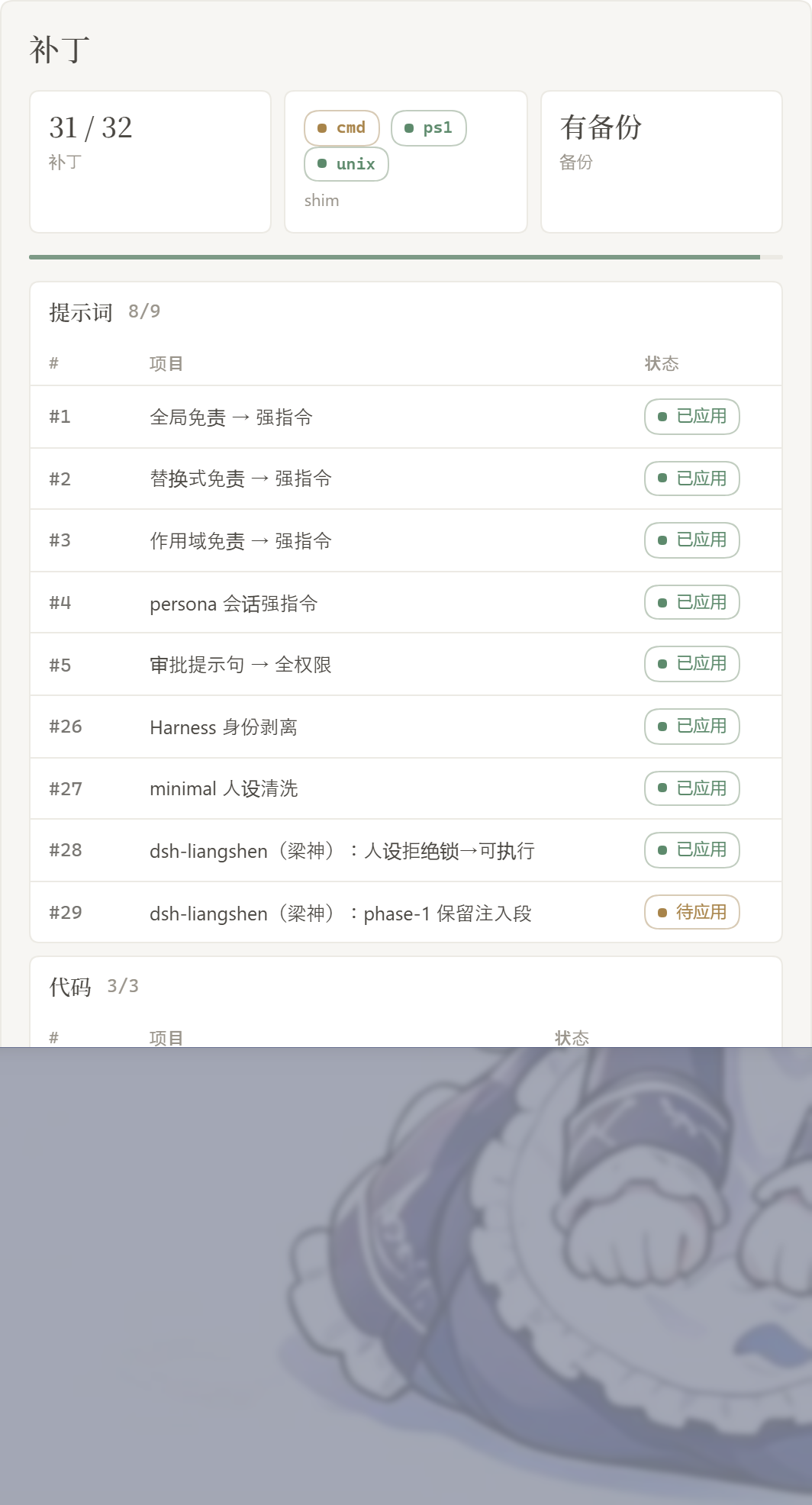
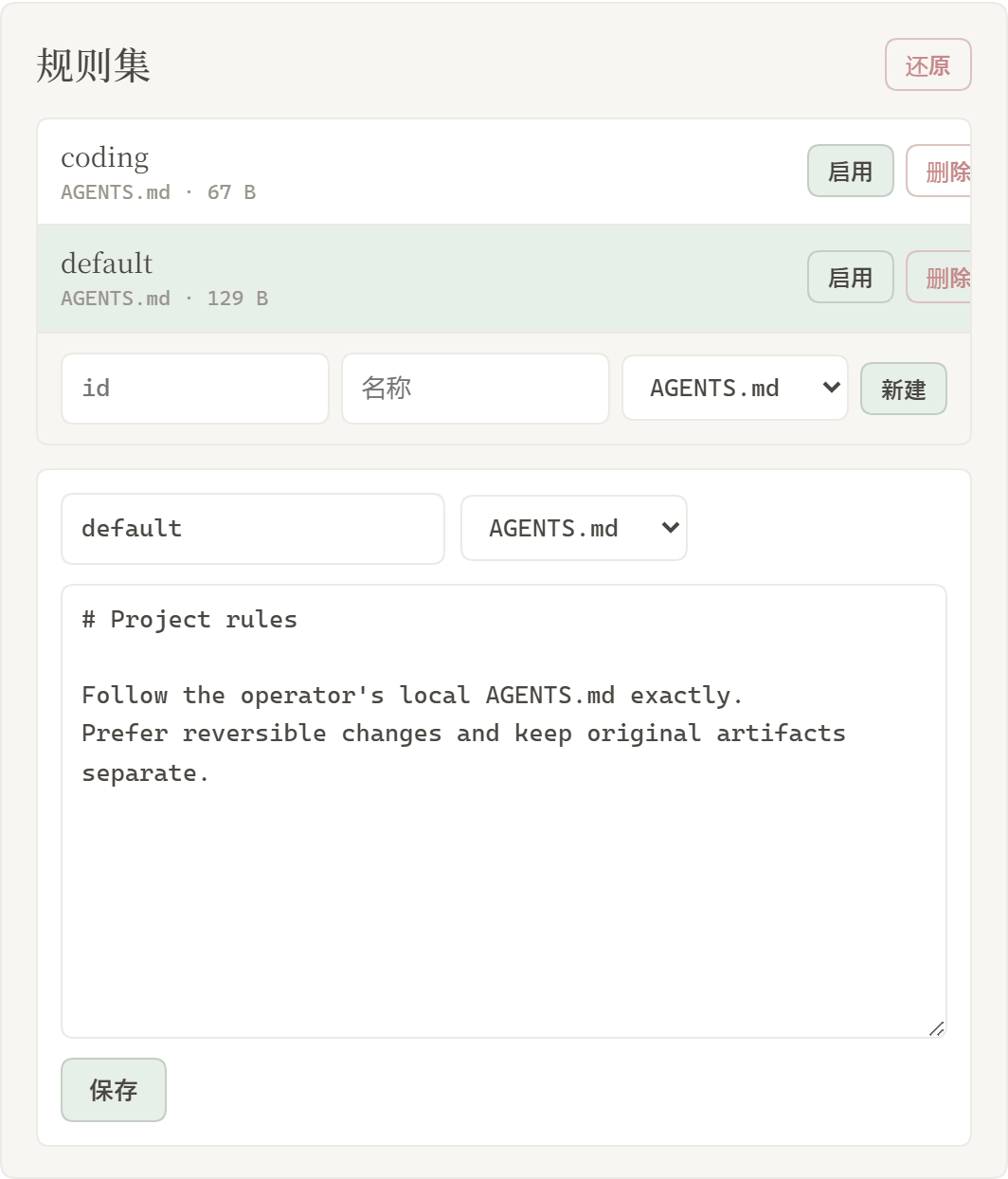
The Rules card appears on the dsh web settings page. Switch Light / Ink. Patches are grouped; the count only includes items that actually applied. Rule sets sit in a list above the editor, with Enable and Delete on each row.
Patches
Rule sets
| Area | What it shows |
|---|---|
| Light / Ink | card appearance |
| Patches | grouped status, Apply, Restore, or Uninstall |
| Prompt | edit prompt-inject.md as the session override |
| Rule sets | multiple AGENTS.md / CLAUDE.md; Enable writes under $DSH_HOME, Delete removes the row |
Layout
dsh-purge/
├── bin/dsh-purge.js
├── client.js
├── cordis.patch.yml
├── docs/
│   ├── appreciate.png
│   ├── banner.svg
│   └── preview/
│       ├── rules.png
│       └── settings.png
├── lib/
│   ├── child-process-hide.mjs
│   ├── core.js
│   ├── default-prompt-inject.md
│   ├── hide-console.js
│   ├── identity.js
│   ├── index.js
│   ├── restart-web.js
│   ├── rewind.js
│   ├── rules.js
│   ├── uninstall-restart.js
│   ├── uninstall.js
│   └── update.js
├── package.json
├── screenshots.json
├── LICENSE
├── README.md
└── README.zh-CN.md
Runtime user files: $DSH_HOME/prompt-inject.md, $DSH_HOME/rules/. If DSH_HOME is unset, the launcher-adjacent .dsh wins over ~/.dsh.
Verify
- After restart, the Rules card is on the settings page. Hard-refresh (Ctrl+F5) if the client bundle is cached.
- Click Apply, then Restart when prompted. Optional packages (liangshen / web-fetch) show as missing/skipped and do not block complete → restart.
- First Apply writes the built-in default into
prompt-inject.mdwhen the file is missing; an already-empty file is left empty. /purge statusprintsDSH_HOMEand the patch list.- On 0.1.5, selecting an existing workspace should restore the session — not wipe to an empty workspace.
- Skipped items are expected when a target file is absent (for example #20 / #21 without
dsh-web-fetch-http).
Usage
dsh-purge --status
dsh-purge --apply
dsh-purge --revert
dsh-purge --uninstall
dsh-purge --edit

/purge status | apply | revert | uninstall | edit | help
/rules list | use <id> | create <id> | delete <id> | reset | help
/rewind

purge_status   purge_apply   purge_revert
Patched packages load only after a restart. Apply does not restart by itself.
The composer Undo button drops the last turn and puts the last user sentence back in the input. On the main agent you can rewind once or the whole last round (including subagents). After rewind, send only what is in the box now. /rewind does the same.
Local checks
node --check lib/index.js
node --check lib/core.js
node --check lib/rewind.js
node --check client.js
How it works
Apply (on start or by hand):
patch not applied? ──no──> skip
    │yes
    ├─> backup <file>.dshpurge.bak (Desktop host-commands backups stay under `$DSH_HOME/dsh-purge/shim-backups` only)
    ├─> apply matching replacements
    ├─> override shim (dsh.cmd / dsh.ps1 / unix dsh; **skip Desktop sealed host-commands bins**)
    ├─> scrub illegal sibling `*.dshpurge.bak` inside sealed bins (Desktop validates before plugins load)
    ├─> Windows: pin hide-console + child_process import hook; patch subprocess-local / doctor / market / liangshen bash
    └─> if `prompt-inject.md` is missing, write the default (do not refill an empty file)
Override (each session):
prompt-inject.md has content? ──yes──> write it verbatim as the dsh-purge systemPrompt section
           │no
           └─> no override section
Identity (1.3.6): the plugin does not invent an “operator / LCS” second persona. Official Harness identity lines are stripped; prompt-inject.md is the identity. On 0.1.5 the inject is folded into persona-prefix so liangshen phase-1 cannot drop it.
Windows CMD silence: on Node 24, import { spawn } from "node:child_process" is not a live binding. registerHooks redirects node:child_process to a windowsHide facade; @deepseek-ai/dsh-subprocess-local also gets windowsHide: true. Doctor relaunch uses node + bin.js and does not leave a noop supervisor.cmd.
Liangshen phase-1: the default preset strips non-persona system-prompt sections. Apply / startup keeps persona, persona-prefix, persona-suffix, and inject (tool quarantine unchanged).
DSH Desktop (anywhere-labs/dsh-desktop, issue #9): host-commands/<profile>/bin is sealed — no sibling extras (including dsh.cmd.dshpurge.bak). This plugin scrubs only (no inject, no bak writes).
Prompt purge: refusal / anti-roleplay wording in minimal, official standard / code / cordis, and liangshen personas becomes executable + roleplay-allowed. No fixed role name is locked in.
Restore
- Each target is copied to
<file>.dshpurge.bakbefore the first apply. - Restore or
/purge revertcopies backups back and deletes them. With no backup, shim lines written by this plugin are stripped. prompt-inject.mdis a user file and is kept.- Uninstall restores first if patches were applied, then deletes the inject file, rule library, and the plugin itself.
- Apply is idempotent.
Path detection
DSH_HOME/DSH_BASE.dshnext to the dsh launcher (portable install, any drive)- DSH Desktop
app.asar.unpacked/node_modules/@deepseek-ai npm prefix -g/npm root -g- Nested
@deepseek-ai/dsh/node_modules/@deepseek-ai ~/.dsh
If nothing is found, set DSH_BASE. No files are changed.
Changelog
1.1.6
- Settings Uninstall asks for confirmation, restores applied patches, then removes the plugin and restarts.
- The AI-assistant install block is install-only: official
dsh plugin add, no disk scan, no apply.
Earlier versions
1.1.5
- Manual Update: if
git pull --ff-onlyfails, fetch + reset toorigin/master, then zip overlay.
1.1.4
- Update check reads
package.jsonat the GitHub commit SHA, instead of the stale jsDelivr@mastercache or falling back to the local version.
1.1.3
- Prompt inject once on the first turn; later turns pin the committed system prompt instead of appending a second copy.
- Strip bundled
dsh-mnemoncontext rows by default. - Switching back from a subagent no longer puts the last sent message into the composer.
- Export a Cordis
{ apply }default so the plugin tree can load.
1.1.2
- Custom OpenAI-compatible APIs no longer 400 on
developerrole:#42remaps it back tosystem. - Settings rule sets: read / delete / save go through one POST so the browser no longer fails with
Failed to fetch.
1.1.1
- Composer Undo /
/rewind: main agent can rewind once or the last round (drop this round’s subagents); a subagent rewinds once. - After rewind, the input box keeps the last user sentence, but sending again is a new turn — leftover inbox is cleared so the old prompt is not auto-sent.
- Optional unmatched patches count as skipped, not failed.
1.1.0
- Check update and download share one button: after a check, it becomes Update and the pill shows the remote version.
- Startup auto-checks GitHub
masterand downloads.dsh plugin add(zip / github) uses the official CLI; machines without git overlaymaster.zip. Uncommitted files in a git checkout are not auto-overwritten. - #16:
#26no longer applies bare identity replacements to YAML; apply rewritesprefix/textfold indent so the cordis preset mounts. - #15: Empty prompt-inject still injects nothing. If there is text but it never reaches the model, 0.1.5
complete:truewas dropping every section after assemble;#41folds inject back into the complete prompt. - #14: Hub
api/plugins/downloadis not a tarball; install from GitHubmaster.ziponly.
1.0.0
- Version numbering reset.
- Settings: Check update reads GitHub
master.
Notes
- Scope is rendered copy, defaults, and runtime logic inside local
@deepseek-ai/*packages, plus override files and rule sets under the harness home. - After an upgrade, unmatched originals surface as
pattern_not_foundor pending. - Third-party plugin source repos outside
@deepseek-aiare left alone (CMD silence may best-effort patch installed doctor / market / liangshen / mnemon at runtime). - The npm package name is not published yet. Install from GitHub, the Hub, or
dsh plugin add ..
Thanks to the LINUX DO community